
ASRock B550M-HDV vs ASRock B550M Pro4: Which Should You Buy?
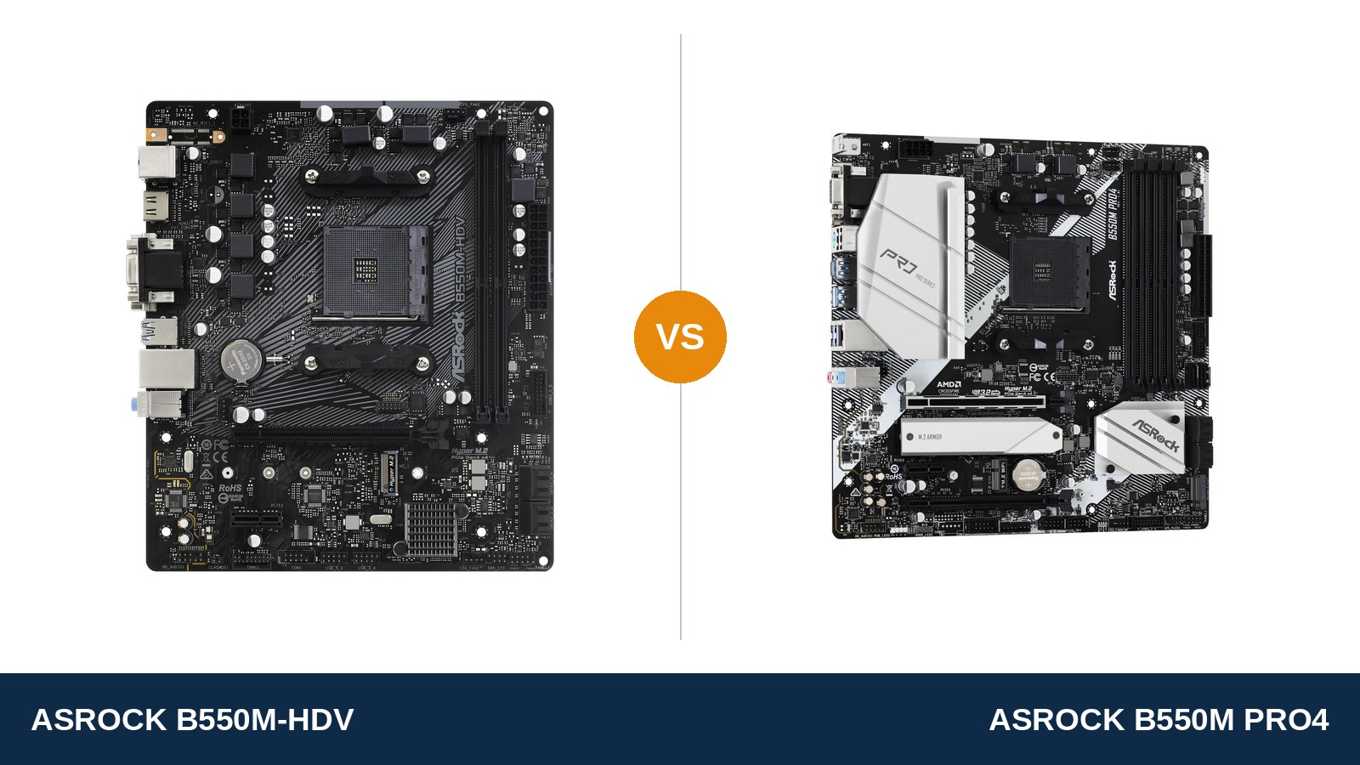
Same brand. Same chipset. Same socket. Very different motherboards.
The ASRock B550M-HDV is the cheapest sensible way into a Ryzen build. The B550M Pro4 sits a clear step above it in ASRock's own range, and it is the board the HDV gets compared against in almost every budget build thread.
So what does the extra money actually buy? Not a faster PC on day one — with the same processor and graphics card, these two boards game identically. What it buys is room: memory slots, storage slots, expansion slots, and power-delivery headroom.
This guide settles where the gap is real and where it is not. Every specification below comes from ASRock's own published data. And the verdict is the same one we would give a friend spending their own money.
Key Takeaways
- The B550M Pro4 is the better foundation. More of everything that cannot be upgraded later: phases, DIMM slots, M.2 slots, expansion slots.
- The B550M-HDV is the honest budget buy for a Ryzen 5 build you plan to leave alone — it keeps PCIe 4.0 for the GPU and one fast SSD.
- Memory is the HDV's hardest limit. Two DIMM slots and a 64 GB ceiling, against four slots and 128 GB on the Pro4.
- Networking is a genuine tie. Both boards run the same Realtek gigabit LAN chip. Do not pay extra expecting faster Ethernet.
- Neither board has Wi-Fi fitted. The Pro4 has an M.2 Key E slot ready for a module; the HDV has no wireless provision at all.
Quick Verdict
Buy the ASRock B550M Pro4 for most builds. It is the more complete board by a wide margin.
Its 8-phase Digi Power VRM wears a large heatsink and an 8-pin CPU power connector. It doubles the HDV's memory slots and M.2 slots. It adds a second full-length expansion slot, USB 3.2 Gen 2 with Type-C, DisplayPort, and a proper audio codec.
For a gaming PC you plan to keep and upgrade, this is the safer foundation. It is not close.
Buy the ASRock B550M-HDV if the budget is genuinely tight and the build is genuinely simple. A Ryzen 5, one graphics card, one NVMe drive, two sticks of RAM.
For that build — finished on day one and never opened again — the HDV keeps every essential and cuts everything else. Just buy it knowing exactly which doors it closes.
The Scorecard
Scores below are derived directly from the manufacturer specifications compared in this guide — phase counts, slot counts, port counts and supported standards. They are a reading aid, not benchmark results.
| Category | B550M-HDV | B550M Pro4 | ||
|---|---|---|---|---|
| Power delivery | 5 / 10 | 8 / 10 | ||
| Memory | 5 / 10 | 9 / 10 | ||
| Expansion | 4 / 10 | 8 / 10 | ||
| Storage | 6 / 10 | 9 / 10 | ||
| Display outputs (APU builds) | 7 / 10 | 9 / 10 | ||
| Networking & audio | 6 / 10 | 8 / 10 | ||
| Overall | 5.5 / 10 | 8.3 / 10 | ||
The pattern is one-directional. The Pro4 wins every category that involves hardware you cannot change later. The HDV's only victory is the price tag — and for the right build, that is victory enough.
At a Glance: Who Each Board Fits
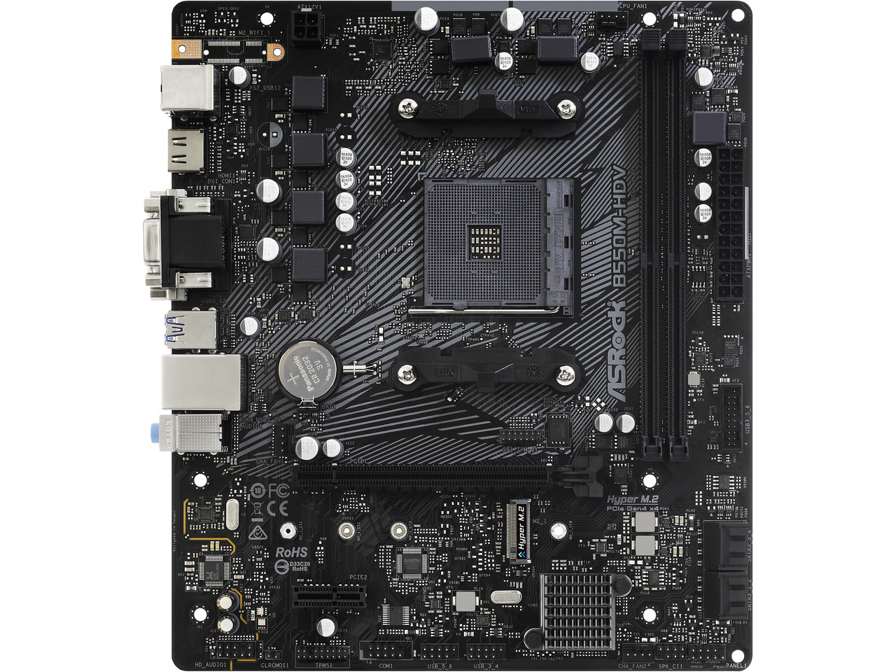
ASRock B550M-HDV
- 6 power phase design, sized for Ryzen 5-class builds
- 2 DDR4 slots, up to 64 GB
- Single Hyper M.2 slot at PCIe 4.0 x4
- HDMI 2.1 + DVI-D + D-Sub display outputs
- Cut-down micro-ATX board, 23.0 × 20.1 cm
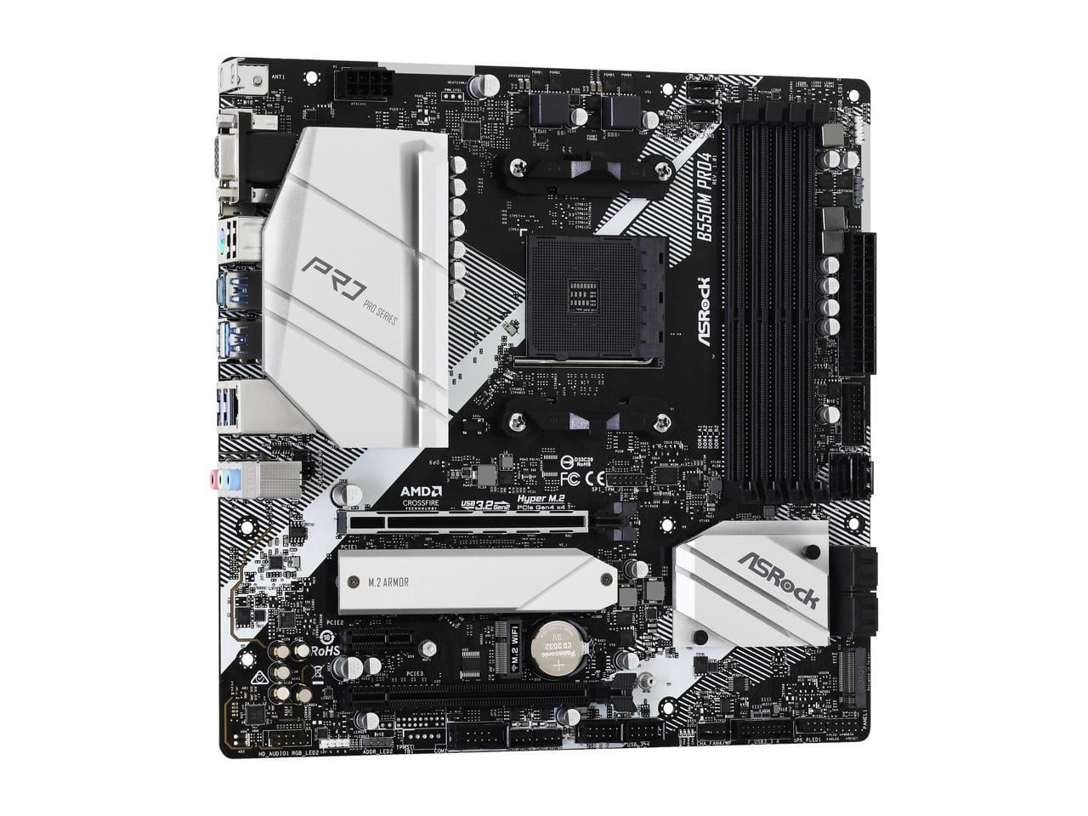
ASRock B550M Pro4
- 8-phase Digi Power VRM with XXL heatsink
- 4 DDR4 slots, up to 128 GB
- Dual M.2 with a full-coverage heatsink
- DisplayPort 1.4 + HDMI + D-Sub display outputs
- USB 3.2 Gen 2 Type-A + Type-C on the rear panel
Choose the B550M-HDV if…
Every dollar counts. Your build is a Ryzen 5 with one graphics card and one SSD, and it will stay that way.
You are reusing an older monitor or two — the HDV's DVI-D and D-Sub ports keep legacy displays in service without adapters.
Or you are building a cheap office or family PC around an APU, where the Pro4's extra slots would sit empty forever.
Choose the B550M Pro4 if…
There is any chance of an upgrade. A Ryzen 7 later. More RAM later. A second SSD later. The Pro4 is built for “later.”
You want DisplayPort for a modern monitor on an APU build, USB-C on the rear panel, or room for a capture card, a sound card or a Wi-Fi module.
Or you simply want the board with headroom everywhere it counts. That is the Pro4, on every line of the spec sheet.
As an Amazon Associate I earn from qualifying purchases at no extra cost to you.
Specifications: The Specs That Actually Matter
Every figure below is taken from ASRock's published specifications and manuals for these two exact models.
One naming caution before the table: ASRock also sells a larger ATX board called the B550 Pro4. It is a different product. Everything here is the micro-ATX B550M Pro4.
| Specification | ASRock B550M-HDV | ASRock B550M Pro4 |
|---|---|---|
| Form factor | Micro ATX, 23.0 × 20.1 cm (cut-down) | Micro ATX, 24.4 × 24.4 cm |
| Socket / chipset | AMD AM4 / B550 | AMD AM4 / B550 |
| CPU support | Ryzen 5000, 5000 G, 4000 G, 3000 series | Ryzen 5000, 5000 G, 4000 G, 3000 series |
| VRM design | 6 power phase, 50A chokes, no heatsink, 4-pin CPU power | 8 power phase Digi Power, 50A chokes, XXL heatsink, 8-pin CPU power |
| Memory | 2 × DDR4 DIMM, up to 64 GB, 4733+ MT/s (O.C.), XMP | 4 × DDR4 DIMM, up to 128 GB, 4733+ MT/s (O.C.), XMP |
| Graphics outputs (APU) | HDMI 2.1, DVI-D, D-Sub | DisplayPort 1.4, HDMI, D-Sub |
| Expansion slots | PCIe 4.0 x16 + PCIe 3.0 x1 | PCIe 4.0 x16 + PCIe 3.0 x16 (x4) + PCIe 3.0 x1 + M.2 Key E |
| M.2 storage | 1 slot: Hyper M.2 PCIe 4.0 x4 / SATA (2242/2260/2280), no heatsink | 2 slots: Hyper M.2 PCIe 4.0 x4 + M.2 PCIe 3.0 x2 / SATA, full-coverage heatsink |
| SATA | 4 × SATA 6 Gb/s, RAID 0/1/10 | 6 × SATA 6 Gb/s, RAID 0/1/10 |
| USB (rear) | 4 × USB 3.2 Gen 1 + 2 × USB 2.0 | 2 × USB 3.2 Gen 2 (Type-A + Type-C) + 4 × USB 3.2 Gen 1 + 2 × USB 2.0 |
| LAN | Realtek RTL8111H Gigabit | Realtek RTL8111H Gigabit |
| Audio | Realtek ALC887/897, 7.1 HD | Realtek ALC1200, 7.1 HD, Nahimic Audio |
| Fan headers | 3 (1 CPU + 2 chassis) | 6 (CPU + CPU/WP + 4 chassis/WP) |
| Lighting & diagnostics | None | 2 × RGB + 2 × addressable RGB headers, Post Status Checker |
Storage note: on the Pro4, the second M.2 slot (M2_2) shares lanes with the SATA3_5_6 ports. Fit an M.2 drive there and those two SATA ports switch off. The HDV has no such trade-off — because it has no second M.2 slot to make it.
Audio note: ASRock's product page lists the Pro4's codec as “ALC1220/ALC1200”; the Pro4's own user manual specifies ALC1200. This guide uses the manual's figure, and either way it sits a clear tier above the HDV's ALC887/897.
The Differences That Actually Matter
1. Power delivery — the widest gap on the spec sheet
The Pro4 runs an 8-phase Digi Power design with premium 50A chokes. A large finned heatsink — ASRock calls it XXL — covers the MOSFETs, and the CPU draws power through a full 8-pin connector.
The HDV runs 6 phases with the same class of 50A chokes. But look at the board photo: there is no VRM heatsink at all, and the CPU power connector is a single 4-pin.
For a Ryzen 5 5600 or 5500, both boards are honestly sufficient. The processor never asks for more than the HDV can give, and you will not feel the difference in games or in work.
Step up to a Ryzen 7 5800X and the story changes. Eight cores at sustained all-core load is exactly the workload that separates these designs.
The Pro4 spreads that load across more phases, feeds it through a beefier connector, and sheds the heat through a heatsink. The HDV runs the same chip at stock — but hotter, and with nothing in reserve.
Ryzen 9 parts? Treat the Pro4 as the sensible floor and the HDV as out of its depth. This is the one specification you can never upgrade around, so it deserves its place at the top of this list.
2. Memory — two slots is a ceiling, not a starting point
Both boards quote the same headline: DDR4 support to 4733+ MT/s overclocked, XMP profiles, dual channel. Read past the headline and they diverge completely.
The HDV has two DIMM slots. Its maximum is 64 GB, and reaching even 32 GB means filling both slots on day one.
That kills the classic budget move. There is no “start with one 16 GB stick and add another later” — later never comes, because there is nowhere to put it. Whatever you install at the first build is, practically, what the machine dies with.
The Pro4 has four slots and a 128 GB ceiling. Start with a 2 × 8 GB or 2 × 16 GB kit, and two empty slots wait for the day memory gets cheap or your workload grows.
One honest caution applies to both boards equally: the 4733+ figure is an overclocking ceiling that depends on your processor's memory controller. A quality 3200–3600 MT/s kit is the sensible buy on either board.
3. Expansion — one spare slot against a full hand
Both boards give a graphics card the same full PCIe 4.0 x16 slot. With a G-series APU it runs at PCIe 3.0 speeds, as on every B550 board. No difference where it matters most.
Underneath, the HDV offers a single PCIe 3.0 x1 slot. That is the entire expansion story: one small card, ever.
The Pro4 adds a second full-length x16 slot wired at x4, keeps the x1 slot, and adds an M.2 Key E slot for a Wi-Fi/Bluetooth module.
Why the x4 slot matters: that is where serious add-in cards live. A capture card. A 10-gigabit network adapter. An extra NVMe carrier. The Key E slot matters too — it is the Pro4's route to wireless, and the HDV simply does not have one.
If your build will only ever hold a graphics card, the HDV loses nothing here. The moment a second card enters the plan, only one of these boards can take it.
4. Storage — one fast drive against a real storage plan
The HDV's single Hyper M.2 slot is genuinely good: PCIe 4.0 x4 with a PCIe 4.0-capable processor, and it accepts SATA M.2 drives and shorter 2242/2260 lengths as well as standard 2280.
But it is one slot, with no heatsink over it, backed by four SATA ports. Fill it, and your next drive is a SATA SSD at a fraction of the speed.
The Pro4 matches that primary slot, then adds a second M.2 at PCIe 3.0 x2 with SATA support, a full-coverage heatsink over the main slot, and six SATA ports.
Real-world translation: the Pro4 takes a fast boot drive today and a second NVMe game drive next year, and still has SATA room for bulk storage. The HDV takes one fast drive, full stop.
Remember the sharing note from the spec table: the Pro4's second M.2 slot trades against two of its SATA ports. Even after that trade, it finishes well ahead.
5. Display outputs — both triple, different third port
This section only matters for APU builds — Ryzen G-series processors with no graphics card. Fitting a discrete GPU makes both boards' onboard outputs irrelevant.
Both boards drive three monitors. Both keep a D-Sub port for older displays. Both do HDMI at up to 4K at 60Hz.
The third port is where they split. The HDV offers DVI-D: fine for an older 1080p monitor, capped at 1920×1200, and a dead end for anything modern.
The Pro4 offers DisplayPort 1.4 instead. That is the output a modern high-resolution or high-refresh monitor actually wants, with no adapters in the chain.
Keeping a legacy DVI monitor alive? The HDV has a real, if narrow, win. Building around any monitor bought in the last several years? The Pro4's DisplayPort is worth more than the HDV's whole third port.
6. USB and the rear panel — a generation apart
The HDV's rear panel is 2020's minimum: four USB 3.2 Gen 1 ports, two USB 2.0 ports, and no Type-C anywhere on the board.
The Pro4 keeps those Gen 1 ports and adds a USB 3.2 Gen 2 pair — one Type-A, one Type-C — at double the 10 Gb/s rate.
That matters for fast external SSDs, which saturate Gen 1 quickly and are exactly the accessory budget builders buy when internal slots run out. On the HDV, remember, internal slots run out fast.
Front-panel support follows the same pattern: the Pro4 provides two USB 3.2 Gen 1 headers for four case ports, the HDV one header for two. Neither board offers a front-panel USB-C header — a shared limitation worth knowing before you choose a case.
7. The small stuff — audio, fans, lights, and one honest tie
Start with the tie, because it kills a common assumption: networking is identical. Both boards run Realtek's RTL8111H gigabit LAN chip. Neither is faster, fancier or more “gaming” than the other.
Audio is not a tie. The Pro4's ALC1200 codec with Nahimic software sits a tier above the HDV's ALC887/897, with cleaner output for headsets and speakers alike.
Cooling control is not a tie either. The Pro4 offers six fan headers, four of them water-pump capable. The HDV offers three. A basic air-cooled build never notices; a case full of fans or an AIO pump does.
Then the garnish: the Pro4 carries RGB and addressable RGB headers with Polychrome sync, plus a Post Status Checker that tells you which stage a failed boot stopped at. The HDV carries neither. Garnish is the right word — but the diagnostic LEDs genuinely save time the first time a build refuses to start.
CPU Pairing Guide
The fastest way to choose between these boards is to start from your processor. This table is the whole comparison in one view.
| Your processor | B550M-HDV | B550M Pro4 | Our call |
|---|---|---|---|
| Ryzen 5 5600 / 5500 | Excellent | Excellent | Buy whichever is cheaper — usually the HDV |
| Ryzen 5 5600G / 5700G (APU) | Good — HDMI fine, no DisplayPort | Excellent — DisplayPort 1.4 | Pro4 for modern monitors; HDV for legacy ones |
| Ryzen 7 5700X / 5800X | Workable at stock, no headroom | Excellent — VRM headroom | B550M Pro4 |
| Ryzen 9 5900X / 5950X | Not recommended | Workable — the sensible ceiling | Pro4 at minimum; consider a stronger board |
| Ryzen 3000 series | Excellent | Excellent | Buy whichever is cheaper |
Notice the pattern in the first and last rows. For the processors budget builders actually buy most, the HDV gives up nothing in daily performance. The Pro4's premium only starts paying out from the Ryzen 7 row down — and at upgrade time.
Ready to check today’s price?
Both boards sell through Amazon. Prices move, so check the live figure on the board that fits your build.
View on Amazon — B550M-HDVView on Amazon — B550M Pro4The 30-Second Decision
| If this sounds like you… | Buy this |
|---|---|
| “Cheapest possible Ryzen 5 build, one GPU, one SSD, done.” | B550M-HDV |
| “I want one board that handles any AM4 upgrade I might make.” | B550M Pro4 |
| “APU build driving a modern monitor, no graphics card.” | B550M Pro4 (DisplayPort) |
| “Office PC reusing an old DVI or VGA monitor.” | B550M-HDV |
| “I will definitely add RAM or a second SSD within a year or two.” | B550M Pro4 |
| “Small case, several fans, maybe an AIO cooler.” | B550M Pro4 (six fan headers) |
What You Gain. What You Give Up.
ASRock B550M-HDV
You gain: the lowest price into the full B550 platform — PCIe 4.0 graphics and storage, Ryzen 5000 support, triple display outputs for APU builds. A smaller board that fits anywhere a micro-ATX board fits, and money left over for the parts that decide frame rates.
You give up: upgrade room, everywhere. Two DIMM slots. One M.2 slot. One spare expansion slot. A 4-pin-fed, heatsink-free VRM that caps your processor ambitions at Ryzen 5, comfortably, and Ryzen 7, cautiously.
ASRock B550M Pro4
You gain: headroom on every axis — 8-phase heatsink-cooled power delivery, four DIMM slots, dual M.2, a second full-length slot, USB 3.2 Gen 2 with Type-C, DisplayPort, better audio, and the fan and lighting headers to finish a build properly.
You give up: the difference in price, and nothing else of substance. DVI-D is the only port the HDV has that the Pro4 lacks — and DisplayPort is the better port for almost everyone in exchange.
Pros and Cons
B550M-HDV — Pros
- Lowest price into the B550 platform
- Full PCIe 4.0 x16 and Gen4 M.2 where it counts
- Triple display outputs, including legacy DVI-D and D-Sub
- Same gigabit LAN as the Pro4
- Compact cut-down PCB suits small cases
Cons
- Only 2 DIMM slots, 64 GB ceiling
- Single M.2 slot, no heatsink
- 6-phase VRM, 4-pin CPU power, no VRM heatsink
- No USB-C or USB 3.2 Gen 2 anywhere
- No DisplayPort, no RGB headers, no Wi-Fi provision
B550M Pro4 — Pros
- 8-phase Digi Power VRM with XXL heatsink, 8-pin power
- 4 DIMM slots, 128 GB ceiling
- Dual M.2 with full-coverage heatsink
- USB 3.2 Gen 2 Type-A + Type-C, DisplayPort 1.4
- ALC1200 audio, six fan headers, Post Status Checker
Cons
- Costs meaningfully more than the HDV
- Second M.2 slot disables two SATA ports
- No DVI-D for legacy monitors
- Wi-Fi needs a separate Key E module
- Same gigabit LAN as the cheaper board
Check the Name, the BIOS and the Bundle
Check the exact name. ASRock's HDV and Pro4 badges have been recycled across chipset generations, and one wrong letter changes the product entirely. The similar-names section below lists the traps.
Check the BIOS. Neither board has a BIOS Flashback button, so neither can be updated without a working processor installed.
Both boards' support lists cover Ryzen 5000, but early production stock shipped with older BIOS versions. Buy from a seller moving current stock, and confirm the board's BIOS against ASRock's CPU support list for your exact chip before you build.
Check the size. The HDV is a cut-down micro-ATX board at 23.0 × 20.1 cm — noticeably shorter than the Pro4's full 24.4 × 24.4 cm square.
It fits any micro-ATX or ATX case, but in a case with a fixed standoff layout, check that the board's mounting holes line up and that its trailing edge is supported before you start plugging in cables.
Check the bundle. Both boxes are spartan at this end of the range: the board, an I/O shield, a pair of SATA cables, an M.2 screw and documentation. The Pro4's M.2 heatsink comes fitted; the HDV has no heatsink to fit.
Plan Wi-Fi before you buy. Neither board includes wireless. On the Pro4, an M.2 Key E module solves it neatly. On the HDV, your only route is a PCIe card in its single x1 slot — which then cannot hold anything else, ever.
The Upgrade Path Test
Judge a budget board by its second year, not its first day.
Year one, both boards run a Ryzen 5 and a mid-range graphics card identically. Nobody could tell them apart in a blind test, and anyone who claims otherwise is selling something.
Year two, the upgrade itch arrives. Memory prices fall and 32 GB looks tempting. A second, larger SSD goes on sale. A discounted Ryzen 7 appears.
The Pro4 says yes to all three: two empty DIMM slots, an empty M.2 slot, a VRM built for the bigger chip.
The HDV says no to the memory — both slots are already full. No to the fast SSD — its slot is taken. And “carefully, at stock settings” to the processor.
That is the entire difference between these boards, stated plainly: one was built to be upgraded, the other was built to be enough. Both are legitimate designs. Only you know which one your build actually is.
When to Skip Both
Honesty cuts both ways. There are builders neither of these boards serves well.
Skip both if you need Wi-Fi fitted at the factory — other B550 boards include it, and adding it to the HDV costs you its only spare slot. Skip both if front-panel USB-C is non-negotiable; neither board has the header.
Skip both if you are building around a Ryzen 9 for heavy all-core work. The Pro4 is the ceiling of this pairing, not the answer, and a stronger VRM class exists for a reason.
And skip both if your case is full ATX and you want the board to fill it — ASRock's ATX B550 Pro4 and its rivals exist for exactly that.
For everyone else — which is most AM4 builders on a budget — one of these two is the right answer. The only question is which future you are buying for.
Final Verdict
The ASRock B550M Pro4 is the board we would build on.
It wins this comparison on the things that decide whether a budget board ages well: power delivery, memory room, storage room and expansion. Its 8-phase heatsink-cooled VRM, four DIMM slots and dual M.2 slots leave every sensible AM4 upgrade open.
It adds the modern touches the HDV skips entirely — DisplayPort, USB 3.2 Gen 2 with Type-C, a better audio codec, proper fan control — and it gives up nothing but a legacy DVI port and a few dollars in return.
Buy the Pro4 for gaming builds, Ryzen 7 processors, APU builds driving modern monitors, and any PC you intend to upgrade rather than replace.
Buy the B550M-HDV if the budget is the build. If the machine is a Ryzen 5 or APU system that will be assembled once and left alone. Or if its DVI-D and D-Sub ports are exactly what your existing monitors need.
It is the honest floor of the B550 range: every essential present, every luxury absent. Buy it with open eyes and it will not disappoint you.
Watch Out: Similar Names, Different Boards
ASRock reuses its badges across generations, and these two names attract more confusion than most. Three warnings belong in every version of this guide.
First: the B550M-HDV is not the B450M-HDV or the B450M-HDV R4.0. Same budget badge, older B450 chipset, different board. A listing that just says “HDV” needs its chipset checked before anything else.
Second: the B550M Pro4 in this comparison is the micro-ATX board. ASRock also sells a full-ATX B550 Pro4 — a different, larger product with a different layout — and a B550M Pro SE, a later cost-reduced model with its own specification. Match the full name, including the M.
Third: neither board here is a Wi-Fi model. ASRock sells separate wireless variants elsewhere in the range, and the Pro4's Key E slot does not mean a module is included — the box says so, and so does ASRock's product page.
Slow down on the product page. Match the full model name, then the chipset, then the price — in that order.
Case, Power and Cabling Notes
Both boards are micro-ATX and fit micro-ATX and full ATX cases. The HDV is a cut-down board — shorter than the standard square — so confirm your case's standoffs support its trailing edge.
Power connectors differ, and it is worth knowing before the build. The Pro4 takes a standard 24-pin main connector and an 8-pin EPS CPU connector. The HDV takes the same 24-pin but only a 4-pin CPU connector.
Any reputable modern power supply covers both without adapters. On the HDV, that 4-pin is one more reason to keep processor ambitions at Ryzen 5 level.
Front-panel connections are straightforward on both: one USB 3.2 Gen 1 header on the HDV, two on the Pro4, plus USB 2.0 headers on each.
And the shared limitation bears repeating: neither board offers a front-panel USB-C header. If your case has a front USB-C port, it will sit unconnected on either board. Know that before you buy the case, not after.
BIOS and Long-Term Support
AM4 is a mature platform. That is a genuine advantage for both of these boards.
The BIOS is stable. The drivers are stable. The surprises have already happened to somebody else, years ago, and been fixed.
Both boards sit on ASRock's standard support pages: BIOS updates through Instant Flash, chipset and LAN drivers, and a full CPU support list per model. ASRock lists both boards as still in production, with technical and security support continuing through the product support period.
Expect future BIOS releases to be about security patches and edge-case compatibility, not new features. On a mature platform, that is exactly what you want.
One habit worth keeping: before any CPU upgrade, check the support list for your board and update the BIOS first. Neither board can flash without a supported processor installed, so the update has to happen while the old chip is still in the socket.
Frequently Asked Questions
Is the B550M Pro4 worth the extra money over the B550M-HDV?
For most builders, yes. The Pro4 doubles the memory slots (four vs two) and M.2 slots (two vs one), runs a stronger 8-phase VRM with a heatsink and 8-pin power against the HDV's 6-phase, heatsink-free, 4-pin design, and adds DisplayPort, USB 3.2 Gen 2 with Type-C, an extra expansion slot and a better audio codec. The HDV only wins on price — which is a real win if the build will never be upgraded.
How much RAM can each board take?
The B550M-HDV has two DDR4 slots and a 64 GB ceiling. The B550M Pro4 has four DDR4 slots and a 128 GB ceiling. Both officially support overclocked speeds to 4733+ MT/s with XMP, though what your kit actually runs at depends on your processor's memory controller.
Can the B550M-HDV run a Ryzen 7 5800X?
Yes, at stock settings — it is on ASRock's support list like every other Ryzen 5000 chip. But its 6-phase VRM has no heatsink and is fed by a 4-pin power connector, so it runs with less thermal and power headroom than the Pro4's 8-phase, heatsink-cooled design. For a Ryzen 7 you plan to keep under load, the Pro4 is the better home.
Does either board have Wi-Fi?
No. Neither board includes a wireless module; both provide wired gigabit Ethernet via the same Realtek RTL8111H chip. The Pro4 has an M.2 Key E slot that accepts a Wi-Fi/Bluetooth module bought separately. On the HDV, the only option is a PCIe Wi-Fi card in its single x1 slot.
How many M.2 SSDs can each board take?
The HDV takes one: a Hyper M.2 slot running PCIe 4.0 x4 (with a PCIe 4.0-capable CPU) that also accepts SATA M.2 drives in 2242, 2260 and 2280 lengths. The Pro4 takes two — the same class of primary slot under a full-coverage heatsink, plus a second slot at PCIe 3.0 x2 with SATA support. Note that fitting a drive in the Pro4's second slot disables its SATA3_5_6 ports.
Which board is better for an APU build without a graphics card?
Both drive three monitors, and both keep a D-Sub port for older displays. The Pro4 is the better pick for a modern monitor because its third output is DisplayPort 1.4; the HDV's third output is DVI-D, capped at 1920×1200. If your monitors are older DVI or VGA models, the HDV covers them without adapters.
Will both boards work with Ryzen 5000 processors out of the box?
Both support the full Ryzen 5000 range, but a board from early production stock may need a BIOS update first — and neither board has BIOS Flashback, so the update requires a supported processor installed. Check ASRock's CPU support list for the minimum BIOS version for your chip, and buy from a seller with current stock.
Is the B550M-HDV the same as the B450M-HDV?
No. They share ASRock's budget HDV badge, but the B450M-HDV (and its R4.0 revision) uses the older B450 chipset, with no PCIe 4.0 support. The B550M-HDV in this comparison is the B550 board, with PCIe 4.0 for the graphics slot and its M.2 slot. Check the chipset in the listing title before buying.
Sources & Verification
ASRock B550M-HDV official specifications, asrock.com • ASRock B550M-HDV quick installation guide (board layout and I/O) • ASRock B550M Pro4 official specifications and product page, asrock.com • ASRock B550M Pro4 user manual (codec, connectors, M.2/SATA sharing) • ASRock motherboard comparison tool data for B550M Pro4. Specifications verified November 2026.

James Wilson
James has been building and benchmarking PCs for over a decade and writes Honestly Compared's motherboard and component guides. His rule for every comparison: the verdict has to survive the spec sheet, not the marketing page.