
ASRock B550M Pro SE vs ASRock B550M Pro4: Which Should You Buy?
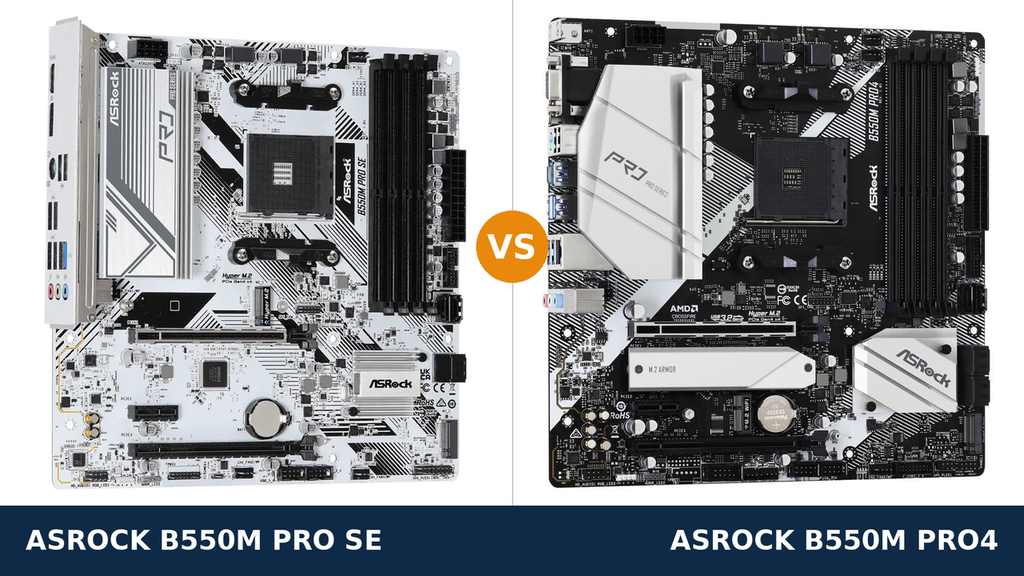
“SE” — two letters that usually mean the upgraded one. Special Edition. The version with more.
So when the ASRock B550M Pro SE turns up beside the B550M Pro4 — newer, whiter, and apparently one rung up the ladder — most buyers read the naming exactly the way a marketing department hopes they will.
Read the spec sheets instead, and the ladder inverts. The Pro SE is not a Pro4 with extras. It is a different board, built on a different chipset, that wins one heavyweight category outright and quietly concedes most of the others.
That does not make it a bad board. If your wired network runs at 2.5 gigabits, or your build is white from case to cable ties, the Pro SE may be the only correct answer in this comparison — the Pro4 cannot match it on either front.
Every figure below comes from ASRock's own specifications and user manuals, checked line by line. The verdict at the end is the one we would give a friend spending their own money.
Key Takeaways
- The SE badge is not an upgrade. The Pro4 carries the longer spec sheet: faster USB, better audio, more storage, more display outputs.
- The Pro SE owns the network port. Its Dragon 2.5G LAN runs at two and a half times the Pro4's gigabit connection — the single largest gap in this comparison.
- Power and memory are level. Both boards run 8-phase power designs and four DDR4 slots rated to the same speeds.
- Check the chipset line: ASRock's own manual puts an AMD PRO565 in the Pro SE, not a B550. It changes little in practice — but you should know before you pay.
- Neither board includes Wi-Fi. Only the Pro4 has the M.2 Key E slot that lets you add a wireless module later.
Quick Verdict
Buy the ASRock B550M Pro4 for most builds. It is the more complete motherboard, and the margin is not subtle.
It is the only board here with USB 3.2 Gen2 — Type-A and Type-C at 10 Gb/s. It has the stronger audio codec, six SATA ports instead of four, a heatsink over its primary M.2 slot, and a third display output for APU builds.
Buy the ASRock B550M Pro SE if 2.5-gigabit networking or a white build is what your PC is actually about. Its Dragon LAN embarrasses the Pro4's gigabit port, and nothing else in this class commits to white the way it does.
Its I/O shield also comes pre-installed. If it undercuts the Pro4 on price and your build never touches fast USB storage or a third monitor, the things it gives up may never reach you.
The Scorecard
Scores below are derived directly from the manufacturer specifications compared in this guide — phase counts, slot counts, port counts and supported standards. They are a reading aid, not benchmark results.
| Category | B550M Pro SE | B550M Pro4 | ||
|---|---|---|---|---|
| Power delivery | 7 / 10 | 8 / 10 | ||
| Networking | 9 / 10 | 6 / 10 | ||
| USB connectivity | 5 / 10 | 9 / 10 | ||
| Audio | 6 / 10 | 8 / 10 | ||
| Display outputs (APU builds) | 7 / 10 | 9 / 10 | ||
| Storage | 7 / 10 | 9 / 10 | ||
| Expansion & extras | 7 / 10 | 9 / 10 | ||
| Overall | 6.9 / 10 | 8.3 / 10 | ||
The shape is the naming played in reverse. The SE takes networking by a distance and drops most of the undercard; the Pro4's wins are individually small and collectively decisive.
At a Glance: Who Each Board Fits
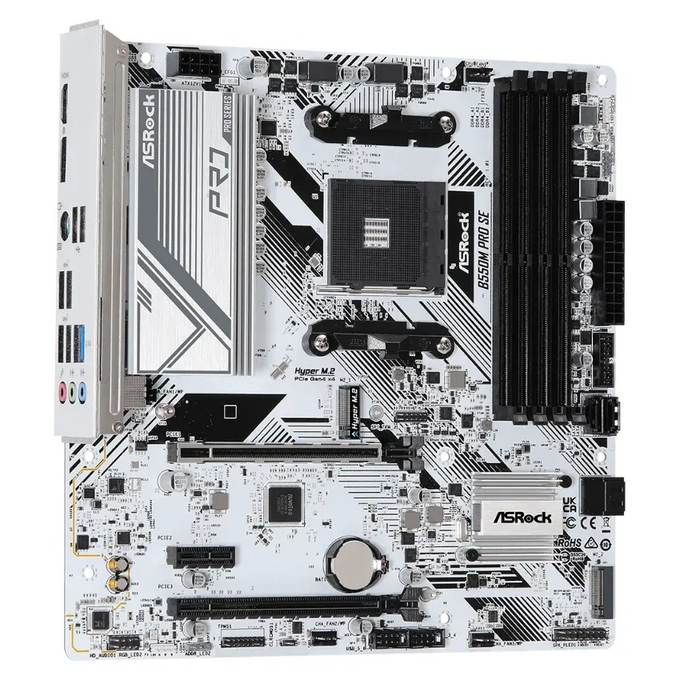
ASRock B550M Pro SE
- 8-phase power design on a white “Pure White” PCB
- Dragon 2.5G LAN (Realtek RTL8125BG) with prioritisation software
- Two display outputs: HDMI 2.1, DisplayPort 1.4
- 4 SATA ports, dual M.2 (Gen4 x4 + Gen3 x2/SATA)
- Pre-installed I/O shield — nothing to forget at build time
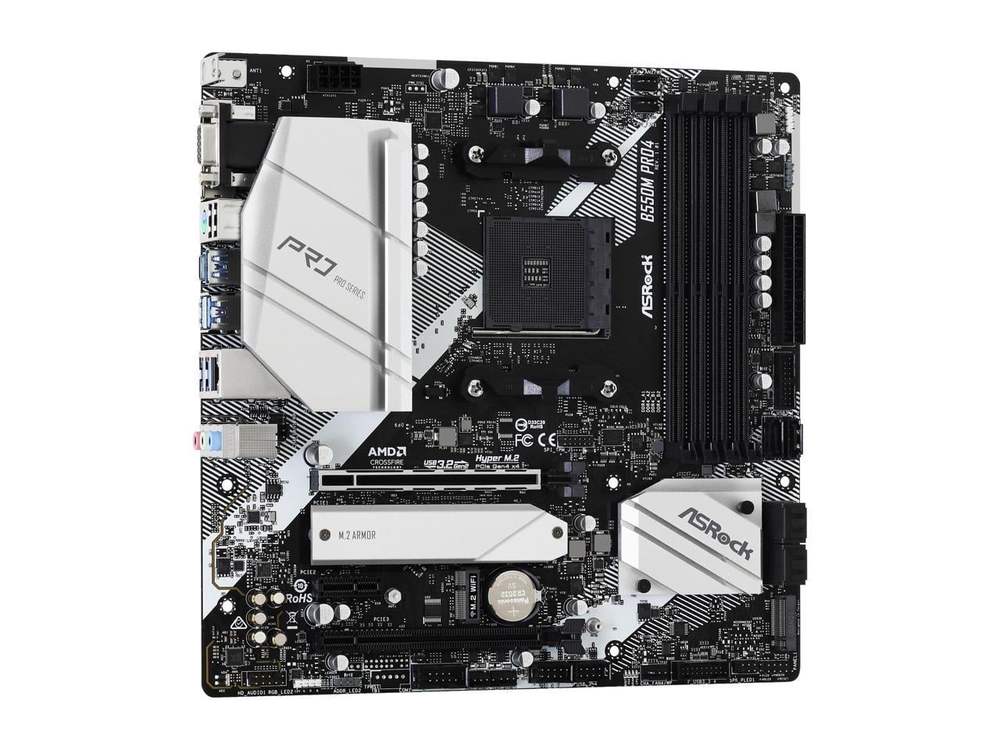
ASRock B550M Pro4
- 8-phase Digi Power design, XXL VRM heatsink, 50A chokes
- USB 3.2 Gen2 Type-A + Type-C (10 Gb/s) on the rear panel
- Three display outputs: D-Sub, HDMI 2.1, DisplayPort 1.4
- 6 SATA ports, dual M.2, full-coverage M.2 heatsink
- M.2 Key E slot for a Wi-Fi module, POST Status Checker
Choose the B550M Pro SE if…
Your network has outgrown gigabit. A 2.5G-capable NAS, switch or internet plan turns its LAN into the most-used upgrade in the whole build.
The build is white. The Pro SE's PCB is white end to end — one of the very few budget AM4 boards that genuinely is.
You want the easiest install in the class. The shield is already on the board: nothing to snap in, nothing to forget, nothing to bleed on.
Choose the B550M Pro4 if…
Fast USB storage is part of your routine. Gen2 at 10 Gb/s, in both connector shapes, exists only on this board.
You are planning an APU build with two or three screens — or you still own a VGA monitor worth keeping in service.
You hoard drives, or you upgrade in stages. Six SATA ports, a cooled M.2 slot and an empty Wi-Fi slot all pay out later rather than sooner.
As an Amazon Associate I earn from qualifying purchases at no extra cost to you.
Specifications: The Specs That Actually Matter
Every figure below is taken from ASRock's published specifications and user manuals for these two boards.
One row deserves a second look before all the others: the chipset. The first board is sold under a B550M name, but ASRock's own manual names a different chip. We print what the manufacturer prints — and the first deep-dive below explains what it means.
| Specification | ASRock B550M Pro SE | ASRock B550M Pro4 |
|---|---|---|
| Form factor | Micro ATX, 24.4 × 24.4 cm | Micro ATX, 24.4 × 24.4 cm, 2oz copper PCB |
| Socket / chipset | AMD AM4 / AMD PRO565 (per ASRock manual) | AMD AM4 / AMD B550 |
| CPU support | Ryzen 5000, 5000 G, 4000 G, 3000 series | Ryzen 5000, 5000 G, 4000 G, 3000 series |
| Power design | 8-phase design | 8-phase Digi Power, 50A chokes, XXL alloy heatsink |
| Memory | 4 × DDR4 DIMM, up to 128 GB, 4733+ MT/s (O.C.), XMP, ECC | 4 × DDR4 DIMM, up to 128 GB, 4733+ MT/s (O.C.), XMP, ECC |
| Graphics outputs (APU) | HDMI 2.1, DisplayPort 1.4 | D-Sub, HDMI 2.1, DisplayPort 1.4 — triple monitor |
| Expansion slots | PCIe 4.0 x16 + PCIe 3.0 x16 (x4) + PCIe 3.0 x1 | PCIe 4.0 x16 + PCIe 3.0 x16 (x4) + PCIe 3.0 x1, M.2 Key E (Wi-Fi) |
| M.2 storage | 2 slots: PCIe 4.0 x4 (2280) + PCIe 3.0 x2 / SATA | 2 slots: PCIe 4.0 x4 (2280) + PCIe 3.0 x2 / SATA (2280), M.2 heatsink |
| SATA | 4 × SATA 6 Gb/s | 6 × SATA 6 Gb/s, RAID 0/1/10 |
| LAN | 2.5 Gigabit Dragon LAN, Realtek RTL8125BG | Gigabit, Realtek RTL8111H |
| Audio | Realtek ALC897 7.1 HD | Realtek ALC1200 7.1 HD, Nahimic Audio |
| USB (rear) | 4 × USB 3.2 Gen1, 2 × USB 2.0 | USB 3.2 Gen2 Type-A + Type-C (10 Gb/s), 4 × Gen1, 2 × USB 2.0 |
| I/O shield | Pre-installed | Separate shield in the box |
Model-name note: ASRock also sells a full-size ATX B550 Pro4 and an older B450M Pro4. Neither appears in this comparison. The two micro-ATX boards here — the B550M Pro SE and the B550M Pro4 — are the whole subject, so match the full name on any listing before you order.
The Differences That Actually Matter
1. The name on the box vs the chip on the board
Start where the confusion starts. ASRock's user manual for the B550M Pro SE lists its chipset as the AMD PRO565.
The Pro4, one column over, runs the genuine AMD B550 chipset. Same socket, same processor list, same family name on the shelf.
In daily use, the gap is mostly invisible. The PCIe 4.0 lanes feeding your graphics card and primary SSD come from the Ryzen processor itself on both boards — the chipset never touches them.
Processor support is identical: Ryzen 3000 through 5000, G-series APUs included. Memory support is identical too, down to the rated overclocking ceiling.
What the PRO565 actually costs you shows up in the hardware ASRock built around it: the port counts and features covered in the sections below. Judge those, not the silicon.
Our stance is simple. Buy the Pro SE for what it demonstrably is — and know that the B550M letters are a family name, not a chipset promise.
2. Networking — the one fight the SE wins big
The Pro SE's Dragon 2.5G LAN, built on Realtek's RTL8125BG controller, moves data at two and a half times the speed of the Pro4's plain gigabit RTL8111H port.
That is not a spec-sheet trophy. It is the difference between saturating a modern NAS and watching a progress bar — between an internet plan above a gigabit being usable and being wasted at the wall socket.
ASRock layers its Dragon software on top: bandwidth prioritisation with presets aimed at gaming, streaming and browsing. Secondary to the hardware, but genuinely handy on a busy home network.
The condition is infrastructure. If your router, your switch and your service all stop at a gigabit, the faster port has nothing faster to talk to, and this section scores itself level.
For everyone whose home network has already moved past gigabit, though, this is the Pro SE's entire case — and it is a strong one. A network port works every second the PC is awake.
3. USB — where the fight flips completely
Turn both boards around. The Pro4's rear panel carries USB 3.2 Gen2 twice over: one Type-A port and one Type-C, each rated at 10 Gb/s.
The Pro SE has no Gen2 anywhere. Four rear ports and two front ones top out at USB 3.2 Gen1 — half the ceiling, and no Type-C in any position.
Put a number on it. A large game folder or a video project copying to a fast external SSD finishes in roughly half the time through the Pro4's best port.
Totals widen the gap further. Count rear ports and internal headers together and the Pro4 supports sixteen USB connections; the Pro SE supports twelve.
Type-C is the quiet long-term issue. Docks, phones and peripherals have standardised on it. The Pro4 meets them today; the Pro SE never will.
If your desk runs on external drives and modern cables, this section alone can settle the comparison — in the opposite direction to the last one.
4. Storage — same headlines, different depth
Both boards open with the same line: a Hyper M.2 slot wired for PCIe Gen4 x4, ready for a fast NVMe system drive. Both follow it with a second M.2 slot at PCIe Gen3 x2 that also accepts SATA M.2 modules.
Underneath the headline, the Pro4 keeps stocking the shelves. Six SATA ports against four, with RAID 0, 1 and 10 on the menu.
It also bolts a full-coverage heatsink over the primary M.2 slot. A Gen4 drive working hard beneath a warm graphics card is exactly the component that benefits.
One Pro4 footnote is worth planning around, straight from ASRock's manual: its second M.2 slot shares lanes with two of the SATA ports. Populate it and those two ports go dark. Sketch the drive layout before the build, not during it.
None of this makes the Pro SE bad at storage. Dual M.2 with a Gen4 primary is a modern arrangement by any measure. It is simply outnumbered — two ports and one heatsink short.
5. Display outputs — an APU-only argument
This section matters to exactly one kind of build: a Ryzen G-series APU with no graphics card. Fit a GPU and both boards' display outputs go dark for the life of the PC.
The Pro4 offers three ways out: D-Sub, HDMI 2.1 and DisplayPort 1.4, with official support for three monitors running at once.
The Pro SE offers the modern pair — HDMI 2.1 and DisplayPort 1.4 — and stops there.
For a single screen, they are equals. Both HDMI ports handle 4K at 60Hz; both DisplayPorts reach 5K-class resolutions at high refresh rates.
The Pro4's advantage is pure flexibility: the second and third screens, the ageing VGA projector, the spare monitor rescued from a cupboard. No adapters, no dongles, no apology.
Planning a tidy one-monitor APU desk? The Pro SE loses nothing you will use. Planning anything more ambitious? Only one board here is invited.
6. Audio — a modest but real Pro4 edge
The Pro4 runs Realtek's ALC1200 codec, with Nahimic Audio software handling the tuning. ASRock's own comparison data also lists an ALC1220 variant of the board; either chip sits a clear class above the Pro SE's hardware.
The Pro SE carries the ALC897 — the standard budget codec of its generation. It does its job without flourish, and without disgrace.
Both boards output 7.1-channel HD audio. Both isolate the audio path on the PCB to keep electrical noise out of the signal.
Who should care? Anyone driving good headphones or powered speakers straight from the rear panel. The Pro4's cleaner signal path and software layer are worth having there.
Who should not? Anyone whose sound already travels through a USB headset or an external DAC. That hardware bypasses both codecs entirely, and this section becomes a draw neither board can lose.
7. Power delivery and the small print
On the headline claim, call it honestly: a tie. Both boards feed the processor through an 8-phase design, and both are rated for the same CPU list.
The Pro4 builds more substance around its phases — premium 50A chokes and an XXL aluminium-alloy heatsink over the VRM. Under a Ryzen 7 or 9 in a warm case, that is hardware with a job to do. The Pro SE's implementation is plainer and leans harder on case airflow.
The slot layout above the chipset matches card for card: a steel-reinforced PCIe 4.0 x16 for the graphics card, a second x16 slot wired at x4, and one x1 slot. CrossFire appears on both spec sheets, for whoever still keeps the faith.
Then the Pro4 starts adding things the SE simply does not have. An M.2 Key E slot, sitting empty, waiting for a Wi-Fi and Bluetooth module. POST Status Checker LEDs that tell you why a build refuses to boot. Six fan headers, pump-capable ones among them. A 256Mb BIOS chip.
The Pro SE's extras run the other way — toward build day. The pre-installed I/O shield. The white PCB. Polychrome RGB headers for the lighting. Mercies, all of them, and all felt in the first hour rather than the third year.
That is the pattern of the whole comparison in miniature: the Pro4 was specified for the years after the build; the Pro SE was specified for two specific wins on day one.
CPU Pairing Guide
The fastest way to choose between these boards is to start from your processor. This table is the whole comparison in one view.
| Your processor | B550M Pro SE | B550M Pro4 | Our call |
|---|---|---|---|
| Ryzen 5 5600 / 5500 | Excellent | Excellent | Either board — the Pro SE if your network runs at 2.5G |
| Ryzen 5 5600G / 5700G (APU) | Good — two outputs only | Excellent — triple-monitor support | Pro4 for multi-monitor; Pro SE for a single screen |
| Ryzen 7 5700X / 5800X | Very good — 8 phases, plainer cooling | Excellent — heatsinked 8-phase | B550M Pro4 |
| Ryzen 9 5900X / 5950X | Workable at stock | Good — the sensible pick of the two | B550M Pro4; sustained all-core loads deserve a higher class |
| Ryzen 3000 series | Excellent | Excellent | Decide on features and price, not the processor |
If the APU row is yours, read it twice. The display-output gap is the one difference in this guide that no later upgrade inside the same board can undo.
Ready to check today’s price?
Both boards sell through Amazon. Prices move, so check the live figure on the board that fits your build.
View on Amazon — B550M Pro SEView on Amazon — B550M Pro4The 30-Second Decision
| If this sounds like you… | Buy this |
|---|---|
| “My NAS and internet already run faster than gigabit.” | B550M Pro SE (2.5G LAN) |
| “The build is white, and a black board would ruin it.” | B550M Pro SE |
| “I copy big files to external SSDs every week.” | B550M Pro4 (USB 3.2 Gen2) |
| “APU build, two or three monitors, maybe one old VGA screen.” | B550M Pro4 |
| “I have five or six SATA drives to bring across.” | B550M Pro4 (6 SATA) |
| “Plain Ryzen 5 build on a gigabit network, budget tight.” | Whichever is cheaper that day |
What You Gain. What You Give Up.
ASRock B550M Pro SE
You gain: Dragon 2.5G LAN the Pro4 cannot answer, a true white-board design from edge to edge, a pre-installed I/O shield, and the same 8-phase power and dual-M.2 headlines for typically less money.
You give up: USB 3.2 Gen2 and Type-C entirely, two SATA ports, the M.2 heatsink, the third display output and a class of audio quality. Its manual names a PRO565 chipset under the B550M badge — a fact that matters less than the ports it cost.
ASRock B550M Pro4
You gain: USB 3.2 Gen2 in Type-A and Type-C, the stronger audio codec with Nahimic tuning, six SATA ports, an M.2 heatsink, three display outputs, boot diagnostics, and a Wi-Fi slot left empty for later.
You give up: network speed — gigabit only, in a comparison against 2.5G. You also give up the white finish and the pre-installed shield, and the longer spec sheet usually carries the higher price.
Pros and Cons
B550M Pro SE — Pros
- Dragon 2.5G LAN with prioritisation software
- White PCB — a genuine white-build board
- Pre-installed I/O shield
- Same 8-phase power design as the Pro4
- Dual M.2 with a Gen4 x4 primary slot
- Polychrome RGB headers onboard
Cons
- PRO565 chipset under a B550M name
- No USB 3.2 Gen2, no Type-C anywhere
- Four SATA ports and no M.2 heatsink
- ALC897 audio is a step down
- Discontinued model — new stock is finite
B550M Pro4 — Pros
- USB 3.2 Gen2 Type-A and Type-C at 10 Gb/s
- ALC1200 audio with Nahimic software
- Six SATA ports plus dual M.2
- Full-coverage M.2 heatsink
- Triple display outputs, D-Sub included
- M.2 Key E slot for adding Wi-Fi
- POST Status Checker diagnostics
Cons
- Gigabit LAN only — no 2.5G
- Separate I/O shield to fit yourself
- Second M.2 slot disables two SATA ports
- No Wi-Fi fitted out of the box
Check the Name, the Bundle and the Stock
Check the full model name. ASRock's Pro range rewards careful reading. The B550M Pro4 is micro-ATX; the B550 Pro4 is a larger ATX board with a different layout; the B450M Pro4 belongs to the previous generation entirely.
The Pro SE has a quieter trap: it is a regional model. ASRock states plainly that it may not be sold in every market, so whether it reaches your country at all is a genuine variable.
Check the stock situation. ASRock lists the B550M Pro SE as discontinued as of January 2026, with technical and security support continuing for up to six years after end-of-life.
Finite stock is not a defect. It is a reason to buy from a seller whose returns policy you trust — and to register and update the board promptly once it arrives.
Check the bundle. The Pro4's box holds the board, a quick installation guide, a support CD, two SATA cables and a loose I/O shield you fit yourself.
The Pro SE's shield arrives already fitted to the board — one part fewer to lose mid-build. Beyond that, expect the same frugal contents from both boxes at this price.
Check your network before the boards. The largest single difference in this comparison only pays out if your router, switch or NAS already speaks 2.5-gigabit. Audit the network first, and let the answer cast its vote.
The Upgrade Path Test
Judge a budget board by its second year, not its first day.
Year one, both boards run a Ryzen 5 and a mid-range graphics card identically. The Pro SE owner with a fast NAS is already ahead; everyone else cannot tell the two apart.
Year two, the requests arrive. A faster external-drive workflow for the creator. A Wi-Fi module for the desk that moved rooms. Two more hard drives for the media shelf.
The Pro4 answers yes, yes and yes — Gen2 ports waiting, Key E slot empty, SATA ports to spare. The Pro SE answers yes only where it has ports left, and its network advantage cannot be spent a second time.
That is the honest summary of this comparison. The Pro4 was built to absorb upgrades. The Pro SE was built to win two specific arguments — network speed and appearance — on the day it is installed.
When to Skip Both
Honesty cuts both ways. Some builders are served by neither of these boards.
Skip both if you want wireless fitted at the factory. Neither board has it; the Pro4 merely leaves a slot for a module of your own.
Skip both if the build needs more than two M.2 drives or a stack of expansion cards. Micro-ATX is a compact promise, and both boards keep it.
Skip both if a flagship Ryzen 9 will spend its working life rendering at full load. Both will run one at stock; a stronger VRM class exists for that job.
Skip both if your head has already moved to AM5. These are end-of-platform boards — superb value for a DDR4 build, and a terminus beyond it.
Everyone else — most AM4 builders, in other words — already has the right answer inside this comparison. The only work left is deciding which of your needs speaks loudest.
Support and Long-Term Outlook
AM4 is a mature platform, and maturity is a feature. Both of these boards inherit it.
The BIOSes are stable. The drivers are stable. The unpleasant surprises were found years ago, by other people, and fixed.
Both models live on ASRock's standard support pages: BIOS updates, chipset, LAN and audio drivers, and complete CPU and memory support lists.
The Pro SE's file carries one extra line: ASRock marks the model discontinued as of January 2026, while committing to technical and security-related support for up to six years after end-of-life, subject to supplier availability.
In plain terms, it will be looked after for years — just do not expect a successor model or fresh production runs behind it.
One habit is worth keeping on either board: before any processor upgrade, check the support list, update the BIOS first, and only then swap the chip.
Final Verdict
The ASRock B550M Pro4 is the board we would build on.
It wins this comparison the way experienced builders judge motherboards: not with one spectacular feature, but everywhere, by a little, all at once — faster USB, stronger audio, deeper storage, an extra display output, working diagnostics, and a wireless slot held in reserve.
No single item on that list is dramatic. Read together, they describe the more complete product — the board that keeps saying yes across the years you own it.
Buy the Pro SE if your wired network already runs at 2.5 gigabits, or the build is white and the board has to match it. In those two builds it is not the compromise choice; it is the correct one.
Buy it with open eyes, though: the chipset is the PRO565, USB stops at Gen1, and the model is discontinued. Priced right, none of that has to matter.
Buy the Pro4 for gaming builds, creator desks, multi-monitor APU systems, and any PC you intend to upgrade rather than replace. It is the default answer in this comparison, and it earns the title.
Frequently Asked Questions
Is the B550M Pro SE a special edition of the Pro4?
No — and the naming is the trap. The Pro SE is a separate, later board with its own layout. ASRock's manual lists its chipset as the AMD PRO565 rather than B550, its LAN is faster than the Pro4's, and its USB, storage and display hardware all sit a step below.
Does the PRO565 chipset make the Pro SE slower?
Not in anything a desktop builder can measure. The PCIe 4.0 lanes for the graphics card and primary SSD come from the Ryzen processor on both boards, CPU and memory support are identical, and both boards run the same processors at the same speeds. The differences that matter are the ports and slots built around the chipset.
Which board suits a white build?
The Pro SE, and it is not close. Its PCB is white across the whole board rather than a black board wearing white heatsinks, which makes it one of the very few budget AM4 boards that can anchor a genuinely white build. The Pro4's black PCB with silver covers cannot imitate it.
Can the Pro SE handle a Ryzen 7 5800X properly?
Yes — at stock settings and in normal use, its 8-phase design matches the Pro4's headline claim. The Pro4 remains the steadier pick for sustained all-core work, because its 50A chokes sit under an XXL VRM heatsink while the Pro SE's implementation is plainer.
Can I run three monitors from an APU on the Pro SE?
No. The Pro SE provides two display outputs — HDMI 2.1 and DisplayPort 1.4 — so two screens is its ceiling on integrated graphics. The Pro4 adds a D-Sub output and officially supports three monitors running at once.
How do I add Wi-Fi to each board?
On the Pro4, cleanly: it includes an M.2 Key E slot that accepts a Wi-Fi and Bluetooth module. The Pro SE has no such slot, so its wireless routes are a PCIe add-in card or a USB adapter.
Which board is better for a home server?
It depends on the bottleneck. The Pro SE's 2.5G LAN moves files across the network far faster, suiting a network-first server. The Pro4 holds more local storage — six SATA ports plus dual M.2 — suiting a drive-heavy one. Choose by whichever limit you would hit first.
Should the Pro SE being discontinued put me off?
Not by itself. ASRock lists the model as discontinued as of January 2026, with technical and security support continuing for up to six years after end-of-life. While reputable stock lasts, it remains a sound buy — order from a seller with a proper returns policy and update the BIOS once the board is installed.
Sources & Verification
ASRock B550M Pro SE official product page, asrock.com • ASRock B550M Pro SE user manual (chipset listed as AMD PRO565 in ASRock's manual; most retail listings describe the board simply as B550 — the manual figure is used here) • ASRock B550M Pro4 official product page and specification, asrock.com • ASRock motherboard comparison data for B550M Pro4 (asrock.com) • ASRock B550M Pro4 user manual • ASRock notes the B550M Pro SE as discontinued in January 2026 with support continuing up to six years after end-of-life. Specifications verified November 2026.

James Wilson
James has been building and benchmarking PCs for over a decade and writes Honestly Compared's motherboard and component guides. His rule for every comparison: the verdict has to survive the spec sheet, not the marketing page.