
ASRock B550M Pro4 vs ASRock B550 Phantom Gaming 4: Which Should You Buy?
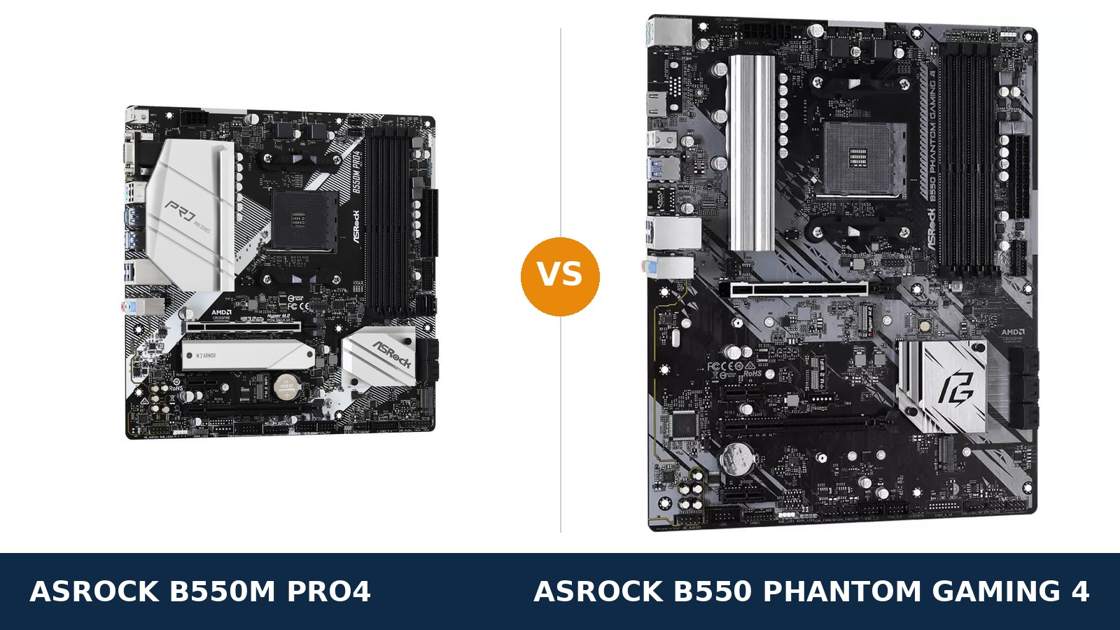
Same brand. Same chipset. Same power design. Two very different boards.
The ASRock B550M Pro4 and the B550 Phantom Gaming 4 share so much hardware that the spec sheets read like copies. Both run an 8-phase power design. Both take four DDR4 sticks, two M.2 drives and six SATA drives.
So why do two boards exist? Because ASRock split them by shape and by priorities. The Pro4 is a micro-ATX board loaded with connectivity. The Phantom Gaming 4 is a full-size ATX board that spends its budget on room instead.
This guide separates them properly. Every specification below comes from ASRock's own product pages and manuals. And the verdict turns on a question most comparisons never ask: what size is your case, and what will you actually plug in?
Key Takeaways
- The B550M Pro4 is the better-connected board. USB 3.2 Gen2 on the rear panel, triple display outputs, and twice the front-panel USB.
- The Phantom Gaming 4 is the roomier board. Full ATX layout, four expansion slots, and debug LEDs for troubleshooting.
- Power, memory, storage speeds and networking are genuine ties. Same 8-phase VRM, same gigabit LAN chip, same audio codec.
- The Pro4 is the only real APU board here. The Phantom Gaming 4 offers a single HDMI output for integrated graphics.
- Neither board has Wi-Fi or 2.5G LAN. Both leave an empty M.2 Key E slot if you want to add wireless yourself.
Quick Verdict
Buy the ASRock B550M Pro4 for most builds. It is the more complete motherboard.
It keeps everything the Phantom Gaming 4 has — the VRM, the storage, the memory support — and adds the things the bigger board left out: 10 Gb/s USB on the rear panel, three display outputs, an M.2 heatsink and double the front USB headers.
It also fits every case the Phantom fits, plus the smaller ones it cannot. That combination is hard to argue with.
Buy the B550 Phantom Gaming 4 if your build genuinely uses the ATX layout. A second small expansion card beside the graphics card. Long 22110 M.2 drives. Debug LEDs for a test bench or a first build you plan to troubleshoot yourself.
Or buy it if it is clearly cheaper when you order and none of the Pro4's extras matter to you. Just know you are trading connectivity for empty space.
The Scorecard
Scores below are derived directly from the manufacturer specifications compared in this guide — phase counts, slot counts, port counts and supported standards. They are a reading aid, not benchmark results.
| Category | B550M Pro4 | B550 Phantom Gaming 4 | ||
|---|---|---|---|---|
| Power delivery | 8 / 10 | 8 / 10 | ||
| Memory | 9 / 10 | 9 / 10 | ||
| USB connectivity | 9 / 10 | 5 / 10 | ||
| Display outputs (APU builds) | 9 / 10 | 4 / 10 | ||
| Storage | 9 / 10 | 8 / 10 | ||
| Expansion & layout | 7 / 10 | 9 / 10 | ||
| Networking & audio | 7 / 10 | 7 / 10 | ||
| Overall | 8.3 / 10 | 7.1 / 10 | ||
The pattern is unusual: the smaller board is the better-equipped one. The Phantom Gaming 4 wins only where physical size itself is the feature.
At a Glance: Who Each Board Fits
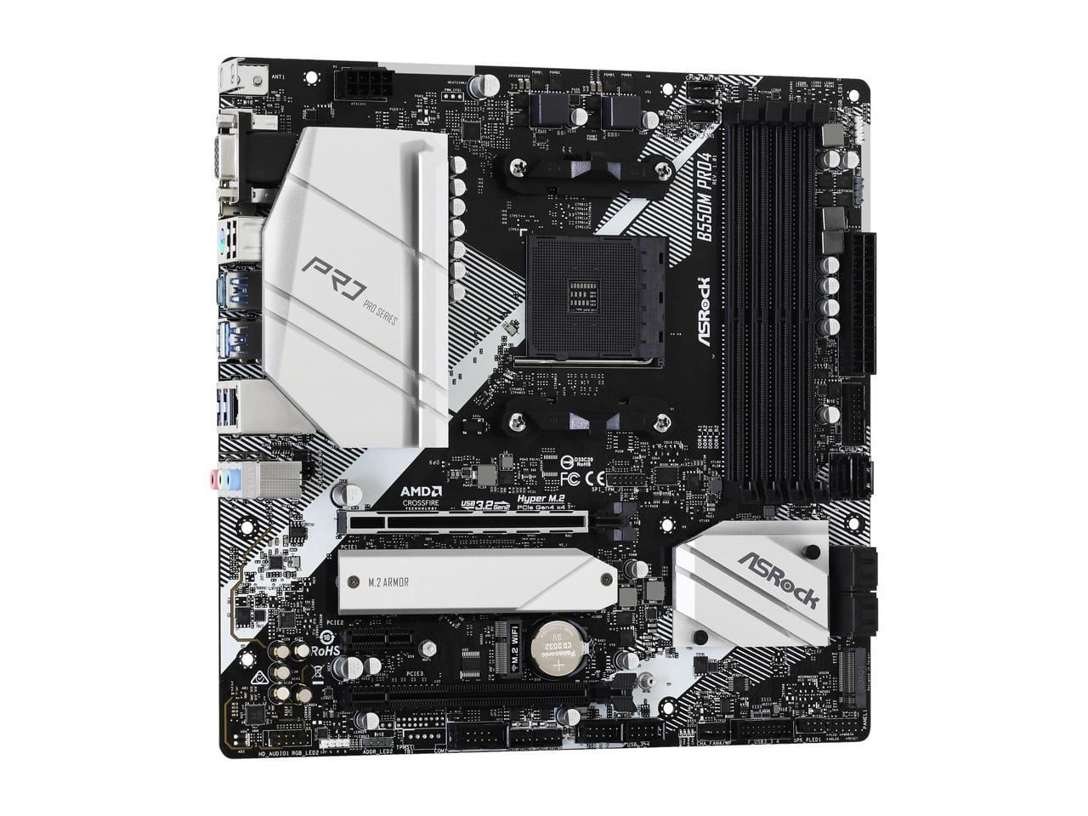
ASRock B550M Pro4
- Micro ATX, 24.4 × 24.4 cm — fits compact and full-size cases
- USB 3.2 Gen2 Type-A and Type-C (10 Gb/s) on the rear panel
- Triple APU display outputs: D-Sub, HDMI 2.1, DisplayPort 1.4
- Heatsink fitted over the primary M.2 slot
- Two front USB 3.2 Gen1 headers for four front ports
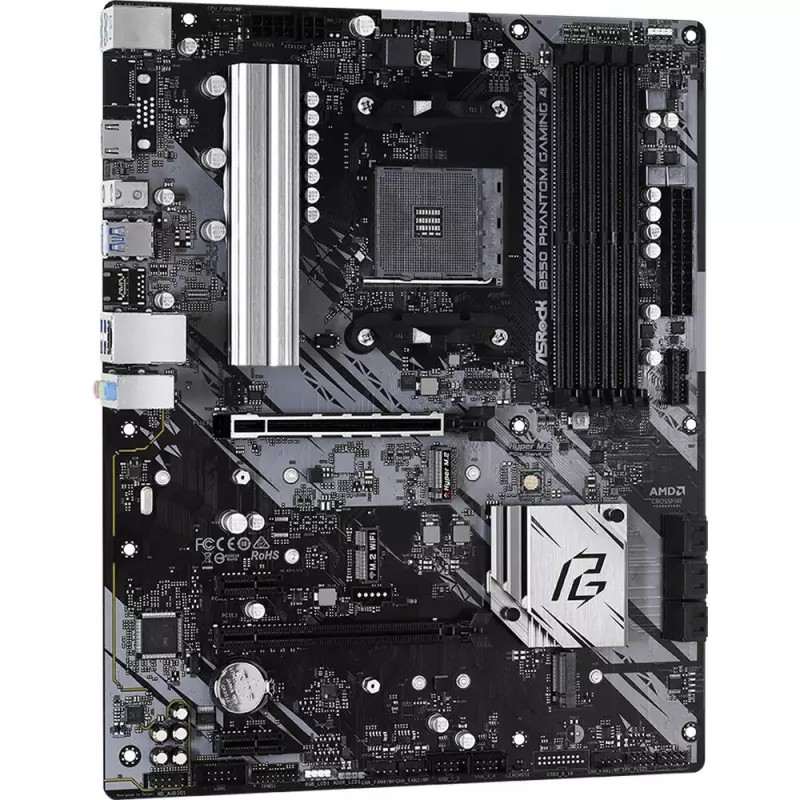
ASRock B550 Phantom Gaming 4
- ATX, 30.5 × 24.4 cm — needs a mid-tower or larger
- Four expansion slots, including two PCIe x1
- Post Status Checker debug LEDs for troubleshooting
- Primary M.2 slot accepts longer 22110 drives
- 8+4 pin CPU power connectors
Choose the B550M Pro4 if…
Your case is micro-ATX. Or it is a full ATX case and you simply want the better-equipped board — the Pro4 fits there too.
You move files to fast external drives. The Gen2 ports transfer at twice the speed of everything on the Phantom's rear panel.
You are building with a Ryzen G-series APU, now or as a fallback. Three display outputs against one is not a small difference.
Choose the B550 Phantom Gaming 4 if…
Your case is a mid-tower and you like room to work. Cables route easier. Big graphics cards breathe easier. Nothing is cramped.
You need two small add-in cards beside the graphics card, or a 22110-length SSD. Or you are a first-time builder who wants debug LEDs telling you what failed.
Or it is the cheaper board on the day you order, and the Pro4's USB and display extras genuinely do not apply to your build.
As an Amazon Associate I earn from qualifying purchases at no extra cost to you.
Specifications: The Specs That Actually Matter
Every figure below is taken from ASRock's published specifications and the boards' user manuals, cross-checked against the manufacturer's product data.
Both boards come from the same B550 generation of ASRock design, which is why so many rows match exactly. The rows that differ are the ones worth your money.
| Specification | ASRock B550M Pro4 | ASRock B550 Phantom Gaming 4 |
|---|---|---|
| Form factor | Micro ATX, 24.4 × 24.4 cm, 2oz copper PCB | ATX, 30.5 × 24.4 cm, 2oz copper PCB |
| Socket / chipset | AMD AM4 / B550 | AMD AM4 / B550 |
| CPU support | Ryzen 5000, 5000 G, 4000 G, 3000 series | Ryzen 5000, 5000 G, 4000 G, 3000 series |
| Power design | 8-phase Digi Power, 50A chokes, XXL alloy heatsink | 8-phase Digi Power, 50A chokes, XXL alloy heatsinks |
| CPU power connectors | 1 × 8-pin | 8-pin + 4-pin |
| Memory | 4 × DDR4 DIMM, up to 128 GB, 4733+ MT/s (O.C.), XMP, ECC | 4 × DDR4 DIMM, up to 128 GB, 4733+ MT/s (O.C.), XMP, ECC |
| Graphics outputs (APU) | D-Sub, HDMI 2.1, DisplayPort 1.4 — triple monitor | HDMI 2.1 only |
| Expansion slots | PCIe 4.0 x16 + PCIe 3.0 x16 (x4) + PCIe 3.0 x1, M.2 Key E (Wi-Fi) | PCIe 4.0 x16 + PCIe 3.0 x16 (x4) + 2 × PCIe 3.0 x1, M.2 Key E (Wi-Fi) |
| M.2 storage | 2 slots: PCIe 4.0 x4 (2280) + PCIe 3.0 x2 / SATA (2280), M.2 heatsink | 2 slots: PCIe 4.0 x4 (2260/2280/22110) + PCIe 3.0 x2 / SATA (2242/2260/2280) |
| SATA | 6 × SATA 6 Gb/s, RAID 0/1/10 | 6 × SATA 6 Gb/s, RAID 0/1/10 |
| LAN | Gigabit, Realtek RTL8111H | Gigabit, Realtek RTL8111H |
| Audio | Realtek ALC1200 7.1 HD, Nahimic Audio | Realtek ALC1200 7.1 HD, Nahimic Audio |
| USB (rear) | USB 3.2 Gen2 Type-A + Type-C (10 Gb/s), 4 × Gen1, 2 × USB 2.0 | 6 × USB 3.2 Gen1 — no Gen2, no Type-C |
| USB (front headers) | 2 × USB 3.2 Gen1 headers (4 ports), 2 × USB 2.0 headers | 1 × USB 3.2 Gen1 header (2 ports), 2 × USB 2.0 headers |
| Fan headers | CPU + CPU/water pump + 4 × chassis/water pump | CPU + CPU/water pump + 4 × chassis/water pump |
| Troubleshooting | None fitted | Post Status Checker LEDs (CPU / DRAM / VGA / Boot) |
| I/O shield | Separate shield in the box | Separate shield in the box |
Two traps to know before the table settles your decision. First: on both boards, the second M.2 slot shares lanes with SATA ports 5 and 6. Fit a drive in that M.2 slot and those two SATA ports switch off. The six-SATA headline is really four, the moment you use both M.2 slots.
Second: ASRock's marketing pages describe the audio on both boards as “ALC1220/ALC1200.” Both boards' user manuals name the ALC1200. We score audio on the manual figure — and on the manual figure, it is a tie.
The Differences That Actually Matter
1. Form factor — the decision that comes before all the others
The Pro4 is a square micro-ATX board, 24.4 × 24.4 cm. The Phantom Gaming 4 is full ATX, stretched to 30.5 cm deep.
That single fact filters everything else. A micro-ATX or mini-tower case ends this comparison instantly: the Phantom does not fit, the Pro4 does.
In a mid-tower, both fit. There, the ATX board buys working room — wider spacing around the graphics card, easier cable runs, less knuckle-scraping around the bottom edge connectors.
What it does not buy is performance. Every shared component performs identically on either PCB. You are choosing a shape, not a speed.
Our advice: let the case decide only if the case is small. If both fit, judge the boards on the sections that follow — because there, the Pro4 wins more than it loses.
2. USB — the Pro4's biggest and most practical win
Turn both boards around. The Pro4's rear panel carries a USB 3.2 Gen2 Type-A port and a Gen2 Type-C port, both at 10 Gb/s.
The Phantom Gaming 4 has neither. Its entire rear panel — six ports — runs at USB 3.2 Gen1 speed, 5 Gb/s. There is no USB-C port of any kind.
For keyboards, mice and headsets, that difference is invisible. For an external SSD, a fast card reader or a capture device, Gen2 is twice the ceiling. External storage is exactly where home PCs keep growing.
One honest detail from the Pro4's manual: its four rear Gen1 ports hang off an ASMedia ASM1074 hub. That is normal practice at this price, and it changes nothing in daily use.
The front panel repeats the result. The Pro4 provides two USB 3.2 Gen1 headers, feeding up to four fast front ports. The Phantom provides one header — two ports. Cases with twin front USB ports are common; the Pro4 serves them fully, the Phantom leaves one dark or demoted.
Neither board offers a front-panel USB-C header. If your case has a front Type-C port, it stays unconnected on both. That shared omission is the one USB criticism that applies to the pair equally.
3. Display outputs — a rout, if you ever run an APU
The Pro4 offers three display outputs: D-Sub, HDMI 2.1 and DisplayPort 1.4. ASRock rates it for triple-monitor duty from a Ryzen G-series APU.
The Phantom Gaming 4 offers one: HDMI 2.1. That is the whole list.
With a discrete graphics card fitted, none of this matters — the card's outputs take over. But APU builds are a real category on AM4: office machines, home theatre PCs, and gaming builds waiting out graphics-card prices on a 5600G.
For those builders this section ends the comparison. One HDMI port means one monitor without adapters, and no DisplayPort at all. The Pro4 runs a modern dual- or triple-screen desk from integrated graphics without breaking a sweat.
Even gamers should weigh it lightly in the Pro4's favour. Integrated graphics are the backup display when a graphics card fails. Three outputs make a better backup than one.
4. Expansion — the Phantom's one clean win
Both boards give the graphics card a steel-reinforced PCIe 4.0 x16 slot. Both add a second physical x16 slot wired at x4. Both include an M.2 Key E slot for a Wi-Fi module you buy separately.
The Phantom then adds one more: a second PCIe 3.0 x1 slot, for four slots in total against the Pro4's three.
Who uses a second x1 slot? The builder with a sound card and a capture card. A serial or parallel legacy card. A second network adapter. It is a narrow audience — but if you are in it, the Pro4 simply has nowhere to put your second card.
The ATX layout helps in a quieter way too. On the micro-ATX Pro4, a thick dual-slot graphics card can crowd the slot below it. On the Phantom, the spacing is more forgiving.
Score this one honestly for the Phantom. Just be sure you will actually populate the extra slot before paying for it with the USB and display features above.
5. Storage — same speeds, different fine print
The headline storage story is identical. A Hyper M.2 slot at PCIe 4.0 x4 for a fast boot drive. A second M.2 at PCIe 3.0 x2 with SATA mode support. Six SATA ports with RAID 0, 1 and 10.
Boot times, game loads and file copies will match to the second. Neither board is a storage upgrade over the other.
The fine print splits two ways. The Pro4 fits a heatsink — ASRock's M.2 Armor — over its primary slot, which keeps a hard-working Gen4 drive cooler under sustained writes.
The Phantom's primary slot instead accepts longer 22110 drives alongside 2260 and 2280, where the Pro4 takes 2280 only. Its second slot is more flexible too, down to short 2242 drives.
And both boards share the trap from the spec table: use the second M.2 slot, and SATA ports 5 and 6 go dark. Plan on four usable SATA ports in any dual-M.2 build, whichever board you pick.
Net call: a slight Pro4 edge for the heatsink, because 2280 drives are what almost everyone buys. If you own a 22110 drive, the edge flips.
6. Power delivery — a tie, and do not let the extra plug fool you
Underneath, these boards are the same. Both run ASRock's 8-phase Digi Power design with premium 50A chokes, a 2oz copper PCB and XXL aluminium heatsinks over the MOSFETs.
That design handles the full AM4 range — Ryzen 5, 7 and 9 — at stock settings and sensible overclocks, identically on both boards. There is no VRM reason to pick one over the other.
The Phantom does add a 4-pin CPU power connector beside the main 8-pin. It looks like extra headroom. In practice, a single 8-pin EPS connector already delivers far more than any AM4 processor draws in normal use.
Treat the extra connector as a styling cue, not a specification. If a salesperson makes it the headline, they have run out of real differences — this section is a draw.
7. The small stuff — debug LEDs one way, silence the other
The Phantom Gaming 4 carries ASRock's Post Status Checker: four small LEDs that report CPU, DRAM, VGA and Boot status at every start-up.
When a build refuses to post, those LEDs turn an hour of guesswork into a thirty-second diagnosis. First-time builders and test-bench users get real value here. The Pro4 has no equivalent.
Almost everything else small is shared. The same Realtek RTL8111H gigabit LAN — no 2.5G on either board, a genuine shared limitation. The same ALC1200 audio with Nahimic software. The same four chassis fan headers, the same two RGB and two addressable headers, the same PS/2 combo port for a legacy keyboard.
And the same wireless story: an empty M.2 Key E slot on both. Add your own module and antennas, or buy one of ASRock's Wi-Fi-fitted variants instead — the buying guide below names the trap.
CPU Pairing Guide
Both boards run the same processors with the same power design, so this table is mostly about the build around the CPU. One shared limit first: like every ASRock B550 board, neither supports the older Ryzen 5 3400G or Ryzen 3 3200G.
| Your processor | B550M Pro4 | B550 Phantom Gaming 4 | Our call |
|---|---|---|---|
| Ryzen 5 5600 / 5500 | Excellent | Excellent | Pro4 for the better rear panel — or whichever fits your case |
| Ryzen 5 5600G / 5700G (APU) | Excellent — triple display outputs | Limited — a single HDMI output | B550M Pro4, clearly |
| Ryzen 7 5700X / 5800X | Excellent — VRM headroom to spare | Excellent — identical VRM | Tie on power; Pro4 on features |
| Ryzen 9 5900X / 5950X | Workable — the sensible ceiling | Workable — the sensible ceiling | Dead tie; consider a stronger board class for heavy all-core work |
| Ryzen 3000 series | Excellent | Excellent | Buy on case fit and price |
Read the APU row twice if there is any chance of integrated graphics in your future. It is the single widest gap between these boards, and it costs nothing to get right today.
Ready to check today’s price?
Both boards sell through Amazon. Prices move, so check the live figure on the board that fits your build.
View on Amazon — B550M Pro4View on Amazon — B550 Phantom Gaming 4The 30-Second Decision
| If this sounds like you… | Buy this |
|---|---|
| “My case is micro-ATX or a compact mini-tower.” | B550M Pro4 — the Phantom does not fit |
| “I use fast external SSDs or a USB-C drive dock.” | B550M Pro4 (rear Gen2 Type-A + Type-C) |
| “APU build, two or three monitors, no graphics card.” | B550M Pro4 (D-Sub + HDMI + DisplayPort) |
| “Mid-tower build, two small add-in cards planned.” | B550 Phantom Gaming 4 (four slots) |
| “First build — I want debug LEDs if it won't start.” | B550 Phantom Gaming 4 (Post Status Checker) |
| “Gaming PC, one graphics card, mid-tower case.” | B550M Pro4 — the features you will actually touch |
What You Gain. What You Give Up.
ASRock B550M Pro4
You gain: 10 Gb/s USB-C and Type-A on the rear panel. Three display outputs for APU builds. A heatsink on the primary M.2 slot. Double the front USB 3.2 headers. And a board that fits compact cases the Phantom cannot enter.
You give up: the fourth expansion slot and the extra slot spacing of a full ATX layout. Debug LEDs. Support for long 22110 M.2 drives. In a big case, you also give up a little visual fill — a small board in a large window looks sparse.
ASRock B550 Phantom Gaming 4
You gain: a full ATX layout with four expansion slots and easier building room. Post Status Checker LEDs for troubleshooting. 22110 M.2 support. An 8+4 pin CPU power arrangement that looks the part in a gaming build.
You give up: every fast USB port — the rear panel tops out at Gen1 speeds, with no USB-C at all. Two of the three display outputs, which ends APU multi-monitor builds. The M.2 heatsink. And compatibility with any case smaller than a mid-tower.
Pros and Cons
B550M Pro4 — Pros
- USB 3.2 Gen2 Type-A and Type-C at the rear
- Triple display outputs — the APU-friendly board
- M.2 Armor heatsink on the primary slot
- Two front USB 3.2 Gen1 headers
- Fits micro-ATX and ATX cases alike
Cons
- Only three expansion slots
- No debug LEDs for troubleshooting
- 2280-only M.2 slots
- Gigabit LAN only — same as the Phantom
- No Wi-Fi fitted — same as the Phantom
B550 Phantom Gaming 4 — Pros
- Full ATX layout, four expansion slots
- Post Status Checker debug LEDs
- Accepts 22110-length M.2 drives
- 8+4 pin CPU power connectors
- Same strong 8-phase VRM as the Pro4
Cons
- Rear USB stops at Gen1 — no Gen2, no USB-C
- HDMI is the only display output
- No M.2 heatsink
- One front USB 3.2 Gen1 header only
- Needs a mid-tower case or larger
Check the Model Name Twice — This Family Is a Maze
Check the exact name. ASRock sells three boards whose names differ by a letter or two. They are not the same product.
The B550 Phantom Gaming 4 in this comparison is the wired, full-ATX board. The B550 Phantom Gaming 4/ac is a separate model with a Wi-Fi module fitted — and its own spec sheet differs, including the storage layout, so judge it separately if wireless matters to you.
Then there is the B550M Phantom Gaming 4 — note the M. It is a different micro-ATX board entirely, with fewer SATA ports and a different slot layout. A hurried click buys the wrong motherboard.
Check the CPU pairing. Both boards support Ryzen 5000 from a recent BIOS, and both flatly exclude the Ryzen 5 3400G and 3 3200G. Neither offers a BIOS flashback button, so an old-stock board with an early BIOS may need a supported processor installed before a Ryzen 5000 chip will boot. Buy from a seller with current stock, and check ASRock's CPU support list for your board before ordering the processor.
Check the bundle. Both boxes are honest budget fare: the board, a separate I/O shield, two SATA cables, M.2 screws and documentation. Neither includes a Wi-Fi module for that Key E slot, and neither includes antennas. If wireless is on your list, price the module in — or start with the /ac variant instead.
The Upgrade Path Test
These boards share a platform, so their upgrade paths mostly overlap. The same processors, the same memory ceilings, the same second M.2 slot waiting for a future drive.
The differences appear at the edges. The Pro4 owner's external drives get faster the day they buy a Gen2 enclosure. The Phantom owner plugging in the same enclosure is capped at half speed, forever — rear-panel USB cannot be upgraded.
The Phantom owner's edge runs the other way. A second capture card or a legacy controller drops into that spare x1 slot years later. The Pro4 owner, out of slots, is shopping for a new board.
Ask which upgrade is more likely in your house. For most builders it is storage and peripherals, not a second add-in card — which is one more reason the Pro4 takes this comparison.
When to Skip Both
Honesty cuts both ways. Some builders should pass over this entire pairing.
Skip both if you need Wi-Fi out of the box — ASRock's /ac and Wi-Fi variants exist for that. Skip both if your internet or home network runs at 2.5 gigabit; neither board can use it.
Skip both if your case has a front USB-C port you refuse to leave dead, since neither board can connect it. And skip both if a Ryzen 9 will spend its life on sustained all-core rendering — the shared 8-phase design is capable, but a stronger board class is the honest recommendation there.
For the mainstream AM4 build — Ryzen 5 or 7, one graphics card, one or two SSDs — one of these two is the right answer. The only question is which set of extras matches your desk.
Final Verdict
The ASRock B550M Pro4 is the board we would buy.
It matches the Phantom Gaming 4 everywhere the hardware is shared — power delivery, memory, storage speeds, networking, audio — and then beats it on the features a builder touches every week: fast rear USB with Type-C, three display outputs, an M.2 heatsink and fuller front-panel support.
It does all that while fitting more cases, not fewer. The smaller board being the better board is unusual, but the spec sheets leave no other honest conclusion.
Buy the B550M Pro4 for compact builds, APU builds, mixed work-and-play machines, and any build that leans on external storage.
Buy the B550 Phantom Gaming 4 if your mid-tower build will use its four slots, if you value debug LEDs, or if you already own a 22110 drive. It is a sound, honest ATX board.
Just buy it for its layout — not expecting connectivity it does not have.
View on Amazon — B550 Phantom Gaming 4
Watch Out: Similar Names, Different Boards
First: the B550M Pro4 is not the B550 Pro4. The M is the micro-ATX board in this comparison; the board without it is a separate full-ATX model with its own specification. Listings shorten names carelessly.
Second: the B550 Phantom Gaming 4 is not the B550M Phantom Gaming 4. One letter changes the size, the slot count and the storage layout. Match the full name character by character before you pay.
Third: the Phantom Gaming 4/ac is the Wi-Fi-fitted sibling, not a bundle of this board. Its storage specification differs on ASRock's own sheet. If a listing's title ends in “/ac,” you are looking at a different product page.
Slow down on the model name, then check the form factor line, then the price — in that order.
Case, Power and Cabling Notes
The Pro4 fits micro-ATX and ATX cases. The Phantom Gaming 4 needs an ATX case — a mid-tower or larger — and will not mount in a micro-ATX chassis at all.
Power is simple on both. A 24-pin main connector and an 8-pin EPS connector run either board. The Phantom's extra 4-pin is optional headroom your power supply almost certainly covers, but the build works without it connected.
Front-panel wiring differs once: cases with two fast front USB ports use both of the Pro4's Gen1 headers, while the Phantom's single header leaves the second port unconnected or on a slower header. Check your case's front panel against the board before you commit.
Cooling control is level: four chassis fan headers plus CPU and pump headers on both boards. Neither build will want for fan connections.
BIOS and Long-Term Support
AM4 is a mature platform, and both boards sit on ASRock's standard support pages: BIOS updates, drivers, manuals and per-model CPU support lists.
That maturity is a genuine shared strength. The BIOS is stable, the quirks are documented, and the remaining updates are about security and edge-case compatibility rather than fixing a young platform.
Two habits serve owners of either board. Update the BIOS before a processor upgrade, using a currently supported CPU, since neither board offers a flashback button. And keep the CPU support list bookmarked — it is the final word on which chips your board's BIOS generation accepts.
Expect either board to outlast the useful life of the platform. The choice between them will be decided by ports and size long before support runs out.
Frequently Asked Questions
Is the B550M Pro4 better than the B550 Phantom Gaming 4?
For most builders, yes. It matches the Phantom on VRM, memory, storage speeds, LAN and audio, then adds USB 3.2 Gen2 with Type-C, three display outputs, an M.2 heatsink and an extra front USB header. The Phantom answers with a full ATX layout, a fourth expansion slot and debug LEDs.
What is the real difference between the B550M Pro4 and the B550 Phantom Gaming 4?
Size and connectivity. The Pro4 is micro-ATX with the richer rear panel; the Phantom Gaming 4 is full ATX with more slot room. Everything underneath — the 8-phase power design, DDR4 support, dual M.2 storage, gigabit LAN and ALC1200 audio — is shared.
Which board is better for a Ryzen 5600G or 5700G APU build?
The B550M Pro4, decisively. It provides D-Sub, HDMI 2.1 and DisplayPort 1.4 outputs for up to three monitors. The Phantom Gaming 4 has a single HDMI port, which limits an APU build to one display without workarounds.
Does the B550 Phantom Gaming 4 have USB-C?
No. Its rear panel carries six USB 3.2 Gen1 Type-A ports and nothing faster — no Gen2 and no Type-C. Neither board has a front-panel USB-C header either. If USB-C matters, the Pro4's rear Gen2 Type-C port is the only one in this pairing.
Can both boards run a Ryzen 9 5900X or 5950X?
Yes, at stock settings and sensible overclocks. Both use the same 8-phase Digi Power design with 50A chokes and full heatsinks. For sustained all-core production workloads, a higher-tier board class is still the honest recommendation — but that advice applies to both boards equally.
What happens to SATA ports when I install a second M.2 drive?
On both boards, the second M.2 slot shares lanes with SATA ports 5 and 6. Populate that M.2 slot and those two SATA ports are disabled, leaving four working SATA ports. Plan your drive layout around that shared limit.
Does either board have Wi-Fi or 2.5G Ethernet?
Neither. Both provide gigabit Ethernet through the Realtek RTL8111H and an empty M.2 Key E slot for a Wi-Fi module you supply yourself. For built-in wireless, look at ASRock's /ac variant of the Phantom Gaming 4 — a separate model with its own specification.
Will the B550 Phantom Gaming 4 fit a micro-ATX case?
No. It is a full ATX board at 30.5 × 24.4 cm and needs a mid-tower or larger. The B550M Pro4, at 24.4 × 24.4 cm, fits micro-ATX cases and also mounts happily in full ATX cases.
Sources & Verification
ASRock B550M Pro4 official product page and user manual (rear panel, storage and connector specifications) • ASRock B550 Phantom Gaming 4 official product page and user manual (platform, expansion, storage and connector specifications) • ASRock retail product data for both boards. Specifications verified November 2026.

James Wilson
James has been building and benchmarking PCs for over a decade and writes Honestly Compared's motherboard and component guides. His rule for every comparison: the verdict has to survive the spec sheet, not the marketing page.