
ASRock B550M Pro4 vs MSI B550M Pro-VDH WiFi: Which Should You Buy?
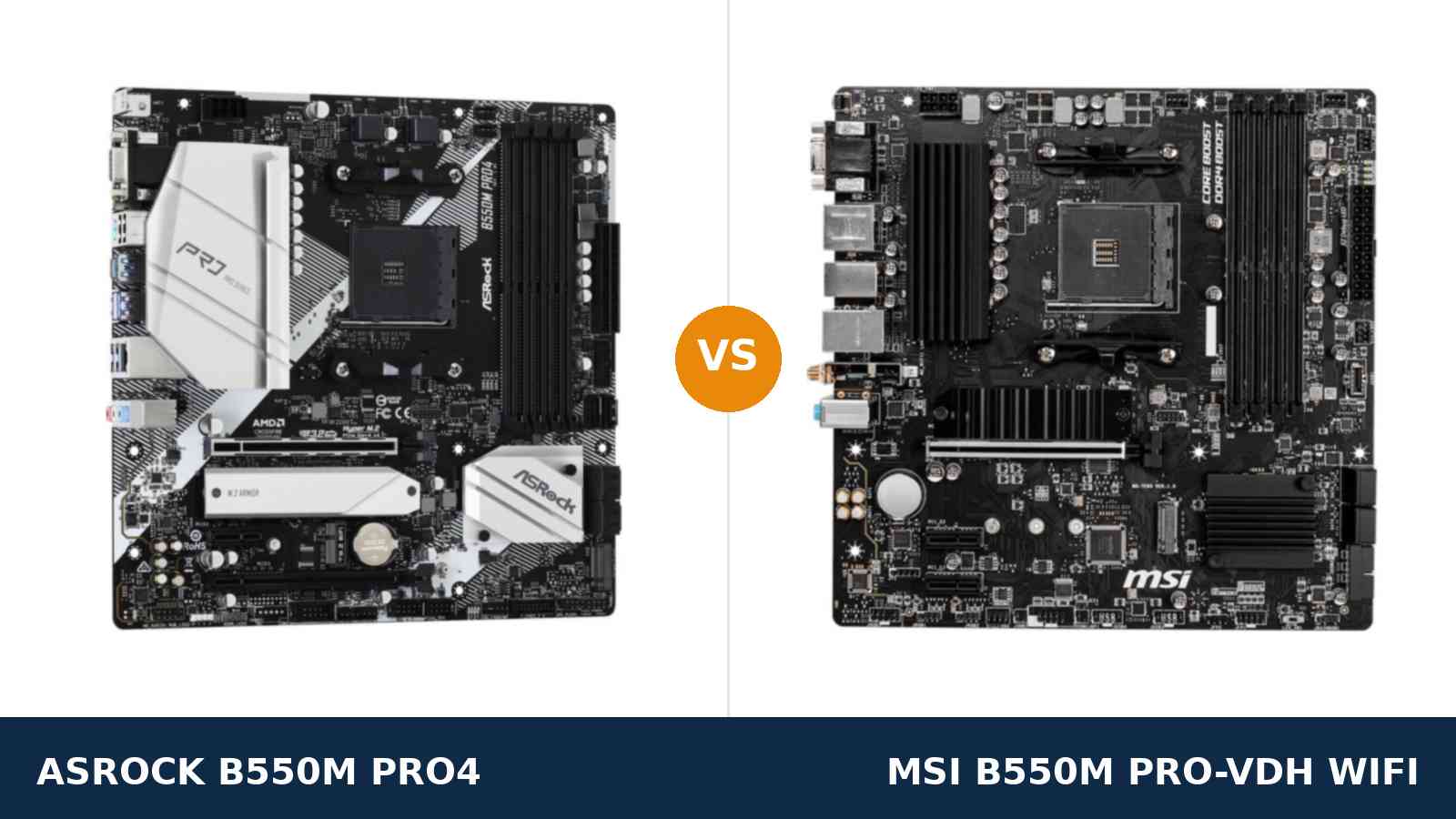
Every motherboard at this price leaves something out. The only question that matters is whether the missing piece can be added later — or whether it is missing forever.
That question separates the ASRock B550M Pro4 from the MSI B550M Pro-VDH WiFi more cleanly than any spec sheet. The ASRock's big omission is wireless networking, and wireless bolts on afterwards through a slot ASRock left open. The MSI's omissions are structural — a leaner power design, no fast expansion slot — and cannot be retrofitted at any price.
Read the two boards that way and the comparison stops being confusing. One asks you to finish it yourself. The other arrives finished, with a lower ceiling welded on.
What follows uses ASRock's and MSI's own published specifications. Where the two tie, we say so. Where one wins, we name it.
Key Takeaways
- The Pro4 wins the permanent hardware. More power phases, a PCIe x4 slot, USB 3.2 Gen2, six SATA ports, a newer audio codec.
- The Pro-VDH WiFi wins the first evening. Wireless and Bluetooth run out of the box, antennas included — no module to buy, no case to reopen.
- The Pro4's missing Wi-Fi is the fixable kind. Its empty M.2 Key E slot accepts a modern Wi-Fi 6 or 6E module later; the MSI's Wi-Fi 5 module is the one it keeps.
- Three boards share the MSI's name. A wired-only Pro-VDH and a Wi-Fi 6 (CEC) variant sit beside the standard model. The standard board is Wi-Fi 5 — check the box.
- Reusing a Ryzen 5 3400G or 3 3200G settles everything. MSI's own spec excludes both chips. ASRock supports them.
Quick Verdict
For most builds, buy the ASRock B550M Pro4. It gets the fundamentals right in the places a motherboard cannot be upgraded.
Power delivery is a clear step up. So is expansion. The rear panel carries the faster USB standard in both connector shapes, storage room is deeper, and the one feature it lacks can be added later through its Key E slot — with a faster module than its rival ships.
If a cable can reach your PC, or a module purchase does not bother you, take the stronger board.
Buy the MSI B550M Pro-VDH WiFi when the PC simply cannot be wired. It connects on day one, Bluetooth pairs without a dongle, and a front USB-C header keeps a modern case functional.
For a desk rooms away from the router, that convenience is the entire point of the purchase.
The Scorecard
Scores below are derived directly from the manufacturer specifications compared in this guide — phase counts, slot counts, port counts and supported standards. They are a reading aid, not benchmark results.
| Category | B550M Pro4 | B550M Pro-VDH WiFi | ||
|---|---|---|---|---|
| Power delivery | 9 / 10 | 7 / 10 | ||
| Expansion | 8 / 10 | 5 / 10 | ||
| Wireless | 4 / 10 | 9 / 10 | ||
| Storage | 8 / 10 | 8 / 10 | ||
| Memory | 9 / 10 | 8 / 10 | ||
| USB | 9 / 10 | 7 / 10 | ||
| Audio | 8 / 10 | 7 / 10 | ||
| Overall | 8.3 / 10 | 8.0 / 10 | ||
Six of the seven rows belong to the ASRock or end level. The seventh — wireless — belongs entirely to the MSI, and it is the row that decides this comparison for anyone whose desk sits far from a network socket.
At a Glance: Who Each Board Fits
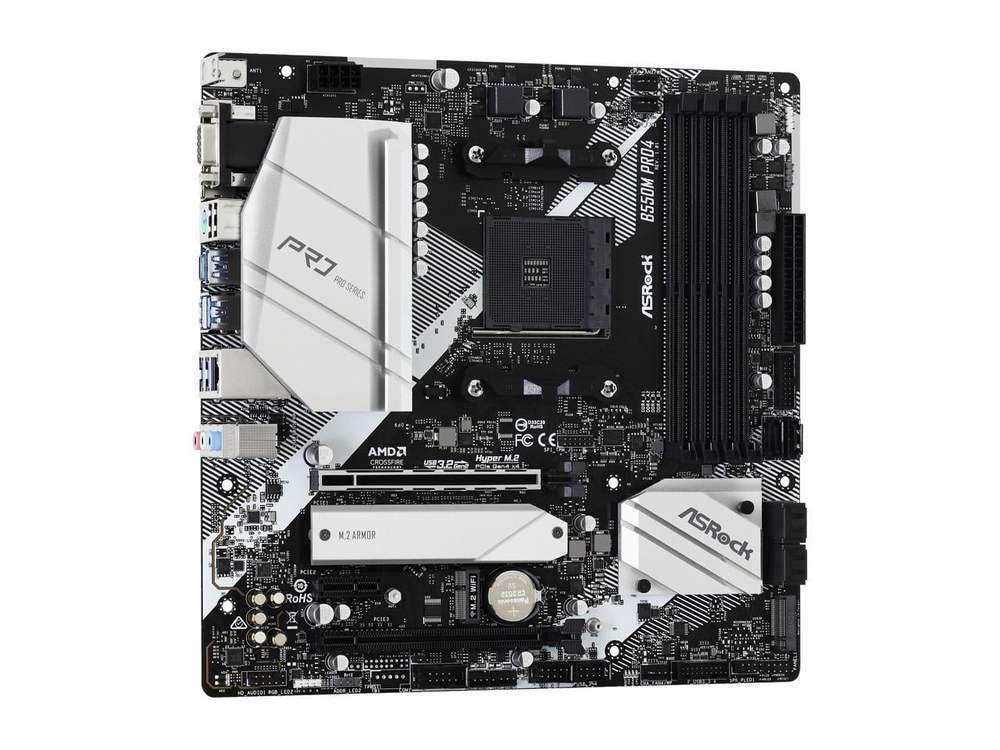
ASRock B550M Pro4
- 8-phase Digi Power design with 50A chokes and an XXL alloy heatsink
- USB 3.2 Gen2 Type-A and Type-C (10 Gb/s) on the rear panel
- PCIe x16 slot wired at x4, plus six SATA ports
- M.2 Key E slot ready for a Wi-Fi module of your choice
- ALC1200 audio, POST Status Checker, triple display outputs
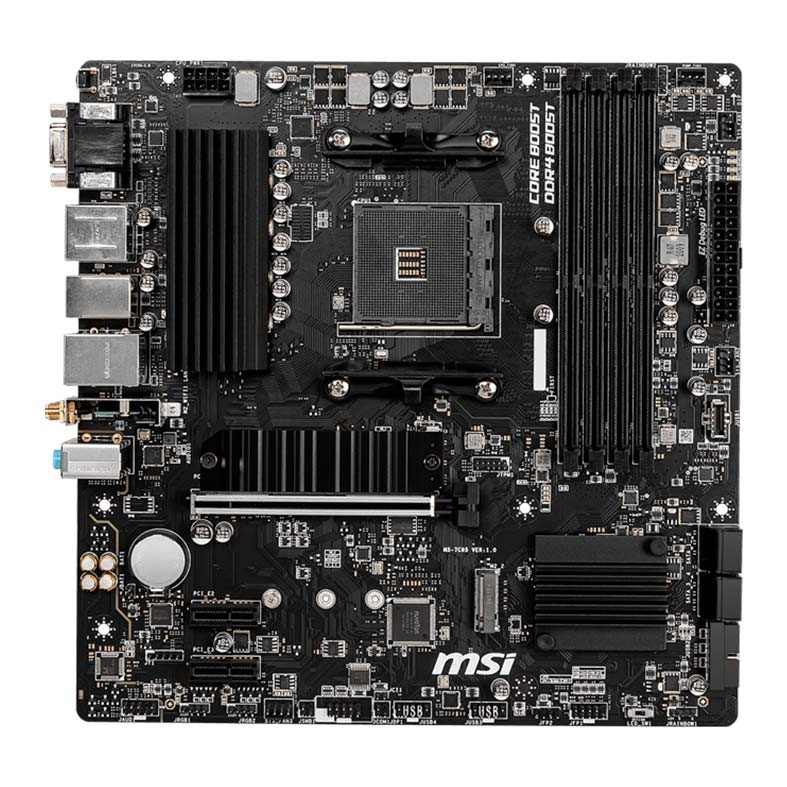
MSI B550M Pro-VDH WiFi
- Wi-Fi 5 and Bluetooth 4.2 fitted, antennas in the box
- Front-panel USB-C header for current cases
- Second M.2 slot wired at full PCIe 3.0 x4
- VGA, HDMI and DisplayPort outputs — three monitors from an APU
- EZ Debug LED, M.2 Shield Frozr heatsink, Steel Armor main slot
Choose the B550M Pro4 if…
An ethernet cable can reach the build, even if fitting one takes an afternoon. Once wired, the MSI's headline feature stops mattering and its compromises are all that remain.
A Ryzen 7 is in the build today, or on the wish list for later. The power design to feed one comfortably is already soldered down here.
You hoard storage, shuttle big files to external SSDs, or can imagine a capture card or NVMe adapter in your future. This board has somewhere to put all of them.
Choose the B550M Pro-VDH WiFi if…
No cable run is realistic. The PC is going in a bedroom, a rented room, a living room — anywhere the router is not.
Bluetooth gear is part of the setup. A controller, wireless headphones, a keyboard you would rather not trail a dongle behind.
Your case's front panel has a USB-C socket you expect to work, and the build tops out at a Ryzen 5 or a G-series APU that never asks the power design hard questions.
As an Amazon Associate I earn from qualifying purchases at no extra cost to you.
Specifications: The Specs That Actually Matter
Nothing in this table comes from a retailer's summary. Each row traces back to the specification pages and manuals ASRock and MSI publish for these two boards.
Two caveats before you read it. MSI nowhere states a phase count for its VRM, so that cell relies on independent teardowns of retail hardware. And the MSI's wireless hardware is not the same in every region — a note beneath the table explains.
| Specification | ASRock B550M Pro4 | MSI B550M Pro-VDH WiFi |
|---|---|---|
| Form factor | Micro ATX (24.4 × 24.4 cm), 2oz copper PCB | Micro ATX (24.4 × 24.4 cm) |
| Socket / chipset | AMD AM4 / B550 | AMD AM4 / B550 |
| CPU support | Ryzen 5000, 5000 G, 4000 G and 3000 series, incl. 3400G / 3200G | Ryzen 5000 / 3000 and 4000 G-Series — 3400G / 3200G excluded |
| VRM design | 8-phase Digi Power, 50A chokes, XXL alloy heatsink | 4+2+1 phases per teardowns; heatsink over the VCore bank |
| Memory | 4 × DDR4 DIMM, 128 GB max, XMP + ECC, 4733+ MT/s (O.C.) | 4 × DDR4 DIMM, 128 GB max, A-XMP, 4400 MT/s (O.C.) |
| Wireless | Not fitted; M.2 Key E slot and antenna bracket provided | Intel Wi-Fi 5 (802.11ac), Bluetooth 4.2 |
| Graphics outputs (APU) | D-Sub, HDMI 2.1, DisplayPort 1.4 — triple monitor | VGA (D-Sub), HDMI, DisplayPort (4K@60) — triple monitor |
| Expansion slots | PCIe 4.0 x16 + PCIe 3.0 x16 (x4) + PCIe 3.0 x1, M.2 Key E | Steel Armor PCIe 4.0 x16, plus 2 × PCIe 3.0 x1 |
| M.2 storage | Two slots — PCIe 4.0 x4 and PCIe 3.0 x2 / SATA (both 2280), heatsink fitted | Two slots — PCIe 4.0 x4 / SATA and PCIe 3.0 x4 (both 2280), Shield Frozr heatsink |
| SATA | 6 × SATA 6 Gb/s with RAID 0/1/10 | 4 × SATA 6 Gb/s with RAID 0/1/10 |
| LAN | Realtek RTL8111H GbE | Realtek RTL8111HN GbE |
| Audio | Realtek ALC1200, 7.1 HD, Nahimic Audio | Realtek ALC892/ALC897, 7.1 HD with Audio Boost |
| USB (rear) | 1 × Gen2 Type-A, 1 × Gen2 Type-C (10 Gb/s), 4 × Gen1, 2 × USB 2.0 | 4 × USB 3.2 Gen1 Type-A and USB 2.0 ports |
| Front-panel USB-C header | None; front USB via Gen1 Type-A headers | USB 3.2 Gen 1 Type-C header fitted |
| Fan connectors | Six headers, several water-pump capable | Complete PWM set sized for a typical build |
| Boot diagnostics | POST Status Checker LEDs | EZ Debug LED |
| BIOS flashing | In-BIOS update only — no flashback | In-BIOS update only — no flashback |
Wireless variants: MSI's specification page gives the standard B550M Pro-VDH WiFi — the model this page links to — an Intel Wi-Fi 5 module and Bluetooth 4.2. A regional (CEC) edition swaps in Wi-Fi 6, Bluetooth 5.2 and quicker rear USB, and some shop listings merge the two boards into one description. Read the artwork on the box, not the listing title, to know which radio you own.
Lane sharing on the Pro4: populating ASRock's second M.2 slot takes over the lanes of two SATA sockets, which then stop working. Treat the board as six SATA ports on paper, or four with both M.2 slots filled in practice.
Audio sourcing: the Pro4's ALC1200 figure comes from ASRock's user manual; ASRock comparison pages elsewhere have printed ALC1220 for this model, and the manual wins ties on this site. MSI hedges its own codec as “ALC892/ALC897” because production batches differ — either chip sits a tier under the ALC1200.
The Differences That Actually Matter
1. Power delivery — the gap you can never close later
Begin with the hardware soldered down for the life of the board.
ASRock fits an 8-phase Digi Power design with 50A chokes, under the big silver heatsink visible in every product photo — the largest in this class.
MSI fits a simpler arrangement. Teardowns count 4+2+1 phases, because MSI declines to publish a number, and only the main VCore bank gets a heatsink.
Drop a Ryzen 5 5600 on either board and you will never detect the difference. Not in a game, not anywhere in daily use.
The gap opens at eight cores. A 5800X — or the 5800X3D so many AM4 owners are waiting to catch on sale — asks for sustained current the ASRock delivers with room to spare, while the MSI runs near its limits throughout.
You cannot buy your way out of that later. No accessory upgrades a VRM. This is the strongest single argument in the comparison, and it points at the Pro4.
2. Expansion — an x4 slot against two x1 slots
The graphics slot is level. Both boards hand a GPU the full PCIe 4.0 x16 connection, stepping down to PCIe 3.0 behind a G-series APU, as every B550 board does.
Underneath it, they diverge hard. ASRock provides a second full-length slot wired at x4, plus an x1. MSI provides two x1 slots and nothing wider.
x4 is the width the interesting cards ask for. Capture hardware. A 10-gigabit network adapter. An NVMe carrier card. A serious sound card. In an x1 slot most of these crawl; several refuse to fit the plan at all.
One honest counterweight: the card owners reach for most often is wireless, and the MSI has already bought it for you. If a Wi-Fi card was your whole expansion plan, the extra slot buys nothing.
Plan anything beyond wireless, though, and only one of these boards can execute the plan.
3. Wi-Fi — the MSI's whole argument, and a good one
Now the feature that sells the MSI, stated at full strength.
Its Intel module is already installed when the box opens. Wi-Fi 5, dual-band, Bluetooth 4.2 alongside. Screw on the supplied antennas, boot, connect. A PC built on a Friday evening is online on Friday evening.
Calibrate expectations, though. The module is a 1×1 design: a few hundred megabits in real rooms. Ample for play and streaming, short of what a cable pulls from a gigabit line.
The Pro4 ships unconnected but prepared. Its M.2 Key E slot is wired for exactly this job, and the rear panel already carries the antenna bracket the module's posts screw into.
Filling it is ten minutes of work and one extra order. The reward is choice: a Wi-Fi 6 or 6E module, faster than anything MSI fits here, at a price you control.
So the row splits by temperament. Network tonight, zero further shopping? MSI. Ten minutes spent to end up with the better radio? The Pro4 overtakes it.
4. USB — speed at the rear, a socket at the front
Spin both boards around and compare rear panels. The Pro4 offers USB 3.2 Gen2 twice — Type-A and Type-C — each at 10 Gb/s, backed by four Gen1 ports and a pair of USB 2.0.
The MSI's rear panel peaks at Gen1. Four Type-A sockets and USB 2.0 fill it out. Against a fast external SSD, its best port moves a large folder in roughly double the ASRock's time.
Walk to the front of the case and the result flips. MSI provides an internal Type-C header at Gen1; ASRock provides none at all, serving front panels through Type-A headers only.
That header is the difference between a modern case's front USB-C port working and that port being a blank decoration. A growing number of cases ship with exactly one front socket — and it is the C-shaped one.
Neither board wins USB outright. The Pro4 owns transfer speed; the MSI owns front-panel completeness. Your peripherals and case decide which half matters.
5. Storage — port count against second-slot speed
Boot storage is a genuine tie. Each board leads with a CPU-wired PCIe 4.0 x4 M.2 slot under a heatsink.
The philosophies split below that. ASRock counts higher: six SATA sockets, enough for a serious stack of drives carried over from older machines.
MSI wires deeper instead. Its second M.2 runs the full PCIe 3.0 x4, where ASRock's is an x2 design — and occupying it retires two of those six SATA ports.
Match the board to the shelf. Drives in quantity, mixed old and new: Pro4. A pair of fast NVMe drives and nothing spinning: MSI, by a nose.
One NVMe today and maybe another next year — most builders' actual pattern — leaves this section level.
6. Display outputs and processor support — level, with one hard exception
For APU builds, the output sets look interchangeable. Three connectors apiece spanning the same eras: a VGA-class D-Sub, HDMI and DisplayPort, three monitors at once from either board.
Small edges hide in the fine print. ASRock's HDMI carries the newer 2.1 standard; MSI's DisplayPort is the one rated at 4K@60. Both edges vanish the moment a graphics card is fitted, muting every onboard output.
The exception that is not small sits in the CPU support lists. MSI states plainly that this board does not support the Ryzen 5 3400G or the Ryzen 3 3200G. ASRock's support list includes them.
Anyone rebuilding around one of those older APUs has no decision left — the MSI is disqualified before the comparison starts. Fresh 5600G or 5700G builds face no such trap; both boards qualify, and the section returns to a draw.
7. Audio, fan headers and the finishing details
Sound goes to ASRock. The ALC1200 with Nahimic tuning sits a generation above the ALC892 or ALC897 — MSI lists both, because the fitted chip depends on the batch.
Through a basic headset you may never notice; through good headphones the cleaner output is there to be heard. A DAC still beats both; the Pro4 starts nearer to making one optional.
Cooling connections follow the same direction. Six fan headers, several pump-rated, give the ASRock room for elaborate airflow; MSI's PWM set handles an ordinary build and asks for splitters beyond it.
Diagnostics, creditably, are present on both — ASRock's POST Status Checker and MSI's EZ Debug LED turn a failed first boot into a readable stage light instead of guesswork.
Lighting honours are shared: RGB and addressable headers on both, under Polychrome and Mystic Light respectively.
None of this section buys a motherboard alone. As a pattern, though, it is unmissable: outside wireless, the Pro4 is the more generously specified board, because MSI spent its budget on the radio.
CPU Pairing Guide
Start from the processor and the choice usually makes itself. Each row below pairs a chip with the board that treats it better.
| Your processor | B550M Pro4 | B550M Pro-VDH WiFi | Our call |
|---|---|---|---|
| Ryzen 5 5600 / 5500 | Excellent | Excellent | Either board; MSI when Wi-Fi is needed |
| Ryzen 5 5600G / 5700G (APU) | Excellent — HDMI 2.1 + DisplayPort | Excellent — DisplayPort 4K@60 + Wi-Fi | Either; MSI for unwired rooms |
| Ryzen 7 5700X / 5800X / 5800X3D | Excellent — VRM headroom | Good at stock, less headroom | B550M Pro4 |
| Ryzen 9 5900X / 5950X | Workable — the sensible ceiling | Not recommended | Pro4 at minimum; consider a stronger board |
| Ryzen 5 3400G / 3 3200G (older APU) | Supported | Excluded by MSI's own spec | B550M Pro4, no contest |
| Ryzen 3000 series | Excellent | Excellent | Either — decide on Wi-Fi |
One row deserves a second look before you order: the 3400G row. It is the sole line in this table where a board is not merely worse but unusable, and no amount of convenience compensates for a processor the firmware refuses.
Ready to check today’s price?
Both boards are stocked by Amazon, and the gap between them shifts week to week. Look up the current figure for whichever board fits.
View on Amazon — B550M Pro4View on Amazon — B550M Pro-VDH WiFiThe 30-Second Decision
| If this sounds like you… | Buy this |
|---|---|
| “An ethernet cable will never reach this desk.” | B550M Pro-VDH WiFi |
| “A Ryzen 7 is going in now, or going in eventually.” | B550M Pro4 |
| “I move large files on and off an external SSD constantly.” | B550M Pro4 (USB 3.2 Gen2) |
| “My case front has a USB-C port and it had better work.” | B550M Pro-VDH WiFi |
| “Half a dozen SATA drives are coming over from my old PC.” | B550M Pro4 (6 SATA ports) |
| “This build reuses a Ryzen 5 3400G.” | B550M Pro4 — the MSI excludes that chip |
| “Gamepad and headphones over Bluetooth, no dongles anywhere.” | B550M Pro-VDH WiFi |
What You Gain. What You Give Up.
ASRock B550M Pro4
You gain: power delivery with genuine eight-core headroom, a PCIe x4 slot, the 10 Gb/s USB standard in both shapes, six SATA sockets, the stronger audio codec, six fan headers — and a Key E slot that lets you choose your own wireless hardware later, faster than the rival's.
You give up: connectivity on day one. There is no Wi-Fi and no Bluetooth until a module is bought and fitted. There is no front USB-C header. And the second M.2 slot runs at x2 while borrowing lanes from two SATA ports.
MSI B550M Pro-VDH WiFi
You gain: a finished network connection from the first boot, antennas included, plus Bluetooth for the peripherals that use it. A front USB-C header. A second M.2 at full x4 speed. Boot diagnostics that actually help. Everything a PC far from the router needs, with nothing left to order.
You give up: the ceiling. Upgrade headroom on the processor, any expansion card wider than x1, USB 3.2 Gen2 in every location, two SATA ports — and compatibility with the Ryzen 3400G and 3200G, should an older APU have been part of the plan.
Pros and Cons
B550M Pro4 — Pros
- Eight Digi Power phases under the XXL heatsink
- Gen2 USB at the rear in Type-A and Type-C shapes
- A second full-length slot, wired x4
- Room for six SATA drives alongside two M.2 drives
- ALC1200 codec with Nahimic tuning
- Key E slot waiting for the Wi-Fi module you pick
- Older 3400G and 3200G APUs still welcome
Cons
- Nothing wireless leaves the factory fitted
- Front panels get no USB-C header
- The x2 second M.2 retires two SATA sockets
- Loose I/O shield instead of an integrated one
B550M Pro-VDH WiFi — Pros
- Wireless networking and Bluetooth from the first boot
- DisplayPort, HDMI and VGA cover three display eras
- Internal header for a case's front USB-C port
- Full-width x4 wiring on the second M.2, heatsink included
- EZ Debug LEDs shorten a failed first boot
Cons
- Single-stream Wi-Fi 5 is modest even by its era
- Expansion stops at two x1 slots
- Gen2 USB appears nowhere on the board
- SATA count is four, not six
- 3400G and 3200G are refused outright
Before You Pay: Name, Variant, Bundle
Pin down which Pro-VDH is in the cart. One name covers three different products.
The model compared here is the standard WiFi edition: Wi-Fi 5, Bluetooth 4.2. The (CEC) edition changes the radio to Wi-Fi 6 with Bluetooth 5.2 and speeds up the rear USB. A third board drops wireless entirely and sells as the plain Pro-VDH, a single word shorter.
Shop titles merge the trio freely. Trust the specification block and the box print over any headline.
Confirm the processor pairing early. Ryzen 5000 chips run on both boards. The trap is at the older end: MSI's specification refuses the Ryzen 5 3400G and Ryzen 3 3200G, so an APU hand-me-down build has its answer before the comparison begins.
Price the Pro4's wireless honestly. The Key E slot accepts any standard M.2 module and the antenna bracket is already on the rear panel — but module and antennas are a separate purchase. Add them to ASRock's side of the ledger before comparing totals.
Know what the boxes hold. Expect spareness at this money: motherboard, a couple of SATA leads, paperwork. MSI includes the antenna pair its board needs. ASRock's shield arrives as a loose plate you press in yourself — a two-minute job, once.
The Upgrade Path Test
Score a budget motherboard on its second year. The first year flatters everything.
In year one, a Ryzen 5 build on either board feels the same. Same graphics performance, same boot drive speeds, same memory ceiling in practice.
Year two is where the philosophies cash out. The Pro4 owner can chase a discounted 5800X3D, occupy the x4 slot, and drop a Wi-Fi 6E module into Key E — ending the year with a board that outgrew its price tag.
The Pro-VDH owner's second year is calmer: networking was never a problem, and the second M.2 swallows a full-speed drive. But the processor ceiling is nearer, and nothing wider than x1 joins the build.
Neither trajectory is a mistake. One board spends its money on the upgrades you might choose in year two; the other spends it on the convenience you will definitely use on night one.
When to Skip Both
Fairness demands a paragraph for the buyers neither board serves.
Walk past both if fast wireless is required without a separate module purchase — boards one tier up fit Wi-Fi 6 as standard. Walk past both for a Ryzen 9 build doing sustained all-core work; that job wants a heavier power design.
Walk past both for Gen2 USB at the front as well as the rear, more than two M.2 slots, or a full-ATX board.
Everyone left — most of the AM4 market, honestly — is choosing between these two. The deciding factor turns out to be a cable, or the lack of one.
Final Verdict
Our money goes on the ASRock B550M Pro4.
It takes the categories that decide how long a motherboard stays useful. Eight-phase power under a proper heatsink. A slot that accepts real expansion cards. The faster USB standard. Deeper storage. The better codec.
Its famous omission is also the most forgivable in this class. Wi-Fi is the rare missing feature with an aftermarket — and a module added later can be faster than the one the MSI ships today.
Buy the Pro4 for wired desks, Ryzen 7 builds, storage-heavy systems, and any machine you expect to keep improving.
Buy the B550M Pro-VDH WiFi when wiring is simply not possible. Its radio is modest, but it arrives installed, with antennas, working before the side panel is screwed down — and no line on the opposing spec sheet can network a computer that sits three rooms from the router.
Choose it with open eyes: the money MSI saved came out of tomorrow's headroom. Today's performance, for the builds it targets, is untouched.
View on Amazon — B550M Pro-VDH WiFi
Similar Names, Different Motherboards
Catalogue naming in this price class punishes anyone shopping in a hurry. Watch for these three collisions.
The missing letter: B550M Pro4 and B550 Pro4 are separate products from the same family — one micro-ATX, one full-size, with different layouts. A listing missing the “M” is not this comparison's ASRock.
The bracket: Pro-VDH, Pro-VDH WiFi and Pro-VDH WiFi (CEC) read like typos of one another. They are three boards: no wireless, Wi-Fi 5, and Wi-Fi 6 respectively. The rear I/O panel is the quickest tell — count the antenna posts.
The generation: yesterday's B450M Pro4 still circulates at tempting prices. Different chipset, older PCIe, lower memory ceilings. It shares a name and a face with the B550M Pro4 and nothing else that matters.
Work down the listing slowly: confirm the complete model string first, the variant second, the price last.
Case, Power and Cabling Notes
Micro-ATX is the shared footprint, so case choice is unconstrained: snug small towers and roomy ATX enclosures both accept either board.
Power cabling holds no surprises: a 24-pin main connector and one 8-pin EPS lead, supplied by any respectable modern PSU.
The one cable that separates them was covered in the USB section. MSI's header wakes up a case's front USB-C socket; on the ASRock that socket stays dark. Settle how much that matters before the case is ordered, because it cannot be settled afterwards.
Fan wiring leans ASRock's way during the build itself. Six headers swallow a well-ventilated case's worth of fans without splitter cables; MSI's set is adequate for a standard layout and starts asking for splitters beyond it.
Antennas, finally: MSI's pair threads onto the rear panel in about a minute. ASRock's bracket simply waits, empty, until the day a module joins it.
BIOS and Long-Term Support
Both boards ride on a platform that has finished surprising anyone. AM4's firmware and driver stack has been stable for years, and the bugs that remain are documented ones.
Support lives where you would expect: each maker's product page carries BIOS releases, chipset and network drivers, and the definitive processor support list. ASRock's 256Mb BIOS chip leaves generous room for the platform's long CPU history.
Future updates are housekeeping — security fixes, odd compatibility corners — not new capability. On a mature socket, that predictability is itself a feature.
Practical habit: flash the BIOS with your current processor installed before any CPU swap. Neither board offers button-based flashback, so the update must happen while the old chip still boots.
Frequently Asked Questions
Which of these two boards is stronger overall?
The Pro4, on specification. Eight power phases against a teardown-counted 4+2+1, a wired-x4 second slot the MSI does not offer, Gen2 USB, two extra SATA ports and the newer audio codec. MSI answers with the one capability ASRock leaves out entirely — wireless networking — and for a room without cabling that answer can be the whole argument.
Can Wi-Fi be added to the ASRock B550M Pro4 later?
Yes — the board was designed for it. An empty M.2 Key E slot takes a standard wireless module and the rear panel already has the antenna bracket. The module is a separate purchase, but it can be a Wi-Fi 6 or 6E part, which would leave the Pro4 with faster wireless than the MSI ships with.
What wireless hardware does the MSI actually carry?
An Intel module running Wi-Fi 5 (802.11ac) in a single-stream configuration, with Bluetooth 4.2. Expect a few hundred megabits through real walls — fine for play and streaming, short of saturating gigabit fibre. Note that the separate (CEC) edition of this board upgrades to Wi-Fi 6, so confirm the edition on the box.
I want a Ryzen 7 5800X3D eventually. Which board?
The Pro4. Eight-core chips under sustained all-core loads reward its eight phases and large heatsink; MSI's simpler power section runs the same processors at stock but with visibly less margin. Since a VRM can never be upgraded, this is the row to weight most heavily if an eight-core future is likely.
Will my old Ryzen 5 3400G work in these boards?
In the ASRock, yes; in the MSI, no. MSI's published specification excludes the 3400G and the 3200G from the Pro-VDH WiFi's support list, while ASRock lists both. Anyone transplanting one of those APUs into a new board has only one choice here.
Do both boards take two NVMe drives?
Both do, each with a heatsink over the primary slot. The difference is wiring: MSI's second slot gets the full PCIe 3.0 x4, while ASRock's second runs at x2 and takes two SATA ports out of service while occupied. One fast boot drive plus a second later is comfortable on either.
Which suits an APU build with no graphics card?
A 5600G or 5700G is happy on both — triple-monitor output either way. The Pro4 brings the newer HDMI 2.1; the MSI brings a 4K@60-rated DisplayPort and wireless, handy for the small, place-anywhere machines APUs usually power. The older 3400G and 3200G, again, run only on the ASRock.
My case has a front USB-C port. Which board connects it?
The MSI. Its internal USB 3.2 Gen1 Type-C header is exactly what that port needs. The Pro4 has no such header — its Type-C lives on the rear panel, where it runs at the faster Gen2 speed instead. Pick based on which socket you will actually reach for.
Sources & Verification
Specification pages and user manual for the B550M Pro4, asrock.com • Specification pages and datasheet for the B550M PRO-VDH WIFI, msi.com • (CEC) edition specification page, consulted to separate the variants • Shared PRO-VDH / PRO-VDH WIFI user manual (board code MS-7C95) • Published teardown reporting, used only for MSI's unstated VRM phase count (Tom’s Hardware) • ASIN-verified manufacturer retail data for both boards. Specifications verified November 2026.

James Wilson
James has been building and benchmarking PCs for over a decade and writes Honestly Compared's motherboard and component guides. His rule for every comparison: the verdict has to survive the spec sheet, not the marketing page.