
ASRock B550M Pro4 vs MSI B550M Pro-VDH WiFi: Which Should You Buy?
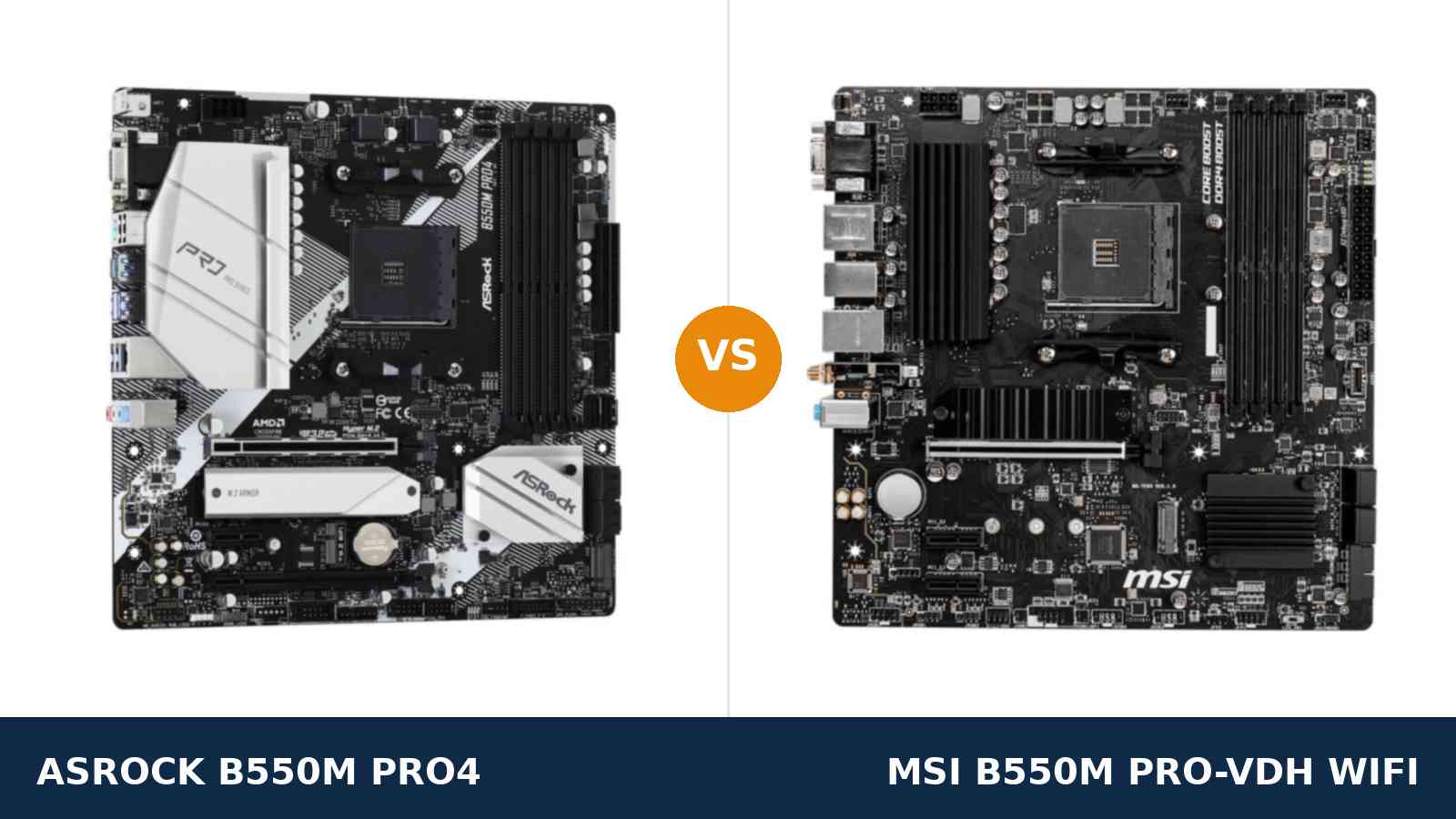
One of these boards arrives with Wi-Fi already fitted. The other arrives with a stronger power design, faster USB and an empty slot where Wi-Fi could go later.
That is the whole argument between the ASRock B550M Pro4 and the MSI B550M Pro-VDH WiFi. Same B550 chipset. Same AM4 socket. Same four memory slots. Completely different ideas about where a budget board's money should go.
One naming note before we start. The MSI in this comparison is the Pro-VDH WiFi model — the version with the wireless module fitted and the one behind the buying link on this page. MSI has also sold a wired-only namesake, and it is a different purchase; the buying guide below explains how to tell them apart.
Every specification here comes from ASRock's and MSI's own published data, and the verdict is the same one we would give a friend spending their own money.
Key Takeaways
- The Pro4 is the stronger board. An 8-phase Digi Power design, an extra x4 expansion slot, USB 3.2 Gen2 in both plug shapes, six SATA ports and the better audio codec.
- The Pro-VDH WiFi is the more convenient board. Wi-Fi and Bluetooth work from the first boot, with no card, no module and no cable run to the router.
- Storage is closer than it looks. The Pro4 fits more drives; the MSI's second M.2 is the faster one. Both cool the primary drive.
- Check which MSI you are buying. A wired-only Pro-VDH and a Wi-Fi 6 (CEC) variant share this name. The standard board is Wi-Fi 5.
- Old APU owners, take note. MSI states this board does not support the Ryzen 5 3400G or Ryzen 3 3200G. The ASRock does.
Quick Verdict
Buy the ASRock B550M Pro4 for most builds. It is the better foundation, and the gap is in hardware you cannot change later.
Its 8-phase power design wears a full heatsink. It carries a PCIe x16 slot wired at x4 for the add-in card you have not bought yet. Its rear panel serves USB 3.2 Gen2 in both plug shapes, and it fits six SATA drives.
If your PC lives near the router, or can be wired to it, this is the board. It is not particularly close.
Buy the MSI B550M Pro-VDH WiFi if the PC cannot be wired. Wi-Fi 5 and Bluetooth are built in, the antennas screw on in a minute, and a front-panel USB-C header keeps modern cases fully working.
For a bedroom, study or living-room build, that convenience is worth more than the ASRock's spec-sheet wins.
The Scorecard
Scores below are derived directly from the manufacturer specifications compared in this guide — phase counts, slot counts, port counts and supported standards. They are a reading aid, not benchmark results.
| Category | B550M Pro4 | B550M Pro-VDH WiFi | ||
|---|---|---|---|---|
| Power delivery | 9 / 10 | 7 / 10 | ||
| Expansion | 8 / 10 | 5 / 10 | ||
| Wireless | 4 / 10 | 9 / 10 | ||
| Storage | 8 / 10 | 8 / 10 | ||
| Memory | 9 / 10 | 8 / 10 | ||
| USB | 9 / 10 | 7 / 10 | ||
| Audio | 8 / 10 | 7 / 10 | ||
| Overall | 8.3 / 10 | 8.0 / 10 | ||
Read the wireless row carefully. It is the only category the MSI wins outright, and for some homes it outweighs everything else on this page. Everything else is the Pro4's — or a draw.
At a Glance: Who Each Board Fits
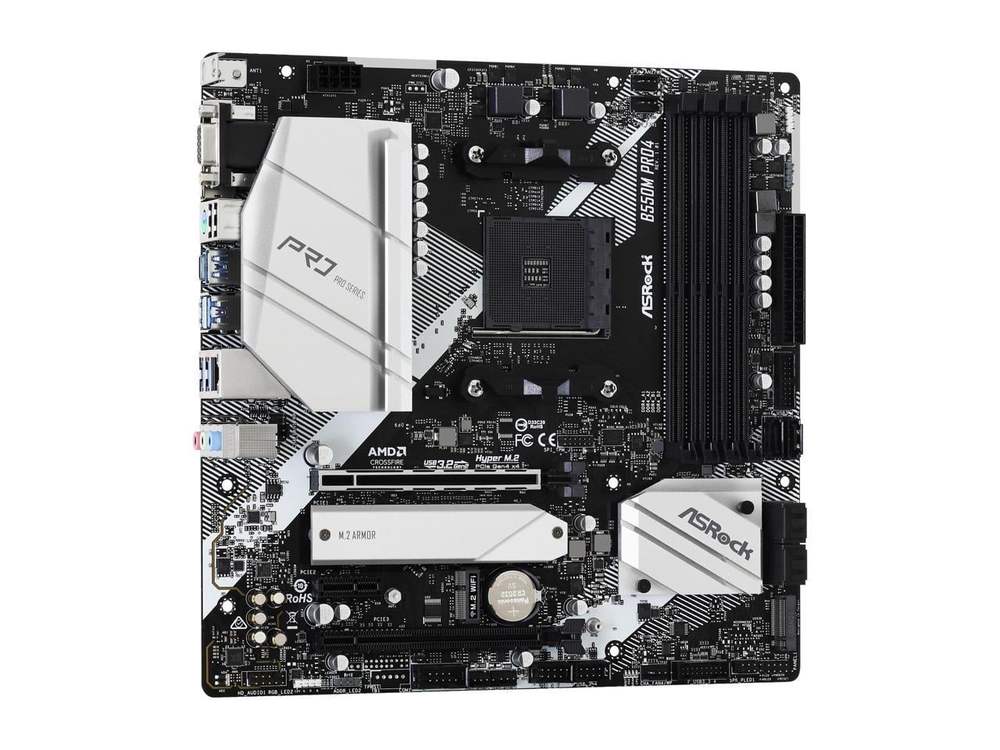
ASRock B550M Pro4
- 8-phase Digi Power design, 50A chokes, XXL alloy heatsink
- USB 3.2 Gen2 Type-A + Type-C (10 Gb/s) on the rear panel
- Three display outputs: D-Sub, HDMI 2.1, DisplayPort 1.4
- 6 SATA ports, dual M.2, full-coverage M.2 heatsink
- M.2 Key E slot for a Wi-Fi module, POST Status Checker
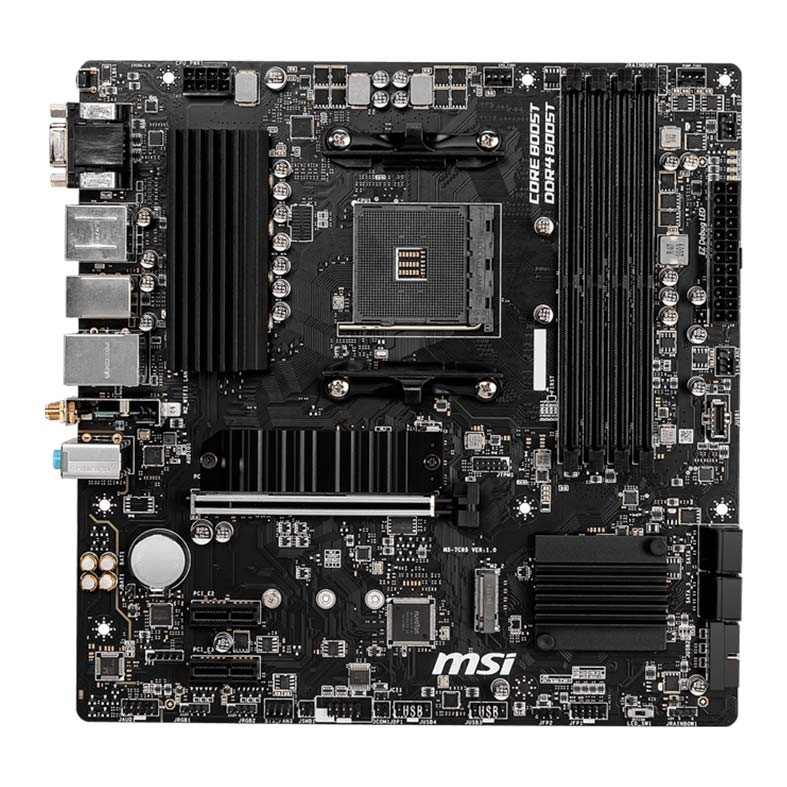
MSI B550M Pro-VDH WiFi
- Wi-Fi 5 (802.11ac) and Bluetooth 4.2 built in
- HDMI + DisplayPort + VGA display outputs
- Front-panel USB-C header for modern cases
- Second M.2 slot at full PCIe 3.0 x4, plus M.2 heatsink
- 4+2+1 phase VRM with heatsink, EZ Debug LED
Choose the B550M Pro4 if…
Your PC sits within cable reach of the router. Or you are happy to run one cable and be done with networking forever.
You are building with a Ryzen 7. Or you might upgrade to one later and want the power design already in place.
You keep several SATA drives. You copy large files to fast external SSDs. You want a spare x4 slot for a capture card, a network card or storage controller one day.
Choose the B550M Pro-VDH WiFi if…
The PC will live somewhere an ethernet cable cannot reasonably reach. A bedroom. A study. A living room across the house.
You use Bluetooth peripherals — a controller, headphones, a keyboard — and want them working without a dongle.
Your case has a front USB-C port you actually intend to plug in, and your build is a Ryzen 5 or an APU that does not need the ASRock's extra headroom.
As an Amazon Associate I earn from qualifying purchases at no extra cost to you.
Specifications: The Specs That Actually Matter
Every figure below is taken from ASRock's and MSI's published specifications and manuals, cross-checked against the manufacturer's product data.
Two honest footnotes ride along. MSI does not publish a VRM phase count, so its figure comes from independent teardowns. And the MSI's wireless hardware has a regional variant, covered under the table.
| Specification | ASRock B550M Pro4 | MSI B550M Pro-VDH WiFi |
|---|---|---|
| Form factor | Micro ATX, 24.4 × 24.4 cm, 2oz copper PCB | Micro ATX, 24.4 × 24.4 cm |
| Socket / chipset | AMD AM4 / B550 | AMD AM4 / B550 |
| CPU support | Ryzen 5000, 5000 G, 4000 G, 3000 series (incl. 3400G / 3200G) | Ryzen 5000 & 3000, 4000 G-Series (Ryzen 5 3400G / 3 3200G not supported) |
| VRM design | 8-phase Digi Power, 50A chokes, XXL alloy heatsink | 4+2+1 phase (teardown figure), heatsink on the VCore bank |
| Memory | 4 × DDR4 DIMM, up to 128 GB, 4733+ MT/s (O.C.), XMP, ECC | 4 × DDR4 DIMM, up to 128 GB, 4400 MT/s (O.C.), A-XMP |
| Wireless | None fitted — M.2 Key E slot + antenna bracket for a module | Intel Wi-Fi 5 (802.11ac), Bluetooth 4.2 |
| Graphics outputs (APU) | D-Sub, HDMI 2.1, DisplayPort 1.4 — triple monitor | VGA (D-Sub), HDMI, DisplayPort (4K@60) — triple monitor |
| Expansion slots | PCIe 4.0 x16 + PCIe 3.0 x16 (x4) + PCIe 3.0 x1, M.2 Key E | PCIe 4.0 x16 (Steel Armor) + 2 × PCIe 3.0 x1 |
| M.2 storage | 2 slots: PCIe 4.0 x4 (2280) + PCIe 3.0 x2 / SATA (2280), M.2 heatsink | 2 slots: PCIe 4.0 x4 + SATA (2280) + PCIe 3.0 x4 (2280), M.2 Shield Frozr heatsink |
| SATA | 6 × SATA 6 Gb/s, RAID 0/1/10 | 4 × SATA 6 Gb/s, RAID 0/1/10 |
| LAN | Realtek RTL8111H GbE | Realtek RTL8111HN GbE |
| Audio | Realtek ALC1200, 7.1 HD, Nahimic Audio | Realtek ALC892/ALC897, 7.1 HD with Audio Boost |
| USB (rear) | USB 3.2 Gen2 Type-A + Type-C (10 Gb/s), 4 × Gen1, 2 × USB 2.0 | 4 × USB 3.2 Gen 1 Type-A, plus USB 2.0 |
| Front-panel USB-C header | None — front USB is Gen1 Type-A via headers | 1 × USB 3.2 Gen 1 Type-C header |
| Fan connectors | 6 total, including water-pump-capable headers | Full PWM set for a typical build |
| Boot diagnostics | POST Status Checker LEDs | EZ Debug LED |
| BIOS flashing | Via BIOS setup (no flashback button) | Via BIOS setup (no flashback button) |
Variant note — the MSI's wireless: the standard B550M Pro-VDH WiFi, the board behind the link on this page, carries an Intel Wi-Fi 5 module with Bluetooth 4.2, per MSI's specification page. A separate (CEC) variant sold in some regions upgrades to Wi-Fi 6 with Bluetooth 5.2 and faster rear USB. Some retailer titles blur the two. Check the box artwork before assuming you have the faster module.
Variant note — the Pro4's second M.2: fitting a drive in the ASRock's second M.2 slot shares lanes with two SATA ports, which drop out of service. Six SATA is the headline; four plus both M.2 slots is the real simultaneous maximum.
Audio note: ASRock's manual lists the Pro4's codec as the ALC1200; some ASRock comparison listings have shown ALC1220 against this model. The table uses the manual's figure. On the MSI, MSI itself lists “ALC892/ALC897” — the chip varies by production batch, and either is a step below the Pro4's.
The Differences That Actually Matter
1. Wi-Fi — fitted on one board, a slot on the other
Start here, because this section decides the comparison for more buyers than any other.
The MSI has an Intel wireless module pre-installed. Wi-Fi 5, dual-band, Bluetooth 4.2 riding along. Two antenna connectors sit on the rear panel, the antennas are in the box, and the PC connects the day it is built.
Be honest about its speed, though. This is a 1×1 module, good for a few hundred megabits in real rooms. Fine for gaming, streaming and downloads. Not a substitute for a cable on a gigabit connection.
The Pro4 ships with no wireless at all. What it ships with is preparation: an M.2 Key E slot wired for a Wi-Fi/Bluetooth module, and an antenna bracket on the rear panel waiting for the posts.
Fitting a module later is a ten-minute job and lets you choose a faster Wi-Fi 6 or 6E card than the MSI carries. But it is a second purchase, a second parcel, and a screwdriver session the MSI buyer never has.
Decide by geography. PC near the router, or wired through the wall? The Pro4. PC wherever the desk fits? The MSI, every time.
2. Power delivery — the clearest hardware gap
The Pro4 runs ASRock's 8-phase Digi Power design with 50A chokes, under an XXL alloy heatsink you can see from across the room in the product photo.
The MSI runs a simpler design — 4+2+1 phases by independent teardown count, since MSI does not publish the figure — with a heatsink over the main VCore bank only.
For a Ryzen 5 5600, both are comfortably sufficient. You will never feel the difference. Not in games, not in renders, not anywhere.
Step up to a Ryzen 7 5800X, or the 5800X3D that AM4 owners keep circling as prices fall, and the ASRock's extra phases and heatsink mass run the same work cooler and steadier. That headroom is bought once, on day one, or not at all.
Neither board suits a Ryzen 9 doing heavy all-core work all day. But between these two, only one credibly grows into an 8-core upgrade.
3. Expansion — three slots against two, and the x4 difference
Both boards give a graphics card the same full PCIe 4.0 x16 slot. With a G-series APU fitted it runs at PCIe 3.0 speeds, as on every B550 board. Dead tie at the top.
Below it, the boards part company. The Pro4 adds a PCIe x16 slot wired at x4, plus an x1 slot. The MSI offers two x1 slots and stops there.
An x4 slot is where serious add-in cards live: a capture card, a 10-gigabit network card, an NVMe adapter card, a proper sound card. On the MSI, none runs at full speed — most will not run at all in an x1 slot.
Now the irony, and it deserves stating plainly. The most common card a Pro4 owner will ever fit is a Wi-Fi card or module — the very hardware the MSI already has. If your expansion plan begins and ends with wireless, the MSI has already spent this section's budget for you.
If it extends to anything faster than x1, only the ASRock can take you there.
4. USB — Gen2 at the back against Type-C at the front
Turn both boards around. The Pro4's rear panel carries USB 3.2 Gen2 in both flavours — a Type-A port and a Type-C port, each at 10 Gb/s.
The MSI's rear panel tops out at USB 3.2 Gen1. Four Type-A ports, plus USB 2.0. Copying a large library to a fast external SSD takes roughly twice as long through its best rear port.
Then the front panel reverses the result. The MSI provides an internal USB 3.2 Gen1 Type-C header. The Pro4 provides none — its front USB is Type-A via Gen1 headers.
That header decides whether the USB-C port on a modern case works or sits as decoration. Cases increasingly ship with exactly one front port, and it is Type-C.
So this section is a genuine split. Fast external drives at the desk: Pro4. A case front panel that fully works: MSI. Neither board gives you both.
5. Storage — more ports against a faster second slot
Both boards carry two M.2 slots and heatsinks over the primary drive. Both boot from the same PCIe 4.0 x4 CPU-connected slot. The boot-drive experience is identical.
The differences sit underneath. The Pro4 fits six SATA drives to the MSI's four — real room for a stack of archive HDDs or a mixed SSD/HDD library.
The MSI answers with the better second M.2. Its slot runs at the full PCIe 3.0 x4, where the ASRock's second slot is wired at x2 — and, per the note under the spec table, borrowing it costs two SATA ports.
Score it by your shelves. Several spinning drives and one or two NVMe drives: Pro4. Two fast NVMe drives and nothing else: MSI, narrowly.
For most builds — one NVMe boot drive, maybe a second later — this section is a draw wearing two different costumes.
6. Display outputs and APU support — a tie with sharp edges
Both boards drive three monitors from an APU, and both cover the same three connector eras: VGA-class D-Sub, HDMI and DisplayPort.
The Pro4's HDMI is the newer 2.1 standard. The MSI's DisplayPort is specified at 4K@60, which is the output most APU desktops actually use. Call the outputs themselves a tie.
The sharp edge is processor support. MSI's own specification states this board is not compatible with the Ryzen 5 3400G or Ryzen 3 3200G. The ASRock supports them, along with the rest of the 3000 series.
Upgrading an older APU system and keeping the chip? That single line ends the comparison: the Pro4 is your only option of the two.
Building new with a 5600G or 5700G? Both boards serve you, and this section goes back to being a draw.
7. Audio, cooling and the small stuff
The Pro4's ALC1200 codec with Nahimic software is the better audio implementation here. The MSI's ALC892 or ALC897 — the chip varies by production batch — is a generation behind.
Through a gaming headset, the difference is modest. Through decent headphones, it is audible. Neither replaces a DAC; one starts closer to not needing one.
Cooling connections favour the ASRock too: six fan connectors, several water-pump capable, against a standard PWM set on the MSI that covers a typical build but not elaborate loops.
Diagnostics are a wash, pleasantly. ASRock's POST Status Checker and MSI's EZ Debug LED do the same job — four lights that tell you which stage a failed boot stopped at. Both beat guessing, and both boards deserve credit for including them at this price.
Lighting is likewise level: both boards carry RGB and addressable headers for strips and fans, under ASRock's Polychrome and MSI's Mystic Light software respectively.
None of these small things decides a purchase alone. Together they confirm the pattern: the Pro4 is the fuller-featured board, and the MSI's budget went somewhere else — onto the wireless module.
CPU Pairing Guide
The fastest way to choose between these boards is to start from your processor. This table is the whole comparison in one view.
| Your processor | B550M Pro4 | B550M Pro-VDH WiFi | Our call |
|---|---|---|---|
| Ryzen 5 5600 / 5500 | Excellent | Excellent | Either — MSI if you need Wi-Fi |
| Ryzen 5 5600G / 5700G (APU) | Excellent — HDMI 2.1 + DisplayPort | Excellent — DisplayPort 4K@60 + Wi-Fi | Either; MSI for unwired rooms |
| Ryzen 7 5700X / 5800X / 5800X3D | Excellent — VRM headroom | Good at stock, less headroom | B550M Pro4 |
| Ryzen 9 5900X / 5950X | Workable — the sensible ceiling | Not recommended | Pro4 at minimum; consider a stronger board |
| Ryzen 5 3400G / 3 3200G (older APU) | Supported | Not supported — MSI states this | B550M Pro4, no contest |
| Ryzen 3000 series | Excellent | Excellent | Either — decide on Wi-Fi |
Read the 3400G row twice if it applies. It is the only row where one board scores zero, and no convenience fixes an unsupported processor.
Ready to check today’s price?
Both boards sell through Amazon. Prices move, so check the live figure on the board that fits your build.
View on Amazon — B550M Pro4View on Amazon — B550M Pro-VDH WiFiThe 30-Second Decision
| If this sounds like you… | Buy this |
|---|---|
| “The PC cannot be reached with an ethernet cable.” | B550M Pro-VDH WiFi |
| “I want one board that handles any AM4 upgrade I might make.” | B550M Pro4 |
| “I copy big files to a fast external SSD.” | B550M Pro4 (USB 3.2 Gen2) |
| “My case has a front USB-C port and I want it working.” | B550M Pro-VDH WiFi |
| “I have a shelf of SATA drives to carry over.” | B550M Pro4 (6 SATA ports) |
| “I am upgrading a Ryzen 5 3400G system.” | B550M Pro4 — the MSI excludes that chip |
| “Bluetooth controller and headphones, no dongles.” | B550M Pro-VDH WiFi |
What You Gain. What You Give Up.
ASRock B550M Pro4
You gain: an 8-phase power design with real upgrade headroom. A PCIe x4 expansion slot. USB 3.2 Gen2 in both plug shapes. Six SATA ports. The better audio codec, six fan connectors, and an empty Key E slot that lets you add modern Wi-Fi later, on your terms.
You give up: wireless on day one — no Wi-Fi, no Bluetooth, until you buy and fit a module. A front-panel USB-C header. And the MSI's faster second M.2 slot; the ASRock's runs at x2 and borrows lanes from two SATA ports.
MSI B550M Pro-VDH WiFi
You gain: Wi-Fi and Bluetooth working from the first boot, antennas included. A front USB-C header. A second M.2 slot at full PCIe 3.0 x4. EZ Debug LEDs. The complete everyday board for a PC that lives away from the router.
You give up: power-delivery headroom for high-end AM4 upgrades. The x4 expansion slot entirely. USB 3.2 Gen2 everywhere. Two SATA ports. And support for the Ryzen 3400G and 3200G, if an older APU was in your plans.
Pros and Cons
B550M Pro4 — Pros
- 8-phase Digi Power VRM with XXL heatsink
- USB 3.2 Gen2 Type-A and Type-C at 10 Gb/s
- Extra PCIe x16 (x4) expansion slot
- Six SATA ports plus dual M.2
- ALC1200 audio with Nahimic software
- M.2 Key E slot for adding Wi-Fi later
- Supports the Ryzen 3400G / 3200G
Cons
- No Wi-Fi or Bluetooth fitted
- No front-panel USB-C header
- Second M.2 at x2, shares lanes with two SATA ports
- Separate I/O shield to fit yourself
B550M Pro-VDH WiFi — Pros
- Wi-Fi 5 and Bluetooth 4.2 built in
- HDMI, DisplayPort and VGA — every monitor era covered
- Front-panel USB-C header
- Second M.2 at full PCIe 3.0 x4, Shield Frozr heatsink
- EZ Debug LED for painless troubleshooting
Cons
- Wi-Fi is 1×1 Wi-Fi 5 — adequate, not fast
- No x4 expansion slot — two x1 slots only
- No USB 3.2 Gen2 anywhere
- Four SATA ports
- Ryzen 3400G / 3200G not supported
Check the Name, the Variant and the Bundle
Check which Pro-VDH you are buying. Three boards hide behind nearly one name.
The standard Pro-VDH WiFi in this comparison carries Wi-Fi 5 and Bluetooth 4.2. A (CEC) variant upgrades the module to Wi-Fi 6 with Bluetooth 5.2 and adds faster rear USB. And a wired-only Pro-VDH, with no wireless hardware at all, exists under a name missing a single word.
Retailer titles blur all three. Check the box artwork and the specification list, not the headline, before you pay.
Check the CPU before the board. Both boards handle the Ryzen 5000 range, but the MSI excludes the Ryzen 5 3400G and Ryzen 3 3200G outright, per its own specification. Reusing an older APU settles this comparison instantly.
Check the Pro4's Wi-Fi plan. The ASRock's Key E slot takes a standard M.2 Wi-Fi/Bluetooth module, and its rear panel already carries the antenna bracket. Budget for the module and antennas if you plan to fill it — they are not in the box.
Check the bundle. Both boxes are honest at this price: the board, SATA cables, documentation. The MSI adds its Wi-Fi antennas. The ASRock's I/O shield is separate, fitted by you — a small thing, noticed exactly once, during the build.
The Upgrade Path Test
Judge a budget board by its second year, not its first day.
Year one, these boards feel identical in a Ryzen 5 build with one graphics card. Same frame rates. Same boot drive. Same memory ceiling.
Year two is where they diverge. The Pro4 owner drops in a discounted Ryzen 7 or 5800X3D, fills the x4 slot, and bolts a Wi-Fi 6E module into the Key E slot — ending with a board that has outgrown its price class.
The Pro-VDH owner's year two is quieter. The wireless is sorted and the second M.2 takes a full-speed drive. But the processor ceiling arrives sooner, and no card faster than x1 will ever fit.
Neither path is wrong. They are answers to different questions: the ASRock bets on upgrades you choose later; the MSI pays for convenience you use tonight.
When to Skip Both
Honesty cuts both ways. Some builders should walk past this entire comparison.
Skip both if you need fast Wi-Fi — Wi-Fi 6 or better, at full speed — without buying a separate module: boards with modern wireless fitted as standard exist one shelf up. Skip both if you are building around a Ryzen 9 for sustained all-core work; a stronger VRM class exists for a reason.
Skip both if you want USB 3.2 Gen2 at the front as well as the back, more than two M.2 slots, or a board that fills a full-ATX case.
For everyone else — which is most AM4 builders — one of these two is the right answer. The only question is whether your deciding factor is a cable.
Final Verdict
The ASRock B550M Pro4 is the board we would build on.
It wins on the hardware that decides how long a motherboard stays useful: an 8-phase power design under a real heatsink, a PCIe x4 slot, USB 3.2 Gen2, six SATA ports and the better audio codec.
Its one headline omission — Wi-Fi — is the rare gap you can close later, through the Key E slot ASRock had the foresight to fit, with a module faster than the one its rival ships.
Buy the Pro4 for wired builds, Ryzen 7 processors, storage-heavy systems, and any PC you intend to upgrade rather than replace.
Buy the B550M Pro-VDH WiFi if the PC cannot be wired, full stop. Its wireless is modest, but it is present, fitted and working from the first boot — and no spec-sheet victory on the other side connects a PC in the wrong room.
It is the more complete everyday board for exactly the homes that need it. Buy it knowing its savings came out of headroom, not today’s performance.
View on Amazon — B550M Pro-VDH WiFi
Watch Out: Similar Names, Different Boards
Board names in this class are a trap for the hurried buyer. Three warnings belong in every version of this guide.
First: the B550M Pro4 and the B550 Pro4 are different boards. The full-ATX namesake shares the family face but not this board's layout. A listing that drops the “M” is not selling you the micro-ATX board in this comparison.
Second: the Pro-VDH, the Pro-VDH WiFi and the Pro-VDH WiFi (CEC) are three products. Only the two WiFi models have wireless hardware, and only the CEC carries Wi-Fi 6. The names differ by a word or a bracket; the rear panels differ entirely.
Third: the B550M Pro4 is not the older B450M Pro4. The chipset, the PCIe generation and the memory ceilings all moved on. A bargain listing for the B450 board is not a discount on this one.
Slow down on the product page. Match the full model name, then the variant, then the price — in that order.
Case, Power and Cabling Notes
Both boards are micro-ATX. They fit micro-ATX and full ATX cases alike, and they leave extra cable room in larger cases.
Both take a standard 24-pin main power connector and an 8-pin EPS CPU power connector. Any reputable modern power supply covers this without adapters.
The cabling difference is the one from the USB section: only the MSI connects a case's front USB-C port. On the Pro4, that port sits unconnected — decide whether you care before choosing the case, not after.
One Pro4 advantage reappears at build time. Its six fan connectors mean splitters are rarely needed even in a well-fanned case. The MSI's set covers a normal build; elaborate cooling wants planning.
And a note on antennas: the MSI's screw onto its rear panel in a minute. The ASRock's bracket waits empty until a module is fitted.
BIOS and Long-Term Support
AM4 is a mature platform. That is a genuine advantage for both of these boards.
The BIOS is stable. The drivers are stable. The surprises have already happened to somebody else, years ago, and been fixed.
Both boards sit on their makers' standard support pages: BIOS updates, chipset, LAN and wireless drivers, and a full CPU support list per model. ASRock's larger 256Mb BIOS chip gives its board comfortable room for the platform's full processor history.
Expect future BIOS releases to cover security patches and edge-case compatibility, not new features. On a mature platform, that is exactly what you want.
One habit worth keeping: before any CPU upgrade, check the support list for your board and update the BIOS first. Neither board has a flashback button, so the update happens with your current processor installed — plan the order of operations accordingly.
Frequently Asked Questions
Is the ASRock B550M Pro4 better than the MSI B550M Pro-VDH WiFi?
On hardware, yes. It has the stronger VRM (8-phase Digi Power against 4+2+1), a PCIe x4 expansion slot the MSI lacks, USB 3.2 Gen2, six SATA ports and the better audio codec. The MSI's counter is built-in Wi-Fi and Bluetooth, which the Pro4 omits entirely — and for an unwired room, that single feature can outweigh the rest.
Does the ASRock B550M Pro4 have Wi-Fi?
No. It has no wireless module fitted. It does provide an M.2 Key E slot and a rear antenna bracket, so a Wi-Fi/Bluetooth module can be added later — you choose the module, including Wi-Fi 6 or 6E models faster than the MSI's built-in Wi-Fi 5.
How fast is the MSI's Wi-Fi?
It is a 1×1 Intel Wi-Fi 5 (802.11ac) module with Bluetooth 4.2 — a few hundred megabits in real-world conditions. That is plenty for gaming, streaming and ordinary downloads, but it will not saturate a gigabit fibre connection. A separate (CEC) variant of the board carries Wi-Fi 6; check the box to know which you have.
Which board is better for a Ryzen 7 5800X or 5800X3D?
The B550M Pro4. Its 8-phase power design and XXL heatsink handle sustained all-core loads from 8-core processors more comfortably than the MSI's 4+2+1 design. The MSI will run those chips at stock settings, but it leaves less thermal and power headroom.
Can I reuse my Ryzen 5 3400G with either board?
Only with the Pro4. MSI's own specification states the Pro-VDH WiFi is not compatible with the Ryzen 5 3400G or Ryzen 3 3200G. ASRock lists both chips as supported on the B550M Pro4.
Can I run two M.2 SSDs on either board?
Yes. Both boards have two M.2 slots with heatsinks on the primary slot. The MSI's second slot runs at full PCIe 3.0 x4; the ASRock's second slot runs at x2 and shares lanes with two of its SATA ports, which are disabled while it is occupied.
Which board should I choose for an APU build without a graphics card?
Either serves a 5600G or 5700G well — both drive three monitors. The Pro4 offers the newer HDMI 2.1; the MSI offers DisplayPort at 4K@60 plus built-in Wi-Fi, which suits the compact, anywhere-in-the-house builds APUs are usually bought for. Reusing a 3400G or 3200G settles it for the Pro4.
Does either board have a front-panel USB-C header?
Only the MSI. Its internal USB 3.2 Gen1 Type-C header makes a modern case's front USB-C port work. The Pro4's Type-C port is on the rear panel instead — and it is the faster USB 3.2 Gen2 standard.
Sources & Verification
ASRock B550M Pro4 official specifications and user manual, asrock.com • MSI B550M PRO-VDH WIFI official specifications and datasheet, msi.com • MSI B550M PRO-VDH WIFI (CEC) specifications (variant check) • MSI B550M PRO-VDH / PRO-VDH WIFI user manual (MS-7C95) • Independent teardown reporting for the MSI's unpublished VRM phase count (Tom’s Hardware) • Manufacturer retail product data for B550M Pro4 and B550M PRO-VDH WIFI (ASIN-verified listings). Specifications verified November 2026.

James Wilson
James has been building and benchmarking PCs for over a decade and writes Honestly Compared's motherboard and component guides. His rule for every comparison: the verdict has to survive the spec sheet, not the marketing page.