
ASRock B650 Pro RS vs ASRock B650 Steel Legend WiFi: Which Should You Buy?
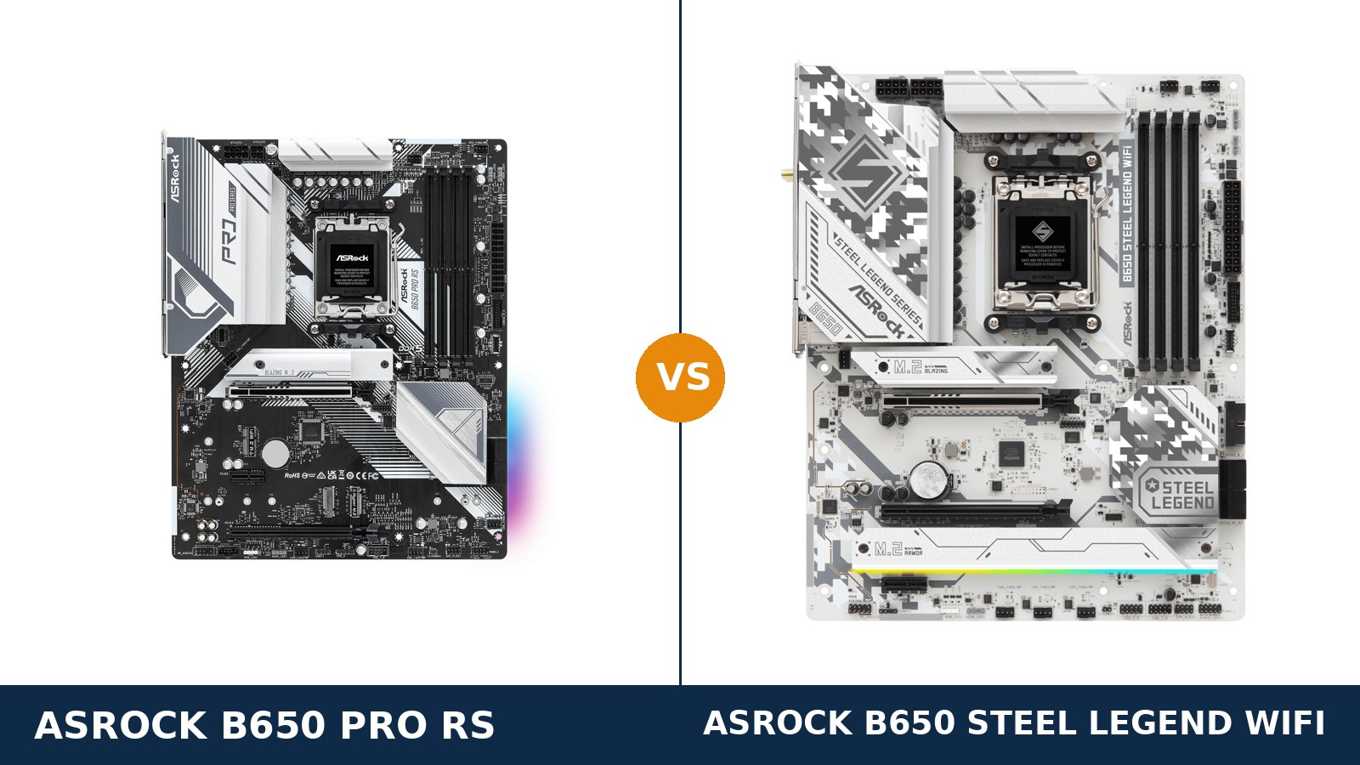
Same brand. Same chipset. Same socket. Same silver-and-white armour.
Put the ASRock B650 Pro RS and the B650 Steel Legend WiFi next to each other in a store listing and they look like the same motherboard photographed twice. Both are full-ATX B650 boards for AMD's AM5 socket. Both headline a 14+2+1 phase power design. Both promise DDR5 memory up to 7200+(OC).
They are not the same board. One of them carries a PCIe 5.0 graphics slot and Wi-Fi 6E in the box. The other leaves the WiFi socket empty, keeps its graphics slot at PCIe 4.0 — and quietly wins a couple of rounds most buyers never notice, including a full-speed front USB-C header.
This guide separates them properly. Every specification below comes from ASRock's own published data, checked line by line. The verdict at the end is the one we would give a friend spending their own money.
Key Takeaways
- The Steel Legend WiFi is the more complete board. PCIe 5.0 graphics slot, Wi-Fi 6E built in, better audio, and every M.2 slot at Gen4 speed or faster.
- The Pro RS is the value play. Same CPUs, same memory support, same Gen5 storage slot — with an empty WiFi socket you can fill yourself later.
- The VRM headline is identical; the parts are not. Both are 14+2+1, but the Steel Legend uses 80A Dr.MOS stages and dual 8-pin CPU power against the Pro RS's 60A SPS and 8+4-pin.
- Memory and display outputs are a dead tie. Do not let either board be sold to you on those.
- Check which Pro RS you are buying. ASRock also sells a Pro RS WiFi with the module factory-fitted — a different box from the plain Pro RS in this comparison.
Quick Verdict
Buy the ASRock B650 Steel Legend WiFi for most builds. It is the fuller board in almost every measurable way.
Its graphics slot runs at PCIe 5.0, ready for the next GPU generation. Wi-Fi 6E and Bluetooth are fitted, with antennas in the box. Its second and third M.2 slots run at full Gen4 x4 speed, and its ALC4082 audio is a clear class above.
If you are building one AM5 machine to keep for years, this is the board that asks the fewest compromises.
Buy the ASRock B650 Pro RS if your PC sits next to the router and your budget is doing real work elsewhere. You keep the same processor support, the same memory ceiling and the same Gen5 storage slot.
Uniquely here, its front-panel USB-C header runs at the full 20 Gb/s — the Steel Legend's is a slower Gen1 header. And if you ever do need wireless, the Pro RS has the empty Key E socket and antenna mounting points waiting for a module.
The Scorecard
Scores below are derived directly from the manufacturer specifications compared in this guide — phase ratings, slot generations, port speeds and supported standards. They are a reading aid, not benchmark results.
| Category | B650 Pro RS | B650 Steel Legend WiFi | ||
|---|---|---|---|---|
| Power delivery | 8 / 10 | 9 / 10 | ||
| Graphics & expansion | 7 / 10 | 9 / 10 | ||
| Storage | 7 / 10 | 9 / 10 | ||
| Connectivity | 7 / 10 | 9 / 10 | ||
| Audio | 6 / 10 | 8 / 10 | ||
| Memory | 9 / 10 | 9 / 10 | ||
| Overall | 7.3 / 10 | 8.8 / 10 | ||
The pattern is one-sided, and it is honest: the Steel Legend is the higher-tier board. The Pro RS does not win on hardware breadth — it wins on price positioning, one faster front header, and flexibility you add yourself.
At a Glance: Who Each Board Fits
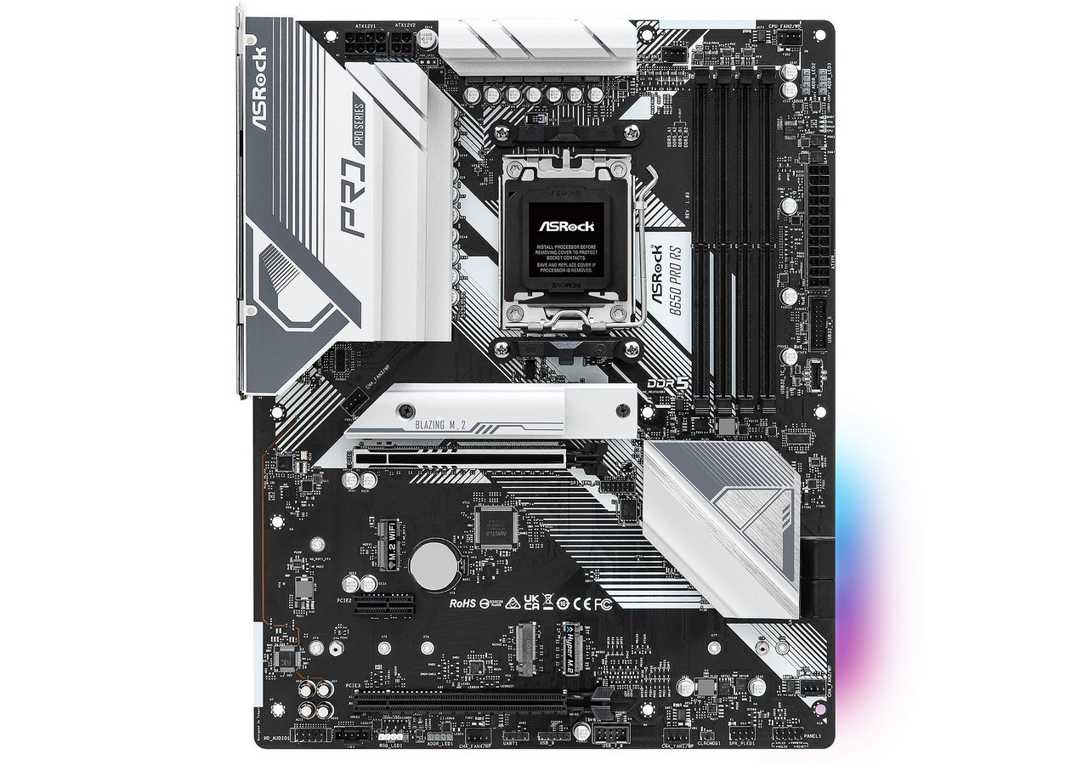
ASRock B650 Pro RS
- 14+2+1 phase VRM, 60A SPS, enlarged heatsink armour
- PCIe 4.0 x16 graphics slot + PCIe Gen5 x4 M.2 slot
- WiFi-ready: empty M.2 Key E socket and antenna mounting points
- Front USB-C header at full 20 Gb/s (Gen2x2)
- Realtek ALC897 audio, Dragon 2.5G LAN
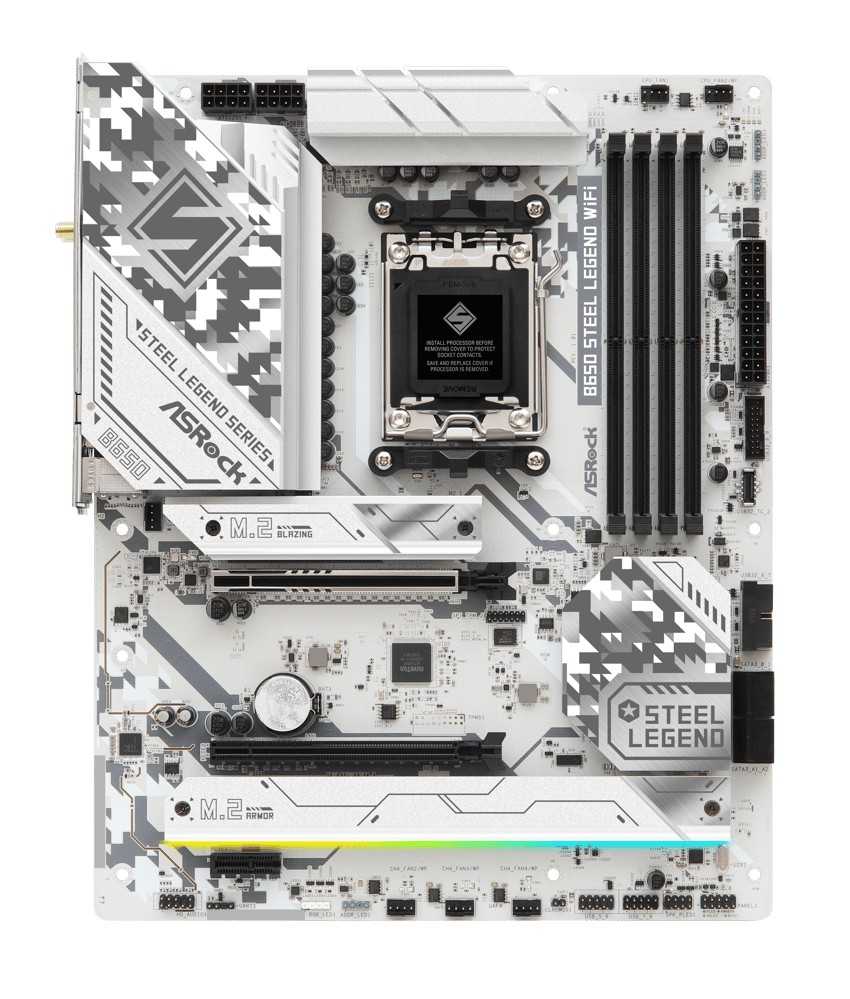
ASRock B650 Steel Legend WiFi
- 14+2+1 phase VRM, 80A Dr.MOS, 20K black capacitors
- PCIe 5.0 x16 graphics slot — rare at this chipset tier
- Wi-Fi 6E + Bluetooth 5.2 fitted, antennas in the box
- All three M.2 slots run at Gen4 x4 or faster
- Realtek ALC4082 audio with optical SPDIF output
Choose the B650 Pro RS if…
Your build is wired. The PC lives near the router, and a WiFi module would be decoration.
Your case has a front USB-C port you actually use. The Pro RS feeds it at 20 Gb/s; the Steel Legend feeds its front Type-C at Gen1 speed.
You want the option, not the obligation, of wireless. The socket and antenna points are there whenever you are ready.
Choose the B650 Steel Legend WiFi if…
You want Wi-Fi and Bluetooth working the day the build boots, with no extra parts to order.
You plan to keep the board through your next graphics card. A PCIe 5.0 x16 slot is the one future-proofing feature that cannot be added later.
You care about onboard audio, or your build is white. The Steel Legend's camo-white PCB and armour are the real thing, not a sticker job.
As an Amazon Associate I earn from qualifying purchases at no extra cost to you.
Specifications: The Specs That Actually Matter
Every figure below is taken from ASRock's published specifications for these two boards, cross-checked across ASRock's product pages and its own comparison data.
Where the two boards tie, the table says so by giving them the same line. Where they differ, the winning cell is marked — and the differences are bigger than the shared product names suggest.
| Specification | ASRock B650 Pro RS | ASRock B650 Steel Legend WiFi |
|---|---|---|
| Form factor | ATX, 30.5 × 24.4 cm, 8-layer PCB | ATX, 30.5 × 24.4 cm, 8-layer PCB |
| Socket / chipset | AMD AM5 / B650 | AMD AM5 / B650 |
| CPU support | Ryzen 9000, 8000 and 7000 series | Ryzen 9000, 8000 and 7000 series |
| VRM design | 14+2+1 phase, 60A SPS | 14+2+1 phase, 80A Dr.MOS, 20K black caps |
| CPU power connectors | 1 × 8-pin + 1 × 4-pin | 2 × 8-pin (hi-density) |
| Memory | 4 × DDR5 DIMM, up to 256 GB, 7200+(OC), EXPO / XMP | 4 × DDR5 DIMM, up to 256 GB, 7200+(OC), EXPO / XMP |
| Graphics slot | PCIe 4.0 x16 | PCIe 5.0 x16 |
| Other expansion | PCIe 3.0 x16 (x4) + PCIe 4.0 x1 | PCIe 3.0 x16 (x4) + PCIe 4.0 x1 |
| Display outputs (iGPU) | HDMI 2.1 + DisplayPort 1.4, up to 4K 120Hz | HDMI 2.1 + DisplayPort 1.4, up to 4K 120Hz |
| M.2 storage | 3 slots: PCIe Gen5 x4 + Gen4 x4 + Gen3 x2 (also SATA) | 3 slots: PCIe Gen5 x4 + Gen4 x4 + Gen4 x4 |
| SATA | 4 × SATA 6 Gb/s | 4 × SATA 6 Gb/s |
| LAN | Realtek Dragon RTL8125BG 2.5G | Realtek Dragon RTL8125BG 2.5G |
| Wireless | None fitted — M.2 Key E socket + antenna points | Wi-Fi 6E (802.11axe) + Bluetooth 5.2, antennas included |
| Audio | Realtek ALC897, 7.1 HD, Nahimic | Realtek ALC4082, 7.1 HD, optical SPDIF, Nahimic |
| USB (rear) | 1 × Gen2 Type-A + 1 × Gen2 Type-C (10 Gb/s), 2 × Gen1, 6 × USB 2.0 | 1 × Gen2x2 Type-C (20 Gb/s) + 1 × Gen2 Type-A, 4 × Gen1, 4 × USB 2.0 |
| USB-C (front header) | USB 3.2 Gen2x2, 20 Gb/s | USB 3.2 Gen1, 5 Gb/s |
| Fan headers | CPU + CPU/pump + 4 × chassis/pump | CPU + CPU/pump + 4 × chassis/pump |
| BIOS | 256 Mb AMI UEFI, BIOS Flashback button | 256 Mb AMI UEFI, BIOS Flashback button |
| In the box | Manual, 2 × SATA cables, 3 × M.2 screws | Manual, 2 × SATA cables, 3 × M.2 screws, M.2 standoff, 2 × WiFi antennas |
Variant note: the name on the box matters more than usual here. ASRock sells a B650 Pro RS WiFi — the same Pro RS with the Wi-Fi 6E module factory-fitted — alongside the plain Pro RS compared here.
Both names also exist in micro-ATX form as the B650M Pro RS and B650M Steel Legend WiFi. Those are different, smaller boards. Check the full name, not just the family name, before you pay.
Lane-sharing note: on the Steel Legend, fitting drives in the SATA3_0 and SATA3_1 ports drops its second PCIe slot from x4 to x2 mode. The Pro RS has no such note — but its second M.2 slot is the slower one instead. Neither board gives you everything at once; they just ration different things.
The Differences That Actually Matter
1. The graphics slot — one generation apart
This is the headline difference, and it is a real one. The Steel Legend's main slot is PCIe 5.0 x16. The Pro RS's main slot is PCIe 4.0 x16.
On the B650 chipset, Gen5 graphics support is a board-level choice, not a chipset guarantee. Most B650 boards — the Pro RS included — wire the slot for Gen4. ASRock chose to wire the Steel Legend for Gen5, which is normally B650E and X870 territory.
What does it buy you today? Honestly, very little. Current graphics cards do not saturate a PCIe 4.0 x16 connection, and we will not pretend otherwise.
What does it buy you in four years? The certainty that the next card you slot in runs at full width and full speed. A motherboard is the least-swapped part in a PC. The Steel Legend's slot is built for the card you have not bought yet.
If your upgrade cycle replaces the whole platform each time, this difference shrinks. If you keep a board through two or three GPUs, it is the single strongest argument in this entire comparison.
2. Power delivery — same headline, better parts
Both boards advertise a 14+2+1 phase design. If you stop reading at the phase count, you will conclude the power delivery is identical. It is not.
The Steel Legend uses 80A Dr.MOS integrated power stages for the core rail, backed by 20K-hour black capacitors and two 8-pin CPU power connectors. The Pro RS uses 60A SPS stages, fed by one 8-pin and one 4-pin connector.
Context matters: any Ryzen processor you can buy for AM5 runs happily on either board at stock settings. The Pro RS's VRM is not a weakness — it is a specification matched to sane use.
The Steel Legend's hardware is headroom. More current per stage, a second EPS connector sharing the load, and capacitors rated for a longer service life. It is the board we would pick for a Ryzen 9, for Precision Boost Overdrive tuning, and for a machine expected to work hard for many years.
Both boards wear enlarged VRM heatsink armour, so cooling the power stages is handled properly on either. This round goes to the Steel Legend on components, not on competence.
3. Wireless — fitted, or fill-it-yourself
The Steel Legend WiFi arrives finished. Its Wi-Fi 6E module is mounted in the vertical Key E slot, Bluetooth 5.2 rides along, and two antennas are in the box. Screw them on, boot, connect.
The Pro RS arrives ready, not finished. It has the same Key E socket sitting empty and two antenna mounting points punched into its rear panel. ASRock clearly designed it to take a module — it just does not include one.
That gives you three honest paths. Ignore wireless entirely and run a cable, which most desktop builds near a router should do anyway. Buy a WiFi module later and fit it yourself. Or skip the plain board and buy the Pro RS WiFi variant, which is this same board with the module installed at the factory.
Do not make the common mistake: ordering the plain Pro RS and expecting antennas in the box. There are none. If WiFi is a day-one requirement, the Steel Legend — or the Pro RS WiFi — is the purchase.
4. Storage — the slots below the first one
At the top end, storage is a tie. Both boards give the CPU-connected Blazing M.2 slot at PCIe Gen5 x4. Your fastest drive performs identically in either.
The separation happens in slots two and three. On the Steel Legend, both run at PCIe Gen4 x4 — full speed for any mainstream NVMe drive you fit today.
On the Pro RS, the third slot is also Gen4 x4, but the second slot runs at Gen3 x2 — a quarter of the Steel Legend's bandwidth in that position. In exchange, that slot also accepts SATA M.2 drives, which the Steel Legend's slots do not.
So the trade is speed against flexibility. A builder with two fast NVMe drives wants the Steel Legend's layout. A builder carrying an older SATA M.2 drive from a previous machine is one of the few people the Pro RS serves better.
SATA support is level: four ports on each board, two from the chipset and two via an ASMedia controller. Remember the Steel Legend's caveat from the spec table — populate its first two SATA ports and its second PCIe slot drops to x2.
5. Audio — a codec class apart
The Pro RS uses Realtek's ALC897, the workhorse codec of mainstream boards. It produces clean 7.1 HD audio, and Nahimic software processing is included. For most headsets and desktop speakers, it is enough.
The Steel Legend steps up to the ALC4082, a newer USB-interface codec, and adds the extras that tend to travel with it: separate PCB layers for the left and right channels, impedance sensing on the rear output, and gold audio jacks.
It also adds an optical SPDIF output. If your amplifier, DAC or soundbar takes optical, the Pro RS simply cannot feed it without an add-in card.
Who hears the difference? Anyone driving demanding headphones straight from the rear jack, and anyone with an optical-fed audio setup. Everyone else gets good audio from both — this is a Steel Legend win on hardware, not a Pro RS failure.
6. USB — where the fast port lives
Count the rear ports and the boards look close: ten each. Read the speeds and the story splits in an interesting direction.
The Steel Legend puts its fastest connection on the back: a USB 3.2 Gen2x2 Type-C port running at 20 Gb/s, beside a Gen2 Type-A, four Gen1 ports and four USB 2.0 ports. Fast external SSDs plug straight in.
The Pro RS caps its rear Type-C and Type-A at Gen2's 10 Gb/s, and spreads the rest as two Gen1 and a generous six USB 2.0 ports — handy for peripherals, dongles and older devices.
Then the Pro RS lands its counterpunch at the front panel. Its front Type-C header is a full Gen2x2 20 Gb/s connection. The Steel Legend's front Type-C header is Gen1 — 5 Gb/s.
So the question is where your fast port needs to be. Desk-level external drives favour the Steel Legend's rear port. A modern case with a front USB-C you use daily favours the Pro RS. Neither answer is wrong; buying without asking the question is.
7. Memory and displays — the honest tie
Some sections of a comparison exist to tell you there is nothing to buy. This is one.
Memory support is identical, down the line: four DDR5 slots, up to 256 GB, overclocking support to 7200+(OC), ECC and non-ECC unbuffered modules, and both EXPO and XMP profiles.
One caution applies equally to both: 7200+(OC) is an overclocking ceiling, not a promise. What your kit runs at depends on your processor and modules, and sensible AM5 builds target the platform's sweet spot rather than the box number.
Display outputs are identical too. Both boards give you HDMI 2.1 and DisplayPort 1.4 from the integrated graphics, each good for up to 4K at 120Hz. For an APU build or a troubleshooting display, there is nothing to choose between them.
The supporting cast is level as well: the same fan-header layout, the same three addressable LED headers, the same 256 Mb BIOS with a Flashback button, and the same Post Status Checker for diagnosing a build that will not boot.
Judge these boards on sections one to six. This section is a draw, and any seller telling you otherwise is selling.
CPU Pairing Guide
Start from the processor and the choice usually makes itself. This table is the whole comparison in one view.
| Your processor | B650 Pro RS | B650 Steel Legend WiFi | Our call |
|---|---|---|---|
| Ryzen 5 7600 / 9600X | Excellent | Excellent | Pro RS if wired — save the difference |
| Ryzen 7 7700 / 9700X | Excellent | Excellent | Either; Steel Legend if you want WiFi |
| Ryzen 7 7800X3D / 9800X3D | Excellent | Excellent — Gen5 slot for the next GPU | Steel Legend WiFi for a keeper build |
| Ryzen 9 7900X / 7950X / 9900X / 9950X | Capable — 60A stages, 8+4-pin power | Excellent — 80A Dr.MOS, dual 8-pin | Steel Legend WiFi |
| Ryzen 5 8600G / Ryzen 7 8700G (APU) | Good — display outputs identical | Good — display outputs identical | Either; check ASRock's bandwidth table — APU lane counts differ |
The pattern holds at every row. The Pro RS never fails a pairing — it simply stops being the smarter buy as the processor, and the build around it, gets more ambitious.
The 30-Second Decision
| If this sounds like you… | Buy this |
|---|---|
| “One AM5 build, kept for years, GPU upgrades to come.” | B650 Steel Legend WiFi |
| “Wired ethernet, sensible budget, same platform please.” | B650 Pro RS |
| “There is no network cable where my PC lives.” | B650 Steel Legend WiFi |
| “My case's front USB-C has to run at full speed.” | B650 Pro RS |
| “It's a white build and it has to look right.” | B650 Steel Legend WiFi |
| “I have an older SATA M.2 drive I want to keep using.” | B650 Pro RS |
Ready to check today’s price?
Both boards sell through Amazon. Prices move, so check the live figure on the board that fits your build.
View on Amazon — B650 Pro RSView on Amazon — B650 Steel Legend WiFiWhat You Gain. What You Give Up.
ASRock B650 Pro RS
You gain: the same AM5 platform — same CPU generations, same memory ceiling, same Gen5 storage slot — at the lower position in ASRock's range. A front USB-C header at the full 20 Gb/s. A SATA-capable second M.2 slot. And a genuine DIY wireless path: empty Key E socket, antenna points fitted.
You give up: PCIe 5.0 on the graphics slot, WiFi and Bluetooth out of the box, the ALC4082 audio tier and optical output, and full-speed second and third M.2 slots. You are trading tomorrow's headroom for today's savings.
ASRock B650 Steel Legend WiFi
You gain: the complete board. A Gen5 graphics slot, Wi-Fi 6E and Bluetooth fitted, 80A power stages with dual 8-pin inputs, three full-speed NVMe slots, a 20 Gb/s rear Type-C port, and the better audio section with optical out.
You give up: the higher price of admission. The front Type-C header runs at Gen1 speed only. Its second PCIe slot drops to x2 if you populate the first two SATA ports. And the full white camo styling is a commitment — it decides your build's colour scheme for you.
Pros and Cons
B650 Pro RS — Pros
- Same CPU and memory support as the Steel Legend
- Gen5 x4 storage slot for a flagship boot drive
- Front USB-C header at full 20 Gb/s
- WiFi-upgradeable: Key E socket and antenna points
- Second M.2 slot accepts SATA drives
Cons
- Graphics slot is PCIe 4.0, not 5.0
- No WiFi module or antennas in the box
- ALC897 audio, no optical output
- Second M.2 slot is only Gen3 x2
- 60A VRM stages — fine, but less headroom
B650 Steel Legend WiFi — Pros
- PCIe 5.0 x16 graphics slot on a B650 board
- Wi-Fi 6E + Bluetooth 5.2 fitted, antennas included
- 80A Dr.MOS VRM, dual 8-pin, 20K capacitors
- All three M.2 slots at Gen4 x4 or faster
- ALC4082 audio with optical SPDIF
- 20 Gb/s USB-C on the rear panel
Cons
- The pricier board of the two
- Front USB-C header is Gen1 speed only
- Second PCIe slot drops to x2 with SATA3_0/1 populated
- White camo styling will not suit every build
Check the Variant and the Case, Not Just the Board
Check which Pro RS is in the listing. Two products share this name. The plain B650 Pro RS has an empty WiFi socket and no antennas. The B650 Pro RS WiFi is the same board with the Wi-Fi 6E module factory-fitted.
Retail listings are not always careful with the distinction. Read the full product title and the box contents before paying — especially if the price looks like the plain board but the description promises WiFi.
Check the form factor in the name. B650M Pro RS and B650M Steel Legend WiFi also exist. The M means micro-ATX: different, smaller boards with their own specifications. This comparison covers the full-ATX pair only.
Check your case's front panel. If your case has a front USB-C port, the two boards feed it very differently — 20 Gb/s from the Pro RS, 5 Gb/s from the Steel Legend. Match the board to the case you already own, not the other way round.
Check the bundle against the build. The Steel Legend's box includes its WiFi antennas, an M.2 standoff and three M.2 screws. The Pro RS includes three M.2 screws and two SATA cables — but no antennas, because there is nothing to connect them to until you add a module.
Check the BIOS before a 9000-series build. Both boards support Ryzen 9000 processors, and both carry a BIOS Flashback button, so a board shipped with an early BIOS can be updated with no CPU installed. Verify your exact processor on ASRock's CPU support list for the board you choose.
The Upgrade Path Test
Judge an AM5 board by its third year, because AM5 is a platform you buy into, not a single build.
AMD's socket already spans the Ryzen 7000, 8000 and 9000 generations, and ASRock lists all three on both of these boards. Processor upgrades are a shared strength — neither board locks you out.
The paths diverge at the graphics slot. Graphics cards are the most common upgrade in a gaming PC's life. The Steel Legend's PCIe 5.0 slot means every future card runs at full specification. The Pro RS's Gen4 slot means future cards run — at Gen4.
Storage tells the same story in miniature. Both boards start with a Gen5 boot drive. The Steel Legend keeps full speed in every slot as the library grows; the Pro RS slows down in its second slot.
And the Pro RS has one upgrade trick of its own: its empty Key E socket. The board you buy wired can become the board you run wireless, on your schedule, for the cost of a module.
Net result: the Steel Legend is built to absorb upgrades. The Pro RS is built to permit the essentials. Decide which kind of owner you are before you decide which board to buy.
When to Skip Both
Honesty cuts both ways. Some builders should walk past this entire pairing.
Skip both if you need USB4 or a guaranteed Gen5 slot with workstation ambitions — that is X870 and B650E territory, a tier above these boards.
Skip both if your case is micro-ATX. ASRock sells M versions of both boards for exactly that build; do not force an ATX board into a small case conversation.
Skip both if Wi-Fi 7 is a requirement. ASRock's newer B850 Steel Legend WiFi carries it; this B650 generation tops out at Wi-Fi 6E.
And skip both if you need more than four SATA devices or a native Thunderbolt port — the Pro RS offers only a Thunderbolt add-in-card header, and neither board goes beyond four SATA connectors.
For the mainstream AM5 builder — gaming, productivity, one machine kept and upgraded — one of these two is the right answer. The only question is how much of the future you want pre-paid.
BIOS and Long-Term Support
Both boards sit in the mature part of their product lives, and that is a strength. The BIOS is a 256 Mb AMI UEFI on each, with the same Flashback button and the same Post Status Checker diagnostics.
ASRock's Auto Driver Installer is genuinely useful on both: connect the finished build to the internet once, and the LAN driver is already in place to pull the rest. No driver disc, no second PC, no hunting.
Expect support pages for both models to keep receiving BIOS updates as new AGESA versions land — new processor support is added exactly this way, and both boards' listings already span three Ryzen generations.
One habit is worth keeping on either board: update the BIOS before a processor upgrade, not after a failed boot. Flashback makes it a short, safe job even with the new chip still sealed in its box.
Final Verdict
The ASRock B650 Steel Legend WiFi is the board we would build on.
It wins this comparison on the specifications that cannot be added later: a PCIe 5.0 graphics slot, an 80A power design with dual 8-pin inputs, and three full-speed M.2 slots. Everything else it adds — Wi-Fi 6E in the box, the ALC4082 audio, the 20 Gb/s rear Type-C — is margin on top of a lead.
Buy the Steel Legend WiFi for a gaming or productivity build you intend to keep and upgrade, for any Ryzen 9, and for any desk where a network cable cannot reach.
View on Amazon — B650 Steel Legend WiFi
Buy the B650 Pro RS if the build is wired, the budget is better spent on the processor or graphics card, or your case's front USB-C needs the full-speed header only this board provides.
It is not the lesser board so much as the narrower one: the same platform, honestly trimmed, with a wireless upgrade left in your hands. Just order it knowing exactly which parts were trimmed — and confirm the listing is not the WiFi variant at the wrong price, or the plain board at the WiFi price.
Frequently Asked Questions
Is the B650 Steel Legend WiFi better than the B650 Pro RS?
On specifications, yes — in most categories. It has a PCIe 5.0 graphics slot against Gen4, fitted Wi-Fi 6E, an 80A Dr.MOS VRM against 60A SPS, all M.2 slots at Gen4 x4 or faster, and the higher ALC4082 audio codec. The Pro RS answers with a lower position in the range, a full-speed front USB-C header and a SATA-capable M.2 slot.
Does the ASRock B650 Pro RS have WiFi?
No — not in the box. The plain Pro RS has an empty M.2 Key E socket and antenna mounting points on its rear panel, so a WiFi module can be added later. ASRock also sells a separate B650 Pro RS WiFi variant with the Wi-Fi 6E module factory-fitted; check the full product name in the listing before ordering.
Is a PCIe 5.0 graphics slot worth paying for?
Not for today's graphics cards, which do not saturate PCIe 4.0 x16. It is worth it as insurance: the Steel Legend's Gen5 slot means the next card you buy runs at full specification without a platform change. If you replace your whole platform every few years, the Pro RS's Gen4 slot costs you nothing.
Do both boards support Ryzen 9000 processors?
Yes. ASRock lists Ryzen 9000, 8000 and 7000 series support for both boards. Both have a BIOS Flashback button, so even a board shipped with an early BIOS can be updated for a 9000-series chip with no processor installed. Always confirm your exact CPU on ASRock's support list.
Which board is better for a Ryzen 9 9950X?
The Steel Legend WiFi. Both boards run the 9950X at stock, but the Steel Legend's 80A Dr.MOS stages, dual 8-pin CPU power connectors and 20K capacitors give it more electrical headroom for sustained all-core loads and tuning. The Pro RS's 60A SPS design and 8+4-pin input are adequate, not generous.
Can the Pro RS use a SATA M.2 drive?
Yes. Its second M.2 slot (M2_2) supports both SATA 6 Gb/s and PCIe Gen3 x2 modes, which makes it a useful home for an older SATA M.2 drive carried over from a previous build. The Steel Legend's M.2 slots are NVMe-only, but all run at Gen4 x4 or faster.
Does the Steel Legend have any lane-sharing catches?
One. If the SATA3_0 and SATA3_1 ports are occupied, its second PCIe slot (PCIE2) drops from x4 to x2 mode. With NVMe-only storage the slot runs at full width. ASRock publishes this in the board's specifications, and it only matters if you plan to combine SATA drives with a card in that slot.
Which board suits a white PC build?
The Steel Legend WiFi, decisively. Its PCB and camo-pattern armour are white and silver throughout. The Pro RS pairs a black PCB with silver heatsinks — a black-and-silver board, not a white one — despite sitting next to the Steel Legend in silver-toned listings.
Sources & Verification
ASRock B650 Pro RS official specifications and ASRock motherboard comparison data, asrock.com • ASRock B650 Steel Legend WiFi official product page and specifications, asrock.com • ASRock B650 Pro RS WiFi comparison data (variant check) • Retail product data for B650 Pro RS (MPN 90-MXBL10-A0UAYZ) and B650 Steel Legend WiFi (MPN 90-MXBN90-A0UAYZ), ASIN-verified listings. Specifications verified November 2026.

James Wilson
James has been building and benchmarking PCs for over a decade and writes Honestly Compared's motherboard and component guides. His rule for every comparison: the verdict has to survive the spec sheet, not the marketing page.