
ASUS ROG Strix B550-A Gaming vs ASUS ROG Strix B550-F Gaming: Which Should You Buy?
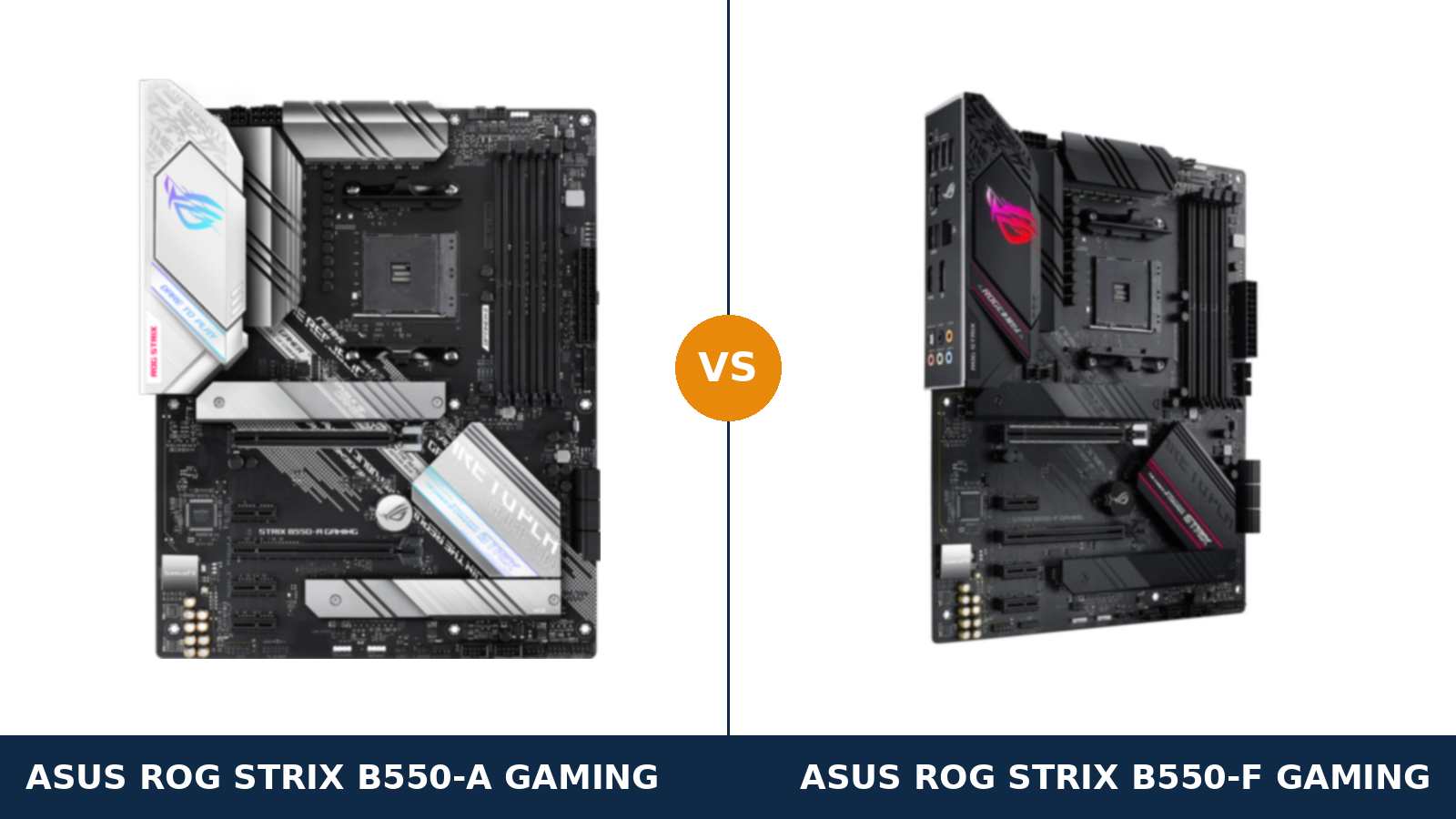
Same board. Same specs. Two colours.
That is not a lazy summary — it is the literal truth of this comparison. The ROG Strix B550-A Gaming is the white-and-silver edition of the ROG Strix B550-F Gaming, built on the same PCB design, the same power stages, the same audio and the same rear panel.
ASUS finished the -A, in its own words, “in stunning white and silver” for builders whose cases, coolers and graphics cards already wear that colour. The -F is the black original. Everything else is shared.
Almost everything. ASUS's own specification pages contain exactly one functional difference between the two boards, and it is a difference almost nobody will ever use. This guide walks the full spec sheet, names that one difference honestly, and then gives you the only decision rule that matters here.
Key Takeaways
- The hardware is identical. Same 12+2 teamed power stages, same slots, same storage, same Intel 2.5Gb Ethernet, same SupremeFX audio.
- The -A is the white edition. Silver heatsinks and I/O shroud over the same black PCB. If your build is white, this is the board ASUS made for it.
- The one spec difference: multi-GPU. ASUS lists NVIDIA SLI support for the -F only. The -A is CrossFireX only — a paper difference in 2026, but it is there.
- Neither board has Wi-Fi. The -F has separate Wi-Fi variants to avoid at checkout; the -A has none, so its listing is unambiguous.
- Buy on colour and price. Performance, features and support are a dead tie. Whichever matches your build — or costs less that day — is the right one.
Quick Verdict
Buy the ROG Strix B550-A Gaming for a white or silver build. It is the same motherboard as the -F in every way that affects performance.
You lose nothing by choosing it. The power delivery, the expansion, the storage and the audio are carried over part for part.
What you gain is a board that actually matches a white case, a white cooler and a white graphics card — instead of a black slab breaking up the theme.
Buy the ROG Strix B550-F Gaming for a black build, or when it is the cheaper of the two. It is the original, it has been on sale longer, and stock tends to be deeper.
It also carries one line the -A does not: official NVIDIA SLI support on ASUS's spec page. Treat that as a trivia point, not a reason — SLI is a discontinued technology. The real reasons to pick the -F are colour and price, same as the -A.
The Scorecard
Scores below are derived directly from the manufacturer specifications compared in this guide — phase designs, slot counts, port counts and supported standards. They are a reading aid, not benchmark results.
| Category | Strix B550-A | Strix B550-F | ||
|---|---|---|---|---|
| Power delivery | 9 / 10 | 9 / 10 | ||
| Expansion | 8 / 10 | 8 / 10 | ||
| Storage | 8 / 10 | 8 / 10 | ||
| Memory | 9 / 10 | 9 / 10 | ||
| Networking | 7 / 10 | 7 / 10 | ||
| Audio | 9 / 10 | 9 / 10 | ||
| USB connectivity | 8 / 10 | 8 / 10 | ||
| Overall | 8.3 / 10 | 8.3 / 10 | ||
A flat scorecard is the honest result here. These are not two boards that happen to score alike — they are one board design sold in two finishes, and the table simply reflects that.
At a Glance: Who Each Board Fits
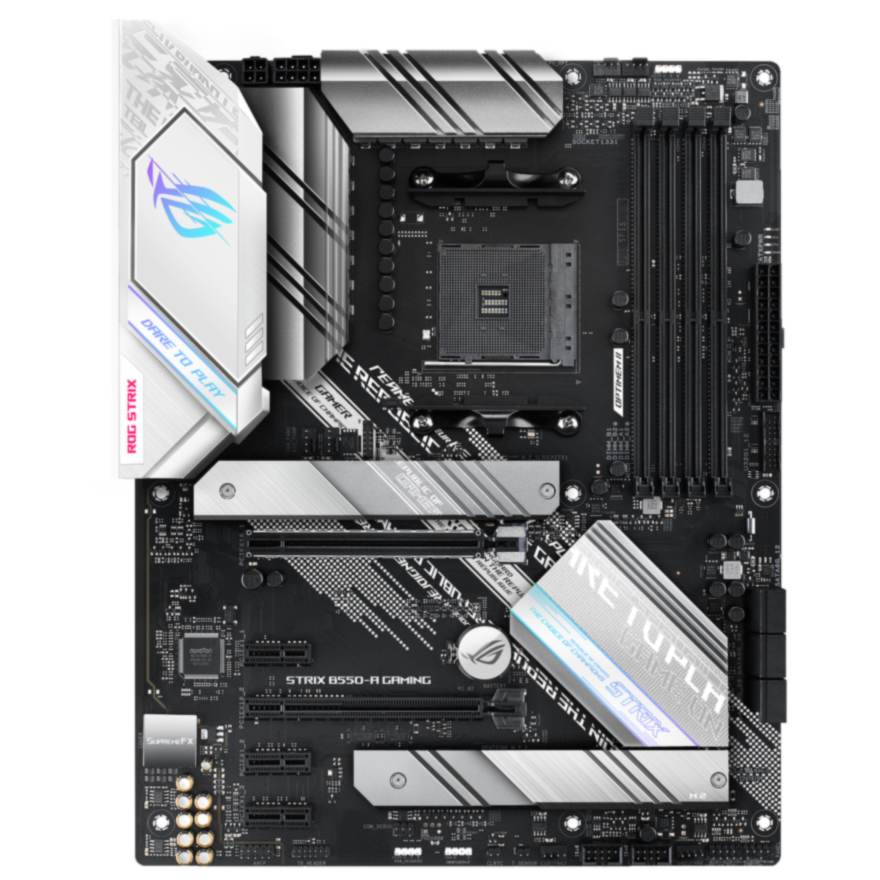
ASUS ROG Strix B550-A Gaming
- White-and-silver edition of the Strix B550 design
- 12+2 teamed power stages, ProCool 8+4-pin power
- PCIe 4.0 x16 SafeSlot + dual M.2 (Gen 4 + Gen 3)
- Intel I225-V 2.5Gb Ethernet, wired only — no Wi-Fi variant exists
- SupremeFX S1220A audio, 120 dB SNR playback
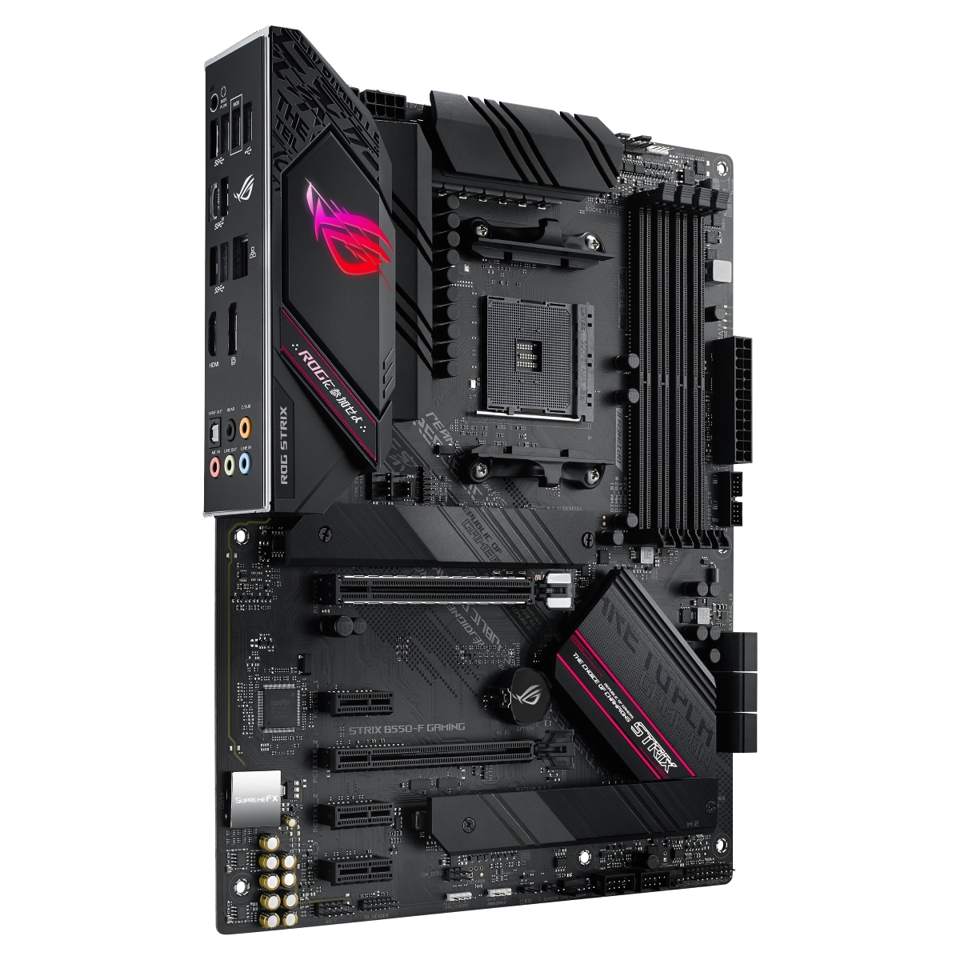
ASUS ROG Strix B550-F Gaming
- The black original of the same Strix B550 design
- 12+2 teamed power stages, ProCool 8+4-pin power
- PCIe 4.0 x16 SafeSlot + dual M.2 (Gen 4 + Gen 3)
- Intel I225-V 2.5Gb Ethernet, wired only
- SupremeFX S1220A audio, 120 dB SNR playback
Choose the B550-A Gaming if…
Your build is white or silver. White case, white AIO, white graphics card — the -A was released specifically so the motherboard stops being the one black component in that build.
You want a listing you cannot get wrong. There is no Wi-Fi version of the -A, no II revision, no lookalike variant. The name on the box is the board in the box.
Or it is simply the cheaper of the two on the day you order. The hardware underneath the finish is the same either way.
Choose the B550-F Gaming if…
Your build is black or dark-themed, which is most builds. The -F's black heatsinks and shroud with red ROG accents disappear into a dark case exactly as intended.
You are buying used or from remaining stock. The -F launched first and sold in larger numbers, so the second-hand and clearance supply is deeper.
Or, for completeness, you genuinely run two NVIDIA cards in SLI. ASUS lists SLI support for this board and not for the -A. Almost nobody should weight this — but if it is your setup, it is a real line-item difference.
As an Amazon Associate I earn from qualifying purchases at no extra cost to you.
Specifications: The Specs That Actually Matter
Every figure below is taken from ASUS's published specification pages for these two exact models, cross-checked against the manufacturer's product data.
Read the table column by column. Its sameness is the finding — and the one row that differs is flagged where it appears.
| Specification | ASUS ROG Strix B550-A Gaming | ASUS ROG Strix B550-F Gaming |
|---|---|---|
| Form factor | ATX, 30.5 × 24.4 cm | ATX, 30.5 × 24.4 cm |
| Socket / chipset | AMD AM4 / B550 | AMD AM4 / B550 |
| CPU support | Ryzen 5000, 5000 G, 4000 G, 3000 series | Ryzen 5000, 5000 G, 4000 G, 3000 series |
| VRM design | 12+2 teamed power stages, ProCool 8+4-pin | 12+2 teamed power stages, ProCool 8+4-pin |
| Memory | 4 × DDR4 DIMM, up to 128 GB, OptiMem II | 4 × DDR4 DIMM, up to 128 GB, OptiMem II |
| Graphics outputs (APU) | HDMI 2.1 (4K@60), DisplayPort 1.2 | HDMI 2.1 (4K@60), DisplayPort 1.2 |
| Expansion slots | PCIe 4.0 x16 SafeSlot + PCIe 3.0 x16 (x4) + 3 × PCIe 3.0 x1 | PCIe 4.0 x16 SafeSlot + PCIe 3.0 x16 (x4) + 3 × PCIe 3.0 x1 |
| Multi-GPU support | AMD 2-Way CrossFireX | AMD 3-Way CrossFireX + NVIDIA 2-Way SLI |
| M.2 storage | 2 slots: PCIe 4.0 x4 (22110) + PCIe 3.0 x4 (22110); heatsink on primary slot | 2 slots: PCIe 4.0 x4 (22110) + PCIe 3.0 x4 (22110); heatsink on primary slot |
| SATA | 6 × SATA 6 Gb/s, RAID 0/1/10 (ports 5/6 disabled if M.2_2 populated) | 6 × SATA 6 Gb/s, RAID 0/1/10 (ports 5/6 disabled if M.2_2 populated) |
| LAN | Intel I225-V 2.5 Gb Ethernet | Intel I225-V 2.5 Gb Ethernet |
| Audio | ROG SupremeFX S1220A, 7.1 HD, 120 dB SNR playback, optical S/PDIF | ROG SupremeFX S1220A, 7.1 HD, 120 dB SNR playback, optical S/PDIF |
| USB (rear) | 8 ports: 2 × USB 3.2 Gen 2 (Type-A + Type-C), 4 × Gen 1, 2 × USB 2.0 | 8 ports: 2 × USB 3.2 Gen 2 (Type-A + Type-C), 4 × Gen 1, 2 × USB 2.0 |
| Front USB-C header | None | None |
| BIOS flashing | BIOS FlashBack button (no CPU/RAM/GPU needed) | BIOS FlashBack button (no CPU/RAM/GPU needed) |
| Wi-Fi | None (no Wi-Fi variant of this model) | None (separate Wi-Fi variants exist) |
| Finish | White and silver heatsinks and shroud | Black heatsinks and shroud, red accents |
The one differing row: multi-GPU support. ASUS's specification page for the B550-F Gaming lists NVIDIA 2-Way SLI alongside AMD CrossFireX. The B550-A Gaming's page lists CrossFireX only.
Everything else — every slot, port, codec and connector — is published identically for both models. Where ASUS's pages present a figure differently (memory speeds are listed per processor generation, and the two pages lead with different tables), the underlying hardware support is the same, as the memory section below explains.
Variant note: the B550-F Gaming also exists as the B550-F Gaming (Wi-Fi), with an Intel Wi-Fi 6 module, and as the later WiFi II with Wi-Fi 6E. Those are different products with different listings. The B550-A Gaming has no wireless variant at all — if a listing claims one, it is mislabelled.
The Differences That Actually Matter
1. The finish — the entire reason both boards exist
Start with the obvious, because here the obvious is the substance. The B550-A wears silver heatsinks, a silver I/O shroud with the ROG eye in iridescent colours, and white accent printing.
The B550-F wears black heatsinks and a black shroud with the ROG eye lit in red, plus red accent lines on the chipset cover. Same shapes, same layout — the tooling is shared; only the finish changes.
Underneath the heatsinks, both boards use a black PCB. The -A is not a white-PCB board; it is a black board dressed in silver and white where it shows.
In a windowed white build, that is exactly what matters. The heatsinks and shroud are the parts you see. In a black build, the -F's finish does the same disappearing act in reverse.
Neither finish affects thermals, performance or longevity in any way ASUS documents — or any way that matters. Choose the one that matches the rest of your parts. That is not a cop-out; on identical hardware, it is the correct decision procedure.
2. Power delivery — the same 12+2 design, an honest tie
Both boards run ASUS's 12+2 teamed power stage design, fed by a ProCool 8-pin plus 4-pin CPU power connection. It is one of the stronger VRM designs in the B550 class.
For a Ryzen 5 5600 or Ryzen 7 5800X, it is more than sufficient. For a Ryzen 9 5900X or 5950X under sustained all-core load, it remains a sensible, heatsink-cooled choice.
There is no version of this decision where power delivery separates the two boards. The stages, the heatsinks and the power connectors are the same parts in different colours.
If VRM quality is why you are shopping this class of board, both answer the question identically. Move on to colour and price.
3. Multi-GPU — the one real spec-page difference
Here is the single functional line where ASUS's own pages separate the twins. The B550-F Gaming's specification lists support for NVIDIA 2-Way SLI and AMD 3-Way CrossFireX.
The B550-A Gaming's page lists AMD 2-Way CrossFireX only. No SLI, and CrossFireX capped at two cards rather than three.
Now the honest context. NVIDIA ended SLI profile support years ago, and modern games do not use it. AMD's CrossFireX is in the same state. A dual-GPU gaming build in 2026 is a museum piece, not a plan.
So this difference is real on paper and near-worthless in practice. We record it because a comparison that hides the one difference it found is not a comparison. But do not pay a premium for it, and do not let it override colour or price.
If you are one of the very few people maintaining a legacy SLI setup, the -F is your board. Everyone else can score this section a tie and keep reading — or stop reading, because the verdict is already colour and price.
4. Storage — identical, including the shared compromise
Both boards carry two M.2 slots. The primary slot runs at PCIe 4.0 x4 from the CPU and takes drives up to 22110 length. The second runs at PCIe 3.0 x4 from the chipset, also up to 22110.
Both fit an aluminium heatsink over the primary slot. The second slot is bare on both — a warm Gen 3 drive there may want its own small heatsink, a few dollars as an add-on.
Both boards also share the platform's familiar trade-off: populate the second M.2 slot and SATA ports 5 and 6 switch off. Four of the six SATA ports remain, which covers most builds, but plan around it if you run many SATA drives.
Six SATA ports with RAID 0, 1 and 10, two M.2 slots, one heatsink, one shared quirk. Identical storage, identical caveats.
5. Memory — same hardware, differently printed tables
Both boards have four DDR4 slots, a 128 GB ceiling and ASUS's OptiMem II trace layout. Both support ECC memory in ECC mode where the processor allows it.
ASUS publishes memory speeds per processor generation, and the two product pages lead with different tables: the -A's page prints a 4600 MT/s (O.C.) headline for Ryzen 5000 and 3000 processors, while the -F's US page leads with its 3rd Gen table at 4400 MT/s (O.C.). Both pages list higher tables — up to 5100 MT/s (O.C.) — for Ryzen 4000 G-Series chips.
Do not read a performance gap into that. It is the same memory hardware documented at different moments in the pages' lives. The same sensible 3200–3600 MT/s kit will run at the same speed on either board, limited by your processor's memory controller, not by which Strix you bought.
Memory is a tie. Buy the kit on its own merits and spend no time on the boards' headline numbers.
6. Rear panel and USB — port for port, the same
Turn both boards around and the rear panels match. Eight USB ports: two USB 3.2 Gen 2 (one Type-A, one Type-C), four USB 3.2 Gen 1, and two USB 2.0.
Plus the Intel 2.5-gigabit Ethernet port, HDMI 2.1 and DisplayPort 1.2 for APU builds, five gold-plated audio jacks, an optical S/PDIF output, and the BIOS FlashBack button. The I/O shield comes pre-mounted on both.
Inside, the header story is also shared — and includes the pair's one genuine connectivity gap. Neither board has a front-panel USB-C header. If your case has a front USB-C port, it sits unconnected on both of these boards.
Front USB is otherwise covered: a USB 3.2 Gen 1 header for two ports and two USB 2.0 headers for four more, on both. Fan headers match too — CPU, CPU OPT, three chassis and an AIO pump header, six in total.
7. Audio and networking — the same parts, the same result
Audio is ROG SupremeFX on both boards, built on the S1220A codec. Dual OP amplifiers, impedance sensing for headphone outputs, 120 dB signal-to-noise on playback and 113 dB on recording, premium capacitors under an audio cover.
It is the best onboard audio in this class of board, and it is identical here. Headphone users and streamers get the same Sonic Studio III software and AI noise-cancelling microphone support from either box.
Networking is the same single Intel I225-V 2.5-gigabit controller with ASUS LANGuard surge protection. One port, wired only, on both boards.
If you need Wi-Fi, neither of these boards provides it — your options are a PCIe card, a USB adapter, or one of the -F's separate Wi-Fi variants, which are different products covered in the buying guide below.
CPU Pairing Guide
Processor choice cannot separate these boards — they support the same CPUs and feed them with the same power design. This table shows the pairing verdicts anyway, because the right answer per chip is worth stating plainly.
| Your processor | Strix B550-A | Strix B550-F | Our call |
|---|---|---|---|
| Ryzen 5 5600 / 5600X | Excellent | Excellent | Tie — buy on colour |
| Ryzen 7 5700X / 5800X | Excellent — VRM headroom to spare | Excellent — VRM headroom to spare | Tie — buy on colour |
| Ryzen 9 5900X / 5950X | Well suited — 12+2 stages, heatsink-cooled | Well suited — 12+2 stages, heatsink-cooled | Tie — buy on colour |
| Ryzen 5 5600G / 5700G (APU) | Excellent — HDMI 2.1 + DisplayPort | Excellent — HDMI 2.1 + DisplayPort | Tie — buy on colour |
| Ryzen 3000 series | Excellent | Excellent | Tie — buy on colour |
One support note applies to both boards equally: neither lists the older Ryzen 3 3200G or Ryzen 5 3400G APUs, which predate the B550 chipset's processor support. And before fitting any newer CPU, update the BIOS first — BIOS FlashBack makes that a ten-minute job on either board, with no processor installed.
Ready to check today’s price?
Same board, two finishes — prices move independently, so check the live figure on the colour that fits your build.
View on Amazon — Strix B550-AView on Amazon — Strix B550-FThe 30-Second Decision
| If this sounds like you… | Buy this |
|---|---|
| “My build is white — case, cooler, card, everything.” | Strix B550-A Gaming |
| “My build is black, like most builds.” | Strix B550-F Gaming |
| “One of them is noticeably cheaper today.” | The cheaper one — the hardware is identical |
| “My case has no window.” | Either — buy on price alone |
| “I still run two NVIDIA cards in SLI.” | Strix B550-F Gaming (SLI listed; the -A omits it) |
| “I keep clicking the wrong variant at checkout.” | Strix B550-A Gaming — it has no variants to confuse |
What You Gain. What You Give Up.
ASUS ROG Strix B550-A Gaming
You gain: the white-and-silver finish that completes a light-themed build, on the full Strix B550 hardware — 12+2 power stages, dual M.2, SupremeFX audio, 2.5Gb Ethernet. You also gain a product line with no variants: no Wi-Fi edition, no II revision, nothing to mistake it for.
You give up: the SLI and 3-way CrossFireX lines on the spec page — legacy multi-GPU support almost no one can still use. And, in practice, some availability: the -A sold in smaller numbers, so used and clearance stock is thinner than the -F's.
ASUS ROG Strix B550-F Gaming
You gain: the same complete hardware in the original black finish, with the deeper stock, the longer sales history, and the spec page's full multi-GPU listing (NVIDIA SLI plus 3-way CrossFireX) for the rare legacy setup that needs it.
You give up: the white option — there is no light finish of this exact listing. And you take on checkout risk the -A does not have: the (Wi-Fi) and WiFi II variants sit one click away with near-identical names, and they are different products at different prices.
Pros and Cons
Strix B550-A — Pros
- White/silver finish for light-themed builds
- Identical hardware to the -F, part for part
- 12+2 teamed power stages — Ryzen 9 capable
- SupremeFX S1220A audio with optical S/PDIF
- No variants — the listing cannot be confused
Cons
- No NVIDIA SLI support on the spec page
- Thinner used and clearance availability
- No front-panel USB-C header (same as -F)
- No Wi-Fi (same as -F)
Strix B550-F — Pros
- The original — deep stock, long sales history
- Identical hardware to the -A, part for part
- 12+2 teamed power stages — Ryzen 9 capable
- SLI + 3-way CrossFireX listed on the spec page
- SupremeFX S1220A audio with optical S/PDIF
Cons
- Black finish only
- Wi-Fi and WiFi II variants invite checkout mistakes
- No front-panel USB-C header (same as -A)
- No Wi-Fi (same as -A)
Buy the Finish, Check the Name
Check the full model name. “Strix B550” covers a family, not a board. The B550-E sits above these two with a different design; the B550-I is a mini-ITX board; the B550-XE is a separate Wi-Fi model with an add-in M.2 card. None of them is the board in this comparison.
On the -F, check for the variant suffix. The base B550-F Gaming has no Wi-Fi and no antenna posts on its rear panel — look at the product photo and confirm. The B550-F Gaming (Wi-Fi) adds an Intel Wi-Fi 6 module; the WiFi II is a later Wi-Fi 6E revision. Both are fine boards, but they are different listings at different prices, and a hurried click buys the wrong one.
On the -A, the check is simpler. There is exactly one B550-A Gaming. If a listing shows antenna connectors or claims Wi-Fi, it is mislabelled — walk away. The genuine board's shroud reads ROG Strix in silver, and the PCB silkscreen reads STRIX B550-A GAMING.
Check the CPU plan, not the board. Both boards flash with BIOS FlashBack, so an older stock BIOS is no obstacle to a Ryzen 5000 processor. Update first, then swap the CPU.
Check your case's front panel. If it has a front USB-C port you care about, neither board can connect it — both lack the header. That is the pair's one shared connectivity gap, and it is worth knowing before the build, not during it.
The Upgrade Path Test
Upgrade headroom is identical because the platform is identical. Judge it once, for both boards.
Year one, either board runs a Ryzen 5 and a mid-range graphics card at full PCIe 4.0 speed. Year two, a discounted Ryzen 7 or 9 drops into the same socket — the 12+2 power design was specified for exactly that step.
Storage grows the same way on both: a second M.2 drive in the Gen 3 slot, at the cost of two SATA ports. Memory grows to 128 GB across four slots on both.
The ceiling is also shared. AM4 is a finished platform — there is no next generation coming to either board. What you are buying is the mature, fully-sorted end state of AM4, and on that measure the twins are equals.
When to Skip Both
Identical boards share identical limits. There are builders neither of them serves.
Skip both if you need Wi-Fi built in — look at the -F's own Wi-Fi variants or another range entirely. Skip both if front-panel USB-C is non-negotiable; this design has no header for it.
Skip both if you are planning around a Ryzen 3 3200G or Ryzen 5 3400G — neither board supports those APUs. And skip both if your build is mini-ITX or micro-ATX; these are full ATX boards.
For everyone else building on AM4 with a discrete graphics card, one of these two is the right board. The only question left is the colour of your case.
Final Verdict
It is a tie — and that is a verdict, not a shrug.
We compared ASUS's own specification pages line by line. The power design, slots, storage, memory hardware, networking, audio and rear panel are the same, because the B550-A Gaming is the B550-F Gaming wearing a white-and-silver finish.
The single difference the spec pages contain — NVIDIA SLI and 3-way CrossFireX listed for the -F, CrossFireX only for the -A — belongs to a discontinued technology. It decides nothing for a modern build.
Buy the Strix B550-A if your build is white or silver. You give up nothing that matters and your motherboard finally matches the rest of the machine.
Buy the Strix B550-F if your build is black, if it is the cheaper listing today, or if its deeper used supply suits how you buy. Same board, original finish.
Decide by the colour of your case and the price on the day. Every other way of deciding this one is theatre.
Watch Out: Similar Names, Different Boards
ASUS's B550 Strix family is a naming maze. Four warnings belong in this guide.
First: the B550-F Gaming, B550-F Gaming (Wi-Fi) and B550-F Gaming WiFi II are three different products. Only the first is in this comparison. The Wi-Fi models have antenna posts on the rear panel; the base board does not.
Second: there is no “B550-A Gaming WiFi”. The -A exists only in the wired form compared here. A listing that says otherwise is wrong.
Third: the B550-E Gaming and B550-XE Gaming WiFi are higher-tier boards with different designs and different prices. The B550-I Gaming is a mini-ITX board. Similar names, unrelated purchases.
Fourth: do not confuse this pair with MSI's B550-A Pro — a different brand's board that shares nothing but a letter and a chipset.
Match the full model name on the box to the silkscreen on the board — STRIX B550-A GAMING or STRIX B550-F GAMING — before you pay.
Case, Power and Cabling Notes
Both boards are full ATX, 30.5 × 24.4 cm. They fit ATX cases; in a white case, the -A's silver heatsinks are the ones that match the paint.
Both take a 24-pin main power connector plus 8-pin and 4-pin EPS CPU connectors — the ProCool metal-reinforced sockets are the same on both. Any reputable modern power supply covers this.
Fan wiring is identical: CPU and CPU OPT headers, three chassis headers and an AIO pump header. Lighting is identical too — two Aura RGB headers and one Addressable Gen 2 header, synced through Aura Sync on both.
One shared note for APU builders: the HDMI 2.1 and DisplayPort 1.2 outputs sit on the pre-mounted I/O shield of both boards, and both drive a 4K60 display from a G-series processor.
And the shared limitation, once more: no front USB-C header on either board. A case front Type-C port will sit unconnected whichever twin you buy.
BIOS and Long-Term Support
AM4 is a mature platform, and both boards sit on the same support footing.
Both run the same 256 Mb UEFI BIOS with ASUS EZ Flash 3 and CrashFree BIOS 3, and both carry the BIOS FlashBack button for CPU-less updates. BIOS releases for the two models track the same AGESA updates from AMD.
Both sit on ASUS's standard support pages: drivers, BIOS files, and a per-model CPU support list and memory QVL. Check your exact processor and memory kit against the list for the board you buy — the lists are published per model even though the hardware matches.
Expect future BIOS releases to be security and compatibility maintenance, not new features. On a finished platform, that is what you want.
Frequently Asked Questions
Are the ROG Strix B550-A and B550-F the same motherboard?
Effectively, yes. ASUS built the B550-A Gaming as the white-and-silver edition of the B550-F Gaming: same 12+2 teamed power stages, slots, storage, Intel 2.5Gb Ethernet, SupremeFX S1220A audio and rear panel. The only functional difference on ASUS's spec pages is multi-GPU support — the -F lists NVIDIA SLI, the -A does not.
What is actually different between the B550-A and B550-F?
Two things. The finish: silver heatsinks and shroud on the -A, black with red accents on the -F. And the multi-GPU listing: ASUS lists NVIDIA 2-Way SLI and AMD 3-Way CrossFireX for the -F, but only AMD 2-Way CrossFireX for the -A. Everything else in the specification is published identically.
Which board should I buy for a white PC build?
The B550-A Gaming. It exists for exactly that build — silver heatsinks and I/O shroud over the same platform as the -F. You lose nothing in performance or features by choosing it; the SLI line it omits is a discontinued technology.
Does either board have Wi-Fi?
No. Both are wired-only boards with Intel 2.5Gb Ethernet. ASUS sells separate B550-F Gaming (Wi-Fi) and WiFi II variants with wireless modules, but those are different products. There is no Wi-Fi version of the B550-A Gaming.
Is the B550-F better for a Ryzen 7 5800X or Ryzen 9 5900X?
No — the boards are equal here. Both use the same 12+2 teamed power stage design with the same heatsinks and 8+4-pin ProCool power input. Either runs the full AM4 range, including the Ryzen 9 parts, with the same headroom. Update the BIOS before a CPU swap; both boards have BIOS FlashBack.
Can I run two M.2 SSDs on these boards?
Yes, on both. The primary slot runs at PCIe 4.0 x4 with a heatsink fitted; the second runs at PCIe 3.0 x4 without one. Note the shared trade-off: populating the second M.2 slot disables SATA ports 5 and 6 on both boards, leaving four SATA ports live.
Why do the memory speeds look different on ASUS's pages?
ASUS publishes memory support per processor generation, and the two pages lead with different tables — the -A's page headlines 4600 MT/s (O.C.) for Ryzen 5000/3000, the -F's US page leads with 4400 MT/s (O.C.) for 3rd Gen, and both reach 5100 MT/s (O.C.) with 4000 G-Series chips. The memory hardware is the same; a 3200–3600 MT/s kit performs identically on either board.
Does either board have a front-panel USB-C header?
No. Neither the B550-A nor the B550-F has a front USB-C header, so a case front Type-C port cannot be connected on either. Both boards do provide rear USB-C — one USB 3.2 Gen 2 Type-C port on the back panel.
Sources & Verification
ASUS ROG Strix B550-A Gaming official specifications, rog.asus.com • ASUS ROG Strix B550-F Gaming official specifications, rog.asus.com • ASUS product overviews for both models (teamed power stages, SupremeFX S1220A, Intel I225-V) • Amazon listing data for ROG Strix B550-A Gaming (ASIN B08F9VP2RC, UPC 192876826607) and ROG Strix B550-F Gaming (ASIN B088W7RKVZ, UPC 192876749685). Specifications verified November 2026.

James Wilson
James has been building and benchmarking PCs for over a decade and writes Honestly Compared's motherboard and component guides. His rule for every comparison: the verdict has to survive the spec sheet, not the marketing page.