
ASUS Prime X570-P vs ASUS TUF Gaming X570-Plus: Which Should You Buy?
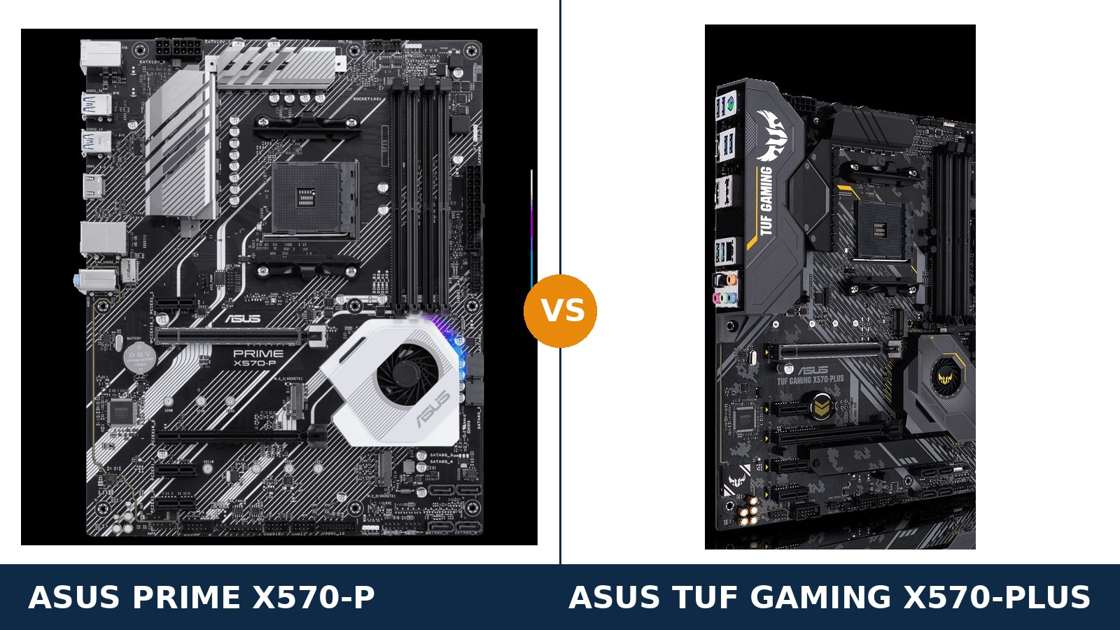
Same chipset. Same socket. Same memory support. Same maker.
The ASUS Prime X570-P and the TUF Gaming X570-Plus are two answers to the same question: what should an X570 board be? One is dressed for work. The other is dressed for war.
Underneath the styling, though, the real differences are specific and measurable — power stages, display outputs, a USB-C port, two extra SATA ports. Small lines on a spec sheet. Big consequences for the build you end up with.
This guide compares the two boards the way ASUS itself specifies them. Every figure below comes from ASUS's official product pages. The verdict at the end follows from those figures, not from the marketing.
Key Takeaways
- The TUF Gaming X570-Plus is the stronger board. More power stages, DisplayPort, USB-C, more storage — it wins most of the spec sheet.
- The Prime X570-P is the value play. It keeps the full X570 platform and usually costs less; its cuts land on features many builds never use.
- APU builders: this one is easy. Only the TUF has DisplayPort. The Prime offers HDMI alone.
- Memory and expansion are a dead tie. Identical DIMM support, identical PCIe slot layout on both boards.
- Neither board has Wi-Fi or BIOS FlashBack. The TUF name in this comparison is the non-Wi-Fi model — check the variant before you buy either.
Quick Verdict
Buy the ASUS TUF Gaming X570-Plus for gaming and high-core-count builds. It is the more capable board, and the gap is not cosmetic.
Its 12+2 Dr. MOS power stages outmuscle the Prime's 8+4. It adds DisplayPort for APU builds, a rear USB-C port, eight SATA ports, an M.2 heatsink and debug LEDs. If your Ryzen has eight cores or more, this is the board that was built for it.
Buy the ASUS Prime X570-P when the price gap is real and your build is mainstream. It is the same X570 platform — PCIe 4.0 everywhere, dual M.2, the same memory ceiling — in a plainer, work-focused dress.
For a Ryzen 5 or Ryzen 7 gaming PC with one graphics card and a couple of drives, the Prime gives up surprisingly little. What it gives up, it gives up on paper you may never miss.
The Scorecard
Scores below are derived directly from the manufacturer specifications compared in this guide — power stage counts, slot counts, port counts and supported standards. They are a reading aid, not benchmark results.
| Category | Prime X570-P | TUF Gaming X570-Plus | ||
|---|---|---|---|---|
| Power delivery | 7 / 10 | 9 / 10 | ||
| Storage | 7 / 10 | 9 / 10 | ||
| Expansion | 8 / 10 | 8 / 10 | ||
| Display outputs (APU builds) | 5 / 10 | 8 / 10 | ||
| USB & connectivity | 7 / 10 | 8 / 10 | ||
| Audio & networking | 7 / 10 | 8 / 10 | ||
| Memory | 9 / 10 | 9 / 10 | ||
| Overall | 7.1 / 10 | 8.4 / 10 | ||
The pattern is one-directional. Where the boards differ at all, the TUF is usually the one ahead — the Prime's case rests on price, not on specifications.
At a Glance: Who Each Board Fits
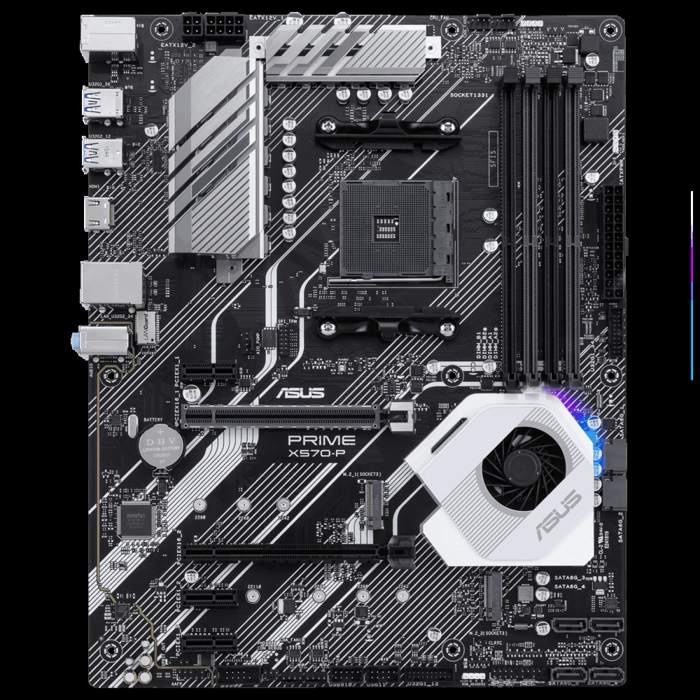
ASUS Prime X570-P
- 8+4 Dr. MOS power stages, DIGI+ VRM, ProCool power connectors
- HDMI 1.4b display output only — no DisplayPort, no USB-C
- 8 rear USB ports, the most of the two boards
- Dual M.2 PCIe 4.0, 6 × SATA 6Gb/s
- MemOK II automatic memory recovery
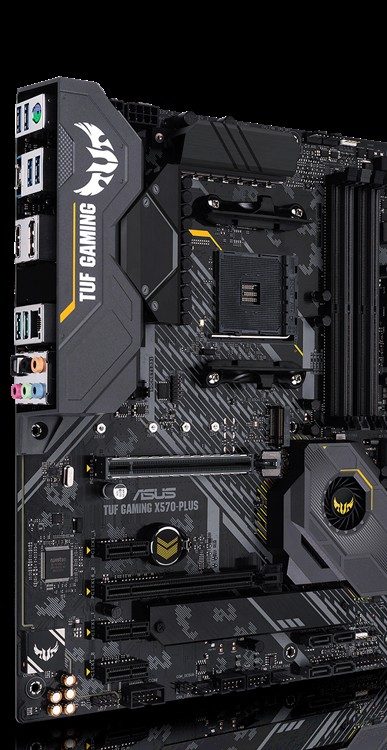
ASUS TUF Gaming X570-Plus
- 12+2 Dr. MOS power stages with TUF components
- HDMI + DisplayPort outputs, rear USB 3.2 Gen 2 Type-C
- Dual M.2 with heatsink, 8 × SATA 6Gb/s
- Optical S/PDIF out and DTS Custom headset audio
- Q-LED debug lights and onboard Aura Sync lighting
Choose the Prime X570-P if…
Your build is a Ryzen 5 or Ryzen 7 with a single graphics card. The board's job is to stay out of the way.
You are building a work or mixed-use machine and the gaming extras mean nothing to you. No lighting, no armour, no ceremony.
You want more rear USB ports and more front-panel USB headers than the TUF offers. Peripheral-heavy desks are the Prime's quiet home turf.
Or the Prime is simply cheaper by a margin that matters. At a real discount, its missing features stay missing — and unmissed.
Choose the TUF Gaming X570-Plus if…
You are running, or plan to run, a Ryzen 9 or a heavily worked Ryzen 7. The stronger VRM is the whole point.
You are building on an APU, or want DisplayPort as a fallback. The Prime cannot offer it at all.
You have many drives, want USB-C on the rear panel, or want debug LEDs when a build refuses to boot. The TUF was specced by people who have troubleshot a PC at 1 a.m.
As an Amazon Associate I earn from qualifying purchases at no extra cost to you.
Specifications: The Specs That Actually Matter
Every figure below is taken from ASUS's published specifications for these two boards, including the power-stage counts ASUS states on its own product pages.
One naming warning before the table: this comparison covers the TUF Gaming X570-Plus without Wi-Fi. ASUS also sells a TUF Gaming X570-Plus (Wi-Fi); it is a different model with a different listing, and the buying guide below explains how to tell them apart.
| Specification | ASUS Prime X570-P | ASUS TUF Gaming X570-Plus |
|---|---|---|
| Form factor | ATX, 30.5 × 24.4 cm | ATX, 30.5 × 24.4 cm |
| Socket / chipset | AMD AM4 / X570 | AMD AM4 / X570 |
| CPU support | Ryzen 5000 / 5000 G / 4000 G / 3000 / 3000 G / 2000 / 2000 G series | Ryzen 5000 / 5000 G / 4000 G / 3000 / 3000 G / 2000 / 2000 G series |
| VRM design | 8+4 Dr. MOS power stages, DIGI+ VRM | 12+2 Dr. MOS power stages, DIGI+ VRM, TUF components |
| CPU power connectors | 8-pin + 4-pin ProCool (solid pins) | 8-pin + 4-pin ProCool (solid pins) |
| PCB | 6-layer | 6-layer |
| Memory | 4 × DDR4 DIMM, up to 128 GB, 5100 MT/s (O.C.) | 4 × DDR4 DIMM, up to 128 GB, 5100 MT/s (O.C.) |
| Graphics outputs (APU) | HDMI 1.4b only | HDMI 1.4b + DisplayPort (up to 4096 × 2160 @ 60 Hz) |
| Expansion slots | PCIe 4.0 x16 + PCIe 4.0 x16 (x4) + 3 × PCIe 4.0 x1 | PCIe 4.0 x16 + PCIe 4.0 x16 (x4) + 3 × PCIe 4.0 x1 |
| M.2 storage | 2 slots, PCIe 4.0 x4 (2280 / 22110), no heatsink | 2 slots, PCIe 4.0 x4 (both 22110), M.2 heatsink fitted |
| SATA | 6 × SATA 6 Gb/s, RAID 0/1/10 | 8 × SATA 6 Gb/s, RAID 0/1/10 |
| LAN | Realtek RTL8111H GbE, LANGuard | Realtek L8200A GbE, LANGuard, TurboLAN |
| Audio | Realtek S1200A, 8-channel, 3 rear jacks | Realtek S1200A + DTS Custom, 5 rear jacks, optical S/PDIF out |
| USB 3.2 Gen 2 Type-C | None — no USB-C anywhere on the board | 1 rear port (10 Gb/s) |
| Rear USB ports (total) | 8 (4 × Gen 2, 2 × Gen 1, 2 × USB 2.0) | 7 (3 × Gen 2 incl. Type-C, 4 × Gen 1) |
| Front USB 3.2 Gen 1 headers | 2 headers (up to 4 ports) | 1 header (up to 2 ports) |
| Troubleshooting | MemOK II memory auto-recovery | Q-LED debug lights (CPU / DRAM / VGA / Boot) |
| BIOS | 256 Mb UEFI, EZ Flash 3, CrashFree BIOS 3 | 256 Mb UEFI, EZ Flash 3, CrashFree BIOS 3 |
| Wi-Fi | None | None on this model (see Wi-Fi variant note) |
Variant note: the TUF Gaming X570-Plus (Wi-Fi) adds an Intel Wireless-AC 9260 module and Bluetooth 5.0 to this same board design. Everything else in the TUF column above describes both versions — but the Amazon listing, the price and the box contents differ, so buy the exact model name you intend to own.
The Differences That Actually Matter
1. Power delivery — the TUF's headline advantage
ASUS states the stage counts plainly. The TUF Gaming X570-Plus runs 12+2 Dr. MOS power stages. The Prime X570-P runs 8+4.
Both designs use Dr. MOS stages, DIGI+ digital control, alloy chokes and ProCool solid-pin power connectors. The shared engineering is genuinely good on both boards.
The difference is depth. The TUF spreads the CPU's current across more stages, adds military-grade TUF components and wears larger VRM heatsinks to shed the heat.
For a Ryzen 5 or Ryzen 7 at stock settings, both boards are more than sufficient. You will not feel the difference, and we will not pretend otherwise.
For a Ryzen 9 5900X or 5950X — or a Ryzen 7 worked hard with Precision Boost Overdrive — the TUF's design has the cooler, calmer headroom. Sixteen cores fed all day is exactly the workload the extra stages were bought for.
As ever with motherboards: the VRM is the one component you cannot upgrade later. If a big processor is anywhere in your future, weight this section heavily.
2. Display outputs — DisplayPort versus nothing
This difference is absolute. The TUF Gaming X570-Plus has DisplayPort, rated up to 4096 × 2160 at 60 Hz, alongside HDMI 1.4b.
The Prime X570-P has HDMI 1.4b. Only HDMI 1.4b. That is the entire list.
It matters for exactly one class of builder: anyone using a Ryzen G-series APU's integrated graphics. No graphics card, no other way to reach the monitor.
On the TUF, an APU build drives a modern 4K or high-refresh display properly over DisplayPort. On the Prime, you are capped by an old HDMI standard — 4K at a sluggish 24 Hz — or buying a graphics card you did not plan on.
Fitting a discrete graphics card from day one? Then both boards' display outputs are decoration, and this section scores zero for both. Judge your own build honestly.
3. USB-C and the rear panel — newer versus more
The TUF puts three USB 3.2 Gen 2 ports on the rear panel, and one of them is Type-C. The Prime has no USB-C connector anywhere on the board — rear, front, anywhere.
That is the TUF's connectivity headline, and for builders with USB-C drives, docks or capture gear, it settles the section on its own.
But count the whole panel before you concede it. The Prime actually offers more rear USB in total: eight ports, including four Gen 2 Type-A and — unfashionably useful — two USB 2.0 ports.
USB 2.0 on the rear is where keyboards, mice, receivers, printers and UPS links belong. The TUF offers none back there; its seven rear ports are all USB 3.2.
The Prime also doubles the TUF's front-panel offer: two USB 3.2 Gen 1 headers for up to four case-front ports, against the TUF's single header and two ports.
Neither board has a front-panel USB-C header. If your case has a front Type-C port, it stays dark on both. Call that a shared failure of the whole X570 generation at this price.
4. Storage — more of everything on the TUF
Both boards start level: two M.2 slots, each wired PCIe 4.0 x4, each ready for a fast NVMe boot drive or an NVMe RAID pair.
Then the TUF pulls ahead three times. Both of its M.2 slots accept 22110-length drives; on the Prime, only the second slot does — the primary tops out at 2280.
The TUF also fits a heatsink over an M.2 slot. The Prime leaves both drives bare. A heatsink is a small thing until a Gen 4 drive starts throttling in a warm case.
And on SATA, it is eight ports against six. Six is enough for most gaming builds. Eight is what a home-server or media-hoarding build actually needs.
Storage verdict: a mainstream build ties. A storage-heavy build does not — it belongs on the TUF.
5. Audio and networking — same codec, different effort
Both boards carry the Realtek S1200A codec, with audio shielding, dedicated PCB layers and premium Japanese capacitors. ASUS quotes the same 108 dB line-out signal-to-noise figure for the design. The core audio hardware is a tie.
The TUF then adds the gaming layer: DTS Custom processing for headsets, a full five-jack rear array, and an optical S/PDIF output for receivers and soundbars.
The Prime's rear audio is three jacks and done. Perfectly serviceable for a headset or desktop speakers. Nothing for a home-theatre receiver that wants optical.
Networking follows the same script. Both boards are gigabit Ethernet with ASUS LANGuard surge protection — a tie on speed.
The TUF's Realtek L8200A is the gaming-tuned controller, and it ships with ASUS's TurboLAN prioritisation utility. The Prime's RTL8111H is the honest workhorse chip. In practice the difference is software and tuning, not throughput.
6. Troubleshooting and lighting — built for the 1 a.m. build
When a new build refuses to POST, the two boards help you very differently.
The TUF gives you Q-LED debug lights: four LEDs that stop on CPU, DRAM, VGA or Boot and tell you exactly where the boot died. It is the single most useful feature on either board the first time something goes wrong.
The Prime answers with MemOK II, which automatically retrains memory settings until the system boots. Different philosophy: the TUF diagnoses, the Prime self-heals — at least when memory is the culprit.
On lighting, the TUF carries onboard Aura Sync RGB and both boards offer two Aura RGB headers plus an addressable Gen 2 header for strips and fans.
The Prime keeps its lighting entirely off-board, through those same headers. A windowed gaming case looks alive on the TUF by default; on the Prime, you bring every LED yourself.
7. Expansion and memory — the honest tie
Some sections exist to be short. The slot layout is identical: one PCIe 4.0 x16 slot for the graphics card, a second x16 slot wired at x4 from the chipset, and three PCIe 4.0 x1 slots.
Both boards support AMD CrossFireX for whatever that is worth in this decade. Both put a fortified SafeSlot around the primary graphics slot.
Memory is equally level. Four DIMM slots, 128 GB ceiling, official overclocking support to 5100 MT/s, ECC support that varies by processor, ASUS OptiMem trace layouts on both.
As with every board, the headline memory figure is an overclocking number. Your kit's real speed depends on your processor's memory controller. A good 3600 MT/s kit remains the sensible buy on either board.
Do not let a retailer sell you either of these boards over the other on slots or memory. There is nothing there to sell.
CPU Pairing Guide
The fastest way to choose between these boards is to start from your processor. This table is the whole comparison in one view.
| Your processor | Prime X570-P | TUF Gaming X570-Plus | Our call |
|---|---|---|---|
| Ryzen 5 5600 / 5600X | Excellent | Excellent | Buy whichever is cheaper — usually the Prime |
| Ryzen 7 5700X / 5800X | Very good at stock | Excellent — more VRM headroom | TUF if you overclock or upgrade later |
| Ryzen 9 5900X / 5950X | Workable at stock, the sensible ceiling | Excellent — built for this tier | TUF Gaming X570-Plus |
| Ryzen 5 5600G / 5700G (APU) | Limited — HDMI 1.4b only | Excellent — DisplayPort 4K @ 60 Hz | TUF Gaming X570-Plus |
| Ryzen 3000 series | Excellent | Excellent | Buy whichever is cheaper |
Notice the shape of the table. The Prime is never bad — it is simply outclassed as the processor gets bigger or the graphics move on-board.
Ready to check today’s price?
Both boards sell through Amazon. Prices move, so check the live figure on the board that fits your build.
View on Amazon — Prime X570-PView on Amazon — TUF Gaming X570-PlusThe 30-Second Decision
| If this sounds like you… | Buy this |
|---|---|
| “Ryzen 9, or a Ryzen 7 I plan to push hard.” | TUF Gaming X570-Plus (12+2 power stages) |
| “APU build, no graphics card, modern monitor.” | TUF Gaming X570-Plus (DisplayPort) |
| “Mainstream gaming PC, one GPU, sensible budget.” | Prime X570-P if it is cheaper — it usually is |
| “Lots of drives — NAS-style storage in a desktop case.” | TUF Gaming X570-Plus (8 × SATA, M.2 heatsink) |
| “A desk full of USB peripherals and a case with four front ports.” | Prime X570-P (8 rear USB, 2 front headers) |
| “I want USB-C for my external SSD.” | TUF Gaming X570-Plus — the Prime has none |
What You Gain. What You Give Up.
ASUS Prime X570-P
You gain: the full X570 platform for less money. More rear USB ports than the TUF, including legacy USB 2.0 for peripherals. Double the front USB 3.2 Gen 1 headers. MemOK II self-healing memory training, and a plain design that suits a work machine.
You give up: four power stages' worth of VRM headroom. DisplayPort, USB-C and optical audio entirely. Two SATA ports, the M.2 heatsink, debug LEDs and onboard lighting. Everything gaming-flavoured, in short.
ASUS TUF Gaming X570-Plus
You gain: the stronger 12+2 stage VRM with TUF components. DisplayPort and rear USB-C. Eight SATA ports, 22110 support in both M.2 slots and an M.2 heatsink. Optical audio, DTS Custom, Q-LED debug lights and onboard Aura Sync.
You give up: money — it usually costs more. One rear USB port overall, all rear USB 2.0 ports, and one front USB header against the Prime. The gaming dress is also not to every taste.
Pros and Cons
Prime X570-P — Pros
- Full X570 platform, usually the cheaper board
- 8 rear USB ports — best of the two
- Two front USB 3.2 Gen 1 headers
- MemOK II automatic memory recovery
- ProCool power connectors and 6-layer PCB
Cons
- No DisplayPort — HDMI 1.4b only
- No USB-C anywhere on the board
- 8+4 power stages trail the TUF
- Only 6 SATA ports, no M.2 heatsink
- No debug LEDs, no optical audio out
TUF Gaming X570-Plus — Pros
- 12+2 Dr. MOS power stages, TUF components
- DisplayPort for APU builds, rear USB-C
- 8 SATA ports and an M.2 heatsink
- Q-LED debug lights for troubleshooting
- Optical S/PDIF and DTS Custom headset audio
Cons
- Usually the pricier of the two
- No rear USB 2.0 ports at all
- One front USB 3.2 Gen 1 header only
- No Wi-Fi on this model — the Wi-Fi variant costs more
- No front-panel USB-C header — same as the Prime
Check the Variant and the BIOS, Not Just the Board
Check the TUF variant. “TUF Gaming X570-Plus” names two products. This comparison and its Amazon link cover the non-Wi-Fi board, model 90MB1170-M0EAY0.
The TUF Gaming X570-Plus (Wi-Fi), model 90MB1180-M0EAY0, adds Intel Wireless-AC 9260 Wi-Fi and Bluetooth 5.0. Same board underneath, different box, different price, different listing. If you need wireless, buy the Wi-Fi name deliberately — not by accident.
Check the Prime's name, too. The Prime X570-P is not the Prime X570-Pro. The Pro is a separate, higher model.
Worse, Amazon's own listing title for the X570-P has historically mislabeled it as the “X570-Pro.” Trust the model number, not the title: the X570-P is 90MB11N0-M0EAY0. There is also a Prime X570-P/CSM business variant with corporate lifecycle support, built on the same hardware.
Check the BIOS before a Ryzen 5000 build. Neither board has USB BIOS FlashBack. Updating the BIOS requires a processor the board already recognises, using ASUS EZ Flash 3.
X570 launched before Ryzen 5000 existed. A board from old stock may need an update before a 5000-series chip will boot. Look for Ryzen 5000 readiness on the box, or be ready to borrow an older AM4 processor for ten minutes.
Check the bundle. Both boxes are honest at this price: the board, an I/O shield, two SATA cables, an M.2 screw package, manual and driver disc. The TUF adds its certification card and sticker. Neither includes a Wi-Fi antenna — on the non-Wi-Fi TUF, there is nothing to attach one to.
The Upgrade Path Test
Judge an X570 board by the second processor it will carry, because AM4's whole charm is that there will be one.
Start both boards on a Ryzen 5. They feel identical — same slots, same memory, same storage speed. The Prime's value case is at its strongest here.
Then the discounted Ryzen 9 appears. On the TUF, it is a drop-in upgrade the VRM was designed around. On the Prime, it runs — at stock, with the board at the top of its comfort zone.
Storage tells the same story. The build that grows from two drives to six still has SATA ports free on the TUF. On the Prime, drive six is where the board runs out.
Neither board grows Wi-Fi, USB-C front-panel or a second life on AM5. What you buy is what the board stays. Buy the one whose ceiling you will not hit.
When to Skip Both
Honesty cuts both ways. Some builders should walk past this entire comparison.
Skip both if you need Wi-Fi on the board: the TUF Gaming X570-Plus (Wi-Fi) exists for you, one model name away. Skip both if you need 2.5-gigabit networking or BIOS FlashBack — neither feature appears anywhere in this pairing.
Skip both if your case is micro-ATX; both of these are full ATX boards. Skip both if a front-panel USB-C port must work; neither board can light one up.
And skip X570 itself if your build is a single graphics card and one NVMe drive. A good B550 board does that job for less, and the money belongs in the graphics card. X570 earns its premium in PCIe 4.0 storage and expansion — buy it only if you will use them.
BIOS, Chipset Fans and Long-Term Support
Both boards sit on ASUS's standard support pages: BIOS updates, drivers and a per-model CPU support list that ASUS still maintains for the X570 generation.
Expect new BIOS releases to be about security and support for late AM4 processors, not new features. On a mature platform, that is the correct priority.
One ownership note applies to both boards equally: X570 is actively cooled. Each carries a small chipset fan under its heatsink.
ASUS rates and designs these fans for long service, and Fan Xpert 4 controls them alongside your case fans. Still, it is the one moving part on the motherboard — worth knowing it exists before it is the only sound your PC makes.
Keep the chipset fan's intake clear when you cable-manage, and either board should quietly outlast the build around it.
Final Verdict
The ASUS TUF Gaming X570-Plus is the board we would build on.
It does not win on one trick. It wins across the sheet: more power stages for big processors, DisplayPort for APU builds, USB-C for modern peripherals, more and better-cooled storage, debug lights for the bad days.
The Prime X570-P is a good board standing next to a better one. Its spec-sheet defeats are real, but they are concentrated in features a mainstream build may genuinely never touch.
Buy the TUF Gaming X570-Plus for Ryzen 9 and hard-worked Ryzen 7 builds, APU builds, storage-heavy builds, and any PC you intend to grow into. It is the safer long-term foundation of the two.
View on Amazon — TUF Gaming X570-Plus
Buy the Prime X570-P if the price gap is wide when you order, your processor is a Ryzen 5 or stock Ryzen 7, and your desk values USB ports over gaming features. It is the same platform with the ceremony stripped off — and for a work-first build, that is a compliment.
Frequently Asked Questions
Is the TUF Gaming X570-Plus better than the Prime X570-P?
On specifications, yes. It has more power stages (12+2 against 8+4), DisplayPort, a rear USB-C port, eight SATA ports against six, an M.2 heatsink and debug LEDs. The Prime counters on price, rear USB count and front-panel headers — value, not capability.
Does the TUF Gaming X570-Plus in this comparison have Wi-Fi?
No. This comparison covers the non-Wi-Fi TUF Gaming X570-Plus (model 90MB1170-M0EAY0). ASUS sells a separate TUF Gaming X570-Plus (Wi-Fi) (90MB1180-M0EAY0) that adds Intel Wireless-AC 9260 Wi-Fi and Bluetooth 5.0. Check the full model name before ordering.
Which board is better for a Ryzen 9 5900X or 5950X?
The TUF Gaming X570-Plus. Its 12+2 Dr. MOS power stages and TUF components give it more headroom for sustained all-core loads from 12- and 16-core processors. The Prime X570-P will run them at stock settings, but it is operating at the top of its design envelope.
Which board should I choose for an APU build without a graphics card?
The TUF Gaming X570-Plus. It provides DisplayPort (up to 4096 × 2160 @ 60 Hz) alongside HDMI. The Prime X570-P offers HDMI 1.4b only, which limits 4K output to 24 Hz — a poor match for a modern monitor.
Can either board update its BIOS without a CPU for Ryzen 5000?
No. Neither board has USB BIOS FlashBack. Both use ASUS EZ Flash 3 from inside the BIOS, which requires a supported processor to be installed. If your board ships with an early BIOS, you may need an older AM4 CPU to perform the update for a Ryzen 5000 chip.
How many drives can each board hold?
Both boards have two M.2 slots (PCIe 4.0 x4) supporting NVMe RAID. The TUF adds eight SATA ports and accepts 22110-length drives in both M.2 slots, plus an M.2 heatsink. The Prime has six SATA ports and 22110 support in its second M.2 slot only.
Is the Prime X570-P good for gaming?
Yes. With a Ryzen 5 or Ryzen 7 and a single graphics card in its PCIe 4.0 x16 slot, gaming performance is set by the processor and graphics card, not the board — and there it matches the TUF. What you give up is headroom and features: power stages for Ryzen 9 upgrades, DisplayPort, USB-C and storage room.
What is the difference between the Prime X570-P and the Prime X570-Pro?
They are different models. The X570-Pro is a higher-tier board; the X570-P (model 90MB11N0-M0EAY0) is the value model compared here. Amazon's listing title for the X570-P has been known to say “Pro” in error — always confirm the model number on the listing before buying.
Sources & Verification
ASUS PRIME X570-P official specifications and product page (power stage design), asus.com • ASUS TUF GAMING X570-PLUS official specifications and product page (12+2 Dr. MOS power stages), asus.com • ASUS TUF GAMING X570-PLUS (WI-FI) specifications, for the variant distinction • ASUS retail model data: Prime X570-P 90MB11N0-M0EAY0, TUF Gaming X570-Plus 90MB1170-M0EAY0 (non-Wi-Fi), 90MB1180-M0EAY0 (Wi-Fi). Specifications verified November 2026.

James Wilson
James has been building and benchmarking PCs for over a decade and writes Honestly Compared's motherboard and component guides. His rule for every comparison: the verdict has to survive the spec sheet, not the marketing page.