
ASUS ROG Strix B550-F Gaming vs MSI MAG B550 Tomahawk: Which Should You Buy?
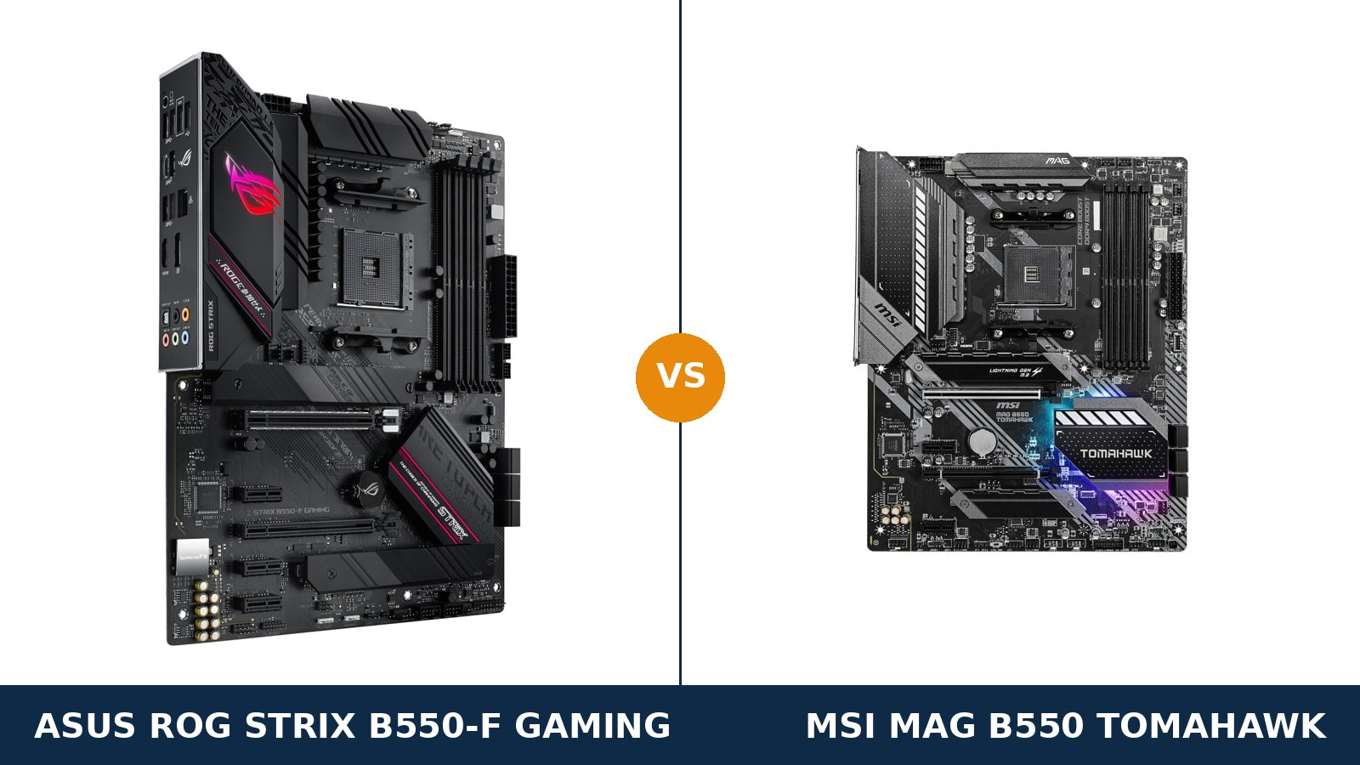
This is the B550 title fight. These are the two boards everyone shortlists.
The ASUS ROG Strix B550-F Gaming and the MSI MAG B550 Tomahawk sit at the top of the B550 class, and they have split buyers since the day they launched. Same chipset. Same socket. Same promise: X570-grade features without the X570 fan or the X570 price.
So why is the choice so hard? Because each board spends its budget in a different place. ASUS spends on audio, rear-panel USB and ROG polish. MSI spends on networking, front-panel connectivity and heatsinks everywhere.
This guide settles it from the manufacturers' own specification pages. Every figure below is checkable. The verdict at the end is the one we would give a friend.
Key Takeaways
- The Tomahawk is the more complete all-rounder. Dual LAN, a front USB-C header and heatsinks on both M.2 slots.
- The Strix B550-F is the audio and rear-I/O board. SupremeFX S1220A sound and eight rear USB ports, including USB 3.2 Gen 2 Type-C.
- Power delivery is a genuine tie at the top. ASUS's 12+2 teamed stages and MSI's 10+2+1 Duet Rail both handle any AM4 processor.
- Neither board here has Wi-Fi. This comparison covers the base Strix B550-F Gaming — ASUS sells separate Wi-Fi variants, and they are different products.
- Watch the Strix's second M.2 slot. Populating it disables two of its SATA ports; the Tomahawk has no such catch.
Quick Verdict
Buy the MSI MAG B550 Tomahawk for most builds. It is the most complete B550 board of the two.
It is the only one with two Ethernet ports. The only one with a front-panel USB-C header. And the only one that cools both M.2 drives with proper heatsinks.
For a gaming or workstation build you intend to keep for years, that completeness wins. Narrowly, but clearly.
Buy the ASUS ROG Strix B550-F Gaming if audio and the rear panel matter to you. Its SupremeFX S1220A codec is a class above the Tomahawk's ALC1200, and its eight rear USB ports — Gen 2 Type-C included — are the better rear panel.
Streamers, headphone users and ROG loyalists: this is your board. Everyone else should start with the Tomahawk and argue their way out of it.
The Scorecard
Scores below are derived directly from the manufacturer specifications compared in this guide — phase designs, slot counts, port counts and supported standards. They are a reading aid, not benchmark results.
| Category | Strix B550-F | B550 Tomahawk | ||
|---|---|---|---|---|
| Power delivery | 9 / 10 | 9 / 10 | ||
| Expansion | 8 / 10 | 7 / 10 | ||
| Storage | 8 / 10 | 9 / 10 | ||
| Memory | 9 / 10 | 9 / 10 | ||
| Networking | 7 / 10 | 9 / 10 | ||
| Audio | 9 / 10 | 7 / 10 | ||
| USB connectivity | 8 / 10 | 8 / 10 | ||
| Overall | 8.3 / 10 | 8.4 / 10 | ||
One tenth of a point. That is how close this is. The Tomahawk edges it on completeness; the Strix answers with the best audio and rear panel in the class.
At a Glance: Who Each Board Fits
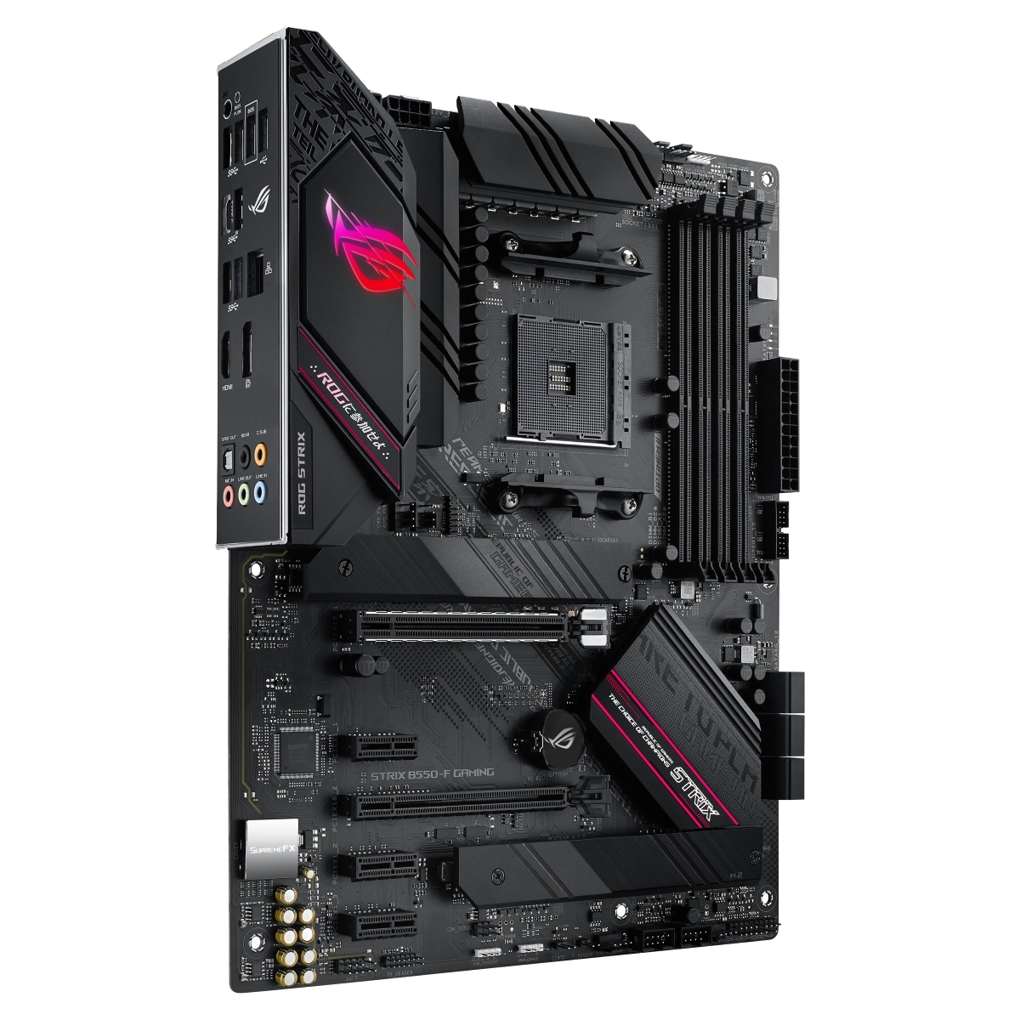
ASUS ROG Strix B550-F Gaming
- 12+2 teamed power stages with ProCool connectors
- SupremeFX S1220A audio, 120 dB SNR playback
- 8 rear USB ports, incl. USB 3.2 Gen 2 Type-C
- Intel I225-V 2.5 Gb Ethernet
- BIOS FlashBack, Q-LED debug, pre-mounted I/O shield
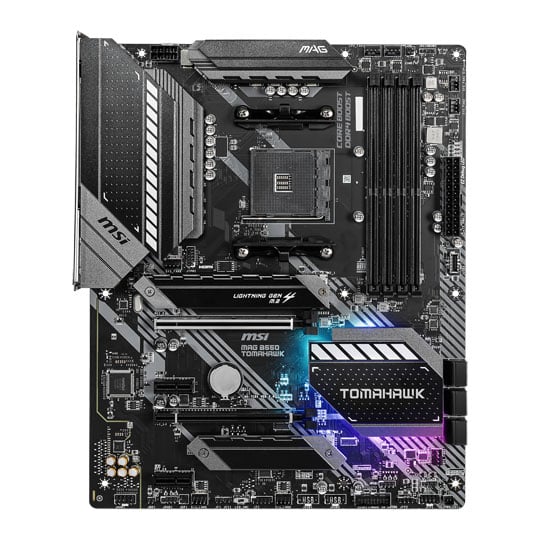
MSI MAG B550 Tomahawk
- 10+2+1 Duet Rail VRM with extended heatsinks
- Dual LAN: 2.5 Gb + Gigabit Ethernet
- Front-panel USB 3.2 Gen 1 Type-C header
- Heatsinks on both M.2 slots (M.2 Shield Frozr)
- Flash BIOS Button, Steel Armor graphics slot
Choose the Strix B550-F Gaming if…
You listen through good headphones and can hear the difference a better codec makes. ASUS's SupremeFX implementation is the real thing, not a sticker.
You plug a lot into the back of the PC. Eight rear USB ports, two of them 10 Gbps, is the stronger rear panel.
You like the ROG ecosystem: Armoury Crate, Aura Sync, and a BIOS layout many builders consider the friendliest on AM4.
Choose the MAG B550 Tomahawk if…
You want the most complete board for the money. Dual LAN and a front USB-C header are features the Strix simply does not offer at any setting.
Your case has a front USB-C port you actually want to use. On the Strix it would sit dead; on the Tomahawk it works.
You plan to run two fast NVMe drives long-term. Both get heatsinks here, and no SATA ports disappear when the second drive goes in.
As an Amazon Associate I earn from qualifying purchases at no extra cost to you.
Specifications: The Specs That Actually Matter
Every figure below is taken from ASUS's and MSI's published specifications for these exact models, cross-checked against the manufacturers' product data.
One naming warning before the table: this is the base ROG Strix B550-F Gaming, without Wi-Fi. ASUS also sells a B550-F Gaming (Wi-Fi) and a later WiFi II. Different boards, different listings — check before you buy.
| Specification | ASUS ROG Strix B550-F Gaming | MSI MAG B550 Tomahawk |
|---|---|---|
| Form factor | ATX, 30.5 × 24.4 cm | ATX, 30.5 × 24.4 cm |
| Socket / chipset | AMD AM4 / B550 | AMD AM4 / B550 |
| CPU support | Ryzen 5000, 5000 G, 4000 G, 3000 series | Ryzen 5000 & 3000, 4000 G-Series (not 3200G/3400G) |
| VRM design | 12+2 teamed power stages, ProCool 8+4 pin | 10+2+1 Duet Rail, digital PWM, extended heatsinks |
| Memory | 4 × DDR4 DIMM, up to 128 GB, OptiMem II | 4 × DDR4 DIMM, up to 128 GB, 5100 MT/s+ (O.C.) |
| Graphics outputs (APU) | HDMI 2.1 (4K@60), DisplayPort 1.2 | HDMI, DisplayPort |
| Expansion slots | PCIe 4.0 x16 SafeSlot + PCIe 3.0 x16 (x4) + 3 × PCIe 3.0 x1 | PCIe 4.0 x16 Steel Armor + PCIe 3.0 x16 (x4) + 2 × PCIe 3.0 x1 |
| M.2 storage | 2 slots: PCIe 4.0 x4 (22110) + PCIe 3.0 x4 (22110); heatsink on primary slot | 2 slots: PCIe 4.0 x4 (22110) + PCIe 3.0 x4; heatsinks on both slots |
| SATA | 6 × SATA 6 Gb/s, RAID 0/1/10 (ports 5/6 disabled if M.2_2 populated) | 6 × SATA 6 Gb/s, RAID 0/1/10 |
| LAN | Intel I225-V 2.5 Gb Ethernet | Realtek 2.5 Gb + Realtek Gigabit (dual LAN) |
| Audio | ROG SupremeFX S1220A, 7.1 HD, 120 dB SNR playback, optical S/PDIF | Realtek ALC1200, 7.1 HD, optical S/PDIF |
| USB (rear) | 8 ports: 2 × USB 3.2 Gen 2 (Type-A + Type-C), 4 × Gen 1, 2 × USB 2.0 | 6 ports: USB 3.2 Gen 2 Type-C + Type-A, 2 × Gen 1, 2 × USB 2.0 |
| Front USB-C header | None | Yes — USB 3.2 Gen 1 Type-C |
| BIOS flashing | BIOS FlashBack button (no CPU/RAM/GPU needed) | Flash BIOS Button (no CPU/RAM/GPU needed) |
| Wi-Fi | None (separate Wi-Fi variants exist) | None |
Memory note: ASUS publishes the Strix's memory speeds by processor generation — 4400 MT/s (O.C.) in its 3rd Gen Ryzen table, with higher overclocking tables for later G-series chips. MSI prints a single headline figure of 5100 MT/s+ (O.C.). In practice both boards run the same sensible 3200–3600 MT/s kits identically; do not buy either board on its memory headline.
Variant note: the Strix B550-F Gaming (Wi-Fi) adds an Intel Wi-Fi 6 AX200 module to this same board design, and the later WiFi II moves to Wi-Fi 6E. Everything else in this comparison concerns the wired base model in the keyword — the one with no antenna posts on its rear panel.
The Differences That Actually Matter
1. Power delivery — two strong designs, one honest tie
ASUS runs 12+2 teamed power stages. MSI runs a 10+2+1 Duet Rail design with a digital controller and extended heatsinks.
The numbers look different. The outcome is not. Both VRMs were designed to laugh at a Ryzen 9 5950X, let alone the Ryzen 5 and 7 chips most B550 builds actually run.
ASUS feeds its stages through ProCool solid-pin connectors, an 8-pin plus a 4-pin. MSI answers with oversized heatsinks — the Tomahawk's VRM cooling is visibly the beefier of the two.
For sustained all-core work in a warm case, we would give MSI's heatsink mass the slightest of edges. For electrical design bragging rights, ASUS's stage count takes it.
Net result: a tie, and a luxurious one. This is the last reason to choose between these boards.
2. Audio — the Strix's clearest win
Here the gap is real. ASUS fits its SupremeFX S1220A codec with dual OP amplifiers, premium capacitors and full shielding.
ASUS rates playback at 120 dB SNR. That is a specification the Tomahawk's Realtek ALC1200 does not match.
The ALC1200 is a perfectly respectable codec. In most B550 boards it would be a selling point. Here it is simply outclassed.
If you drive good headphones or powered speakers straight from the board, the Strix sounds cleaner. That is not marketing; it is in the published signal-to-noise figures.
Using a USB DAC or a dedicated sound card anyway? Then this entire section scores zero for both boards, and you should decide elsewhere.
3. Networking — the Tomahawk's clearest win
Both boards have 2.5-gigabit Ethernet. ASUS uses Intel's I225-V controller; MSI uses Realtek's RTL8125B.
Then MSI adds a second port: a full gigabit Realtek connection alongside the 2.5G port. Dual LAN, on a B550 board.
Who needs two Ethernet ports? Home-lab builders. Streamers separating game traffic from stream traffic. Anyone running the PC as a small server or router-adjacent box.
If that is you, this section ends the comparison. The Strix cannot answer it — one port is one port.
If it is not you, the ports are equal in daily use, and ASUS's LANGuard surge protection is a nice consolation. But the hardware win belongs to MSI.
4. USB — rear panel vs front panel, pick your battlefield
Count the rear ports and ASUS wins: eight against six. Both boards offer USB 3.2 Gen 2 in Type-A and Type-C at the back.
ASUS adds four USB 3.2 Gen 1 ports where MSI fits two. For desks crowded with peripherals, drives and dongles, that difference is felt weekly.
Now walk to the front of the case. MSI provides a USB 3.2 Gen 1 Type-C front-panel header. ASUS provides none.
Modern cases ship with a front USB-C port. On the Tomahawk, it works. On the Strix, it is a decorative hole in your front panel — forever.
Neither board wins USB outright. ASUS owns the back, MSI owns the front. Which matters more is a question about your case and your desk, not about the boards.
5. Storage — both fast, one small print difference
The headline storage story is identical. A PCIe 4.0 x4 M.2 slot from the CPU. A PCIe 3.0 x4 M.2 slot from the chipset. Six SATA ports.
Both primary slots accept drives up to 22110 length. Both boards support RAID 0, 1 and 10 on SATA.
Now the differences. MSI fits its M.2 Shield Frozr heatsinks to both slots. ASUS heatsinks the primary slot and leaves the second bare.
Gen 3 drives run cool either way, so the bare slot is no tragedy. But sustained writes on a fast second drive will thank MSI for the metal.
Second difference, and it matters more: populate the Strix's M.2_2 slot and its SATA ports 5 and 6 switch off. ASUS prints this in its own specification.
Two NVMe drives plus six SATA drives is an unusual build — but if it is yours, the Strix quietly becomes a four-SATA board. The Tomahawk makes no such trade.
6. Expansion — a slot-count edge for ASUS
Both graphics slots are armoured and run PCIe 4.0 x16 with a Ryzen 5000 or 3000 processor. ASUS calls its version SafeSlot; MSI calls its Steel Armor. Same idea, same result.
Both boards add a physical x16 slot wired at x4 for a second card. Capture cards, storage controllers and network cards are equally at home.
The difference is in the small slots: three PCIe 3.0 x1 on the Strix, two on the Tomahawk.
One extra x1 slot will not change most builds. But it is free flexibility, and on the Strix it comes with a caveat printed in ASUS's spec: the x4 slot shares bandwidth with those three x1 slots.
Verdict on expansion: ASUS by a nose, for the extra slot. Most builders will never use the difference.
7. The small stuff — debug, shields and software
ASUS fits its four-LED Q-LED debug system, which tells you at a glance whether a failed boot is CPU, memory, graphics or boot device. MSI's EZ Debug LEDs do the same job in simpler form. Both beat guessing.
Both boards flash their BIOS from a button with no processor installed — ASUS calls it BIOS FlashBack, MSI calls it the Flash BIOS Button. Identical feature, different badge.
The Strix's I/O shield comes pre-mounted. It is a small mercy that every builder who has forgotten one at the end of a build will appreciate.
Software divides opinion more than hardware does. ASUS's Armoury Crate and Aura Sync run your lighting and fans from one place; MSI counters with Mystic Light and its own Center software.
Neither suite is beloved. Both work. If you already live in one ecosystem, that familiarity is a legitimate tiebreaker.
CPU Pairing Guide
Start from the processor and this comparison mostly resolves itself. Both boards were built for the top of the AM4 stack.
| Your processor | Strix B550-F | B550 Tomahawk | Our call |
|---|---|---|---|
| Ryzen 5 5600 / 5600X | Excellent | Excellent | Either — decide on features, not the CPU |
| Ryzen 7 5700X / 5800X | Excellent | Excellent | Either — both VRMs are oversized for these |
| Ryzen 7 5800X3D | Excellent (update BIOS first) | Excellent (update BIOS first) | Either — a flagship AM4 gaming pairing |
| Ryzen 9 5900X / 5950X | Excellent — 12+2 stages | Excellent — heatsink mass | Dead tie; pick on LAN, audio or USB |
| Ryzen 5 5600G / 5700G (APU) | Excellent — HDMI 2.1 + DP 1.2 out | Excellent — HDMI + DP out | Either; the Strix's display outputs are better documented |
| Ryzen 3000 (3600, 3700X) | Excellent, PCIe 4.0 unlocked | Excellent, PCIe 4.0 unlocked | Either |
| Ryzen 3200G / 3400G | Not the intended pairing — check ASUS's CPU list | Not supported (MSI states this explicitly) | Neither — use a B450 board instead |
Read the last row twice if you are recycling an old APU. These are flagship B550 boards aimed at Ryzen 3000 and 5000; the oldest G-series chips are not what either was built for.
Ready to check today’s price?
Both boards sell through Amazon. Prices move, so check the live figure on the board that fits your build.
View on Amazon — Strix B550-FView on Amazon — B550 TomahawkThe 30-Second Decision
| If this sounds like you… | Buy this |
|---|---|
| “I want the most complete B550 board, full stop.” | MSI MAG B550 Tomahawk |
| “I game on good headphones plugged into the PC.” | ASUS ROG Strix B550-F Gaming |
| “My case has a front USB-C port and I refuse to waste it.” | MSI MAG B550 Tomahawk |
| “I need two Ethernet connections — home lab, streaming, server duties.” | MSI MAG B550 Tomahawk |
| “Everything plugs into the back of my PC.” | ASUS ROG Strix B550-F Gaming |
| “Two NVMe drives and a pile of SATA drives.” | MSI MAG B550 Tomahawk |
| “Whichever is cheaper this week.” | Legitimate — this matchup is that close |
What You Gain. What You Give Up.
ASUS ROG Strix B550-F Gaming
You gain: the best onboard audio in the B550 class, an eight-port rear panel with Gen 2 speeds on two of them, an extra x1 expansion slot, Q-LED debugging and a pre-mounted I/O shield.
You give up: the second Ethernet port, the front USB-C header, a heatsink on the second M.2 slot — and two SATA ports whenever that second slot is populated.
MSI MAG B550 Tomahawk
You gain: dual LAN, a working front USB-C connection, heatsinks on both M.2 slots, all six SATA ports in every configuration, and extended VRM heatsinks.
You give up: audio quality — the ALC1200 trails the SupremeFX codec — plus two rear USB ports and one x1 slot against the Strix.
Pros and Cons
Strix B550-F Gaming — Pros
- SupremeFX S1220A audio, 120 dB SNR playback
- 8 rear USB ports incl. Gen 2 Type-C
- 12+2 teamed power stages, ProCool connectors
- Q-LED debug display and pre-mounted I/O shield
- Three PCIe x1 slots
Cons
- No front-panel USB-C header
- Single Ethernet port
- M.2_2 use disables SATA ports 5/6
- Second M.2 slot has no heatsink
- No Wi-Fi on this variant
MAG B550 Tomahawk — Pros
- Dual LAN: 2.5 Gb + Gigabit
- Front USB 3.2 Gen 1 Type-C header
- Heatsinks on both M.2 slots
- 10+2+1 VRM with extended heatsinks
- All six SATA ports always available
Cons
- ALC1200 audio trails the Strix
- Six rear USB ports, not eight
- Two PCIe x1 slots, not three
- No Wi-Fi
- Ryzen 3200G / 3400G explicitly unsupported
Check the Variant and the Bundle, Not Just the Board
Check the Strix variant. Three boards share this name family, and listings blur them constantly.
The base B550-F Gaming in this guide has no Wi-Fi and no antenna posts on its rear panel. The B550-F Gaming (Wi-Fi) adds Wi-Fi 6. The WiFi II is a later refresh with Wi-Fi 6E.
If the listing photo shows antenna connectors, it is not the board in this comparison. Match the model name exactly before the price seduces you.
Check the CPU pairing. Both boards flash their BIOS from a button with no CPU fitted. An older-stock board can be updated for a Ryzen 5000 or 5800X3D in minutes.
Do that update before the build, not after the first failed boot. Both manufacturers publish per-model CPU support lists; your exact chip and board revision are what count.
Check the bundle. The Strix ships with four SATA cables — generous for the class. Expect two from MSI, an I/O shield (pre-mounted on the ASUS) and the usual M.2 hardware from both.
Neither box includes Wi-Fi antennas, because neither of these boards has Wi-Fi. If a listing promises antennas in the box, you are looking at a different variant.
The Upgrade Path Test
Flagship B550 boards earn their price in year three, not week one.
Both boards start life identically under a Ryzen 5: same frame rates, same load times, same everything that shows up in a game.
The upgrades arrive later. A discounted Ryzen 9 drops straight into both sockets — both VRMs were built for exactly that moment.
A second NVMe drive arrives. On the Tomahawk it gets a heatsink and costs nothing. On the Strix it costs two SATA ports, if you were using them.
A new case arrives, with front USB-C. The Tomahawk lights it up. The Strix leaves it dark.
Neither board will be the reason an AM4 build feels old. The platform itself will retire first — and until then, both of these are endgame B550 boards.
When to Skip Both
Honesty cuts both ways. Some builders should walk past this entire matchup.
Skip both if you need Wi-Fi out of the box. ASUS will sell you a Strix variant with it; MSI's B550 range answers with its own wireless models. Do not buy a wired board and a dongle out of stubbornness.
Skip both if your budget is genuinely tight. Boards a class below run a Ryzen 5 5600 and a mid-range graphics card identically — the money saved buys memory or storage you will actually feel.
Skip both if you are building micro-ATX. These are full ATX boards and no amount of optimism changes a spec sheet.
And skip both if you are starting a brand-new high-end build with no AM4 parts on hand. The newer AM5 platform is where a fresh flagship budget belongs; these two are the kings of the previous one.
BIOS and Long-Term Support
AM4 is a finished, mature platform. For boards of this class, that is a feature.
Both ASUS and MSI maintain full support pages for these models: BIOS updates, chipset drivers, and per-model CPU support lists that still get revised when a new chip or a security patch requires it.
Expect future BIOS releases to be about AGESA updates, security and edge-case compatibility. Neither board needs more than that to run any AM4 processor ever released for it.
Both brands also carry the platform's institutional knowledge: the memory training quirks, the USB oddities of early AGESA versions, all long since documented and fixed.
One habit worth keeping: update the BIOS before a CPU swap, using the flash button if the new chip will not boot on the old firmware. On either board it is a ten-minute, no-drama job.
Final Verdict
The MSI MAG B550 Tomahawk is the B550 board we would buy.
Not by much — this is the closest flagship matchup on the platform. But completeness is completeness.
It is the board with two network ports instead of one. The board whose front USB-C header works. The board that heatsinks both its M.2 slots and never asks you to trade SATA ports for storage.
Buy the Tomahawk for gaming builds, home-lab and streaming rigs, dual-drive storage plans, and any PC you intend to keep upgrading until AM4 itself retires.
View on Amazon — B550 Tomahawk
Buy the Strix B550-F Gaming if your ears are the deciding organ. Its SupremeFX audio is a genuine class above, its rear panel is the stronger one, and the ROG BIOS and lighting ecosystem is a real quality-of-life edge.
It loses this comparison on completeness, not on quality. For an audio-first gaming build, it is not the runner-up — it is the right answer.
Frequently Asked Questions
Is the MSI B550 Tomahawk better than the ASUS B550-F?
Overall, narrowly, yes — it is the more complete board, with dual LAN, a front-panel USB-C header and heatsinks on both M.2 slots. The Strix B550-F counters with clearly better onboard audio and more rear USB ports. Which is "better" depends on which of those you will actually use.
Does the ASUS ROG Strix B550-F Gaming have Wi-Fi?
No. The base B550-F Gaming in this comparison is a wired-only board. ASUS sells a separate B550-F Gaming (Wi-Fi) with Wi-Fi 6 and a later WiFi II with Wi-Fi 6E — different models with different listings. If the rear panel shows antenna connectors, it is not this board.
Which board is better for a Ryzen 9 5950X?
Both were built for it. ASUS's 12+2 teamed power stages and MSI's 10+2+1 Duet Rail design with extended heatsinks both run a 5950X at full performance. Choose on networking, audio or USB instead — the VRMs will not separate them.
Can both boards run a Ryzen 7 5800X3D?
Yes. The 5800X3D is an AM4 chip and both boards support it — just update the BIOS first if your board shipped with early firmware. Both boards can be flashed from a button with no processor installed, so this is a ten-minute job.
Which board has better audio?
The ASUS, clearly. Its SupremeFX S1220A codec with dual OP amplifiers is rated at 120 dB SNR for playback. The Tomahawk's Realtek ALC1200 is a solid mainstream codec but a class below. Headphone users will hear the difference; USB DAC users will not, because the codec is bypassed.
Does the Tomahawk really have two Ethernet ports?
Yes — a 2.5-gigabit Realtek port and a gigabit Realtek port. It is unusual at this level and genuinely useful for home labs, streaming setups that separate traffic, and small-server duties. The Strix has a single Intel 2.5-gigabit port.
What happens when I install a second M.2 drive?
On the Tomahawk, nothing else changes — both slots are heatsinked and all six SATA ports stay live. On the Strix, the second M.2 slot (M.2_2) has no heatsink, and populating it disables SATA ports 5 and 6, per ASUS's own specification.
Is either board a good upgrade from B450?
Yes, if you want PCIe 4.0 for a current graphics card and NVMe drive, plus the stronger VRMs for a Ryzen 5000 upgrade. If your B450 board already runs your chip well and you do not need PCIe 4.0, the honest answer is to keep it and spend the money elsewhere.
Sources & Verification
ASUS ROG Strix B550-F Gaming official specifications, rog.asus.com • MSI MAG B550 Tomahawk official specifications and datasheet, msi.com • ASUS and MSI retail product data for ROG Strix B550-F Gaming (12+2 power stages, ASIN-verified listing) and MAG B550 Tomahawk (10+2+1 Duet Rail, ASIN-verified listing). Audio codec note: MSI's spec summary lists ALC1200 / ALC1220P; independent reviews identify the fitted Tomahawk codec as the Realtek ALC1200, which this guide uses. Specifications verified November 2026.

James Wilson
James has been building and benchmarking PCs for over a decade and writes Honestly Compared's motherboard and component guides. His rule for every comparison: the verdict has to survive the spec sheet, not the marketing page.