
MSI B450 Tomahawk MAX vs MSI B450 Gaming Plus MAX: Which Should You Buy?
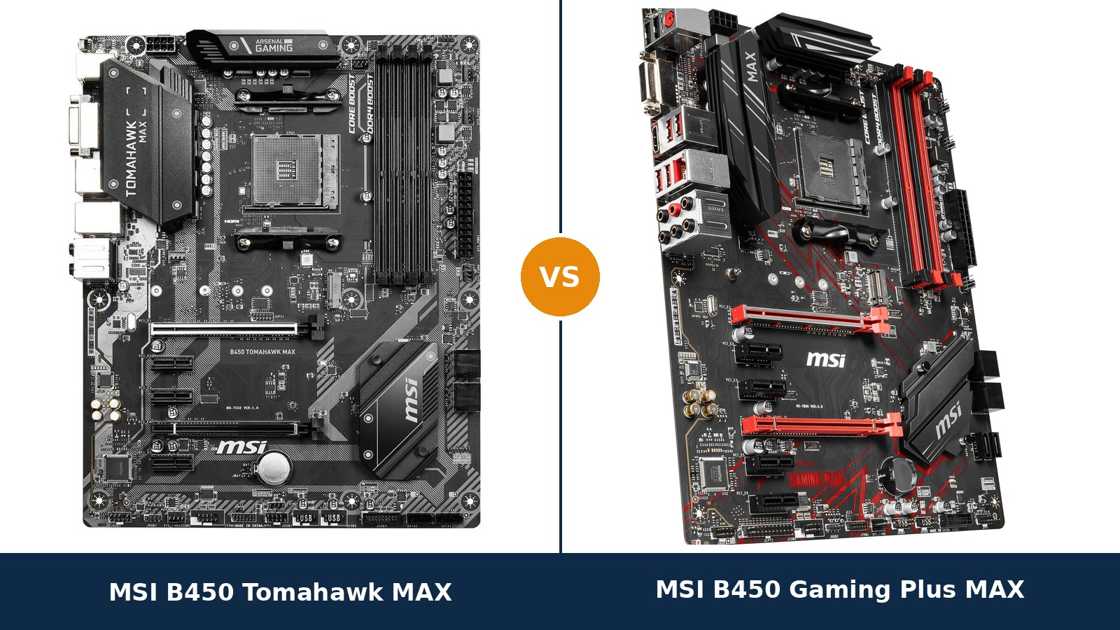
Two boards. Same maker. Same chipset. Same MAX badge.
When MSI refreshed its B450 range for Ryzen 3000, it applied the same fix to both of these boards: a bigger BIOS chip, full graphical firmware, and support for the new processors out of the box. That shared fix is exactly what makes this matchup confusing.
If the platform, the memory support and the CPU support are all identical, what are you actually choosing between? The answer is the design work around that platform — cooling, rear-panel connections and expansion — plus the character of two different MSI product lines.
This guide separates the twins properly. Every specification below comes from MSI's own published data.
Key Takeaways
- Both are MAX boards. The 32 MB BIOS chip, Ryzen 3000 support out of the box, full Click BIOS 5 and a Ryzen 5000 upgrade path are shared — a tie where it matters most.
- The Tomahawk MAX wins the rear panel. Its USB 3.2 Gen 2 pair includes a Type-C port; the Gaming Plus MAX offers two Type-A ports and no USB-C anywhere.
- The Gaming Plus MAX wins small-slot count. Four PCIe x1 slots against the Tomahawk MAX's three.
- Storage and memory are dead ties. One M.2 slot each, the same SATA trade-off on both, the same DDR4 ceiling.
- The Tomahawk MAX is the safer high-core pick thanks to its extended heatsink design; the Gaming Plus MAX is the value twin when it sells for less.
Quick Verdict
Buy the MSI B450 Tomahawk MAX for most builds. It is the more complete version of this shared platform.
It carries MSI's extended heatsink design over the power stages. It is the only one of the two with a USB-C port. And it comes from the Tomahawk line, the B450 range's benchmark for running high-core Ryzen processors on a budget.
Buy the MSI B450 Gaming Plus MAX if it is clearly cheaper, or if you genuinely need a fourth x1 slot. Underneath the red accents sits the same MAX platform: same BIOS chip, same memory ceiling, same CPU support.
For a Ryzen 5 build with a single graphics card, the Gaming Plus MAX gives up nothing you will feel. Spend the saving on the parts that decide frame rates.
The Scorecard
Scores below are derived directly from the manufacturer specifications compared in this guide — heatsink design, slot counts, port counts and supported standards. They are a reading aid, not benchmark results.
| Category | B450 Tomahawk MAX | B450 Gaming Plus MAX | ||
|---|---|---|---|---|
| Power delivery & cooling | 8 / 10 | 7 / 10 | ||
| Expansion | 7 / 10 | 8 / 10 | ||
| Storage | 7 / 10 | 7 / 10 | ||
| Memory | 9 / 10 | 9 / 10 | ||
| USB & connectivity | 8 / 10 | 7 / 10 | ||
| Networking & audio | 7 / 10 | 7 / 10 | ||
| Overall | 8.0 / 10 | 7.6 / 10 | ||
The pattern is a split decision. The Tomahawk MAX wins the categories tied to heat and the rear panel. The Gaming Plus MAX wins the slot count. Everything structural — BIOS, memory, storage, CPU support — is shared.
At a Glance: Who Each Board Fits
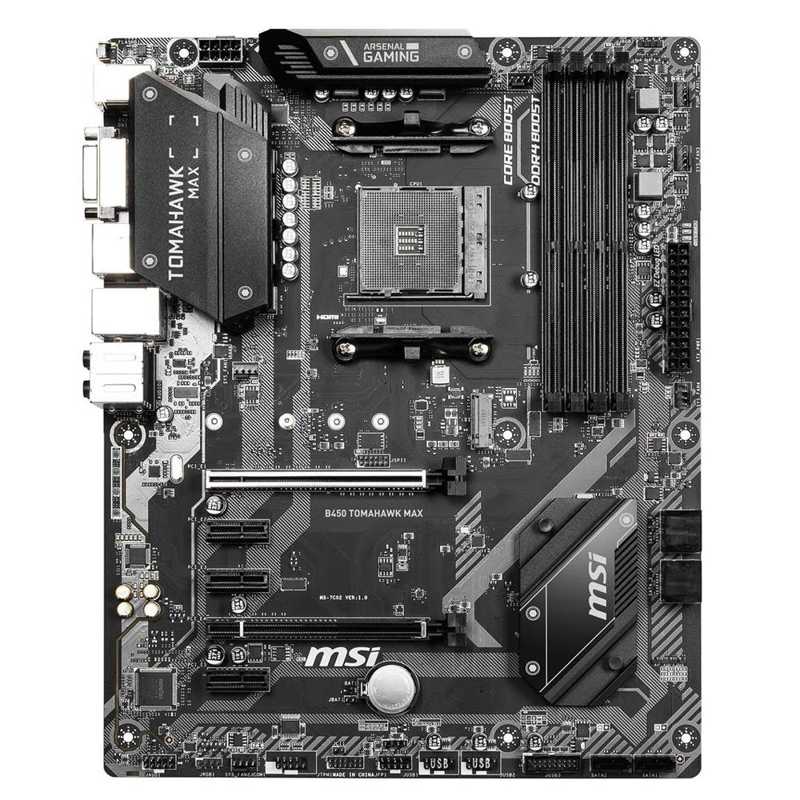
MSI B450 Tomahawk MAX
- 32 MB BIOS chip, full Click BIOS 5, Ryzen 3000 out of the box
- Extended heatsink design over the power stages
- USB 3.2 Gen 2 Type-C + Type-A at the rear
- Three PCIe x1 slots alongside the two x16 slots
- Grey-and-black Arsenal Gaming styling
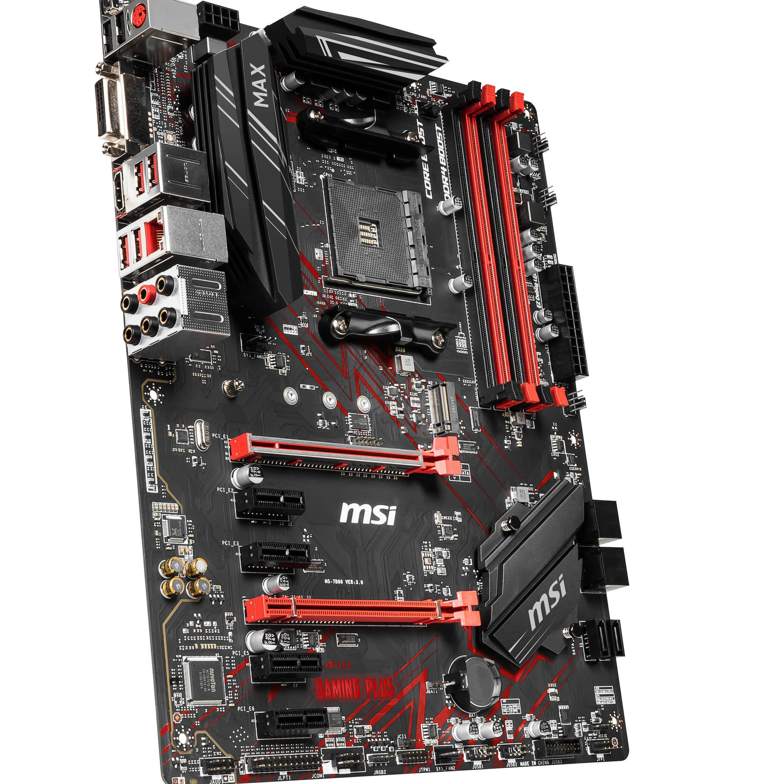
MSI B450 Gaming Plus MAX
- 32 MB BIOS chip, full Click BIOS 5, Ryzen 3000 out of the box
- Four PCIe x1 slots — the most in this pairing
- Two USB 3.2 Gen 2 Type-A ports at the rear, no USB-C
- Red-accented MPG gaming styling
- Often the cheaper of the two MAX boards
Choose the B450 Tomahawk MAX if…
You are building with a Ryzen 7 or Ryzen 9. Or you might upgrade to one later, and want the coolest-running power stages in this pairing.
You own anything USB-C — an external SSD, a dock, a capture device — and want the fast Gen 2 port at the rear.
You prefer the muted grey-and-black look. Or you simply want the version of this platform with the fewest compromises.
Choose the B450 Gaming Plus MAX if…
It is meaningfully cheaper when you order. The platform underneath is identical, and for a Ryzen 5 build the differences shrink to the rear panel.
You run several small add-in cards — a sound card, a Wi-Fi card, a serial or capture card — and will actually use a fourth x1 slot.
Or your build is themed black and red. This is the board MSI designed for exactly that case window.
As an Amazon Associate I earn from qualifying purchases at no extra cost to you.
Specifications: The Specs That Actually Matter
Every figure below is taken from MSI's published specifications, datasheets and manuals for the two boards, cross-checked against each other.
Read the first five rows carefully. They are the MAX inheritance, and they are identical — which is why this comparison is decided further down the table.
| Specification | MSI B450 Tomahawk MAX | MSI B450 Gaming Plus MAX |
|---|---|---|
| Form factor | ATX, 30.5 × 24.4 cm | ATX, 30.5 × 24.4 cm |
| Socket / chipset | AMD AM4 / B450 | AMD AM4 / B450 |
| CPU support, out of the box | Ryzen 1000/2000/3000, Ryzen with Radeon graphics, Athlon with Vega graphics | Ryzen 1000/2000/3000, Ryzen with Radeon graphics, Athlon with Vega graphics |
| BIOS chip | 32 MB (256 Mb) flash | 32 MB (256 Mb) flash |
| BIOS interface | Full Click BIOS 5 graphical interface | Full Click BIOS 5 graphical interface |
| VRM heatsinks | Extended heatsink design, enlarged coverage over the power stages | Gaming heatsinks over the power stages |
| Memory | 4 × DDR4 DIMM, up to 128 GB, 4133 MT/s (O.C.) with Ryzen 3000, A-XMP | 4 × DDR4 DIMM, up to 128 GB, 4133 MT/s (O.C.) with Ryzen 3000, A-XMP |
| Graphics outputs (APU) | HDMI 1.4, DVI-D | HDMI 1.4, DVI-D |
| PCIe x16 slots | PCIe 3.0 x16 + PCIe 2.0 x16 (x4), 2-way CrossFire | PCIe 3.0 x16 + PCIe 2.0 x16 (x4), 2-way CrossFire |
| PCIe x1 slots | 3 × PCIe 2.0 x1 | 4 × PCIe 2.0 x1 |
| M.2 storage | 1 × Turbo M.2, PCIe 3.0 x4 / SATA, 2242–22110 | 1 × Turbo M.2, PCIe 3.0 x4 / SATA, 2242–22110 |
| SATA | 6 × SATA 6 Gb/s, RAID 0/1/10 (ports 5/6 unavailable with an M.2 drive fitted) | 6 × SATA 6 Gb/s, RAID 0/1/10 (ports 5/6 unavailable with an M.2 drive fitted) |
| LAN | Realtek 8111H GbE | Realtek 8111H GbE |
| Audio | Realtek ALC892, 7.1 HD, Audio Boost | Realtek ALC892/ALC897, 7.1 HD, Audio Boost |
| USB (rear) | 2 × USB 3.2 Gen 2 (Type-A + Type-C), 2 × USB 3.2 Gen 1, 2 × USB 2.0 | 2 × USB 3.2 Gen 2 (Type-A only), 2 × USB 3.2 Gen 1, 2 × USB 2.0 |
| BIOS flashing | Flash BIOS Button (no CPU/RAM/GPU needed) | Flash BIOS Button (no CPU/RAM/GPU needed) |
Three notes before you use this table. First, the 4133 MT/s memory figure on both boards applies with a Ryzen 3000 processor fitted; MSI's own tables cap older generations lower. It is a validation ceiling, not a promise for every kit.
Second, the Gaming Plus MAX's audio codec is listed by MSI as ALC892/ALC897. That slash is production variance — boards shipped with either chip. They sit in the same class, and we score audio as a tie because of it.
Third, both boards exist alongside MAX II revisions and non-MAX originals; the buying guide below covers telling them apart.
The Differences That Actually Matter
1. Power delivery and heatsinks — the Tomahawk's home turf
Start where the Tomahawk name earned its reputation. The original B450 Tomahawk became the default Ryzen recommendation largely because its power stages stayed cool under processors that made rival boards sweat.
The MAX keeps that design brief. MSI sells it on an extended heatsink design: large, finned blocks with visibly more coverage over the CPU power stages than the Gaming Plus MAX's gaming heatsinks.
Does the Gaming Plus MAX run hot? No. For Ryzen 5 and Ryzen 7 processors at stock settings, both boards are comfortably sufficient, and you will never feel the difference in a game.
The gap appears at the top of the AM4 stack and over time. A Ryzen 9 under sustained all-core load, in a warm case, is where heatsink coverage stops being cosmetic. The Tomahawk MAX simply has more metal doing that job.
Principle worth keeping: the graphics card and processor are easy upgrades. The board's cooling hardware is fixed for the life of the build. If a 12- or 16-core upgrade is even a possibility, this section decides your purchase.
2. Rear-panel USB — one port of difference
Here is the cleanest factual split in this entire comparison. Both boards offer six rear USB ports, and both reserve two of them for USB 3.2 Gen 2 speed.
The Tomahawk MAX splits its Gen 2 pair between one Type-A and one Type-C port. The Gaming Plus MAX makes both of them Type-A — and fits no USB-C connector anywhere on the board.
In 2026 that matters more than it did at launch. External NVMe enclosures, docks, capture devices and fast card readers increasingly ship USB-C first. On the Gaming Plus MAX, every one of them needs an adapter or a front-panel header your case may not wire up.
The rest is shared: two USB 3.2 Gen 1 ports, two USB 2.0 ports, gigabit Ethernet, the same display outputs and audio jacks, and matching front-panel headers.
If nothing you own uses USB-C and nothing you plan to buy will, score this section a draw and move on. Everyone else should count it as a real Tomahawk MAX win.
3. Expansion — the Gaming Plus MAX strikes back
The graphics-card story is identical. Both boards give your GPU a full PCIe 3.0 x16 slot, and both add a second physical x16 slot wired at x4 through the chipset, with 2-way CrossFire support that few buyers will ever use.
Below that, the Gaming Plus MAX wins a quiet round: four PCIe 2.0 x1 slots against three. One extra home for a small add-in card.
Be honest about what x1 slots carry: a Wi-Fi card, a sound card, a USB or serial card, a budget capture card. Most builders use one; very few use four.
So this is a genuine Gaming Plus MAX advantage with a narrow audience. If your parts drawer holds three or four small cards destined for this build, it is the deciding fact in this guide. If it holds none, it changes nothing — but it is the one specification where the cheaper board is strictly better equipped.
4. Storage — a genuine tie, trade-off included
Storage is where spec-sheet shopping goes to waste time. These two boards are line-for-line identical.
Both give you one Turbo M.2 slot at PCIe 3.0 x4, accepting NVMe and SATA drives from 2242 up to 22110 length. Both surround it with six SATA 6 Gb/s ports and RAID 0, 1 and 10.
Both also share the same B450-era catch: fit an M.2 drive and SATA ports 5 and 6 switch off, because the slot borrows their lanes. MSI prints that warning in both manuals. Realistically you get one NVMe drive plus four SATA devices — plenty for a gaming PC, a hard ceiling for a home-server build.
The shared limits matter more than any difference here. Neither board runs a second NVMe drive at full speed, and neither offers PCIe 4.0 storage. If two fast M.2 drives are in your plan, this comparison is not the one you should be reading — skip ahead to the When to Skip Both section.
Call storage a draw, honestly earned.
5. Memory and CPU support — the shared MAX inheritance
Everything the MAX badge promises, both boards deliver identically. That is the whole point of the badge, and it is worth stating plainly what it buys you.
The 32 MB BIOS chip means Ryzen 3000 processors work out of the box, with the full graphical Click BIOS 5 interface intact. The non-MAX originals had to slim their firmware down to fit newer CPUs. Neither of these boards makes that compromise.
It also means the support list was never pruned: the oldest AM4 processors stay supported alongside the newest the BIOS team validated, and Ryzen 5000 support arrived by BIOS update on both boards.
Memory matches too. Four DDR4 slots, up to 128 GB, and the same A-XMP overclocking ceiling of 4133 MT/s with a Ryzen 3000 processor. Both boards run a sensible 3200–3600 MT/s kit identically, which is what most AM4 builds should buy anyway.
One shared tool deserves a mention: both boards carry MSI's Flash BIOS Button. Any BIOS update — including the one that unlocks a Ryzen 5000 upgrade — can be applied with no processor, memory or graphics card installed. The safety net is equal, and it is excellent.
6. Audio and networking — a tie with a footnote
Networking first, because it takes one line: both boards use the same Realtek 8111H gigabit Ethernet controller. Same speed, same behaviour, no wireless on either. A perfect tie.
Audio is nearly as close. The Tomahawk MAX uses the Realtek ALC892 codec with MSI's Audio Boost treatment. The Gaming Plus MAX is listed by MSI with an ALC892/ALC897 pairing, meaning production boards shipped with either chip fitted.
If your Gaming Plus MAX happens to carry the ALC897, it is the marginally newer codec. If it carries the ALC892, the two boards are identical here. You cannot choose which one arrives, so no honest guide can award this round to either side.
In practice both are competent 7.1 HD implementations, and the rest of your audio chain will drown out any difference between them. Buy on the other sections.
7. Design and product lines — Arsenal grey or MPG red
The last difference is the one you can see from across the room, and it is legitimate to let it sway a close call.
The Tomahawk MAX comes from MSI's Arsenal Gaming line: gunmetal-grey heatsinks, a black PCB with grey striping, and a military stencil aesthetic. It disappears into a build rather than decorating it.
The Gaming Plus MAX comes from the MPG performance-gaming line: black board, red slot accents, red PCB graphics and red memory-slot clips. In a windowed case with a red theme, it is the board that looks intentional.
Both boards provide RGB strip headers and Mystic Light control, so lighting plans are not limited by either choice.
Neither look is better engineering. But builds live on desks for years, and this is the one section where “I prefer how it looks” is a complete and honest reason. Everything above it in this list is where the functional money goes.
CPU Pairing Guide
The fastest way to choose between these boards is to start from your processor. This table is the whole comparison in one view.
| Your processor | B450 Tomahawk MAX | B450 Gaming Plus MAX | Our call |
|---|---|---|---|
| Ryzen 5 3600 / 5600 | Excellent | Excellent | Buy whichever is cheaper |
| Ryzen 7 3700X / 5700X | Excellent — heatsink headroom | Very good at stock settings | Tomahawk MAX, unless the price gap is wide |
| Ryzen 9 3900X / 5900X / 5950X | Good — the sensible ceiling of the pair | Workable at stock, less cooling margin | Tomahawk MAX; consider B550 for a new build |
| Ryzen 5 3400G / 5600G (APU) | Good — HDMI 1.4 + DVI-D outputs | Good — same outputs | Dead tie; buy on price |
| Ryzen 1000/2000, upgrading later | Excellent — full support list kept | Excellent — full support list kept | Tie; both keep every generation supported |
Read the table's shape, not just its rows. The boards separate only as processor power climbs — everywhere else, your CPU cannot tell them apart.
Ready to check today’s price?
Both boards sell through Amazon. Prices move, so check the live figure on the board that fits your build.
View on Amazon — B450 Tomahawk MAXView on Amazon — B450 Gaming Plus MAXThe 30-Second Decision
| If this sounds like you… | Buy this |
|---|---|
| “Ryzen 7 or 9 now, or as my planned upgrade.” | B450 Tomahawk MAX |
| “I plug fast USB-C storage or a dock into the rear panel.” | B450 Tomahawk MAX |
| “Ryzen 5 build, one graphics card, tightest sensible budget.” | B450 Gaming Plus MAX (if cheaper) |
| “I have a stack of small PCIe cards to carry over.” | B450 Gaming Plus MAX (four x1 slots) |
| “Black-and-red build in a windowed case.” | B450 Gaming Plus MAX |
| “Whichever one is on sale this week.” | Legitimate — the platform underneath is identical |
What You Gain. What You Give Up.
MSI B450 Tomahawk MAX
You gain: the extended heatsink design, which is the pairing's best answer to high-core Ryzen processors under sustained load. A USB 3.2 Gen 2 Type-C port at the rear. And the Tomahawk line's conservative, upgrade-friendly design brief.
You give up: one PCIe x1 slot — three instead of four. And usually a little money, since the Tomahawk MAX typically sells at or above its twin. Nothing else: the platform, memory and storage are shared.
MSI B450 Gaming Plus MAX
You gain: a fourth PCIe x1 slot, the red-accented MPG styling, and frequently the lower price for the same MAX platform — same BIOS chip, same memory ceiling, same CPU support list.
You give up: USB-C entirely — every Gen 2 port is Type-A. And the Tomahawk's extended heatsink coverage, which only starts to matter with Ryzen 9-class processors and sustained all-core work.
Pros and Cons
B450 Tomahawk MAX — Pros
- Extended heatsink design over the power stages
- USB 3.2 Gen 2 Type-C at the rear
- 32 MB BIOS, Click BIOS 5, Ryzen 5000 path
- Flash BIOS Button for CPU-free updates
- Muted styling suits any build
Cons
- Three x1 slots, one fewer than its twin
- Single M.2 slot, like its twin
- Usually the pricier of the two
- No Wi-Fi — same as the Gaming Plus MAX
B450 Gaming Plus MAX — Pros
- Four PCIe x1 slots
- Same 32 MB BIOS and full CPU support list
- Often the cheaper MAX board
- Distinctive black-and-red MPG styling
- Flash BIOS Button for CPU-free updates
Cons
- No USB-C port anywhere
- Smaller heatsink coverage for Ryzen 9 loads
- Audio codec varies by production batch
- Single M.2 slot, like its twin
- No Wi-Fi
MAX, Non-MAX, MAX II: Check Which Board Is Actually in the Box
Check for the MAX name — in full. Both boards in this guide are the MAX refreshes of 2018 originals. The original B450 Tomahawk and B450 Gaming Plus carry a 16 MB BIOS chip; updated for Ryzen 3000, they fall back to a cut-down text-style BIOS and drop support for the oldest pre-Ryzen processors.
The MAX versions were built to end that compromise: 32 MB chip, full Click BIOS 5, nothing pruned. A listing missing the word MAX is a different, lesser board — however good the price looks.
Check against the MAX II revisions. During the component shortages MSI re-released boards under MAX II names, the B450 Tomahawk MAX II among them. They are close relatives, built to keep shelves stocked when parts ran short, but they are separate products with their own support pages and BIOS lines.
Nothing about a MAX II makes it a bad buy. Just know which one a listing is selling, because support pages, manuals and BIOS files are not interchangeable between the MAX and MAX II lines.
Check the board code if a listing is vague. The Tomahawk MAX is MSI's MS-7C02 family; the Gaming Plus MAX is MS-7B86. Both codes are printed on the PCB silkscreen, visible in any honest product photo.
The heatsinks tell the same story at a glance: Tomahawk MAX branding on the grey I/O cover for one, MAX printed on the black VRM heatsink and red slot accents for the other. Match the photo to the name before you pay.
Check the bundle expectations. Both boxes are from the same era and equally spartan: the board, an I/O shield, SATA cables and documentation. Neither includes Wi-Fi antennas, because neither board has Wi-Fi to feed them.
The Upgrade Path Test
These two boards pass the upgrade test together, because the test is mostly about the platform they share.
Start with a Ryzen 5 3600 today and both boards feel identical. Drop in a Ryzen 7 5700X in two years and both accept it with a BIOS update — full support list, no processors sacrificed, thanks to that 32 MB chip.
Finish the AM4 journey with a discounted Ryzen 9 or a 5800X3D-class gaming chip and the paths finally diverge. The Tomahawk MAX's heatsink coverage is the one you would rather own for the 12- and 16-core end of the socket.
The honest limit is shared too. AM4 is a finished platform: DDR4 ends here, PCIe 4.0 never arrives on B450, and the second M.2 slot neither board has is the upgrade you will miss first.
Buy either board as the last motherboard of an AM4 build and it will serve the whole life of that build. Just buy the Tomahawk MAX if that life includes the socket's biggest processors.
When to Skip Both
Honesty cuts both ways. There are builders neither of these boards serves well.
Skip both if you need a second NVMe drive — MSI's own B450M Mortar MAX adds one in a smaller format, and B550 boards make dual Gen4 storage routine. Skip both if you need Wi-Fi on the board itself; neither has it.
Skip both for a new high-end build in 2026. B550 successors bring PCIe 4.0 for graphics and storage at similar money, and AM5 sits above them for a fully new platform.
And skip both if you are shopping the used market at near-new prices. These boards earn their keep at MAX-board money; at a premium, the newer platforms are the smarter spend.
BIOS and Long-Term Support
AM4 is a mature platform, and both boards inherit the benefits: stable BIOS releases, settled drivers, and CPU support lists that have stopped moving.
Each board has its own MSI support page and BIOS line — download for the exact model name, not the family resemblance.
The Flash BIOS Button on both boards is the long-term insurance policy. A BIOS can be recovered or updated with nothing but a power supply and a USB stick, which is exactly the tool you want beside a five-year-old board.
One habit covers both: before any processor upgrade, update the BIOS first while the current CPU is still installed and known-good. Ten minutes of patience, once, beats a troubleshooting evening.
Final Verdict
The MSI B450 Tomahawk MAX is the board we would build on.
It does not win on the platform — that is shared, down to the last SATA port. It wins on the two things the Gaming Plus MAX cannot match: heatsink coverage for the processors at the top of the AM4 stack, and a USB-C port on the rear panel.
Those are exactly the things you cannot retrofit later. Slots you never fill and styling you stop noticing cost nothing; heat headroom and missing ports are forever.
Buy the Tomahawk MAX for Ryzen 7 and Ryzen 9 builds, for USB-C peripherals, and for any AM4 system you intend to keep upgrading to the end of the socket.
View on Amazon — B450 Tomahawk MAX
Buy the Gaming Plus MAX if it is meaningfully cheaper when you order. If your build is a Ryzen 5 system with a single graphics card. Or if a fourth x1 slot and red styling are worth more to you than a USB-C port.
It is the same MAX platform wearing gaming colours, and for the builds it suits, nothing about it will hold you back.
View on Amazon — B450 Gaming Plus MAX
Watch Out: Similar Names, Different Boards
MSI's B450 naming is a trap for the hurried buyer. Three warnings belong in every version of this guide.
First: the non-MAX originals. The B450 Tomahawk and B450 Gaming Plus without MAX in the name carry the smaller 16 MB BIOS chip and the firmware compromises that come with it. Same silhouettes, lesser boards.
Second: the MAX II revisions. The B450 Tomahawk MAX II is a separate, later product with its own BIOS line. Close to the MAX, not identical to it, and not what this comparison covers.
Third: the M-suffixed boards. The B450M Mortar MAX and its siblings are micro-ATX — different size, different slot layout, sometimes a second M.2 slot. A stray letter M in a listing changes the product entirely.
Slow down on the product page. Match the full model name, check the silkscreen board code in the photos — MS-7C02 for the Tomahawk MAX, MS-7B86 for the Gaming Plus MAX — then compare prices, in that order.
Case, Power and Cabling Notes
Both boards are full ATX, 30.5 × 24.4 cm. They fit ATX cases — check your case's stated maximum before assuming anything smaller works.
Both take a standard 24-pin main power connector and a single 8-pin EPS CPU power connector. Any reputable modern power supply covers this without adapters or splitters.
Fan control is a match. Each board provides a CPU fan header, a pump header and four system fan headers, with MSI's BIOS and software control over all of them. Neither board limits a sensible air or liquid cooling setup.
One cabling note applies to both: the single M.2 slot sits above the graphics card slot, clear of the GPU's backplate on typical cards.
And one shared limitation to plan around: neither board has a front-panel USB-C header. A case USB-C port will sit unconnected on both — the Tomahawk MAX's USB-C lives at the rear only.
Frequently Asked Questions
What is the difference between the B450 Tomahawk MAX and the Gaming Plus MAX?
Less than the names suggest. Both share the B450 platform, the 32 MB BIOS chip, memory support, storage layout and CPU support list. The real differences: the Tomahawk MAX has an extended heatsink design and a rear USB-C port; the Gaming Plus MAX has one extra PCIe x1 slot and red MPG styling.
Do both boards support Ryzen 5000 processors?
Yes, via a BIOS update. Both MAX boards were built around a 32 MB BIOS chip precisely so newer generations could be added without dropping older ones. Update the BIOS before swapping the processor, and confirm your exact CPU on MSI's support list for the board.
Which board is better for a Ryzen 9 5900X or 5950X?
The B450 Tomahawk MAX. Its extended heatsink design gives the power stages more cooling margin under sustained all-core loads. The Gaming Plus MAX will run these processors at stock settings, but the Tomahawk MAX is the safer long-term home for them — and for a brand-new Ryzen 9 build, a B550 board deserves a look too.
Does either board have Wi-Fi or USB-C?
Neither board has Wi-Fi; both use the same Realtek gigabit Ethernet. For USB-C, only the Tomahawk MAX qualifies — it has one USB 3.2 Gen 2 Type-C port at the rear. The Gaming Plus MAX has no USB-C connector at all.
Can I fit two NVMe SSDs in either board?
No. Both boards have a single M.2 slot (PCIe 3.0 x4 / SATA) plus six SATA ports — and fitting the M.2 drive disables SATA ports 5 and 6. For dual NVMe storage, look at the B450M Mortar MAX or a B550 board instead.
Is the Gaming Plus MAX worse for gaming?
No. With the same processor, memory and graphics card, gaming performance is identical — the graphics card runs at full PCIe 3.0 x16 speed in both boards, and the platform underneath is shared. The differences show up in cooling headroom, ports and expansion, not frame rates.
What does the MAX badge actually mean on these boards?
It marks MSI's refresh for Ryzen 3000: a 32 MB BIOS chip instead of 16 MB, Ryzen 3000 support out of the box, the full graphical Click BIOS 5 kept at every version, and a support list that never had to drop older processors. Both boards in this comparison carry it — it is the reason they are so evenly matched.
Should I buy the Tomahawk MAX or the Tomahawk MAX II?
They are different products from different production runs, with separate support pages and BIOS lines. The MAX II was released during the component shortages to keep the board available. Either serves an AM4 build well — just buy under the exact name, and use the matching support page for whichever one you own.
Sources & Verification
MSI B450 TOMAHAWK MAX official specifications and datasheet, msi.com • MSI B450 GAMING PLUS MAX official specifications and datasheet, msi.com • MSI user manuals for both boards (storage lane-sharing and BIOS notes) • MSI MAX series launch materials (32 MB BIOS ROMs, Ryzen 3000 out of the box). Specifications verified November 2026.

James Wilson
James has been building and benchmarking PCs for over a decade and writes Honestly Compared's motherboard and component guides. His rule for every comparison: the verdict has to survive the spec sheet, not the marketing page.