
MSI B450 Tomahawk MAX vs MSI B450 Tomahawk: Which Should You Buy?
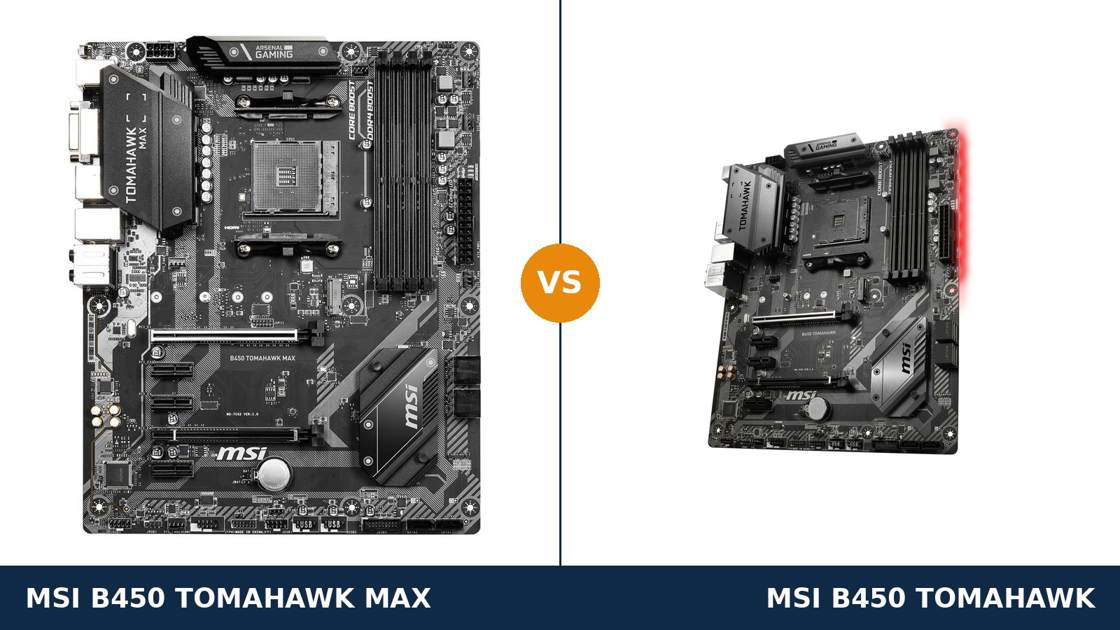
Start with the answer most buyers need: the MAX is the one to buy. Then ask the more interesting question.
Is there any situation — any processor, any budget, any build — where the original B450 Tomahawk, the board the MAX replaced, is the smarter purchase? Surprisingly, yes. A few.
The two boards share a PCB design, a chipset and almost every component that affects performance. What separates them is a single memory chip, soldered quietly next to the BIOS settings it stores.
That chip decides which processors boot without an update, which BIOS interface you live with, and how much you should pay second-hand. This guide works through all of it, from MSI's own published specifications.
Key Takeaways
- The MAX is the default buy. Its 32 MB BIOS chip doubles the original's capacity, and that one change removes every firmware compromise in this comparison.
- Ryzen 3000 works out of the box on the MAX. On the original it works only after a BIOS update — one that downgrades the BIOS interface and deletes the oldest CPU support.
- Performance is identical. Same VRM design, slots, storage, networking and audio. No benchmark will ever separate these boards.
- The original still wins three narrow contests: as a steep used discount, as a board you already own, and as a home for the Ryzen generations it launched with.
- Beware the third Tomahawk. A later MAX II model exists, and listings blur all three names constantly.
Quick Verdict
Buy the MSI B450 Tomahawk MAX. For a new purchase, this is the finished article.
Every AM4 generation it supports is supported cleanly: Ryzen 3000 from the first boot, the full graphical Click BIOS 5 at every version, and a CPU support list that has never had an entry deleted to make room.
Buy the original B450 Tomahawk only when the deal argues for it. A used board at a genuinely low price, for a Ryzen 1000 or 2000 build, is the same hardware doing the same job.
Outside those cases the original asks favours the MAX never does: an update before newer chips will boot, a text-menu BIOS afterwards. Fair trades at the right discount. Bad ones at price parity.
The Scorecard
Scores below are derived directly from the manufacturer specifications compared in this guide — BIOS capacity, out-of-box CPU support, slot counts, port counts and supported standards. They are a reading aid, not benchmark results.
| Category | B450 Tomahawk MAX | B450 Tomahawk | ||
|---|---|---|---|---|
| CPU support out of the box | 10 / 10 | 6 / 10 | ||
| BIOS capacity & interface | 10 / 10 | 5 / 10 | ||
| Memory | 9 / 10 | 7 / 10 | ||
| Storage | 8 / 10 | 8 / 10 | ||
| Expansion | 8 / 10 | 8 / 10 | ||
| Power delivery & cooling | 8 / 10 | 8 / 10 | ||
| Overall | 8.8 / 10 | 7.0 / 10 | ||
Notice where the gap lives. Four categories are dead level, because the hardware is shared. The MAX's entire lead sits in two firmware rows — and firmware, on a board bought to host several processor generations, is not a detail.
At a Glance: Who Each Board Fits
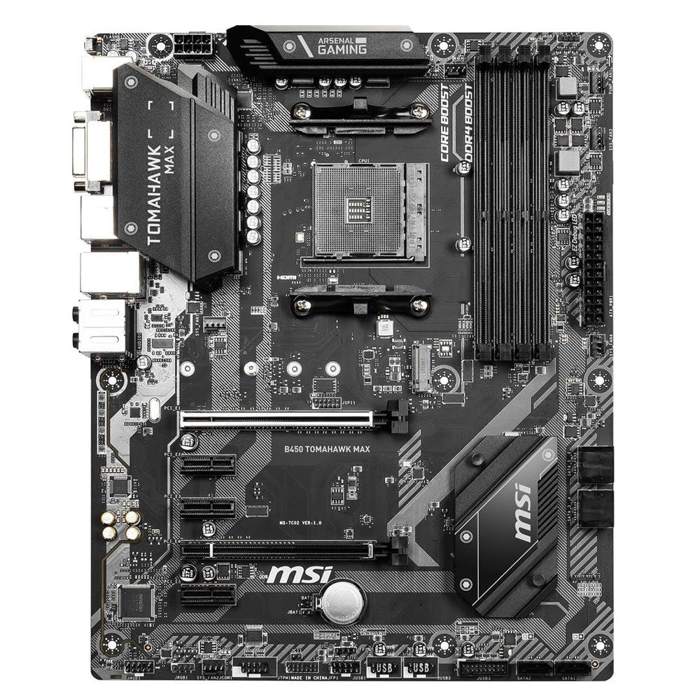
MSI B450 Tomahawk MAX
- The 2019 refresh of MSI's 7C02 Tomahawk design
- 32 MB BIOS chip — Ryzen 3000 ready out of the box
- Full Click BIOS 5 interface, kept at every version
- DDR4 validated to 4133 MT/s (O.C.) with Ryzen 3000
- Blacked-out heatsinks with MAX branding
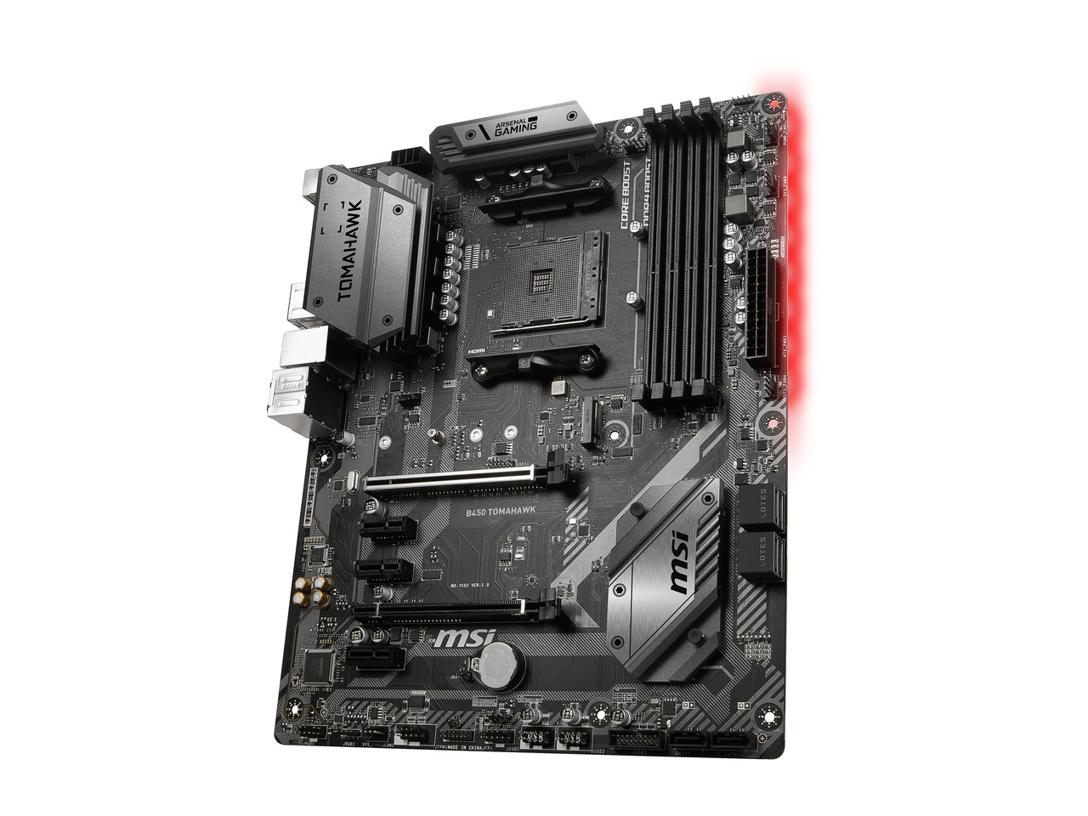
MSI B450 Tomahawk
- The original 2018 board, PCB family MS-7C02
- 16 MB BIOS chip — Ryzen 3000 needs an update first
- DDR4 support up to 3466 MT/s (O.C.)
- Flash BIOS Button: update with no CPU installed
- Grey and silver Arsenal Gaming heatsinks
Choose the B450 Tomahawk MAX if…
You are spending money on a board today. At anything close to the same price, there is no new-build scenario where the original is the better purchase.
Your processor is a Ryzen 3000 chip, or might become one. On the MAX it boots the first time you press the power button.
You expect to change processors over the board's life. The MAX's support list only grows; nothing is ever sacrificed to fit the next generation.
Choose the original B450 Tomahawk if…
One is already in your PC. Keep it. The correct upgrade is a free BIOS file, not a second motherboard.
You have found one used at a serious discount for a Ryzen 1000 or 2000 build. Underneath the older firmware sits the MAX's exact hardware.
Your build centres on an early APU and the board still runs an early BIOS. That is the one configuration where the original loses nothing at all.
As an Amazon Associate I earn from qualifying purchases at no extra cost to you.
Specifications: The Specs That Actually Matter
Every figure below is taken from MSI's published specifications and datasheets for the two boards.
Work down the table and the story tells itself: row after row of exact matches, broken only where the BIOS is involved. That is this comparison in a single page.
| Specification | MSI B450 Tomahawk MAX | MSI B450 Tomahawk |
|---|---|---|
| Form factor | ATX, 30.5 × 24.4 cm | ATX, 30.5 × 24.4 cm |
| Socket / chipset | AMD AM4 / B450 | AMD AM4 / B450 |
| CPU support, out of the box | Ryzen 1000/2000/3000, Ryzen with Radeon graphics, Athlon with Vega graphics | Ryzen 1000/2000, Ryzen with Vega graphics, Athlon with Vega graphics |
| BIOS chip | 32 MB (256 Mb) flash | 16 MB (128 Mb) flash |
| BIOS interface on the latest BIOS | Full Click BIOS 5 graphical interface | GSE Lite (text-style) once updated for Ryzen 3000 |
| Memory | 4 × DDR4 DIMM, up to 128 GB, 4133 MT/s (O.C.) with Ryzen 3000, A-XMP | 4 × DDR4 DIMM, up to 128 GB, 3466 MT/s (O.C.), A-XMP |
| Graphics outputs (APU) | HDMI 1.4, DVI-D | HDMI 1.4, DVI-D |
| Expansion slots | PCIe 3.0 x16 (Steel Armor) + PCIe 2.0 x16 (x4) + 3 × PCIe 2.0 x1, 2-way CrossFire | PCIe 3.0 x16 (Steel Armor) + PCIe 2.0 x16 (x4) + 3 × PCIe 2.0 x1, 2-way CrossFire |
| M.2 storage | 1 × Turbo M.2, PCIe 3.0 x4 / SATA | 1 × Turbo M.2, PCIe 3.0 x4 / SATA |
| SATA | 6 × SATA 6 Gb/s, RAID 0/1/10 | 6 × SATA 6 Gb/s, RAID 0/1/10 |
| LAN | Realtek 8111H GbE | Realtek 8111H GbE |
| Audio | Realtek ALC892, 7.1 HD, Audio Boost | Realtek ALC892, 7.1 HD, Audio Boost |
| USB (rear) | 2 × USB 3.2 Gen 2 (Type-A + Type-C), 2 × USB 3.2 Gen 1, 2 × USB 2.0 | 2 × USB 3.1 Gen 2 (Type-A + Type-C), 2 × USB 3.1 Gen 1, 2 × USB 2.0 |
| BIOS flashing | Flash BIOS Button (no CPU/RAM/GPU needed) | Flash BIOS Button (no CPU/RAM/GPU needed) |
Memory capacity note: MSI's current specification pages list both boards at 128 GB. Launch-era documentation said 64 GB.
The higher ceiling came with later BIOS releases and 32 GB modules. Both boards share it, so it separates nothing here — but it is worth knowing before you repeat the older figure.
The one-line summary: if a row describes metal, silicon or a socket, it is a tie. If a row describes firmware, the MAX wins it.
The Differences That Actually Matter
1. One chip, doubled — why the MAX exists at all
Every motherboard carries a small flash chip that stores its BIOS. On the original Tomahawk, that chip holds 16 MB.
In 2018 that was plenty. Then Ryzen 3000 arrived in July 2019, carrying microcode for a new architecture — and the support code for three processor generations no longer fitted comfortably in 16 MB alongside a graphical BIOS.
MSI's response was not a new board. It was a new chip: the MAX line took the existing designs, fitted a 32 MB BIOS ROM, and relaunched them with Ryzen 3000 support baked in.
So when you pay more for a Tomahawk MAX, you are quite literally paying for a bigger memory chip. Everything downstream of that sentence — the out-of-box support, the interface, the memory validation — flows from it.
Judge the premium accordingly. It buys no speed. It buys the absence of every workaround the rest of this section describes.
2. First boot — the thirty seconds that define the MAX
Fit a Ryzen 5 3600 to the MAX, connect the power, press the button. It boots.
Fit the same processor to an original Tomahawk still running its early BIOS and nothing happens. The board predates the chip; the support code is simply not there.
This is the difference buyers actually experience. Not in frame rates — the boards perform identically once running — but on build day, at the exact moment a new PC is supposed to come alive.
The original is not locked out of Ryzen 3000. MSI published the BIOS, and the next section covers what accepting it involves.
But the MAX never asks. For a first-time builder especially, that calm first boot is worth real money.
3. The toll the original pays for its update
Updating the original Tomahawk for Ryzen 3000 works, and MSI was transparent about the cost. The 16 MB chip cannot hold everything, so two things are traded away.
First, the interface. The graphical Click BIOS 5 — mouse-driven, with its visual fan-curve editor — is replaced by GSE Lite, a plain text-style menu system.
GSE Lite still exposes the essential settings: boot order, XMP profiles, fan behaviour, overclocking menus. It is functional. It is also a permanent downgrade for the life of that BIOS line.
Second, the guest list. Support for the pre-Ryzen Bristol Ridge A-series processors is removed to free space. Run one of those chips today and update for Ryzen 3000, and the old APU will never boot in that board again.
The MAX pays neither toll. Thirty-two megabytes holds the full interface and the complete processor list at once, at every BIOS version, with room to spare.
How much does this matter? If you open the BIOS twice a year to toggle one setting, very little. If you tinker, tune fan curves, or keep old processors in rotation, it is the whole argument.
4. Memory — a higher ceiling with an honest asterisk
Both boards carry four DDR4 slots in dual channel, with A-XMP profile support. Both are listed by MSI at up to 128 GB.
The validated speed ceiling differs. The original's specification stops at DDR4-3466 with overclocking.
The MAX's specification climbs to DDR4-4133 — and here the asterisk matters. MSI's own table ties that figure to a Ryzen 3000 processor. Fit an older chip and the MAX's validated list also settles at 3466, because the faster memory controller lives in the newer CPUs, not in the board.
So memory is a MAX win only in the configuration most buyers will actually run: a Ryzen 3000 or later processor with fast memory.
And keep perspective. AM4's gaming sweet spot is a 3200–3600 MT/s kit with tight timings. The 4133 figure is validation headroom, not a target — on either board, spend memory money on capacity and timings first.
5. Ryzen 5000 — same destination, different journey
Neither board supports Ryzen 5000 out of the box. The 5000 series arrived after both of them.
MSI later extended 5000-series support across its 400-series range, MAX and original alike. A Ryzen 5 5600 or 5800X can run in either Tomahawk, on the appropriate BIOS — check MSI's CPU support list for the exact version your processor requires before buying anything.
The journey still differs. On the MAX, the update is routine and the full Click BIOS 5 remains when you arrive. On the original, the same update lands on the 16 MB chip's terms: Lite interface, trimmed support list.
Both boards do share one saving grace. The Flash BIOS Button reflashes from a USB stick with no processor fitted at all, so a bad flash or a chip swap in the wrong order is recoverable on either.
One shared caution: B450 was never Ryzen 5000's intended platform. It works, MSI supports it, and a 5600 in a Tomahawk is a fine gaming machine. Treat it as a strong late-life upgrade, not a five-year foundation.
6. Everything else — the great tie
Now the hardware, because this is where the original defends its honour — completely.
Both boards use MSI's Core Boost power design under the same extended, finned VRM heatsinks that built the Tomahawk's reputation in this class. Sustained loads, overclocking headroom, temperatures: shared.
Both give a graphics card a Steel Armor PCIe 3.0 x16 slot, backed by a second x16 slot wired at x4 and three x1 slots, with 2-way CrossFire on paper. Both take one Turbo M.2 drive at PCIe 3.0 x4 beside six SATA ports with RAID 0, 1 and 10.
Both run Realtek 8111H gigabit Ethernet and the ALC892 codec with Audio Boost. Both put Gen 2 USB in Type-A and Type-C form on the rear panel — the generation labels differ between the datasheets, the ports do not. Both carry Mystic Light headers and EZ Debug LEDs.
Same processor, same memory, same graphics card in each board, and no test on earth will tell them apart. Anyone selling the MAX as a performance upgrade is selling you a story.
7. Telling them apart — colour is the giveaway
The boards announce themselves visually, which matters enormously in used listings where titles lie.
The MAX wears black. Blacked-out heatsinks, MAX worked into the heatsink branding, and TOMAHAWK MAX printed on the PCB beneath the main slot.
The original wears the 2018 Arsenal Gaming livery: grey and silver heatsinks, plain TOMAHAWK lettering, a lighter PCB print.
The rule is absolute: if the heatsinks are grey, it is not a MAX, whatever the listing title claims. If the PCB does not say MAX, it is not a MAX. Ask for a photograph of the actual board, not a stock image.
One more name waits below in the similar-names section — the MAX II — ready to catch buyers who learned only half of this lesson.
CPU Pairing Guide
The fastest way to choose between these boards is to start from your processor. This table is the whole comparison in one view.
| Your processor | B450 Tomahawk MAX | B450 Tomahawk | Our call |
|---|---|---|---|
| Ryzen 3000 (3600, 3700X, 3900X) | Excellent — works out of the box | Needs a BIOS update first; Lite interface afterwards | B450 Tomahawk MAX |
| Ryzen 5000 (5600, 5800X) | Works on the latest BIOS — check the CPU list | Works on the latest BIOS — check the CPU list | MAX, for the full BIOS interface |
| Ryzen 1000 / 2000 (1600, 2600, 2700X) | Excellent — native support | Excellent — native support | Buy whichever is cheaper |
| APUs (2200G, 3200G, 3400G) | Excellent — native support | Excellent — native support | Dead tie |
| Bristol Ridge A-series (pre-Ryzen) | Supported — never removed | Early BIOS versions only — support removed by the Ryzen 3000 update | MAX, if you must run one at all |
| Ryzen 9 (3900X / 5900X) | Workable — the sensible ceiling for this VRM | Workable — the sensible ceiling for this VRM | Tie on hardware; MAX for the firmware |
Read the third row carefully if you are bargain-hunting. For the processors these boards were launched alongside, the original gives up nothing at all.
Ready to check today’s price?
Both boards sell through Amazon, mostly via marketplace sellers now. Check the live figure — and check the exact model name on the listing before you pay.
View on Amazon — B450 Tomahawk MAXView on Amazon — B450 TomahawkThe 30-Second Decision
| If this sounds like you… | Buy this |
|---|---|
| “I am building a Ryzen 3000 PC and want zero hassle.” | B450 Tomahawk MAX |
| “I already own the original Tomahawk.” | Neither — update your BIOS and keep it |
| “Used original, half the price, for a Ryzen 2600 build.” | B450 Tomahawk — the bargain is real |
| “I tinker in the BIOS and want the full Click BIOS 5.” | B450 Tomahawk MAX |
| “I plan to drop in a Ryzen 5000 chip later.” | B450 Tomahawk MAX — the smoother update path |
| “My spare PC runs an old A-series APU.” | B450 Tomahawk MAX — its support was never deleted |
What You Gain. What You Give Up.
MSI B450 Tomahawk MAX
You gain: the complete version of this board. Ryzen 3000 ready on day one, the full Click BIOS 5 at every version, a 4133 memory validation ceiling with newer processors, and a CPU support list that never shrinks.
You give up: nothing in hardware — the compromise is availability. Both boards are discontinued, and the MAX's reputation means used examples hold their value. You may pay a premium for what is, in the end, firmware peace of mind.
MSI B450 Tomahawk
You gain: the MAX's hardware for typically less money on the used market. Native support for the Ryzen generations it launched with, and the Flash BIOS Button, which makes any later update a low-risk job.
You give up: Ryzen 3000 support out of the box. The full graphical BIOS, permanently, once you update for newer processors. And the oldest pre-Ryzen chips, deleted by that same update.
Pros and Cons
B450 Tomahawk MAX — Pros
- 32 MB BIOS chip — room for every AM4 generation
- Ryzen 3000 works out of the box
- Full Click BIOS 5 kept at every version
- DDR4-4133 validation with Ryzen 3000 CPUs
- Same proven hardware as the original
Cons
- No hardware upgrade over the original at all
- Ryzen 5000 still needs a BIOS update
- Discontinued — mostly used and marketplace stock
- Often priced close to newer B550 boards used
- MAX II confusion in listings (see below)
B450 Tomahawk — Pros
- Identical slots, storage, LAN and audio to the MAX
- Strong extended VRM heatsinks for the class
- Flash BIOS Button — update with no CPU fitted
- Usually the cheaper board second-hand
- Native fit for Ryzen 1000/2000 and early APUs
Cons
- 16 MB BIOS chip is a hard ceiling
- Ryzen 3000 update swaps in the GSE Lite interface
- Bristol Ridge support deleted by that update
- Memory validation stops at 3466 MT/s
- No Ryzen 3000 support out of the box
How to Buy the Right Board — and Not the Wrong Tomahawk
Read the heatsink, not the headline. Titles in this family are unreliable; listings borrow the MAX name for boards that never earned it.
The physical tells never lie. Black heatsinks with MAX branding, TOMAHAWK MAX printed on the PCB: that is the MAX. Grey and silver heatsinks with no MAX anywhere: that is the original.
If a listing shows only a stock photograph, ask the seller for a shot of the real board. A seller who cannot show you the heatsinks cannot tell you which Tomahawk is in the box.
Ask about the BIOS version. Buying an original Tomahawk for a Ryzen 3000 or 5000 processor? Ask which BIOS is installed before money moves.
An early BIOS means flashing before first boot. Thanks to the Flash BIOS Button that is a ten-minute job with a USB stick and no spare processor — an inconvenience to price into the deal, not a reason to walk away.
Check the bundle. Both boxes were always lean: board, I/O shield, SATA cables, documentation. On used boards the missing I/O shield is the classic small print — confirm it is included, or budget for the gap it leaves in your case.
Price the MAX honestly. Its premium over the original buys firmware convenience, not performance. If a used MAX is priced within reach of a B550 board, the newer platform deserves a hard look before the Tomahawk nostalgia wins.
The Upgrade Path Test
Judge these boards by the processors they will meet over their working lives, not the one fitted on day one.
Start either board with a Ryzen 2600. For as long as that chip stays, the two ownership experiences are indistinguishable.
Move to a Ryzen 3600 in year two. In the MAX, the swap is a five-minute job that ends at a desktop. In the original, you flash first — and your BIOS becomes the text-style Lite interface from that day forward.
Move to a Ryzen 5600 in year four. Both boards need their latest BIOS. The MAX absorbs the change inside its roomy firmware. The original absorbs it too — MSI's support held up — on the same trimmed terms as before.
That timeline is the whole comparison. The original never falls behind; it simply pays a small toll at every generation gate. The MAX drives through free, every time.
When to Skip Both
Honesty cuts both ways. Some builders in 2026 should walk past the entire Tomahawk family.
Skip both if you are starting AM4 from zero and B550 boards are within budget — PCIe 4.0 and a longer support runway make them the better foundation. Skip both if you need a second M.2 slot; each of these boards has exactly one.
Skip both if you need Wi-Fi built into the board, or a front-panel USB-C header in your case. Neither Tomahawk offers either feature, in any variant.
And skip both if a Ryzen 9 for heavy all-core work is the permanent plan. They will run one. A stronger VRM class is simply the correct tool for that job.
For everyone else shopping B450 today — which is a great many people — the question is not whether to buy a Tomahawk. It is which of the two, at which price.
BIOS and Long-Term Support
AM4 is a mature platform, and both boards sit near the end of their support arcs. For a used purchase, that maturity is a feature.
The BIOS is stable. The drivers are stable. Every nasty surprise in these boards' lives happened years ago, to somebody else, and has been fixed.
MSI's support pages carry each model's full BIOS history, chipset and LAN drivers, and — most importantly — the CPU support list that names the exact BIOS version each processor requires. Before any processor upgrade, on either board, that list is the document to trust.
Expect future releases, if any, to be security and compatibility maintenance rather than new features. On boards of this age, that is precisely what you want.
Keep one habit and both boards stay safe to own: update the BIOS before the new processor goes in. If the old chip is already sold, the Flash BIOS Button does the job with an empty socket.
Final Verdict
The MSI B450 Tomahawk MAX is the one to buy.
Unusually for a comparison like this, the winner does not win a single hardware category. VRM: tie. Slots: tie. Storage, networking, audio: tie, tie, tie.
The MAX wins on the chip nobody photographs. Thirty-two megabytes of BIOS storage buys Ryzen 3000 support out of the box, the full Click BIOS 5 for life, and a support list that has never lost an entry. On a board whose whole purpose is hosting processor upgrades, that is the spec that matters.
Buy the MAX for any fresh purchase, any Ryzen 3000 build, and any PC you intend to carry across AM4 generations.
View on Amazon — B450 Tomahawk MAX
Buy the original only when the discount is doing the talking: a used bargain, a Ryzen 1000 or 2000 build, a like-for-like replacement. And if one already sits in your case, buy nothing. A free BIOS update is the whole upgrade.
It is still a good board. It is simply the draft; the MAX is the published version.
View on Amazon — B450 Tomahawk
Watch Out: Similar Names, Different Boards
The Tomahawk name covers more boards than this comparison. Three warnings belong in every version of this guide.
First, and most important: the B450 Tomahawk MAX II is a separate, later model. It arrived in 2021, during the component shortages, with its own product code (7C02-014R), its own support page and its own BIOS line.
Its core specification sits very close to the MAX's, which is exactly why listings blur them. This comparison covers the original MAX. If a listing says MAX II, you are looking at a different product — judge it on its own page, not this one.
Second: a listing titled plainly “Tomahawk” with no MAX is the 2018 original, whatever the photographs imply. Check the heatsinks: grey and silver means original, black means MAX.
Third: the Tomahawk name also appears on newer platforms entirely — the B550 Tomahawk on AM4, and Intel boards besides. A bargain “Tomahawk” at the wrong socket is no bargain. Match the full model name, chipset first, before the price tempts you.
Case, Power and Cabling Notes
Both boards are full ATX, 30.5 × 24.4 cm. They need an ATX case, and they fill one properly — no micro-ATX board rattling around in a big chassis here.
Both take a standard 24-pin main power connector and a single 8-pin EPS CPU connector. Any reputable modern power supply covers that without adapters.
One shared storage trap, straight from the manuals: fit an M.2 drive and two of the six SATA ports — SATA5 and SATA6 — are disabled. Plan a big spinning-disk array around ports 1 to 4.
The second PCIe x16 slot is wired for x4 and shares the chipset's limited lanes with the x1 slots. Fine for a capture card or a network card. Not a home for a second serious GPU, whatever the CrossFire badge implies.
And one shared absence: neither board has a front-panel USB-C header. A case front Type-C port will sit unconnected on either Tomahawk. Know it before you buy the case.
Frequently Asked Questions
Is the B450 Tomahawk MAX worth paying more for than the original?
For most buyers, yes — and what you are paying for is convenience, not speed. The premium buys Ryzen 3000 support out of the box, the full Click BIOS 5 interface for life, and a CPU support list that never shrinks. If the gap is small, take the MAX. If a used original costs half as much and your build uses a Ryzen 1000 or 2000 chip, the original is the smarter money.
Is the Tomahawk MAX faster than the original Tomahawk?
No. With the same processor, memory and graphics card, the two boards perform identically — the VRM, chipset, slots and storage are shared designs. Every MAX advantage is firmware: out-of-box CPU support, the graphical BIOS interface and higher validated memory speeds. Buy it for longevity and ease, never for frame rates.
Does the Tomahawk MAX have a better VRM than the original?
No. Both boards use MSI's Core Boost power design with the same extended heatsinks, a deliberate part of the MAX formula: change the BIOS chip, keep the proven hardware. Processor support and overclocking behaviour under the same chip are the same on both boards.
Will a Ryzen 5 3600 work in the MAX straight out of the box?
Yes. The MAX was launched specifically so Ryzen 3000 processors would boot without any update — it is the board's reason for existing. The original Tomahawk runs the same chip equally well, but only after its BIOS has been updated to a Ryzen 3000 version.
Can the original Tomahawk run a Ryzen 5000 processor like the 5600?
Yes, on its later BIOS releases. MSI added Ryzen 5000 support across the 400-series range, original Tomahawk included. Check the CPU support list for the exact BIOS version your processor needs, update first, and expect the board to run that chip under the GSE Lite text-style BIOS interface rather than the graphical Click BIOS 5.
Why did the Tomahawk's BIOS turn into a text menu after updating?
That is GSE Lite, and on the original board it is expected behaviour. Its 16 MB BIOS chip cannot store the graphical Click BIOS 5 alongside the newer processors' microcode, so MSI's Ryzen 3000-era update switches to the lighter text interface. All essential settings remain available. The MAX, with its 32 MB chip, keeps the graphical interface permanently.
Is the B450 Tomahawk MAX II better than the MAX?
They are different products rather than a simple better-or-worse pair. The MAX II is a separate 2021 model with its own product code, support page and BIOS line, and core specifications very close to the MAX's. This comparison covers the original MAX — if you are shopping and a MAX II appears, compare it on its own specification page rather than assuming it continues this board's story.
Can I update either board's BIOS without a CPU installed?
Yes — both boards carry MSI's Flash BIOS Button. With only the power supply connected, it flashes the BIOS from a USB stick: no processor, memory or graphics card required. It is the feature that makes the original a safe used buy for newer processors, and it protects MAX owners just the same.
Sources & Verification
MSI B450 TOMAHAWK MAX official specifications (global and US) and datasheet, msi.com • MSI B450 TOMAHAWK official specifications and datasheet • MSI MAX series launch materials (32 MB BIOS ROM, Ryzen 3000 out-of-box support) • MSI BIOS release notes and CPU support lists for the 7C02 family. Specifications verified November 2026.

James Wilson
James has been building and benchmarking PCs for over a decade and writes Honestly Compared's motherboard and component guides. His rule for every comparison: the verdict has to survive the spec sheet, not the marketing page.