
MSI B450 Tomahawk MAX vs MSI MAG B550 Tomahawk: Which Should You Buy?
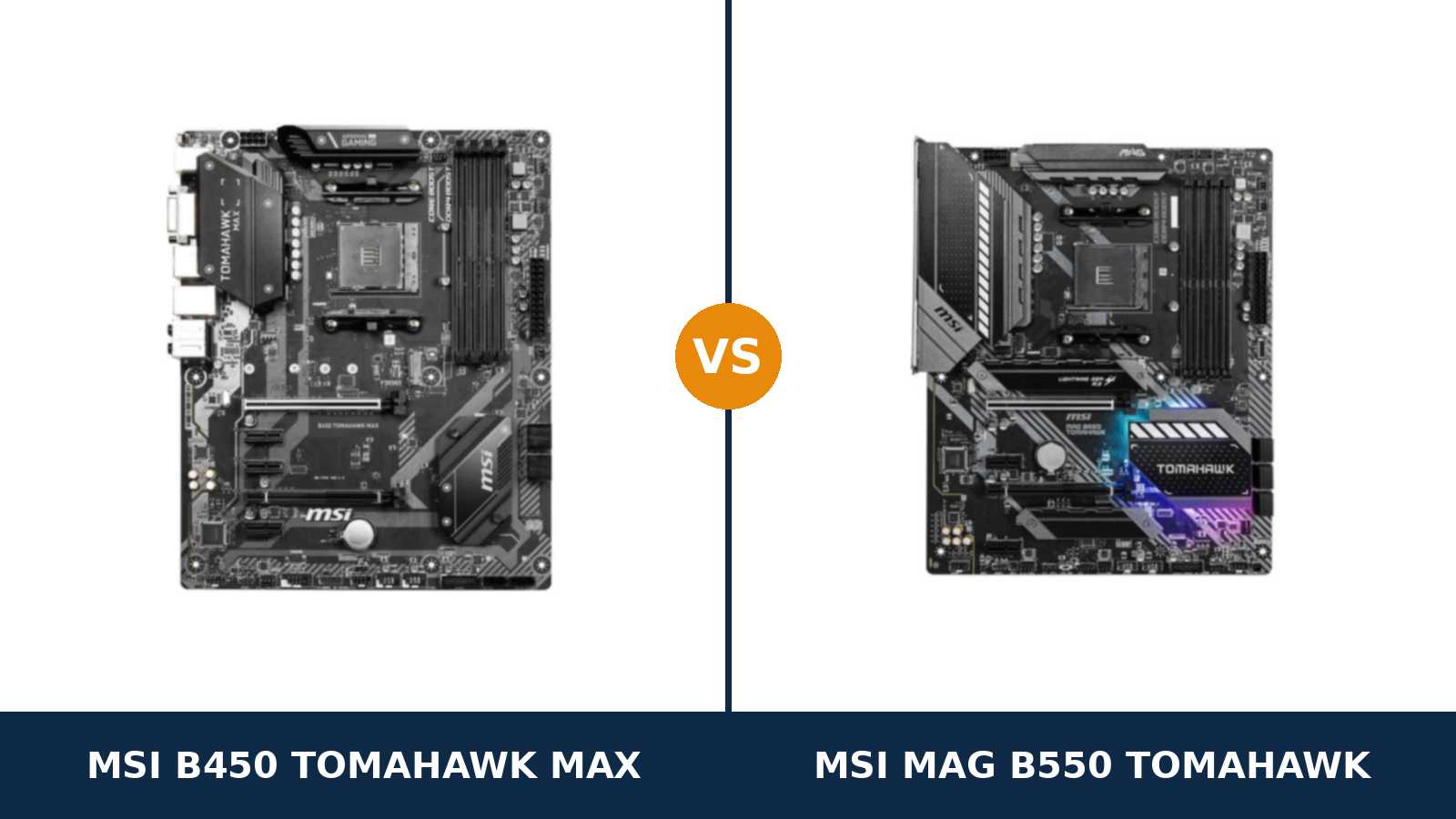
Begin with the fact that makes this comparison awkward for the newer board: if a B450 Tomahawk MAX is already screwed into your case, it can run the same Ryzen 7 5800X as its B550 successor — after nothing more than a BIOS update.
The MAG B550 Tomahawk is not rescuing B450 owners from an obsolete platform. It is asking them to pay for a list of specific upgrades, and the honest question is whether those upgrades touch anything in your build.
Shoppers building from scratch face the mirror-image question. The B450 board is cheaper, runs a wider range of processors, and is famously hard to kill. The B550 board is a generation newer at every point where a generation counts. Every specification in this guide comes from MSI's own published data.
So this guide works the problem from both chairs: owners deciding whether to keep, and buyers deciding whether to save.
Key Takeaways
- For a new build, the MAG B550 Tomahawk is the better board. PCIe 4.0, a much stronger VRM, two heatsinked M.2 slots and dual LAN.
- For owners, the B450 Tomahawk MAX is usually a keeper. A BIOS update carries it to Ryzen 5000; replacing it is a sidegrade unless you need the B550's specific hardware.
- The B450 accepts processors the B550 refuses outright. Ryzen 1000, 2000 and the 3200G/3400G APUs simply do not run on the newer board.
- Storage is where the generation gap bites hardest. The B550 has two M.2 slots with heatsinks; the B450 has one, and filling it disables two SATA ports.
- Neither board has Wi-Fi. Listings showing antennas belong to a different model — the B550 Tomahawk MAX WiFi.
Quick Verdict
Buy the MSI MAG B550 Tomahawk if you are building new with Ryzen 3000 or 5000. It is the board with headroom in every direction: Gen 4 bandwidth for the graphics card and first SSD, a 10+2+1 Duet Rail power design, room for a second NVMe drive, and 2.5-gigabit networking.
Buy the MSI B450 Tomahawk MAX if your processor predates Ryzen 3000, your APU is a 3200G or 3400G, or its price is low enough to move money into the graphics card. In a Ryzen 5 build with one SSD and a PCIe 3.0 graphics card, it gives up nothing you can feel in a game.
Already own the B450 Tomahawk MAX? Then our verdict is to buy neither board. Update the BIOS, install your Ryzen 5000 chip, and spend the saving where it shows.
The Scorecard
Scores below are derived directly from the manufacturer specifications compared in this guide — phase designs, slot counts, port counts and supported standards. They are a reading aid, not benchmark results.
| Category | B450 Tomahawk MAX | MAG B550 Tomahawk | ||
|---|---|---|---|---|
| Power delivery | 6 / 10 | 9 / 10 | ||
| PCIe platform | 5 / 10 | 10 / 10 | ||
| Storage | 6 / 10 | 9 / 10 | ||
| CPU compatibility breadth | 9 / 10 | 7 / 10 | ||
| Networking | 6 / 10 | 9 / 10 | ||
| Audio & USB | 7 / 10 | 8 / 10 | ||
| Memory | 8 / 10 | 9 / 10 | ||
| Overall | 6.7 / 10 | 8.7 / 10 | ||
One row deserves a second look: CPU compatibility breadth is a gate, not a gradient. A processor the B550 refuses does not run slowly on it — it does not run at all.
At a Glance: Who Each Board Fits
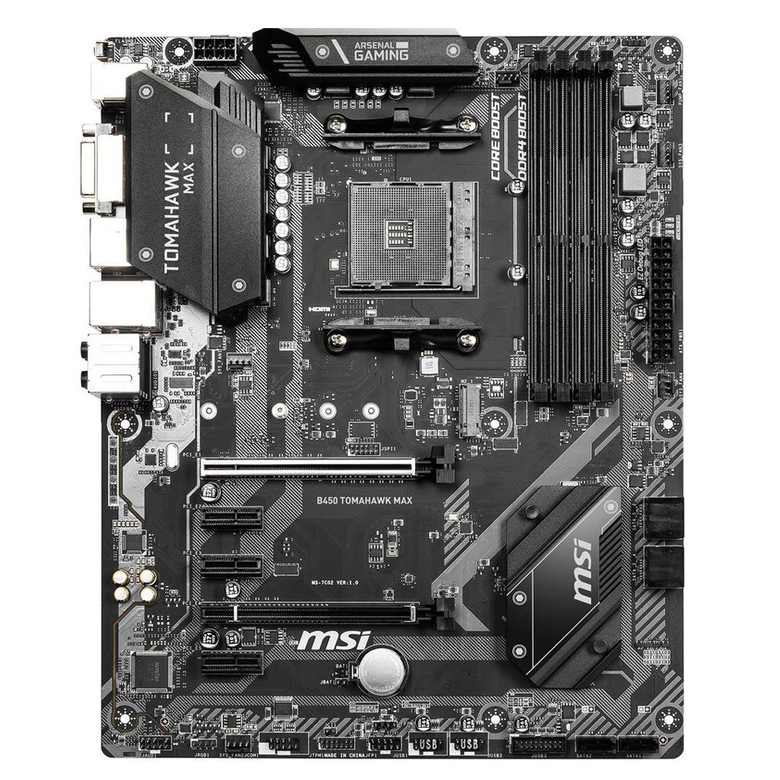
MSI B450 Tomahawk MAX
- The full B450 feature set on a PCIe 3.0 platform
- Runs Ryzen 1000 through 5000 with BIOS updates
- One Turbo M.2 slot at PCIe 3.0 x4 (32 Gb/s)
- 32 MB BIOS chip and Flash BIOS Button
- Extended VRM heatsink, Steel Armor main slot
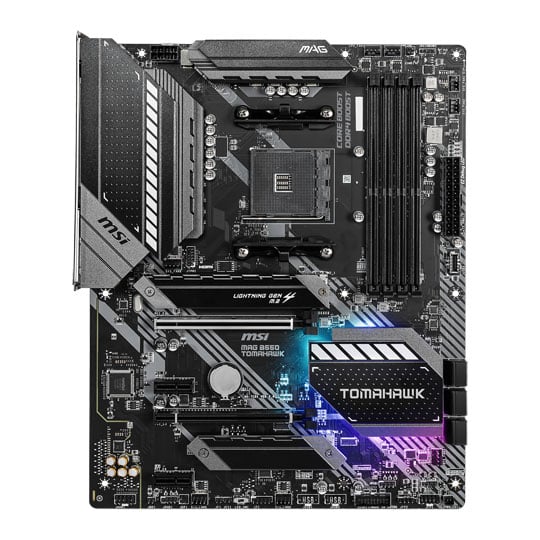
MSI MAG B550 Tomahawk
- PCIe 4.0 x16 graphics slot and Gen 4 M.2 slot
- 10+2+1 Duet Rail VRM with extended heatsinks
- Two M.2 slots, both with Shield Frozr heatsinks
- Dual LAN: 2.5G (RTL8125B) + Gigabit (RTL8111H)
- Realtek ALC1200 audio and a front USB-C header
Choose the B450 Tomahawk MAX if…
Your chip is a Ryzen 5 2600, a 2700X, or any other AM4 processor older than the 3000 series. The B550 board cannot take it, at any price, with any BIOS.
Your graphics come from a 3200G or 3400G. Same story: MSI excludes those APUs from the B550 Tomahawk by name.
Or you found one at a used price that frees real money for the graphics card, where a gaming build actually feels its budget.
Choose the MAG B550 Tomahawk if…
You are assembling a fresh Ryzen 3000 or 5000 system and want the platform finished rather than compromised: Gen 4 storage, a second M.2 slot, 2.5G networking.
A Ryzen 7 or Ryzen 9 is in the build, now or in a year. The B550's power design is built for exactly that workload.
Your case has a front USB-C port you actually intend to plug in. Only the B550 board gives it a header.
As an Amazon Associate I earn from qualifying purchases at no extra cost to you.
Specifications: The Specs That Actually Matter
All figures below are drawn from MSI's published specifications and datasheets for the pair.
Where MSI's own pages disagree with each other — it happens twice here — the table follows the current global specification, and the notes under the table say what was set aside and why.
| Specification | MSI B450 Tomahawk MAX | MSI MAG B550 Tomahawk |
|---|---|---|
| Form factor | ATX | ATX |
| Socket / chipset | AMD AM4 / B450 | AMD AM4 / B550 |
| CPU support | Ryzen 1000–5000 incl. Vega APUs & Athlon (BIOS update for 5000) | Ryzen 5000 & 3000, 4000 G-Series (not 3200G/3400G) |
| VRM design | Core Boost design, extended heatsink | 10+2+1 Duet Rail, digital PWM, extended heatsinks |
| Memory | 4 × DDR4 DIMM, up to 128 GB, 4133 MT/s (O.C.) | 4 × DDR4 DIMM, up to 128 GB, 5100 MT/s+ (O.C.) |
| Graphics slot | PCIe 3.0 x16 (Steel Armor), CPU lanes | PCIe 4.0 x16 (Steel Armor), CPU lanes |
| Other expansion | PCIe 2.0 x16 (x4) + 3 × PCIe 2.0 x1 | PCIe 3.0 x16 (x4) + 2 × PCIe 3.0 x1 |
| M.2 storage | 1 slot: PCIe 3.0 x4 / SATA (Turbo M.2) | 2 slots: PCIe 4.0 x4 + SATA (22110) and PCIe 3.0 x4, both with heatsinks |
| SATA | 6 × SATA 6 Gb/s, RAID 0/1/10 (ports 5/6 disable with M.2 fitted) | 6 × SATA 6 Gb/s, RAID 0/1/10 |
| LAN | Gigabit Realtek RTL8111H | 2.5G Realtek RTL8125B + Gigabit RTL8111H (dual LAN) |
| Audio | Realtek ALC892, 7.1 HD | Realtek ALC1200, 7.1 HD, optical S/PDIF out |
| Display outputs (APU) | HDMI + DVI-D | HDMI + DisplayPort |
| USB (rear) | USB 3.2 Gen 2 Type-C + Type-A, 2 × Gen 1, 2 × USB 2.0 | USB 3.2 Gen 2 Type-C + Type-A, 2 × Gen 1, 2 × USB 2.0 |
| Front USB-C header | No (USB 3.2 Gen 1 Type-A header only) | Yes — USB 3.2 Gen 1 Type-C |
| BIOS flashing | Flash BIOS Button (no CPU/RAM/GPU needed) | Flash BIOS Button (no CPU/RAM/GPU needed) |
| Wi-Fi | None | None |
Memory ceiling note: MSI's global specification for the B450 Tomahawk MAX lists 128 GB; its US specification summary says 64 GB. The table follows the global figure, which matches what a current BIOS accepts. Reaching it needs that later BIOS — one more reason the Flash BIOS Button matters on this board.
Support note: the B450 Tomahawk MAX's original datasheet stops at Ryzen 3rd Gen because it was printed before Ryzen 5000 existed. MSI's current specification lists support up to Ryzen 9. The support arrived by BIOS update, not by a different board.
Variant note: three boards answer to similar names. The plain B450 Tomahawk (2018) has a smaller BIOS chip and a lower memory ceiling; this board, the MAX, added the 32 MB chip; a later MAX II kept near-identical specifications. The buying guide shows how to tell them apart.
The Differences That Actually Matter
1. PCIe 4.0 — one generation of bandwidth, two very different consequences
Everything in this comparison flows from a single number: per lane, PCIe 4.0 carries twice the data of PCIe 3.0.
The B550 Tomahawk wires its main slot and first M.2 slot to the processor at Gen 4. The B450 Tomahawk MAX tops out at Gen 3 everywhere.
For a graphics card, the practical cost today is modest. A full-width x16 card gives up very little at Gen 3. The squeeze lands on cards with narrowed x8 or x4 links, where halving an already thin connection is genuinely felt.
For an NVMe drive there is no softening it. A Gen 4 SSD in the B450 board is capped at the slot's Gen 3 x4 rate — MSI quotes 32 Gb/s for that slot — no matter what the drive's box promises. In the B550 board the same drive runs at its rated speed.
So weigh this section by your parts list. Gen 4 graphics card with a full link and a Gen 3 SSD? The gap is mostly theoretical. A Gen 4 drive, or a GPU on a cut-down link? The gap is in every file copy.
2. CPU support — the door the B550 closes
This is the B450 board's headline win, and it is not a subtle one.
The B550 chipset drops the first two Ryzen generations entirely. MSI's specification for the B550 Tomahawk covers Ryzen 5000 and 3000 plus the 4000 G-Series — and names the Ryzen 5 3400G and Ryzen 3 3200G as not compatible.
The B450 Tomahawk MAX covers the whole AM4 catalogue. Ryzen 1000 and 2000 run natively. Ryzen 3000 runs out of the box — that readiness is precisely what the “MAX” badge and its enlarged 32 MB BIOS chip were for. Ryzen 5000, up to Ryzen 9, arrives by BIOS update.
It also runs the integrated-graphics chips the B550 refuses, from the 2200G and 2400G through the 3200G and 3400G, plus Athlon processors with Radeon graphics. For a cheap APU build, the older board is not the compromise option — it is the only one of the two that boots.
If your processor predates Ryzen 3000, you can stop reading comparisons. Your board is the B450.
3. Storage — the slot you cannot add later
Count the M.2 slots and the comparison nearly finishes itself: two on the B550 board, one on the B450.
The B550's first slot takes Gen 4 x4 drives, SATA M.2 drives and long 22110 modules. Its second slot runs Gen 3 x4 from the chipset. MSI fits a Shield Frozr heatsink over each, which at Gen 4 speeds is functional equipment, not jewellery — fast controllers throttle without one.
The B450's single Turbo M.2 slot is a good slot. Gen 3 x4 bandwidth, SATA support, sensibly placed. There is just one of it, and AM4 owners reliably outgrow one fast drive.
Then there is the clause B450 buyers discover after cabling. Populate the M.2 slot and SATA ports 5 and 6 switch off. Six storage ports quietly become four usable ones beside your NVMe drive.
The B550's sharing rule is gentler: run the second M.2 slot together with both small PCIe slots and that M.2 drops to x2 while the last x1 slot disables. All six SATA ports stay live throughout.
4. Power delivery — different leagues, honestly labelled
MSI specifies the B550 Tomahawk's power design in full: a 10+2+1 Duet Rail system, a digital PWM controller, extended heatsinks, and a 6-layer PCB with 2 oz thickened copper. It is a power section built to feed flagship processors without drama.
For the B450 board, MSI publishes the design language — Core Boost, an extended heatsink — rather than a phase count, and we will not invent one. What the record shows is reputation: in the B450 generation this board was the reference answer to rivals whose power stages ran hot and throttled.
Best-in-class for 2019 and mid-pack for the B550 generation are both true at once. The leagues are simply different.
In practice: Ryzen 5 and Ryzen 7 chips at stock or sensible settings are served properly by either board. Sustained all-core work on a Ryzen 9 5900X or 5950X is where the B550's headroom stops being a spec-sheet line and starts deciding whether a boost clock is held or surrendered.
Every other component can be swapped later; the power design is the one you keep. If a flagship AM4 chip is anywhere in the plan, this section alone can settle the purchase.
5. Networking and audio — the quiet rout
Open the B550 board's rear panel and there are two Ethernet ports. One is a Realtek RTL8125B running 2.5-gigabit; the other is the familiar RTL8111H gigabit chip. Fast home networks, NAS transfers and virtual-machine setups all have something to use here.
The B450 board carries the single RTL8111H gigabit port. It is the same chip the B550 includes as its second string — which tells you exactly where the older board's networking sits in the hierarchy.
Audio repeats the pattern. The B550 uses Realtek's ALC1200 codec and adds an optical S/PDIF output, the connection soundbars and AV receivers still speak. The B450 uses the older ALC892 and stops at analogue.
Neither gap changes a frame rate. Together they confirm the positioning: the B550 Tomahawk was specified a class up, and the rear panel is where it shows.
6. USB, front panels and display outputs — small print, real consequences
At the back, these boards are near-twins. Each provides USB 3.2 Gen 2 in Type-A and Type-C at 10 Gb/s, two Gen 1 ports and two USB 2.0 ports. Each has a PS/2 combo port and a Flash BIOS Button.
The split appears at the case's front panel. The B550 board provides a USB 3.2 Gen 1 Type-C header, so a modern case's front USB-C port works. The B450 board provides only a Type-A Gen 1 header. Fit it in a USB-C-fronted case and that port is a decoration.
Display outputs matter only when the graphics live in the processor, but there the split returns: HDMI plus DisplayPort on the B550, HDMI plus DVI-D on the B450. One modern monitor over HDMI is fine on either; the B450's second output speaks only to a legacy DVI panel, while DisplayPort is the connection a high-refresh screen actually wants.
7. Memory — a wide paper gap over a narrow real one
MSI rates memory overclocking at 5100 MT/s and above on the B550 board, and at 4133 MT/s on the B450. Both take four DIMMs and up to 128 GB on current specifications.
Filed side by side, those ceilings look like a verdict. In a running PC they are closer to a footnote.
AM4 processors do their best work with memory in the 3200–3600 MT/s window, timings tight, and both boards hold that window indefinitely. Push far beyond it and the limit is rarely the board — it is the memory controller inside your particular processor.
Credit the B550 with genuine headroom for faster kits. Then score memory as what it is in almost every real build: a practical tie wearing a paper gap.
CPU Pairing Guide
Pick your processor first and this comparison mostly answers itself. The table below is the whole guide on one screen — including the final row, which is the one most often left out.
| Your situation | B450 Tomahawk MAX | MAG B550 Tomahawk | Our call |
|---|---|---|---|
| Ryzen 1000 / 2000 (e.g. 2600, 2700X) | Excellent | Not supported | B450 Tomahawk MAX — the only choice |
| Ryzen 3200G / 3400G APU build | Excellent | Not supported (MSI states this explicitly) | B450 Tomahawk MAX |
| Ryzen 3000 (3600, 3700X) | Excellent, ready out of the box | Excellent, PCIe 4.0 unlocked | B550 for new builds; B450 if the price gap is wide |
| Ryzen 5000 (5600, 5700X, 5800X) | Very good after a BIOS update | Excellent, ready out of the box | MAG B550 Tomahawk for new builds |
| Ryzen 9 5900X / 5950X | Workable at stock; VRM is the ceiling | Excellent — VRM built for it | MAG B550 Tomahawk |
| Ryzen 5600G / 5700G APU build | Good after BIOS update — HDMI/DVI only | Excellent — DisplayPort output | MAG B550 Tomahawk |
| You already own the B450 Tomahawk MAX | BIOS update unlocks Ryzen 5000 | A sidegrade, not an upgrade | Keep the B450 — update, don't replace |
Linger on that last row — it is the answer most B450 owners came here for. With a current BIOS, your existing board runs the same Ryzen 5000 processors. What it cannot hand you is PCIe 4.0, a second M.2 slot or 2.5-gigabit networking. If none of those three is on your list, a replacement buys you very nearly nothing.
Ready to check today’s price?
Both boards sell through Amazon. Prices move, so check the live figure on the board that fits your build.
View on Amazon — B450 Tomahawk MAXView on Amazon — MAG B550 TomahawkThe 30-Second Decision
| If this sounds like you… | Buy this |
|---|---|
| “Fresh build, Ryzen 5000, no compromises I will regret.” | MAG B550 Tomahawk |
| “My chip is a Ryzen 2600, 2700X or 3400G.” | B450 Tomahawk MAX — the B550 cannot run it |
| “The B450 Tomahawk MAX is already in my case.” | Neither — flash its BIOS instead |
| “Ryzen 5, one SSD, graphics card on a Gen 3 link, tight budget.” | B450 Tomahawk MAX, when clearly cheaper |
| “A Gen 4 NVMe now and a second drive later.” | MAG B550 Tomahawk |
| “Ryzen 9 under long rendering or compiling loads.” | MAG B550 Tomahawk (VRM headroom) |
What You Gain. What You Give Up.
MSI B450 Tomahawk MAX
You gain: the broadest processor support AM4 ever offered, from a 2017 Ryzen 5 1600 to a Ryzen 9 after an update. Ryzen 3000 readiness straight from the box, and pricing — above all second-hand — that the newer board cannot get near.
You give up: PCIe 4.0 in full. The second M.2 slot. Two SATA ports for as long as an NVMe drive is fitted. 2.5-gigabit networking, the front USB-C header, DisplayPort, and the power headroom a Ryzen 9 genuinely appreciates.
MSI MAG B550 Tomahawk
You gain: full-speed lanes for modern graphics cards and Gen 4 SSDs. A 10+2+1 Duet Rail power design with room to spare. A second, heatsinked M.2 slot. Dual LAN headed by 2.5G, the newer audio codec with optical output, and headers that match current cases.
You give up: every AM4 processor launched before Ryzen 3000, including the still-common 3200G and 3400G APUs. And the price advantage — this board lives a class above the B450's territory.
Pros and Cons
B450 Tomahawk MAX — Pros
- Runs every AM4 generation, Ryzen 1000 to 5000
- Ryzen 3000-ready out of the box; 32 MB BIOS chip
- Flash BIOS Button — updates with no CPU fitted
- The strongest-regarded VRM of the B450 generation
- Often dramatically cheaper, especially used
Cons
- PCIe 3.0 only — graphics and SSD capped a generation back
- One M.2 slot, and it disables SATA ports 5/6
- Single gigabit LAN; older ALC892 audio, no optical out
- No front USB-C header; DVI-D instead of DisplayPort
- Ryzen 5000 will not boot until the BIOS is updated
MAG B550 Tomahawk — Pros
- PCIe 4.0 x16 and a Gen 4 M.2 slot for full-speed parts
- 10+2+1 Duet Rail VRM, extended heatsinks, 6-layer PCB
- Two M.2 slots, Shield Frozr heatsinks on both
- Dual LAN: 2.5G + Gigabit
- ALC1200 audio with optical S/PDIF
- DisplayPort output and a front USB-C header
Cons
- Nothing before Ryzen 3000 — and no 3200G/3400G
- Costs clearly more than the B450 board
- No Wi-Fi (the MAX WiFi is a separate model)
- Second M.2 shares lanes with the small PCIe slots
Know Exactly Which Tomahawk You Are Buying
Start with the badge: Tomahawk, Tomahawk MAX, Tomahawk MAX II are three products. The 2018 original (no MAX) pairs a smaller BIOS chip with a lower memory ceiling — the constraint the MAX was created to remove. The MAX II arrived later with near-identical headline specifications to the MAX.
This comparison is about the original MAX, board code MS-7C02. The silkscreen across the board reads “B450 TOMAHAWK MAX”, and the big heatsink repeats it. Check both on any listing photo; marketplace galleries are routinely borrowed from the wrong sibling.
Then separate the B550 board from its own namesake. The MAG B550 Tomahawk in this guide is wired-only. MSI also sells a B550 Tomahawk MAX WiFi — a different, later board with Wi-Fi 6E. Antennas in the photo means you are looking at that model, not this one.
Check the BIOS if you are buying the B450 for Ryzen 5000. It boots Ryzen 3000 as shipped; a 5000-series chip needs a later BIOS first. The Flash BIOS Button removes the chicken-and-egg problem entirely: power supply, USB stick, button, done — no loaner processor required.
Buying used, check the bundle and the board. The B450's I/O shield is a separate piece that sellers lose; look for bent socket pins in photos, and confirm the M.2 screw is present. The B550 board's shield comes pre-installed.
Finally, sanity-check the price gap itself. The B450 board only makes sense while clearly cheaper. At near-parity, the B550's hardware wins every tiebreak here.
The Upgrade Path Test
No board on AM4 tells a better upgrade story than the B450 Tomahawk MAX — starting three generations back.
Bought with a Ryzen 2600, it took a 3600 without complaint. Flashed a few years later, it takes a 5800X today. Three processor generations on one board. The B550 board cannot tell that story; it declines the opening chapter.
The B550 Tomahawk's story begins at Ryzen 3000 and trades breadth for depth: Gen 4 storage when you are ready for it, a second drive when the first fills, a power section that treats a Ryzen 9 as routine work.
Both stories close at the same wall. AM4 is finished: no DDR5, no Ryzen 7000 on either board. You are choosing the best seat for the platform's first half or its peak.
Framed that way, the decision sharpens. Leftover AM4 parts and a tight budget point one way. A fresh Ryzen 5000 build meant to be kept points the other.
When to Skip Both
Some builders should walk past both boards, and honesty requires naming them.
Skip both if wireless has to be built in. The B550 Tomahawk MAX WiFi exists for that job and is a different product from either board tested here.
Skip both if you want two Gen 4 NVMe drives running at full speed. B550's second slot is a chipset Gen 3 slot; twin Gen 4 storage belongs to X570.
Skip both if your case takes micro-ATX or mini-ITX only. These are full ATX boards and no amount of verdict changes their dimensions.
And skip both if you are starting from an empty desk with a generous budget. A finished platform, however excellent, is still finished — AM5 is where an unconstrained new build belongs.
BIOS and Long-Term Support
Each board lives on MSI's support pages with its own BIOS line, driver set and processor support list. That list is the authority in any compatibility argument — check it before a processor purchase, not after a failed boot.
The Flash BIOS Button defines both boards' longevity. Updating firmware with no processor, memory or graphics card installed sounds like a party trick until a new chip arrives and the old BIOS does not know it. On the B450 board, it is the entire reason Ryzen 5000 support is practical.
Expect future BIOS releases on both models to concern security fixes and edge-case compatibility. On a mature platform, that is the profile you want.
One discipline protects either purchase: update the BIOS before fitting a newer processor. Both boards reduce that to a short, low-risk job.
Final Verdict
For a new build, the MSI MAG B550 Tomahawk wins this comparison outright.
It wins where a motherboard's working life is decided: full-speed lanes for the two fastest components you own, a power design that never becomes the ceiling, a second cooled M.2 slot, and networking specified a class higher.
Buy the MAG B550 Tomahawk for any fresh Ryzen 3000 or 5000 build — above all if a Ryzen 7 or Ryzen 9, a Gen 4 SSD, or a second NVMe drive features anywhere in the plan.
View on Amazon — MAG B550 Tomahawk
Buy the B450 Tomahawk MAX when your processor is older than Ryzen 3000, when your graphics come from a 3200G or 3400G, or when its price undercuts the B550 by enough to upgrade the graphics card instead. In a Ryzen 5 gaming rig, that reallocation is frequently the smartest money in the entire build.
And the verdict for current owners bears repeating: keep it. Flash the BIOS, seat the Ryzen 5000 processor, and redirect the board money to a component you will actually notice.
View on Amazon — B450 Tomahawk MAX
Watch Out: Similar Names, Different Boards
Tomahawk naming is a trap with several doors. Walk through them once and you will not fall through any.
First: “B450 Tomahawk” and “B450 Tomahawk MAX” are not the same board with different box art. The MAX carries the larger BIOS chip that kept processor support alive; the original's smaller chip and lower memory ceiling are exactly why the MAX exists.
Second: the MAX II is a later sibling with near-identical specifications, not a rename. Listings swap the three names carelessly; the silkscreen on the board itself never lies.
Third: “B550 Tomahawk” listings with antennas are the B550 Tomahawk MAX WiFi — a different board that happens to share most of a name. This guide's MAG B550 Tomahawk has no wireless hardware at all.
Match the full model name, then the board code, then the price. In that order, every time.
Case, Power and Cabling Notes
Both boards are full ATX and reward a case with decent airflow — the B450 board's VRM cooling leans on case airflow more heavily than the B550's.
Power connections are standard on both: a 24-pin main connector and an 8-pin EPS CPU connector, covered by any reputable modern supply without adapters.
Cabling holds one asymmetry. On the B450, SATA drives must go on ports 1–4 once the M.2 slot is occupied. Route the cables before the graphics card goes in.
Front-panel wiring is otherwise equal: USB 3.2 Gen 1 and USB 2.0 headers on both, with the B550 alone adding the Type-C header discussed above.
Frequently Asked Questions
Should I replace my B450 Tomahawk MAX with the B550 Tomahawk?
Usually not. After a BIOS update, your B450 board runs the same Ryzen 5000 processors. Replace it only if you specifically need PCIe 4.0 storage, a second M.2 slot, 2.5-gigabit networking, or more VRM headroom for a Ryzen 9. Otherwise the swap is a sidegrade at full price.
Does the B450 Tomahawk MAX really support Ryzen 5000?
Yes. MSI's current specification lists support up to Ryzen 9 via BIOS update, and the 32 MB BIOS chip — the whole point of the MAX — is what made that practical. Use the Flash BIOS Button to update before installing the new processor.
Why won't the B550 Tomahawk run my Ryzen 5 2600?
Because the B550 chipset dropped support for the first two Ryzen generations. MSI lists the board for Ryzen 5000, 3000 and 4000 G-Series processors only, and explicitly excludes the 3200G and 3400G as well. No BIOS update changes this.
What does the MAX in B450 Tomahawk MAX actually mean?
It marks MSI's revision with a doubled BIOS chip — 32 MB instead of the original Tomahawk's smaller chip — so the BIOS could keep absorbing new processor support. That is why the MAX shipped Ryzen 3000-ready and later accepted Ryzen 5000, while the plain Tomahawk's support story is shorter.
Will a Gen 4 NVMe drive work in the B450 Tomahawk MAX?
It will work, at Gen 3 speed. The slot is PCIe 3.0 x4, so the drive's bandwidth is halved and MSI rates the link at 32 Gb/s. Nothing breaks and the drive still feels fast — you simply paid for performance the slot cannot pass through, which is the B550 board's clearest storage argument.
How many SSDs can each board hold?
The B550 Tomahawk holds two M.2 drives (one Gen 4 x4 that also accepts SATA and 22110 modules, one Gen 3 x4), both under heatsinks, plus six SATA drives. The B450 Tomahawk MAX holds one M.2 drive plus six SATA ports on paper — but ports 5 and 6 disable while the M.2 slot is populated, so plan on four usable SATA connections beside the NVMe drive.
Does either board include Wi-Fi?
No. Both are wired-only designs. The B550 board's networking advantage is a second, faster Ethernet port — 2.5-gigabit — not wireless. MSI's B550 Tomahawk MAX WiFi is the model with Wi-Fi 6E built in, and it is a separate product.
Is the B450 Tomahawk MAX the same board as the MAX II?
No. The MAX II is a later MSI variant whose headline specifications are near-identical. This comparison covers the original MAX (MS-7C02). If a listing's name and the board's silkscreen disagree, believe the silkscreen.
Sources & Verification
MSI B450 TOMAHAWK MAX official specifications and product page, msi.com / us.msi.com • MSI B450 TOMAHAWK MAX datasheet (storage-asset.msi.com) • MSI MAG B550 TOMAHAWK official specifications and product page, msi.com • MSI MAG B550 TOMAHAWK datasheet (storage-asset.msi.com) • MSI retail product data for B450 TOMAHAWK MAX and MAG B550 TOMAHAWK (ASIN-verified listings). Specifications verified November 2026.

James Wilson
James has been building and benchmarking PCs for over a decade and writes Honestly Compared's motherboard and component guides. His rule for every comparison: the verdict has to survive the spec sheet, not the marketing page.