
MSI B450 Tomahawk vs MSI B450 Tomahawk MAX: Which Should You Buy?
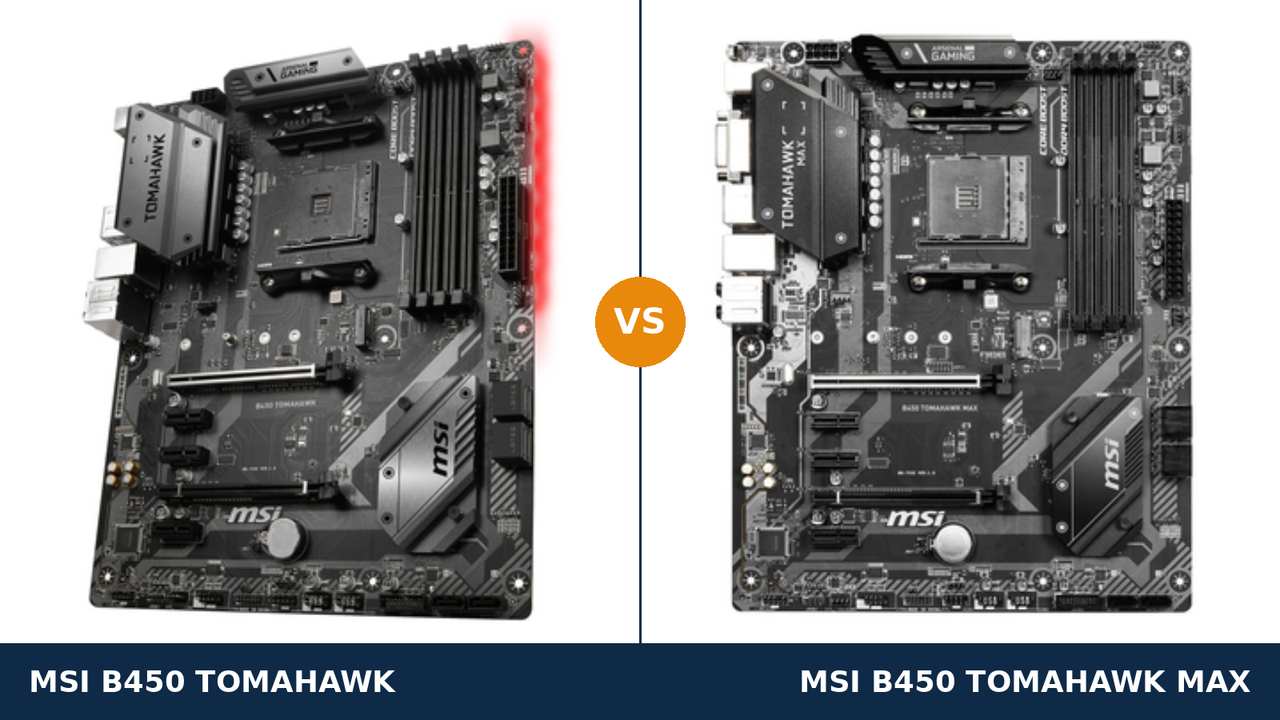
Nobody really buys these boards new anymore. They buy them used — from the classifieds, from a friend upgrading to AM5, from the shelf of a shop clearing old stock.
And the used market is exactly where this comparison gets interesting. Because the B450 Tomahawk and the B450 Tomahawk MAX are the same motherboard.
Same PCB family. Same slots, same ports, same heatsinks, same everything you can touch. MSI built the MAX in 2019 by taking the 2018 original and changing one soldered component: the BIOS chip.
So the question is no longer “which board is better?” It is sharper than that. What is that one chip worth second-hand, what should you check before paying for either board, and when is the cheaper original the smarter money?
This guide answers all three. Every specification comes from MSI's own published data, and the buying checks come from how these boards actually change hands in 2026.
Key Takeaways
- The hardware is identical. Same power design, slots, storage, LAN, audio and USB. Gaming performance will never separate them.
- The MAX doubles the BIOS chip — 32 MB against 16 MB — so it holds support for every Ryzen generation at once, in a full graphical BIOS.
- The original catches up by update. Ryzen 3000 and 5000 run on it, but the update costs the graphical BIOS interface and the oldest CPU support.
- Used, the gap decides. A small premium for the MAX is money well spent. A large one is not — the original at a real discount is the value buy.
- Already own the original? Keep it. Swapping sideways to a MAX buys firmware convenience, not performance.
Quick Verdict
Buy the MSI B450 Tomahawk MAX if you are choosing one today. It is the same board with every firmware compromise removed.
Ryzen 3000 works out of the box. Ryzen 5000 arrives on a normal update that keeps the full Click BIOS 5 interface. There is no version of its BIOS that deletes a processor you might own.
Buy the original B450 Tomahawk if the used price is clearly lower and your plans are modest. For a Ryzen 1000 or 2000 build it is every bit the MAX's equal.
And if you plan to flash it once for a newer CPU and then never open the BIOS again, its one real compromise — a text-mode BIOS — may never bother you at all.
The Scorecard
Scores below are derived directly from the manufacturer specifications compared in this guide — chip capacities, supported processors, slot counts and supported standards. They are a reading aid, not benchmark results.
| Category | B450 Tomahawk | B450 Tomahawk MAX | ||
|---|---|---|---|---|
| CPU support out of the box | 6 / 10 | 10 / 10 | ||
| BIOS capacity & interface | 5 / 10 | 10 / 10 | ||
| Memory | 7 / 10 | 9 / 10 | ||
| Storage | 8 / 10 | 8 / 10 | ||
| Expansion | 8 / 10 | 8 / 10 | ||
| Power delivery & cooling | 8 / 10 | 8 / 10 | ||
| Overall | 7.0 / 10 | 8.8 / 10 | ||
Read the table carefully and the whole comparison is in front of you. Four categories are dead level. The MAX's entire lead is firmware: what boots without an update, and what the BIOS looks like afterwards.
At a Glance: Who Each Board Fits
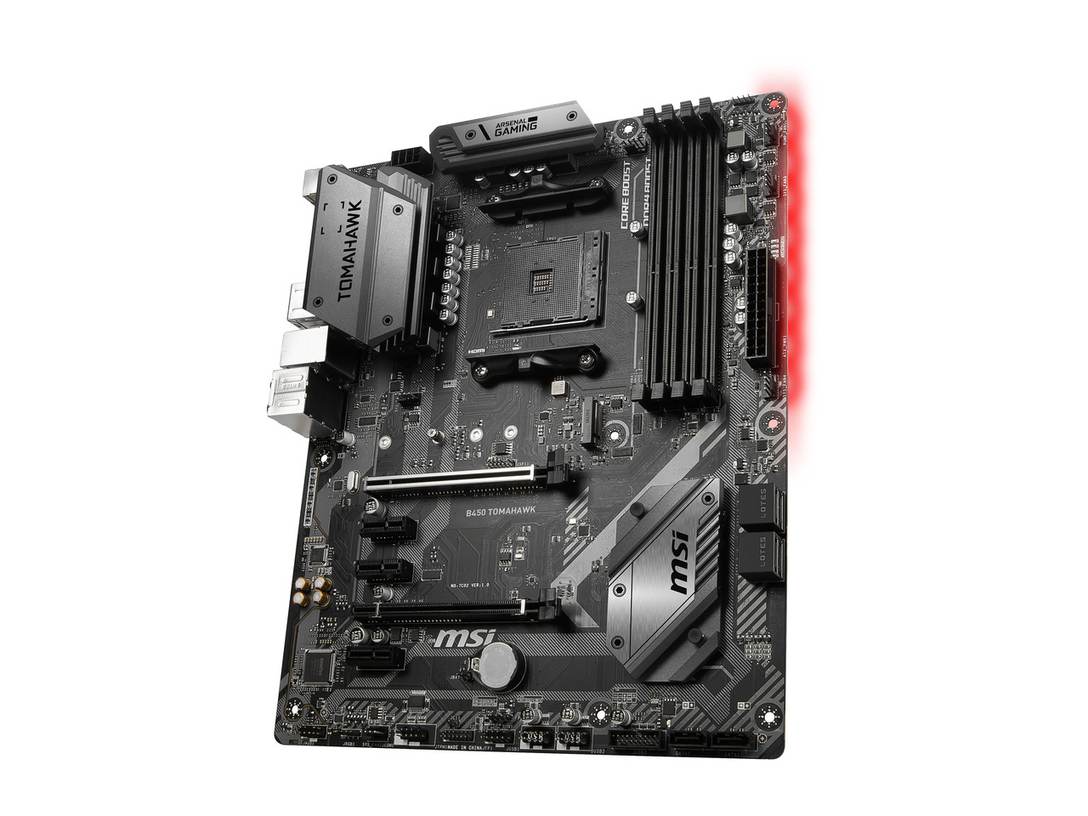
MSI B450 Tomahawk
- 16 MB BIOS chip — newer Ryzen generations arrive by update
- Graphical BIOS until you update; text-style GSE Lite after
- Memory validated to DDR4-3466 (O.C.)
- Flash BIOS Button — update or recover with no CPU fitted
- Identical slots, storage, LAN and audio to the MAX
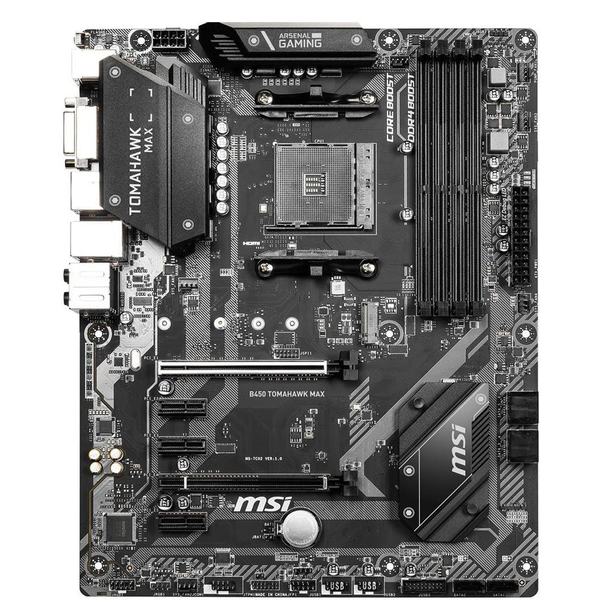
MSI B450 Tomahawk MAX
- 32 MB BIOS chip — every Ryzen generation's support in one ROM
- Ryzen 3000 out of the box; Ryzen 5000 on a normal update
- Full Click BIOS 5 graphical interface on every BIOS version
- Memory validated to DDR4-4133 (O.C.) with Ryzen 3000 CPUs
- Same hardware everywhere else — the premium buys firmware
Choose the B450 Tomahawk if…
The used listing is meaningfully cheaper than any MAX you can find. That discount is the entire case for this board, and it is a legitimate one.
Your processor is from the Ryzen 1000 or 2000 series. On those chips the original needs nothing, lacks nothing, and matches the MAX feature for feature.
Or you are comfortable flashing a BIOS once — the button on the rear panel makes it a ten-minute job — and a text-mode settings screen does not trouble you.
Choose the B450 Tomahawk MAX if…
You are building around Ryzen 3000 or 5000 and want the board to simply work. No update first, no interface downgrade after.
You are buying used and cannot verify what BIOS a second-hand original is carrying. The MAX removes that unknown from the purchase entirely.
Or the price gap is small. When the MAX costs only slightly more, its convenience is worth every penny of the difference.
As an Amazon Associate I earn from qualifying purchases at no extra cost to you.
Specifications: The Specs That Actually Matter
Every figure below is taken from MSI's published specifications and datasheets for the two boards, cross-checked against MSI's support pages.
Two figures in this table carry asterisks in the real world — maximum memory and the MAX's headline memory speed. Both get an honest note under the table rather than a quiet footnote.
| Specification | MSI B450 Tomahawk | MSI B450 Tomahawk MAX |
|---|---|---|
| Form factor | ATX, 30.5 × 24.4 cm | ATX, 30.5 × 24.4 cm |
| Socket / chipset | AMD AM4 / B450 | AMD AM4 / B450 |
| CPU support, out of the box | Ryzen 1000/2000, Ryzen with Vega graphics, Athlon with Vega graphics | Ryzen 1000/2000/3000, Ryzen with Radeon graphics, Athlon with Vega graphics |
| BIOS chip | 16 MB (128 Mb) flash | 32 MB (256 Mb) flash |
| BIOS interface on the latest BIOS | GSE Lite (text-style) once updated for Ryzen 3000 | Full Click BIOS 5 graphical interface |
| Memory | 4 × DDR4 DIMM, up to 128 GB, 3466 MT/s (O.C.), A-XMP | 4 × DDR4 DIMM, up to 128 GB, 4133 MT/s (O.C.) with Ryzen 3000, A-XMP |
| Graphics outputs (APU) | HDMI 1.4, DVI-D | HDMI 1.4, DVI-D |
| Expansion slots | PCIe 3.0 x16 (Steel Armor) + PCIe 2.0 x16 (x4) + 3 × PCIe 2.0 x1, 2-way CrossFire | PCIe 3.0 x16 (Steel Armor) + PCIe 2.0 x16 (x4) + 3 × PCIe 2.0 x1, 2-way CrossFire |
| M.2 storage | 1 × Turbo M.2, PCIe 3.0 x4 / SATA | 1 × Turbo M.2, PCIe 3.0 x4 / SATA |
| SATA | 6 × SATA 6 Gb/s, RAID 0/1/10 | 6 × SATA 6 Gb/s, RAID 0/1/10 |
| LAN | Realtek 8111H GbE | Realtek 8111H GbE |
| Audio | Realtek ALC892, 7.1 HD, Audio Boost | Realtek ALC892, 7.1 HD, Audio Boost |
| USB (rear) | 2 × USB 3.2 Gen 2 (Type-A + Type-C), 2 × USB 3.2 Gen 1, 2 × USB 2.0 | 2 × USB 3.2 Gen 2 (Type-A + Type-C), 2 × USB 3.2 Gen 1, 2 × USB 2.0 |
| BIOS flashing | Flash BIOS Button (no CPU/RAM/GPU needed) | Flash BIOS Button (no CPU/RAM/GPU needed) |
Memory capacity note: MSI's current specification pages list 128 GB for both boards. Launch-era documentation said 64 GB. The table follows MSI's current figure; in practice, four 32 GB DDR4 sticks are an eccentric thing to fit to a B450 board either way.
Memory speed note: the MAX's DDR4-4133 validation applies with a Ryzen 3000-series processor fitted. With other generations MSI's own table caps the validated figure at 3466 — the same as the original. Section 4 below explains why this matters less than it appears.
The Differences That Actually Matter
1. One chip, doubled — what 32 MB actually buys
A BIOS chip stores the firmware that teaches a motherboard which processors exist. Every CPU generation needs its own microcode added to that firmware.
By 2019, AM4 had accumulated a lot of generations. The original Tomahawk's 16 MB chip could no longer hold all of them alongside MSI's full graphical BIOS.
The MAX's 32 MB chip holds everything at once. That is the entire engineering story of this product line — MSI said so plainly at launch.
Nothing about that makes the MAX faster. It makes it unconditional. Every processor it supports, it supports in the full-featured firmware, with room to spare.
2. Out of the box vs update first — and the used-board lottery
Fit a Ryzen 3000 processor to the MAX and it boots. Fit one to the original and nothing happens until the BIOS is updated.
That update is not difficult. The Flash BIOS Button on the rear panel updates the board with no processor fitted at all — power supply, USB stick, button, done.
But buying used adds a wrinkle no spec sheet shows. A second-hand original arrives carrying whatever BIOS its previous owner left on it.
That might be a launch BIOS. It might be a Ryzen 5000 BIOS. It might be a beta. You find out when your processor does — or does not — boot.
The button rescues every one of those cases, which is why the original remains a safe used buy. But the MAX never makes you ask the question in the first place.
3. The BIOS screen you will live with
To fit Ryzen 3000 support into 16 MB, MSI stripped the original's firmware down to a text-style interface called GSE Lite.
Every BIOS update for the original from that point on — including the ones that add Ryzen 5000 — keeps that stripped interface.
What do you actually lose? Graphics, mouse-driven menus, and polish. The settings that matter are still there, navigable by keyboard.
What you do not lose is a single point of performance. A text BIOS overclocks, sets XMP and controls fans exactly as well as a pretty one.
The MAX keeps the full Click BIOS 5 graphical interface on every version, permanently. If you tinker often, that is a genuine quality-of-life difference. If you set the BIOS once and forget it for three years, it is close to worthless — price it accordingly.
4. Memory ceilings — a validation gap, not a real-world one
On paper the MAX wins memory clearly: validated to DDR4-4133 against the original's 3466.
Read MSI's fine print, though, and the 4133 figure applies only with a Ryzen 3000 processor in the socket. Other generations validate at 3466 on both boards.
Real memory behaviour is governed by the processor's integrated memory controller far more than by the board's validation table. The same Ryzen chip will run the same DDR4 kit at the same speed on either board.
For the 3200–3600 MT/s kits that make sense on AM4, memory is a practical tie. The MAX's higher ceiling is a spec-sheet trophy, and we score it as a small win rather than a big one for exactly that reason.
5. Everything physical is a tie — the honest list
Both boards come from the same MS-7C02 design, and it shows everywhere you look.
Same extended heatsinks over the same power design. Same Steel Armor primary slot, same second x16 slot wired at x4, same three x1 slots.
Same single Turbo M.2 slot, same six SATA ports, same Realtek gigabit LAN, same ALC892 audio, same rear USB layout down to the Type-C port.
Even the display outputs match: HDMI 1.4 and DVI-D, a pairing that was already conservative in 2018.
Anyone trying to sell you one of these boards over the other on hardware is selling you a story. The difference is firmware, and only firmware.
6. The used-market maths — when the discount is real
Because the boards are hardware-identical, the used decision reduces to one number: the size of the price gap on the day you buy.
If the gap is small, take the MAX. You are paying a little to delete an update step, a text-mode BIOS, and every BIOS-version question a used board can ask.
If the gap is large — if the original is selling at the kind of discount discontinued boards often reach — the maths flips. The original plus one free evening with the Flash BIOS Button gets you to almost exactly the same PC.
The trap is the middle: an original priced close to the MAX because its listing says “Tomahawk” in big letters. Check which board a listing actually is before comparing prices. The silkscreen settles it — more on that in the buying guide.
One more used-market reality: neither board's warranty is worth pricing in. Treat any second-hand example as sold as seen, and let the price reflect that.
7. The endgame question — both roads lead to Ryzen 5000
Most people buying these boards in 2026 are building AM4's endgame: a cheap platform today, one strong processor upgrade later.
Both boards make that journey. MSI's support lists run to the Ryzen 5000 series on each, including the 5800X3D that has become the platform's favourite final upgrade.
The difference is the texture of the trip. On the MAX, the final BIOS is the full graphical firmware, one ordinary update away.
On the original, the same destination waits behind the Lite interface — and behind one more caveat: the update path that added Ryzen 3000 deleted support for the oldest pre-Ryzen A-series processors. Nobody sane builds around those chips today, but if a PC in your house still runs one, the original's early BIOSes are the only ones that boot it.
Destination: identical. Journey: noticeably smoother on the MAX. That sentence summarises this entire comparison.
CPU Pairing Guide
Start from the processor, as always. On this pairing the CPU decides not just whether a board works, but how much updating stands between you and a booting PC.
| Your processor | B450 Tomahawk | B450 Tomahawk MAX | Our call |
|---|---|---|---|
| Ryzen 5 1600 / 2600 (1000/2000 series) | Excellent — native support | Excellent — native support | Original at a discount; dead level here |
| Ryzen 5 3600 / 3700X (3000 series) | Works — BIOS update required first | Excellent — works out of the box | B450 Tomahawk MAX |
| Ryzen 5 5600 / 5700X (5000 series) | Works — on the latest BIOS, Lite interface | Works — on the latest BIOS, full interface | B450 Tomahawk MAX |
| Ryzen 7 5800X3D | Works — on the latest AGESA BIOS | Works — on the latest AGESA BIOS | MAX, for the painless path to AM4's endgame chip |
| Ryzen 5 3400G / 5600G (APU) | Supported — confirm BIOS version on MSI's list | Supported — confirm BIOS version on MSI's list | Either — display outputs are identical |
One row deserves emphasis. The 5800X3D is the upgrade that keeps AM4 gaming PCs alive, and both of these boards carry it. A cheap used Tomahawk — either one — plus that chip is one of the best-value builds left in PC gaming.
Ready to check today’s price?
Stock of both boards is mostly used and refurbished now, so prices swing week to week. Check the live figure on the board that fits your processor.
View on Amazon — B450 TomahawkView on Amazon — B450 Tomahawk MAXThe 30-Second Decision
| If this sounds like you… | Buy this |
|---|---|
| “I am building with a Ryzen 3000 or 5000 processor.” | B450 Tomahawk MAX |
| “I found the original cheap, and my Ryzen 5 2600 is staying.” | B450 Tomahawk |
| “I already own the original and everything works.” | Neither — keep your board and your money |
| “I want the full graphical BIOS and zero update drama.” | B450 Tomahawk MAX |
| “I am assembling the cheapest AM4 PC I can from used parts.” | Whichever is cheaper — after the BIOS check below |
| “This board ends its life under a 5800X3D.” | B450 Tomahawk MAX |
What You Gain. What You Give Up.
MSI B450 Tomahawk
You gain: the lower used price for literally the same hardware. Full native support for the Ryzen generations the board was launched with. And a Flash BIOS Button that makes its one weakness — the update-first requirement — a minor chore instead of a roadblock.
You give up: the graphical BIOS, permanently, the moment you update for a newer processor. Out-of-the-box support for anything from Ryzen 3000 onward. And certainty about what firmware a used example is running until you power it on.
MSI B450 Tomahawk MAX
You gain: Ryzen 3000 out of the box and a BIOS chip with room for everything AM4 ever produced. The full Click BIOS 5 interface on every update, forever. The highest validated memory ceiling of the pair, and the calmest used purchase of the two.
You give up: money — the MAX consistently holds a premium over its twin, new-old-stock and used alike. And nothing else. That is precisely the point: on this board, the premium buys convenience only, and you should decide what convenience is worth to you.
Pros and Cons
B450 Tomahawk — Pros
- Identical hardware to the MAX for less money
- Native support for Ryzen 1000/2000 and Vega APUs
- Flash BIOS Button makes updates CPU-free
- Still reaches Ryzen 5000 and the 5800X3D
- Huge used supply — easy to find, easy to haggle
Cons
- Ryzen 3000+ needs a BIOS update before first boot
- Updates replace the graphical BIOS with text-style GSE Lite
- Newer BIOSes drop the oldest pre-Ryzen A-series support
- Used examples arrive with an unknown BIOS version
B450 Tomahawk MAX — Pros
- Ryzen 3000 out of the box; 5000 on a painless update
- 32 MB BIOS holds every generation at once
- Full Click BIOS 5 graphical interface on all versions
- DDR4-4133 validation with Ryzen 3000 processors
- The safer second-hand buy — no firmware unknowns
Cons
- Costs more than the identical-hardware original
- No performance advantage of any kind
- Still a single M.2 slot and no Wi-Fi, like the original
- Name collides with the later MAX II — check listings carefully
Buying Used: The Checks That Matter
Confirm which board the listing actually is. Sellers write “Tomahawk” and let you guess the rest.
The board itself never lies: “B450 TOMAHAWK” or “B450 TOMAHAWK MAX” is silkscreened on the PCB, printed again on the VRM heatsink, and both boards carry the model code MS-7C02. Ask for a photo of the silkscreen if the listing is vague.
Ask two questions about any used original. Which processor did you run, and which BIOS is installed?
The answers tell you whether the board arrives ready for your CPU, carrying the Lite BIOS, or still on a launch firmware. None of these is a deal-breaker — the Flash BIOS Button fixes all of them — but they decide whether your build boots on day one or day two.
Inspect the socket before anything is fitted. AM4 keeps its pins on the processor, not the board, which removes the classic bent-pin risk.
What remains is contamination: thermal paste or dust down in the socket holes causes exactly the kind of intermittent fault that ruins a weekend. A photograph of the socket, close up, is a reasonable thing to request.
Check the small parts. The I/O shield is the accessory used boards most often lose, and an ATX case looks unfinished without one.
The M.2 screw and standoff matter more — without them your SSD mounting becomes improvisation. SATA cables are in every parts drawer on Earth and are not worth negotiating over.
Run a first-boot routine. Power the board with the minimum fitted, watch the EZ Debug LEDs step through their checks, and enter the BIOS to note its version before the full build goes together.
Then update to the latest BIOS for your exact board from MSI's support page — the original and the MAX have separate pages, and their files are not interchangeable.
The Upgrade Path Test
Judge these boards by the role they play in 2026: the cheap foundation of an AM4 build that gets one big processor upgrade before retirement.
That path runs identically on both. Start with whatever Ryzen chip the budget allows. Finish, when prices suit you, on a Ryzen 5000 processor — the 5800X3D if the PC games, the 5700X if it works.
Your DDR4 carries across. Your cooler carries across. The board is the one part that never needs to change, which is the whole economic argument for buying either Tomahawk now.
Owners of the original should hear this plainly: the MAX is not an upgrade path. It is the same destination viewed through a prettier BIOS.
The real fork in the road is not Tomahawk versus MAX. It is one last AM4 processor versus a full AM5 rebuild — new board, new DDR5, new CPU. Both Tomahawks sit on the cheap side of that fork, together.
When to Skip Both
Some builders should walk past this entire comparison, however cheap the boards get.
Skip both if you need PCIe 4.0 — for a current graphics card's full link or a Gen4 NVMe drive, that means B550 or X570. Skip both if one M.2 slot is not enough storage expansion for you.
Skip both if you want Wi-Fi on the board itself; neither Tomahawk has it, at any price, in any revision.
Skip both if a Ryzen 9 will spend its life at full all-core load. These boards will run one, but a stronger power-delivery class is the honest recommendation for that duty cycle.
And skip both if you are buying new with a real budget. AM5 is the platform with a future; these boards are the platform with a past — a glorious one, but a past.
BIOS and Long-Term Support
AM4 is a finished platform, and for boards like these that is a feature. The firmware is mature, the drivers are stable, and every surprise has already happened to someone else.
Both boards live on MSI's support pages with full BIOS histories, driver sets and per-board CPU support lists. Treat those lists — not forum posts — as the authority on whether a given processor needs a given BIOS.
Expect future BIOS releases to be occasional AGESA and security maintenance rather than new features. On a platform at this stage of life, that is exactly the right cadence.
One discipline covers both boards: update the BIOS before a processor upgrade, never after a failed boot forces the issue. The Flash BIOS Button makes “before” trivially easy on either board.
Final Verdict
The MSI B450 Tomahawk MAX is the one to buy.
Not because it is faster — it is not, at anything, ever. It wins because it is the same excellent board with its single historical compromise engineered away.
A 32 MB BIOS chip means Ryzen 3000 out of the box, Ryzen 5000 on an ordinary update, and the full graphical firmware at every step. Bought used, it is also the purchase with no firmware unknowns attached.
Buy the MAX for any Ryzen 3000 or 5000 build, for a 5800X3D endgame, and whenever the price gap over the original is small enough to be boring.
View on Amazon — B450 Tomahawk MAX
Buy the original Tomahawk when the used market prices it like the discontinued board it is. For Ryzen 1000 and 2000 builds it surrenders nothing at all.
And for newer chips, its compromises are an evening's flashing and a text-mode menu — real, but easy to overpay to avoid.
View on Amazon — B450 Tomahawk
Watch Out: Similar Names, Different Boards
The Tomahawk name has been busy, and used listings exploit the confusion. Three warnings.
First: the B450 Tomahawk MAX II is a different, later board — a 2021 revision sold under its own name, with its own MSI support page and its own BIOS line. A listing that just says “MAX” can mean either. The silkscreen and the box label settle which one is in front of you.
Second: “Tomahawk” spans generations. The B350, B450, B550 and X570 Tomahawks are four different chipsets with four different feature sets, and their prices overlap in the used market. Match the chipset in the title before you compare a price.
Third: the B450M boards — Mortar, Bazooka and their kin — are micro-ATX relatives, not this board. A Tomahawk listing with an “M” hiding in the model name is a smaller board with a different layout.
Model name, then model code MS-7C02, then price. In that order, every time.
Case, Power and Cabling Notes
Both boards are full ATX. They need an ATX-capable case, and in return they give you the era's most spacious, easy-to-build layout.
Power is unremarkable in the best way: a 24-pin main connector and a single 8-pin EPS CPU connector. Any reputable modern power supply covers both without adapters.
Storage planning is the one place the shared design shows its age. A single M.2 slot means one NVMe drive; everything else rides the six SATA ports.
For most builds that split is still right — a fast NVMe for the system and games, SATA SSDs or a hard drive for the library. Just plan it before the M.2 slot is occupied and the itch for a second NVMe arrives.
Front-panel connections date the boards honestly. There is a USB 3.2 Gen 1 header for case ports, but no front-panel USB-C header on either board — a case front Type-C port will sit unconnected on both. The rear Type-C Gen 2 port works fine; it is simply at the back.
Frequently Asked Questions
Is the B450 Tomahawk MAX faster than the B450 Tomahawk?
No. The two boards share the same MS-7C02 design: identical power delivery, slots, storage, networking and audio. The MAX differs only in its BIOS chip — 32 MB against 16 MB — which changes processor support and the BIOS interface, never performance.
Can the original B450 Tomahawk run Ryzen 5000, including the 5800X3D?
Yes, on the latest BIOS from MSI's support page for the board. The update runs through the Flash BIOS Button with no CPU fitted, so a used board on an old BIOS is never a dead end. Be aware the updated firmware uses the text-style GSE Lite interface rather than the graphical Click BIOS 5.
I already own the original Tomahawk. Should I swap it for a MAX?
No. It is a sideways move to identical hardware. Everything the MAX would give you — Ryzen 5000 support included — is one free BIOS update away on the board you own. Spend the money on the processor or graphics card instead.
What does the GSE Lite BIOS actually cost me?
Presentation, not capability. You lose the graphical, mouse-driven Click BIOS 5 menus; the settings themselves — XMP, fan control, voltages, boot order — are all present in text form. The update that introduces GSE Lite also removes support for the oldest pre-Ryzen A-series processors, which is the only functional loss.
Which Tomahawk is the better used buy?
The MAX, if the premium is small: it removes the update step, the interface downgrade and every question about what BIOS a used board carries. The original, if it is substantially cheaper and your processor is Ryzen 1000/2000 — or if you are happy to flash it once via the BIOS button and move on.
Is the Tomahawk MAX II the same board as the MAX?
No. The MAX II is a later, separate model with its own MSI support page and BIOS line. Listings sometimes shorten both names to “MAX”. Check the silkscreen on the PCB or the box label, and download BIOS files only from the page for the exact board you hold.
Will DDR4-3600 memory run on both boards?
Yes, as an overclock, with a suitable processor — in practice the CPU's memory controller decides what a given kit achieves, and it is the same controller on either board. The validated ceilings differ on paper (3466 on the original; 4133 on the MAX with a Ryzen 3000 CPU), but sensible 3200–3600 MT/s kits behave identically on both.
Does either board have Wi-Fi, PCIe 4.0 or a second M.2 slot?
No to all three, on both boards. Networking is wired gigabit Ethernet, the graphics slot is PCIe 3.0, and storage expansion beyond the single M.2 slot means SATA drives. If any of those is a requirement, look at B550 boards instead.
Sources & Verification
MSI B450 Tomahawk official specifications and datasheet, msi.com • MSI B450 Tomahawk MAX official specifications (global and US), msi.com • MSI MAX series launch coverage: 32 MB BIOS ROMs and Ryzen 3000 out-of-the-box support (TechPowerUp; PC Perspective, on GSE Lite behaviour of updated 16 MB boards) • MSI support pages and CPU support lists for both boards. Specifications verified November 2026.

James Wilson
James has been building and benchmarking PCs for over a decade and writes Honestly Compared's motherboard and component guides. His rule for every comparison: the verdict has to survive the spec sheet, not the marketing page.