
MSI B550-A Pro vs MSI MAG B550 Tomahawk: Which Should You Buy?
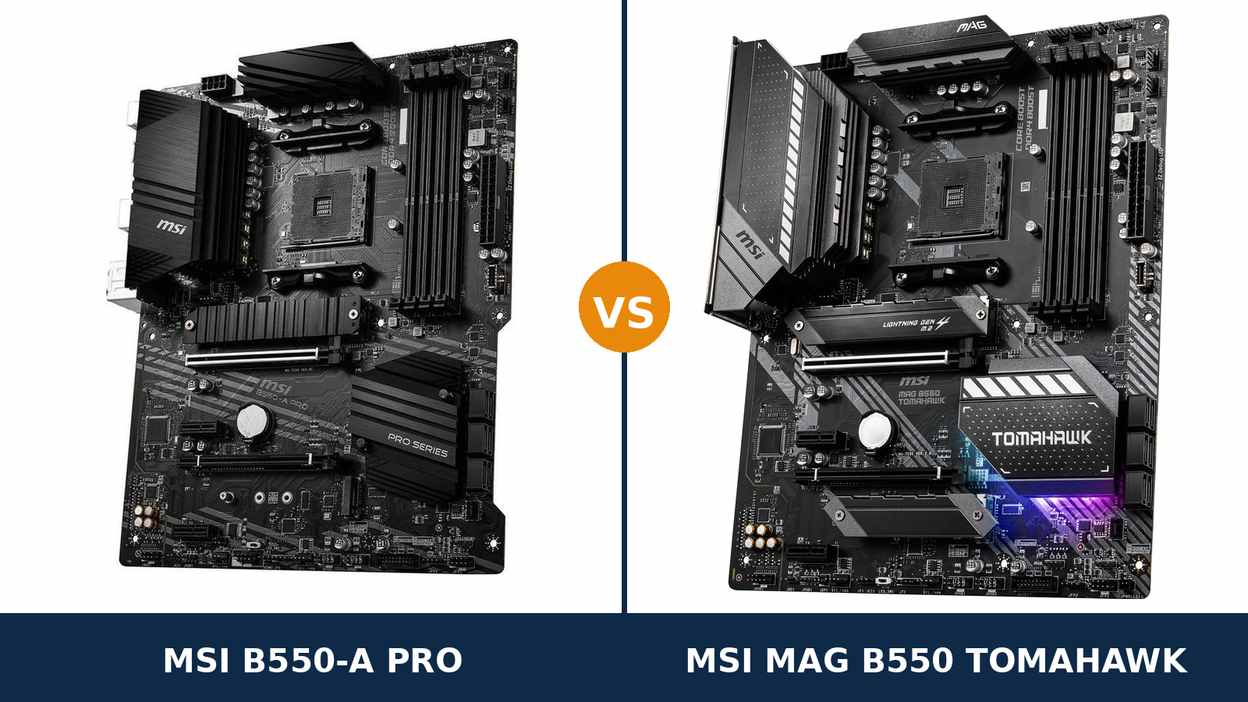
Start at the back of the case. That is where these two boards confess what they are.
The B550-A Pro's rear panel reads like an office inventory: one network port, a deep bench of USB 2.0 sockets, plain analogue audio jacks. The MAG B550 Tomahawk's reads like a streaming desk: two network ports, one of them 2.5-gigabit, plus an optical audio output.
Flip both boards face-up and the surprise lands. Underneath the trim they are near-identical twins — same B550 chipset, same AM4 socket, the same 10+2+1 power design on paper, four memory slots apiece, two M.2 slots and six SATA ports each.
So this comparison was never about the platform — both boards hand you all of it. It is about the extras MSI bolted onto each model, and whether the pricier board's extras are ones your build will ever touch.
Every figure below comes from MSI's own specifications, datasheets and manuals. No marketing claims, no borrowed benchmarks — just the hardware, then a verdict.
Key Takeaways
- The Tomahawk wins on hardware you cannot retrofit. 2.5-gigabit dual LAN, optical audio and 60-amp power stages are soldered decisions, not upgrade options.
- The power headline is a tie; the parts behind it are not. Both boards claim 10+2+1 phases. The Tomahawk fills its phases with 60A Smart Power Stages.
- The A Pro is the value answer for Ryzen 5 and workstation builds. It keeps the whole platform and trims only the extras.
- Storage, slots and fan headers barely separate them. Anyone selling you either board on connector counts is selling you a tie.
- Neither board has Wi-Fi. Both are wired-only; plan networking accordingly.
Quick Verdict
Buy the MSI MAG B550 Tomahawk if this PC is a keeper. It is the more complete board, and its advantages compound the longer you own it.
It networks at 2.5 gigabits and keeps a second gigabit port in reserve. It feeds soundbars and receivers over optical. Its power stages are rated at 60 amps and sit under a larger heatsink assembly.
Build once, upgrade the processor later, let the home network get faster around it — the Tomahawk is already ready for all three.
Buy the MSI B550-A Pro if the build is a Ryzen 5, an office machine or a workstation. Nothing it gives up matters to those builds, and the saving is real money.
It even wins a few quiet rounds of its own: an 8+4-pin CPU power feed, four rear USB 2.0 ports, a serial header and proper debug LEDs. For the desk it was designed for, those beat RGB lighting every time.
The Scorecard
The scores below are read straight off the manufacturer specifications compared in this guide — network controllers, codec tiers, phase hardware and port counts. Treat them as a spec-sheet summary, not test results.
| Category | B550-A Pro | MAG B550 Tomahawk | ||
|---|---|---|---|---|
| Power delivery | 8 / 10 | 9 / 10 | ||
| Networking | 5 / 10 | 9.5 / 10 | ||
| Audio | 6 / 10 | 8.5 / 10 | ||
| Storage | 8.5 / 10 | 9 / 10 | ||
| Memory | 8 / 10 | 9 / 10 | ||
| Expansion & lane sharing | 7.5 / 10 | 8.5 / 10 | ||
| Cooling & headers | 8 / 10 | 8.5 / 10 | ||
| Overall | 8.0 / 10 | 8.8 / 10 | ||
Read the table top to bottom and a shape emerges. Rows covering the shared platform sit level. Rows covering silicon MSI paid extra for — networking, audio, power stages — all lean the same way.
At a Glance: Who Each Board Fits
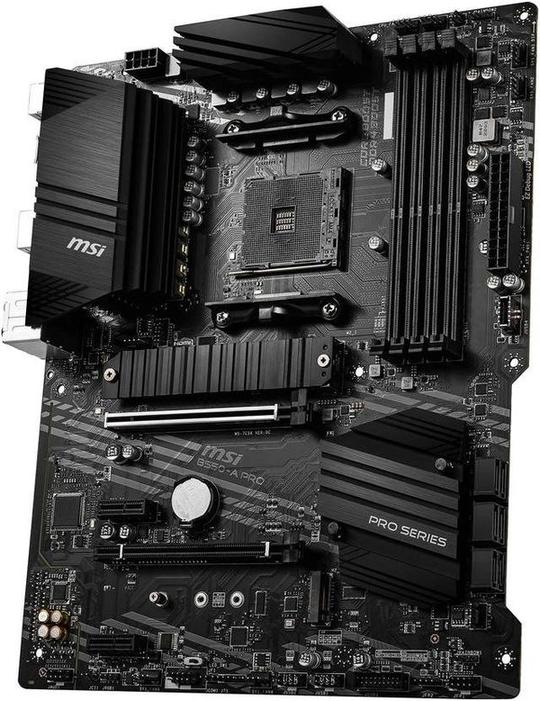
MSI B550-A Pro
- 10+2+1 Duet Rail VRM fed by an 8+4-pin CPU power input
- One Realtek gigabit LAN port
- ALC892 audio, analogue outputs only
- Four rear USB 2.0 ports, serial header, EZ Debug LEDs
- The same B550 platform for less money
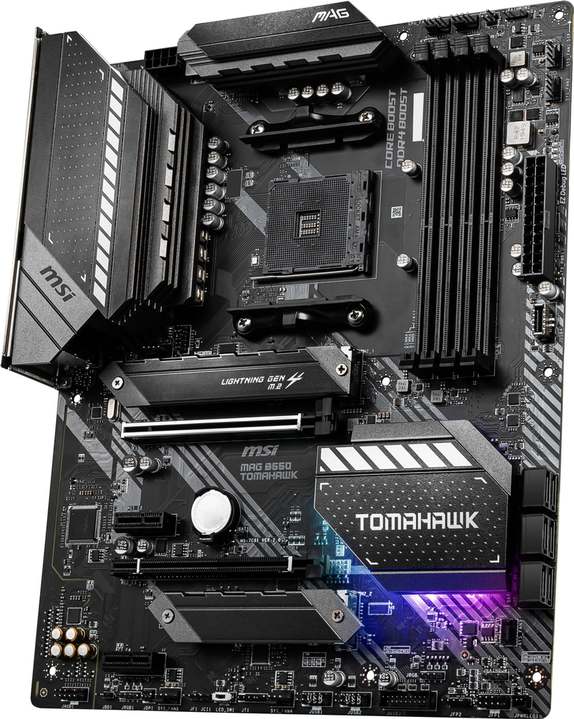
MSI MAG B550 Tomahawk
- 10+2+1 Duet Rail VRM built on 60A Smart Power Stages
- Two LAN ports: 2.5-gigabit and gigabit
- ALC1200 audio with an optical S/PDIF output
- Heatsinks over both M.2 slots, Mystic Light RGB
- Memory validated to 5100 MT/s (O.C.)
Choose the B550-A Pro if…
You are building around a Ryzen 5, or the PC is headed for a desk job — office work, a home server, a quiet workstation.
Your peripherals are old and proud of it. Serial devices and USB 2.0 hardware get a warmer welcome on this rear panel than on most modern boards.
Or the price gap is wide on the day you order. Everything the A Pro surrenders lives outside a simple build's daily routine.
Choose the MAG B550 Tomahawk if…
You game, stream or shuffle large files around a home network. The 2.5-gigabit port earns its place quickly.
A Ryzen 7 or Ryzen 9 sits in the upgrade plan. The stronger power stages and memory headroom keep that plan open.
Your PC drives a soundbar or an AV receiver. Optical output exists on exactly one of these two boards.
As an Amazon Associate I earn from qualifying purchases at no extra cost to you.
Specifications: The Specs That Actually Matter
Every figure in this table is taken from MSI's published specifications, datasheets and manuals for these two models.
Where MSI's own documents disagree with each other, the table follows the manufacturer's current product page, and the notes underneath flag it.
| Specification | MSI B550-A Pro | MSI MAG B550 Tomahawk |
|---|---|---|
| Form factor | ATX, 30.5 × 24.4 cm | ATX, 30.5 × 24.4 cm |
| Socket / chipset | AMD AM4 / B550 | AMD AM4 / B550 |
| CPU support | Ryzen 5000, 5000 G, 4000 G, 3000 series | Ryzen 5000, 5000 G, 4000 G, 3000 series |
| VRM design | 10+2+1 Duet Rail digital power, extended heatsink, 8+4-pin CPU power | 10+2+1 Duet Rail, 60A Smart Power Stages, digital PWM, extended heatsink, 8-pin CPU power |
| Memory | 4 × DDR4 DIMM, up to 128 GB, 4400 MT/s (O.C.), A-XMP | 4 × DDR4 DIMM, up to 128 GB, 5100+ MT/s (O.C.), A-XMP |
| Graphics outputs (APU) | HDMI, DisplayPort | HDMI, DisplayPort |
| Expansion slots | PCIe 4.0 x16 + PCIe 3.0 x16 (x4) + 2 × PCIe 3.0 x1 | PCIe 4.0 x16 + PCIe 3.0 x16 (x4) + 2 × PCIe 3.0 x1 |
| Lane sharing | Second M.2 populated → one PCIe x1 slot disabled; the x4 slot stays live | Gentler rule: the x4 slot is only lost when the second M.2 and every remaining slot are populated too |
| M.2 storage | 2 slots: PCIe 4.0 x4 (CPU) + PCIe 3.0 x4 (chipset), M.2 Shield Frozr heatsink | 2 slots: PCIe 4.0 x4 / SATA (up to 22110) + PCIe 3.0 x4; heatsinks on both slots |
| SATA | 6 × SATA 6 Gb/s, RAID 0/1/10 | 6 × SATA 6 Gb/s, RAID 0/1/10 |
| LAN | Realtek RTL8111H Gigabit Ethernet (single port) | Realtek RTL8125B 2.5 Gb/s + RTL8111H 1 Gb/s (dual ports) |
| Audio | Realtek ALC892, 7.1 HD Audio Boost, analogue jacks only | Realtek ALC1200, 7.1 HD Audio Boost, optical S/PDIF out |
| USB (rear) | 2 × USB 3.2 Gen 2 (Type-A + Type-C), 2 × Gen 1, 4 × USB 2.0 | 2 × USB 3.2 Gen 2 (Type-A + Type-C), 2 × Gen 1, 2 × USB 2.0 |
| USB (front headers) | USB 3.2 Gen 1 Type-C header + Gen 1 header + 2 × USB 2.0 headers | USB 3.2 Gen 1 Type-C header + Gen 1 header + 2 × USB 2.0 headers |
| Fan headers | 8 × 4-pin (CPU, pump, 6 × system) | 8 × 4-pin (CPU, pump, 6 × system) |
| BIOS flashing | Flash BIOS Button (no CPU/RAM/GPU needed) | Flash BIOS Button (no CPU/RAM/GPU needed) |
Codec note: MSI's summary tables hedge both boards — “ALC892/ALC897” for the A Pro, “ALC1200/ALC1220P” for the Tomahawk — because the fitted codec varied across production runs. The datasheets name the ALC892 and the ALC1200 respectively, so those are the chips scored in this guide.
Memory note: the Tomahawk's 5100+ MT/s rating comes from MSI's current product page. Its 2020 launch datasheet printed 4866+. The point survives either figure: the ceiling clears the A Pro's 4400 MT/s comfortably, and clears what most memory kits will ever be asked to run by more still.
CPU note: one support line applies to both boards — B550 does not carry the Ryzen 5 3400G or Ryzen 3 3200G. Those APUs belong to the B450 generation. Check MSI's CPU support list for your exact processor before ordering.
The Differences That Actually Matter
1. Networking — the gap that grows with your house
This is the widest gap in the whole comparison, and it widens every year.
The Tomahawk carries two wired controllers: a Realtek RTL8125B running at 2.5 Gb/s, with the familiar RTL8111H gigabit chip as its running mate. The A Pro carries the RTL8111H on its own and stops there.
Gigabit was the ceiling of home networking for a long time; it is not any more. NAS boxes ship with 2.5G ports, switches have dropped in price, and fibre routers increasingly offer a multi-gig socket. Behind a gigabit motherboard, all of that hardware waits.
On the Tomahawk, a transfer to the NAS lands roughly two and a half times faster, downloads stop queuing behind the port, and the second port is not decoration either: one cable to the router, one straight into a NAS or a second PC.
None of this condemns the A Pro. A single gigabit port behind a gigabit router, used for browsing and streaming, never makes itself felt. The difference only wakes up when faster networking enters the house — and on current trends, it will.
2. Power delivery — an identical headline over different hardware
Both boards print the same boast: a 10+2+1-phase Duet Rail design under an extended heatsink. Stop reading there and the VRM scores a tie.
The Tomahawk builds each phase around a 60-amp Smart Power Stage — an integrated, high-current part governed by a digital PWM controller. The A Pro reaches the same phase count with a more conventional layout.
At stock settings, both boards feed any AM4 processor without complaint. The separation shows at the top of the range and over time: sustained all-core loads, a Ryzen 9 rendering for hours, where the Tomahawk's stages deliver each amp with less strain.
Then comes the detail that trips up spec-sheet shoppers, verified in MSI's own manuals: the cheaper A Pro accepts an 8+4-pin CPU power feed, while the Tomahawk takes a single 8-pin plug. Resist the obvious conclusion. Connector count describes how power arrives, not what the VRM does with it.
One 8-pin EPS connector already carries more current than any AM4 chip can draw. The deciding hardware is the power stages downstream of the plug — and those belong to the Tomahawk.
So score power honestly: the A Pro's design is genuinely strong, which is why it rates well across our B550 guides. The Tomahawk simply buys its way into the class above.
3. Audio — one codec tier and one port apart
The Tomahawk pairs Realtek's ALC1200 codec and Audio Boost circuitry with an optical S/PDIF socket on the rear panel. The A Pro pairs the older ALC892 with analogue jacks and nothing else.
Through headphones or desktop speakers, the ALC1200 is the cleaner implementation — a lower noise floor, a tidier output. Call it a refinement rather than a revelation.
The optical socket is the bigger deal, because it is binary. A soundbar, AV receiver or DAC with a Toslink input plugs straight into the Tomahawk and receives a purely digital feed, with no electrical noise path from the PC.
The A Pro cannot do that at all. The same setup has to route audio over HDMI through the graphics card, or out through a USB DAC. Both work. Both are workarounds for a missing port.
A dedicated sound card or external DAC outclasses either board. Judged as onboard audio, though, this section has one winner — the same board that just won networking.
4. Storage — the same counts, different small print
Count connectors and storage is level: a CPU-connected PCIe 4.0 x4 M.2 slot, a chipset PCIe 3.0 x4 M.2 slot and six SATA ports with RAID 0/1/10, on both boards.
The differences live in the footnotes. The Tomahawk puts a Shield Frozr heatsink over each of its M.2 slots; the A Pro covers the first slot and leaves the second bare. The Tomahawk's primary slot also swallows 22110-length drives beside the standard sizes and accepts SATA-mode M.2 drives.
Lane sharing is the other footnote, and it only speaks up after your second SSD goes in. Populate the A Pro's second M.2 slot and one of its PCIe x1 slots switches off. Importantly, the x4 slot — the one worth having — stays alive.
The Tomahawk's trigger is harder to pull: its x4 slot only drops out in the fully loaded case — second M.2 and both remaining slots populated at once — which most builders never arrange.
For the two-drive builds most people actually assemble, the boards behave identically. The Tomahawk just sends fewer compromises to the people who keep going.
5. Memory — headroom on paper, parity in practice
Four DIMM slots, a 128 GB ceiling and A-XMP profiles on both boards. At the speeds real builds run — 3200 to 3600 MT/s — there is nothing between them.
The rated ceilings do differ. MSI's current page validates the Tomahawk to 5100+ MT/s; the A Pro's datasheet stops at 4400 MT/s.
Hold that gap up to the light, though. AM4 memory overclocking runs into the processor's fabric clock long before it runs into the motherboard's rating. Your kit and your chip's memory controller settle the result, not the number on the box.
So call it a practical tie with a paper win for the Tomahawk: if memory tuning is your hobby, its board is validated further; if you enable XMP once and forget it, both boards forget it with you.
6. Cooling, headers and the trim war
Here, at last, the A Pro stops giving ground.
Fan headers are a flat tie: eight 4-pin headers apiece — CPU, pump and six system — with the same BIOS fan-curve controls behind them. A big case full of fans is equally at home on either board.
Trim is where the philosophies split. The Tomahawk spends its budget on presentation: the second LAN port, the optical socket, Mystic Light RGB with matching headers. It looks like a gaming board because gaming is its job.
The A Pro spends its budget on the workshop. Four rear USB 2.0 ports against the Tomahawk's two, for the legacy hardware offices genuinely still run. A serial port header. EZ Debug LEDs that name the stage of a failed boot — the feature a workstation buyer uses and a gamer never knows exists.
Neither set of choices is a mistake. They are pointed at different desks. The only error is buying the trim meant for somebody else's.
CPU Pairing Guide
Start from the processor and this choice mostly makes itself. The table below is the comparison compressed into one view.
| Your processor | B550-A Pro | MAG B550 Tomahawk | Our call |
|---|---|---|---|
| Ryzen 5 5600 / 5500 | Excellent | Excellent | B550-A Pro — identical performance, smaller bill |
| Ryzen 5 5600G / 5700G (APU) | Excellent — HDMI + DisplayPort | Excellent — HDMI + DisplayPort | A coin flip — the display outputs match exactly |
| Ryzen 7 5700X / 5800X | Very good | Excellent — 60A stages, bigger heatsink | MAG B550 Tomahawk |
| Ryzen 9 5900X / 5950X | Workable at stock | Very good — the sensible pick of the two | Tomahawk here; full-time all-core work deserves a stronger class |
| Ryzen 3000 series | Excellent | Excellent | Whichever is cheaper on the day |
One warning covers both boards equally: the Ryzen 5 3400G and Ryzen 3 3200G are not supported on B550 at all. Carrying one of those APUs forward means a B450 board, not either of these.
Ready to check today’s price?
Both boards sell through Amazon, and pricing drifts. Check the live figure on the board that fits your build.
View on Amazon — B550-A ProView on Amazon — MAG B550 TomahawkThe 30-Second Decision
| If this sounds like you… | Buy this |
|---|---|
| “My home network runs — or soon will run — faster than gigabit.” | MAG B550 Tomahawk |
| “Ryzen 5 build, weekend gaming, careful budget.” | B550-A Pro — put the saving toward the GPU or storage |
| “The PC feeds a soundbar or a receiver.” | MAG B550 Tomahawk (optical S/PDIF) |
| “Office or workstation build. Ports and reliability, no light show.” | B550-A Pro |
| “A CPU upgrade is already pencilled into the plan.” | MAG B550 Tomahawk |
| “Half my peripherals predate USB 3.” | B550-A Pro |
What You Gain. What You Give Up.
MSI B550-A Pro
You gain: the complete B550 platform at the lower price — the same 10+2+1 VRM headline, both M.2 slots, Gen 2 USB front and rear, Flash BIOS. Plus workstation manners the gaming board skips: an 8+4-pin power feed, four rear USB 2.0 ports, a serial header and debug LEDs for when a build refuses to boot.
You give up: 2.5-gigabit networking and the spare LAN port. The optical output and the newer codec. A heatsink over the second M.2 slot. Memory validation past 4400 MT/s. Read that list again — it is all extras, no foundations.
MSI MAG B550 Tomahawk
You gain: the fullest B550 specification MSI wrote. Dual LAN headed by a 2.5G port, ALC1200 audio with optical out, 60-amp power stages, both M.2 slots heatsinked and the higher memory ceiling. Nothing on this board needs an apology or an add-in card.
You give up: the premium — it has never been the cheap way into B550. Two of the A Pro's four rear USB 2.0 ports. The serial header and the workshop trim. And after paying more: still no Wi-Fi.
Pros and Cons
B550-A Pro — Pros
- 10+2+1 VRM with 8+4-pin feed — a flagship headline at a midrange tier
- Dual M.2 and Gen 2 USB-C, essentials untrimmed
- Four rear USB 2.0 ports, serial header, EZ Debug LEDs
- Eight fan headers, matching the Tomahawk
- Flash BIOS Button for CPU-less updates
Cons
- Single gigabit LAN — the spec that has aged worst
- ALC892 audio, and no optical output
- Second M.2 slot runs without a heatsink
- Memory validated only to 4400 MT/s
- No Wi-Fi
MAG B550 Tomahawk — Pros
- Dual LAN: 2.5-gigabit plus gigabit
- 60A Smart Power Stages — the strongest VRM in this pairing
- ALC1200 audio with optical S/PDIF
- Both M.2 slots heatsinked; 22110 support in slot one
- Memory rated to 5100+ MT/s (O.C.)
Cons
- The pricier route onto the same platform
- Two rear USB 2.0 ports to the A Pro's four
- Single 8-pin CPU power — adequate, but it raises eyebrows
- No serial header or workstation trim
- No Wi-Fi
Check the Name Carefully — MSI Sells a Near-Identical Namesake
Check for the M. This guide covers the B550-A Pro, a full-ATX board. MSI also sells the B550M-A Pro, where one added letter shrinks the board to micro-ATX with a single M.2 slot and a fraction of the headers. It is an entirely different product wearing nearly the same name. Match the full name on the listing against the full name at the top of this page.
Check the CPU pairing. Both boards carry a Flash BIOS Button, so a board that arrives wearing an older BIOS can be updated for a Ryzen 5000 processor with no CPU, memory or graphics card installed — ten minutes and a USB stick.
Even so, confirm your exact processor against MSI's CPU support list before ordering — and remember the platform limit: the Ryzen 5 3400G and Ryzen 3 3200G are unsupported on B550, on these boards and every other.
Check the box contents. The A Pro's I/O shield arrives as a separate piece — seat it in the case before the board goes in, not after. Expect the board, SATA cables and documentation. Neither box includes Wi-Fi antennas, because neither board has Wi-Fi.
Check the gap, not just the prices. What does the Tomahawk's premium actually purchase? Networking silicon, audio silicon and a costlier class of power stage. When the gap has narrowed to very little, take the Tomahawk and do not look back. When it has stretched wide and your build is simple, the value is sitting with the A Pro.
The Upgrade Path Test
Score a motherboard on its third year, not its first.
Year one is a dead heat. A Ryzen 5 and a mid-range graphics card run the same on both boards, and no blind test will separate them.
Year two is where the paths fork, and it usually starts with the network — a NAS on the shelf, a faster fibre tier at the door. The Tomahawk's 2.5-gigabit port wakes up and earns its keep. The A Pro's gigabit port quietly becomes the ceiling — and the only fix is a network card in a slot you may have other plans for.
Year three brings the processor itch. A discounted Ryzen 7 or 9 drops into the same socket. Both boards accept it. The Tomahawk's 60-amp stages and higher memory validation accept it with more room to spare.
That is the whole comparison in one sentence: the A Pro is sized for the build as planned, and the Tomahawk is sized for the build as it evolves.
When to Skip Both
Fairness demands a section for the builders neither board serves.
Skip both if Wi-Fi must be built in. Neither model includes it, and MSI never sold a wireless edition of either — the answer is a different B550 model with Wi-Fi built in, or a PCIe card.
Skip both if the plan is a Ryzen 9 workstation grinding all-core work all day, every day. Both boards will run one at stock. A stronger VRM class on X570 exists for exactly that duty cycle, and it is the honest tool for it.
Skip both for a micro-ATX case. These are full-size ATX boards; they physically will not fit. And skip both if you need more than two M.2 slots, or a front-panel USB-C port running at Gen 2 speeds — the front Type-C header on both boards is Gen 1.
Everyone else building on AM4 lands on one of these two.
Final Verdict
Our money goes on the MSI MAG B550 Tomahawk.
It wins on the features that age. Networking that already sits a generation ahead. The better codec, carrying the only optical output. Power stages drawn from a costlier class of component. Heatsinks over both M.2 slots, and the higher memory validation.
None of it is garnish. Each item is something an A Pro owner would later buy as an add-in card — at which point the price gap that justified the A Pro has already been spent, in pieces.
Buy the Tomahawk if the PC will game, stream, move serious data around a network, or grow a faster processor later — in short, if it is being built to be kept.
View on Amazon — MAG B550 Tomahawk
Buy the B550-A Pro if the build is a Ryzen 5, an office machine or a workstation. If its workshop trim — serial header, debug LEDs, that deep bench of USB 2.0 ports — fits your desk better than RGB does.
Underneath, it is the same platform wearing most of the same spec sheet. What it hands back, that desk never asks for. Buy it knowing precisely which features the saving came from — because now you do.
Watch Out: Similar Names, Different Boards
MSI's B550 catalogue is a naming maze, and three traps catch buyers every season.
First: do not confuse the B550-A Pro with the B550M-A Pro. The M model is a smaller micro-ATX board with one M.2 slot and a far shorter feature list. One letter carries the whole difference.
Second: do not confuse the MAG B550 Tomahawk with the B450 Tomahawk MAX. The MAX belongs to the older B450 generation — a good board, but PCIe 3.0, with a single M.2 slot and gigabit-only networking. No product called a “B550 Tomahawk MAX” exists; a listing that implies one is selling mislabelled stock or something else entirely.
Third: MAG and MPG are separate MSI ranges. The MPG B550 Gaming Plus sits spiritually between these two boards — gaming trim, but a lone gigabit port. When a listing blends the names, slow down and match the full model name before the price.
Full model name first, chipset second, price third. In that order, every time.
Case, Power and Cabling Notes
Both boards are full ATX at 30.5 × 24.4 cm. They belong in ATX cases; neither fits a micro-ATX case, whatever the A Pro's smaller namesake elsewhere in the range might suggest.
Main power is a standard 24-pin connector on each. For CPU power, the A Pro offers 8+4-pin sockets — the 8-pin is the mandatory one, the extra 4-pin is for heavy overclocking headroom. The Tomahawk's single 8-pin covers every AM4 processor at stock and at sensible overclocks.
Front-panel wiring matches socket for socket: a USB 3.2 Gen 1 Type-C header, a Gen 1 header feeding two Type-A ports, and two USB 2.0 headers on each board. A case cabled for one is cabled for the other.
One Tomahawk habit worth forming: give the second LAN port a defined job, or leave it deliberately empty. Two live ports on one home network can tangle routing until each port has an assigned role.
BIOS and Long-Term Support
AM4 is a settled platform now, and that settlement advantages both of these boards.
The BIOS releases are mature. The drivers are mature. The nasty surprises happened years ago, to other people, and were patched.
Both models live on MSI's standard support pages: BIOS updates, chipset, LAN and audio drivers, and a CPU support list per model. Both flash from the rear-panel Flash BIOS Button, so a processor upgrade never needs a borrowed CPU first.
From here, expect BIOS updates to concern security patches and edge-case compatibility rather than new features. On a platform this established, that quiet is precisely what you want — and it settles over the A Pro and the Tomahawk equally.
Keep one habit on either board: before any CPU upgrade, check the support list and update the BIOS first. Ten minutes of prevention, performed on the board you already own.
Frequently Asked Questions
Is the MAG B550 Tomahawk worth paying more for than the B550-A Pro?
For gaming and long-term builds, yes — the premium buys 2.5-gigabit dual LAN, ALC1200 audio with optical output, and 60-amp power stages, none of which the A Pro can add later. For a Ryzen 5 office or budget build, the A Pro delivers the same platform for less, and the saving does more good in storage or memory.
Which board should carry a Ryzen 7 5800X?
The MAG B550 Tomahawk. The phase counts match at 10+2+1, but the Tomahawk's 60A Smart Power Stages and extended heatsink carry an 8-core chip through sustained loads with more margin. The A Pro runs a 5800X at stock settings without trouble; the Tomahawk is simply the more comfortable home for one.
Does the B550-A Pro get 2.5G Ethernet?
No. The A Pro has one Realtek RTL8111H gigabit port. Upgraded networking belongs to the Tomahawk alone — a 2.5 Gb/s RTL8125B port plus a second gigabit port. If fast wired networking is on your list, that single difference can settle the whole comparison.
Can I run two NVMe SSDs on either board?
Yes. Each board provides two M.2 slots — a PCIe 4.0 x4 slot wired to the CPU and a PCIe 3.0 x4 slot from the chipset — alongside six SATA ports. The Tomahawk heatsinks both M.2 slots while the A Pro heatsinks the first. Note the A Pro's sharing rule: populating its second M.2 slot disables one PCIe x1 slot.
Will either board run Ryzen 5000 out of the box?
Boards shipping today will, on both models. If you meet early stock carrying an older BIOS, each board's Flash BIOS Button updates it from a USB stick with no processor installed. One exclusion applies to both: the Ryzen 5 3400G and Ryzen 3 3200G are not supported on B550 at all.
Which board has better audio?
The Tomahawk. Its Realtek ALC1200 sits a tier above the A Pro's ALC892, and it adds the optical S/PDIF output the A Pro lacks entirely — the cleanest route into a soundbar or AV receiver. Through everyday headsets and speakers both boards are competent; better equipment is what reveals the gap.
Does either board have Wi-Fi?
No. Both boards are wired-Ethernet only, and MSI sold no Wi-Fi edition of either model. Add a PCIe Wi-Fi card — both boards keep spare slots for one — or choose a board with wireless built in from the start.
Will either of these boards fit a micro-ATX case?
No. Both are full-ATX boards measuring 30.5 × 24.4 cm. Order carefully, too: MSI's B550M-A Pro is a different, smaller board that shares most of the A Pro's name. Look for the “M” before you pay.
Sources & Verification
MSI B550-A PRO official specifications and datasheet, msi.com • MSI B550-A PRO user manual (CPU power connectors, fan headers, lane sharing) • MSI MAG B550 TOMAHAWK official specifications and datasheet, msi.com • MSI MAG B550 TOMAHAWK user manual (power stages, M.2 support, lane sharing). Specifications verified November 2026.

James Wilson
James has been building and benchmarking PCs for over a decade and writes Honestly Compared's motherboard and component guides. His rule for every comparison: the verdict has to survive the spec sheet, not the marketing page.