
MSI MPG B550 Gaming Plus vs MSI B550-A Pro: Which Should You Buy?
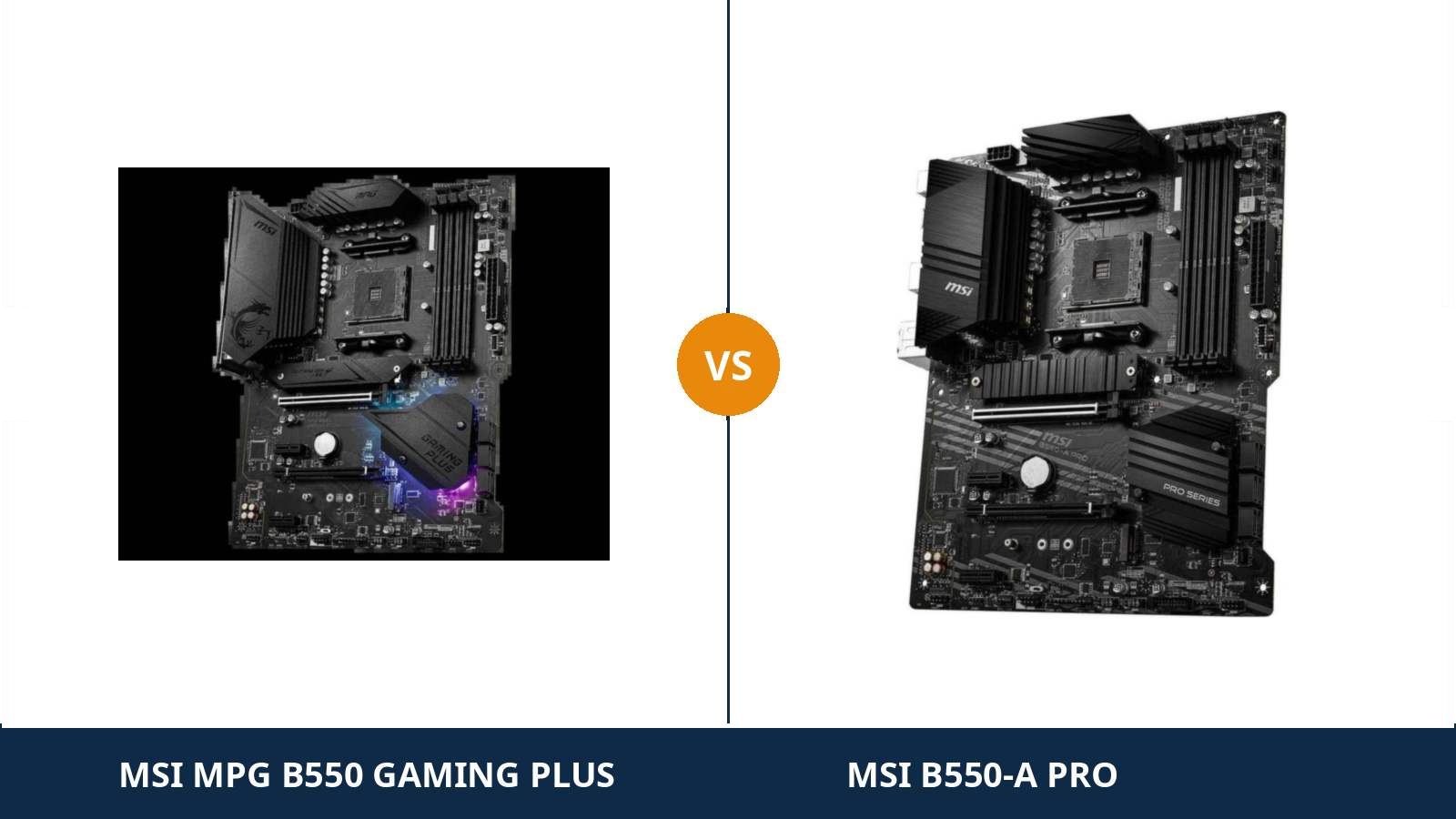
Ask about this pairing in any PC forum and the thread closes within minutes. Same board underneath, buy whichever costs less, move on.
It is the most repeated advice in AM4 shopping. Unusually for forum wisdom, it is also mostly right.
MSI developed the MPG B550 Gaming Plus and the B550-A Pro from a single hardware design. One power design, one storage layout, one port map. Set the two datasheets side by side and entire pages read identically.
Mostly right is not completely right, though. A short list of line items genuinely separates them: each board keeps a few things the other gives up. One entry — a lane-sharing rule buried in the manuals — matters more than the rest combined.
So treat this guide as an audit of the consensus. Where the crowd is correct, we say so and move on. Where the crowd stops being correct, we mark the exact spot.
Key Takeaways
- The shared hardware really is shared. An identical 10+2+1 Duet Rail VRM, twin M.2 slots, six SATA ports, the same USB layout, network chip and audio codec.
- The consensus breaks on one rule. Fit a second NVMe drive and the Gaming Plus surrenders its x4 expansion slot; the B550-A Pro surrenders only an x1.
- The Gaming Plus holds the comfort features. An optical S/PDIF output, an I/O shield already fitted, and the lighting controls.
- The B550-A Pro holds the workshop features. EZ Debug LEDs that identify where a boot stopped, and a serial header for older equipment.
- Fast networking is on neither board. Gigabit Ethernet only, no Wi-Fi — that step up means choosing a different model.
Quick Verdict
Buy the MSI B550-A Pro for most builds. The foundation is identical, and the plainer board is the one that keeps its options open.
You lose nothing structural: the same VRM feeds the processor, the same pair of M.2 slots holds your storage, the same headers wire the case. What you keep is the x4 slot after a second drive arrives, plus fault lights for the worst evening in PC building. It typically costs less while doing it.
Buy the MSI MPG B550 Gaming Plus if an optical cable carries your sound, or if the computer is meant to be looked at. It alone offers S/PDIF for a receiver, soundbar or DAC. Its rear shield arrives fitted. Its lighting hardware suits a glass case.
Those are real features, honestly sold. They are also the complete list — check your build against it before paying the difference.
The Scorecard
Scores below are derived directly from the manufacturer specifications compared in this guide — phase counts, slot counts, port counts and supported standards. They are a reading aid, not benchmark results.
| Category | MPG B550 Gaming Plus | B550-A Pro | ||
|---|---|---|---|---|
| Power delivery | 9 / 10 | 9 / 10 | ||
| Expansion & lane sharing | 7 / 10 | 8 / 10 | ||
| Storage | 9 / 10 | 9 / 10 | ||
| Memory | 9 / 10 | 9 / 10 | ||
| Networking & audio | 7 / 10 | 6 / 10 | ||
| USB & rear panel | 8 / 10 | 8 / 10 | ||
| Extras & trim | 8 / 10 | 7 / 10 | ||
| Overall | 7.8 / 10 | 8.0 / 10 | ||
Read it as a column of ties interrupted three times. The Gaming Plus scores its points in audio and trim; the A Pro scores its in expansion — the single category governed by a rule fixed at the factory. Everything level is level because there is only one underlying design.
At a Glance: Who Each Board Fits
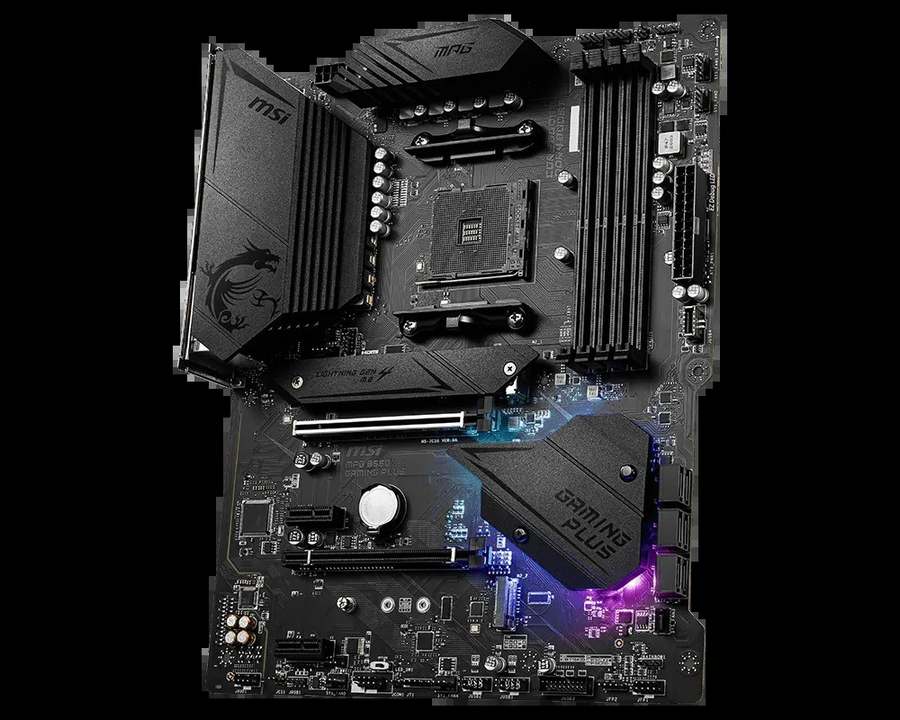
MSI MPG B550 Gaming Plus
- Identical 10+2+1 Duet Rail VRM under an extended heatsink
- Optical S/PDIF output for receivers, soundbars and DACs
- Rear I/O shield fitted before the board leaves the factory
- EZ LED Control switch and Mystic Light headers
- Twin M.2 slots with Shield Frozr heatsink, 6 × SATA
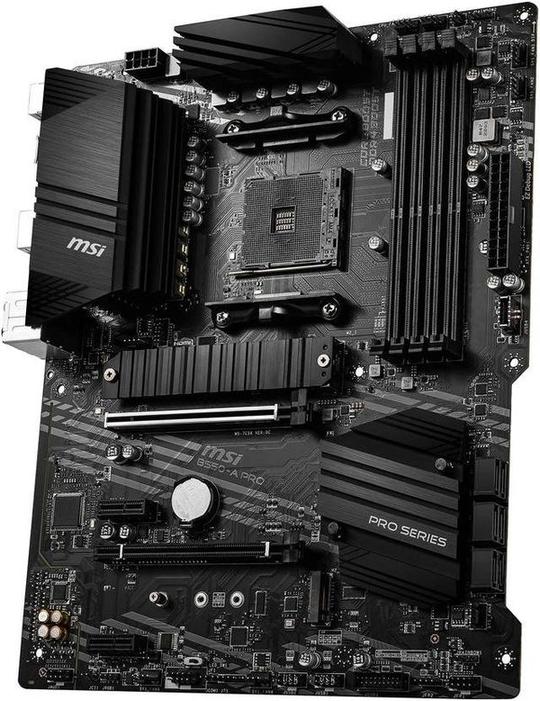
MSI B550-A Pro
- The same 10+2+1 Duet Rail VRM and extended heatsink
- x4 expansion slot still works with two NVMe drives fitted
- EZ Debug LEDs identify the stage where a boot failed
- Serial port header for legacy and workshop equipment
- Twin M.2 slots with Shield Frozr heatsink, 6 × SATA
Choose the MPG B550 Gaming Plus if…
Your audio path ends in an optical input. AV receivers, most soundbars and plenty of desktop DACs expect Toslink, and this is the only board of the pair that provides it.
The build sits behind glass and the lighting plan is deliberate. A physical switch for the board's LEDs, plus the fuller Mystic Light header set, keeps a lit build tidy.
Or your storage plan is one NVMe drive, settled for good. In that build the Gaming Plus's one genuine penalty can never occur, and what is left is trim you may simply prefer.
Choose the B550-A Pro if…
Storage growth is likely. A second NVMe drive is the most common upgrade in PC ownership, and on this board it arrives without evicting the slot an add-in card needs.
You maintain this machine yourself. Four small LEDs, labelled by boot stage, convert a silent no-start into a short diagnosis instead of an evening of reseating parts.
Or the PC works for a living — desk machine, office box, home server — where a serial header can still earn its keep and a light show cannot.
As an Amazon Associate I earn from qualifying purchases at no extra cost to you.
Specifications: The Specs That Actually Matter
Every figure here is drawn from MSI's published specifications, datasheets and manuals for the two models. Work down the columns and count how many rows match — the count tells most of this story on its own.
| Specification | MSI MPG B550 Gaming Plus | MSI B550-A Pro |
|---|---|---|
| Form factor | ATX, 30.5 × 24.4 cm | ATX, 30.5 × 24.4 cm |
| Socket / chipset | AMD AM4 / B550 | AMD AM4 / B550 |
| CPU support | Ryzen 5000, 5000 G, 4000 G, 3000 series | Ryzen 5000, 5000 G, 4000 G, 3000 series |
| VRM design | 10+2+1 Duet Rail, extended heatsink, 8+4-pin EPS feed | 10+2+1 Duet Rail, extended heatsink, 8+4-pin EPS feed |
| Memory | 4 × DDR4 DIMM, up to 128 GB, 4400 MT/s (O.C.), A-XMP | 4 × DDR4 DIMM, up to 128 GB, 4400 MT/s (O.C.), A-XMP |
| Graphics outputs (APU) | HDMI, DisplayPort | HDMI, DisplayPort |
| Expansion slots | PCIe 4.0 x16 + PCIe 3.0 x16 (x4) + 2 × PCIe 3.0 x1 | PCIe 4.0 x16 + PCIe 3.0 x16 (x4) + 2 × PCIe 3.0 x1 |
| Lane sharing | Fitting the second M.2 slot disables the PCIe x4 slot | Fitting the second M.2 slot disables one PCIe x1 slot; the x4 keeps working |
| M.2 storage | 2 slots: PCIe 4.0 x4 (CPU) + PCIe 3.0 x4 (chipset), Shield Frozr heatsink | 2 slots: PCIe 4.0 x4 (CPU) + PCIe 3.0 x4 (chipset), Shield Frozr heatsink |
| SATA | 6 × SATA 6 Gb/s, RAID 0/1/10 | 6 × SATA 6 Gb/s, RAID 0/1/10 |
| LAN | Realtek RTL8111H Gigabit Ethernet | Realtek RTL8111H Gigabit Ethernet |
| Audio | Realtek ALC892, 7.1 HD Audio Boost, analogue jacks + optical S/PDIF | Realtek ALC892, 7.1 HD Audio Boost, analogue jacks only |
| USB 3.2 (rear) | Gen 2 Type-A + Gen 2 Type-C (10 Gb/s), 2 × Gen 1 Type-A | Gen 2 Type-A + Gen 2 Type-C (10 Gb/s), 2 × Gen 1 Type-A |
| Front-panel USB-C | USB 3.2 Gen 1 Type-C header | USB 3.2 Gen 1 Type-C header |
| I/O shield | Mounted on the board at the factory | Separate shield, supplied loose in the box |
| Lighting & extras | EZ LED Control switch, Mystic Light headers | EZ Debug LEDs, serial (COM) port header |
| BIOS flashing | Flash BIOS Button (no CPU/RAM/GPU needed) | Flash BIOS Button (no CPU/RAM/GPU needed) |
One codec note, covering both boards: MSI's web spec summaries print the audio chip as “ALC892/ALC897” — near-identical parts fitted across different production runs. The official datasheets for both models name the ALC892, so the table follows them.
The variance changes nothing here either way, because it applies to the pair symmetrically. A board from one production run may carry the same codec as its rival from another.
The VRM figure deserves the same footnote: 10+2+1 comes from the datasheets rather than MSI's compressed web summaries, and it matches on both — the Gaming Plus inherited the A Pro's power design, then changed the finish.
The Differences That Actually Matter
1. Power delivery — the tie that kills the upsell
Start with the assumption most buyers bring to this pairing: the gaming model must feed the processor better. It is a reasonable guess. Here it is simply wrong.
Lift the heatsinks and both boards show MSI's 10+2+1 Duet Rail digital power design. The extended heatsink over it is shared. The processor draws current through the same 8+4-pin arrangement — the manuals name the sockets CPU_PWR1 and CPU_PWR2 on both.
Behaviour follows hardware: Ryzen 5 parts run with room to spare, Ryzen 7 parts sit well inside the design's comfort zone, and Ryzen 9 parts work properly at stock on both.
So if listing copy suggests the Gaming Plus is the stronger foundation for a bigger CPU, ask which component delivers that strength. On power delivery, there is no candidate part.
What the Gaming Plus adds is presentation: sculpted heatsink covers, printed branding, illumination. Presentation is a legitimate purchase. It is not a specification, and it should never be priced as one.
2. Lane sharing — the one rule with teeth
Every B550 design borrows bandwidth from somewhere. The second M.2 slot takes its lanes from the chipset, and those lanes are shared with part of the slot layout. Somebody's expansion slot pays.
On the Gaming Plus, the manual is blunt: populate the second M.2 slot and PCI_E2 — the x16-length slot wired for x4, sitting under the graphics card — is switched off entirely.
On the B550-A Pro, the same upgrade disables PCI_E3, one of the small x1 slots. The x4 slot carries on with the drive installed beside it.
The x4 slot earns this defence because of what fits in it: capture cards, 10-gigabit network adapters, NVMe carrier boards. The x1 slot, by contrast, serves minor peripherals — an entry wireless card, a port bracket, a small controller.
Sacrificing an x1 is a shrug. Sacrificing the x4 is a locked door — and it locks on the day your storage outgrows a single drive, which for many owners is a when, not an if.
The honest counterpoint stands: a build that will only ever run one NVMe drive never meets this rule, and for that build this whole section is academic. Judge it against your own storage plans, not against a hypothetical.
3. Audio — the same chip, one extra socket
Audio separates into sound quality and sound connections, and only the second one differs.
Quality is level: both boards run Realtek's ALC892 behind MSI's Audio Boost circuitry, feeding the same 7.1 HD analogue outputs. Via a headset or powered speakers, no listener reliably separates them.
Connections are where the Gaming Plus takes its cleanest win of the comparison: an optical S/PDIF output on the rear panel. The B550-A Pro's rear audio is analogue jacks, full stop.
That single socket matters to a large and specific group of households — anyone whose sound runs through an AV receiver, a soundbar, or a DAC or headphone amplifier with a Toslink input. If that describes your desk, the Gaming Plus is not the prettier pick. It is the only pick.
And if your audio leaves by USB or a 3.5 mm lead, the port is dead weight in your budget. Establish which listener you are before it influences the decision.
4. Rear panel — an identical tally, a smoother first hour
Count the sockets along the back and neither board pulls ahead: USB 3.2 Gen 2 in Type-A and Type-C at 10 Gb/s, two Gen 1 Type-A ports, HDMI and DisplayPort for APU graphics, and the RTL8111H gigabit Ethernet jack.
The front of the case draws level as well. Each board supplies a USB 3.2 Gen 1 Type-C header, so the front USB-C port on a modern case works on either build.
The separation is a piece of stamped metal. On the Gaming Plus, the I/O shield leaves the factory already mounted to the board, where it belongs.
On the A Pro it travels loose in the packaging, in the time-honoured fashion — accompanied by the two classic mishaps: the shield remembered only after the board is screwed down, or its spring tabs folded into a USB socket during fitting.
Neither mishap ruins anything. Both tax the first hour of the build by about fifteen minutes, and the Gaming Plus simply declines to charge it.
5. The extras — one board helps you fix it, the other helps you light it
The small features each model retained are a reliable confession of who MSI pictured buying it.
The B550-A Pro carries EZ Debug LEDs — four tiny lamps marked CPU, DRAM, VGA and BOOT. When a machine refuses to start, one lamp stays lit and names the stage that failed.
Anyone who has faced the silent black screen knows what that is worth: an evening of reseating and swapping collapses into minutes of directed work. For a first build or any PC without a support department, we rate it the most useful extra in this comparison.
The A Pro also keeps a serial port header. Dated, unquestionably — and still the native tongue of some printers, UPS units and workshop instruments, which is exactly why a board with Pro in its name retains one.
The Gaming Plus answers with the EZ LED Control switch, a hardware toggle for the board lighting, and a fuller set of Mystic Light headers. Note what it does not carry: despite the similar name, its EZ LED feature controls lights, not diagnostics — there are no debug LEDs here.
Neither bundle wins in the abstract. One supports the afternoon something breaks; the other supports every evening the machine sits glowing beside you. Spend according to which calendar your life actually keeps.
6. Storage, memory and networking — three ties, called ties
What remains on the datasheet matches line for line, and padding ties into fake contests would serve nobody. Here they are, plainly.
Storage: each board offers two M.2 slots — one PCIe 4.0 x4 fed by the processor, one PCIe 3.0 x4 fed by the chipset — with a Shield Frozr heatsink over the primary slot, alongside six SATA ports supporting RAID 0, 1 and 10.
Memory: four DDR4 slots per board, a 128 GB ceiling, overclocked support to 4400 MT/s and A-XMP profiles on both. The sensible gaming choice, a 3200–3600 MT/s kit, behaves identically in whichever frame holds it.
Networking: the same RTL8111H gigabit controller on both, and no wireless hardware on either. If your requirements list built-in Wi-Fi or 2.5-gigabit Ethernet, this pairing is the wrong shelf — that is a tier decision.
CPU Pairing Guide
Because the power design is shared, no processor can split this pair — so use the table differently. Every row is a performance tie; the recommendation column is decided by the features wrapped around the chip.
| Your processor | MPG B550 Gaming Plus | B550-A Pro | Our call |
|---|---|---|---|
| Ryzen 5 5600 / 5500 | Excellent | Excellent | Whichever listing is cheaper |
| Ryzen 7 5700X / 5800X | Excellent — identical VRM | Excellent — full VRM headroom | B550-A Pro, unless optical audio is required |
| Ryzen 9 5900X / 5950X | Workable — the shared VRM's sensible ceiling | Workable — same ceiling | Either at stock; a stronger tier for heavy overclocking |
| Ryzen 5 5600G / 5700G (APU) | Excellent — HDMI + DisplayPort | Excellent — HDMI + DisplayPort | A genuine coin flip — trim and price decide |
| Ryzen 3000 series | Excellent | Excellent | Whichever listing is cheaper |
Both boards run the flagships correctly at stock — power delivery was never where either design saved money. Sustained heavy overclocking belongs to a tier above both.
The 30-Second Decision
| If this sounds like you… | Buy this |
|---|---|
| “My receiver or soundbar connects with an optical cable.” | MPG B550 Gaming Plus |
| “A second SSD this year; a capture card or faster networking after that.” | B550-A Pro (the x4 slot survives) |
| “Tempered glass and lit fans — the PC is part of the room.” | MPG B550 Gaming Plus |
| “When it will not boot, I am the support department.” | B550-A Pro (EZ Debug LEDs) |
| “One drive, one graphics card, finished build — best price wins.” | Either — take the cheaper listing |
| “Wi-Fi or 2.5-gigabit Ethernet has to be built in.” | Neither — see When to Skip Both |
Two boards, one live price check
The gap between these listings drifts week to week. Open both, confirm the full model name on each, and take the live figure for the board your build needs.
View on Amazon — MPG B550 Gaming PlusView on Amazon — B550-A ProWhat You Gain. What You Give Up.
MSI MPG B550 Gaming Plus
You gain: the optical audio output its rival lacks completely, a rear shield that arrives already mounted, a hardware lighting switch with the richer Mystic Light header set, and gaming-styled heatsinks — all wrapped around core hardware identical to the plainer board's.
You give up: the x4 expansion slot on the day a second NVMe drive is fitted. Diagnostic LEDs for the morning a boot fails. And, in most weeks, a slice of money that buys presentation rather than capability.
MSI B550-A Pro
You gain: everything the gaming board is made of — VRM, storage, USB layout, network chip, codec — organised for a machine that grows: an x4 slot still alive with two NVMe drives installed, debug lights for bad mornings, a serial header, and usually a smaller bill at the till.
You give up: any form of optical audio output. The factory-fitted shield and the lighting extras. And the gaming presentation — this board dresses like equipment, which is precisely what it is.
Pros and Cons
MPG B550 Gaming Plus — Pros
- Optical S/PDIF output for receivers and soundbars
- I/O shield pre-installed at the factory
- EZ LED Control switch and Mystic Light headers
- Core hardware identical to the A Pro's
- Styled heatsinks suit glass-sided showcase builds
Cons
- A second NVMe drive disables the x4 slot
- No debug LEDs — its EZ LED feature is lighting only
- The premium buys presentation, not performance
- Gigabit LAN only, no Wi-Fi
B550-A Pro — Pros
- VRM identical to the gaming board's, 10+2+1 Duet Rail
- Keeps the PCIe x4 slot live with two NVMe drives fitted
- EZ Debug LEDs turn fault-finding into minutes
- Serial port header for legacy equipment
- Typically the cheaper listing of the pair
Cons
- No optical S/PDIF audio output
- Loose I/O shield — the classic forgotten part
- No lighting-control extras
- Gigabit LAN only, no Wi-Fi (true of both)
Buying Guide: Read the Whole Name Before the Price
Mind the M. MSI also sells a B550M-A Pro — a micro-ATX model, physically smaller, laid out differently, with a feature set of its own, hiding behind nearly the same name as the board on the right of this page.
Listings get abbreviated and search results get compressed, so verify two things before paying: the name reads “B550-A Pro” with no M attached, and the photograph shows a full ATX board with three x16-length slots descending from the socket.
Know how the shield should arrive. A loose shield in the A Pro's packaging is the correct contents, not a packing mistake — it presses into the case aperture before the board goes in. On the Gaming Plus the shield is part of the board, so a listing photo showing a bare rear edge is a photo of something else.
Retire the BIOS worry. Both models carry MSI's Flash BIOS Button, which updates firmware with no processor, memory or graphics card installed. Even a unit that shipped with an early BIOS can be made ready for Ryzen 5000 at home, in minutes.
That settles the oldest anxiety in AM4 shopping: processor compatibility is solved before the CPU leaves its box.
Shop for the third year, not the first day. The real fork in this pairing is whether a second drive and another card are plausible later. Answer that honestly and the rest of the decision tends to make itself.
The Upgrade Path Test
AM4 is a completed platform, and that simplifies the maths: every processor either board will ever support already exists. What changes is everything accumulated around the socket.
The processor ladder is shared rung for rung — open with a Ryzen 5, close with a Ryzen 7 or a stock Ryzen 9. The common VRM and four DIMM slots, good for 128 GB, cover the entire climb on both boards.
The graphics ladder is shared too. A full PCIe 4.0 x16 connection on each board is everything this platform sensibly asks a graphics card to use.
The divergence is storage and expansion arriving together, as they tend to. On the B550-A Pro, the natural endgame — two NVMe drives plus an x4 card running capture, faster networking or further storage — installs in full and simply works.
On the Gaming Plus, that same endgame presents a bill: fit the second drive and surrender the card's slot. It is the one junction where this comparison stops being about finish, and it sits exactly where real builds eventually arrive.
If your endgame is a single fast drive inside the best-presented case on the desk, the Gaming Plus's route runs smooth to the end. If your endgame collects hardware, the A Pro is the board that never asks you to choose.
When to Skip Both
Parity has boundaries. Four requirements outgrow either board, and each is answered elsewhere in the range rather than by a coin toss here.
Skip both if wireless networking has to be built in. MSI manufactures B550 boards with Wi-Fi; burning an expansion slot to retrofit it solves a problem the catalogue already solved.
Skip both if 2.5-gigabit Ethernet is a requirement. Each board stops at the RTL8111H gigabit chip, and MSI's wired networking only steps up higher in the range, around the MAG B550 Tomahawk class.
Skip both if your case is micro-ATX. Both are full-size ATX boards, and a tape measure settles what no spec sheet can.
And skip both if the machine's purpose is sustained, heavy all-core overclocking on a Ryzen 9. The pair run flagship chips correctly at stock; a heavier power tier exists for the other assignment.
Final Verdict
The MSI B550-A Pro is our pick.
Return to the consensus this page opened with. It holds for the VRM, the storage, the USB map, the network chip and the codec — genuinely, verifiably identical. The decision therefore lives entirely in the short list of things that differ.
On that list the A Pro holds the more durable assets: an expansion slot that survives the commonest upgrade in computing, fault lights that survive the worst morning in computing, and typically the lower price for the privilege. It concedes nothing structural to earn them.
Buy the B550-A Pro for builds expected to gather drives and cards over time, for workstations and home servers, and for anyone who is their own support department.
Buy the MPG B550 Gaming Plus if an optical cable joins your PC to your sound system. If the case is a display piece and lighting forms part of the specification. Or if one NVMe drive is the permanent storage ceiling.
It spends its money where the eye lands rather than where the years do. For the right builder that is a fair trade — as long as it is struck with both columns in view.
View on Amazon — MPG B550 Gaming Plus
Watch Out: Similar Names, Different Boards
MSI's B550 catalogue is dense enough to ambush a careful shopper. Four neighbours of this pair are worth naming outright.
First: the B550M-A Pro is a separate motherboard — one letter different, one form factor smaller. Micro-ATX, its own layout, its own features. Catch the M before you catch the apparent bargain.
Second: the B450-A Pro and B450 Gaming Plus are the previous generation wearing familiar clothes. Their graphics and storage links run at PCIe 3.0 speeds, a genuine step down. A strikingly cheap listing carrying a 4 in its name is the older platform wearing a familiar badge.
Third: the MAG B550 Tomahawk is a true step up rather than a relabel — faster wired networking, a higher audio tier, a broader feature set. If its price ever settles at the Gaming Plus's level, the verdict on this page no longer applies.
Fourth: the MPG B550 Gaming Edge WiFi is this gaming family's wireless model. The Gaming Plus compared here carries no Wi-Fi hardware whatsoever. Match the exact model name, never the family resemblance.
Case, Power and Cabling Notes
Both boards measure 30.5 × 24.4 cm in standard ATX and want an ATX-capable case. A mid-tower is home territory for either.
Power wiring matches exactly: a 24-pin main connector plus the 8+4-pin EPS arrangement. Any reputable modern supply with an 8-pin EPS lead runs a stock processor happily; the extra 4-pin waits as overclocking headroom.
Front-panel headers match too — USB 3.2 Gen 1, a Gen 1 Type-C and USB 2.0 — so a case offering front USB-C gets a working port from either board.
One planning note belongs to the Gaming Plus alone: its x4 slot sits directly beneath the graphics slot, the natural home for a capture card — and it is the slot the second M.2 drive switches off. Decide the card's future before the drive arrives, not after.
BIOS and Long-Term Support
Each model lives on MSI's standard support pages, carrying BIOS releases, chipset and LAN drivers, and a complete CPU support list. For mature hardware that is the desirable state: stable and free of surprises.
The Flash BIOS Button deserves its second mention here, as insurance. Whatever firmware a future processor demands can be written to a bare board — no donor CPU, no workshop visit.
Expect the remaining updates to be security patches and occasional compatibility fixes rather than new features. On a finished platform, that is the correct shape for a changelog.
One routine serves both boards: before a processor swap, consult the model's CPU support list, flash the latest BIOS while the old chip is still installed, then make the change. Sequence is the cheapest troubleshooting there is.
Frequently Asked Questions
Are the Gaming Plus and the B550-A Pro actually the same board?
Underneath, nearly — the VRM, storage, USB layout, LAN chip and codec are all shared. The differences: the lane-sharing rule; an optical output, fitted shield and lighting hardware on the Gaming Plus; debug LEDs and a serial header on the A Pro.
What changes when a second NVMe SSD goes in?
Both boards accept the drive and run it at full speed. The side effects differ: the Gaming Plus switches its PCIe x4 slot off, while the A Pro retires one x1 slot and keeps the x4 working. Only builders who also plan an x4 add-in card will ever feel that difference.
Does the Gaming Plus handle a processor any better?
No. Both boards share the 10+2+1 Duet Rail design, the same extended heatsink and the same 8+4-pin processor feed, so CPU support, boost behaviour and overclocking headroom are identical.
What is the optical port on the Gaming Plus for?
It is a Toslink S/PDIF output — the digital feed AV receivers, soundbars and many DACs and headphone amplifiers are built around. If your sound travels by USB or analogue leads, the port contributes nothing; the two boards carry the same ALC892 codec.
Do either of these boards include Wi-Fi or faster Ethernet?
Neither. Wired networking tops out at the gigabit Realtek RTL8111H on both, and there is no wireless module on either model. Builds needing Wi-Fi or 2.5G Ethernet on the board should begin their search in MSI's higher B550 tiers.
How does the B550-A Pro differ from the B550M-A Pro?
They are separate products. The B550M-A Pro is the micro-ATX variant — smaller board, different layout, different feature set. This comparison covers the full ATX B550-A Pro, so confirm the complete name on any listing before paying.
Will either board run a Ryzen 9?
Yes, at stock settings. The shared VRM — 10+2+1 phases beneath an extended heatsink — handles the 5900X and 5950X on both boards. For hard, sustained all-core overclocking, step up to a tier designed with a beefier power stage.
Can I flash the BIOS before installing a processor?
Yes. A Flash BIOS Button on each board writes firmware from a USB stick with the board otherwise bare, so a unit shipped with an old BIOS can be prepared for Ryzen 5000 before the CPU is installed.
Sources & Verification
MSI MPG B550 GAMING PLUS official specifications and datasheet, msi.com • MSI B550-A PRO official specifications, datasheet (7C56) and user manual, msi.com • Lane-sharing behaviour per each model's manual notes on the second M.2 slot • Audio codec per MSI datasheets (ALC892); the “ALC892/ALC897” production variance shown in MSI's web spec summaries is noted in the article. Specifications verified November 2026.

James Wilson
James has been building and benchmarking PCs for over a decade and writes Honestly Compared's motherboard and component guides. His rule for every comparison: the verdict has to survive the spec sheet, not the marketing page.