
MSI MPG B550 Gaming Plus vs MSI MAG B550 Tomahawk: Which Should You Buy?
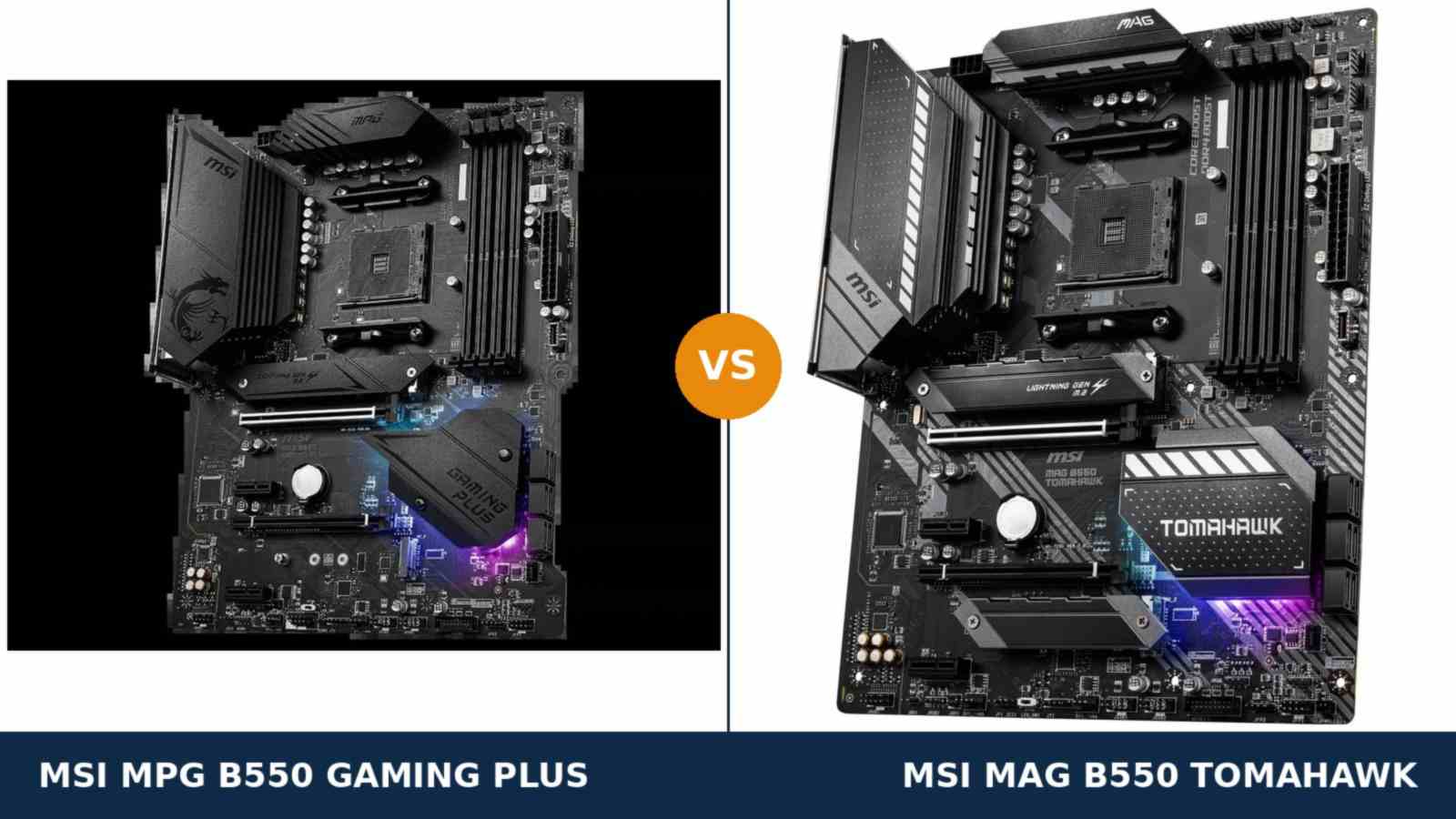
Nobody buys a B550 motherboard as the start of a journey any more.
AM4 is a finished platform. The processors are known quantities, the prices have settled, and no new chipset generation is coming. Whoever buys one of these two boards now is making the last motherboard decision of an AM4 build.
That changes what “better” means. A board bought in 2020 could be forgiven a missing feature; a next upgrade would fix it. A board bought as the platform’s final host has to contain everything the build will ever need, because nothing arrives later to rescue it.
The MPG B550 Gaming Plus and the MAG B550 Tomahawk share the same skeleton — chipset, slot layout, storage counts, memory capacity. What separates them is a short list of components: power stages, network ports, an audio codec, heatsinks. Small print, on paper.
In a final purchase, the small print is the purchase: the Tomahawk put its extra money into exactly those components, and the Gaming Plus left them out and charges less. Below, each one gets examined and matched to the buyer it matters to — every figure from MSI’s own specifications, datasheets and manuals.
Key Takeaways
- The Tomahawk is the stronger final purchase. 60A power stages, dual LAN, the better audio codec and heatsinks on both M.2 slots — headroom in every direction a build grows.
- The Gaming Plus is the right buy for a finished build. If the parts list is fixed today and stays fixed, it gives up nothing you will feel.
- Ignore the shared VRM headline. Both boards say 10+2+1 Duet Rail. Only the Tomahawk builds those phases from 60A Smart Power Stages.
- One trap hides in the storage fine print. Add a second M.2 drive to the Gaming Plus and its x4 expansion slot goes dark. On the Tomahawk, the slot survives ordinary two-drive builds.
- Both boards are wired-only. Neither has Wi-Fi, and neither runs a Ryzen 5 3400G or Ryzen 3 3200G. Make both checks before the comparison even starts.
Quick Verdict
Buy the MSI MAG B550 Tomahawk if this board has to last. It is the more complete board of the two.
Its power delivery is built from proper 60A Smart Power Stages under a larger heatsink. It carries two Ethernet ports, one running at 2.5 Gb/s. Its audio codec sits a tier higher, and both of its M.2 slots wear heatsinks — each of them an answer to a need that typically arrives in year two or three of a PC’s life.
Buy the MSI MPG B550 Gaming Plus if the build is already finished on paper. A Ryzen 5 or Ryzen 7, one graphics card, gigabit internet, no expansion cards planned.
For that closed specification, the Gaming Plus surrenders nothing you will notice in daily use. Spend the difference on the processor or a bigger SSD, where it will actually show up.
The Scorecard
The scores are read straight off the manufacturer specifications compared in this guide — power-stage ratings, port counts, slot counts and rated standards. Treat them as a map of the spec sheet, not as lab results.
| Category | MPG B550 Gaming Plus | MAG B550 Tomahawk | ||
|---|---|---|---|---|
| Power delivery | 7.5 / 10 | 9.0 / 10 | ||
| Networking | 5.0 / 10 | 9.5 / 10 | ||
| Audio | 7.0 / 10 | 8.5 / 10 | ||
| Storage | 8.0 / 10 | 9.0 / 10 | ||
| Memory | 8.0 / 10 | 9.0 / 10 | ||
| Expansion | 7.5 / 10 | 8.5 / 10 | ||
| Overall | 7.8 / 10 | 8.8 / 10 | ||
At a Glance: Who Each Board Fits
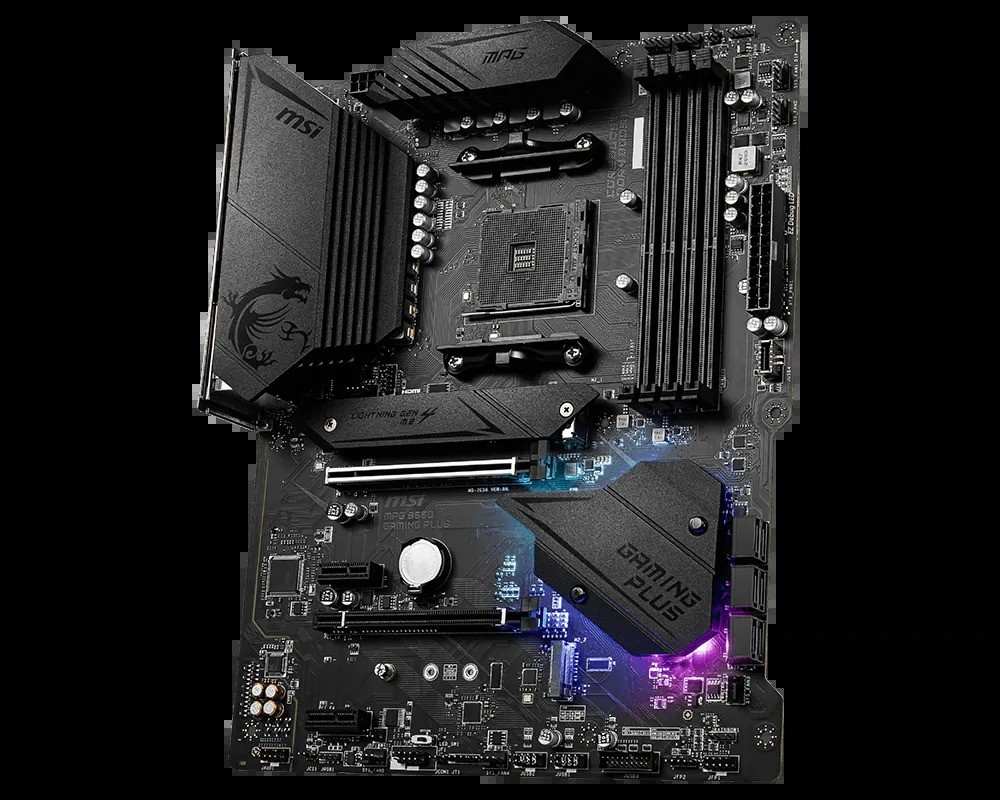
MSI MPG B550 Gaming Plus
- 10+2+1 Duet Rail VRM on discrete MOSFETs; 8+4-pin CPU power feed
- One gigabit Ethernet port (Realtek RTL8111H) — no 2.5G, no spare
- Realtek ALC892 audio with optical S/PDIF output
- Two M.2 slots; heatsink on the primary slot only
- The cheaper ticket into the same slot and storage layout
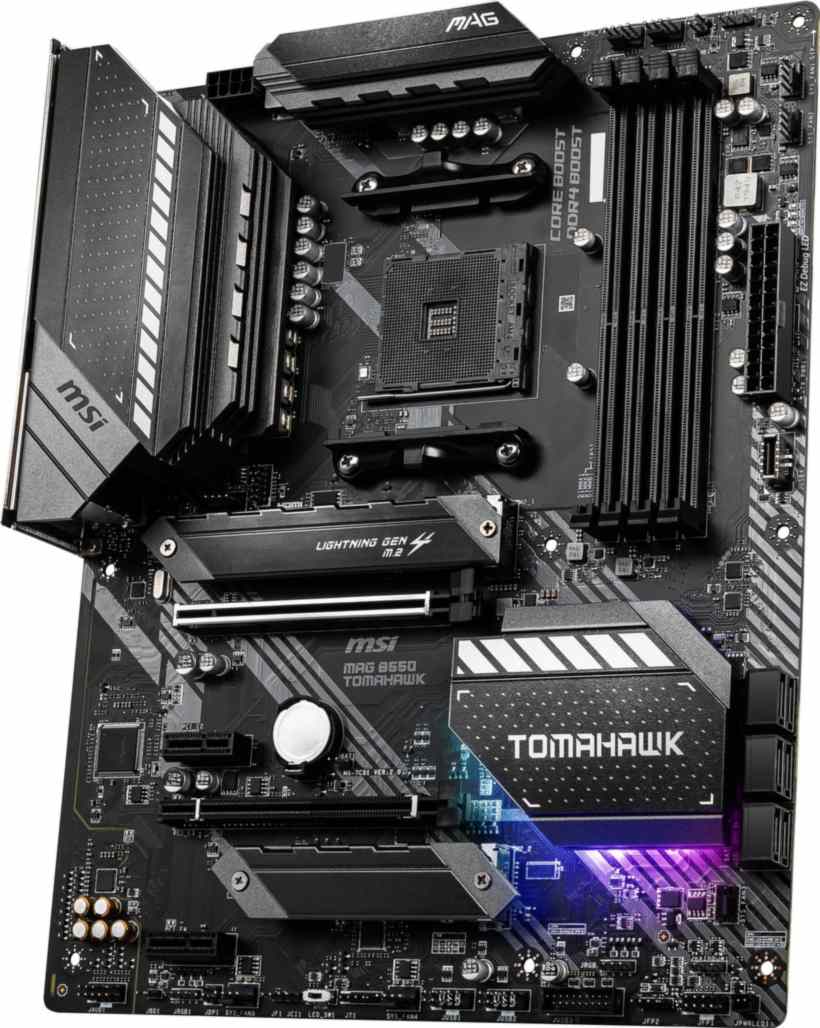
MSI MAG B550 Tomahawk
- 10+2+1 Duet Rail VRM built on 60A Smart Power Stages
- Two Ethernet ports: 2.5 Gb/s (RTL8125B) plus gigabit (RTL8111H)
- Realtek ALC1200 audio with optical S/PDIF output
- Heatsinks over both M.2 slots; 22110 support in the first
- Memory validated to 5100+ MT/s (O.C.); eight fan headers
Choose the MPG B550 Gaming Plus if…
Your parts list is final. Ryzen 5 or Ryzen 7, a single graphics card, a gigabit router, and no expansion card anywhere on the roadmap.
The price gap buys something visible instead — a faster SSD, or 32 GB of memory rather than 16 GB: upgrades felt every day, unlike a spare network port.
Or you simply prefer the look — dragon heatsink, RGB underglow. Once the specs you need are covered, taste is a legitimate reason.
Choose the MAG B550 Tomahawk if…
A bigger processor is coming — a Ryzen 7 today, perhaps a Ryzen 9 when prices fall. The 60A stages were specified for exactly that day.
Your network is faster than gigabit, or will be. A NAS, a home server or a 2.5-gigabit switch turns the Tomahawk’s second port from trivia into the reason you bought it.
You run two NVMe drives and still want an add-in card. Only this board keeps its x4 slot alive in that company.
You listen properly. Through good headphones or an amplifier, the cleaner codec is the one you want at the start of the chain.
As an Amazon Associate I earn from qualifying purchases at no extra cost to you.
Specifications: The Specs That Actually Matter
All figures below come from MSI’s published specification pages, datasheets and manuals, cross-checked against the manufacturer’s product data.
Both are ATX boards on one chipset, so the shared rows pass quickly. The rows that differ decide this comparison — and two production notes follow the table.
| Specification | MSI MPG B550 Gaming Plus | MSI MAG B550 Tomahawk |
|---|---|---|
| Form factor | ATX, 30.5 × 24.4 cm | ATX, 30.5 × 24.4 cm |
| Socket / chipset | AMD AM4 / B550 | AMD AM4 / B550 |
| CPU support | Ryzen 5000, 5000 G, 4000 G, 3000 series — not 3400G / 3200G | Ryzen 5000, 5000 G, 4000 G, 3000 series — not 3400G / 3200G |
| VRM design | 10+2+1 Duet Rail, discrete MOSFETs, extended heatsink, 8+4-pin CPU power | 10+2+1 Duet Rail, 60A Smart Power Stages, digital PWM, extended heatsink, 8-pin CPU power |
| Memory | 4 × DDR4 DIMM, up to 128 GB, 4400+ MT/s (O.C.), A-XMP | 4 × DDR4 DIMM, up to 128 GB, 5100+ MT/s (O.C.), A-XMP |
| Graphics outputs (APU) | HDMI + DisplayPort | HDMI + DisplayPort |
| Expansion slots | PCIe 4.0 x16 + PCIe 3.0 x16 (x4) + 2 × PCIe 3.0 x1 | PCIe 4.0 x16 + PCIe 3.0 x16 (x4) + 2 × PCIe 3.0 x1 |
| M.2 storage | 2 slots: PCIe 4.0 x4 (CPU) + PCIe 3.0 x4 (chipset); Shield Frozr heatsink on slot 1 only | 2 slots: PCIe 4.0 x4 / SATA (up to 22110) + PCIe 3.0 x4; heatsinks on both slots |
| SATA | 6 × SATA 6 Gb/s, RAID 0/1/10 | 6 × SATA 6 Gb/s, RAID 0/1/10 |
| LAN | Realtek RTL8111H, 1 Gb/s (single port) | Realtek RTL8125B 2.5 Gb/s + RTL8111H 1 Gb/s (dual ports) |
| Audio | Realtek ALC892, 7.1 HD, Audio Boost, optical S/PDIF out | Realtek ALC1200, 7.1 HD, Audio Boost, optical S/PDIF out |
| USB (rear) | 2 × USB 3.2 Gen 2 (Type-A + Type-C), 2 × Gen 1, 4 × USB 2.0 | 2 × USB 3.2 Gen 2 (Type-A + Type-C), 2 × Gen 1, 2 × USB 2.0 |
| USB (front headers) | USB 3.2 Gen 1 Type-C header + Gen 1 header + 2 × USB 2.0 headers | USB 3.2 Gen 1 Type-C header + Gen 1 header + 2 × USB 2.0 headers |
| Fan headers | 6 × 4-pin (CPU, pump, 4 × system) | 8 × 4-pin (CPU, pump, 6 × system) |
| BIOS flashing | Flash BIOS Button (no CPU/RAM/GPU needed) | Flash BIOS Button (no CPU/RAM/GPU needed) |
Variant notes: two honesty notes before these figures get quoted back at us. First, audio: MSI’s current spec summary prints the Gaming Plus codec as “ALC892/ALC897” and the Tomahawk’s as “ALC1200/ALC1220P” — either chip can be fitted, depending on the production run. This guide uses the launch figures (ALC892, ALC1200); teardowns of retail Tomahawks confirm the ALC1200, and the tier gap between the boards survives either pairing.
Second, memory: the Tomahawk’s ceiling read 4866+ MT/s in its 2020 datasheet and 5100+ on the current product page; the table uses the current figure. Either way, both numbers sit above the Gaming Plus’s 4400+.
The Differences That Actually Matter
1. Networking — the gap most likely to be missed later
Start with the largest functional difference on either spec sheet. The Tomahawk carries two Ethernet ports: a Realtek RTL8125B running at 2.5 Gb/s, and a conventional gigabit port beside it.
The Gaming Plus carries one port. A single RTL8111H gigabit connection is the entirety of its wired networking.
If broadband is your board’s only network job, and that broadband is gigabit or slower, call this section a draw and move on: a faster port cannot speed up a slower connection.
The need usually arrives sideways. A NAS joins the house, and file transfers settle at gigabit’s ceiling of roughly 112 MB/s. A switch gets upgraded, and suddenly every device on the desk runs 2.5-gigabit except the motherboard.
Retrofitting is the ugly part. A 2.5-gigabit PCIe card costs real money and consumes an expansion slot — and slots, as the storage section shows, are the other scarce resource in this comparison.
On a board bought to be kept, networking is the feature most likely to be wanted later — and the most annoying to add.
2. Power delivery — the shared headline that isn’t
Both boxes print the same claim: a 10+2+1 Duet Rail power design. Buyers reasonably assume the VRMs are therefore equal. They are not.
The Tomahawk builds its phases from 60-amp Smart Power Stages — integrated driver-and-MOSFET packages of the kind MSI fits to far pricier boards — run by a digital PWM controller and cooled by the larger extended heatsink.
The Gaming Plus hits the identical phase count using discrete MOSFETs — the traditional, cheaper construction, and less efficient phase for phase.
At stock settings under a Ryzen 5 or Ryzen 7, the distinction is invisible. No game will ever report the difference.
It surfaces at the top of the AM4 stack, under sustained all-core Ryzen 9 load — precisely the processor a final AM4 purchase is most likely to end up hosting. Cooler stages and more headroom are what the Tomahawk’s extra money physically buys.
Now the irony, because it misleads people. The Gaming Plus takes an 8+4-pin CPU power feed. The Tomahawk takes a single 8-pin.
Connector count is not a VRM score: one 8-pin EPS connector is rated far beyond what any AM4 processor draws at sane settings. MSI omitted the extra plug because the stages behind the socket never asked for it.
Remember the principle, here and everywhere in this market: phase counts are the headline; power-stage ratings are the hardware.
3. Storage — identical counts, one buried condition
The layout diagram is shared: a CPU-connected M.2 slot at PCIe 4.0 x4, a second chipset-fed M.2 at PCIe 3.0 x4, six SATA ports with RAID 0, 1 and 10.
Boot times and game libraries will be indistinguishable. Storage speed is not a reason to choose between these boards.
The real differences wear heatsinks — or don’t. The Tomahawk covers both M.2 slots. The Gaming Plus fits its M.2 Shield Frozr to the primary slot and leaves a second drive bare, which matters for a hard-worked Gen 4 SSD in a warm case.
The Tomahawk’s first slot also swallows 22110-length drives — free flexibility, since most consumer SSDs are 2280.
Then comes the condition, and it belongs to the Gaming Plus. Read its manual’s lane-sharing rule: populate the second M.2 slot, and the PCIe x4 expansion slot (PCI_E3) is disabled. The second SSD and the slot cannot coexist.
The Tomahawk’s manual tells a narrower story: its x4 slot drops out only in a fully loaded board — second M.2 fitted and both remaining slots populated at once — and even then the cost is the second M.2 dropping to x2 speed. Normal two-drive builds keep everything.
Planning two NVMe drives alongside a capture card, a sound card or a network card? On the Gaming Plus, that plan has a hole in it. On the Tomahawk, it simply works.
4. Audio — a tier apart, with honest limits
The Tomahawk’s Realtek ALC1200 sits a clear tier above the Gaming Plus’s ALC892 in Realtek’s range — cleaner output, better numbers on the bench. Both boards add MSI’s Audio Boost treatment.
On outputs, the section is a tie. Each board offers analogue 7.1 plus an optical S/PDIF port for receivers and soundbars — more than many boards at this level manage.
Whether the codec gap reaches your ears depends entirely on the rest of your chain. Through a budget headset or basic desktop speakers, we would not bet on you hearing it.
Through good headphones, a headphone amplifier or powered monitors, the Tomahawk’s cleaner feed is the one you want — the codec is the first link in the chain, and everything downstream can only pass on what it receives.
And if your chain starts with a USB DAC, both codecs are bypassed and this whole section scores a draw. Price decides instead.
5. Memory — a ceiling you won’t touch, from a layout you might
The fundamentals are shared: four DDR4 slots, 128 GB maximum, A-XMP profiles. For the 3200–3600 MT/s kits that populate most AM4 builds, the boards are interchangeable.
The spec sheets part at the top. MSI validates the Tomahawk to 5100+ MT/s with overclocked memory. The Gaming Plus is rated to 4400+.
One buyer cares: the tuner running four fast sticks or chasing tight timings on a Ryzen 7 or 9. For them, the higher validated ceiling reflects more careful memory routing, and it is a genuine point in the Tomahawk’s favour.
Everyone else should treat memory as a tie — with the standing caution that headline speeds are overclocking figures on both boards, and your processor’s memory controller grades the final result.
6. Cooling — fan headers and room to grow
B550’s quiet gift applies to both: the chipset needs no fan, so neither board has one whining under the graphics card. Extended VRM heatsinks and 2 oz copper PCBs are shared, too.
The separation is fan headers: eight 4-pin on the Tomahawk (CPU, pump, six system) against six on the Gaming Plus (CPU, pump, four system).
Six headers honestly cover most builds. Eight cover the rest without splitters — a radiator, push-pull fans, a full tower’s worth of case fans, and a spare for the fan added in year two.
A small section, then, with the familiar winner. The Tomahawk simply budgets more room for a cooling setup to grow into.
7. The small print — rear USB, lighting and looks
Here the Gaming Plus collects a genuine win: four rear USB 2.0 ports against the Tomahawk’s two, alongside an identical fast set — two USB 3.2 Gen 2 ports (Type-A and Type-C) and two Gen 1 ports.
Legacy ports sound dull until the dongles multiply — keyboard, mouse, headset, controller receiver — and then two extra sockets earn their keep every single day. Front-panel headers match exactly, USB-C header included.
Lighting speaks one language across the pair — MSI Mystic Light, with 12V RGB and 5V addressable headers on each — though the Gaming Plus adds its EZ LED Control switch and the dragon-etched, underlit MPG wardrobe.
The Tomahawk’s MAG wardrobe is the restrained one: gunmetal and angles. Which looks right through your case window is taste, and taste scores as a draw.
Step back and the pattern of this whole comparison fits in one line: the Gaming Plus’s wins are visible on day one — price, ports, looks. The Tomahawk’s wins arrive on upgrade day. A final purchase should be judged by upgrade day.
CPU Pairing Guide
Start from the processor and the choice usually makes itself. The table below compresses the whole comparison into one view.
| Your processor | MPG B550 Gaming Plus | MAG B550 Tomahawk | Our call |
|---|---|---|---|
| Ryzen 5 5600 / 5500 | Excellent | Excellent | Either — Gaming Plus on price |
| Ryzen 5 5600G / 5700G (APU) | Excellent — HDMI + DisplayPort | Excellent — HDMI + DisplayPort | Coin flip; buy the cheaper board |
| Ryzen 7 5700X / 5800X | Very good | Excellent — stages and heatsink sized for it | MAG B550 Tomahawk |
| Ryzen 7 5800X3D | Very good at stock | Excellent — the endgame drop-in pick | MAG B550 Tomahawk |
| Ryzen 9 5900X / 5950X | Workable at stock | Very good — the only sensible pick of the two | Tomahawk; sustained all-core pros should step up a class |
| Ryzen 3000 series | Excellent | Excellent | Whichever costs less |
One exclusion applies to both boards, and it catches people out: neither supports the Ryzen 5 3400G or Ryzen 3 3200G, and neither takes Ryzen 2000-series processors. If your processor sits on that excluded list, neither board here can help you — head for “When to Skip Both” below, because the fix is a different chipset generation.
The 30-Second Decision
| If this sounds like you… | Buy this |
|---|---|
| “This is my last AM4 board and it has to cover everything.” | MAG B550 Tomahawk |
| “Fixed build: Ryzen 5, one GPU, gigabit router, done.” | MPG B550 Gaming Plus |
| “There’s a NAS or a 2.5-gigabit switch in my house.” | MAG B550 Tomahawk (dual LAN) |
| “A Ryzen 9 drop-in is planned when prices fall.” | MAG B550 Tomahawk (60A stages) |
| “Two NVMe drives plus a capture card in the x4 slot.” | MAG B550 Tomahawk — the Gaming Plus trades that slot for the second drive |
| “The Gaming Plus is discounted hard this week.” | Take it — a closed build will never miss the extras |
Ready to check today’s price?
Both boards sell through Amazon. Prices move, so check the live figure on the board that fits your build.
View on Amazon — MPG B550 Gaming PlusView on Amazon — MAG B550 TomahawkWhat You Gain. What You Give Up.
MSI MPG B550 Gaming Plus
You gain: the lower price for the platform’s full skeleton — PCIe 4.0 x16, dual M.2, four DIMM slots, a front USB-C header and six SATA ports. Four rear USB 2.0 ports, more than its rival offers. An 8+4-pin CPU power feed. A pre-installed I/O shield, the EZ LED Control switch, and the MPG dragon styling.
You give up: 2.5-gigabit Ethernet and the second LAN port. The 60-amp power stages. The ALC1200 codec. The second M.2 heatsink — and the x4 expansion slot, on the day a second M.2 drive goes in.
MSI MAG B550 Tomahawk
You gain: the strongest component package in MSI’s mainstream B550 line: 60A Smart Power Stages, dual LAN headed by a 2.5 Gb/s port, ALC1200 audio, heatsinks on both M.2 slots with 22110 support, a 5100+ MT/s memory rating and eight fan headers.
You give up: money — it typically sells above the Gaming Plus. Two rear USB 2.0 ports. And, on paper, the extra 4-pin CPU power connector, a loss that costs nothing in practice.
Pros and Cons
MPG B550 Gaming Plus — Pros
- Cheaper route to the same slot and storage layout
- Four rear USB 2.0 ports for peripherals and dongles
- 8+4-pin CPU power feed
- Pre-installed I/O shield — one less build-day fumble
- EZ LED Control switch and MPG dragon styling
Cons
- Single gigabit LAN — no 2.5 Gb/s, no second port
- Discrete-MOSFET VRM behind the shared 10+2+1 badge
- Second M.2 drive disables the x4 expansion slot
- ALC892 audio sits a tier below
- Memory support tops out at 4400+ MT/s
- No Wi-Fi
MAG B550 Tomahawk — Pros
- 60A Smart Power Stages — real Ryzen 9 headroom
- Dual LAN: 2.5 Gb/s plus gigabit
- ALC1200 audio with optical S/PDIF
- Heatsinks on both M.2 slots; 22110 in the first
- 5100+ MT/s memory rating; eight fan headers
Cons
- Usually the pricier of the two
- Single 8-pin CPU power (ample, but plain)
- Only two rear USB 2.0 ports
- No Wi-Fi — same as the Gaming Plus
- More board than a basic Ryzen 5 build needs
Read the Name Like a Contract
Check the name — twice. MSI’s B550 catalogue is a hall of mirrors, and three traps matter here.
First: the B550 Tomahawk MAX WiFi is a newer, different board with Wi-Fi 6E built in. The board in this comparison is the original MAG B550 Tomahawk — wired only, no MAX. If a listing’s photos show antennas, it is not selling this board.
Second: the B450 Tomahawk Max wears a near-identical name on the previous chipset generation. No PCIe 4.0, different board entirely. A legitimate used buy; a common ordering mistake.
Third: the Gaming Plus sits below the MPG B550 Gaming Edge WiFi and Gaming Carbon WiFi — step-up models with wireless built in. A “Gaming Plus” listing that advertises Wi-Fi is mislabelled or is quietly a different product.
Check the codec. Remember the variant note under the spec table: each board leaves the factory with one of two possible audio codecs, depending on the production run. The tier gap between the boards survives either pairing — but if audio is your deciding factor, the codec is printed on the PCB and worth confirming with the seller.
Check the CPU pairing. Both boards carry a rear-panel Flash BIOS Button: the BIOS can be updated for a Ryzen 5000 processor with no CPU, memory or graphics card installed. Treat “Ryzen 5000 ready” stickers — present or absent — as worth exactly nothing in the price.
Check the bundle. The box holds the board, SATA cables, an M.2 screw set and documentation; the Gaming Plus ships with its I/O shield pre-installed. Neither box contains Wi-Fi antennas — neither board has Wi-Fi to attach them to.
The Second-CPU Test
The typical AM4 story is not one build but one board: bought with a mid-range processor, kept through one or two CPU drops as prices fall. The run from a Ryzen 5 to a discounted 5800X3D is the canonical final move.
So judge these boards by the drop-in test. Does the board welcome the hungriest CPU it will ever host? The second NVMe drive? The faster home network? The capture card for the project you keep meaning to start?
The Tomahawk says yes four times. Its stages shrug at the Ryzen 9. Its 2.5-gigabit port is already wired into the house. Its x4 slot is still alive with two drives fitted.
The Gaming Plus says yes to the processor, honestly, at stock settings — and then starts negotiating. The second drive costs the x4 slot. The faster network costs a card, in a slot that may already have been spent.
Buy for the build’s final form, not its first form. On a closing platform, the final form is the one you live with.
When to Skip Both
Honesty cuts both ways, and some builders are served by neither board on this page.
Skip both if wireless has to live on the board itself — that job belongs to the B550 Tomahawk MAX WiFi and the MPG B550 Gaming Edge WiFi. Skip both, too, if your processor is a Ryzen 5 3400G, a Ryzen 3 3200G or any 2000-series chip: B550 never opens its doors to them.
Skip both if your case is micro-ATX — the MAG B550M Mortar class is the same thinking in the smaller format. Skip both if you are jumping platforms anyway: PCIe 5.0 and DDR5 live on AM5, and no B550 board changes that arithmetic.
And skip both if the plan is hard, daily overclocking of a Ryzen 9. That workload belongs to X570 flagship power delivery, a class above anything on this page.
Everyone else — most AM4 builders — will find the right answer on this page. All that remains is deciding what the saving is for.
BIOS and Long-Term Support
On a closing platform, maturity is a feature, and both boards have it in full: the BIOS releases are stable, the drivers are stable, and the surprises happened years ago — to somebody else — and were fixed in public.
Each board sits on MSI’s standard support pages: BIOS updates, chipset, LAN and audio drivers, and a full CPU support list. Future BIOS releases will concern security patches and edge cases — exactly the right priorities on a mature platform.
Both boards carry the Flash BIOS Button, the most useful support feature a modern board can have. A bad flash or a new processor stops being a crisis and becomes a ten-minute job with a USB stick.
One habit is worth keeping on either board: before any CPU upgrade, check the support list for your board and update the BIOS first. Cheap insurance, either way.
Final Verdict
The MSI MAG B550 Tomahawk is the board to finish AM4 on.
It wins the way this comparison had to be won: not on the shared skeleton, but on the components hung from it. Sixty-amp Smart Power Stages where its rival uses discrete MOSFETs. Two LAN ports where its rival fits one, the fast one running 2.5 Gb/s. The cleaner audio codec. Heatsinks on both M.2 slots. A memory ceiling a full tier higher.
Individually, none of those wins is dramatic. Together they describe the only board of the two with headroom in every direction a PC grows — which is the whole brief for a platform’s final motherboard.
Buy the Tomahawk for Ryzen 7 and Ryzen 9 builds, networked homes, good headphones, and any machine you intend to upgrade rather than replace.
View on Amazon — MAG B550 Tomahawk
Buy the Gaming Plus if it is meaningfully cheaper when you order, and your build is genuinely closed: a Ryzen 5 or Ryzen 7, one graphics card, wired gigabit internet, no expansion plans.
It remains a sensible, honest value board. Just buy it knowing the saving comes out of your future options, not out of today’s frame rates.
View on Amazon — MPG B550 Gaming Plus
Frequently Asked Questions
Which of these two boards is better overall?
The MAG B550 Tomahawk, for most builders. It builds its VRM from 60A Smart Power Stages, carries dual LAN with a 2.5 Gb/s port, fits the ALC1200 audio codec, heatsinks both M.2 slots and validates faster memory. The Gaming Plus answers on price, rear USB and styling.
Both boards claim a 10+2+1 VRM. Are they really different?
Yes. The phase layout matches; the components do not. The Tomahawk’s phases are 60A Smart Power Stages under a larger heatsink, run by a digital PWM controller. The Gaming Plus uses discrete MOSFETs. Same headline, different hardware, and the difference shows under sustained Ryzen 9 loads.
Does the MPG B550 Gaming Plus have 2.5-gigabit Ethernet?
No. Its only wired connection is one Realtek RTL8111H gigabit port. The Tomahawk has two ports: an RTL8125B at 2.5 Gb/s and an RTL8111H at gigabit speed. If your home network includes a NAS or a 2.5-gigabit switch, this is the simplest reason to buy the Tomahawk.
Is the Tomahawk worth it for a Ryzen 7 5800X3D build?
Yes — the 5800X3D is the classic final AM4 gaming upgrade, and the Tomahawk is the comfortable host for it: 60A stages and the bigger heatsink for a power-hungry chip, plus the networking and slot flexibility to keep the rest of the build growing around it. The Gaming Plus runs the same processor at stock, but with less in reserve.
Can I fit two NVMe SSDs and a capture card to both boards?
Only to the Tomahawk, in practice. Both boards have two M.2 slots, but on the Gaming Plus the second M.2 drive disables the x4 expansion slot a capture card needs. The Tomahawk heatsinks both slots, accepts 22110 drives in the first, and keeps its x4 slot available in two-drive builds.
Does either board have Wi-Fi?
No. Neither the MPG B550 Gaming Plus nor the original MAG B550 Tomahawk includes a wireless module; both are wired-only designs. For built-in Wi-Fi, look at the B550 Tomahawk MAX WiFi or the MPG B550 Gaming Edge WiFi — different boards, at different prices.
Can I use a Ryzen 5 3400G with either board?
No. Neither board supports the Ryzen 5 3400G or Ryzen 3 3200G, and neither accepts Ryzen 2000-series processors. Both boards accept the rest of the family: Ryzen 3000 apart from those two APUs, plus the 4000 G-Series, 5000 and 5000 G-Series lines. Confirm your exact processor on MSI’s CPU support list for the board before buying.
For a Ryzen 5 5600 gaming build, does the Tomahawk gain me anything?
Not in frame rates — the processor and graphics card decide those, and both boards feed them identically. Buy on price for that build, which usually means the Gaming Plus. Step up to the Tomahawk only if its LAN, audio or upgrade headroom matches a plan you actually have.
Sources & Verification
MSI MPG B550 GAMING PLUS official specifications and datasheet (storage-asset.msi.com) • MSI MAG B550 TOMAHAWK official specifications, datasheet and user manual • MSI manufacturer product data via Scan UK (Gaming Plus power design) • Independent reviews of the MAG B550 Tomahawk (Tom’s Hardware, KitGuru) for power stages and the fitted audio codec. Specifications verified November 2026.

James Wilson
James has been building and benchmarking PCs for over a decade and writes Honestly Compared’s motherboard and component guides. His rule for every comparison: the verdict has to survive the spec sheet, not the marketing page.