
Gigabyte B550 Gaming X V2 vs B550M Aorus Elite: Which Should You Buy?
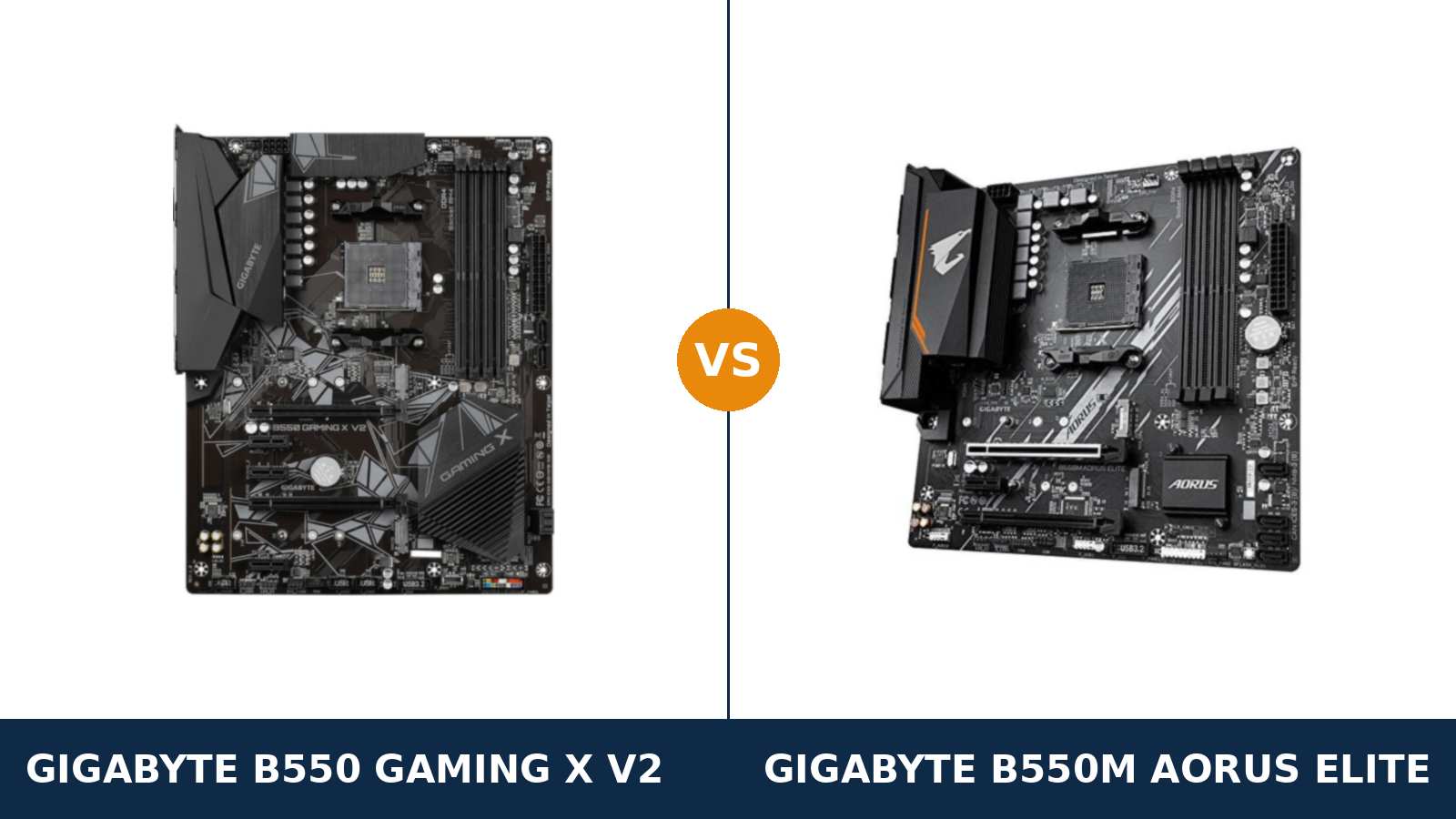
Same brand. Same chipset. Same socket. Same four memory slots.
Put the Gigabyte B550 Gaming X V2 and the B550M Aorus Elite side by side on a spec sheet and they look like the same motherboard cut to two different sizes. The Aorus badge on the smaller board even suggests it might be the premium pick of the pair.
It is not. Read past the shared platform lines and the bigger board pulls away: a much stronger power design, a faster second M.2 slot, faster USB, and fan headers the Elite simply does not have. The Elite fights back with compact size, a better-wired second expansion slot, and a typically lower price.
Every specification below comes from Gigabyte's own published data, and the verdict at the end is the one we would give a friend spending their own money.
Key Takeaways
- The Gaming X V2 is the stronger board. A 10+3 phase VRM, a full-speed second M.2 slot, USB 3.2 Gen 2 and a front USB-C header.
- The B550M Aorus Elite is the compact value pick. The same platform essentials in a micro-ATX footprint, usually for less money.
- Memory, display outputs, LAN and audio are dead ties. Do not let either board be sold to you on those.
- One slot runs backwards: the Elite's second PCIe slot is wired x4; the Gaming X V2's is only x2, despite the bigger board offering more slots overall.
- Check the revision on both boards. Revision 1.3 of each quietly swaps in a smaller BIOS chip.
Quick Verdict
Buy the Gigabyte B550 Gaming X V2 for most ATX builds. It is the more complete board by a clear margin.
Its 10+3 phase digital twin VRM doubles the Elite's 5+3 design. Both of its M.2 slots run at x4 width. It alone offers a 10 Gb/s rear USB port and a front-panel USB-C header.
If your case takes a full ATX board, this is the foundation with headroom everywhere it counts.
Buy the Gigabyte B550M Aorus Elite if your build is compact or your budget is tight. It keeps the platform essentials intact: four DIMM slots, dual M.2 storage, a full PCIe 4.0 x16 graphics slot.
For a Ryzen 5 build in a small case, its compromises are the ones you will never feel. Just know they are concentrated in power delivery and connectivity, and they cannot be undone later.
The Scorecard
Scores below are derived directly from the manufacturer specifications compared in this guide — phase counts, slot counts, port counts and supported standards. They are a reading aid, not benchmark results.
| Category | B550 Gaming X V2 | B550M Aorus Elite | ||
|---|---|---|---|---|
| Power delivery | 9 / 10 | 6 / 10 | ||
| Expansion | 8 / 10 | 7 / 10 | ||
| Storage | 9 / 10 | 7 / 10 | ||
| USB connectivity | 9 / 10 | 6 / 10 | ||
| Display outputs (APU builds) | 6 / 10 | 6 / 10 | ||
| Memory | 9 / 10 | 9 / 10 | ||
| Networking & audio | 7 / 10 | 7 / 10 | ||
| Overall | 8.1 / 10 | 6.9 / 10 | ||
The pattern is one-directional. Wherever the boards differ, the Gaming X V2 is usually the one holding the extra hardware — with a single, genuinely interesting exception in the expansion slots.
At a Glance: Who Each Board Fits
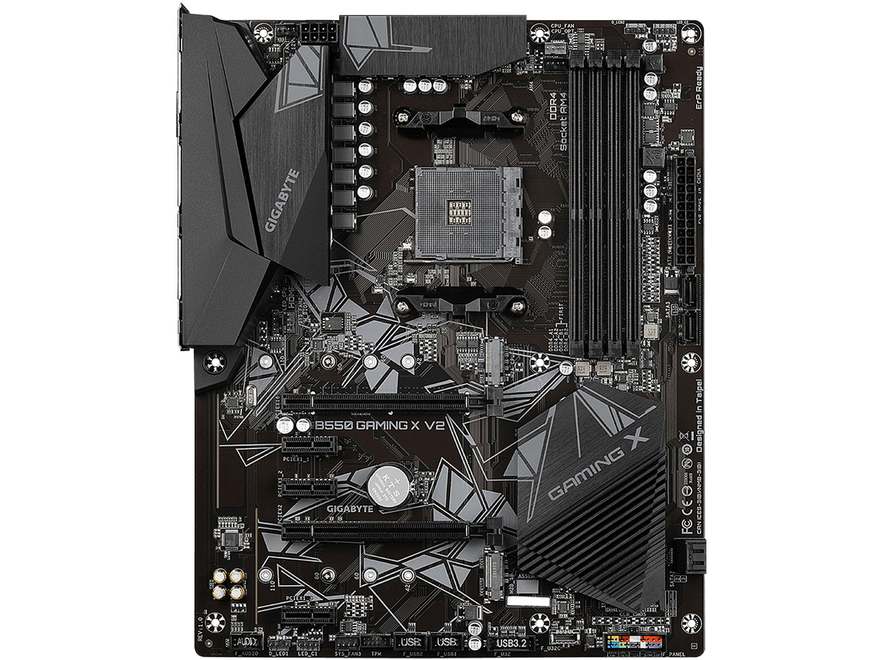
Gigabyte B550 Gaming X V2
- 10+3 phase digital twin VRM with enlarged heatsinks
- Dual M.2, both at PCIe x4 width, both 22110-ready
- Rear USB 3.2 Gen 2 (10 Gb/s) plus front USB-C header
- Five expansion slots and five fan headers
- Full ATX — needs an ATX-capable case
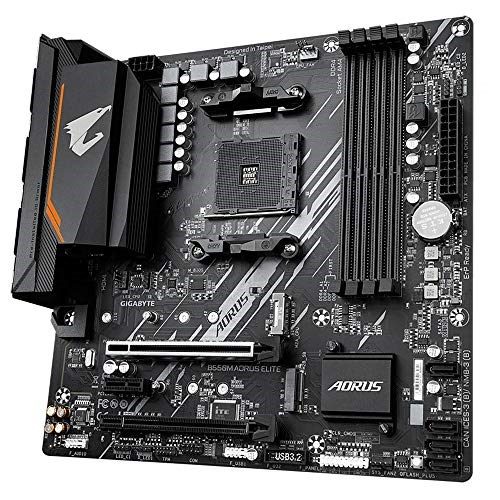
Gigabyte B550M Aorus Elite
- 5+3 phase pure digital VRM with heatsink
- Second PCIe x16 slot wired at x4 — better than its rival's
- Dual M.2, second slot at PCIe 3.0 x2
- Micro-ATX — fits compact cases
- Usually the cheaper of the two boards
Choose the B550 Gaming X V2 if…
Your case takes a full ATX board. That single fact unlocks everything else in this comparison.
You are building with a Ryzen 7, or might upgrade to a Ryzen 9 later. The 10+3 phase VRM is built for exactly that path.
You want a second NVMe drive at full speed, a front USB-C port that actually works, or more than three fans under motherboard control.
Choose the B550M Aorus Elite if…
Your case is micro-ATX, or you simply want the smaller board. The Gaming X V2 physically cannot follow you there.
Your build is a Ryzen 5 with one graphics card and one or two drives. The Elite covers that brief completely.
Or your one planned add-in card is a serious one — a fast capture card or NVMe adapter — and you want the second slot wired at x4 rather than x2.
As an Amazon Associate I earn from qualifying purchases at no extra cost to you.
Specifications: The Specs That Actually Matter
Every figure below is taken from Gigabyte's published specifications for each board, cross-checked against the manufacturer's product data.
Both boards exist in several hardware revisions. The table reflects the original revision line of each — revisions 1.0 to 1.2 — and the one revision change that matters gets its own note under the table.
| Specification | Gigabyte B550 Gaming X V2 | Gigabyte B550M Aorus Elite |
|---|---|---|
| Form factor | ATX, 30.5 × 24.4 cm | Micro ATX, 24.4 × 24.4 cm |
| Socket / chipset | AMD AM4 / B550 | AMD AM4 / B550 |
| CPU support | Ryzen 5000, 5000 G, 4000 G, 3000 series | Ryzen 5000, 5000 G, 4000 G, 3000 series |
| VRM design | 10+3 phase digital twin, enlarged heatsinks | 5+3 phase pure digital, heatsink fitted |
| Memory | 4 × DDR4 DIMM, up to 128 GB, 4733 MT/s (O.C.), XMP | 4 × DDR4 DIMM, up to 128 GB, 4733 MT/s (O.C.), XMP |
| Graphics outputs (APU) | HDMI 2.1, DVI-D | HDMI 2.1, DVI-D |
| Expansion slots | PCIe 4.0 x16 + PCIe x16 slot (PCIe 3.0 x2) + 3 × PCIe 3.0 x1 — 5 total | PCIe 4.0 x16 + PCIe x16 slot (PCIe 3.0 x4) + PCIe 3.0 x1 — 3 total |
| M.2 storage | 2 slots: PCIe 4.0 x4 (22110) + PCIe 3.0 x4 (22110) | 2 slots: PCIe 4.0 x4 (22110) + PCIe 3.0 x2 (2280) |
| SATA | 4 × SATA 6 Gb/s, RAID 0/1/10 | 4 × SATA 6 Gb/s, RAID 0/1/10 |
| LAN | Realtek GbE LAN with bandwidth management | Realtek GbE LAN with bandwidth management |
| Audio | Realtek HD Audio codec, 7.1-channel | Realtek HD Audio codec, 7.1-channel |
| USB (rear) | 1 × USB 3.2 Gen 2 (10 Gb/s) + 3 × USB 3.2 Gen 1 + 2 × USB 2.0 | 4 × USB 3.2 Gen 1 + 4 × USB 2.0 |
| Front-panel USB | USB-C (USB 3.2 Gen 1) header + USB 3.2 Gen 1 header + 2 × USB 2.0 headers | USB 3.2 Gen 1 header + 1 × USB 2.0 header |
| Fan headers | 5 (CPU, water-cooling CPU, 3 system) | 3 (CPU, 2 system) |
| BIOS flashing | Q-Flash Plus, button on the rear panel | Q-Flash Plus, button on the board |
Revision note: Gigabyte later shipped a revision 1.3 of both boards. On each one, the documented change is a smaller 128 Mbit BIOS chip in place of the 256 Mbit chip on revisions 1.0–1.2.
The headline specifications in this table — VRM, slots, storage, USB — are the same on rev. 1.3. But BIOS files are revision-specific, so match downloads to the revision printed on your board.
One more naming caution before we go further: the B550M Aorus Elite AX is a different, Wi-Fi-equipped board. Nothing in this comparison describes it.
The Differences That Actually Matter
1. Power delivery — the biggest gap between these boards
The Gaming X V2 runs a 10+3 phase digital twin power design. Look at the board photo: two banks of power stages under enlarged surface heatsinks, top and side of the socket.
The B550M Aorus Elite runs a 5+3 phase pure digital design. It does get a proper VRM heatsink — credit where due — but there is half as much hardware underneath it.
For a Ryzen 5 5600, both boards are comfortably sufficient. Stock settings, gaming loads, everyday work: you will never feel the difference.
Step up to a Ryzen 7 5800X, and then to a Ryzen 9 5900X or 5950X, and the boards separate. Sixteen cores pulling sustained all-core loads is exactly the workload a doubled VRM design exists for.
The Gaming X V2 spreads that load across twice the phases, each running cooler. The Elite concentrates it. It will run those chips — Gigabyte lists them as supported — but with less thermal headroom and less margin for a warm case.
The principle from every one of our AM4 guides applies here: you can upgrade everything around a motherboard except its VRM. On that single component, this comparison is one-sided.
2. Form factor — the difference that decides before specs do
The Gaming X V2 is a full ATX board, 30.5 cm long. The B550M Aorus Elite is micro-ATX, a square 24.4 cm. This is the one difference that can end the comparison in ten seconds.
A micro-ATX or mini-ITX case cannot take the Gaming X V2 at all. If your case is small, the Elite wins by default and the rest of this guide is academic.
In a full ATX case, the argument reverses. The Elite fits, of course — micro-ATX boards mount in ATX cases — but it leaves the bottom of the case empty and gives up the slot and header room the bigger board uses. The ATX layout also spreads slots and headers out, so a thick graphics card smothers less of the board beneath it.
Neither board is the wrong size. They are answers to two different case questions. Answer yours first.
3. Expansion — more slots on one board, wider slots on the other
Both boards give your graphics card a full PCIe 4.0 x16 slot. With a G-series APU installed it runs at PCIe 3.0 speeds, as on every B550 board. No difference where it matters most.
Below that slot, the story gets genuinely interesting — and it cuts both ways.
The Gaming X V2 offers five slots in total: the graphics slot, a second x16-length slot, and three PCIe x1 slots. The Elite offers three: graphics, a second x16-length slot, and a single x1.
But read the wiring, not the slot count. The Elite's second slot runs at PCIe 3.0 x4. The Gaming X V2's second slot runs at only PCIe 3.0 x2.
For a Wi-Fi card, a sound card or a USB expansion card, any of these slots is plenty, and the Gaming X V2's extra x1 pair is pure flexibility. For one bandwidth-hungry card — a 4K capture card, a dual-NVMe adapter, a 10-gigabit NIC — the Elite's x4 slot is worth more than its rival's slot count.
Verdict: the Gaming X V2 wins on quantity, the Elite wins on the quality of its second slot. Most builders need quantity more. Know which one you are.
4. Storage — the second M.2 slot is not the same slot
Both boards carry two M.2 slots and four SATA ports with RAID 0/1/10. On a feature checklist, storage looks like a tie. It is not.
The first slot is identical: CPU-connected, PCIe 4.0 x4 with a Ryzen 3000 or 5000 processor, and long enough for 22110 drives on both boards. Your boot drive will perform exactly the same on either.
The second slot is where the boards split. On the Gaming X V2 it is a chipset slot running PCIe 3.0 x4, and it also accepts 22110 drives. On the Elite it runs at PCIe 3.0 x2 — half the lanes — and tops out at 2280 length.
A PCIe 3.0 x2 link caps a fast NVMe drive at roughly half the sequential speed it could reach at x4. For a game library or media drive, you will not notice. For scratch storage or large file work, you might.
Call it this way: one fast drive, the boards tie. Two fast drives, the Gaming X V2 wins clearly.
5. USB — one board speaks 10 Gb/s, the other does not
This is the most clear-cut difference in the whole comparison, and the easiest to overlook on a spec sheet.
The Gaming X V2 has a USB 3.2 Gen 2 port on its rear panel — 10 Gb/s, the red Type-A socket. The B550M Aorus Elite has no Gen 2 port anywhere. Its fastest USB, front or rear, is 5 Gb/s Gen 1.
The front panel tells the same story. The Gaming X V2 provides a USB Type-C header with USB 3.2 Gen 1 speeds, so a case front USB-C port works. The Elite has no USB-C header at all; a front Type-C port on your case would sit unconnected.
Raw port counts favour neither in a useful way. The Elite actually has more rear ports — eight against six — but four of them are USB 2.0.
If you move large files to external SSDs, the Gen 2 port halves your transfer times. If your peripherals are a keyboard, a mouse and a headset, none of this matters. Decide by what you plug in, not by the port census.
6. Cooling and fan headers — five against three
The Gaming X V2 provides five fan headers: CPU, a water-cooling CPU header, and three system fan headers. The Elite provides three: CPU and two system.
Both boards run Gigabyte's Smart Fan 5 with hybrid headers and FAN STOP behaviour, so per-header control quality is a tie. The difference is purely how many fans you can land on the board before reaching for splitters or a hub.
A compact Elite build with a CPU cooler and two case fans uses every header it has — and that is fine. Add a third case fan or a pump, and you are splitting headers on day one. The Gaming X V2's extra headers are the kind of headroom that only becomes visible when a build grows.
7. The ties — displays, memory, networking and audio
Four areas of these spec sheets are functionally identical, and we will not manufacture differences where none exist.
Display outputs tie exactly: HDMI 2.1 and DVI-D on both boards, nothing else. For APU builds that means a modern 4K path over HDMI, a legacy second monitor over DVI-D — and no DisplayPort on either board. If DisplayPort matters to you, neither of these is your board; Gigabyte's ATX B550 Aorus Elite is the sibling that has it.
Memory ties exactly: four DDR4 slots, 128 GB maximum, overclocking support to 4733 MT/s, ECC unbuffered support and XMP on both. A 3200–3600 MT/s kit remains the sensible buy on either.
Networking ties: both boards use a Realtek gigabit LAN chip with Gigabyte's bandwidth management software — the 8118 gaming setup in Gigabyte's product materials. Neither board has Wi-Fi. The Elite's AX namesake is the wireless model, not this one.
Audio ties: both boards run a Realtek 7.1-channel HD codec with Gigabyte's audio capacitors and noise-guard layout. Gigabyte's spec pages do not name the exact codec chip for either board, so we claim no winner here — through ordinary speakers or a headset, the implementations are equivalent.
CPU Pairing Guide
The fastest way to choose between these boards is to start from your processor. This table is the whole comparison in one view.
| Your processor | B550 Gaming X V2 | B550M Aorus Elite | Our call |
|---|---|---|---|
| Ryzen 5 5600 / 5500 | Excellent | Excellent | Elite if the case is small; otherwise either |
| Ryzen 5 5600G / 5700G (APU) | Excellent — same display outputs | Excellent — same display outputs | Dead tie; choose by case size |
| Ryzen 7 5700X / 5800X | Excellent — VRM headroom | Good at stock, less headroom | B550 Gaming X V2 |
| Ryzen 9 5900X / 5950X | Good — the sensible choice of the two | Supported, but not recommended | B550 Gaming X V2 |
| Ryzen 3000 series | Excellent | Excellent | Buy on case size and price |
Read the Ryzen 9 row carefully. Both boards officially support those processors. Only one of them is the board we would actually pair with a 16-core chip for sustained work.
Ready to check today’s price?
Both boards sell through Amazon. Prices move, so check the live figure on the board that fits your build.
View on Amazon — B550 Gaming X V2View on Amazon — B550M Aorus EliteThe 30-Second Decision
| If this sounds like you… | Buy this |
|---|---|
| “My case is micro-ATX or smaller.” | B550M Aorus Elite — the only one that fits |
| “Full ATX case, Ryzen 7 or 9 planned now or later.” | B550 Gaming X V2 |
| “I run two fast NVMe drives.” | B550 Gaming X V2 (both M.2 slots at x4) |
| “My case has a front USB-C port I want working.” | B550 Gaming X V2 |
| “One serious add-in card matters more than extra slots.” | B550M Aorus Elite (second slot at x4) |
| “Ryzen 5 build, tight budget, simple parts list.” | B550M Aorus Elite |
What You Gain. What You Give Up.
Gigabyte B550 Gaming X V2
You gain: a 10+3 phase VRM with real Ryzen 9 headroom. Two M.2 slots both running at x4. The only 10 Gb/s USB port and the only front USB-C header in this comparison. Five fan headers and five expansion slots.
You give up: compact-case compatibility — full ATX only. The second expansion slot is wired at just x2, worse than the smaller board's. And you will typically pay more for the privilege.
Gigabyte B550M Aorus Elite
You gain: micro-ATX dimensions that fit anywhere, a second PCIe slot wired at a genuinely useful x4, and the same memory, display and networking platform for typically less money.
You give up: half the VRM. A second M.2 slot capped at x2. Every form of USB faster than 5 Gb/s, and the front USB-C header. Every saving on this board comes out of headroom, not day-one performance.
Pros and Cons
B550 Gaming X V2 — Pros
- 10+3 phase VRM with enlarged heatsinks
- Both M.2 slots at PCIe x4, both 22110-ready
- Rear USB 3.2 Gen 2 and front USB-C header
- Five expansion slots, five fan headers
- Q-Flash Plus button on the rear panel
Cons
- ATX only — no compact cases
- Second x16 slot wired at just x2
- No DisplayPort for APU builds
- No Wi-Fi
- Typically the pricier of the two
B550M Aorus Elite — Pros
- Micro-ATX — fits compact builds
- Second PCIe slot wired at x4
- Full platform essentials: 4 DIMMs, dual M.2
- VRM heatsink fitted, unlike many budget rivals
- Usually the cheaper board
Cons
- 5+3 phase VRM limits Ryzen 9 confidence
- Second M.2 slot capped at PCIe 3.0 x2
- No USB faster than 5 Gb/s; no front USB-C header
- Only three fan headers
- No DisplayPort, no Wi-Fi
Check the Revision and the Exact Model, Not Just the Name
Check the revision. Both of these boards exist in an original revision line (1.0–1.2) and a later revision 1.3.
The change Gigabyte documents for rev. 1.3 is a smaller BIOS chip — 128 Mbit instead of 256 Mbit. The specification sheet otherwise reads the same.
Why care? Because BIOS downloads, CPU support lists and manuals are filed per revision. The revision is printed on the box label and in the corner of the PCB. Match your downloads to it.
Check the CPU pairing. Both boards flash with Q-Flash Plus, so a board carrying an older BIOS can be updated for a Ryzen 5000 processor with no CPU installed. The Gaming X V2 puts its button on the rear panel; the Elite's is on the board itself.
Buy the Gaming X V2 if a Ryzen 7 or 9 is in the plan at any point. Buy the Elite for Ryzen 5 and APU builds in smaller cases, and put the saving toward memory or storage, where it will actually be felt.
Check the exact model name. Gigabyte's B550 range is a naming maze, and the section after the verdict maps the traps. The short version: the Elite AX has Wi-Fi and is not this board, and the board in this comparison has no wireless hardware of any kind.
Check the bundle. At this price, both boxes are spartan: the board, an I/O shield (pre-installed on the Gaming X V2), SATA cables and documentation. Neither box contains Wi-Fi antennas, because neither board has Wi-Fi.
The Upgrade Path Test
Judge a budget board by its second year, not its first day.
Year one, both boards run a Ryzen 5 and a mid-range graphics card identically. Nobody could tell them apart in a blind test, and the Elite owner paid less for the privilege.
Year two, the upgrade itch arrives. A discounted Ryzen 7 or 9. A second NVMe drive. A capture card. A case swap to something with a front USB-C port.
The Gaming X V2 says yes to nearly all of it. The processor upgrade lands on a VRM built for it. The second drive runs at full x4 speed. The USB-C header is waiting.
The Elite says yes to the processor, cautiously, and yes to the capture card — its x4 slot is genuinely good — but the second drive runs at half width and the USB-C port stays dark.
When to Skip Both
Honesty cuts both ways. There are builders neither of these boards serves well.
Skip both if you need Wi-Fi on the board itself. Gigabyte sells the B550M Aorus Elite AX for exactly that brief, and it is a different product from the Elite in this comparison.
Skip both if you want DisplayPort for an APU build, or 2.5-gigabit Ethernet. The full-ATX B550 Aorus Elite — a third board, distinct from both of these — covers that ground.
Skip both if you are building around a Ryzen 9 for heavy sustained production work and the budget can stretch. A stronger VRM class exists above these boards, and for that workload it earns its price.
And skip both if your case is mini-ITX. Neither board fits, full stop.
Final Verdict
The Gigabyte B550 Gaming X V2 is the board we would build on.
It wins this comparison on the hardware that decides how a board ages: a 10+3 phase VRM with headroom for every AM4 processor, two full-width M.2 slots, and USB connectivity a generation ahead of its rival's.
The Aorus badge on the smaller board does not change the hardware underneath it. Badge engineering aside, the Elite is the trimmed product here, and its spec sheet says so in row after row.
Buy the Gaming X V2 for ATX builds, Ryzen 7 and Ryzen 9 processors, dual-NVMe storage setups, and any PC you intend to upgrade rather than replace.
View on Amazon — B550 Gaming X V2
Buy the B550M Aorus Elite if your case is micro-ATX. If your build is a Ryzen 5 or APU system that will stay simple. Or if its x4-wired second slot matches the one add-in card you care about.
It is an honest compact board that keeps the platform's essentials and charges less for them. Just buy it knowing the savings come from your future options, not from today's frame rates.
View on Amazon — B550M Aorus Elite
Watch Out: Similar Names, Different Boards
Gigabyte's B550 range is a trap for the hurried buyer. Four warnings belong in every version of this guide.
First: the B550M Aorus Elite and the B550M Aorus Elite AX are different products. The AX adds Wi-Fi and Bluetooth; the board in this comparison has neither. A listing that says “Elite” without “AX” is the wired board.
Second: the B550 Aorus Elite — no M — is a full-ATX board with a stronger VRM, DisplayPort and 2.5-gigabit LAN. It shares half a name with the micro-ATX board here and almost nothing else that matters.
Third: the original B550 Gaming X is not the Gaming X V2. The V2 is the later revision of that design, and it is the board in this comparison. Check for “V2” in the listing title.
Fourth: the B550M Gaming X is a separate micro-ATX board that borrows the Gaming X name. It is not a small version of the V2, and its specifications differ.
Slow down on the product page. Match the full model name, then the revision, then the price — in that order.
Case, Power and Cabling Notes
The Gaming X V2 needs a case with full ATX mounting. The B550M Aorus Elite fits micro-ATX and ATX cases alike, and leaves generous cable room in larger ones.
Both boards take a standard 24-pin main power connector and a single 8-pin EPS CPU power connector. Any reputable modern power supply covers this without adapters.
Front-panel USB is where the cabling difference lives. The Gaming X V2 connects a case's USB-C and USB 3.2 Gen 1 front ports, plus USB 2.0. The Elite connects USB 3.2 Gen 1 and USB 2.0 only — a front USB-C port on the case will have nothing to plug into.
Fan cabling follows the header counts. Five headers on the Gaming X V2 cover most ATX cooling layouts directly. The Elite's three headers suit a compact build; plan a splitter or hub if your case carries more than two case fans.
BIOS and Long-Term Support
AM4 is a mature platform. That is a genuine advantage for both of these boards.
The BIOS is stable. The drivers are stable. The surprises have already happened to somebody else, years ago, and been fixed.
Both boards sit on Gigabyte's standard support pages: BIOS updates, chipset and LAN drivers, and a full CPU support list — filed separately for each hardware revision, so download against the revision printed on your board. Expect future BIOS releases to be about security patches and edge-case compatibility, not new features; on a mature platform, that is exactly what you want.
One habit worth keeping: before any CPU upgrade, check the support list for your board's revision and update the BIOS first. Q-Flash Plus makes that a ten-minute job on either board, even with the new processor still in its box.
Frequently Asked Questions
Is the B550 Gaming X V2 better than the B550M Aorus Elite?
On specifications, yes, clearly. It has double the VRM phases (10+3 against 5+3), both M.2 slots at PCIe x4, a USB 3.2 Gen 2 rear port, a front USB-C header and five fan headers against three. The Elite's wins are its micro-ATX size, its x4-wired second PCIe slot, and a typically lower price.
Does the B550M Aorus Elite have Wi-Fi?
No. The B550M Aorus Elite is a wired-only board with gigabit Ethernet. The Wi-Fi model is the separate B550M Aorus Elite AX, which adds wireless and Bluetooth and is a different product with its own listing.
Which board is better for a Ryzen 9 5900X or 5950X?
The B550 Gaming X V2. Both boards officially support Ryzen 9 processors, but the Gaming X V2's 10+3 phase VRM with enlarged heatsinks handles sustained all-core loads from 12- and 16-core chips with far more headroom than the Elite's 5+3 phase design.
Can I run two NVMe SSDs at full speed on either board?
Only on the Gaming X V2. Its second M.2 slot runs at PCIe 3.0 x4, matching its CPU-connected PCIe 4.0 x4 primary slot in width. On the B550M Aorus Elite the second M.2 slot runs at PCIe 3.0 x2, which caps a fast drive's sequential speeds at roughly half.
Do both boards support Ryzen 5000 processors?
Yes. Both are AM4 B550 boards supporting Ryzen 5000, 5000 G-Series, 4000 G-Series and 3000 series processors. Both offer Q-Flash Plus, so the BIOS can be updated for a newer CPU without an older processor installed. Always confirm your exact CPU on Gigabyte's support list for the board's revision.
Which board should I choose for an APU build without a graphics card?
Either — this is a genuine tie. Both boards provide exactly the same display outputs, HDMI 2.1 and DVI-D, and neither offers DisplayPort. Choose by case size: the Elite for micro-ATX, the Gaming X V2 for ATX. If DisplayPort is essential, look at the ATX B550 Aorus Elite instead.
What changed in revision 1.3 of these boards?
On both boards, Gigabyte's documentation shows revision 1.3 swapping the 256 Mbit BIOS chip of revisions 1.0–1.2 for a 128 Mbit chip, with the headline specifications otherwise unchanged. BIOS files are revision-specific, so match your downloads to the revision printed on the box or the corner of the board.
Does the B550M Aorus Elite fit in an ATX case?
Yes. Micro-ATX boards mount in ATX cases using the shared standoff positions, and the Elite works in any ATX or micro-ATX case. The reverse is not true: the full-ATX Gaming X V2 cannot fit a micro-ATX-only case.
Sources & Verification
GIGABYTE B550 GAMING X V2 (rev. 1.0/1.1/1.2) and (rev. 1.3) official specifications, gigabyte.com • GIGABYTE B550M AORUS ELITE (rev. 1.0/1.1/1.2) and (rev. 1.3) official specifications, gigabyte.com • Gigabyte product key-feature data for both boards • Gigabyte's specification pages list the audio simply as a Realtek HD codec, so no codec model is claimed for either board. Specifications verified November 2026.

James Wilson
James has been building and benchmarking PCs for over a decade and writes Honestly Compared's motherboard and component guides. His rule for every comparison: the verdict has to survive the spec sheet, not the marketing page.