
Gigabyte B550M DS3H vs Gigabyte B550 Aorus Elite V2: Which Should You Buy?
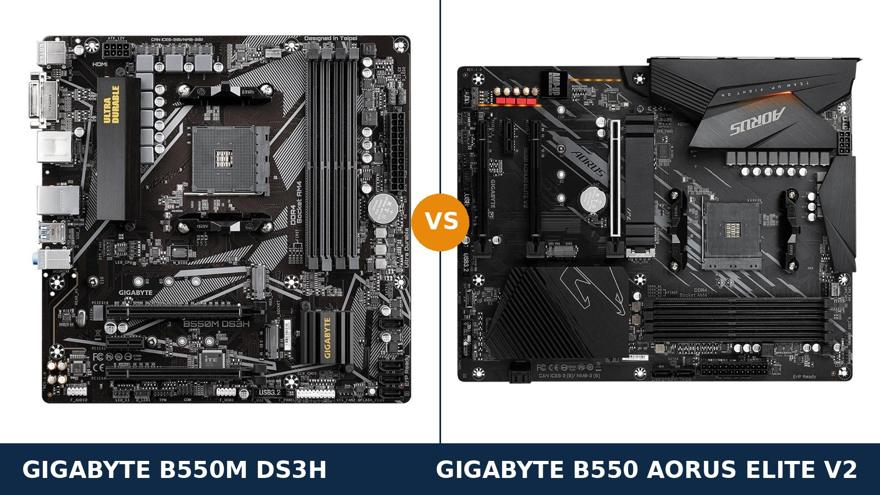
Same brand. Same chipset. Same socket. That is where the similarity ends.
The B550M DS3H is Gigabyte's budget Ultra Durable board: micro-ATX, honestly specified, built to a price. The B550 Aorus Elite V2 is from Gigabyte's gaming line: full ATX, a far stronger power design, faster networking and a longer feature list everywhere you look.
So this is not really a fair fight on paper — and yet the cheaper board keeps selling, for good reasons. Size is one. Price is another. And the DS3H holds one genuine technical win that the Aorus board cannot match.
This guide works through all of it with Gigabyte's own published specifications: which differences are real, which are marketing, and which board deserves your money for the build you are actually planning.
Key Takeaways
- The Aorus Elite V2 is the stronger board in almost every measurable way — VRM, networking, audio, USB and display outputs all go its way.
- The DS3H is the compact, budget play. It fits micro-ATX cases the Elite V2 cannot enter, and leaves more of your budget for the processor and graphics card.
- One real DS3H win: its second PCIe x16 slot is wired at x4; the Elite V2's second slot runs at only x2.
- Memory and SATA are a dead tie. Four DDR4 slots, 128 GB, 4733 MT/s (O.C.) and four SATA ports on both.
- Check the exact model name before buying. B550 Aorus Elite, Elite V2 and Elite AX V2 are three different boards — and the DS3H has revisions that change its hardware.
Quick Verdict
Buy the Gigabyte B550 Aorus Elite V2 for most full-size builds. It is simply the better motherboard.
A 12+2 phase DrMOS power design built for any AM4 processor you can name. 2.5-gigabit networking. The ALC1200 audio codec with an optical output. DisplayPort and HDMI for APU builds. A front-panel USB-C header. None of that is decoration — it is hardware the DS3H does not have at any price.
Buy the Gigabyte B550M DS3H if your case is compact or your budget is tight. It is a micro-ATX board, so it fits cases the Elite V2 physically cannot.
It keeps the platform essentials intact: PCIe 4.0 for your graphics card, dual M.2 storage, four memory slots. For a Ryzen 5 build, the money it saves is better spent on the processor or GPU sitting on it.
The Scorecard
Scores below are derived directly from the manufacturer specifications compared in this guide — phase counts, slot counts, port counts and supported standards. They are a reading aid, not benchmark results.
| Category | B550M DS3H | B550 Aorus Elite V2 | ||
|---|---|---|---|---|
| Power delivery | 6 / 10 | 10 / 10 | ||
| Expansion | 7 / 10 | 8 / 10 | ||
| Storage | 8 / 10 | 9 / 10 | ||
| Connectivity (USB & LAN) | 5 / 10 | 10 / 10 | ||
| Audio | 6 / 10 | 9 / 10 | ||
| Display outputs (APU builds) | 6 / 10 | 9 / 10 | ||
| Memory | 9 / 10 | 9 / 10 | ||
| Overall | 6.7 / 10 | 9.1 / 10 | ||
That overall gap is the honest shape of this comparison. The Elite V2 is a class above. What the scorecard cannot show is the DS3H's two counter-arguments: it fits smaller cases, and it costs less. For the right build, those two facts outweigh everything above.
At a Glance: Who Each Board Fits
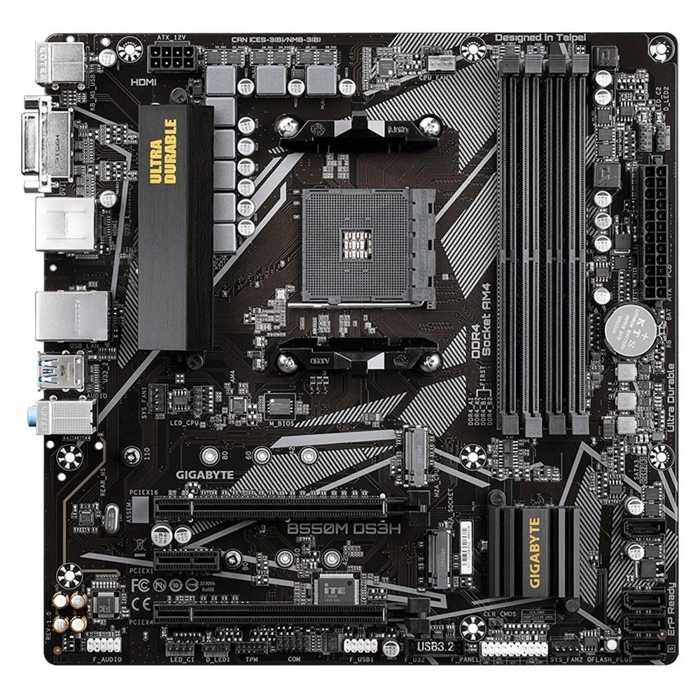
Gigabyte B550M DS3H
- Micro-ATX — fits compact cases the Elite cannot
- 5+3 phase pure digital VRM with VRM heatsink
- Second PCIe x16 slot wired at x4
- Dual M.2: PCIe 4.0 x4 (22110) + PCIe 3.0 x2
- HDMI 2.1 + DVI-D display outputs
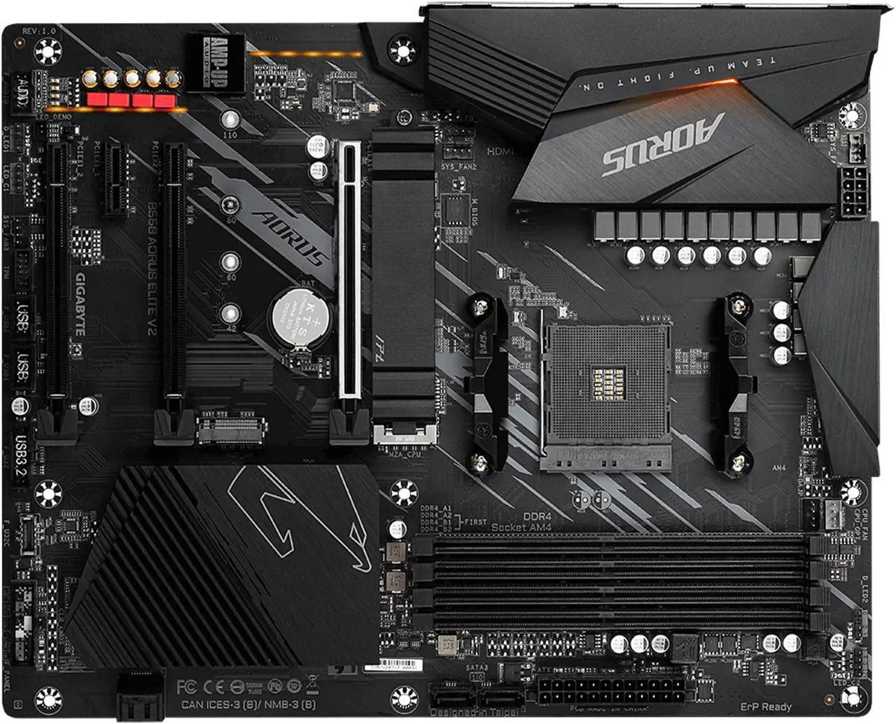
Gigabyte B550 Aorus Elite V2
- Full ATX with 12+2 phase DrMOS VRM, enlarged heatsinks
- Realtek 2.5GbE LAN and rear USB 3.2 Gen 2 ports
- ALC1200 audio with optical S/PDIF output
- Dual M.2, both x4 and 22110, with M.2 Thermal Guard
- DisplayPort 1.4 + HDMI 2.1, front USB-C header
Choose the B550M DS3H if…
Your case is micro-ATX. That settles it on its own — the Elite V2 will not fit, and no feature list changes physics.
Your budget is fixed and the build is a Ryzen 5 with a single graphics card. The saving over the Aorus board buys real performance elsewhere in the build.
Or you need one add-in card running at x4 — a fast storage adapter, a serious network card. The DS3H's second slot is wired for exactly that.
Choose the B550 Aorus Elite V2 if…
Your case takes ATX and you are building with a Ryzen 7 or Ryzen 9 — or plan to upgrade to one. The 12+2 DrMOS power design is built for precisely those processors.
You have, or expect, faster-than-gigabit networking. You want the front USB-C port on a modern case to actually work. You care about onboard audio quality.
Or you simply want the board that never becomes the reason you cannot upgrade something else.
As an Amazon Associate I earn from qualifying purchases at no extra cost to you.
Specifications: The Specs That Actually Matter
Every figure below is taken from Gigabyte's published specifications for the B550M DS3H and the B550 Aorus Elite V2 (rev. 1.0/1.1), cross-checked against the manufacturer's product data.
Both boards exist in other revisions and near-identical variants. The notes after the table cover the ones that change the hardware.
| Specification | Gigabyte B550M DS3H | Gigabyte B550 Aorus Elite V2 |
|---|---|---|
| Form factor | Micro ATX, 24.4 × 24.4 cm | ATX, 30.5 × 24.4 cm |
| Socket / chipset | AMD AM4 / B550 | AMD AM4 / B550 |
| CPU support | Ryzen 5000, 5000 G, 4000 G, 3000 series | Ryzen 5000, 5000 G, 4000 G, 3000, 3000 G series |
| VRM design | 5+3 phase pure digital, heatsink fitted | 12+2 phase digital twin, 50A DrMOS, enlarged heatsinks |
| Memory | 4 × DDR4 DIMM, up to 128 GB, 4733 MT/s (O.C.), XMP | 4 × DDR4 DIMM, up to 128 GB, 4733 MT/s (O.C.), XMP |
| Graphics outputs (APU) | HDMI 2.1, DVI-D | DisplayPort 1.4, HDMI 2.1 |
| Expansion slots | PCIe 4.0 x16 + PCIe 3.0 x16 (x4) + PCIe 3.0 x1 | PCIe 4.0 x16 + PCIe 3.0 x16 (x2) + PCIe 3.0 x16 (x1) + PCIe 3.0 x1 |
| M.2 storage | 2 slots: PCIe 4.0 x4 (2280/22110) + PCIe 3.0 x2 (2280) | 2 slots: PCIe 4.0 x4 (22110) + PCIe 3.0 x4 (22110), Thermal Guard |
| SATA | 4 × SATA 6 Gb/s, RAID 0/1/10 | 4 × SATA 6 Gb/s, RAID 0/1/10 |
| LAN | Realtek 8118 GbE (1 Gb/s) | Realtek 2.5GbE (2.5 Gb/s) |
| Audio | Realtek ALC887, 7.1 HD | Realtek ALC1200, 7.1 HD, optical S/PDIF out |
| USB (rear panel) | 4 × USB 3.2 Gen 1 | 2 × USB 3.2 Gen 2 + 3 × USB 3.2 Gen 1 + 2 × USB 2.0 |
| Front-panel USB-C | No USB-C header | USB 3.2 Gen 1 Type-C header |
| BIOS flashing | Q-Flash Plus (no CPU/RAM/GPU needed) | Q-Flash Plus with rear-panel button, 256 Mbit flash |
DS3H revision note: Gigabyte later shipped a B550M DS3H revision 1.7. It upgrades the VRM to 6+2 phases, swaps the audio to the ALC1220-VB codec and adds DisplayPort alongside HDMI and DVI-D.
That narrows — but does not close — the gaps in this table. The revision is printed on the box label and in the corner of the PCB, so check before you buy.
Elite V2 revision note: this comparison uses the Elite V2 rev. 1.0/1.1, which fits one M.2 Thermal Guard. Gigabyte's later rev. 1.5 adds a second Thermal Guard over the other M.2 slot.
Do not confuse the family: the earlier B550 Aorus Elite (no “V2”), the Wi-Fi-equipped B550 Aorus Elite AX V2 and the micro-ATX B550M Aorus Elite are all different boards from the one compared here.
The Differences That Actually Matter
1. Form factor — the decision that comes first
Before VRM phases or port counts, answer one question: what size is your case?
The DS3H is micro-ATX: 24.4 × 24.4 cm. The Elite V2 is full ATX: 30.5 × 24.4 cm — the same depth, but 6.1 cm wider.
If your case is a compact micro-ATX tower, the Elite V2 does not fit. Full stop. The DS3H wins by being the only option on the table.
If your case takes ATX, the larger board earns its space. Slots are spread out instead of stacked. A big graphics card stops crowding the slot below it. Cable runs are easier, and there is simply more board for the cooling and connectivity hardware the rest of this guide describes.
Neither size is “better” in the abstract. But it is the only difference in this comparison that can make the other board literally unusable, so it gets decided first.
2. Power delivery — not the same league
The DS3H runs a 5+3 phase pure digital VRM with a fitted heatsink. It is an honest budget design, sized for Ryzen 5 and comfortable with a Ryzen 7 at stock settings.
The Elite V2 runs a 12+2 phase digital twin design built on 50A DrMOS stages, under enlarged heatsinks. That is enthusiast-class power delivery on a mid-range board.
What does that buy you? Headroom, in every direction. A Ryzen 9 5900X or 5950X runs without the power stages becoming the story. Sustained all-core workloads hold up. There is room to tune, if tuning is your hobby.
On a Ryzen 5 5600, both boards deliver identical day-to-day performance — the processor never asks the question. The difference appears exactly where upgrades live: at the top of the AM4 range.
Remember the rule from every board comparison we publish: you can replace anything around a motherboard, but never its VRM. The Elite V2's is the one you will never need to think about again.
3. Networking and USB — a generation apart
The DS3H uses Realtek's 8118 gigabit LAN chip. Perfectly good for gigabit broadband and a gigabit home network — which is what most homes still run.
The Elite V2 uses a Realtek 2.5GbE chip. If your router, switch or NAS runs at 2.5 gigabits — increasingly common — the Aorus board uses that speed and the DS3H cannot, today or ever.
USB tells the same story. The DS3H's rear panel tops out at USB 3.2 Gen 1. The Elite V2 adds two USB 3.2 Gen 2 Type-A ports — double the bandwidth for fast external drives — alongside three more Gen 1 ports and a pair of USB 2.0.
One honest caveat, straight from Gigabyte's specification: those red Gen 2 ports run at full Gen 2 speed with Ryzen 5000 and 3000 processors, but drop to Gen 1 speed with G-series APUs. The ports still work; the headline speed is CPU-dependent.
And the Elite V2 has a front-panel USB Type-C header. The DS3H has none. Buy a modern case with a front USB-C port and pair it with the DS3H, and that port is dead plastic. On the Elite V2, it works.
4. Audio and display outputs — the Aorus polish shows
Onboard audio is where budget boards quietly cut. The DS3H's Realtek ALC887 is a workmanlike 7.1 codec that has served budget boards for years.
The Elite V2 steps up to the ALC1200, with higher-quality capacitors and an optical S/PDIF output on the rear panel — five analogue jacks plus optical, against the DS3H's basic jack set.
Driving speakers or a headset straight from the board, the ALC1200 is the cleaner, better-specified source. Feeding a home-theatre receiver digitally is something only the Elite V2 can do at all.
Display outputs matter to one group: APU builders with no graphics card. The Elite V2 pairs HDMI 2.1 with DisplayPort 1.4, good for high-resolution, high-refresh monitors.
The original DS3H pairs HDMI with a legacy DVI-D port capped at 1920×1200. Fine for an old second monitor, wrong for a modern main display. (The rev. 1.7 DS3H adds DisplayPort — check the revision note above.)
Fit a discrete graphics card and the onboard outputs on both boards sit unused. For gaming builds with a GPU, score this section to the Elite on audio alone.
5. Storage — the second slot tells the story
Both boards offer two M.2 slots and four SATA ports with RAID 0/1/10. The headline count is a tie. The wiring is not.
The primary slot is identical in spirit on both: CPU-connected, PCIe 4.0 x4 with a Ryzen 5000 or 3000 processor, accepting drives up to 22110 length.
The second slot is where they split. On the Elite V2 it runs at PCIe 3.0 x4 and takes 22110 drives. On the DS3H it runs at PCIe 3.0 x2 — half the bandwidth — and stops at 2280.
A second NVMe drive on the DS3H is capped by that x2 link. For a game library you may never notice. For scratch disks, media work or simply getting what your SSD is rated for, the Elite V2's full-width slot is the correct hardware.
The Elite V2 also fits an M.2 Thermal Guard heatsink over the primary slot, keeping a fast Gen4 drive from throttling under sustained transfers. The DS3H leaves its drives bare.
SATA, for the record, is a genuine tie: four ports, same RAID levels, same chipset. Bulk storage builders are equally served.
6. Expansion — the DS3H's one genuine win
Count the slots and the Elite V2 wins: four physical slots against three. Read the wiring diagram and the story flips for one specific job.
Both boards give the graphics card a full PCIe 4.0 x16 slot — PCIe 3.0 with a G-series APU, as on all B550 boards. Below it, the DS3H provides an x16 slot wired at x4, plus an x1.
The Elite V2 spreads its chipset lanes thinner: its second x16 slot runs at only x2, the third at x1, plus a separate x1 slot. More slots, less bandwidth in each.
So if your build needs exactly one serious add-in card — a quad-NVMe adapter, a 10-gigabit card that wants x4, a high-end capture card — the humble DS3H feeds it twice the lanes of the Aorus board's second slot.
If instead you need several light cards — Wi-Fi, sound, extra USB — the Elite V2's four slots give you places to put them, even if each runs narrow.
Neither layout is a mistake. They are different bets: the DS3H bets on one card done properly, the Elite V2 on more cards done adequately.
7. Memory — a tie — and the cooling extras
Memory is identical, and we will not manufacture a difference: four DDR4 slots, up to 128 GB, official overclocking support to 4733 MT/s, XMP on both boards.
As always, the headline figure is an overclocking rating. A quality 3200–3600 MT/s kit is the sensible buy on either board, and it will run the same on both.
The ATX board's extra space does show up in cooling support. The Elite V2 provides five fan headers, including a dedicated water-cooling CPU header, all rated for high-power pumps and fans.
It also carries the fuller RGB Fusion 2.0 header set — two addressable and two standard strip headers, plus a CPU cooler LED header — against a smaller set on the DS3H.
Add the small conveniences: a physical Q-Flash Plus button on the Elite V2's rear panel for BIOS updates, where the DS3H's flashing is header-and-jumper work. None of this decides a purchase alone. Together it is the texture of a board from a higher line.
CPU Pairing Guide
Start from your processor and this comparison mostly decides itself. The table below is the whole argument in one view.
| Your processor | B550M DS3H | B550 Aorus Elite V2 | Our call |
|---|---|---|---|
| Ryzen 5 5600 / 5500 | Excellent | Excellent, with headroom to spare | Either — DS3H if budget is tight |
| Ryzen 5 5600G / 5700G (APU) | Good — DVI-D limits the second display | Excellent — DisplayPort 1.4 + HDMI 2.1 | Aorus Elite V2 |
| Ryzen 7 5700X / 5800X | Good at stock settings | Excellent — VRM built for it | Aorus Elite V2 |
| Ryzen 9 5900X / 5950X | Below its sensible ceiling | Excellent — 12+2 DrMOS earns its keep | Aorus Elite V2, clearly |
| Ryzen 3000 series | Excellent | Excellent | Either — buy on price and case fit |
Notice the pattern: the further up the Ryzen range your plans reach — now or later — the more one-sided this table becomes.
The 30-Second Decision
| If this sounds like you… | Buy this |
|---|---|
| “My case is micro-ATX.” | B550M DS3H — the Elite V2 does not fit |
| “Ryzen 5 build, tight budget, one graphics card.” | B550M DS3H |
| “Ryzen 7 or 9 — now, or as a planned upgrade.” | B550 Aorus Elite V2 |
| “My network or NAS runs faster than gigabit.” | B550 Aorus Elite V2 (2.5GbE) |
| “My case has a front USB-C port I want working.” | B550 Aorus Elite V2 |
| “I need one add-in card running at a full x4.” | B550M DS3H (x4-wired second slot) |
Ready to check today’s price?
Both boards sell through Amazon. Prices move, so check the live figure on the board that fits your build.
View on Amazon — B550M DS3HView on Amazon — B550 Aorus Elite V2What You Gain. What You Give Up.
Gigabyte B550M DS3H
You gain: micro-ATX fit for compact cases. A lower price that funds a better processor or graphics card. A second slot wired at a full x4. The same memory and SATA platform as the Aorus board.
You give up: VRM headroom for Ryzen 9 and tuning. 2.5-gigabit networking, USB 3.2 Gen 2 and a front USB-C header. ALC1200 audio, DisplayPort and a full-speed second M.2 slot.
Gigabyte B550 Aorus Elite V2
You gain: a 12+2 DrMOS power design that takes any AM4 processor. Faster networking and USB. Better audio with optical out. Both M.2 slots at full x4 width, and the cooling headers to run a serious build.
You give up: compact-case compatibility — this board needs an ATX case. A higher price. And, oddly, second-slot bandwidth: its x16 slots run at x2 and x1, where the DS3H offers one honest x4.
Pros and Cons
B550M DS3H — Pros
- Fits micro-ATX cases the Elite V2 cannot
- Lowest price into the B550 platform done properly
- Second PCIe x16 slot wired at x4
- 5+3 VRM with heatsink handles Ryzen 5/7
- Dual M.2 and four DIMM slots, untrimmed
Cons
- Gigabit LAN only; no USB 3.2 Gen 2
- No front-panel USB-C header
- Second M.2 slot limited to PCIe 3.0 x2
- ALC887 audio; DVI-D instead of DisplayPort
- No Wi-Fi — same as the Elite V2
B550 Aorus Elite V2 — Pros
- 12+2 phase 50A DrMOS VRM, enlarged heatsinks
- 2.5GbE LAN and rear USB 3.2 Gen 2 ports
- ALC1200 audio with optical S/PDIF output
- Both M.2 slots x4 and 22110, Thermal Guard fitted
- Front USB-C header; DisplayPort + HDMI for APUs
- Five fan headers and a rear Q-Flash Plus button
Cons
- Needs an ATX case — no compact builds
- Costs meaningfully more than the DS3H
- Secondary x16 slots wired at only x2 and x1
- Rear Gen 2 USB drops to Gen 1 speed with G-series APUs
- No Wi-Fi — that is the separate AX V2 model
Check the Case, the Name and the Revision
Check the case first. Measure before anything else. An ATX board in a micro-ATX case is not a compromise — it is a return shipment.
If you are buying a case for the Elite V2, confirm it accepts full ATX and has a front USB-C port only if you will use the header the board provides. The DS3H drops into either case size, but leaves an ATX case looking empty.
Check the full model name. Gigabyte's B550 Aorus range is a naming maze. The B550 Aorus Elite V2 in this guide has no Wi-Fi. The B550 Aorus Elite AX V2 adds Wi-Fi 6 and is a different board with a different listing.
The earlier B550 Aorus Elite (without “V2”) is the previous model. And the B550M Aorus Elite is a micro-ATX board that shares the name and almost nothing else — do not let a search result swap it in.
The same discipline applies on the other side: B550M DS3H, DS3H AC (with Wi-Fi) and DS3H AC R2 are separate products.
Check the revision. DS3H revision 1.7 meaningfully upgrades that board — 6+2 VRM, ALC1220-VB audio, DisplayPort added. Elite V2 rev. 1.5 adds a second M.2 Thermal Guard over rev. 1.0/1.1.
Revisions are printed on the box label and the PCB corner. Retail listings do not always say which revision ships, so if a specific revision matters to you, confirm with the seller before ordering.
Check the CPU support, not the box art. Both boards update via Q-Flash Plus, so an older BIOS is a ten-minute fix rather than a blocker — the Elite V2 even puts the button on its rear panel.
Fit the board to the processor you will own in two years, not just the one in today's basket.
The Upgrade Path Test
Judge these boards by the second build you put on them, not the first.
On the DS3H, the comfortable ceiling arrives early. Ryzen 7 at stock is fine; Ryzen 9, heavy tuning and a rack of fast add-in hardware are where you start negotiating with the board.
Its storage ceiling arrives too: the second M.2 slot's x2 link is a permanent governor on any second NVMe drive.
On the Elite V2, the ceiling sits at the top of the platform. Every AM4 processor is in scope. Both M.2 slots run full width. The networking and USB are a generation ahead, so they age slower.
Be honest about the shared limit, though: AM4 is a finished platform. Neither board leads anywhere beyond Ryzen 5000.
Within that world, the Elite V2 is the board you buy once. The DS3H is the board you buy for a specific, bounded build — and for that job it is genuinely well judged.
When to Skip Both
Some requirements send you elsewhere entirely, and a straight guide should say so.
Skip both if you need Wi-Fi on the board. Gigabyte sells the DS3H AC and the Aorus Elite AX V2 for exactly that — buy the variant, not a dongle.
Skip both if you are building a mini-ITX system. Neither board is small enough, whatever the “M” in one name suggests.
Skip both if your plan involves multiple graphics cards or chipset-fed PCIe 4.0 storage arrays. That is X570 territory, and B550 was never pretending otherwise.
And skip both if you are starting entirely from scratch with a generous budget. AM5 and DDR5 are the forward platform; these two boards are the best of the AM4 endgame, not its successor.
BIOS and Long-Term Support
AM4 is a mature platform, and maturity is a feature. The BIOS is stable, the drivers are stable, and the early surprises were fixed years ago.
Both boards live on Gigabyte's standard support pages: BIOS updates, chipset, LAN and audio drivers, and a per-revision CPU support list.
Expect future BIOS releases to be security patches and edge-case compatibility, not new features. On a platform at this stage, that is precisely the right cadence.
The habit worth keeping: before any processor upgrade, check the CPU support list for your board's revision and update the BIOS first. Q-Flash Plus makes it easy on either board — no CPU, memory or graphics card needs to be installed.
Final Verdict
The Gigabyte B550 Aorus Elite V2 is the better motherboard, and for ATX builds it is the one to buy.
It does not win on a technicality. It wins on power delivery, networking, USB, audio, display outputs and storage wiring — the substance of a motherboard — while matching the DS3H on memory and SATA.
If your case takes ATX and your budget stretches to it, there is no serious argument the other way. This is the B550 board that never becomes the bottleneck.
Buy the Aorus Elite V2 for Ryzen 7 and Ryzen 9 builds, faster-than-gigabit networks, modern cases with front USB-C, and any PC meant to be upgraded to the top of the AM4 range.
View on Amazon — B550 Aorus Elite V2
Buy the B550M DS3H if your case is micro-ATX, if the budget is genuinely tight, or if one x4 add-in card matters more to you than everything on the Aorus feature list.
It remains a well-judged budget board. It is simply competing here against a board from the class above — and priced like one.
Frequently Asked Questions
Is the B550 Aorus Elite V2 better than the B550M DS3H?
Yes, as a motherboard. Its 12+2 DrMOS VRM, 2.5GbE LAN, ALC1200 audio, USB 3.2 Gen 2 ports, DisplayPort output and full-speed second M.2 slot all beat the DS3H's specification. The DS3H answers with a lower price, a micro-ATX fit and a second PCIe slot wired at x4 instead of x2.
Will the B550 Aorus Elite V2 fit in a micro-ATX case?
No. The Elite V2 is a full ATX board measuring 30.5 × 24.4 cm, and micro-ATX cases are built for boards up to 24.4 × 24.4 cm like the DS3H. Check your case's supported form factors before ordering — this is the most common mistake in this comparison.
Which board is better for a Ryzen 9 5900X or 5950X?
The Aorus Elite V2, decisively. Its 12+2 phase digital twin VRM with 50A DrMOS stages and enlarged heatsinks was designed for the top of the AM4 range. The DS3H's 5+3 design is aimed at Ryzen 5 and Ryzen 7; a Ryzen 9 sits beyond its sensible ceiling.
Which board should I choose for an APU build without a graphics card?
The Aorus Elite V2. It offers DisplayPort 1.4 and HDMI 2.1, driving modern high-resolution monitors properly. The original DS3H pairs HDMI with a DVI-D port limited to 1920×1200 — though the rev. 1.7 DS3H adds DisplayPort. Note the Elite V2's rear USB Gen 2 ports run at Gen 1 speed with G-series APUs.
Does either board have Wi-Fi?
No. Both boards are wired-only, with Ethernet as their networking. Gigabyte sells Wi-Fi variants separately: the B550M DS3H AC and the B550 Aorus Elite AX V2. Make sure the listing you buy from is the model you actually want.
Can both boards run two NVMe SSDs at full speed?
Not quite. On the Elite V2, both M.2 slots run at x4 (PCIe 4.0 from the CPU, PCIe 3.0 from the chipset). On the DS3H, the second M.2 slot is wired at PCIe 3.0 x2, which caps a second drive's bandwidth. The first slot is PCIe 4.0 x4 on both boards.
Is the B550M Aorus Elite the same board as the B550 Aorus Elite V2?
No. Despite the near-identical names, the B550M Aorus Elite is a separate micro-ATX board with a different layout and specification. The board in this comparison is the full-ATX B550 Aorus Elite V2. Match the complete model name when ordering.
Do both boards support Ryzen 5000 processors out of the box?
Both support the full Ryzen 5000 range, but a board from older stock may need a BIOS update first. Both offer Q-Flash Plus, so the update can be done without a CPU, memory or graphics card installed — check Gigabyte's CPU support list for your board's revision to see the minimum BIOS version.
Sources & Verification
GIGABYTE B550 AORUS ELITE V2 (rev. 1.0/1.1) official specifications, gigabyte.com • GIGABYTE B550 AORUS ELITE V2 (rev. 1.5) product page (second Thermal Guard note) • GIGABYTE B550M DS3H (rev. 1.7) official specifications and B550M DS3H user manual • Gigabyte retail product data for B550M DS3H (5+3 phase) and B550 Aorus Elite V2 (12+2 phase DrMOS). Specifications verified November 2026.

James Wilson
James has been building and benchmarking PCs for over a decade and writes Honestly Compared's motherboard and component guides. His rule for every comparison: the verdict has to survive the spec sheet, not the marketing page.