
Gigabyte B550M DS3H vs B550M K: Which Should You Buy?
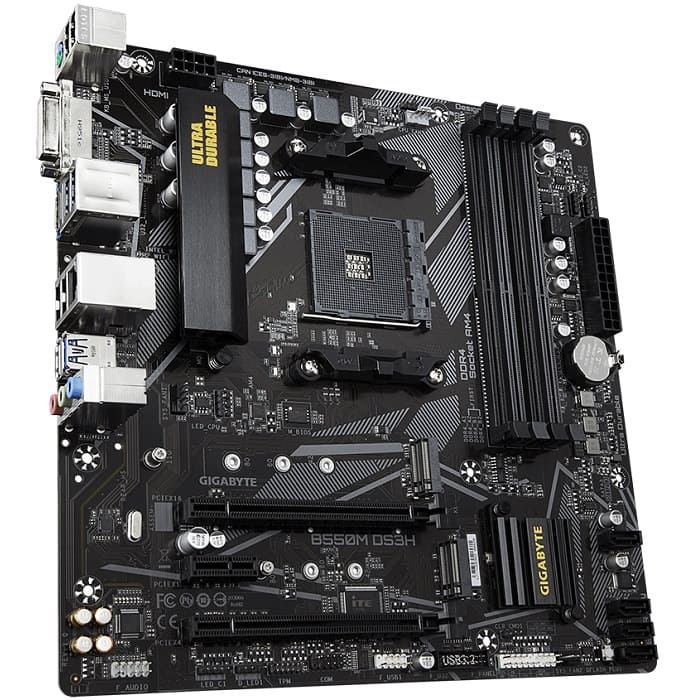
Two boards. Same chipset. Same socket. Same four memory slots.
On a spec sheet, the Gigabyte B550M DS3H and the B550M K look like the same motherboard wearing two different price tags. They are not.
The differences sit exactly where they matter most: power delivery, expansion and the rear panel. Get this choice wrong and you will not notice on day one. You will notice in two years, when you try to upgrade.
This guide settles it properly. Every specification below comes from Gigabyte's own published data. Every claim can be checked. And the verdict at the end is the same one we would give a friend spending their own money.
Key Takeaways
- The DS3H is the better foundation. Stronger VRM, an extra expansion slot, and more storage flexibility.
- The B550M K is the smarter budget buy for a simple Ryzen 5 build — and the better APU board, thanks to DisplayPort.
- Storage and memory are a dead tie. Do not let either board be sold to you on those.
- Check the DS3H revision before buying. Revision 1.7 quietly upgrades the VRM, audio and display outputs.
- Neither board has Wi-Fi. Budget for a card or a cable run if you need wireless.
Quick Verdict
Buy the Gigabyte B550M DS3H for most builds. It is the more complete board.
Its 5+3 phase VRM wears a proper heatsink. It carries an extra PCIe x16 slot running at x4. Its first M.2 slot even accepts longer 22110 drives.
For a gaming PC you plan to keep and upgrade, this is the safer foundation. It is not close.
Buy the Gigabyte B550M K if it is clearly cheaper and your build is simple. It keeps everything a basic build actually uses: four DDR4 slots, dual M.2 storage, a full-speed PCIe 4.0 graphics slot.
For an APU build it is arguably the better board outright. Its DisplayPort 1.4 output beats the DS3H's ageing DVI-D port every day of the week.
The Scorecard
Scores below are derived directly from the manufacturer specifications compared in this guide — phase counts, slot counts, port counts and supported standards. They are a reading aid, not benchmark results.
| Category | B550M DS3H | B550M K | ||
|---|---|---|---|---|
| Power delivery | 8 / 10 | 6 / 10 | ||
| Expansion | 8 / 10 | 5 / 10 | ||
| Display outputs (APU builds) | 6 / 10 | 9 / 10 | ||
| Storage | 9 / 10 | 8 / 10 | ||
| Memory | 9 / 10 | 9 / 10 | ||
| Networking & audio | 7 / 10 | 7 / 10 | ||
| Overall | 8.1 / 10 | 7.0 / 10 | ||
The pattern is consistent. The DS3H wins on the hardware you cannot change later. The K wins on price and on one very specific use case: driving a modern monitor from an APU.
At a Glance: Who Each Board Fits
Gigabyte B550M DS3H
- 5+3 phase pure digital VRM with VRM heatsink
- Three expansion slots, including PCIe x16 (x4)
- HDMI 2.1 + DVI-D display outputs
- First M.2 slot accepts longer 22110 SSDs
- Realtek 8118 gaming GbE LAN

Gigabyte B550M K
- 4+2 phase digital VRM, sized for Ryzen 5-class builds
- Two expansion slots: PCIe 4.0 x16 + PCIe x1
- HDMI 2.1 + DisplayPort 1.4 display outputs
- Dual M.2, both 2280 length
- Usually the cheaper of the two boards
Choose the B550M DS3H if…
You are building with a Ryzen 7. Or you might upgrade to one later.
You want room for a second expansion card one day. A capture card. A storage controller. A sound card.
You are keeping an older DVI monitor in service. Or you simply want the board with more headroom everywhere it counts.
Choose the B550M K if…
Your budget is tight. Your build is a Ryzen 5, or an APU, with a single graphics card or none at all.
You are driving a modern monitor from an APU and want DisplayPort. DVI-D cannot do that job properly.
Or the K is on sale well below the DS3H. At a real discount, its compromises stop mattering for a simple build.
As an Amazon Associate I earn from qualifying purchases at no extra cost to you.
Specifications: The Specs That Actually Matter
Every figure below is taken from Gigabyte's published specifications and manuals, cross-checked against the manufacturer's product data.
Where a board exists in several hardware revisions, the table reflects the widely sold original revision of the DS3H. One revision changes things enough to matter, and it gets its own note under the table.
| Specification | Gigabyte B550M DS3H | Gigabyte B550M K |
|---|---|---|
| Form factor | Micro ATX, 24.4 × 24.4 cm | Micro ATX, 24.4 × 24.4 cm |
| Socket / chipset | AMD AM4 / B550 | AMD AM4 / B550 |
| CPU support | Ryzen 5000, 5000 G, 4000 G, 3000 series | Ryzen 5000, 5000 G, 4000 G, 3000 series |
| VRM design | 5+3 phase pure digital, heatsink fitted | 4+2 phase digital twin |
| Memory | 4 × DDR4 DIMM, up to 128 GB, 4733 MT/s (O.C.), XMP | 4 × DDR4 DIMM, up to 128 GB, 4733 MT/s (O.C.), XMP |
| Graphics outputs (APU) | HDMI 2.1, DVI-D | HDMI 2.1, DisplayPort 1.4 |
| Expansion slots | PCIe 4.0 x16 + PCIe 3.0 x16 (x4) + PCIe 3.0 x1 | PCIe 4.0 x16 + PCIe 3.0 x1 |
| M.2 storage | 2 slots: PCIe 4.0 x4 (2280/22110) + PCIe 3.0 x2 (2280) | 2 slots: PCIe 4.0 x4 (2280) + PCIe 3.0 x2 (2280) |
| SATA | 4 × SATA 6 Gb/s, RAID 0/1/10 | 4 × SATA 6 Gb/s, RAID 0/1/10 |
| LAN | Realtek 8118 GbE (gaming, bandwidth management) | Realtek GbE (RTL8111H) |
| Audio | Realtek ALC887, 7.1 HD | Realtek ALC897, 7.1 HD |
| USB 3.2 Gen 1 (rear) | 4 ports | 4 ports |
| BIOS flashing | Q-Flash Plus (no CPU/RAM/GPU needed) | Q-Flash Plus (no CPU/RAM/GPU needed) |
Revision note: Gigabyte later shipped a B550M DS3H revision 1.7. It upgrades the VRM to 6+2 phases.
It swaps the audio to the ALC1220-VB codec. And it adds DisplayPort alongside HDMI and DVI-D, for up to three displays.
If display outputs or audio are what swing your decision, check the revision printed on the box before you buy. A rev. 1.7 DS3H removes the B550M K's two headline advantages in one move.
The Differences That Actually Matter
1. Power delivery — the difference you cannot upgrade later
The DS3H runs a 5+3 phase pure digital VRM. Look at the board photos: a finned heatsink sits over the CPU power stages.
The B550M K runs a leaner 4+2 phase digital twin design. It is a cost decision, and it shows.
For a Ryzen 5 5600 at stock settings, both boards are comfortably sufficient. You will never feel the difference. Not in games, not in renders, not anywhere.
Move up to a Ryzen 7 5700X or 5800X and the picture changes. That is exactly the upgrade AM4 owners make when prices fall.
The DS3H's extra phases spread the load. The heatsink sheds the heat. Sustained all-core work runs cooler and steadier.
Here is the principle worth remembering: you can replace almost every part around a motherboard. The VRM is the one thing you are stuck with. Buy it right the first time.
2. Cooling and layout — small boards, real consequences
Both boards are micro-ATX, 24.4 × 24.4 cm. Both fit the same cases.
The DS3H's VRM heatsink is the visible difference. It is not decoration. On a board without one, the power stages rely on case airflow alone.
In a well-ventilated case, the K copes fine with its intended processors. In a compact case with poor airflow, the DS3H's heatsink earns its keep.
Fan control is a wash. Both boards run Gigabyte's Smart Fan software with hybrid headers and fan-stop behaviour. Neither will limit a sensible cooling setup.
3. Expansion — three slots against two
Both boards give your graphics card a full PCIe 4.0 x16 slot. With a G-series APU it runs at PCIe 3.0 speeds, as on every B550 board. No difference there.
Below the graphics slot, the boards part company. The DS3H adds a PCIe x16 slot wired at x4, plus an x1 slot.
The K offers only the x1 slot. That is the whole expansion story.
Why does an x4 slot matter? Because that is where serious add-in cards live. A capture card for streaming. A 10-gigabit network card. An extra NVMe adapter. A dedicated sound card.
If your build will only ever hold a graphics card, the K loses nothing. The moment you add one serious expansion card, the DS3H is the only one of the two that can run it at full speed.
4. Display outputs — the APU builder's deciding vote
This is the B550M K's one clear win. It only matters for one type of build: a Ryzen G-series APU with no graphics card.
The K pairs HDMI 2.1 with DisplayPort 1.4. That combination drives modern monitors properly — high resolution, high refresh, no adapters.
The original DS3H pairs HDMI with DVI-D. DVI-D tops out at 1920×1200. It is a legacy port for a legacy monitor.
Planning a 1440p or 4K desktop on integrated graphics? The DS3H's second output cannot help you. The K's can.
Fitting a discrete graphics card instead? Then both boards' onboard outputs sit unused. This entire difference evaporates.
And remember the revision note: a rev. 1.7 DS3H has DisplayPort too. On that revision, this section scores a draw.
5. Storage — a tie, with one small DS3H edge
Storage is where the spec sheets match almost line for line.
Both boards: a CPU-connected PCIe 4.0 x4 M.2 slot for a fast boot drive. A second chipset M.2 at PCIe 3.0 x2. Four SATA ports with RAID 0/1/10.
Real-world result: identical boot drives, identical game libraries, identical upgrade room for most builders.
The DS3H's only edge is physical. Its primary M.2 slot accepts 22110-length drives as well as the standard 2280.
That matters for a small number of enterprise-style SSDs. For the 2280 drives almost everyone buys, it matters not at all.
Call storage a draw. Do not let anyone sell you either board on storage alone.
6. Memory — genuinely identical
Four DDR4 slots. Up to 128 GB. Official overclocking support to 4733 MT/s. XMP profiles on both.
There is nothing to separate them here, and we will not pretend otherwise.
One honest caution applies to both boards equally: headline memory speeds are overclocking figures. What your kit actually runs at depends on your processor's memory controller and your specific modules.
For gaming builds, a quality 3200–3600 MT/s kit is the sensible buy on either board. Spend the saving elsewhere.
7. The small stuff — LAN, audio and lighting
Gigabyte separates the pair in the details. None of these should decide the purchase alone. Together, they confirm the pattern.
The DS3H uses Realtek's 8118 gaming LAN chip, with bandwidth-management software. Useful if your household network is busy while you game.
It also carries the fuller RGB Fusion 2.0 header set — addressable and standard strip headers — which makes a lit build easier to wire neatly.
The K counters with the ALC897 audio codec against the DS3H's ALC887. It is the marginally newer chip.
In practice? Both are honest 7.1 HD implementations with quality capacitors. Through a headset or desktop speakers, you will not reliably hear the difference.
Pattern confirmed: the DS3H is the fuller-featured board. The K is the trimmed one. The trimming was deliberate, and the price reflects it.
CPU Pairing Guide
The fastest way to choose between these boards is to start from your processor. This table is the whole comparison in one view.
| Your processor | B550M DS3H | B550M K | Our call |
|---|---|---|---|
| Ryzen 5 5600 / 5500 | Excellent | Excellent | Buy whichever is cheaper |
| Ryzen 5 5600G / 5700G (APU) | Good — DVI-D limits second monitor | Excellent — DisplayPort 1.4 | B550M K, unless rev. 1.7 DS3H |
| Ryzen 7 5700X / 5800X | Excellent — VRM headroom | Workable at stock, less headroom | B550M DS3H |
| Ryzen 9 5900X / 5950X | Workable — the sensible ceiling | Not recommended | DS3H at minimum; consider a stronger board |
| Ryzen 3000 series | Excellent | Excellent | Buy whichever is cheaper |
Read the Ryzen 9 row carefully. It is the honest limit of this entire price class, and it applies to both boards — the DS3H just reaches it more gracefully.
Ready to check today’s price?
Both boards sell through Amazon. Prices move, so check the live figure on the board that fits your build.
View on Amazon — B550M DS3HView on Amazon — B550M KThe 30-Second Decision
| If this sounds like you… | Buy this |
|---|---|
| “I want one board that handles any AM4 upgrade I might make.” | B550M DS3H |
| “Budget build, Ryzen 5, one graphics card, done.” | B550M K |
| “APU build driving a modern monitor, no graphics card.” | B550M K (DisplayPort) |
| “I stream, capture, or need a second serious add-in card.” | B550M DS3H (x4 slot) |
| “Small case, warm room, Ryzen 7 planned.” | B550M DS3H (VRM heatsink) |
| “Whichever one is on sale this week.” | Legitimate — the gap is small for simple builds |
What You Gain. What You Give Up.
Gigabyte B550M DS3H
You gain: stronger, heatsink-cooled power delivery with Ryzen 7 headroom. A third expansion slot wired at x4. A longer primary M.2 slot. A gaming LAN chip and the fuller lighting-header set.
You give up: DisplayPort on the original revision — DVI-D instead. And usually a few dollars, since the DS3H typically sells above the K. On rev. 1.7 boards, the display compromise disappears.
Gigabyte B550M K
You gain: the lower price for the same platform essentials — four DIMM slots, dual M.2, PCIe 4.0 x16. Plus DisplayPort 1.4 for APU builds, and a slightly newer audio codec.
You give up: VRM headroom for high-end AM4 upgrades. The x4 expansion slot. 22110 M.2 support. Every saving on this board comes out of future flexibility, not day-one performance.
Pros and Cons
B550M DS3H — Pros
- 5+3 phase VRM with a real heatsink
- Extra PCIe x16 (x4) expansion slot
- 22110 M.2 support in the primary slot
- Gaming LAN chip with bandwidth management
- Rev. 1.7 upgrades audio, VRM and displays
Cons
- No DisplayPort on the original revision
- ALC887 audio is a generation older
- Usually the pricier of the two
- No Wi-Fi — same as the K
B550M K — Pros
- Lowest price into the same platform
- DisplayPort 1.4 — the better APU board
- Four DIMM slots and dual M.2, untrimmed
- ALC897 audio codec
- Q-Flash Plus BIOS flashing, no CPU needed
Cons
- 4+2 phase VRM limits upgrade headroom
- Only two expansion slots, no x4
- 2280-only M.2 slots
- No VRM heatsink
- No Wi-Fi
Check the Revision and the Bundle, Not Just the Board
Check the revision. “B550M DS3H” names at least two materially different boards.
The original pairs a 5+3 VRM and ALC887 audio with HDMI + DVI-D. Revision 1.7 upgrades the VRM, the audio and the display outputs.
The revision is printed on the box label and in the corner of the PCB. Check it before the box goes in the recycling.
The B550M K also has revisions. Its core layout — 4+2 VRM, two slots, HDMI + DisplayPort — stays consistent across them.
Check the CPU pairing. Both boards flash with Q-Flash Plus. A board that ships with an older BIOS can be updated for a Ryzen 5000 processor without a spare CPU on hand.
Buy the DS3H if a Ryzen 7 is in the plan at any point. Buy the K for Ryzen 5 and APU builds, and put the saving toward memory or storage, where it will actually be felt.
Check the bundle. At this price, both boxes are spartan. Expect the board, an I/O shield, a pair of SATA cables and documentation.
Neither board includes Wi-Fi. Need wireless? Price in a PCIe Wi-Fi card — another argument for the DS3H's extra slot — or look at the separate DS3H AC variant instead.
The Upgrade Path Test
Judge a budget board by its second year, not its first day.
Year one, both boards run a Ryzen 5 and a mid-range graphics card identically. Nobody could tell them apart in a blind test.
Year two, the upgrade itch arrives. A discounted Ryzen 7. A capture card. A bigger GPU that deserves a faster network card beside it.
The DS3H says yes to all of it. The K says yes to the processor, cautiously, and no to the card.
That is the entire difference between these boards, stated plainly: one was built to be upgraded, the other was built to be enough.
When to Skip Both
Honesty cuts both ways. There are builders neither of these boards serves well.
Skip both if you need Wi-Fi on the board itself — Gigabyte sells AC variants for that. Skip both if you are building around a Ryzen 9 for heavy all-core work; a stronger VRM class exists for a reason.
Skip both if your case is full ATX and you want the board to fill it. And skip both if USB-C front-panel connectivity is non-negotiable in your build.
For everyone else — which is most AM4 builders — one of these two is the right answer. The only question is which future you are buying for.
Final Verdict
The Gigabyte B550M DS3H is the board we would build on.
It wins this comparison not on headline specs. Those are shared. It wins on the two things that decide whether a budget board ages well: power delivery and expansion.
Its heatsink-cooled 5+3 phase VRM leaves the door open to every AM4 processor worth upgrading to. Its extra x4 slot leaves the door open to every add-in card worth fitting.
Buy the DS3H for gaming builds, Ryzen 7 processors, and any PC you intend to upgrade rather than replace.
Buy the B550M K if it is meaningfully cheaper when you order. If your build is a Ryzen 5 or APU system with a single graphics card. Or if DisplayPort for an APU is the feature you actually need.
It is a sensible, honest budget board. Just buy it knowing the savings come from your future options, not from today's frame rates.
Watch Out: Similar Names, Different Boards
AM4 board names are a trap for the hurried buyer. Three warnings belong in every version of this guide.
First: the B550M DS3H, the B550M DS3H AC and the DS3H AC R2 are three different products. Only the AC models include Wi-Fi. A listing that says “DS3H” is the wired board in this comparison.
Second: Gigabyte's B550M K is not the ASUS Prime B550M-K. The names differ by one hyphen and one brand. They are unrelated boards from rival ranges, with different layouts and different specifications.
Third: “B550M DS3H” on its own does not tell you the revision. Two listings with identical titles can ship different VRM and display hardware, as the revision note in this guide explains.
Slow down on the product page. Match the full model name, then the revision, then the price — in that order.
Case, Power and Cabling Notes
Both boards are micro-ATX. They fit micro-ATX and full ATX cases alike, and they leave extra cable room in larger cases.
Both take a standard 24-pin main power connector and an 8-pin EPS CPU power connector. Any reputable modern power supply covers this without adapters.
Front-panel connections are equally painless. Both boards provide a USB 3.2 Gen 1 header for case front ports, plus USB 2.0 headers for the rest.
One DS3H advantage reappears here. Its extra x4 slot sits below the graphics card slot. In a compact case, that is exactly where a Wi-Fi card or capture card wants to live — clear of the GPU's fans on the K, it simply has nowhere equivalent to go.
And one shared limitation: neither board offers a front-panel USB-C header. If your case has a front USB-C port, it will sit unconnected on either board. Know that before you buy the case, not after.
BIOS and Long-Term Support
AM4 is a mature platform. That is a genuine advantage for both of these boards.
The BIOS is stable. The drivers are stable. The surprises have already happened to somebody else, years ago, and been fixed.
Both boards sit on Gigabyte's standard support pages: BIOS updates, chipset and LAN drivers, and a full CPU support list per revision.
Expect future BIOS releases to be about security patches and edge-case compatibility, not new features. On a mature platform, that is exactly what you want.
One habit worth keeping: before any CPU upgrade, check the support list for your board's revision and update the BIOS first. Q-Flash Plus makes that a ten-minute job on either board, even with the new processor still in its box.
Frequently Asked Questions
Is the B550M DS3H better than the B550M K?
For most builders, yes. It has a stronger VRM (5+3 phases with a heatsink against 4+2), an extra PCIe x16 slot running at x4, and support for 22110-length M.2 drives. The K fights back with DisplayPort 1.4 for APU builds and a usually lower price.
Do both boards support Ryzen 5000 processors?
Yes. Both are AM4 B550 boards supporting Ryzen 5000, 5000 G-Series, 4000 G-Series and 3000 series processors. Both offer Q-Flash Plus, so the BIOS can be updated for a newer CPU without an older processor installed. Always confirm your exact CPU on Gigabyte's support list for the board's revision.
Which board is better for a Ryzen 7 5800X?
The B550M DS3H. Its 5+3 phase VRM and fitted heatsink handle sustained all-core loads from 8-core processors more comfortably than the K's 4+2 phase design. The K will run a 5800X at stock settings, but it leaves less thermal and power headroom.
Can I run two M.2 SSDs on either board?
Yes. Both boards have two M.2 slots: a PCIe 4.0 x4 slot connected to the CPU (with a PCIe 4.0-capable processor) and a PCIe 3.0 x2 slot from the chipset, plus four SATA ports. The DS3H's primary slot also accepts longer 22110 drives.
Which board should I choose for an APU build without a graphics card?
The B550M K, unless you find a revision 1.7 DS3H. The K's DisplayPort 1.4 output suits modern monitors far better than the original DS3H's DVI-D, which is limited to 1920×1200. Both boards also provide HDMI 2.1.
Does either board have Wi-Fi?
No. Neither the B550M DS3H nor the B550M K includes a wireless module; both provide wired gigabit Ethernet. Gigabyte sells a separate B550M DS3H AC variant with Wi-Fi, or you can add a PCIe Wi-Fi card.
What is the difference between the DS3H revisions?
Later revisions change real hardware. Revision 1.7 upgrades the VRM to 6+2 phases, moves to the ALC1220-VB audio codec and adds DisplayPort for up to three displays, alongside HDMI and DVI-D. The model name stays the same, so check the revision printed on the box or the corner of the board.
Is the B550M K good for gaming?
Yes, for the builds it was designed for. With a Ryzen 5 and a single graphics card running in its full PCIe 4.0 x16 slot, gaming performance is identical to the DS3H — the graphics card decides frame rates, not the board. The K's limits appear at upgrade time, not in today's games.
Sources & Verification
GIGABYTE B550M DS3H (rev. 1.7) official specifications, gigabyte.com • GIGABYTE B550M DS3H / DS3H AC user manual (rev. 1702) • GIGABYTE B550M K user manual and specifications • Gigabyte retail product data for B550M DS3H (5+3 phase) and B550M K (4+2 phase, ASIN-verified listings). Specifications verified November 2026.