
Gigabyte B550M DS3H vs MSI B550M Pro-VDH WiFi: Which Should You Buy?
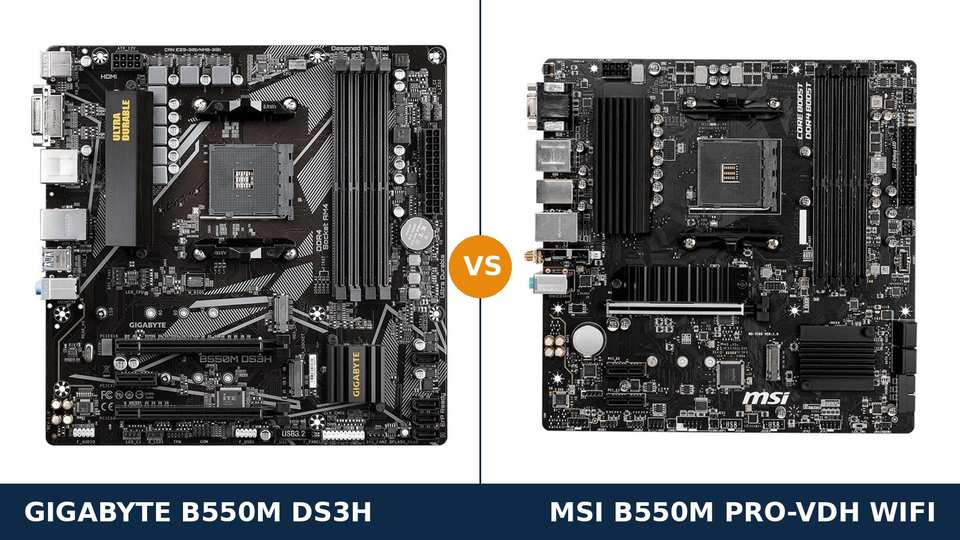
In the budget corner of the B550 catalogue, these two boards sit on the same shelf, within a few dollars of each other, wearing near-identical spec sheets.
Look closer and they were designed from opposite ends. Gigabyte started at the CPU socket and spent its money on power delivery and expansion. MSI started at the rear panel and spent its money on connections — wireless, display outputs, the front of your case.
One clarification before anything else: the search term drops the suffix, but the MSI board in this comparison is the B550M Pro-VDH WiFi, the wireless model. It matters, because wireless is half the story here.
So this is not really a contest between a good board and a lesser one. It is a fork in the road. One path assumes your PC stays wired and grows. The other assumes it has to work wherever in the house it lands.
Every figure below comes from Gigabyte's and MSI's own published specifications. The verdict at the end follows from those figures, and from one question only you can answer: where will this PC live?
Key Takeaways
- Wireless is the dividing line. The Pro-VDH WiFi carries Wi-Fi and Bluetooth on the board. The DS3H has neither — it is ethernet or nothing.
- The DS3H is built to grow. A heatsink-cooled 5+3 phase VRM and a PCIe x16 slot wired at x4 give it the upgrade headroom the MSI lacks.
- The MSI is the easier board to live with. DisplayPort and VGA next to HDMI, a front-panel USB-C header, a quicker second M.2 slot and a heatsink over the main drive.
- Two name traps guard this pairing. A wired-only Pro-VDH exists under almost the same name, and a (CEC) version of the WiFi board upgrades the wireless — check the box, not the search result.
- The DS3H has a revision lottery. Revision 1.7 improves its VRM, audio and display outputs enough to narrow this comparison. The revision is printed on the box.
Quick Verdict
Buy the MSI B550M Pro-VDH WiFi if the PC cannot be cabled to the router. For the majority of home builds, this is the one.
Wireless and Bluetooth work from the first boot. DisplayPort drives a modern monitor from an APU. The case's front USB-C port actually connects to something. It asks the least of its owner.
Buy the Gigabyte B550M DS3H if the build is wired now and wired forever. It is the better board to build a gaming PC on.
A stronger VRM under a proper heatsink. A second full-length slot that can take a capture card at full speed. And a typically lower price, because none of your money went on a radio you will never switch on.
The Scorecard
Scores below are derived directly from the manufacturer specifications compared in this guide — phase counts, slot counts, port counts and supported standards. They are a reading aid, not benchmark results.
| Category | B550M DS3H | B550M Pro-VDH WiFi | ||
|---|---|---|---|---|
| Power delivery | 8 / 10 | 7 / 10 | ||
| Expansion | 8 / 10 | 5 / 10 | ||
| Networking & connectivity | 6 / 10 | 10 / 10 | ||
| Display outputs (APU builds) | 6 / 10 | 9 / 10 | ||
| Storage | 8 / 10 | 9 / 10 | ||
| Memory | 9 / 10 | 8 / 10 | ||
| Overall | 7.5 / 10 | 8.0 / 10 | ||
Read the split, not just the totals. Everything the DS3H wins sits inside the case and pays off at upgrade time. Everything the MSI wins sits on the edges of the board and pays off every single day.
At a Glance: Who Each Board Fits
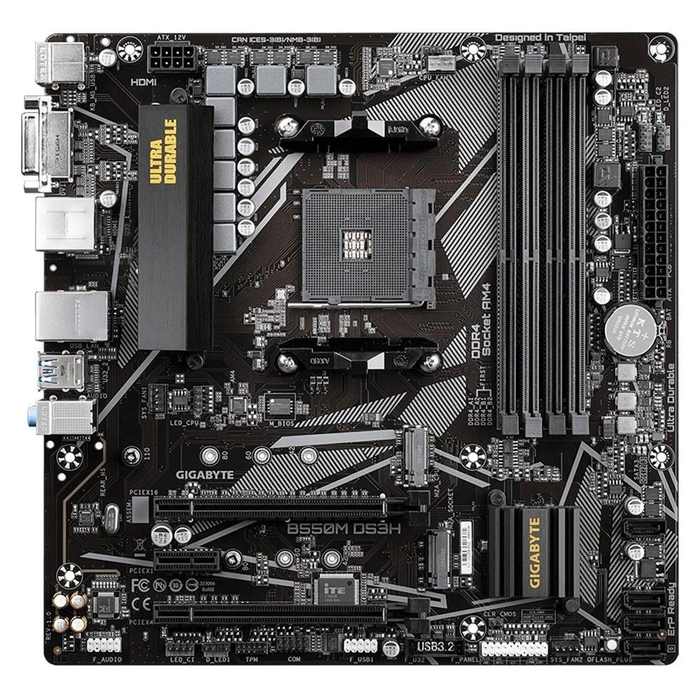
Gigabyte B550M DS3H
- 5+3 phase pure digital VRM with VRM heatsink
- Three expansion slots, including PCIe x16 (x4)
- HDMI 2.1 + DVI-D display outputs
- First M.2 slot accepts longer 22110 SSDs
- No Wi-Fi — Realtek 8118 gaming GbE LAN only
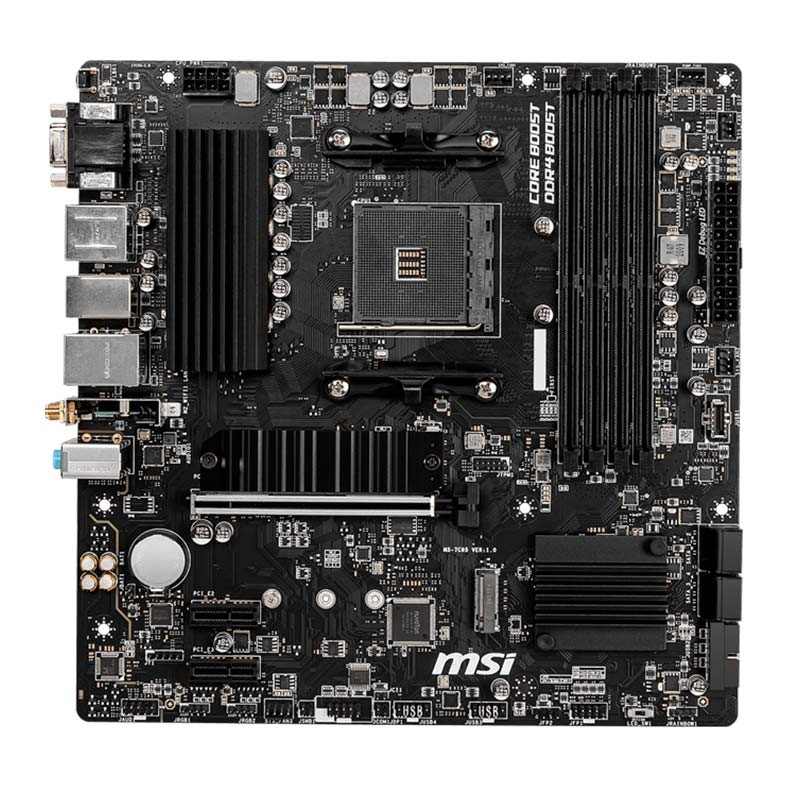
MSI B550M Pro-VDH WiFi
- Wi-Fi 5 (802.11ac) and Bluetooth 4.2 built in
- HDMI + DisplayPort + VGA display outputs
- Front-panel USB-C header for modern cases
- Second M.2 slot at full PCIe 3.0 x4, plus M.2 heatsink
- 4+2+1 phase VRM with heatsink, EZ Debug LED
Choose the B550M DS3H if…
The desk is staying where the ethernet socket is. That decision is already made.
A Ryzen 7 is in the build today, or on the upgrade list for next year. Room for a second serious add-in card matters more than a radio.
Or an older DVI monitor is still in service, and the saving over the MSI goes straight into the graphics card fund.
Choose the MSI B550M Pro-VDH WiFi if…
The desk goes where the room allows, and the router is somewhere else entirely.
Bluetooth is part of daily life — a game controller, wireless headphones, a keyboard with no receiver to lose.
Or this is an APU build, and DisplayPort for a modern monitor plus VGA for the spare one is exactly the combination you need.
As an Amazon Associate I earn from qualifying purchases at no extra cost to you.
Specifications: The Specs That Actually Matter
Nothing in this table comes from a review or a retailer listing. Every line is drawn from the specification pages and manuals Gigabyte and MSI publish themselves.
Variants complicate both boards, so the table is pinned to specific ones: the DS3H in its original, widely sold revision, and the Pro-VDH WiFi in standard form. The notes beneath the table deal with the versions that break the pattern.
| Specification | Gigabyte B550M DS3H | MSI B550M Pro-VDH WiFi |
|---|---|---|
| Form factor | Micro ATX, 24.4 × 24.4 cm | Micro ATX, 24.4 × 24.4 cm |
| Socket / chipset | AMD AM4 / B550 | AMD AM4 / B550 |
| CPU support | Ryzen 5000, 5000 G, 4000 G, 3000 series | Ryzen 5000 & 3000, 4000 G-Series (Ryzen 5 3400G / 3 3200G not supported) |
| VRM design | 5+3 phase pure digital, heatsink fitted | 4+2+1 phase, heatsink on the VCore bank |
| Memory | 4 × DDR4 DIMM, up to 128 GB, 4733 MT/s (O.C.), XMP | 4 × DDR4 DIMM, up to 128 GB, 4400 MT/s (O.C.), A-XMP |
| Wireless | None — wired ethernet only | Intel Wi-Fi 5 (802.11ac), Bluetooth 4.2 |
| Graphics outputs (APU) | HDMI 2.1, DVI-D | HDMI, DisplayPort (4K@60), VGA (D-Sub) |
| Expansion slots | PCIe 4.0 x16 + PCIe 3.0 x16 (x4) + PCIe 3.0 x1 | PCIe 4.0 x16 (Steel Armor) + 2 × PCIe 3.0 x1 |
| M.2 storage | 2 slots: PCIe 4.0 x4 (2280/22110) + PCIe 3.0 x2 (2280) | 2 slots: PCIe 4.0 x4 + SATA (2280) + PCIe 3.0 x4 (2280), M.2 Shield Frozr heatsink |
| SATA | 4 × SATA 6 Gb/s, RAID 0/1/10 | 4 × SATA 6 Gb/s, RAID 0/1/10 |
| LAN | Realtek 8118 GbE (gaming, bandwidth management) | Realtek RTL8111HN GbE |
| Audio | Realtek ALC887, 7.1 HD | Realtek ALC892/ALC897, 7.1 HD with Audio Boost |
| USB 3.2 Gen 1 (rear) | 4 ports, Type-A | 4 ports, Type-A |
| Front-panel USB-C header | None | 1 × USB 3.2 Gen 1 Type-C header |
| BIOS flashing | Q-Flash Plus (no CPU/RAM/GPU needed) | — |
DS3H revision note: A later DS3H revision, numbered 1.7, changes enough to matter. Its VRM grows to 6+2 phases and its audio becomes the ALC1220-VB codec.
DisplayPort also joins the rear panel, giving three display outputs in total. Anyone choosing on audio or APU display support should confirm which revision a listing actually ships — the box carries the number.
MSI variant note: Some regions get a B550M Pro-VDH WiFi (CEC) instead. That build swaps in Intel Wi-Fi 6 with Bluetooth 5.2 and faster rear USB ports.
What is compared here, and what the button on this page leads to, is the standard Wi-Fi 5 board. Identical name, different radio — confirm on the packaging rather than trusting a listing title.
The Differences That Actually Matter
1. Wi-Fi and Bluetooth — the question of where the PC lives
Answer one question honestly and this section may settle the whole comparison: can an ethernet cable reach the desk?
The MSI carries an Intel wireless module fitted at the factory. Dual-band Wi-Fi 5, Bluetooth 4.2 alongside it, two antenna connectors on the rear panel and the antennas themselves in the box. Screw them on, join the network, done.
The DS3H ships with no wireless hardware at all. There is no module, no Bluetooth, nowhere to attach an antenna. Away from a cable, it is offline.
Keep the MSI's radio in perspective. Its Intel AC3168 is a single-stream part with a 433 Mbps ceiling. Broadband, streaming and online play are well within it. A modern Wi-Fi 6 card is faster, and a cable still beats both for competitive latency.
On the DS3H, adding wireless later is possible but never free. A PCIe card costs money and occupies a slot. A USB dongle is the cheaper, weaker compromise.
And a trap to sidestep: Gigabyte sells a DS3H AC that does include Wi-Fi. It is a separate product with a separate listing — not this board with a feature switched on.
2. Display outputs — the MSI covers every monitor era
If a graphics card is going in the build, skip this section. Its outputs replace the board's entirely.
For APU builds, the MSI's rear panel is the most accommodating in the class: HDMI, DisplayPort and VGA. The letters are in the model name — VDH is VGA, DisplayPort, HDMI.
DisplayPort does the heavy lifting. It runs a current 4K monitor at 60 Hz from integrated graphics, which is precisely the job an APU desktop is bought to do. VGA keeps the ancient spare monitor useful as a second screen.
The DS3H in its original form offers HDMI 2.1 and DVI-D. That second port is capped at 1920×1200 — fine for the monitor it was designed for, a poor match for anything recent.
So for graphics-free builds the MSI spans three generations of display at once. The DS3H spans the middle one.
The standing exception applies here too: a revision 1.7 DS3H gains DisplayPort and erases most of this deficit. Confirm the revision before you let display outputs make the decision.
3. Power delivery — where the DS3H spends its money
Turn both boards over in the product photos and the spending priorities are visible. The DS3H's finned VRM heatsink is the biggest piece of aluminium on either board, sitting over a 5+3 phase pure digital design.
The MSI's arrangement is a step simpler: a 4+2+1 phase layout with a heatsink covering the main VCore bank. Competent, unpretentious, and sized for the processors this price class usually hosts.
Under a Ryzen 5 5600 the two are indistinguishable. Games, renders, compile jobs — neither board is the limiting factor, and neither ever will be at that level.
The gap opens with eight cores. A Ryzen 7 5700X or 5800X on sustained all-core work draws harder for longer, and the DS3H's extra phases and larger heatsink hold temperatures and clocks steadier.
Fairness demands a footnote for the MSI: launch testing pushed its modest VRM harder than the phase count implies, and it coped. At stock settings, Ryzen 7 is workable on either board.
But headroom is the thing you cannot retrofit. Of every component in a build, the VRM is the one married to the board — and the DS3H's is simply the stronger of the two.
4. Expansion — a wider door on the Gigabyte, and one irony
The graphics card is equally served on both: a full PCIe 4.0 x16 slot apiece, steel-reinforced on the MSI. With a G-series APU fitted, both drop to PCIe 3.0 operation, as every B550 board does.
Underneath, the layouts diverge. The DS3H adds a physical x16 slot wired for x4, plus an x1. The MSI stops at two x1 slots.
Bandwidth is what makes the x4 slot matter. Capture cards, 10-gigabit network adapters and NVMe carrier cards are built for four lanes. On the MSI they either run throttled or do not run at all.
Now the irony that keeps this section honest. In practice, the card DS3H owners most often install in that spare slot is a Wi-Fi adapter — hardware the MSI already carries.
So weigh it by your actual plans. A wired build with real expansion ambitions belongs on the DS3H. A build whose only expansion plan was ever wireless has had that plan pre-installed by MSI.
5. Storage — level at the top, split underneath
On the headline numbers the boards match: two M.2 slots each, four SATA ports each, RAID 0/1/10 on both.
The primary slot is a genuine tie. Both take a PCIe 4.0 x4 drive directly from the processor, so boot drives and load times are identical.
The second slot breaks the tie in MSI's favour. It is wired at PCIe 3.0 x4, while the DS3H's second slot runs at x2 — half the ceiling for a second NVMe drive.
MSI adds two refinements on top. Its Shield Frozr heatsink covers the primary slot, so a Gen4 drive under long writes stays cooler and throttles later. And that slot also accepts SATA M.2 drives, which the DS3H's refuses — a niche point, until an old SATA M.2 drive lands in your parts drawer.
The DS3H's reply is physical length. Its primary slot takes 22110 drives as well as the standard 2280. That serves a small pool of enterprise SSDs and almost nobody else, but it is a real checkbox the MSI cannot tick.
6. USB and the front panel — even at the back, decided at the front
Rear USB is a stand-off. Each board offers four USB 3.2 Gen 1 Type-A ports on the back panel, padded out with USB 2.0.
The front panel is not a stand-off. MSI provides an internal USB 3.2 Gen 1 Type-C header. Gigabyte provides no such header on this board.
That single header determines whether the USB-C socket on a current case is a working port or a blank hole in the front panel. Most new cases ship with that socket as standard.
It reads like a footnote in a spec table. In daily use it is the difference between charging a phone from the front of the PC and fishing around the back of it.
Neither standard variant offers Gen 2 speed at the rear, so if 10 Gbps back-panel USB is a requirement, this entire pairing is the wrong place to look.
7. The small stuff — memory numbers, audio, and the LED that saves an evening
Memory first. Four DDR4 slots and a 128 GB ceiling on both boards. Gigabyte quotes the higher overclocking figure — 4733 MT/s against MSI's 4400 MT/s.
Treat that as a paper advantage. Real memory speed is governed by the processor's controller and the kit you buy, and a good 3200–3600 MT/s set remains the right purchase on either board.
Audio tilts toward MSI. Its ALC892/ALC897 codec with Audio Boost is a generation on from the DS3H's ALC887. Both deliver honest 7.1 sound; through ordinary headsets and speakers the practical gap is small.
Wired networking is a draw in everything but garnish. Realtek gigabit silicon under both heatsinks — the DS3H's 8118 adds bandwidth-management software, the MSI's RTL8111HN does without. Same wire speed either way.
Where the MSI quietly earns its keep is failure. Its EZ Debug LED walks through CPU, memory, VGA and boot in sequence and stops at the culprit, converting a silent no-boot into a named suspect.
The DS3H answers with the fuller RGB header set for a lit build, and Q-Flash Plus in the table above. Different small mercies — MSI's shows up on your worst day, Gigabyte's on your best.
CPU Pairing Guide
The fastest way to choose between these boards is to start from your processor. This table is the whole comparison in one view.
| Your processor | B550M DS3H | B550M Pro-VDH WiFi | Our call |
|---|---|---|---|
| Ryzen 5 5600 / 5500 | Excellent | Excellent | Either — MSI if you need Wi-Fi |
| Ryzen 5 5600G / 5700G (APU) | Good — DVI-D limits second monitor | Excellent — DisplayPort, VGA and Wi-Fi | B550M Pro-VDH WiFi |
| Ryzen 7 5700X / 5800X | Excellent — VRM headroom | Good at stock, less headroom | B550M DS3H, if wired |
| Ryzen 9 5900X / 5950X | Workable — the sensible ceiling | Not recommended | DS3H at minimum; consider a stronger board |
| Ryzen 5 3400G / 3 3200G (older APU) | Check Gigabyte's CPU list for your revision | Not supported — MSI states this explicitly | Verify before buying either |
Do not skim the final row. MSI's specification names the two oldest G-series APUs as unsupported, in writing. It is exactly the sort of line that gets discovered with the side panel already off.
The 30-Second Decision
| If this sounds like you… | Buy this |
|---|---|
| “The PC goes in a bedroom. There is no ethernet socket.” | MSI B550M Pro-VDH WiFi |
| “Wired gaming build, and I want upgrade headroom.” | Gigabyte B550M DS3H |
| “APU build driving a modern monitor, no graphics card.” | MSI B550M Pro-VDH WiFi (DisplayPort) |
| “I stream, capture, or need a second serious add-in card.” | Gigabyte B550M DS3H (x4 slot) |
| “My case has a front USB-C port I intend to use.” | MSI B550M Pro-VDH WiFi |
| “Bluetooth controller and headphones, no dongles.” | MSI B550M Pro-VDH WiFi |
Ready to check today’s price?
Both boards sell through Amazon. Prices move, so check the live figure on the board that fits your build.
View on Amazon — B550M DS3HView on Amazon — B550M Pro-VDH WiFiWhat You Gain. What You Give Up.
Gigabyte B550M DS3H
You gain: the more capable power section, heatsink and all, ready for a Ryzen 7 step-up. A third slot with x4 wiring for hardware the MSI cannot host properly. The higher official memory ceiling, and Q-Flash Plus updates with the board completely bare.
You give up: wireless in its entirety — no Wi-Fi, no Bluetooth, no antenna posts on the panel. DisplayPort on the original revision, a front USB-C header, an M.2 heatsink. Should wireless ever become necessary, you will purchase it back with cash and one of those slots.
MSI B550M Pro-VDH WiFi
You gain: a PC that connects to the network and your Bluetooth gear the moment it first boots. Three display outputs spanning three eras of monitor. A live front USB-C port. A second M.2 slot at full width, a heatsink on the first, and diagnostic LEDs for the day something refuses to start.
You give up: any slot wider than x1 below the graphics card. A measure of power-delivery headroom against the Gigabyte. And the budget crown — the wireless hardware is priced into the board whether it gets used or not.
Pros and Cons
B550M DS3H — Pros
- 5+3 phase VRM with a real heatsink
- Extra PCIe x16 (x4) expansion slot
- 22110 M.2 support in the primary slot
- Q-Flash Plus — BIOS flashing with no CPU fitted
- Rev. 1.7 upgrades audio, VRM and displays
Cons
- No Wi-Fi or Bluetooth at all
- No DisplayPort or front USB-C header (original revision)
- Second M.2 slot runs at only PCIe 3.0 x2
- No M.2 heatsink
- ALC887 audio is a generation older
B550M Pro-VDH WiFi — Pros
- Wi-Fi 5 and Bluetooth 4.2 built in
- HDMI, DisplayPort and VGA — every monitor era covered
- Front-panel USB-C header
- Second M.2 at full PCIe 3.0 x4, Shield Frozr heatsink
- EZ Debug LED for painless troubleshooting
Cons
- Wi-Fi is 1×1 Wi-Fi 5 (433 Mbps) — adequate, not fast
- No x4-capable expansion slot
- 4+2+1 VRM leaves less Ryzen 7/9 headroom
- Ryzen 5 3400G / 3 3200G not supported
- Usually costs more than the DS3H
Check the Name, the Variant and the Revision, Not Just the Board
Check the exact name. This pairing sits in the most lookalike-heavy corner of the B550 range, and three confusions account for most wrong orders.
Confusion one: DS3H or DS3H AC? They are separate products, and only the AC carries wireless. A listing titled plain “DS3H” means the wired board compared on this page.
Confusion two: Pro-VDH or Pro-VDH WiFi? MSI sells both, a single word apart, and the plain model has no wireless hardware whatsoever.
Confusion three: standard WiFi or the (CEC) build? The (CEC) steps the radio up to Wi-Fi 6 with Bluetooth 5.2. If wireless speed is a genuine priority it is worth tracking down — but confirm it on the carton, since marketplace listings routinely merge the two.
Check the DS3H revision. The launch board combines the 5+3 VRM and ALC887 audio with HDMI and DVI-D only. Revision 1.7 improves all three of those areas at once. Look for the number on the carton label or the PCB corner.
Check the CPU before the board. The Ryzen 5000 families run on both boards once the BIOS is current, and both makers host the updates on their support sites. The exception sits with MSI: its published specification refuses the Ryzen 5 3400G and Ryzen 3 3200G entirely.
Check the bundle. Two Wi-Fi antennas belong in the MSI's carton. A second-hand or open-box example missing them has lost half of what you are paying for. Beyond that, expect the standard kit in either box: I/O shield, a pair of SATA leads, M.2 screws and paperwork.
Check the case. Micro-ATX dimensions, a 24-pin main power connector and an 8-pin EPS connector are common to both, so any case built for the format accepts either. Just remember that a front-panel USB-C socket only becomes a working port on the MSI.
The Upgrade Path Test
A budget motherboard reveals itself in its second year. The first year tells you almost nothing.
In year one these two are effectively interchangeable: a Ryzen 5, one graphics card, games and work running exactly as expected on either.
Year two pulls them apart — along two different axes. The DS3H's story unfolds inside the case: a discounted Ryzen 7 dropped onto its stronger VRM, a capture card settled into the x4 slot.
The MSI's story unfolds outside it. Houses get rearranged. Desks migrate to rooms without network sockets. Routers end up two floors away. The board with the radio simply carries on.
Both futures are ordinary. Builders arrive at each of them constantly.
Put plainly: the DS3H wagers that you will upgrade this PC. The MSI wagers that you will relocate it. Back the wager that sounds like your life.
When to Skip Both
Neither board is the answer for every builder, and pretending otherwise would waste your money.
Skip both if wireless speed is the priority. Wi-Fi 6 or better is the current standard for a reason; the MSI's Wi-Fi 5 radio is a convenience feature and the DS3H offers nothing at all. Look at Wi-Fi 6 class B550 boards — or MSI's own (CEC) variant of this very board.
Skip both for a Ryzen 9 build doing heavy all-core work. Boards with genuinely stronger power sections exist for that job, and neither of these is one of them.
Skip both if 10 Gbps rear USB is a hard requirement, or if a full ATX case deserves a full ATX board inside it.
Outside those cases — which is where most AM4 builders live — the answer is one of these two. What remains is deciding whether your future upgrades happen inside the case or outside it.
BIOS and Long-Term Support
AM4's age, usually counted against it, works for both boards here. Maturity means stability.
The BIOS code on each has been through years of refinement. The driver packages are settled. Every nasty surprise this platform had in it has already surfaced, been reported and been patched.
Support runs through each manufacturer's usual channels: BIOS downloads, chipset and network drivers, and a per-model CPU support list that accounts for revisions.
What arrives from here on will be security fixes and compatibility edge cases rather than features. For a platform at this stage, that is the correct diet.
Keep one routine regardless of board: ahead of any processor swap, open the maker's CPU list, confirm your chip, and update the BIOS before the old CPU comes out. On the DS3H, Q-Flash Plus even allows the update with no processor installed at all.
Final Verdict
For most builders, the MSI B550M Pro-VDH WiFi is the right purchase.
It does not win the engineer's duel. On power delivery and expansion it concedes both rounds to the Gigabyte, and this page has not hidden that.
It wins the owner's year instead. A motherboard exists to connect things, and the MSI connects the network downstairs, the Bluetooth controller, the new monitor and the front of the case without asking you to buy anything else. A wired-only board that later needs a card, a slot and a Saturday afternoon to reach the internet is not the bargain it first appeared.
Buy the MSI when the build is a household PC, a family machine or an APU system — anywhere the router is out of cable range, or Bluetooth peripherals are part of the plan.
View on Amazon — B550M Pro-VDH WiFi
Buy the DS3H when the machine is a gaming PC with a fixed address: a Ryzen 7 on the horizon, a capture card in the roadmap, and wiring already in place.
On pure hardware it is the better board, and usually the cheaper one — provided the ethernet cable can get to it.
Frequently Asked Questions
Which of these two boards is better overall?
It depends on the build's circumstances more than its components. The MSI is the more complete board as delivered — wireless, Bluetooth, DisplayPort, a front USB-C header and a faster second M.2 slot. The DS3H is the stronger foundation — a heatsink-cooled 5+3 phase VRM against 4+2+1, plus the only x4 expansion slot here — and it generally sells for less. Most home builders land on the MSI; wired upgraders should not.
Does the Gigabyte B550M DS3H include Wi-Fi?
No. The plain B550M DS3H is a wired board: Realtek gigabit ethernet is its only networking. Gigabyte markets a separate B550M DS3H AC model with wireless on board — a different product and listing. On the plain board, going wireless later means a PCIe adapter card or a USB dongle.
Is the MSI's built-in Wi-Fi good enough for gaming?
For most homes, yes. The standard board's Intel Wi-Fi 5 module is rated up to 433 Mbps with Bluetooth 4.2, which comfortably handles broadband speeds, streaming and online play. Serious competitive players will still prefer a cable for latency, and the separate (CEC) variant of this board steps up to Wi-Fi 6 with Bluetooth 5.2 — confirm which version is in the box before ordering.
Which board handles a Ryzen 7 5800X better?
The DS3H. Its 5+3 phase VRM and larger heatsink keep sustained all-core loads cooler and steadier. The MSI runs a 5800X at stock settings without drama — its power section tested respectably at launch — but it carries less margin for hot rooms, long renders and future steps up the stack.
Which board suits an APU build with no graphics card?
The MSI, clearly. DisplayPort runs a modern 4K display at 60 Hz from integrated graphics, VGA is there for a legacy second screen, and the built-in wireless suits the put-it-anywhere builds APUs are usually bought for. The original DS3H's secondary output is DVI-D, which stops at 1920×1200.
Can both boards run two NVMe SSDs?
Yes — each has two M.2 slots alongside its four SATA ports. The difference is wiring: the MSI's second slot runs at PCIe 3.0 x4, the DS3H's at PCIe 3.0 x2, so a second NVMe drive has up to twice the bandwidth ceiling on the MSI. In the DS3H's favour, its main slot also fits longer 22110 drives, while the MSI's main slot wears a heatsink and also accepts SATA M.2 drives.
Will the MSI board work with a Ryzen 5 3400G?
No. MSI's own specification excludes the Ryzen 5 3400G and Ryzen 3 3200G from this board's support list. Ryzen 5000 and 3000 series desktop chips and the Ryzen 4000 G-Series are supported. Owners of the older APUs should check both manufacturers' CPU lists carefully before spending anything.
Which board is the better value?
Follow the wireless question. If you will never need Wi-Fi, the DS3H is the value pick: the stronger board, typically for less money. If you do need wireless, the arithmetic flips — a decent adapter card for the DS3H costs money and consumes an expansion slot, which erases most or all of its price advantage and one of its hardware advantages with it.
Sources & Verification
GIGABYTE B550M DS3H (rev. 1.7) official specifications, gigabyte.com • GIGABYTE B550M DS3H / DS3H AC user manual (rev. 1702) • MSI B550M PRO-VDH WIFI official specifications and datasheet, msi.com • MSI B550M PRO-VDH / PRO-VDH WIFI user manual (MS-7C95) • Manufacturer retail product data behind the ASIN-verified listings for both boards. MSI publishes no VRM phase count for the Pro-VDH WiFi; the 4+2+1 figure used here comes from independent teardowns of the retail board. Specifications verified November 2026.

James Wilson
James has been building and benchmarking PCs for over a decade and writes Honestly Compared's motherboard and component guides. His rule for every comparison: the verdict has to survive the spec sheet, not the marketing page.