
Gigabyte X570 AORUS Elite vs Gigabyte X570 AORUS Ultra: Which Should You Buy?
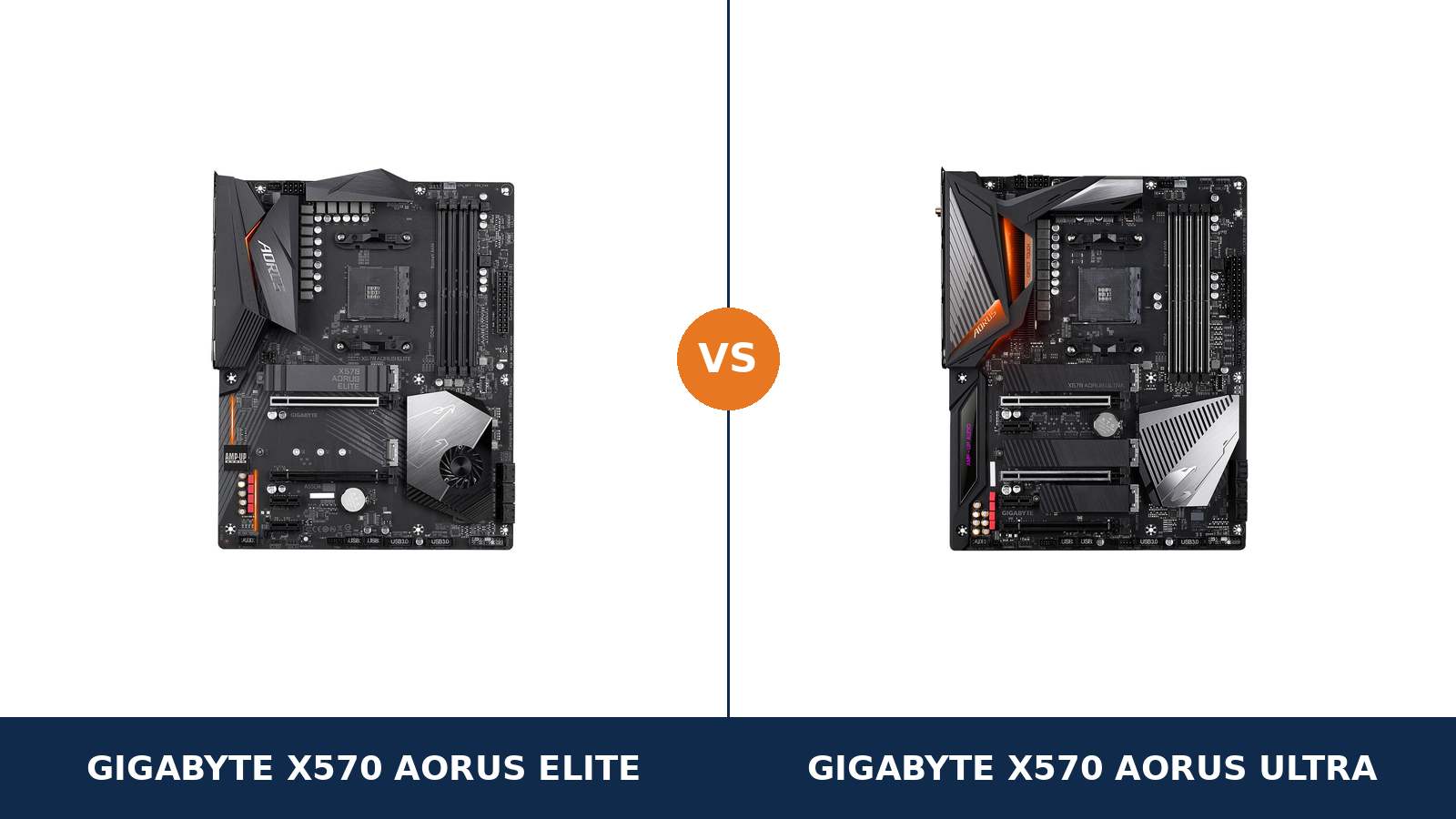
Same chipset. Same socket. Same form factor. Even the same headline VRM: 12+2 phases on both spec sheets.
That is exactly what makes this pair confusing. The Gigabyte X570 AORUS Elite and X570 AORUS Ultra look like one board sold at two prices, with Wi-Fi as the only real difference.
They are not. Read past the headlines and the Ultra pulls ahead almost everywhere: power-stage components, VRM cooling, a third M.2 slot, a better audio codec, DualBIOS and a rear USB-C port the Elite never got.
The Elite still has a case to make. It keeps the platform essentials — full PCIe 4.0, two full-speed M.2 slots, a front USB-C header — and it usually costs less. This guide settles where the Ultra's premium is real, and where the Elite gives up nothing that matters.
Key Takeaways
- The Ultra is the better board, outright. It wins on VRM components and cooling, wireless, storage, audio, USB and BIOS backup.
- Same 12+2 headline, different hardware. The Ultra uses PowIRstage power stages with a finned heatsink and heatpipe; the Elite uses DrMOS under a simpler enlarged heatsink.
- Only the Ultra has Wi-Fi. It carries Wi-Fi 6 and Bluetooth 5.0. The Elite has no wireless at all — and the similarly named Elite WiFi is a different, older-wireless board.
- Storage splits three against two. The Ultra fits three M.2 drives, each under a heatsink. The Elite fits two — but both of its slots run at full PCIe 4.0 x4 speed.
- The Elite is the value play. If you run Ethernet, two NVMe drives or fewer, and no multi-GPU plans, it keeps everything you will actually use.
Quick Verdict
Buy the Gigabyte X570 AORUS Ultra for most builds. It is the more complete board by a clear margin.
Its power stages are a class above, cooled by a finned heatsink with a direct-touch heatpipe. It adds Wi-Fi 6, a third M.2 slot, the ALC1220-VB audio codec and DualBIOS. Nothing on the Elite's spec sheet answers any of that.
Buy the Gigabyte X570 AORUS Elite if the price gap is wide and your build is wired and simple. One graphics card, Ethernet networking, two NVMe drives or fewer.
In that build, the Elite's compromises never surface. It runs the same processors, memory and graphics cards — you are paying less for features you were never going to use.
The Scorecard
Scores below are derived directly from the manufacturer specifications compared in this guide — phase components, slot counts, port counts and supported standards. They are a reading aid, not benchmark results.
| Category | X570 AORUS Elite | X570 AORUS Ultra | ||
|---|---|---|---|---|
| Power delivery | 8 / 10 | 9 / 10 | ||
| Memory | 8 / 10 | 9 / 10 | ||
| Storage | 8 / 10 | 10 / 10 | ||
| Expansion | 6 / 10 | 9 / 10 | ||
| Networking & audio | 6 / 10 | 9 / 10 | ||
| USB & rear panel | 7 / 10 | 9 / 10 | ||
| Overall | 7.2 / 10 | 9.2 / 10 | ||
Unlike many same-brand matchups, this one is not close on paper. The honest question is narrower: does your build use any of the things the Ultra adds?
At a Glance: Who Each Board Fits
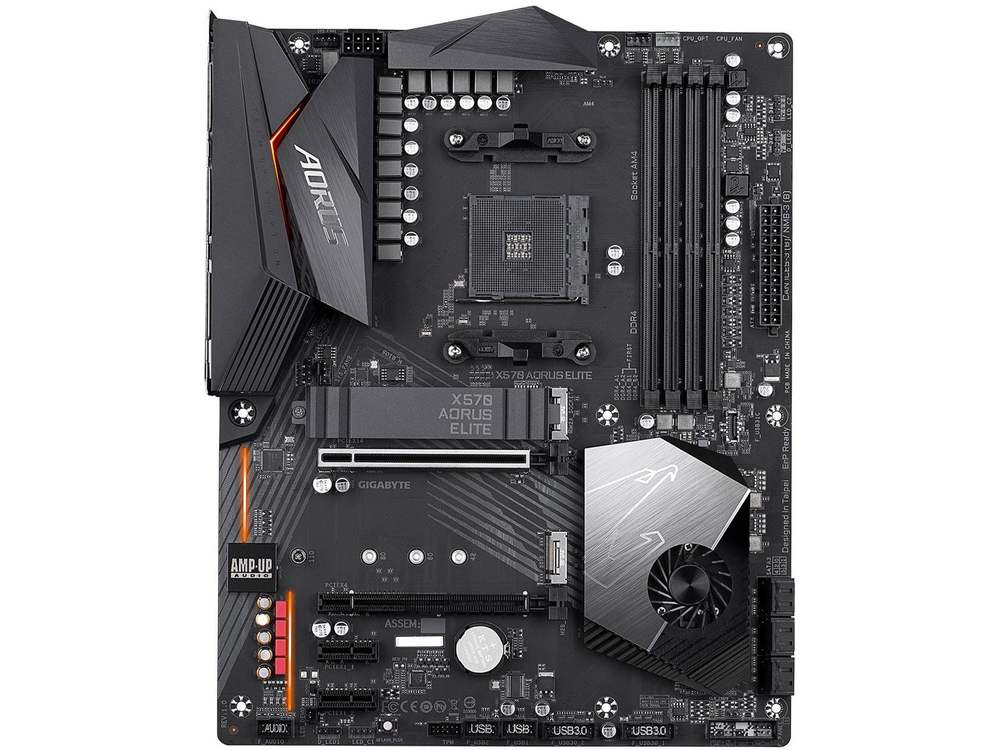
Gigabyte X570 AORUS Elite
- 12+2 phase digital VRM with DrMOS, enlarged heatsink
- Dual M.2, both PCIe 4.0 x4, up to 22110 length
- Intel gigabit Ethernet — wired networking only
- Realtek ALC1200 audio with S/PDIF output
- Front USB-C header, Q-Flash Plus BIOS flashing
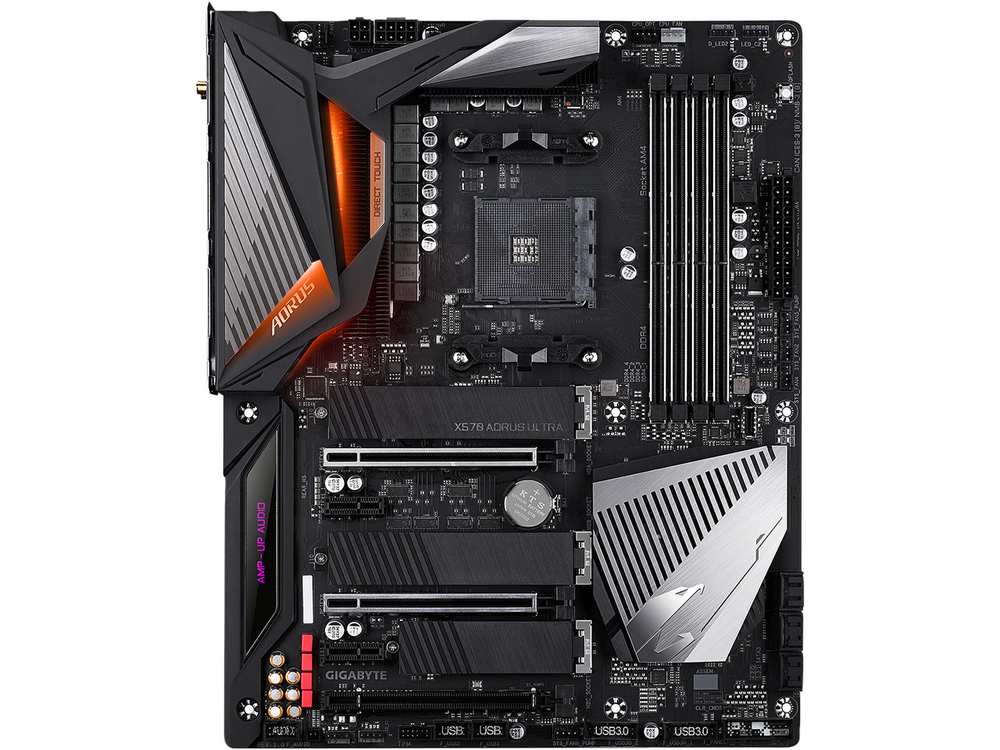
Gigabyte X570 AORUS Ultra
- 12+2 phase IR digital VRM, PowIRstage, finned heatsink with heatpipe
- Wi-Fi 6, Bluetooth 5.0 and Intel gigabit Ethernet
- Triple M.2, every slot under a Thermal Guard heatsink
- Realtek ALC1220-VB audio, 114 dB rear SNR
- Rear USB-C (Gen 2), DualBIOS, integrated I/O shield
Choose the X570 AORUS Elite if…
Your PC sits near the router, or you prefer a cable on principle. Wired gigabit is all this board offers, and for a fixed desk setup it is all most people need.
Your storage plan is one fast boot drive and maybe one more. Two full-speed M.2 slots cover that completely.
Or the Ultra's premium has grown too large to justify. These are discontinued boards, prices drift, and at some gap the Elite becomes the only sensible buy.
Choose the X570 AORUS Ultra if…
You need Wi-Fi, or you might. It is built in here, at Wi-Fi 6 speed, with Bluetooth 5.0 for headsets and controllers.
You run — or plan — a Ryzen 9, a third NVMe drive, a second graphics card, or a case full of fans and pumps. The Ultra was specified for exactly that build.
As an Amazon Associate I earn from qualifying purchases at no extra cost to you.
Specifications: The Specs That Actually Matter
Every figure below is taken from Gigabyte's published specifications for the X570 AORUS Elite (rev. 1.0) and the X570 AORUS Ultra (rev. 1.1/1.2), cross-checked against the boards' manuals.
One Ultra revision differs on a single figure that matters — its memory ceiling. That gets its own note directly under the table.
| Specification | Gigabyte X570 AORUS Elite | Gigabyte X570 AORUS Ultra |
|---|---|---|
| Form factor | ATX, 30.5 × 24.4 cm | ATX, 30.5 × 24.4 cm |
| Socket / chipset | AMD AM4 / X570 | AMD AM4 / X570 |
| CPU support | Ryzen 5000, 3000 series and G-series APUs (BIOS dependent) | Ryzen 5000, 3000 series and G-series APUs (BIOS dependent) |
| VRM design | 12+2 phase digital, DrMOS, enlarged heatsink | 12+2 phase IR digital, PowIRstage, Fins-Array heatsink with Direct Touch heatpipe, 6-layer 2oz copper PCB |
| CPU power connector | 8-pin EPS + 24-pin | 8-pin + 4-pin EPS + 24-pin |
| Memory | 4 × DDR4 DIMM, up to 128 GB, 4733 MT/s (O.C.), XMP, ECC support | 4 × DDR4 DIMM, up to 128 GB, 5400 MT/s (O.C.) on rev. 1.1/1.2, XMP, ECC support |
| Graphics outputs (APU) | HDMI 2.0 | HDMI 2.0 |
| Expansion slots | PCIe 4.0 x16 + PCIe 4.0 x16 slot (x4, chipset) + 2 × PCIe x1; CrossFire only | PCIe 4.0 x16 + PCIe 4.0 x8 (CPU, shared) + PCIe 4.0 x16 slot (x4, chipset) + 2 × PCIe x1; SLI + CrossFire |
| M.2 storage | 2 slots, both PCIe 4.0 x4 + SATA, up to 22110; single Thermal Guard heatsink | 3 slots: 2 × PCIe 4.0 x4 + SATA (up to 22110) + 1 × PCIe 4.0 x2 (2280); Thermal Guards on all three |
| SATA | 6 × SATA 6 Gb/s, RAID 0/1/10 | 6 × SATA 6 Gb/s, RAID 0/1/10 |
| Networking | Intel GbE LAN | Intel GbE LAN + Intel Wi-Fi 6 802.11ax (up to 2.4 Gbps) + Bluetooth 5.0 |
| Audio | Realtek ALC1200, 7.1 HD, S/PDIF out | Realtek ALC1220-VB, 7.1 HD, 114 dB rear SNR, WIMA and Nichicon Fine Gold capacitors, DSD support |
| USB (rear panel) | 4 × USB 2.0, 4 × USB 3.2 Gen 1, 2 × USB 3.2 Gen 2 Type-A | 4 × USB 2.0, 3 × USB 3.2 Gen 1, 3 × USB 3.2 Gen 2 Type-A, 1 × USB 3.2 Gen 2 Type-C |
| USB (front headers) | USB-C Gen 2 header, 2 × USB 3.2 Gen 1 headers, 2 × USB 2.0 headers | USB-C Gen 2 header, 2 × USB 3.2 Gen 1 headers, 2 × USB 2.0 headers |
| Fan / pump headers | 4 (CPU, CPU water cooling, 2 system) | 7 (CPU, CPU water cooling, 3 system, 2 system fan/pump) + 2 temperature sensor headers |
| BIOS | Single 128 Mbit flash, Q-Flash Plus | DualBIOS (2 × 128 Mbit), Q-Flash Plus |
| I/O shield | Separate shield, fitted at build time | Integrated into the rear panel |
Revision note — Ultra memory ceiling: the figures above follow the current Ultra specification (rev. 1.1/1.2), which rates memory to DDR4 5400 (O.C.). The original rev. 1.0 Ultra's own spec page tops out at DDR4 4400 (O.C.).
In practice the gap is academic — very few AM4 processors will run DDR4 anywhere near either ceiling. But if headline memory support is part of your decision, check the revision printed on the box and the PCB corner.
Variant warning: the X570 AORUS Elite WiFi is a separate product with older 802.11ac wireless and Bluetooth 4.2. The fanless X570S AORUS Elite is a different board again. Neither is the Elite compared here.
The Differences That Actually Matter
1. Power delivery — same phase count, different class of hardware
This is the comparison in miniature. Both boards advertise a 12+2 phase digital VRM. The number matches. The hardware behind it does not.
The Elite drives its phases with DrMOS stages under an enlarged heatsink, fed by a single 8-pin EPS connector. It is an honest design that Gigabyte fitted to a long list of X570 boards, and it handles Ryzen 5 and Ryzen 7 processors without drama.
The Ultra drives its phases with PowIRstage stages, which Gigabyte rates at up to 40 amps per phase — a claimed 480 amps of total CPU power capacity. Its VRM wears a Fins-Array heatsink — real stacked fins, not a decorative block — with a Direct Touch heatpipe pulling heat across it, all on a 6-layer PCB with 2oz copper. An additional 4-pin EPS connector sits beside the 8-pin for extreme loads.
For a Ryzen 5 5600 or Ryzen 7 5800X at stock settings, both boards are comfortably sufficient. You will not feel this difference in a game.
For a Ryzen 9 5900X or 5950X running long all-core workloads — renders, compiles, encoding — the Ultra's component class and cooling are the safer long-term bet. Power delivery is the one part of a motherboard you can never upgrade. The Ultra simply bought more of it.
2. Wireless — present and current on the Ultra, absent on the Elite
The Ultra carries Intel Wi-Fi 6 (802.11ax), rated by Gigabyte at up to 2.4 Gbps with 160 MHz channels, plus Bluetooth 5.0. Two SMA antenna connectors sit on the rear panel, and the antennas are in the box.
The Elite has no wireless hardware at all. Intel gigabit Ethernet is its only network connection.
If your desk is wired, this section is a genuine tie — both boards run the same class of Intel gigabit LAN, and a cable beats any Wi-Fi for latency and consistency.
If it is not wired, the Ultra saves you a PCIe Wi-Fi card and a free slot. Bluetooth 5.0 also quietly covers wireless headsets, controllers and peripherals without a dongle.
One trap to avoid: the X570 AORUS Elite WiFi is a different board, and its wireless is older 802.11ac with Bluetooth 4.2 — slower than the Ultra's Wi-Fi 6 on both counts. Do not let a listing blur the two.
3. Storage — three M.2 slots against two, and heatsinks to match
Start with what is equal, because it matters: the first two M.2 slots are the same on both boards. Each connects at PCIe 4.0 x4 with SATA mode support, and each accepts drives up to 22110 length.
Your boot drive and your game library run at identical speed on either board. Nobody's loading screens will reveal which one you bought.
The Ultra then adds a third M.2 slot. It runs at PCIe 4.0 x2, accepts 2280 drives, and drops the SATA mode — a secondary slot for capacity, not for a flagship drive.
Cooling splits them too. The Ultra puts a Thermal Guard heatsink over all three slots. The Elite covers one of its two — Gigabyte's own description is dual M.2 with a single Thermal Guard.
Under sustained writes, a heatsink is the difference between full speed and thermal throttling on a hot Gen 4 drive. The Elite's one uncovered slot is a real, if narrow, compromise.
SATA is a dead tie: six ports and RAID 0, 1 and 10 on both boards.
4. Audio — the ALC1220-VB is a genuine step up
The Elite uses Realtek's ALC1200 codec. The Ultra uses the ALC1220-VB — the codec Gigabyte reserved for its higher tiers.
Gigabyte supports the Ultra's audio with numbers: a 114 dB signal-to-noise ratio on the rear output, WIMA and Nichicon Fine Gold capacitors in the audio path, and native DSD playback support.
Both boards are 7.1 HD implementations with S/PDIF output and an isolated audio section. Neither will embarrass a good headset.
But if you drive quality headphones or powered speakers straight from the board, the Ultra's cleaner output stage is the one you want. It is one of the few differences in this comparison you can actually hear.
Using a USB DAC or a dedicated sound card instead? Then this section scores a tie for you personally — the Elite's free x4 slot is ready to host that card.
5. Expansion — the Ultra still speaks SLI; the Elite does not
Both boards give a single graphics card a full PCIe 4.0 x16 slot fed by the processor. For one GPU, there is nothing between them.
The Ultra's second long slot is also processor-fed. Install two cards and the pair splits to x16/x8, with official support for both NVIDIA SLI and AMD CrossFire.
The Elite's second long slot hangs off the chipset at x4, and its multi-GPU support stops at CrossFire. There is no SLI certification at all.
Multi-GPU gaming is a niche pursuit these days, and we will not oversell it. But the x8 slot has a second life: it is the right home for a high-speed network card, a capture card or an NVMe adapter card that needs real bandwidth.
Both boards add two PCIe x1 slots for small cards. The difference is the class of card the second long slot can do justice to — and there, the Ultra is in another league.
6. Rear panel and USB — look for the Type-C port
Turn both boards around and the Ultra's advantage is visible. It is the only one of the two with a rear USB-C port, a USB 3.2 Gen 2 Type-C alongside its three Gen 2 Type-A ports.
The Elite's rear panel is still respectable: two USB 3.2 Gen 2 Type-A ports, four Gen 1 ports and four USB 2.0. What it lacks is Type-C — every modern phone cable and portable SSD will need an adapter or a front-panel trip.
Credit where due: the front-panel story is a tie. Both boards carry a USB 3.2 Gen 2 Type-C front header, two Gen 1 headers and two USB 2.0 headers, so a case with a front USB-C port works fully on either.
The Ultra also integrates its I/O shield into the rear panel. No separate shield to snap in, no sharp edges, no forgotten shield discovered after the board is screwed down. The Elite's separate shield is a five-minute detail, not a deciding factor — but it is one more small place where the Ultra feels like the dearer product it is.
7. Memory ceiling, BIOS backup and fan headers — the ownership details
Three smaller gaps round out the comparison, and all three favour the Ultra.
Memory ceiling. Both boards take 128 GB across four slots with XMP and ECC support. Gigabyte rates the Elite to DDR4 4733 (O.C.) and the current-revision Ultra to 5400 (O.C.). Real AM4 builds live at 3200–3600 MT/s, so treat this as headroom bragging rights, not a performance promise.
BIOS. The Ultra carries DualBIOS: two 128 Mbit flash chips, so a failed update or corrupted BIOS falls back to a working backup. The Elite has a single BIOS chip. Both boards include Q-Flash Plus for updating without a processor installed — the feature that makes Ryzen 5000 upgrades on older stock painless.
Cooling headers. The Ultra offers seven fan and pump headers, including two rated for pumps, plus two temperature-sensor headers. The Elite offers four headers total. A simple air-cooled build never notices. A custom water loop or a case full of fans runs out of Elite headers quickly.
CPU Pairing Guide
Both boards run the same processors — that is the nature of a shared chipset and socket. The pairing question is about headroom: how hard each board works to feed the chip you choose.
| Your processor | X570 AORUS Elite | X570 AORUS Ultra | Our call |
|---|---|---|---|
| Ryzen 5 5600 / 5500 | Excellent | Excellent | Buy whichever is cheaper |
| Ryzen 5 5600G / 5700G (APU) | Good — single HDMI 2.0 output | Good — single HDMI 2.0 output | Tie — neither board has DisplayPort |
| Ryzen 7 5700X / 5800X | Excellent | Excellent | Either; Ultra if overclocking |
| Ryzen 7 5800X3D | Excellent | Excellent | Either — the AM4 gaming ceiling runs fine on both |
| Ryzen 9 5900X / 5950X | Workable at stock | Excellent — PowIRstage VRM, heatpipe cooling | X570 AORUS Ultra |
| Ryzen 3000 series | Excellent | Excellent | Buy whichever is cheaper |
Read the Ryzen 9 row carefully. The Elite will run a 5950X at stock settings — Gigabyte's CPU support list says so. But sustained all-core work is where the Ultra's power stages and finned, heatpiped heatsink justify themselves.
And note the APU row: both boards offer exactly one display output, HDMI 2.0. If a multi-monitor APU setup is the plan, neither board is the right tool — see When to Skip Both.
The 30-Second Decision
| If this sounds like you… | Buy this |
|---|---|
| “I need Wi-Fi on the board, not on a shopping list.” | X570 AORUS Ultra (Wi-Fi 6 + Bluetooth 5.0) |
| “Wired desk, one GPU, two SSDs at most.” | X570 AORUS Elite — and keep the change |
| “Ryzen 9, long renders, no throttling surprises.” | X570 AORUS Ultra (PowIRstage VRM) |
| “Three NVMe drives, or a fourth planned.” | X570 AORUS Ultra (3 × M.2, all heatsinked) |
| “I listen through good headphones straight off the board.” | X570 AORUS Ultra (ALC1220-VB) |
| “Whichever one is on sale this week.” | Defensible for Ryzen 5/7 builds — the shared platform carries them |
Ready to check today’s price?
Both boards sell through Amazon. These are discontinued models, so stock and prices move — check the live figure on the board that fits your build.
View on Amazon — X570 AORUS EliteView on Amazon — X570 AORUS UltraWhat You Gain. What You Give Up.
Gigabyte X570 AORUS Elite
You gain: the full X570 platform — PCIe 4.0 throughout, two full-speed M.2 slots, 128 GB memory support, a front USB-C header — at the lower price. Plus a VRM that is honestly specified for Ryzen 5 and 7, and Q-Flash Plus for painless CPU upgrades.
You give up: Wi-Fi and Bluetooth entirely. The third M.2 slot and a heatsink on the second. The better audio codec, the backup BIOS, rear USB-C, and VRM headroom for a Ryzen 9. Every saving on this board comes out of features and margins, not day-one speed.
Gigabyte X570 AORUS Ultra
You gain: PowIRstage power delivery with finned, heatpiped cooling and 8+4-pin EPS. Wi-Fi 6 and Bluetooth 5.0. Three heatsinked M.2 slots. ALC1220-VB audio, DualBIOS, rear USB-C, an integrated I/O shield and headers for a full water-cooling setup.
You give up: money — the Ultra has always carried the premium, and discontinued stock can stretch it further. And nothing else of substance: there is no category in this comparison where the Elite is the better-specified board.
Pros and Cons
X570 AORUS Elite — Pros
- Full PCIe 4.0 platform at the lower price
- 12+2 DrMOS VRM, heatsink fitted
- Two M.2 slots, both full PCIe 4.0 x4
- Front USB-C Gen 2 header
- Q-Flash Plus BIOS flashing, no CPU needed
Cons
- No Wi-Fi or Bluetooth
- Only one of two M.2 slots is heatsinked
- ALC1200 audio is a tier below
- Single BIOS, no rear USB-C
- Second slot is x4 and CrossFire-only
X570 AORUS Ultra — Pros
- PowIRstage VRM, Fins-Array heatsink, heatpipe
- Wi-Fi 6 + Bluetooth 5.0 built in
- Three M.2 slots, all under Thermal Guards
- ALC1220-VB audio with 114 dB rear SNR
- DualBIOS, rear USB-C, integrated I/O shield
- SLI support and an x8 CPU-fed second slot
Cons
- Higher price, wider still on scarce stock
- Still gigabit LAN — no 2.5 GbE
- HDMI only for APU display output
- Third M.2 slot runs at x2, 2280 only
Check the Revision and the Exact Model, Not Just the Name
Check the Ultra's revision. “X570 AORUS Ultra” names two specification sheets. Revision 1.1/1.2 rates memory to DDR4 5400 (O.C.); the original rev. 1.0 stops at 4400.
The revision is printed on the box label and in the corner of the PCB. On a used or old-stock board, it takes ten seconds to check and settles which spec sheet you actually own.
Check the exact model. The Elite name is crowded. The X570 AORUS Elite in this comparison is the wired board. The Elite WiFi adds older 802.11ac wireless. The X570S AORUS Elite is a later, fanless redesign with different networking and audio entirely.
A listing that just says “Aorus Elite” is not specific enough. Match the full model name before you match the price.
Check the BIOS story. Both boards support Ryzen 5000 processors, and both carry Q-Flash Plus. An older-stock board can be flashed for a 5000-series chip with no processor, memory or graphics card installed.
That removes the classic AM4 buying risk. Still, confirm your exact processor on Gigabyte's CPU support list for your board's revision before ordering.
Check the bundle. The Ultra's box should include its Wi-Fi antennas — a used board missing them loses much of its point. The Elite's box includes its separate I/O shield; make sure it is present.
Both are discontinued models, so expect retailer and marketplace stock rather than fresh production. Buy from a seller with returns.
The Upgrade Path Test
AM4 is a finished platform, and that reframes this choice. You are not buying a board for the next socket — you are buying the last board some builds will ever need.
The natural endgame is well known: a Ryzen 7 5800X3D for gaming, or a Ryzen 9 for work, cheap DDR4, and as many NVMe drives as the board accepts.
On that path, the Ultra ages better. Its VRM takes the Ryzen 9 without a second thought, its third M.2 slot takes the extra drive, and its Wi-Fi 6 is still a current standard.
The Elite's endgame is narrower but real. A 5800X3D runs beautifully on it, two NVMe drives cover most libraries, and Ethernet never goes out of date.
Buy the Ultra if your AM4 build still has growing to do. Buy the Elite if the build is already the finished article and the board just has to hold it together.
When to Skip Both
Honesty cuts both ways. Some builders are served by neither board.
Skip both if you need faster wired networking — both boards stop at gigabit Ethernet — or a fanless chipset: every original X570 board, these included, cools its chipset actively, and the silent redesigns are the X570S models.
Skip both for an APU build driving multiple modern monitors. One HDMI 2.0 output apiece is the whole display story without a graphics card.
And skip both if you are starting a brand-new build with no AM4 parts on hand. The newer AM5 platform is the forward-looking buy; these two boards make their case to people already invested in AM4, or picking up its mature hardware at mature prices.
BIOS and Long-Term Support
AM4's maturity is a genuine asset here. The BIOS is stable, the drivers are stable, and the platform's surprises are years behind it.
Both boards live on Gigabyte's standard support pages: BIOS updates, drivers and a per-revision CPU support list. Expect future releases to be security and compatibility maintenance, which is exactly what a finished platform should get.
The Ultra holds one support edge: DualBIOS. A corrupted flash is an inconvenience on the Ultra and a potential board-brick on the Elite.
One shared ownership note: the X570 chipset fan is a moving part on both boards. Keep the intake area clear of dust, and know that fan profiles in the BIOS let you quiet it under light loads.
Before any CPU upgrade, update the BIOS first with your current processor still installed — or use Q-Flash Plus, which both boards provide, and skip the juggling entirely.
Final Verdict
The Gigabyte X570 AORUS Ultra wins this comparison, and it is not close.
Same chipset, same phase count, same form factor — and yet the Ultra is better specified in power delivery, cooling, wireless, storage, audio, expansion, USB and BIOS resilience. The Elite's defence is price, and it is a legitimate one: its spec sheet reads like the Ultra's with the luxuries removed, not the essentials.
Buy the Ultra for Wi-Fi, for Ryzen 9 headroom, for a third NVMe drive, for better onboard audio — or simply for the board with no asterisks attached.
View on Amazon — X570 AORUS Ultra
Buy the Elite if your build is wired, single-GPU and two drives or fewer — and the price gap is real money rather than pocket change.
Bought on those terms, it is not a compromise board. It is the same platform, honestly trimmed, and for that build you will never meet the limits it kept.
View on Amazon — X570 AORUS Elite
Watch Out: Similar Names, Different Boards
Gigabyte's X570 naming is a trap for the hurried buyer. Three warnings belong in every version of this guide.
First: the X570 AORUS Elite and the X570 AORUS Elite WiFi are different products. The WiFi model's wireless is 802.11ac with Bluetooth 4.2 — a generation behind the Ultra's Wi-Fi 6 and Bluetooth 5.0.
Second: the X570S AORUS Elite is not a revision of this Elite. It is a later fanless board with 2.5 GbE networking, the ALC1220-VB codec and its own three-slot M.2 layout. Different board, different comparison.
Third: the Ultra sits mid-stack, not at the top — the X570 AORUS Pro and AORUS Master exist above it. Match the full model name, then the revision, then the price, in that order.
Case, Power and Cabling Notes
Both boards are full ATX at 30.5 × 24.4 cm. They fill an ATX case properly and leave the bottom expansion area accessible.
Power connections differ slightly. The Elite needs the standard 24-pin plus a single 8-pin EPS. The Ultra adds a supplementary 4-pin EPS — any quality modern power supply covers both, and the extra connector is about overclocking headroom rather than day-to-day necessity.
One assembly nicety: the Ultra's integrated I/O shield removes the classic forgotten-shield mistake. The Elite's separate shield is the traditional ritual — fit it first, before the board goes in.
And one shared note: both boards carry an actively cooled X570 chipset under a shroud near the bottom slots. Leave it airflow, and keep long graphics cards' exhaust in mind when you route cables past it.
Frequently Asked Questions
Is the X570 AORUS Ultra worth it over the Elite?
For most builders, yes. The Ultra upgrades the VRM components and cooling, adds Wi-Fi 6 and Bluetooth 5.0, a third M.2 slot, the ALC1220-VB audio codec, DualBIOS and a rear USB-C port. The Elite only makes sense when its price advantage is large and your build is wired with two NVMe drives or fewer.
Do both boards support Ryzen 5000 processors, including the 5800X3D?
Yes. Both are AM4 X570 boards supporting the Ryzen 5000 series, subject to BIOS version. Both include Q-Flash Plus, so the BIOS can be updated for a newer processor without a CPU installed. Always confirm your exact chip on Gigabyte's CPU support list for the board's revision.
Does the X570 AORUS Elite have Wi-Fi?
No. The Elite is wired-only, with Intel gigabit Ethernet. Gigabyte sold a separate X570 AORUS Elite WiFi model with 802.11ac wireless and Bluetooth 4.2 — note that even that board's wireless is older than the Ultra's Wi-Fi 6 and Bluetooth 5.0.
How many M.2 SSDs can each board hold?
The Elite holds two, both PCIe 4.0 x4 with SATA mode support and room for 22110 drives; one slot has a heatsink. The Ultra holds three — two matching the Elite's slots and a third at PCIe 4.0 x2 for 2280 drives — and all three sit under Thermal Guard heatsinks. Both boards also provide six SATA ports.
Can the Elite run a Ryzen 9 5950X?
Yes, at stock settings — it is on Gigabyte's support list, and the 12+2 DrMOS VRM is heatsink-cooled. For sustained all-core workloads or overclocking, the Ultra is the better match: PowIRstage power stages, a finned heatsink with a heatpipe, and an extra 4-pin EPS connector.
Which board is better for an APU build without a graphics card?
Neither stands out. Both boards provide a single HDMI 2.0 output for integrated graphics — there is no DisplayPort on either. For a simple one-monitor APU build, buy whichever is cheaper; for multiple modern monitors, look at a board with more display outputs instead.
What is the difference between the Ultra rev. 1.0 and rev. 1.1/1.2?
The headline difference is the rated memory ceiling: DDR4 4400 (O.C.) on the original rev. 1.0 specification, DDR4 5400 (O.C.) on rev. 1.1/1.2. The rest of the board — VRM, Wi-Fi 6, triple M.2, ALC1220-VB audio — is the same design. Check the revision on the box or PCB corner if it matters to you.
Do these boards have USB-C?
Both have a front-panel USB 3.2 Gen 2 Type-C header, so a case front USB-C port works on either. Only the Ultra adds a USB-C port on the rear panel itself. The Elite's rear USB tops out at Gen 2 Type-A.
Sources & Verification
GIGABYTE X570 AORUS ELITE (rev. 1.0) official specifications, gigabyte.com • GIGABYTE X570 AORUS ULTRA (rev. 1.1/1.2) official specifications, gigabyte.com, with the rev. 1.0 specification checked for the memory-ceiling note • X570 AORUS Elite and X570 AORUS Ultra user manuals • Gigabyte retail product data for both boards. Specifications verified November 2026.

James Wilson
James has been building and benchmarking PCs for over a decade and writes Honestly Compared's motherboard and component guides. His rule for every comparison: the verdict has to survive the spec sheet, not the marketing page.