
Gigabyte Z790 Aorus Elite AX vs MSI MAG Z790 Tomahawk WiFi: Which Should You Buy?
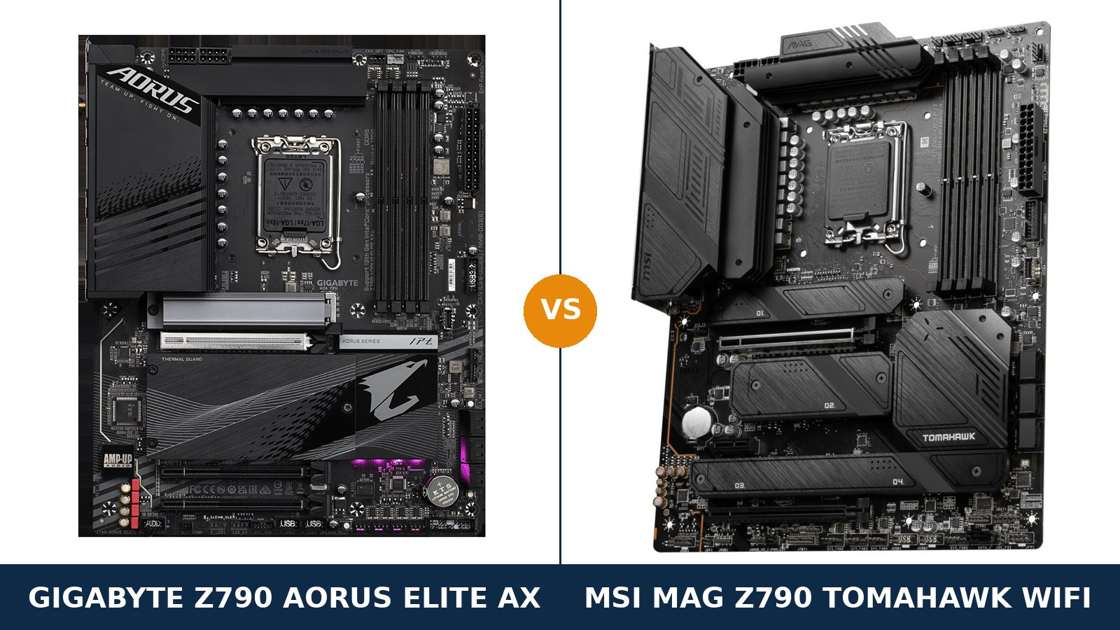
This is the Z790 comparison that trips up the most builders. Two ATX boards, the same chipset, the same socket, near-identical headlines.
Both promise a 16-phase-class power design with 90-amp power stages. Both carry four Gen4 M.2 slots, Wi-Fi 6E, 2.5-gigabit Ethernet and a PCIe 5.0 graphics slot.
Read the marketing pages and you would swear they were the same board in different colours. They are not.
The real separation is in the details the boxes shout about least: the audio codec, the rear USB layout, the DisplayPort version, and how many of the M.2 slots get a proper heatsink. That is where this comparison is won and lost.
One clarification before anything else: this guide covers the DDR5 Z790 Aorus Elite AX. Gigabyte also sells a DDR4 namesake, and it is a different board. Everything below is the DDR5 model, checked against Gigabyte's and MSI's own specification pages.
Key Takeaways
- The MSI MAG Z790 Tomahawk WiFi is the more complete board — better audio, faster rear USB, a proper DisplayPort 1.4 output, and heatsinks on every M.2 slot.
- The Gigabyte Z790 Aorus Elite AX strikes back on memory and expansion — a higher DDR5-7600 overclocking rating and two PCIe x4 slots instead of one.
- Power delivery is effectively a tie. Both run 90A smart power stages and dual 8-pin CPU power; neither will hold back a 14900K at sane settings.
- Storage count is a tie, storage details are not. Four Gen4 M.2 slots each — but MSI adds a seventh SATA port and shields all four M.2 slots.
- Check the Gigabyte revision before buying. The Wi-Fi module changes between PCB revisions — Intel AX211 on rev. 1.0/1.1, Realtek on rev. 1.2.
Quick Verdict
Buy the MSI MAG Z790 Tomahawk WiFi for most builds. It is the better all-rounder.
Its ALC4080 audio is a class above the Gigabyte's unnamed codec. Its rear panel carries more high-speed USB. Its DisplayPort output is the modern 1.4 standard, not 1.2. And every one of its four M.2 slots sits under a heatsink.
For a gaming or mixed-use PC built once and used for years, those are advantages you touch every single day.
Buy the Gigabyte Z790 Aorus Elite AX if memory tuning or expansion is your priority. Its DDR5 support is rated to 7600 MT/s against the MSI's 7200+, and it is the only board here with two PCIe x4 slots.
Its screwless M.2 EZ-Latch Plus system is also the friendlier install experience. If you swap drives often, or you are chasing high DDR5 clocks, the Aorus is your board.
The Scorecard
Scores below are derived directly from the manufacturer specifications compared in this guide — phase counts, slot counts, port counts and supported standards. They are a reading aid, not benchmark results.
| Category | Z790 Aorus Elite AX | MAG Z790 Tomahawk WiFi | ||
|---|---|---|---|---|
| Power delivery | 9 / 10 | 9 / 10 | ||
| Memory | 9 / 10 | 8 / 10 | ||
| Storage | 8 / 10 | 9 / 10 | ||
| Expansion | 8 / 10 | 7 / 10 | ||
| USB & connectivity | 7 / 10 | 9 / 10 | ||
| Networking & audio | 7 / 10 | 9 / 10 | ||
| Display outputs (iGPU) | 6 / 10 | 9 / 10 | ||
| Overall | 7.7 / 10 | 8.6 / 10 | ||
The pattern is clear. The heavy hardware — VRM, memory, storage slots — is closely matched. The MSI pulls away on the everyday layer: the ports, the audio and the outputs you actually use.
At a Glance: Who Each Board Fits
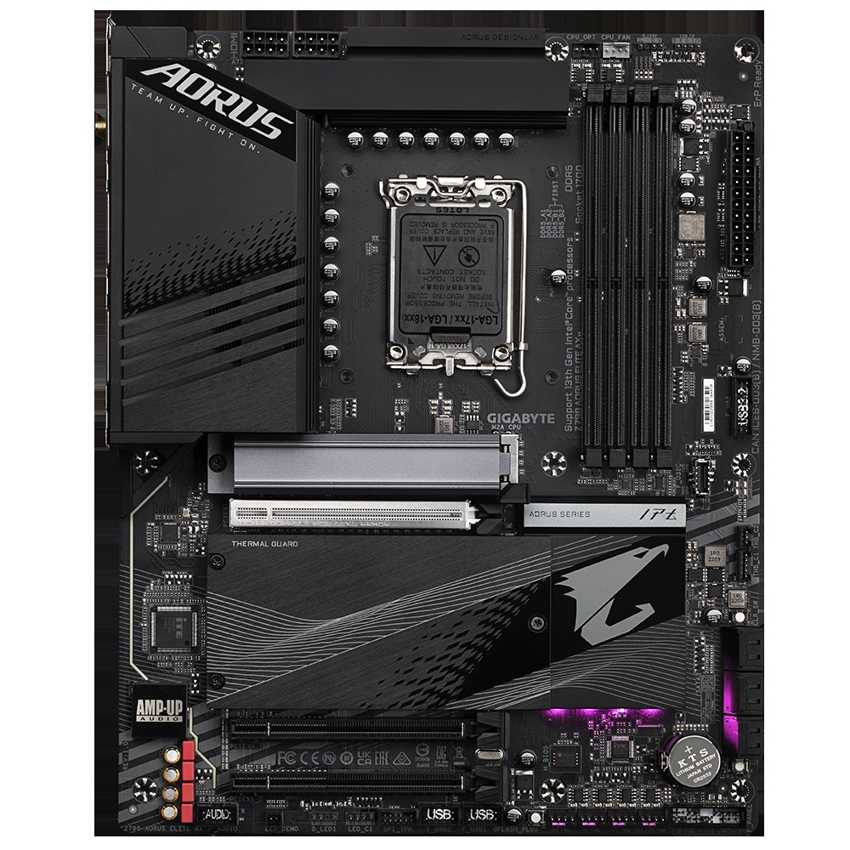
Gigabyte Z790 Aorus Elite AX
- Twin 16+1+2 digital VRM, 90A smart power stages
- DDR5 rated to 7600 MT/s (O.C.), 4 DIMMs
- Two PCIe 4.0 x4 slots plus PCIe 5.0 x16
- Screwless M.2 EZ-Latch Plus on all four M.2 slots
- Wi-Fi 6E + Realtek 2.5GbE LAN
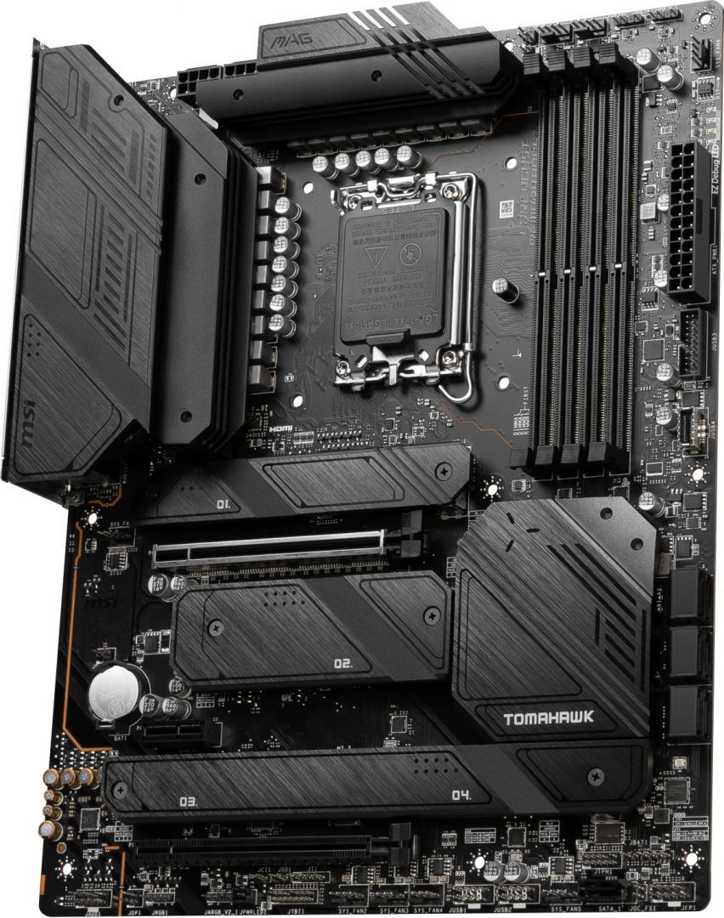
MSI MAG Z790 Tomahawk WiFi
- 16+1+1 mirrored power design, 90A smart power stages
- Realtek ALC4080 audio with S/PDIF output
- DisplayPort 1.4 + HDMI 2.1 onboard outputs
- Heatsinks on all four M.2 slots, 7 SATA ports
- Wi-Fi 6E + Intel 2.5Gbps LAN
Choose the Z790 Aorus Elite AX if…
You plan to tune DDR5 hard. The 7600 MT/s rating and Gigabyte's memory-profile tooling give you the higher ceiling.
You need two add-in cards at x4 speed — a capture card and a storage controller, for example. Only the Gigabyte has the second x4 slot.
You rebuild and swap parts often. EZ-Latch Plus M.2 fittings and the PCIe EZ-Latch make drive and GPU changes genuinely screwless.
Choose the MAG Z790 Tomahawk WiFi if…
You want the best everyday board of the two. Better audio, more fast USB on the rear panel, and a DisplayPort that is not a generation old.
You run several SATA drives alongside your NVMe storage. Seven SATA ports against six is a small number that becomes a big problem when you run out.
You drive a monitor from integrated graphics — troubleshooting, a second screen, a streaming PC. MSI's DisplayPort 1.4 handles 8K60 and high-refresh 4K properly.
As an Amazon Associate I earn from qualifying purchases at no extra cost to you.
Specifications: The Specs That Actually Matter
Every figure below is taken from Gigabyte's and MSI's published specifications for these exact DDR5 models, cross-checked against the manufacturers' product pages.
Both boards exist in DDR4 namesake versions with different memory support and different details. Nothing in this table describes those.
| Specification | Gigabyte Z790 Aorus Elite AX | MSI MAG Z790 Tomahawk WiFi |
|---|---|---|
| Form factor | ATX, 30.5 × 24.4 cm | ATX, 30.5 × 24.4 cm |
| Socket / chipset | Intel LGA1700 / Z790 | Intel LGA1700 / Z790 |
| CPU support | Intel Core 14th / 13th / 12th Gen, Pentium Gold, Celeron | Intel Core 14th / 13th / 12th Gen, Pentium Gold, Celeron |
| VRM design | Twin 16+1+2 digital, 90A smart power stages, 2× 8-pin EPS | 16+1+1 mirrored, 90A smart power stages, 2× 8-pin EPS |
| Memory | 4 × DDR5 DIMM, up to 256 GB, 7600 MT/s (O.C.), XMP 3.0 | 4 × DDR5 DIMM, up to 256 GB, 7200+ MT/s (O.C.), XMP 3.0 |
| Graphics outputs (iGPU) | HDMI 2.1 (4K60), DisplayPort 1.2 (4K60) | HDMI 2.1 (4K60), DisplayPort 1.4 (8K60) |
| Expansion slots | PCIe 5.0 x16 + 2 × PCIe 4.0 x16 (x4) | PCIe 5.0 x16 + PCIe 4.0 x16 (x4) + PCIe 3.0 x1 |
| M.2 storage | 4 slots, all PCIe 4.0 x4, 22110/2280, EZ-Latch Plus | 4 slots, all PCIe 4.0 x4, heatsinks on all slots |
| SATA | 6 × SATA 6 Gb/s, RAID 0/1/5/10 | 7 × SATA 6 Gb/s, RAID 0/1/5/10 |
| LAN | Realtek 2.5GbE | Intel 2.5Gbps |
| Wireless | Wi-Fi 6E (Intel AX211 rev. 1.0/1.1; Realtek RTL8852CE rev. 1.2), Bluetooth 5.3 | Intel Wi-Fi 6E, Bluetooth 5.3 |
| Audio | Realtek codec (model not specified), 7.1, S/PDIF Out, only 2 rear jacks | Realtek ALC4080, 7.1 USB audio, S/PDIF Out, full rear jack set |
| USB (rear) | 1× USB-C 20 Gbps, 2× USB 10 Gbps, 3× USB 5 Gbps, 4× USB 2.0 | 1× USB-C 20 Gbps, 1× USB-C 10 Gbps, 4× USB 10 Gbps, 4× USB 5 Gbps |
| Front USB-C | USB 3.2 Gen 2 (10 Gbps) header | USB 10 Gbps Type-C header |
| BIOS flashing | Q-Flash Plus, onboard button | Flash BIOS button on rear panel |
| PCB | 6-layer, 2× copper | 6-layer server-grade, 2 oz copper |
Variant note: the Aorus Elite AX name covers three boards — this DDR5 model, a DDR4 model, and a white ICE edition. Confirm the listing says DDR5 before anything else; the memory you own decides which board you can use at all.
Revision note: on the Gigabyte, the Wi-Fi module is the one moving part. PCB rev. 1.0 and 1.1 carry Intel's AX211; rev. 1.2 carries a Realtek RTL8852CE. Both are Wi-Fi 6E with Bluetooth 5.3, so the difference is about driver preference, not capability. The Tomahawk's Intel module is fixed across the range.
The Differences That Actually Matter
1. Power delivery — a genuine tie at the top end
Start with the headline both brands lead with. Gigabyte runs a Twin 16+1+2 digital design: the 16 VCore phases are arranged as eight parallel pairs, fed by 90A smart power stages.
MSI answers with a 16-phase mirrored arrangement — its spec sheet reads 16+1+1 — also with 90A smart power stages. Both boards take dual 8-pin EPS CPU power connectors.
Translated out of marketing: both boards have far more VRM than a 13900K or 14900K needs at stock settings, and enough for serious all-core overclocking with proper cooling.
Cooling hardware is serious on both sides. Gigabyte fits fully covered MOSFET heatsinks joined by a 6mm heatpipe. MSI fits its extended heatsink design with 7 W/mK pads.
Verdict on power: buy either board for a flagship CPU without a second thought. Anyone who tells you one of these VRMs is “weak” is selling you something.
2. Memory — Gigabyte holds the higher rating
Here the boards do separate. Gigabyte validates the Aorus Elite AX to DDR5-7600 with XMP overclocking. MSI rates the Tomahawk to 7200+.
Both boards have four DIMM slots, both support up to 256 GB on paper, and both support XMP 3.0 profiles. The everyday experience — load a 6000 or 6400 MT/s kit, enable XMP, done — is identical.
The difference only appears at the sharp end. If you are buying a 7200+ MT/s two-DIMM kit and intend to tune timings by hand, Gigabyte's higher validated ceiling and its built-in memory profile database give you more headroom to play in.
MSI publishes the more honest fine print: its per-configuration limits spell out exactly how the ceiling falls as you add DIMMs and ranks. Four sticks will run slower than two on both boards. That is a DDR5 platform truth, not a brand flaw.
Practical advice for both: two DIMMs with XMP enabled, and spend the memory budget on capacity and tight timings at 6000–6400 MT/s rather than chasing either board's headline number.
3. Audio — the widest gap in this comparison
This is where the Tomahawk stops trading blows and lands one.
MSI fits the Realtek ALC4080, a USB-interface audio codec with 7.1 output, S/PDIF, dedicated audio capacitors and up to 32-bit/384 kHz playback on the front panel. It is the codec MSI reserves for its better boards, sold under the Audio Boost 5 name.
Gigabyte's spec page does not name its codec at all. It lists a Realtek HD audio solution with audiophile WIMA capacitors — and just two audio jacks on the rear panel, with 7.1 completed through the front-panel header and software remapping.
Two rear jacks is the tell. Driving a proper 5.1 or 7.1 speaker set from the rear panel is an MSI-only proposition here. Headphone users with a decent headset will hear the ALC4080's cleaner output stage too.
If onboard audio matters to you at all — and for anyone without a USB DAC it should — this section alone can settle the comparison.
4. Rear USB — MSI simply fits more of the fast stuff
Count the fast ports. The Tomahawk's rear panel carries four USB 10 Gbps Type-A ports, a 10 Gbps Type-C, a 20 Gbps Type-C, and four 5 Gbps Type-A ports.
The Aorus Elite AX carries two 10 Gbps Type-A ports, three 5 Gbps ports, one 20 Gbps Type-C — and four USB 2.0 ports taking up space the MSI spends on speed.
Both boards match on the headline items: a 20 Gbps rear Type-C each, and a 10 Gbps front-panel Type-C header each. Cases with front USB-C are served equally.
But for external SSDs, fast docks and capture gear hanging off the back of the PC, the MSI's panel is objectively better equipped. USB 2.0 ports on a board of this class, in this quantity, is the Gigabyte's most dated decision.
5. Display outputs — a small spec with real consequences
Both boards give the integrated GPU an HDMI 2.1 port good for 4K at 60 Hz. No difference there.
The DisplayPorts are a generation apart. MSI fits DisplayPort 1.4, rated to 8K at 60 Hz. Gigabyte fits DisplayPort 1.2, capped at 4K at 60 Hz.
With a discrete graphics card fitted, both outputs gather dust. That is most gaming builds, and for them this section scores zero.
But iGPU outputs earn their keep in real life: driving a second monitor, running a streaming or office machine without a GPU, or keeping the PC usable while a graphics card is away on RMA.
For those jobs, DP 1.4's extra bandwidth — high-refresh 1440p and 4K, modern docking — makes the MSI the safer pair of hands.
6. Storage — same slot count, different finishing
Both boards offer four M.2 slots, and all eight of them across the two boards are PCIe 4.0 x4. Neither offers a Gen5 M.2 slot. If Gen5 SSD speed is your priority, skip to the end of this guide — neither board is yours.
The differences are in the finishing. MSI puts a Shield Frozr heatsink on all four slots and adds a seventh SATA port for bulk storage.
Gigabyte counters with convenience: EZ-Latch Plus makes every M.2 fitting screwless, the primary slot gets the larger Thermal Guard III heatsink, the remaining slots get enlarged guards, and all four slots accept longer 22110 drives — on the MSI, only the CPU-connected slot does.
RAID support is level: 0, 1, 5 and 10 for both SATA and NVMe arrays on both boards.
Net result: MSI for the builder who fills everything on day one and wants it all cooled. Gigabyte for the builder who swaps drives and values the ten seconds each latch saves, every time.
7. Expansion and the little things — Gigabyte's second x4 vs MSI's polish
Graphics first: both boards run a steel-reinforced PCIe 5.0 x16 slot from the CPU. Identical, full speed, no sharing tricks with the primary M.2 slot on either board.
Below it, the layouts split. Gigabyte fits two further x16-length slots, both PCIe 4.0 at x4. MSI fits one x4 slot and one PCIe 3.0 x1 slot.
Two x4 slots matter for workstation-ish builds: a 10-gigabit NIC and an NVMe carrier card, a capture card and a sound card. The MSI's x1 slot serves small cards well but cannot substitute at x4 bandwidth.
The polish points go the other way. MSI puts its Flash BIOS and Clear CMOS buttons on the rear panel, where you can reach them on a built PC, and fits EZ Debug LEDs for fault-finding.
Gigabyte answers with onboard reset, Clear CMOS and Q-Flash Plus buttons, a configurable Multi-Key, and two Thunderbolt add-in card headers the MSI lacks entirely.
Call your own priority: expandability to the Gigabyte, day-to-day convenience split right down the middle.
CPU Pairing Guide
Both boards support the full LGA1700 run — 12th, 13th and 14th Gen Core, plus Pentium Gold and Celeron. The fastest way to choose between them is to start from your processor and your workload.
| Your processor | Z790 Aorus Elite AX | MAG Z790 Tomahawk WiFi | Our call |
|---|---|---|---|
| Core i9-14900K / 13900K | Excellent — VRM to spare | Excellent — VRM to spare | Either; decide on audio and USB |
| Core i7-14700K / 13700K | Excellent | Excellent | Tomahawk for most, Aorus for memory tuning |
| Core i5-14600K / 13600K | Excellent | Excellent | Tomahawk — better everyday feature set |
| Core i5 / i3 non-K gaming builds | More board than the CPU needs | More board than the CPU needs | Buy whichever is cheaper; both are overqualified |
| 12th Gen (e.g. 12700K) upgrade base | Excellent, DDR5 ceiling higher | Excellent | Aorus if a 14th Gen + fast DDR5 upgrade is planned |
| Any F-series CPU (no iGPU) | Display outputs unusable | Display outputs unusable | Either — a graphics card is mandatory on both |
Read the table honestly: at the processor level these boards never separate. Every split in this comparison lives in features, not in CPU support.
The 30-Second Decision
| If this sounds like you… | Buy this |
|---|---|
| “I want the best all-round board and I am not overclocking memory.” | MAG Z790 Tomahawk WiFi |
| “I run proper speakers or good headphones from onboard audio.” | MAG Z790 Tomahawk WiFi (ALC4080) |
| “I plug fast external drives and docks into the rear panel.” | MAG Z790 Tomahawk WiFi |
| “I am chasing DDR5-7200+ clocks and hand-tuned timings.” | Z790 Aorus Elite AX (7600 MT/s rating) |
| “I need two add-in cards running at x4 bandwidth.” | Z790 Aorus Elite AX |
| “I swap M.2 drives constantly for testing or work.” | Z790 Aorus Elite AX (EZ-Latch Plus) |
| “Whichever one is on sale this week.” | Legitimate — the performance hardware is a tie |
Ready to check today’s price?
Both boards sell through Amazon. Prices move, so check the live figure on the board that fits your build.
View on Amazon — Z790 Aorus Elite AXView on Amazon — MAG Z790 Tomahawk WiFiWhat You Gain. What You Give Up.
Gigabyte Z790 Aorus Elite AX
You gain: the higher DDR5 overclocking ceiling at 7600 MT/s. A second PCIe x4 slot for serious add-in cards. Screwless M.2 installation on every slot. Onboard buttons and Thunderbolt add-in headers.
You give up: audio quality — an unnamed codec and two rear jacks. Rear USB speed, with four slots spent on USB 2.0. And a DisplayPort stuck on the 1.2 standard.
MSI MAG Z790 Tomahawk WiFi
You gain: the ALC4080 audio stage with a full rear jack set. The faster, fuller rear USB panel. DisplayPort 1.4 for the integrated GPU. Heatsinks on all four M.2 slots and a seventh SATA port.
You give up: the second x4 expansion slot, and the top slice of DDR5 overclocking headroom. Your M.2 slots beyond the first also stop at 2280-length drives.
Pros and Cons
Z790 Aorus Elite AX — Pros
- DDR5 validated to 7600 MT/s
- Two PCIe 4.0 x4 expansion slots
- EZ-Latch Plus screwless M.2 fittings
- All four M.2 slots accept 22110 drives
- Onboard Q-Flash Plus, reset and Clear CMOS buttons
- Thunderbolt add-in card headers
Cons
- Unnamed audio codec, only 2 rear audio jacks
- DisplayPort 1.2, not 1.4
- Four of ten rear USB ports are USB 2.0
- Wi-Fi module changes by PCB revision
- Realtek LAN where rivals fit Intel
MAG Z790 Tomahawk WiFi — Pros
- Realtek ALC4080 audio, Audio Boost 5
- DisplayPort 1.4 (8K60) onboard output
- Rear panel heavy on 10 Gbps USB
- All four M.2 slots heatsinked
- 7 SATA ports for bulk storage
- Intel 2.5G LAN and Intel Wi-Fi 6E
- EZ Debug LEDs and rear Flash BIOS button
Cons
- DDR5 ceiling of 7200+ MT/s
- Only one x4 slot; the second slot is x1
- Only the first M.2 slot takes 22110 drives
- Shares its name with a DDR4 namesake — check listings twice
Check the Variant, the Revision and the Bundle
Check the memory variant first. Both product names exist in DDR4 form. A Z790 Aorus Elite AX DDR4 and a MAG Z790 Tomahawk WiFi DDR4 are different boards with different slots.
DDR4 and DDR5 modules are physically keyed differently. The wrong board does not run your memory at all. This single check matters more than everything else in this section.
Check the Gigabyte revision. On the Aorus Elite AX, PCB rev. 1.2 swaps the Intel AX211 Wi-Fi module for a Realtek RTL8852CE.
Both modules deliver Wi-Fi 6E and Bluetooth 5.3. If you have a driver preference — or a Linux install that favours Intel wireless — the revision printed on the box is the one to read.
Check the Gigabyte model line. The Aorus Elite AX also exists as a white ICE edition, and the newer Aorus Elite X WiFi7 is a different, higher board wearing a similar name. Match the full model name on the listing to the name on this page.
Check the bundle. Both boxes cover the essentials: the board, Wi-Fi antenna, SATA cables, M.2 hardware and documentation. The Gigabyte's M.2 heatsinks use its EZ-Latch fittings; the MSI's Shield Frozr plates are pre-fitted over its slots.
Neither box includes a Thunderbolt card. The Gigabyte merely provides the headers if you want to add Gigabyte's own card later.
The Upgrade Path Test
LGA1700 is a finished platform. No new CPU generation is coming to either of these boards, and honesty requires saying so up front.
What remains is movement inside the platform. A 12th Gen build today can take a 14th Gen i7 or i9 tomorrow, and both boards' VRMs will shrug at the swap.
The Gigabyte's upgrade edges are its second x4 slot and its memory ceiling. Both serve the owner who keeps adding and tuning.
The MSI's upgrade edges are quieter: a seventh SATA port for the drive you buy in year three, heatsinks already fitted wherever an SSD lands, and iGPU outputs good enough to bridge a GPU change without adapters.
Storage is the shared ceiling. Neither board offers a PCIe 5.0 M.2 slot, so Gen5 SSDs will run at Gen4 speeds in both. If that future matters to you, it prices you out of this entire comparison — see below.
When to Skip Both
Skip both if you want a PCIe 5.0 M.2 slot for a Gen5 SSD. Boards one rung up — including MSI's own Tomahawk Max and Gigabyte's Aorus Elite X lines — add exactly that.
Skip both if you need Wi-Fi 7. Both of these boards stop at Wi-Fi 6E, and the module is not a user upgrade on either.
Skip both if your memory is DDR4. The DDR4 namesakes of these boards exist for you — but they are different products, and this verdict does not transfer automatically.
And skip both if you are building small. These are full ATX boards; the micro-ATX and Mini-ITX versions of this fight happen elsewhere.
BIOS and Long-Term Support
Both boards flash their BIOS with no CPU installed — Q-Flash Plus on the Gigabyte, the rear Flash BIOS button on the MSI. A board that arrives with an older BIOS is a ten-minute job, not a return.
That matters on LGA1700 more than most platforms. 14th Gen support arrived by BIOS update, so check your exact CPU against each maker's support list before you order.
Support runs through the official product pages on both sides, and both vendors handle warranty claims by region and proof of purchase. Keep the receipt; with boards of this class, the paperwork is the warranty's best friend.
Driver support follows the same pattern on both sides: chipset, LAN, audio and Wi-Fi drivers are maintained on the official product pages, and both vendors' control software — Gigabyte Control Center and MSI Center — is optional, not required.
Final Verdict
The MSI MAG Z790 Tomahawk WiFi is the board we would build on.
It does not win on the glamorous specs. Power delivery is a tie. Storage slots are a tie. It wins on the layer of the board you interact with daily: sound, ports and outputs.
The ALC4080 is the single largest hardware gap in this comparison. The rear USB panel is not far behind. Add DisplayPort 1.4, seven SATA ports and heatsinks on every M.2 slot, and the Tomahawk is simply the more finished product.
Buy the Tomahawk WiFi for gaming builds, mixed-use PCs, and anyone who values audio and connectivity over tuning headroom.
View on Amazon — MAG Z790 Tomahawk WiFi
Buy the Z790 Aorus Elite AX if you are a memory tuner chasing the highest DDR5 clocks, if your build needs two x4 add-in cards, or if your workflow swaps M.2 drives often enough for EZ-Latch to pay rent.
It is an excellent board with a dated rear panel. Buy it for its ceilings, not its sockets.
View on Amazon — Z790 Aorus Elite AX
Watch Out: Similar Names, Different Boards
Z790 naming is a minefield. Three warnings belong in every version of this guide.
First: both boards in this comparison have DDR4 twins with near-identical names. “Z790 Aorus Elite AX DDR4” and “MAG Z790 Tomahawk WiFi DDR4” use different memory and are not covered by a word of this verdict.
Second: the Tomahawk MAX WiFi is not this Tomahawk. The Max adds Wi-Fi 7 and a Gen5 M.2 slot, and it is a meaningfully different board at a different price.
Third: Gigabyte's range stacks the Elite AX, the white Elite AX ICE, and the Elite X WiFi7 within a few dollars of each other at times. All three are real, all three are different, and the listing title is the only thing standing between you and the wrong one.
Slow down on the product page. Match the full model name, then the memory type, then the price — in that order.
Case, Power and Cabling Notes
Both boards are full ATX, 30.5 × 24.4 cm. Any ATX case takes them, with the usual warning that the MSI's extended VRM heatsink and the Gigabyte's I/O cover both sit tall near the top edge — check tower-cooler and top-radiator clearance in compact cases.
Both take a 24-pin main power connector and two 8-pin EPS CPU connectors. Plug in both EPS cables for K-series processors; quality power supplies in this build class include them.
Front-panel connections are well matched. Both boards provide a 10 Gbps USB Type-C front header, USB 3.x Type-A headers and USB 2.0 headers.
Fan and pump support is generous on both sides — multiple system fan headers plus a dedicated pump header on each. Custom-loop and AIO builders are served equally.
One fitting difference: both boards ship with integrated or pre-installed I/O shields, so the traditional blood sacrifice to a loose shield is off the menu either way.
Frequently Asked Questions
Is the MSI MAG Z790 Tomahawk WiFi better than the Gigabyte Z790 Aorus Elite AX?
For most builders, yes. Its ALC4080 audio, faster rear USB panel, DisplayPort 1.4 output and fully heatsinked M.2 slots make it the more complete everyday board. The Gigabyte wins back ground on DDR5 overclocking headroom and its second PCIe x4 slot.
Do both boards support 14th Gen Intel processors?
Yes. Both are LGA1700 Z790 boards supporting 12th, 13th and 14th Gen Core processors. Because 14th Gen support arrived via BIOS updates, confirm your board ships with a recent BIOS or use the no-CPU flash feature both boards provide.
Which board is better for overclocking a 14900K?
Neither holds the CPU back. Both run 90A smart power stages with dual 8-pin EPS power and substantial heatsinks. The Gigabyte's 16+1+2 twin arrangement and the MSI's 16+1+1 mirrored design are equivalent in practice; your cooler will decide the result long before the VRM does.
Can either board take a PCIe 5.0 SSD at full speed?
No. All four M.2 slots on both boards are PCIe 4.0 x4. A Gen5 SSD will work in either board but run at Gen4 speeds. The PCIe 5.0 support on both boards applies to the graphics card slot only.
Which board has better onboard audio?
The MSI, clearly. Its Realtek ALC4080 codec (Audio Boost 5) includes a full rear jack set and S/PDIF output. The Gigabyte uses an unnamed Realtek codec with only two rear audio jacks, completing 7.1 through the front panel — fine for headsets, limiting for surround speakers.
Are the DDR4 versions of these boards the same?
No. The Z790 Aorus Elite AX DDR4 and MAG Z790 Tomahawk WiFi DDR4 are separate models with DDR4 memory slots and detail differences throughout. This comparison covers the DDR5 boards only, and DDR4 memory does not fit either of them.
Does the Gigabyte's Wi-Fi differ between revisions?
Yes, in component only. PCB revisions 1.0 and 1.1 use Intel's Wi-Fi 6E AX211 module; revision 1.2 uses a Realtek RTL8852CE. Both deliver Wi-Fi 6E and Bluetooth 5.3, so capability is unchanged — only the driver stack differs.
Which board should I choose for a workstation with several storage drives?
The MSI, by a nose. Its seven SATA ports and four heatsinked M.2 slots suit a fill-it-and-forget-it storage build. Choose the Gigabyte instead if your workstation plan involves add-in cards — its second x4 slot is the one thing the MSI cannot match.
Sources & Verification
GIGABYTE Z790 AORUS ELITE AX (rev. 1.x) official specifications and key features, gigabyte.com • MSI MAG Z790 TOMAHAWK WIFI official specifications and product page, msi.com • Manufacturer product data via Amazon listings for ASIN verification (Z790 AORUS ELITE AX B0BH9DXY38; MAG Z790 TOMAHAWK WIFI B0BL8K1YH1). Specifications verified November 2026.

James Wilson
James has been building and benchmarking PCs for over a decade and writes Honestly Compared's motherboard and component guides. His rule for every comparison: the verdict has to survive the spec sheet, not the marketing page.