
Gigabyte Z790 Aorus Elite AX vs MSI MAG Z790 Tomahawk WiFi: Which Should You Buy?
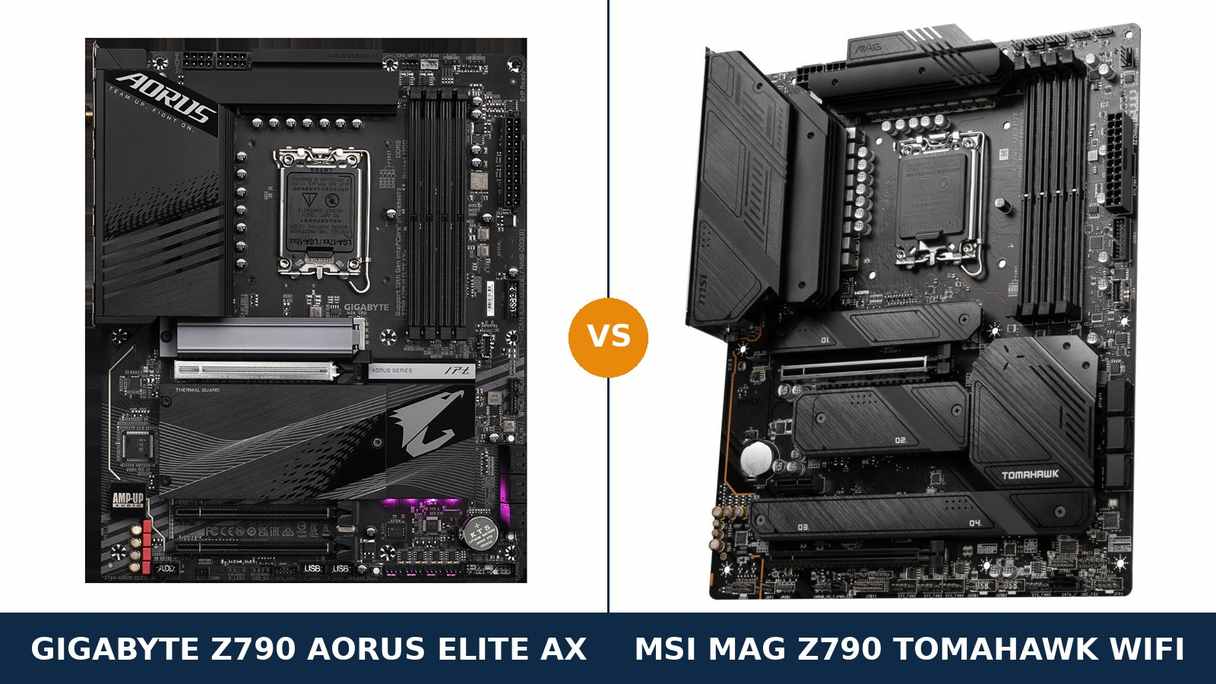
Start with your desk instead of the spec sheet. A headset. An external SSD. A second monitor. A capture device, a DAC, a phone that only ever charges from the back of the PC.
Nobody lives with a phase count. What you live with is the collection of sockets on the rear panel and the slots under the graphics card. That is where this comparison is decided.
The foundations, admittedly, are shared. Same Z790 chipset, same LGA1700 socket, 90-amp power stages on both boards, four Gen4 M.2 slots apiece, Wi-Fi 6E, 2.5-gigabit Ethernet and a PCIe 5.0 slot for the graphics card.
The split is in how each brand spent the rest of the budget. MSI spent it on the surface you touch: audio hardware, fast USB, a current-generation display output. Gigabyte spent it underneath: a higher memory validation and a second full-bandwidth expansion slot.
Two points of order. The “Tomahawk” here is MSI’s MAG Z790 Tomahawk WiFi — the only Tomahawk built on Z790. And both boards are the DDR5 versions; each name also exists in a DDR4 form, a different product entirely.
Key Takeaways
- The MSI MAG Z790 Tomahawk WiFi is the stronger everyday board — a named flagship-class audio codec, more high-speed rear USB, DisplayPort 1.4, and a heatsink over every M.2 slot.
- The Gigabyte Z790 Aorus Elite AX wins the tuner’s ground — DDR5 validated to 7600 MT/s and two PCIe x4 slots where the MSI offers one.
- Power delivery is a dead heat. 90A smart power stages and twin 8-pin EPS connectors on both sides; neither board will hold back a Core i9 at sane settings.
- Storage ties on count, not on finishing. Four Gen4 M.2 slots each — MSI adds a seventh SATA port and full heatsink coverage, Gigabyte adds tool-free latches and 22110 drive support in every slot.
- The Gigabyte’s Wi-Fi chip depends on its PCB revision — Intel AX211 on rev. 1.0/1.1, a Realtek module on rev. 1.2. Check the box if the driver stack matters to you.
Quick Verdict
For the majority of builders, the MSI MAG Z790 Tomahawk WiFi is the right call. It is the more finished product.
Its ALC4080 audio sits a class above the codec Gigabyte declines to name. Its rear panel gives you more USB at 10 Gbps and above. Its DisplayPort speaks the 1.4 standard rather than 1.2. And no M.2 slot on it goes without a heatsink.
Those are the parts of a motherboard you interact with daily, and over a five-year build they add up.
Pick the Gigabyte Z790 Aorus Elite AX when memory overclocking or add-in cards drive the build. A 7600 MT/s memory rating against 7200+, and a second x4 slot the MSI simply does not have.
Its EZ-Latch Plus fittings make M.2 swaps a tool-free job, too — this is the board for builders who open the case often.
The Scorecard
The scores here are read straight off the specifications compared in this guide — phase counts, slot counts, port counts and supported standards. Treat them as a map of the spec sheet, not as benchmark results.
| Category | Z790 Aorus Elite AX | MAG Z790 Tomahawk WiFi | ||
|---|---|---|---|---|
| Power delivery | 9 / 10 | 9 / 10 | ||
| Memory | 9 / 10 | 8 / 10 | ||
| Storage | 8 / 10 | 9 / 10 | ||
| Expansion | 8 / 10 | 7 / 10 | ||
| USB & connectivity | 7 / 10 | 9 / 10 | ||
| Networking & audio | 7 / 10 | 9 / 10 | ||
| Display outputs (iGPU) | 6 / 10 | 9 / 10 | ||
| Overall | 7.7 / 10 | 8.6 / 10 | ||
The shape of the result tells the story. Where the boards carry heavy hardware — power stages, memory slots, storage slots — they shadow each other. The MSI walks away with the comparison on the layer you plug things into.
At a Glance: Who Each Board Fits
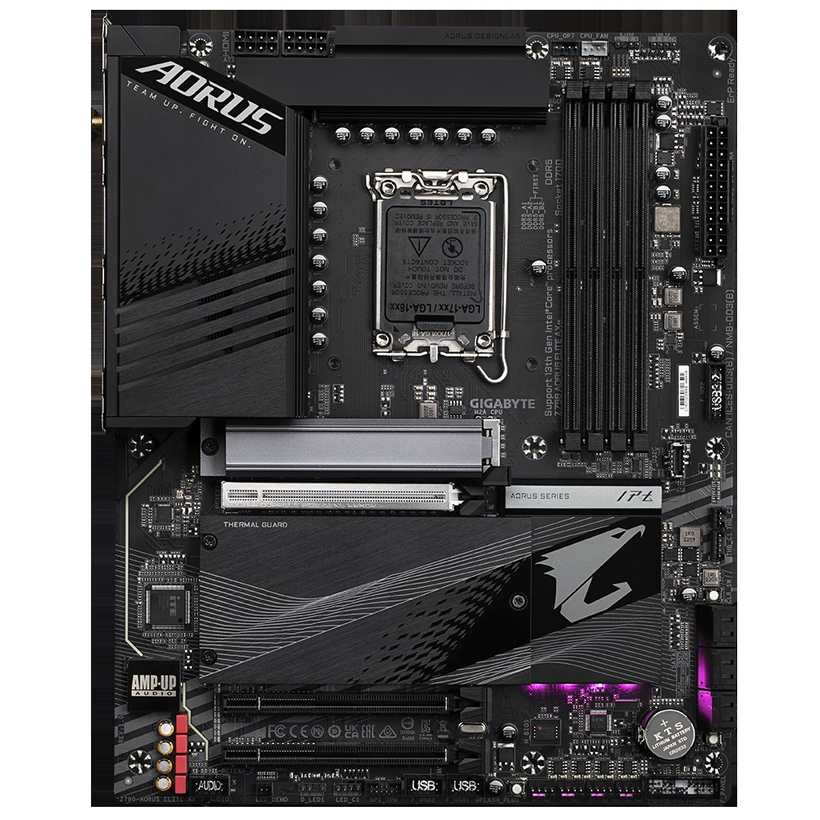
Gigabyte Z790 Aorus Elite AX
- Twin 16+1+2 digital VRM built on 90A smart power stages
- DDR5 validated to 7600 MT/s (O.C.) across four DIMM slots
- Two PCIe 4.0 x4 slots below the PCIe 5.0 x16 graphics slot
- EZ-Latch Plus tool-free fittings on all four M.2 slots
- Wi-Fi 6E plus Realtek 2.5GbE wired networking
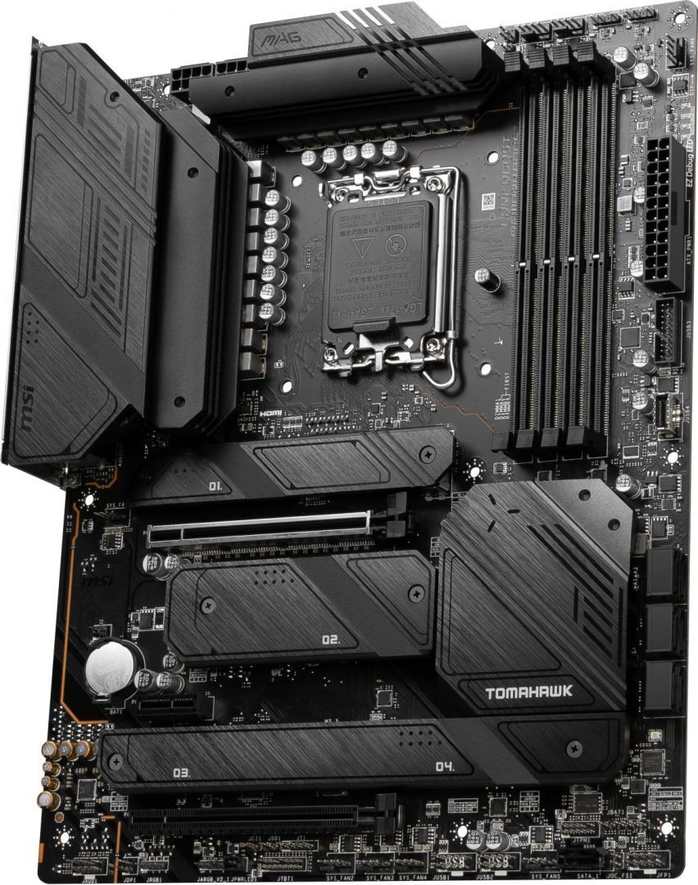
MSI MAG Z790 Tomahawk WiFi
- 16+1+1 mirrored power design, 90A smart power stages
- Realtek ALC4080 audio with optical S/PDIF and a full rear jack set
- DisplayPort 1.4 and HDMI 2.1 for the integrated GPU
- Shield Frozr heatsinks on all four M.2 slots, seven SATA ports
- Intel Wi-Fi 6E module and Intel 2.5Gbps LAN
Choose the Z790 Aorus Elite AX if…
Memory tuning is a hobby, not a chore. The higher validated ceiling and Gigabyte’s library of memory profiles reward the hours you will spend in the BIOS.
Your parts list includes two cards that each want x4 bandwidth — say a capture card beside an NVMe carrier. This is the only board of the pair that can seat both.
You treat the build as a workbench. Tool-free M.2 latches and a quick-release PCIe latch turn drive and GPU swaps into a thirty-second job.
Choose the MAG Z790 Tomahawk WiFi if…
You want the board that is better at ordinary things. Sound, ports and outputs are the specification of daily life, and the Tomahawk leads on all three.
Your storage plan mixes NVMe with a stack of SATA drives. Seven SATA ports forgive a growing drive collection in a way six ports, eventually, do not.
You ever run a display from the processor’s graphics — a second screen, a GPU-less streaming box, a rescue output while a card is repaired. DisplayPort 1.4 does that job to a modern standard.
As an Amazon Associate I earn from qualifying purchases at no extra cost to you.
Specifications: The Specs That Actually Matter
Every figure in this table comes from the specification pages Gigabyte and MSI publish for these exact DDR5 models.
Both names are also sold on DDR4 boards with different memory sections and different details. Nothing in the table below describes those variants.
| Specification | Gigabyte Z790 Aorus Elite AX | MSI MAG Z790 Tomahawk WiFi |
|---|---|---|
| Form factor | ATX, 30.5 × 24.4 cm | ATX, 30.5 × 24.4 cm |
| Socket / chipset | Intel LGA1700 / Z790 | Intel LGA1700 / Z790 |
| CPU support | Intel Core 14th / 13th / 12th Gen, Pentium Gold, Celeron | Intel Core 14th / 13th / 12th Gen, Pentium Gold, Celeron |
| VRM design | Twin 16+1+2 digital, 90A smart power stages, 2× 8-pin EPS | 16+1+1 mirrored, 90A smart power stages, 2× 8-pin EPS |
| Memory | 4 × DDR5 DIMM, up to 256 GB, 7600 MT/s (O.C.), XMP 3.0 | 4 × DDR5 DIMM, up to 256 GB, 7200+ MT/s (O.C.), XMP 3.0 |
| Graphics outputs (iGPU) | HDMI 2.1 (4K60), DisplayPort 1.2 (4K60) | HDMI 2.1 (4K60), DisplayPort 1.4 (8K60) |
| Expansion slots | PCIe 5.0 x16 + 2 × PCIe 4.0 x16 (x4) | PCIe 5.0 x16 + PCIe 4.0 x16 (x4) + PCIe 3.0 x1 |
| M.2 storage | 4 slots, all PCIe 4.0 x4, 22110/2280, EZ-Latch Plus | 4 slots, all PCIe 4.0 x4, heatsinks on all slots |
| SATA | 6 × SATA 6 Gb/s, RAID 0/1/5/10 | 7 × SATA 6 Gb/s, RAID 0/1/5/10 |
| LAN | Realtek 2.5GbE | Intel 2.5Gbps |
| Wireless | Wi-Fi 6E (Intel AX211 rev. 1.0/1.1; Realtek RTL8852CE rev. 1.2), Bluetooth 5.3 | Intel Wi-Fi 6E, Bluetooth 5.3 |
| Audio | Realtek codec (model not specified by Gigabyte), 7.1, S/PDIF Out, only 2 rear jacks | Realtek ALC4080, 7.1 USB audio, S/PDIF Out, full rear jack set |
| USB (rear) | 1× USB-C 20 Gbps, 2× USB 10 Gbps, 3× USB 5 Gbps, 4× USB 2.0 | 1× USB-C 20 Gbps, 1× USB-C 10 Gbps, 4× USB 10 Gbps, 4× USB 5 Gbps |
| Front USB-C | USB 3.2 Gen 2 (10 Gbps) header | USB 10 Gbps Type-C header |
| BIOS flashing | Q-Flash Plus, onboard button | Flash BIOS button on rear panel |
| PCB | 6-layer, 2× copper | 6-layer server-grade, 2 oz copper |
Variant note: one Aorus Elite AX name covers three products — this DDR5 board, a DDR4 board, and a white ICE edition of the DDR5 design. The listing must say DDR5; your memory sticks have already made that decision for you.
Revision note: the Gigabyte’s wireless module is its one variable component. Revisions 1.0 and 1.1 carry Intel’s AX211; revision 1.2 carries Realtek’s RTL8852CE. Both are Wi-Fi 6E with Bluetooth 5.3, so what changes is the driver stack, not the capability. MSI fits its Intel module across the whole Tomahawk range.
The Differences That Actually Matter
1. Power delivery — honours even at the flagship end
Both brands lead their marketing with the VRM, so let us settle it first. Gigabyte arranges its design as a Twin 16+1+2: sixteen VCore phases in eight paralleled pairs, each built on a 90A smart power stage.
MSI’s sheet reads 16+1+1, a mirrored layout, again on 90A smart power stages. Both boards feed the socket through two 8-pin EPS connectors.
Strip the branding away and the conclusion is dull but useful: each board carries more power hardware than a 13900K or 14900K can use at stock, with headroom left for serious overclocking.
The cooling hardware matches the ambition. Gigabyte blankets its MOSFETs in joined heatsinks linked by a 6mm heatpipe. MSI uses an extended heatsink with high-conductivity thermal pads.
So buy your flagship processor without asking either board’s permission. If a review tells you one of these VRMs is the weak one, that review is reaching.
2. Audio — the widest honest gap in this comparison
Here the trading of blows stops. One board lands a clean hit.
MSI fits Realtek’s ALC4080, a USB-interface codec it markets as Audio Boost 5: 7.1 output, optical S/PDIF, dedicated audio capacitors and playback up to 32-bit/384 kHz at the front panel.
Gigabyte’s specification page never names its codec. What it lists is a Realtek HD audio solution with WIMA capacitors — and a rear panel carrying just two audio jacks, with the rest of a 7.1 setup delegated to the front-panel header and software remapping.
Those two jacks settle real-world arguments. A proper 5.1 or 7.1 speaker system fed from the rear panel is possible on the MSI and impractical on the Gigabyte. A good headset, too, gets the cleaner output stage on the Tomahawk.
Own a USB DAC and this section evaporates. For everyone running sound out of the motherboard itself, it may be the only section that matters.
3. Rear USB — count the fast ports, not the ports
Both rear panels have ten USB sockets. The resemblance ends at the count.
The Tomahawk’s ten break down as four 10 Gbps Type-A, one 10 Gbps Type-C, one 20 Gbps Type-C and four 5 Gbps Type-A. Not a slow port among them.
The Aorus Elite AX spends four of its ten sockets on USB 2.0. What remains is two 10 Gbps Type-A ports, three at 5 Gbps, and the same single 20 Gbps Type-C the MSI offers.
The headline items match: a 20 Gbps Type-C on the rear of each board, and a 10 Gbps Type-C header on each for the case front panel.
External SSDs, docking stations and capture hardware live on the rear panel. If your desk accumulates fast peripherals, the MSI’s layout is simply the better tool for the job.
4. Memory — Gigabyte validates the higher ceiling
Gigabyte rates the Aorus Elite AX to DDR5-7600 under XMP overclocking. MSI rates the Tomahawk to 7200+. Four DIMM slots and a 256 GB paper maximum are common to both, as is XMP 3.0 support.
Day to day, none of this shows. A 6000 or 6400 MT/s kit drops into either board, XMP switches on, and the experience is indistinguishable.
The gap opens at the enthusiast end. Pair a fast two-DIMM kit with manual timing work and the Gigabyte’s higher validated ceiling — backed by its built-in database of memory profiles — gives you more room before the board, rather than the memory, becomes the limit.
Credit where due on the other side: MSI publishes the more transparent fine print, spelling out how its ceiling steps down as DIMMs and ranks are added. Both boards slow with four sticks fitted — DDR5 physics, not a defect in either design.
The sensible money, on either board, goes to two DIMMs at 6000–6400 MT/s with tight timings. Spend what is left on capacity.
5. Storage — identical slot count, different manners
Eight M.2 slots sit across these two boards and every one of them runs PCIe 4.0 x4. Neither board offers a Gen5 M.2 slot; if that is the feature you came for, the end of this guide is where your answer lives.
MSI’s finishing is about permanence. All four of its slots wear Shield Frozr heatsinks, and a seventh SATA port waits for the bulk drive you add in year two.
Gigabyte’s finishing is about access. EZ-Latch Plus makes each M.2 fitting screwless, the primary slot gets the oversized Thermal Guard III heatsink with enlarged guards elsewhere, and every slot swallows a 22110-length drive — the MSI manages that only in its CPU-connected slot.
Array support is level: RAID 0, 1, 5 and 10 for SATA and NVMe alike on both boards.
So the choice is temperamental. Fill everything once and forget it? The MSI has it cooled and counted. Swap drives the way other people swap USB sticks? The Gigabyte was built for your hands.
6. Expansion and board furniture — a second x4 against rear-panel polish
The graphics slot is a formality: steel-reinforced PCIe 5.0 x16 from the CPU on both boards, running at full width with no lane-sharing ambush from the primary M.2 slot on either.
Below it, the layouts diverge. Gigabyte installs two more x16-length slots, each wired PCIe 4.0 x4. MSI installs one x4 slot and finishes the row with a PCIe 3.0 x1.
A second x4 slot is workstation vocabulary: a 10-gigabit network card beside an NVMe carrier, a capture card beside a sound card. An x1 slot cannot pretend to that bandwidth.
The convenience points split the other way. MSI puts its Flash BIOS and Clear CMOS buttons on the rear panel — reachable on a finished, cabled PC — and adds EZ Debug LEDs for the day the machine will not POST.
Gigabyte counters with onboard Q-Flash Plus, reset and Clear CMOS buttons, a configurable Multi-Key, and two Thunderbolt add-in card headers that have no equivalent on the MSI at all.
Name your priority honestly. Bandwidth for cards belongs to Gigabyte. Day-to-day tinkering comfort is shared more evenly than either brand admits.
7. Display outputs — one generation apart
HDMI first, because it is equal: both boards output HDMI 2.1 from the integrated GPU, good for 4K at 60 Hz.
The DisplayPorts are not equal. MSI’s is 1.4, rated to 8K at 60 Hz. Gigabyte’s is 1.2, which stops at 4K60.
Fit a discrete graphics card, as most gaming builds do, and both sockets sit idle for the life of the machine.
But integrated outputs have a habit of earning their keep: the second monitor on a work desk, the streaming PC that runs without a GPU, the week your graphics card spends in an RMA box.
For those duties, the extra bandwidth of DisplayPort 1.4 — high-refresh 1440p and 4K, painless docking — makes the MSI the steadier choice.
CPU Pairing Guide
Every LGA1700 processor is welcome on both boards — 12th, 13th and 14th Gen Core, Pentium Gold and Celeron. Start from the chip and the workload, and the boards separate faster.
| Your processor | Z790 Aorus Elite AX | MAG Z790 Tomahawk WiFi | Our call |
|---|---|---|---|
| Core i9-14900K / 13900K | Excellent — VRM to spare | Excellent — VRM to spare | Either; let audio and USB decide |
| Core i7-14700K / 13700K | Excellent | Excellent | Tomahawk for most; Aorus for memory tuners |
| Core i5-14600K / 13600K | Excellent | Excellent | Tomahawk — the fuller everyday feature set |
| Core i5 / i3 non-K gaming builds | More board than the CPU needs | More board than the CPU needs | Whichever is cheaper; both are overqualified |
| 12th Gen (e.g. 12700K) upgrade base | Excellent, higher DDR5 ceiling | Excellent | Aorus if a 14th Gen chip and faster DDR5 follow later |
| Any F-series CPU (no iGPU) | Display outputs unusable | Display outputs unusable | Either — a graphics card is mandatory on both |
Read that table plainly: at processor level these boards never separate. Every difference lives one layer down, in features.
The 30-Second Decision
| If this sounds like you… | Buy this |
|---|---|
| “I want the strongest all-round board and memory overclocking is not my hobby.” | MAG Z790 Tomahawk WiFi |
| “My speakers or headphones plug straight into the motherboard.” | MAG Z790 Tomahawk WiFi (ALC4080) |
| “Fast external drives and docks hang off the back of my PC.” | MAG Z790 Tomahawk WiFi |
| “I am buying DDR5-7200+ memory and I intend to tune it by hand.” | Z790 Aorus Elite AX (7600 MT/s rating) |
| “Two of my add-in cards each need x4 bandwidth.” | Z790 Aorus Elite AX |
| “Drives go in and out of my machine constantly.” | Z790 Aorus Elite AX (EZ-Latch Plus) |
| “Honestly, whichever of the two is discounted this week.” | Legitimate — the performance hardware is tied |
Ready to check today’s price?
Both boards sell through Amazon. Prices change, so check the live figure on the board that fits your build.
View on Amazon — Z790 Aorus Elite AXView on Amazon — MAG Z790 Tomahawk WiFiWhat You Gain. What You Give Up.
Gigabyte Z790 Aorus Elite AX
You gain: the higher DDR5 validation at 7600 MT/s. A second x4 slot for serious add-in cards. Tool-free M.2 installation in every slot. Onboard control buttons and headers for a Thunderbolt add-in card.
You give up: audio definition — an unnamed codec behind two rear jacks. Rear USB pace, with four sockets spent on USB 2.0. And a DisplayPort a generation behind the standard.
MSI MAG Z790 Tomahawk WiFi
You gain: the ALC4080 audio stage with a complete rear jack panel. The deeper, faster rear USB layout. DisplayPort 1.4 for integrated graphics. A heatsink on every M.2 slot and a seventh SATA port.
You give up: the second x4 expansion slot, and the top slice of memory overclocking headroom. Beyond the first slot, your M.2 drives are limited to 2280 length.
Pros and Cons
Z790 Aorus Elite AX — Pros
- DDR5 validated to 7600 MT/s
- Two PCIe 4.0 x4 expansion slots
- EZ-Latch Plus tool-free M.2 fittings
- 22110 drive support in all four M.2 slots
- Onboard Q-Flash Plus, reset and Clear CMOS buttons
- Thunderbolt add-in card headers
Cons
- Audio codec unnamed, only 2 rear jacks
- DisplayPort 1.2 rather than 1.4
- Four of ten rear USB ports are USB 2.0
- Wi-Fi module varies by PCB revision
- Realtek LAN where the rival fits Intel
MAG Z790 Tomahawk WiFi — Pros
- Realtek ALC4080 audio, Audio Boost 5
- DisplayPort 1.4 (8K60) onboard output
- Rear panel weighted toward 10 Gbps USB
- Heatsinks fitted to all four M.2 slots
- 7 SATA ports for bulk storage
- Intel LAN and Intel Wi-Fi 6E throughout
- EZ Debug LEDs, rear-panel Flash BIOS button
Cons
- DDR5 ceiling of 7200+ MT/s
- One x4 slot only; second slot runs x1
- 22110 drives fit only the first M.2 slot
- A DDR4 namesake exists — read listings twice
Check the Variant, the Revision and the Bundle
Check the memory variant before anything else. Each of these names is also printed on a DDR4 board. The DDR4 Aorus Elite AX and the DDR4 Tomahawk WiFi are separate products with separate slot layouts.
DDR4 and DDR5 sticks are keyed differently and cannot be swapped. Order the wrong variant and your memory fits nothing. No other check in this section outranks that one.
Check the Gigabyte revision. Aorus Elite AX boards at rev. 1.0 and 1.1 carry Intel’s AX211 wireless module; rev. 1.2 carries Realtek’s RTL8852CE instead.
Both modules deliver Wi-Fi 6E and Bluetooth 5.3, so the specification does not change. What changes is the driver stack — and if your operating system favours Intel wireless, the revision printed on the box is worth thirty seconds of your attention.
Check the Gigabyte model line. Around this board sit a white ICE edition of the same design and the Aorus Elite X WiFi7, a newer and higher model in a near-identical name. Match the listing’s full title to the name at the top of this page.
Check the bundle. Expect the board, a Wi-Fi antenna, SATA cables, M.2 hardware and documentation from both boxes. The Gigabyte’s M.2 heatsinks mount with its EZ-Latch fittings; the MSI’s Shield Frozr plates arrive pre-fitted over the slots.
Neither bundle includes a Thunderbolt card — on the Gigabyte, what you are buying is the pair of headers for adding one later.
The Upgrade Path Test
Say it plainly: LGA1700 is a closed platform. No further CPU generation is coming to either board, and no honest guide should pretend otherwise.
What survives is movement within the platform. A machine built around a 12th Gen chip today can accept a 14th Gen i7 or i9 tomorrow, and each of these VRMs will take that swap in stride.
The Gigabyte’s long-term edges are structural: the spare x4 slot waiting for a card you have not bought yet, and memory headroom waiting for a faster kit.
The MSI’s edges are domestic: the seventh SATA port for the drive that arrives in year three, heatsinks already sitting wherever an SSD lands, and integrated outputs modern enough to carry the machine through a graphics card change without adapters.
The shared ceiling is storage speed. With no PCIe 5.0 M.2 slot on either board, a Gen5 SSD runs at Gen4 pace in both. If that future is the one you are buying for, this comparison is priced below it.
When to Skip Both
Skip both if a PCIe 5.0 M.2 slot is on your list. A rung up the ranges — MSI’s Tomahawk Max WiFi and Gigabyte’s Aorus Elite X among them — is where Gen5 storage support begins.
Skip both if you want Wi-Fi 7. These boards stop at Wi-Fi 6E, and the wireless module is soldered into the specification, not offered as an upgrade on either.
Skip both if your parts bin holds DDR4. The DDR4 namesakes exist for that situation — but they are different products, and nothing in this verdict transfers to them.
And skip both if the case on your desk is small. These are full-size ATX boards; the micro-ATX and Mini-ITX versions of this argument happen on different pages.
BIOS and Long-Term Support
Each board can rewrite its own BIOS with no processor installed — Q-Flash Plus on the Gigabyte, the rear-panel Flash BIOS button on the MSI. A board that lands with an older BIOS is a short job, not a return shipment.
That feature earns its place on this platform. Support for 14th Gen processors arrived through BIOS updates, so match your exact CPU against each maker’s published support list before ordering.
Beyond the BIOS, support runs through the official product pages on both sides: drivers for chipset, LAN, audio and wireless, maintained in the open. Warranty claims are handled by region against proof of purchase — keep the receipt.
Both vendors will offer you a control suite, Gigabyte Control Center on one side and MSI Center on the other. Both are optional. The boards are fully functional without either installed.
Final Verdict
The MSI MAG Z790 Tomahawk WiFi is where our own money would go.
It does not win where the brochures point. Power delivery is level. M.2 slot counts are level. It wins on the surface of the board that a builder actually touches: the sound it makes, the ports it offers, the outputs it drives.
The ALC4080 is the largest single hardware gap in this comparison, the rear USB panel is the second, and DisplayPort 1.4, seven SATA ports and four heatsinked M.2 slots stack up behind them. Taken together, the Tomahawk is the more complete product.
Buy the Tomahawk WiFi for gaming rigs, mixed-use desktops, and any build that values sound and connectivity over tuning headroom.
View on Amazon — MAG Z790 Tomahawk WiFi
Buy the Z790 Aorus Elite AX if your build brief is written around memory clocks, if two add-in cards need x4 lanes each, or if drives move through your machine often enough that tool-free latches pay for themselves.
It is a strong board wearing a dated rear panel. Buy it for what it does under the heatsinks, not for what it offers around the back.
View on Amazon — Z790 Aorus Elite AX
Watch Out: Similar Names, Different Boards
Z790 naming rewards the careful and bills the hurried. Three warnings are worth printing in every version of this guide.
First: both boards compared here have DDR4 twins carrying almost the same names. The “Z790 Aorus Elite AX DDR4” and the “MAG Z790 Tomahawk WiFi DDR4” take different memory and fall outside every sentence of this verdict.
Second: the Tomahawk MAX WiFi is a different board from this Tomahawk. It adds Wi-Fi 7 and a Gen5 M.2 slot, and it is priced as the upgrade it is.
Third: Gigabyte stacks the Elite AX, its white ICE edition and the Elite X WiFi7 close enough together that listings blur. All three are genuine, all three are distinct, and the full title is the only reliable way to tell them apart.
Slow down on the product page. Match the full model name first, the memory type second, the price last — in that order.
Case, Power and Cabling Notes
Both boards measure 30.5 × 24.4 cm in full ATX. Any ATX case accepts them, with the standing caution that the MSI’s extended VRM heatsink and the Gigabyte’s I/O cover both stand tall along the top edge — confirm tower cooler and top radiator clearance in compact cases.
Power connections are identical: a 24-pin main connector and two 8-pin EPS CPU connectors. Wire up both EPS cables for K-series processors; any quality supply in this build class ships with them.
Front-panel provision is well matched. Each board provides a 10 Gbps USB Type-C front header, USB 3.x Type-A headers and USB 2.0 headers for the case.
Cooling connections are generous on both sides — multiple system fan headers plus a dedicated pump header each. AIO and custom-loop builders want for nothing here.
One shared mercy: both boards arrive with I/O shields integrated or pre-installed, so the traditional fumble with a loose shield is off the schedule.
Frequently Asked Questions
Which of these two Z790 boards is actually better?
For most builders, yes. A named ALC4080 codec, a faster and fuller rear USB panel, DisplayPort 1.4 and heatsinks on every M.2 slot make it the more complete everyday board. The Gigabyte answers with DDR5 headroom to 7600 MT/s and a second PCIe x4 slot.
Will both boards run a 14th Gen Intel processor?
Yes. Both are LGA1700 Z790 boards covering 12th, 13th and 14th Gen Core processors. Because 14th Gen support was delivered through BIOS updates, confirm the board ships with a current BIOS — or use the processor-free flash feature both boards provide.
Which board should I pick for overclocking a 14900K?
Neither one limits the chip. Both run 90A smart power stages fed by dual 8-pin EPS connectors and wear substantial VRM heatsinks. Gigabyte’s twin 16+1+2 arrangement and MSI’s mirrored 16+1+1 are equivalent in practice; your cooling will run out of headroom before either VRM does.
Can either board run a PCIe 5.0 SSD at full speed?
No. All four M.2 slots on both boards are PCIe 4.0 x4, so a Gen5 drive works but at Gen4 speeds. On these boards, PCIe 5.0 is reserved for the graphics card slot.
Which board has better onboard audio?
The MSI, and it is not close. Its Realtek ALC4080 (Audio Boost 5) brings a full rear jack set and optical S/PDIF. The Gigabyte’s codec is not named in its specification and its rear panel carries two audio jacks, completing 7.1 through the front panel — workable for headsets, limiting for surround speakers.
Are the DDR4 versions of these boards the same products?
No. The Z790 Aorus Elite AX DDR4 and the MAG Z790 Tomahawk WiFi DDR4 are distinct models with DDR4 slots and detail changes throughout. This comparison covers the DDR5 boards only, and DDR4 memory physically fits neither of them.
Does the Gigabyte’s Wi-Fi really change between revisions?
In component, yes; in capability, no. Revisions 1.0 and 1.1 use Intel’s Wi-Fi 6E AX211 module, while revision 1.2 uses a Realtek RTL8852CE. Both deliver Wi-Fi 6E with Bluetooth 5.3 — only the driver stack underneath differs.
Which board suits a workstation with a lot of storage?
The MSI, narrowly. Seven SATA ports and four heatsinked M.2 slots suit a machine you fill once and leave alone. Choose the Gigabyte instead when the workstation plan leans on add-in cards — its second x4 slot is the one feature the MSI cannot answer.
Sources & Verification
MSI MAG Z790 TOMAHAWK WIFI official specifications and product page, msi.com • GIGABYTE Z790 AORUS ELITE AX (rev. 1.x) official specifications and key features, gigabyte.com • Manufacturer product data via Amazon listings for ASIN verification (MAG Z790 TOMAHAWK WIFI B0BL8K1YH1; Z790 AORUS ELITE AX B0BH9DXY38). Specifications verified November 2026.

James Wilson
James has been building and benchmarking PCs for over a decade and writes Honestly Compared’s motherboard and component guides. His rule for every comparison: the verdict has to survive the spec sheet, not the marketing page.