
MSI MAG B550 Tomahawk vs MSI MAG X570 Tomahawk WiFi: Which Should You Buy?
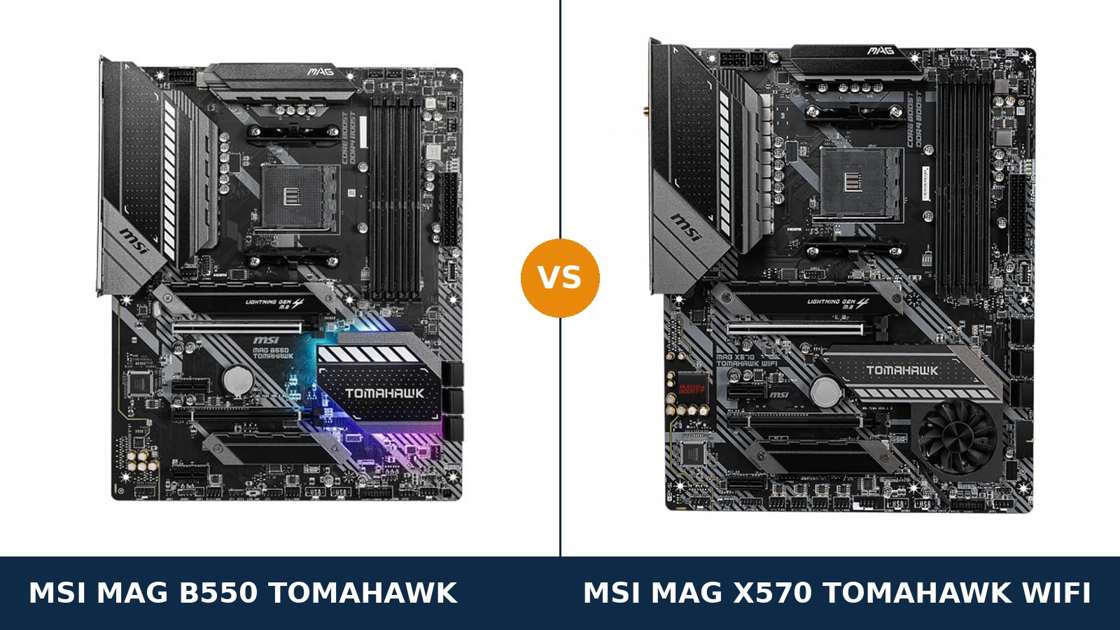
Same brand. Same name. Same heatsink language, same gunmetal shrouds, same TOMAHAWK badge across the chipset cover.
Put the MSI MAG B550 Tomahawk and the MAG X570 Tomahawk WiFi side by side and they look like trim levels of one board. They are not. They are built on two different chipsets with two different philosophies about where PCIe lanes should come from.
The X570 board is the older flagship design: the chipset itself serves up PCIe 4.0 lanes, so the second graphics slot, the second M.2 slot and the fast USB ports all run at full speed. The B550 board is the newer, leaner design: the CPU feeds the important slots, the chipset makes do with PCIe 3.0, and the savings show up as a fanless heatsink and a second LAN port.
That is why this matchup confuses people. The newer board is not simply the better board. Each one wins real categories, and the right choice depends on your processor, your drives and whether your PC connects by cable or by air.
Key Takeaways
- The X570 Tomahawk WiFi is the more complete board. Wi-Fi 6 built in, both M.2 slots at PCIe 4.0, and a second x16 slot that runs at x8.
- The B550 Tomahawk fights back where it counts for wired builds. Dual LAN (2.5 GbE plus gigabit), a fully passive chipset heatsink, and DisplayPort for APU builds.
- CPU support is the hidden trap. The X570 accepts Ryzen 2000 processors and the 3400G / 3200G. The B550 refuses them.
- Power delivery is strong on both. 12+2 phases against 10+2+1, both with 60A Smart Power Stages — either board runs a 5950X.
- Both boards are discontinued AM4 designs. Condition and bundle completeness matter as much as specs when you buy.
Quick Verdict
Buy the MSI MAG X570 Tomahawk WiFi for most builds. It is the more capable foundation.
It brings its own Wi-Fi 6 and Bluetooth. Both of its M.2 slots run a Gen4 drive at full speed. Its second x16 slot carries eight PCIe 4.0 lanes instead of four lanes of PCIe 3.0. And it accepts every AM4 processor worth owning, including the older chips the B550 turns away.
Buy the MSI MAG B550 Tomahawk if your build is wired and staying wired. Its dual LAN ports — 2.5 GbE plus a second gigabit port — suit a streaming PC, home server or router-adjacent gaming rig better than any single-port board.
It is also the silent choice: no chipset fan, nothing to wear out. And for an APU build, its DisplayPort output is the one the X570 does not have.
The Scorecard
Scores below are derived directly from the manufacturer specifications compared in this guide — phase counts, slot counts, port counts and supported standards. They are a reading aid, not benchmark results.
| Category | MAG B550 Tomahawk | MAG X570 Tomahawk WiFi | ||
|---|---|---|---|---|
| Power delivery | 8.5 / 10 | 9 / 10 | ||
| Expansion | 7.5 / 10 | 9 / 10 | ||
| Storage | 8.5 / 10 | 9.5 / 10 | ||
| Networking & wireless | 8 / 10 | 9 / 10 | ||
| USB & rear panel | 7.5 / 10 | 9 / 10 | ||
| CPU support | 7 / 10 | 9.5 / 10 | ||
| Memory | 9 / 10 | 8.5 / 10 | ||
| Overall | 8.2 / 10 | 9.1 / 10 | ||
The pattern: the X570 wins on breadth — more lanes, ports, processors, wireless included. The B550 wins on specific briefs: dual wired networking, silence, and one display output.
At a Glance: Who Each Board Fits
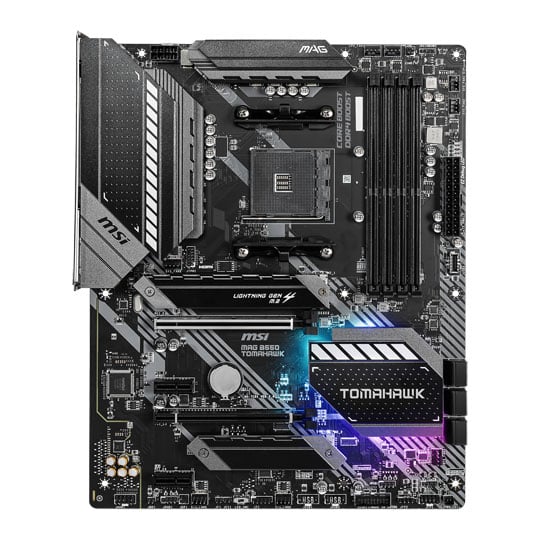
MSI MAG B550 Tomahawk
- 10+2+1 Duet Rail VRM with 60A Smart Power Stages
- Dual LAN: Realtek 2.5 GbE plus a gigabit port
- Fully passive chipset cooling — no fan, ever
- DisplayPort + HDMI outputs for APU builds
- Second M.2 runs at PCIe 3.0 speeds; no Wi-Fi fitted
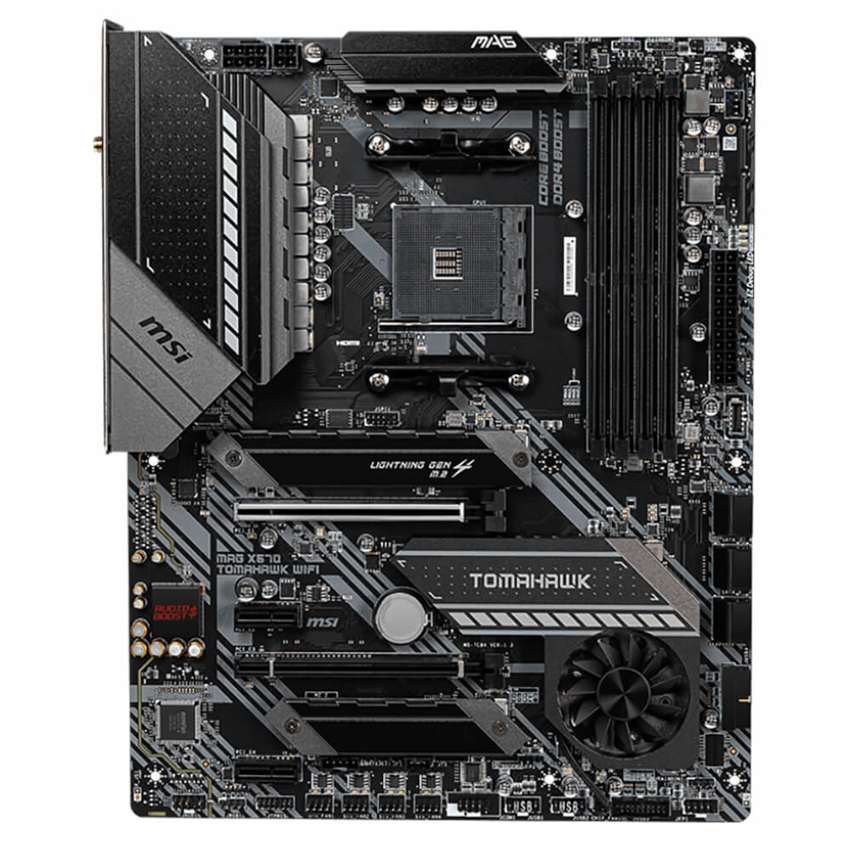
MSI MAG X570 Tomahawk WiFi
- 12+2 Duet Rail VRM, 60A stages, 8+4-pin CPU power
- Intel Wi-Fi 6 AX200 with Bluetooth 5.1 built in
- Both M.2 slots run PCIe 4.0 x4 at full speed
- Second x16 slot runs x8 — real dual-card bandwidth
- Frozr chipset fan fitted; HDMI is the only display output
Choose the MAG B550 Tomahawk if…
Your PC sits next to the router and will never need Wi-Fi. Better: you want two wired networks — one for the internet, one for a NAS, a stream PC or a direct link to another machine.
You are building quiet. A fanless chipset means one less moving part and one less noise source, for the life of the board.
You are building around a Ryzen G-series APU and want DisplayPort for a high-refresh monitor. The X570 cannot give you that port.
Choose the MAG X570 Tomahawk WiFi if…
You need wireless, or Bluetooth for controllers and headsets, without spending on add-in cards.
You own — or plan to buy — two PCIe 4.0 NVMe drives and want both at full speed. Or your processor is a Ryzen 2000 chip, a 3400G or a 3200G: the X570 is the only one of the two that will even POST with them.
You want the fuller rear panel: eight USB ports against six, and a 10 Gb/s front USB-C header instead of 5 Gb/s.
As an Amazon Associate I earn from qualifying purchases at no extra cost to you.
Specifications: The Specs That Actually Matter
Every figure below is taken from MSI's published specifications and datasheets for the two boards.
Both boards are end-of-life designs with no hardware revisions that change the layout described here.
| Specification | MSI MAG B550 Tomahawk | MSI MAG X570 Tomahawk WiFi |
|---|---|---|
| Form factor | ATX, 30.5 × 24.4 cm | ATX, 30.5 × 24.4 cm |
| Socket / chipset | AMD AM4 / B550 | AMD AM4 / X570 |
| CPU support | Ryzen 5000, 5000 G, 4000 G, 3000 series — not 3400G / 3200G, no Ryzen 2000 | Ryzen 5000 down to 2000 series, including 3000 G-series APUs (BIOS updates apply) |
| VRM design | 10+2+1 Duet Rail, 60A Smart Power Stages, single 8-pin EPS | 12+2 Duet Rail, 60A Smart Power Stages, 8+4-pin EPS |
| Memory | 4 × DDR4 DIMM, up to 128 GB, 5100 MT/s (O.C.) | 4 × DDR4 DIMM, up to 128 GB, 4600 MT/s (O.C.) |
| Graphics slot | PCIe 4.0 x16 (from CPU) | PCIe 4.0 x16 (from CPU) |
| Second x16 slot | PCIe 3.0 x4 (from chipset) | PCIe 4.0 x8 — x8/x8 split with both slots populated |
| x1 slots | 2 × PCIe 3.0 x1 | 2 × PCIe x1 |
| M.2 storage | 2 slots: PCIe 4.0 x4 + PCIe 3.0 x4, M.2 Shield Frozr heatsinks on both | 2 slots: PCIe 4.0 x4 + PCIe 4.0 x4, M.2 Shield Frozr heatsinks on both |
| SATA | 6 × SATA 6 Gb/s, RAID 0/1/10 | 6 × SATA 6 Gb/s, RAID 0/1/10 |
| LAN | Realtek RTL8125B 2.5 GbE + Realtek RTL8111H gigabit | Realtek RTL8125B 2.5 GbE |
| Wireless | None fitted | Intel Wi-Fi 6 AX200, Bluetooth 5.1 |
| Audio | Realtek ALC1200, 7.1 HD, 5 jacks + optical S/PDIF | Realtek ALC1200, 7.1 HD, 5 jacks + optical S/PDIF |
| USB 3.2 (rear) | 1 × Gen 2 Type-C, 1 × Gen 2 Type-A, 2 × Gen 1 Type-A (+ 2 × USB 2.0) | 1 × Gen 2 Type-C, 3 × Gen 2 Type-A, 2 × Gen 1 Type-A (+ 2 × USB 2.0) |
| Front USB-C header | USB 3.2 Gen 1, 5 Gb/s | USB 3.2 Gen 2, 10 Gb/s |
| Display outputs (APU) | DisplayPort + HDMI | HDMI only |
| Chipset cooling | Passive heatsink | Frozr heatsink with fan (fan-stop at low temperature) |
| BIOS flashing | Flash BIOS Button (no CPU/RAM/GPU needed) | Flash BIOS Button (no CPU/RAM/GPU needed) |
Two notes on the numbers above. First, the B550 Tomahawk's memory ceiling: MSI's current product page lists 5100 MT/s (O.C.), while its launch-era datasheet listed 4866 MT/s. The table uses the current figure; in practice both boards run the same real-world DDR4 kits.
Second, audio: MSI's summary data for the B550 board has appeared with both “ALC1200” and “ALC1200 / ALC1220P” wording. The B550 datasheet and independent teardowns identify the fitted codec as the ALC1200 — the same codec as the X570 board. Treat audio as a genuine tie.
The Differences That Actually Matter
1. The chipset lanes — what X570 actually buys you
This is the comparison in one idea. On the B550 Tomahawk, PCIe 4.0 exists only where the CPU provides it: the graphics slot and the first M.2 slot. Everything the B550 chipset feeds — the second M.2, the second x16 slot, the x1 slots — runs at PCIe 3.0 speeds.
The X570 chipset generates its own PCIe 4.0 lanes. So on the X570 Tomahawk, the second M.2 slot is a full Gen4 x4 slot. The second x16 slot runs at x8 of Gen4. Even the front USB-C header doubles in speed, because the chipset has the bandwidth to feed it.
Who feels this? Anyone with two fast NVMe drives. Anyone running a second GPU or a high-bandwidth capture card. Anyone plugging a 10 Gb/s enclosure into the front panel.
Who never feels it? A single-GPU, single-NVMe gaming build. For that machine — the most common AM4 build there is — the two chipsets perform identically, because the CPU lanes do all the work on both boards.
2. Power delivery — close on paper, a tie in practice
The X570 Tomahawk carries a 12+2 phase Duet Rail design with 60A Smart Power Stages, fed by 8+4-pin EPS connectors. The B550 Tomahawk answers with 10+2+1 Duet Rail phases, the same class of 60A stage, and a single 8-pin connector.
On a spec sheet, the X570 wins. In a running PC, both VRMs sit under MSI's extended heatsinks, both are properly cooled, and both run a Ryzen 9 5950X at full boost without drama.
The honest read: for Ryzen 5 and Ryzen 7 processors, this section is a dead tie. For a 5950X under sustained all-core loads, or for overclocking, the X570's extra phases and second power connector are cheap insurance.
3. CPU support — the trap that ends builds before they start
Both boards are AM4. Both physically accept the same processors. Electrically and in firmware, they do not support the same processors.
The B550 Tomahawk supports Ryzen 5000, 5000 G-Series, 4000 G-Series and 3000 series chips. It does not support the Ryzen 5 3400G or Ryzen 3 3200G — MSI states this plainly — and it does not support Ryzen 2000 series processors at all.
The X570 Tomahawk supports the full sweep: Ryzen 5000 down through the 2000 series, including the 3000 G-series APUs the B550 refuses, subject to BIOS version. It is the board for an upgrade path that starts with an old chip.
This matters most to upgraders. A Ryzen 5 2600 owner can drop that chip into the X570 today and a 5800X3D next year. On the B550, the 2600 never boots — the new processor must arrive before the board is useful.
Both boards carry a Flash BIOS Button, so updating firmware for Ryzen 5000 needs no spare CPU on either. The tool is equal; the support list is not.
4. Networking — two cables against the airwaves
The B550 Tomahawk is the wired specialist. Its 2.5 GbE port (Realtek RTL8125B) is matched by a second gigabit port (RTL8111H). Two independent wired networks on one board, no add-in card.
That serves real builds: a streaming PC that talks to the gaming rig on one port and the internet on the other. A home server. A machine bridging a NAS to a network that should not see it.
The X570 Tomahawk has one 2.5 GbE port — the same Realtek chip — and spends its networking budget on wireless instead: an Intel Wi-Fi 6 AX200 module with Bluetooth 5.1.
For most households, that is the better spend. Wi-Fi 6 covers the no-cable-run problem entirely, and Bluetooth pairs the controllers, headsets and keyboards a wired-only board cannot talk to.
Verdict within the verdict: dual LAN wins for infrastructure builds. Wi-Fi 6 wins for almost everything else. Neither board does both — which is why this section, not the VRM, decides most real purchases.
5. Storage — identical counts, one speed gap
Count the connectors and storage looks like a tie. Two M.2 slots each, with M.2 Shield Frozr heatsinks over both slots on both boards. Six SATA ports each, with the same RAID 0/1/10 support.
The difference is the second slot's speed. On the X570, both M.2 slots run PCIe 4.0 x4: two Gen4 drives, both at full pace, no asterisks.
On the B550, the second slot is chipset-fed PCIe 3.0 x4. A Gen4 drive fitted there runs at Gen3 speeds — roughly half its sequential ceiling.
Does it matter? For a boot drive plus a game library, barely: game loads do not scale with sequential bandwidth. For scratch disks, video work or any workflow that copies large files between two fast drives, it is the X570's clearest hardware win.
6. Chipset cooling — the fan question
Look at the two boards in the hero image. The X570 Tomahawk has a fan in its chipset heatsink, bottom right. The B550 Tomahawk has a plain finned cover. That fan is the most debated part on either board.
Why it exists: the X570 chipset consumes real power driving its PCIe 4.0 lanes. MSI's Frozr heatsink answers with a double-ball-bearing fan that stops entirely at low chipset temperatures — in desktop and light gaming use, it typically is not spinning at all.
The B550 chipset sips power by comparison. A passive heatsink is all the cooling it needs, and it will never wear out, rattle or clog.
Buying the X570 new-old-stock, the fan is a non-issue. Buying used, spin it with a fingertip first: it should turn freely and silently. A grinding chipset fan is one of the few wear items on either board — and the B550 does not have one.
7. USB, display outputs and memory — the small print
Rear USB goes to the X570: eight ports against six, with three 10 Gb/s Type-A ports against the B550's one. Its front-panel USB-C header is also twice as fast — Gen 2 at 10 Gb/s against Gen 1 at 5 Gb/s.
Display outputs reverse the result. The B550 offers DisplayPort and HDMI, so an APU build can drive a high-refresh monitor properly. The X570 offers HDMI alone — fine for one basic display, limiting for anything more ambitious without a graphics card.
Memory is a paper win for the B550. Both boards have four DDR4 slots and support 128 GB; MSI's current page rates the B550 board to 5100 MT/s (O.C.) against the X570's 4600 MT/s. In practice, AM4 memory overclocking is governed by the processor's controller, not the board — sensible 3600 MT/s kits run identically on both.
CPU Pairing Guide
Start from your processor. On this matchup, the chip you own can make the decision for you — one of these boards refuses whole processor families.
| Your processor | MAG B550 Tomahawk | MAG X570 Tomahawk WiFi | Our call |
|---|---|---|---|
| Ryzen 5 5600 / 5600X | Excellent | Excellent | Either — X570 if you want Wi-Fi |
| Ryzen 7 5800X / 5800X3D | Excellent | Excellent | X570 for features; B550 runs the chip just as well |
| Ryzen 9 5900X / 5950X | Excellent — 60A stages cope | Excellent — extra phases, 8+4-pin feed | X570 Tomahawk, marginally |
| Ryzen 5 5600G / 5700G (APU) | Excellent — DisplayPort + HDMI | Good — HDMI output only | B550 Tomahawk |
| Ryzen 5 3400G / Ryzen 3 3200G | Not supported | Excellent | X570 Tomahawk — the only choice |
| Ryzen 2000 series (2600, 2700X) | Not supported | Excellent | X570 Tomahawk — the only choice |
| Ryzen 3000 series | Excellent | Excellent | Buy on features, not the chip |
Read the two “not supported” rows carefully. They are the entire reason the X570 board still sells: it takes the processors the B550 was never designed to run.
Ready to check today’s price?
Both boards sell through Amazon while stock lasts. On discontinued boards, condition and bundle vary — check the live listing on the board that fits your build.
View on Amazon — B550 TomahawkView on Amazon — X570 Tomahawk WiFiThe 30-Second Decision
| If this sounds like you… | Buy this |
|---|---|
| “No network cable can reach my desk — and I use Bluetooth.” | MAG X570 Tomahawk WiFi |
| “Two wired networks: internet on one port, my NAS or stream PC on the other.” | MAG B550 Tomahawk |
| “I have two PCIe 4.0 NVMe drives and want both at full speed.” | MAG X570 Tomahawk WiFi |
| “My processor is a 3400G / 3200G / Ryzen 2000 chip.” | MAG X570 Tomahawk WiFi — the B550 will not boot it |
| “APU build, one high-refresh monitor, no graphics card.” | MAG B550 Tomahawk (DisplayPort) |
| “Silence matters. No small fans anywhere in my build.” | MAG B550 Tomahawk |
| “Single GPU, single NVMe, wired ethernet, Ryzen 5000.” | Either — buy the cheaper one in better condition |
What You Gain. What You Give Up.
MSI MAG B550 Tomahawk
You gain: a second wired network port no single-LAN board can match without an add-in card. A fanless chipset that never makes a sound or wears out. DisplayPort for APU builds. And, on paper, the higher memory overclocking ceiling.
You give up: Wi-Fi and Bluetooth entirely. Full speed on your second NVMe drive. Eight lanes on the second graphics slot. And any hope of booting a Ryzen 2000 processor or a 3400G / 3200G — those chips are simply not supported.
MSI MAG X570 Tomahawk WiFi
You gain: the complete AM4 feature set — Wi-Fi 6, Bluetooth, two Gen4 M.2 slots, an x8 second slot, eight rear USB ports and the broadest CPU support list MSI published for a Tomahawk. Plus the stronger VRM specification.
You give up: the second LAN port. DisplayPort for APU builds. Passive chipset cooling — there is a fan under that heatsink, and on a used board it is a wear item to inspect. X570 boards also typically cost more than the B550 model, new-old-stock or used.
Pros and Cons
MAG B550 Tomahawk — Pros
- Dual LAN: 2.5 GbE + gigabit, no add-in card needed
- Fanless chipset — silent, nothing to wear out
- DisplayPort + HDMI for APU builds
- 10+2+1 VRM with 60A stages runs any supported Ryzen
- Heatsinks on both M.2 slots
Cons
- No Wi-Fi or Bluetooth
- No support for 3400G, 3200G or Ryzen 2000
- Second M.2 slot limited to PCIe 3.0 x4
- Second x16 slot only x4, and Gen 3
- Six rear USB ports, 5 Gb/s front USB-C header
MAG X570 Tomahawk WiFi — Pros
- Wi-Fi 6 + Bluetooth 5.1 built in
- Both M.2 slots at PCIe 4.0 x4
- Second x16 slot runs x8 (x8/x8 dual-card)
- Widest CPU support: Ryzen 2000 through 5000, incl. 3000 G APUs
- 12+2 VRM, 8+4-pin EPS; 8 rear USB ports
Cons
- Chipset fan is a wear item — inspect on used boards
- Single LAN port only
- HDMI is the only display output for APU builds
- Usually the pricier of the two
- Antennas often missing from used listings
Buying Used or New-Old-Stock: What to Check
Know the market you are in. Both Tomahawks are discontinued. Listings mix remaining retail stock, open-box returns and used boards — and the checks differ for each.
On the X570, check the bundle. The Wi-Fi antennas are the most commonly missing item in used listings, and without them the wireless you paid for barely works. Confirm both antennas, the I/O shield and the SATA cables — or price their absence in.
On the X570, check the chipset fan. Power the board if you can, or spin the fan by hand. It should turn freely and quietly. A seized or grinding fan is fixable, but it is a negotiation point, not a surprise to discover at home.
On both, check the BIOS. A board warehoused since 2020 may carry a BIOS too old for Ryzen 5000. That is not a defect: the Flash BIOS Button on both boards updates firmware with no CPU installed. Just budget the ten minutes.
On the B550, check your processor twice. The support list is the one hard wall in this comparison. Ryzen 2000 chips and the 3400G / 3200G do not work on this board under any BIOS. If that is your chip, buy the X570.
Match the exact model name. “Tomahawk” spans at least five boards across three sockets. The next section names the impostors.
The Upgrade Path Test
AM4 is a finished platform — judge both boards by how gracefully they host its final upgrades.
The CPU upgrade is shared: both boards top out at the same place, a Ryzen 7 5800X3D for gaming or a Ryzen 9 5950X for work, fitted after a BIOS update. Both VRMs handle either chip.
The storage upgrade favours the X570. Gen4 NVMe drives are the default now, and only the X570 gives a second one its full speed. The B550's second slot holds the drive fine — it just runs at Gen3 pace.
The expansion upgrade favours the X570 too. An x8 Gen4 slot keeps capture cards and fast network cards relevant; the B550's x4 Gen3 slot handles mainstream cards and nothing hungrier.
When to Skip Both
Honesty cuts both ways. Some builders should walk past both Tomahawks.
Skip both if you are starting fresh in 2026 with no AM4 parts on hand. AM5 boards with DDR5 are the live platform, and a new build belongs there unless the AM4 discount is dramatic.
Skip both if you need Wi-Fi 6E or USB4. That combination lives on the later MAG X570S Tomahawk Max WiFi — a different board, covered in the similar-names section below.
Skip both for a small-form-factor build; both are full ATX. And skip both if front-panel USB-C at full 10 Gb/s plus a DisplayPort APU output is your exact brief — no single board here does both.
For existing AM4 owners and bargain hunters, though, one of these two is very likely the right board.
Final Verdict
The MSI MAG X570 Tomahawk WiFi is the better board, and the one we would buy for most AM4 builds.
It wins the way complete boards win: nothing important is missing. Wireless and Bluetooth are built in. Both NVMe slots run at full Gen4 speed. The second graphics slot carries real bandwidth. Every AM4 processor from a Ryzen 5 2600 to a 5950X is welcome.
Its costs are specific, not general: one LAN port instead of two, HDMI alone for APU output, and a chipset fan to keep an eye on. Most builders never miss what it lacks.
Buy the X570 Tomahawk WiFi for wireless builds, dual-Gen4 storage, older or APU processors, and any rig meant to stretch AM4 as far as it goes.
View on Amazon — X570 Tomahawk WiFi
Buy the B550 Tomahawk if your network is wired and staying that way — especially if a second port earns its keep — or if a fanless, silent board with DisplayPort for an APU build is the brief.
It is not the lesser board. It is the specialised one, and for its specialities nothing in this comparison touches it.
View on Amazon — B550 Tomahawk
Watch Out: Similar Names, Different Boards
The Tomahawk name is a minefield. Four warnings belong in every version of this guide.
First: the MAG X570S Tomahawk Max WiFi is a later, different board — fanless chipset, Wi-Fi 6E, a different audio codec and a different listing. It is excellent, but it is not the X570 Tomahawk in this comparison, and its price reflects the upgrades.
Second: the MAG B550 Tomahawk MAX WiFi adds wireless to the B550 formula under a longer name. If a “B550 Tomahawk” listing shows antennas in the photos, read the title again — you may be looking at the MAX WiFi, which is a different product at a different price.
Third: the MAG B650 Tomahawk WiFi is an AM5 board. It shares nothing but the badge: different socket, DDR5 memory, total incompatibility with every part in an AM4 build.
Fourth: the B450 Tomahawk Max is the previous generation — PCIe 3.0 throughout. A fine budget board, but not a substitute for either board here.
Slow down on the product page. Match the chipset in the name first, then the exact suffix, then the price — in that order.
Case, Power and Cabling Notes
Both boards are full ATX, 30.5 × 24.4 cm. They fit the same cases and leave the same cable room.
Power connectors differ slightly. Both take the standard 24-pin main connector. The B550 Tomahawk adds a single 8-pin EPS CPU connector; the X570 Tomahawk adds an 8+4-pin pair.
Any reputable modern power supply covers either. The extra 4-pin on the X570 exists for overclocking headroom on the highest-core-count processors; fitting both connectors is the tidy default on that board.
Fan headers favour the B550 on count — six system fan headers (plus CPU and pump) against the X570's four system headers (plus CPU and pump). Large multi-fan cases are slightly easier to wire without splitters on the B550.
Front-panel wiring is otherwise a wash: the USB 3.2 Gen 1 Type-A and USB 2.0 headers match, and the only difference is the USB-C header speed already covered — Gen 2 on the X570, Gen 1 on the B550.
BIOS and Long-Term Support
AM4 is a mature platform, and maturity is a feature. The BIOS releases for both boards are stable, the drivers are settled, and the surprises happened years ago to somebody else.
Both boards sit on MSI's standard support pages: BIOS updates, chipset, LAN and audio drivers, and a per-board CPU support list. Check that list — not forum posts — before any processor swap.
Expect future BIOS releases to be security and compatibility updates rather than new features. On a finished platform, that is exactly what you want.
One board-specific note: the X570 Tomahawk's chipset fan is the only consumable part in this comparison. On an out-of-warranty used board, treat a healthy fan as part of the condition you are paying for.
Both boards also flash firmware from the rear-panel Flash BIOS Button with no processor installed — the most useful support feature on any end-of-life platform, and both Tomahawks have it.
Frequently Asked Questions
Is the X570 Tomahawk WiFi better than the B550 Tomahawk?
For most builders, yes. It adds Wi-Fi 6 and Bluetooth, runs both M.2 slots at PCIe 4.0 x4, gives its second x16 slot eight lanes instead of four, and supports every AM4 processor family. The B550 Tomahawk answers with dual LAN, a fanless chipset and DisplayPort — better only for builds that need those.
Does the MSI MAG B550 Tomahawk have Wi-Fi?
No. The B550 Tomahawk is a wired-only board with two Ethernet ports. MSI sells a separate model, the MAG B550 Tomahawk MAX WiFi, with wireless fitted — check the full model name on any listing, because the two are easy to confuse.
Can both boards run a Ryzen 9 5950X?
Yes. The B550 Tomahawk's 10+2+1 Duet Rail VRM uses 60A Smart Power Stages, and the X570 Tomahawk's 12+2 design uses the same class of stage with an 8+4-pin feed. Both run the 16-core flagship at full boost; update the BIOS before fitting a Ryzen 5000 processor to an older board.
Does the B550 Tomahawk support the Ryzen 5 3400G or 3200G?
No. MSI explicitly excludes the Ryzen 5 3400G and Ryzen 3 3200G from the B550 Tomahawk's support list, and Ryzen 2000 series processors are not supported either. The X570 Tomahawk WiFi supports all of them, subject to BIOS version — it is the only choice of the two for those chips.
Which Tomahawk is better for an APU build without a graphics card?
The B550 Tomahawk, for processors it supports (Ryzen 5000 G and 4000 G series). It provides DisplayPort alongside HDMI, so a high-refresh monitor can be driven properly. The X570 Tomahawk offers HDMI only. If your APU is a 3400G or 3200G, though, the B550 cannot run it at all — the X570 wins by default.
Is the X570 Tomahawk's chipset fan loud? Does it stop?
The Frozr heatsink fan uses a double-ball-bearing design and stops completely at low chipset temperatures, so in light use it is generally not spinning. It is still a moving part: on a used board, check that it spins freely and quietly before buying. The B550 Tomahawk has no chipset fan at all.
Can I run two PCIe 4.0 NVMe drives at full speed on both boards?
Only on the X570 Tomahawk WiFi, where both M.2 slots run PCIe 4.0 x4. On the B550 Tomahawk, the first slot is PCIe 4.0 x4 from the CPU, but the second is PCIe 3.0 x4 from the chipset — a Gen4 drive fitted there runs at Gen3 speeds. Both boards carry heatsinks over both slots and six SATA ports.
Which board should I pick for a Ryzen 7 5800X3D upgrade?
Either — both support the chip after a BIOS update, and both VRMs run it comfortably. Choose on features instead: the X570 if you want Wi-Fi, a second full-speed NVMe slot or the fuller rear panel; the B550 if you want dual LAN, a fanless chipset or DisplayPort for a backup APU later.
Sources & Verification
MSI MAG B550 TOMAHAWK official specifications and datasheet, msi.com • MSI MAG X570 TOMAHAWK WIFI official specifications (us.msi.com) and datasheet • MSI launch material for the X570 Tomahawk series (VRM stage design) • Amazon listing data for both boards used for ASIN verification only; specifications are MSI's. Specifications verified November 2026.

James Wilson
James has been building and benchmarking PCs for over a decade and writes Honestly Compared's motherboard and component guides. His rule for every comparison: the verdict has to survive the spec sheet, not the marketing page.