Home › Motherboards › MSI B550M Pro-VDH WiFi vs MSI PRO B550M-VC WiFi
Search for one of these boards and the other turns up as a suggested match. The names read like a typo and its correction — yet the MSI B550M Pro-VDH WiFi and the MSI PRO B550M-VC WiFi are separate products, from separate MSI ranges, launched two years apart. This guide untangles the naming and settles which board deserves your money.
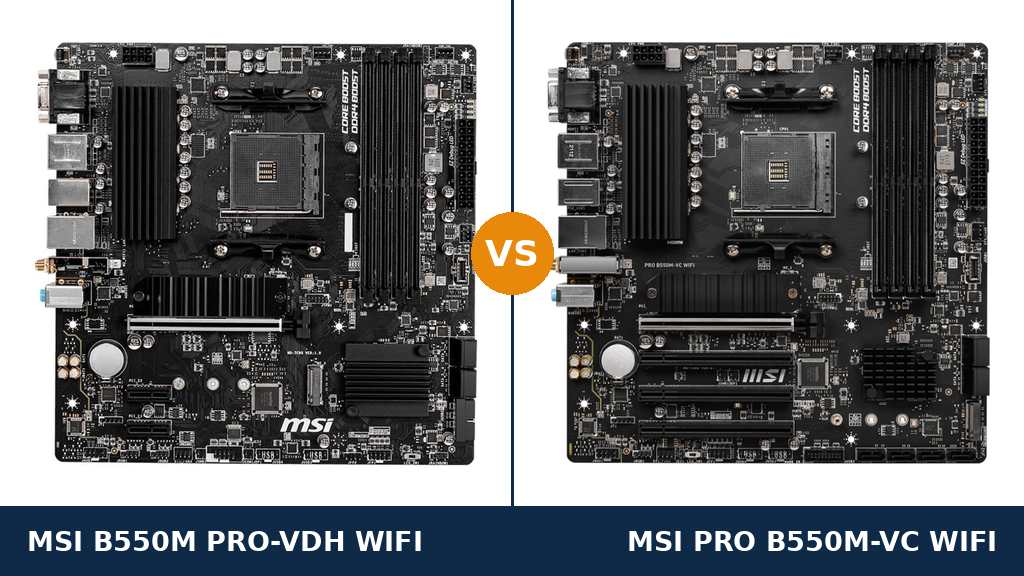
Start with the confusion, because it is justified. Both boards are micro-ATX. Both carry an AM4 socket and the AMD B550 chipset. Both wear four DDR4 slots, two M.2 slots and an MSI badge, and in thumbnail photos they are easy to mistake for one another.
The naming is where buyers get tripped up. The Pro-VDH WiFi sits in MSI's mainstream motherboard line and arrived in 2020 as a budget all-rounder. The PRO B550M-VC WiFi comes from the business-focused PRO series and arrived in 2022. The word PRO in the second name is a product range, not a suggestion that the first board is somehow the amateur edition.
A note on versions before we go further: each of these boards also exists in a plain non-Wi-Fi form. This comparison covers the Wi-Fi models throughout — they are the versions buyers actually cross-shop, and the ones the buy buttons on this page lead to.
Beneath the names, the shared platform is genuine. Memory support matches to the megahertz. The M.2 arrangement matches slot for slot. The audio codec, the display outputs and even the fan header layout are the same. Judge these boards on headline specifications alone and there is almost nothing to judge.
The separation lives in connectivity. The VC updates the wireless hardware by two generations, doubles the speed of two rear USB ports and doubles the SATA count — precisely the specifications that age a motherboard fastest, and precisely the ones a refresh can fix without redesigning the platform. The older board answers with a serial port header the refresh deleted, twice the lighting headers, and a typically lower price. Which of those facts matters is a property of your build, not of the spec sheet, and the rest of this guide works through them one by one.
Buy the MSI PRO B550M-VC WiFi unless you have a specific reason not to. It equals the older board everywhere the platform is concerned, then pulls ahead on the hardware you touch daily — the wireless radio, the rear USB ports and the storage ceiling.
Buy the MSI B550M Pro-VDH WiFi when the PC will sit wired, when a serial port is a genuine requirement rather than a curiosity, or when the saving over the VC is large enough to upgrade something else in the parts list.
Overall scores: Pro-VDH WiFi 8.0/10 · PRO B550M-VC WiFi 8.4/10
Marks out of ten, read directly off the published specification sheets — port counts, slot counts and supported standards. Identical hardware earns identical marks, and nothing here is a benchmark result.
| Category | Pro-VDH WiFi | PRO B550M-VC WiFi |
|---|---|---|
| Power Delivery | 6.0 | 6.0 |
| Wireless & Networking | 5.5 | 9.0 |
| USB Connectivity | 6.0 | 9.0 |
| Storage | 7.0 | 9.0 |
| Expansion | 5.0 | 6.5 |
| Display Outputs | 9.0 | 9.0 |
| Memory Support | 9.0 | 9.0 |
| Overall | 8.0 | 8.4 |
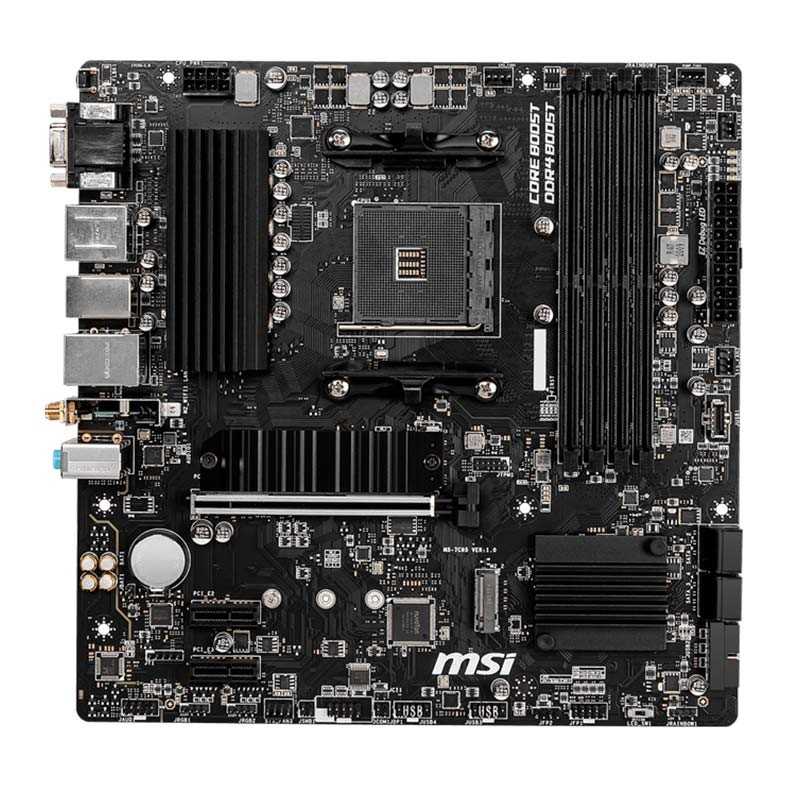
Your desk sits within cable reach of the router, or in a room where Wi-Fi 5 still saturates your internet connection without breaking a sweat.
You run equipment that talks over a serial port — workshop controllers, older networking gear, point-of-sale hardware — and a USB adapter is not an acceptable answer.
Your lighting plan calls for more than a couple of headers' worth of ARGB fans and strips, and you would rather not reach for splitters.
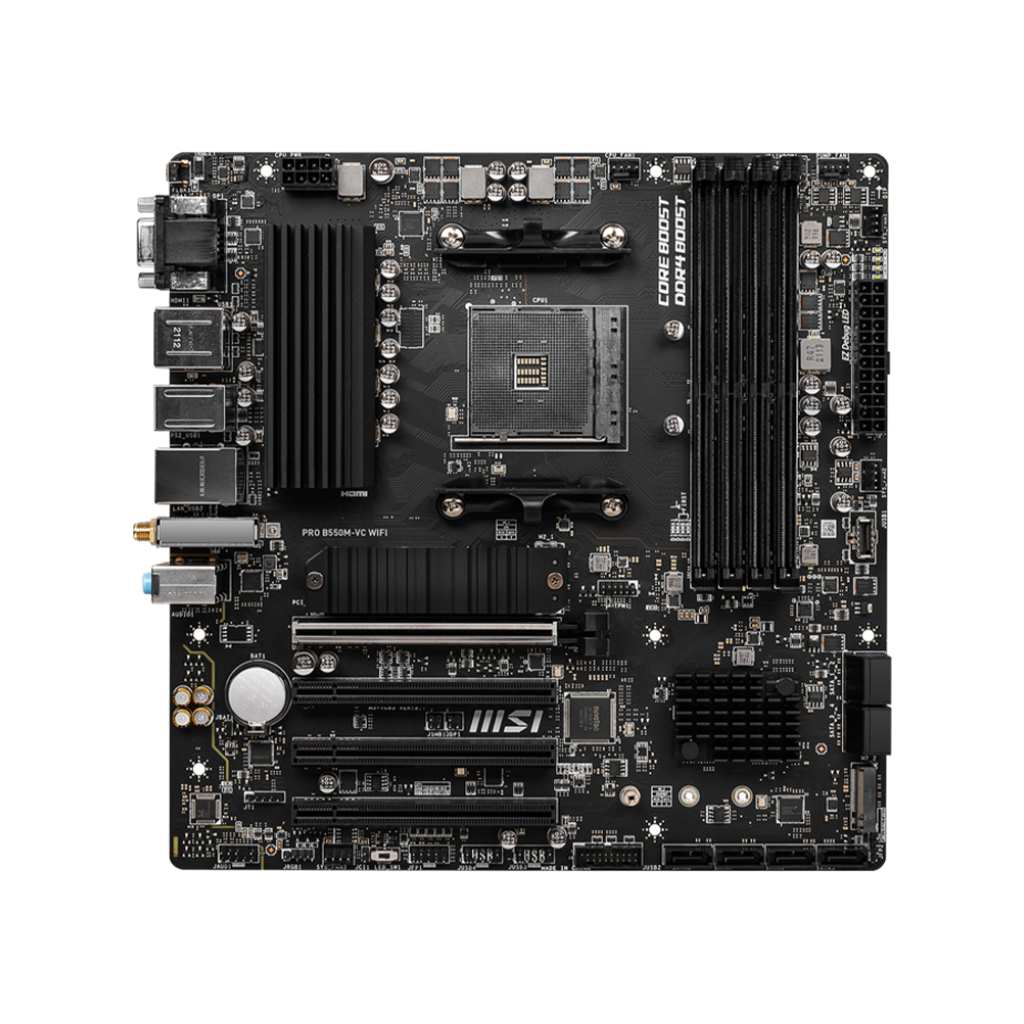
The PC will live on wireless, and your router is Wi-Fi 6E capable today — or will be at some point during the board's service life.
You copy files to external SSDs often enough that 5Gbps USB has become a bottleneck you can actually feel.
You are pooling several SATA drives: a media library, a backup target, or a small home server that will grow over time.
As an Amazon Associate I earn from qualifying purchases at no extra cost to you.
Every figure below comes from MSI's specification pages and user manuals for the two boards. Where a retail listing disagreed with MSI, MSI's figure is the one printed here.
| Specification | MSI B550M Pro-VDH WiFi | MSI PRO B550M-VC WiFi |
|---|---|---|
| Form factor | Micro-ATX, 24.4 × 24.4 cm | Micro-ATX, 24.4 × 24.4 cm |
| Socket / chipset | AM4 / AMD B550 | AM4 / AMD B550 |
| CPU support | Ryzen 5000 / 5000 G / 4000 G / 3000 (not 3400G / 3200G) | Ryzen 5000 / 5000 G / 4000 G / 3000 (not 3400G / 3200G) |
| Memory | 4× DDR4, up to 128GB, 4400+ MHz (OC), A-XMP | 4× DDR4, up to 128GB, 4400+ MHz (OC), A-XMP |
| PCIe x16 slot | 1× PCIe 4.0 x16, Steel Armor | 1× PCIe 4.0 x16, Steel Armor |
| Other PCIe slots | 2× PCIe 3.0 x1 | 3× full-length slots, PCIe 3.0, wired x1 |
| M.2 slots | 2 — Gen4 x4 + SATA (Shield Frozr), Gen3 x4 | 2 — Gen4 x4 + SATA (Shield Frozr), Gen3 x4 |
| SATA ports | 4× SATA 6Gb/s | 8× SATA 6Gb/s (4 chipset + 4 ASMedia ASM1064) |
| RAID | 0 / 1 / 10 (SATA and NVMe) | 0 / 1 / 10 (SATA and NVMe) |
| Rear USB | 4× USB 3.2 Gen 1, 2× USB 2.0 | 2× USB 3.2 Gen 2 (10Gbps), 2× Gen 1, 2× USB 2.0 |
| Front USB | USB-C Gen 1 header, Gen 1 header, 2× USB 2.0 headers | USB-C Gen 1 header, Gen 1 header, 2× USB 2.0 headers |
| Wired LAN | Realtek RTL8111HN Gigabit | Realtek RTL8111GN/HN Gigabit |
| Wi-Fi | Wi-Fi 5 802.11ac (Intel Wireless-AC 3168) | Wi-Fi 6E 802.11ax, 2.4 / 5 / 6 GHz (AMD module) |
| Bluetooth | 4.2 | 5.2 |
| Audio | Realtek ALC892/ALC897, 7.1, Audio Boost | Realtek ALC892/ALC897, 7.1, Audio Boost |
| Display outputs | VGA, DisplayPort, HDMI 2.1 (4K@60) | VGA, DisplayPort, HDMI 2.1 (4K@60) |
| Fan headers | 1× CPU, 1× pump, 3× system | 1× CPU, 1× pump, 3× system |
| Lighting headers | 2× 4-pin RGB, 2× 3-pin ARGB | 1× 4-pin RGB, 1× 3-pin ARGB |
| Serial (COM) header | Yes | No |
| BIOS | 256Mb UEFI, Click BIOS 5, Flash BIOS Button | 256Mb UEFI, Click BIOS 5, Flash BIOS Button |
| Troubleshooting | EZ Debug LED (CPU / DRAM / VGA / Boot) | EZ Debug LED (CPU / DRAM / VGA / Boot) |
Variant note: the Pro-VDH WiFi figures above describe the standard retail board with the Intel Wireless-AC 3168 module. MSI also ships a CEC revision of the same name with a Wi-Fi 6 module and faster rear USB. The buying guide below explains how to tell the two apart before you order.
The Pro-VDH WiFi's radio is an Intel Wireless-AC 3168. That means Wi-Fi 5 on the 2.4 and 5GHz bands and Bluetooth 4.2 — respectable in 2020, and the component that dates this board more than any other.
The VC's pre-installed module comes from AMD and speaks Wi-Fi 6E. Alongside the familiar bands it opens the 6GHz band, where there is far less neighbouring traffic to fight, and it supports 160MHz channels and MU-MIMO. Bluetooth climbs to 5.2 in the same move.
Context matters here. On a wired connection the boards are dead level, because the Ethernet hardware is the same gigabit class on both. The wireless gap only exists for machines that actually use wireless — but for those machines it is the largest single difference in this comparison, and a motherboard's radio is awkward and costly to upgrade after the fact.
One ownership tip: the VC's module is MediaTek-based, and throughput complaints on it usually trace back to old drivers. If speeds disappoint out of the box, install the chipset maker's current driver before blaming the hardware.
Every fast port on the Pro-VDH WiFi's rear panel is USB 3.2 Gen 1 — four of them, at 5Gbps, backed by two USB 2.0 ports. Perfectly normal for its price and era, but it puts a hard ceiling on any external drive you connect.
The VC converts two of those Gen 1 ports into Gen 2 ports running at 10Gbps. The practical translation: a modern external NVMe drive that peaks around 1,000MB/s on the VC will be held to roughly half that figure on the Pro-VDH. Anyone who backs up to external SSDs, or edits media straight off one, will meet this difference weekly rather than theoretically.
At the front of the case, honours are even. Each board provides a USB-C header at Gen 1 speed, a Gen 1 Type-A header and a pair of USB 2.0 headers. Neither offers 10Gbps at the front panel, so your case choice cannot separate them.
Flash storage is a draw. Both boards lay out a PCIe 4.0 x4 M.2 slot under an MSI Shield Frozr heatsink, add a PCIe 3.0 x4 slot behind it, and support RAID 0, 1 and 10 across SATA and NVMe alike. A gaming build with one or two NVMe drives cannot tell these boards apart.
SATA is where the VC walks away with it. Four ports on the Pro-VDH is the conventional B550 allowance. The VC doubles the count to eight by hanging a second set of four off an ASMedia ASM1064 controller — enough for a mirrored pair of bulk hard drives, a couple of SATA SSDs and an optical drive, all at once.
Be honest about whether you will use it. Most gaming PCs never plug in a third SATA device, let alone a fifth, and for those builds the extra ports are inert. For a media server, a backup box or a consolidation build rescuing drives from an old machine, they are the feature that decides the purchase.
Photograph the two boards from above and expansion looks like a rout for the VC: three full-length PCIe slots sit below its main x16 slot, where the Pro-VDH manages two stubby x1 slots. Full-length connectors matter mechanically — some capture cards, legacy RAID controllers and professional audio interfaces simply will not seat in a short slot.
Now the correction. Every one of the VC's three extra slots is wired for a single PCIe 3.0 lane, exactly like the Pro-VDH's pair. What the newer board sells you is physical compatibility and one additional slot, not bandwidth. No add-in card runs faster on it.
And neither board changes the fundamental shape of the platform: one CPU-fed x16 slot, one graphics card. If a second GPU is in your plans, you are shopping in the wrong comparison entirely.
Refreshes giveth, and occasionally they taketh away. The VC drops the serial port header altogether. For most home builders that line of the manual is trivia — but serial remains a working interface in workshops, labs and retail, still driving CNC controllers, PLCs, ageing network hardware and till systems.
If anything in your life talks over a COM port, your decision is already made, and it is the older board. USB-to-serial adapters exist, but timing-sensitive legacy equipment does not always tolerate them, and a native header removes the gamble.
The second regression is cosmetic. The Pro-VDH carries two 4-pin RGB and two 3-pin ARGB headers; the VC halves that to one of each. A business-line board was never going to prioritise light shows, but a case full of ARGB fans will exhaust the VC's headers quickly and send you shopping for splitters or a hub.
Remove radios and ports from the equation and the boards merge. Memory is identical down the line: four slots, a 128GB ceiling, 4400+ MHz overclocked support with A-XMP profiles, and ECC unbuffered DIMM support for those who want it.
APU builders get the same picture from both: VGA, DisplayPort and HDMI 2.1, each capable of 4K at 60Hz where the connector allows. Cooling hardware matches too — a CPU fan header, a pump header, three system fan headers — as do the conveniences: a rear-panel Flash BIOS Button, EZ Debug LEDs and the same 256Mb Click BIOS 5 firmware.
Power delivery deserves an honest paragraph. MSI publishes no phase count for either model, so treat confident forum claims with suspicion. Independent teardowns describe the Pro-VDH WiFi's arrangement as a modest 4+2+1, adequate for any Ryzen chip at stock settings — and there is no published evidence that the VC's delivery is any stronger, which is why we score the category level. Neither board is a serious manual-overclocking platform for a 16-core processor, and neither pretends to be.
Audio closes the list of shared parts: a Realtek ALC892/ALC897 codec on both, with MSI listing the two part numbers because the fitted chip varies between production batches. The only software-era difference is branding — the Pro-VDH's documentation speaks of Dragon Center, while the VC belongs to the MSI Center generation.
A shared platform means shared pairing advice — with a few rows where the board, not the chip, changes the recommendation.
| Processor | On the Pro-VDH WiFi | On the PRO B550M-VC WiFi |
|---|---|---|
| Ryzen 5 5600 | The natural partner. Six stock cores ask nothing of this board that it cannot comfortably give. | Performance is identical. Take this board when the same build also wants Wi-Fi 6E or the extra SATA ports. |
| Ryzen 7 5700X | A sound productivity pairing that boosts fully at stock settings. | Identical again — but eight SATA ports make it the better foundation for a workstation holding large local libraries. |
| Ryzen 7 5700X3D / 5800X3D | The fastest gaming chips on the platform drop straight in, and their locked multipliers never stress the power delivery. | Identical, with a bonus: if you game over Wi-Fi, the 6E radio makes this the stronger X3D home of the two. |
| Ryzen 9 5900X / 5950X | Supported and stable at stock. Keep decent airflow washing over the VRM area during long renders. | The same guidance applies. For heavy overclocking of a 16-core chip, look at a higher tier than either board here. |
| Ryzen 5 5600G (APU) | All three display outputs work, VGA included — handy with an older monitor. Remember the 3400G and 3200G are excluded. | Display support is identical. The stronger wireless suits a living-room or study build that will never be cabled. |
| Memory advice | Two 16GB DDR4-3600 sticks are the value sweet spot; four slots leave the 128GB ceiling open. | The same recommendation. For server duty, four 32GB ECC unbuffered sticks are happily supported. |
| If you… | Buy |
|---|---|
| Will connect over Wi-Fi rather than a cable | PRO B550M-VC WiFi |
| Copy large files to external SSDs and resent the wait | PRO B550M-VC WiFi |
| Own five or more SATA drives, or are planning a home server | PRO B550M-VC WiFi |
| Need a serial port for workshop or legacy equipment | B550M Pro-VDH WiFi |
| Are wiring a case full of ARGB fans and strips | B550M Pro-VDH WiFi |
| Run wired, watch the budget, and found the Pro-VDH clearly cheaper | B550M Pro-VDH WiFi |
| Simply want the pick that ages best | PRO B550M-VC WiFi |
On specification, the VC is the newer and better-connected board, while the Pro-VDH WiFi counters with a serial header, more lighting headers and frequent discounts. Because the price gap between them moves, it is worth thirty seconds on both listings before committing.
View the Pro-VDH WiFi on Amazon View the PRO B550M-VC WiFi on Amazon
You gain: the only serial port header in this pairing, double the lighting headers for RGB-heavy builds, and a proven budget board that is frequently the cheaper purchase — all on the same memory, M.2 and display platform as its rival.
You give up: two generations of wireless progress, every USB port faster than 5Gbps, and half the SATA capacity. Its expansion slots are also short x1 designs that some full-length cards cannot physically use.
You gain: Wi-Fi 6E with the 6GHz band and Bluetooth 5.2, a pair of 10Gbps rear USB ports, eight SATA ports for storage-heavy builds, and full-length expansion slots that accept a wider range of utility cards.
You give up: the serial header entirely, half of the lighting headers, and usually a slice of budget — the connectivity premium is real, even if it is modest.
Confirm you are buying the Wi-Fi version. Both model names also exist without wireless hardware, and marketplace listings occasionally blur the SKUs. The boards compared here carry Wi-Fi modules — check the wireless line of the exact listing in front of you, not just the title.
Pro-VDH buyers: identify the wireless revision. Alongside the standard Wi-Fi 5 board, MSI ships a CEC revision of the Pro-VDH WiFi with a Wi-Fi 6 module and faster rear USB, and some retailers describe the ordinary board as Wi-Fi 6 regardless. If wireless speed is a deciding factor for you, verify the module on the listing — or sidestep the ambiguity entirely with the VC, which is Wi-Fi 6E in every box.
Carried-over APUs need a second look. The B550 chipset never supported the Ryzen 5 3400G or Ryzen 3 3200G, and MSI lists both chips as incompatible with these boards. Anyone upgrading from a B450 system around one of those APUs will find it simply will not boot here.
Old stock and BIOS versions. Both boards predate parts of the Ryzen 5000 range, so early stock can need a BIOS update for the newest chips. Current retail units ship ready, and the rear-panel Flash BIOS Button lets you update with no CPU installed at all — a short job, not an obstacle.
Fit the antennas, and place them well. Both boards bundle screw-on antennas; attach them rather than leaving them in the box. On the VC, remember that the 6GHz band trades range for speed, so antenna position and a clear path to the router matter more than they did at 5GHz.
Eight SATA ports, one setting. Four of the VC's SATA ports run through its ASMedia controller. If a drive connected to ports five to eight does not appear on first boot, enable the controller in BIOS before suspecting the drive.
AM4's story is finished, and both boards share the ending. No further CPU generation will arrive for this socket, so upgrading means travelling within the Ryzen range rather than beyond it.
Fortunately, the range tops out high. A system that starts on a Ryzen 5 5600 can later accept a 5700X3D — a chip that still trades blows with far newer gaming processors — needing nothing more than a BIOS update. DDR4 carries across the whole journey, which keeps every step of that path inexpensive.
Between the two boards, the VC's connectivity gives it the longer stride: storage headroom for eight SATA drives, full-speed external drives, and a wireless standard that will outlast several router replacements. The Pro-VDH WiFi's ceiling is identical in CPU and memory terms; only its ports and radio cap out sooner.
The honest caveat stands for both. If you are building new with a healthy budget and expect to swap the CPU again in a few years, AM5 is the platform with a future. These B550 boards earn their place by being mature, predictable and cheap — not by being future-proof.
Your network is faster than gigabit. Both boards stop at 1GbE wired networking. If you shuffle large files around a home network, a B550 board with 2.5GbE — MSI's MAG tier, for instance — serves you better than either of these plus an add-in card.
You need serious PCIe. One x16 slot and x1-wired utility slots are the ceiling here. Builds planning several high-bandwidth cards belong on ATX B550 or X570 boards with proper lane sharing.
This build must evolve for years. A new AM5 system costs more today and buys DDR5 plus years of CPU upgrades. If the machine must grow rather than eventually be replaced, skip B550 altogether.
The Pro-VDH is priced like the VC. The older board's argument leans heavily on value. At price parity, its serial and lighting advantages become niche talking points, and the VC's connectivity wins for nearly everyone.
Support for both boards runs through the usual MSI channels: a dedicated product page carrying BIOS files and drivers, the Click BIOS 5 firmware, and MSI Center for monitoring and fan control — older Pro-VDH documentation still refers to that software's predecessor, Dragon Center.
BIOS longevity has been B550's quiet virtue. MSI continued shipping AGESA updates for both of these models as later Ryzen 5000 processors — X3D chips included — arrived years after launch. Before fitting a recently released CPU, take the minute to check you are on the latest BIOS.
In the US, both boards carry MSI's three-year motherboard warranty. Keep the receipt and the box, since the serial number printed on the label is what a claim will ask for.
One warning that the shared naming makes essential: download BIOS and driver files from the exact product page for your board. A Pro-VDH WiFi BIOS and a PRO B550M-VC WiFi BIOS are different files, and the near-identical names make the wrong download an easy mistake. The Flash BIOS Button cannot rescue a board flashed with its sibling's firmware through the normal update route.
The PRO B550M-VC WiFi is a model refresh done properly. MSI preserved everything that made the Pro-VDH WiFi a sensible budget board — memory support, M.2 layout, display outputs, troubleshooting aids — and modernised exactly the components that date fastest. Wi-Fi 6E, Bluetooth 5.2, 10Gbps USB and eight SATA ports are unglamorous specifications, but they are the ones still paying rent half a decade from now.
None of that makes the Pro-VDH WiFi a bad buy. It remains the only board here with a serial header, it is the friendlier foundation for a lighting-heavy build, and on a wired desk with a modest drive count it surrenders nothing in everyday performance. A wide enough price gap turns it into the smart purchase.
For most AM4 builders today, though, the VC's connectivity premium is money spent in the right place. Buy the Pro-VDH WiFi when its specialist strengths — serial, lighting headers, or a clear price advantage — speak directly to the machine you are building.
View the Pro-VDH WiFi on Amazon View the PRO B550M-VC WiFi on Amazon
No. They are different products from different MSI ranges, launched two years apart. The Pro-VDH WiFi is a 2020 mainstream board; the PRO B550M-VC WiFi is a 2022 business-line board. They share the B550 platform — memory, M.2 layout, display outputs — but differ in wireless hardware, USB speeds, SATA count, expansion slots and headers.
Gaming performance is identical: same chipset, same PCIe 4.0 x16 slot, same memory support. The PRO B550M-VC WiFi edges ahead as a package because its Wi-Fi 6E radio gives lower-latency wireless play and its Gen 2 USB ports are kinder to external game libraries. If you play wired, there is nothing between them.
The standard board does not — it ships with an Intel Wireless-AC 3168 module providing Wi-Fi 5 and Bluetooth 4.2. A separate CEC revision with Wi-Fi 6 does exist, and some listings blur the two, so check the wireless specification on the exact listing. The PRO B550M-VC WiFi carries Wi-Fi 6E on every unit.
Yes. Both support the full Ryzen 5000 family, X3D models included, on a current BIOS. The 5800X3D's locked multiplier means the boards' modest power delivery is not a limitation in practice, and the Flash BIOS Button on each board makes updating for a newer chip straightforward.
Because the B550 chipset never supported the 3400G or the 3200G. Those APUs are built on an older architecture that AMD excluded from B550, and MSI lists both as incompatible with these boards. They belong on B450 motherboards instead.
The PRO B550M-VC WiFi holds ten: two M.2 drives plus eight SATA drives, with four of the SATA ports provided by an ASMedia ASM1064 controller. The B550M Pro-VDH WiFi holds six: the same two M.2 slots and four SATA ports.
Not in performance terms. The PRO line skips gaming styling, but underneath sits the same B550 hardware: PCIe 4.0, a steel-reinforced x16 slot, A-XMP memory tuning and the same BIOS family. It plays games exactly as well as its specification suggests; it just dresses soberly while doing it.
Yes. Each provides an internal USB 3.2 Gen 1 Type-C header for a case front port, alongside a Gen 1 Type-A header and two USB 2.0 headers. Neither board offers Gen 2 speed at the front panel, so front connectivity does not separate them.
Sources & Verification: Specifications are taken from MSI's official product pages, specification pages and user manuals for the B550M PRO-VDH WiFi and the PRO B550M-VC WiFi, cross-checked against each other and against the VC's manufacturer datasheet dated 2024-08-13; where retailers disagreed, MSI's figures prevailed. Three notes. First, MSI's overview page for the VC still carries an outdated "Intel Wi-Fi 6" line — the current specification sheet and manual both list an AMD Wi-Fi 6E module with Bluetooth 5.2, which is what this guide uses. Second, MSI publishes no VRM phase count for either board; the Pro-VDH arrangement quoted in discussion comes from independent teardowns. Third, one retailer's structured data credits the VC with a PCIe x4 slot; MSI's manual and spec sheet show full-length slots wired at x1, and that is the figure used here. Amazon listings were verified against model numbers and UPCs — Pro-VDH WiFi UPC 824142219393; PRO B550M-VC WiFi UPC 824142299258. Product photos are manufacturer images from MSI and its retail partners.
Disclosure: Honestly Compared is reader-supported. When you buy through links on this page, we may earn an affiliate commission from Amazon, at no extra cost to you. Prices and availability change; check the product page for the latest information.
