
MSI B550M Pro-VDH WiFi vs MSI B550-A Pro: Which Should You Buy?
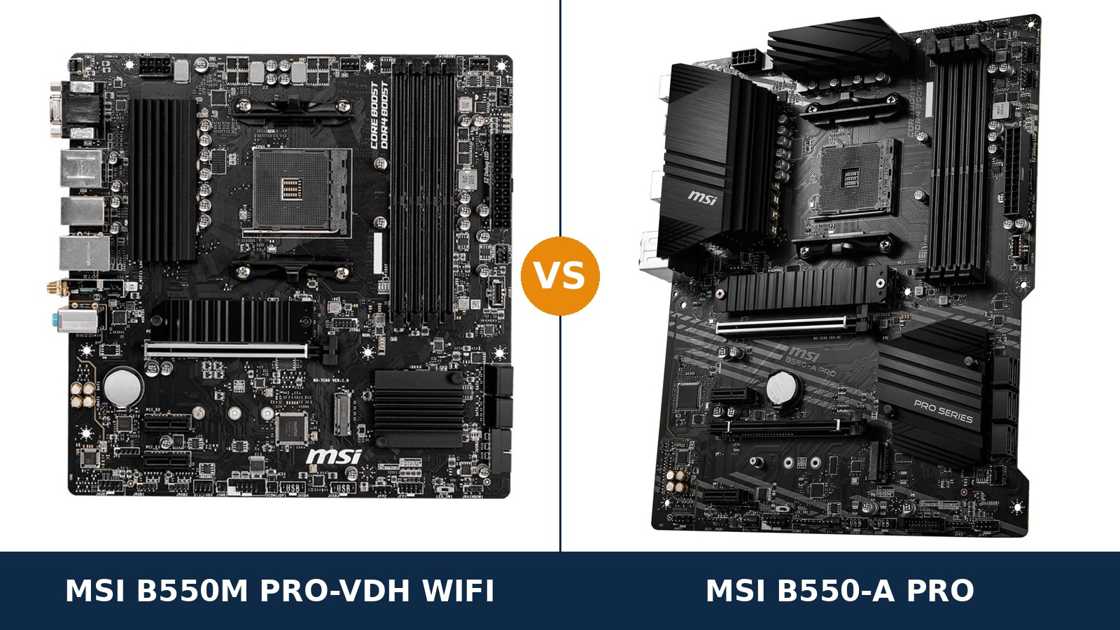
Same brand. Same chipset. Same socket. Two completely different ideas about what a budget board should be.
The MSI B550M Pro-VDH WiFi is the convenience play: a compact micro-ATX board with Wi-Fi and Bluetooth built in, three display outputs, and everything a straightforward build needs on day one.
The MSI B550-A Pro is the foundation play: a full-size ATX board with a much stronger power design, a second full-length expansion slot, more storage ports and faster USB — but no wireless at all.
Neither is the “better board” in the abstract. Each one wins the argument for a specific kind of build, and loses it for the other. This guide settles which one is yours, using MSI's own published specifications throughout.
Key Takeaways
- The B550-A Pro is the stronger foundation. A 10+2+1 phase power design, four expansion slots and six SATA ports against the Pro-VDH's leaner layout.
- The Pro-VDH WiFi is the only one with wireless. Wi-Fi 5 and Bluetooth are built in — modest 1×1 Wi-Fi, but present, which the A Pro cannot say at any price.
- APU builders should look at the Pro-VDH first. It carries HDMI, DisplayPort and VGA — three display outputs, including a legacy port the A Pro dropped entirely.
- Storage speed is a tie; storage count is not. Both boards run dual M.2 at PCIe 4.0 x4 and 3.0 x4. The A Pro adds two extra SATA ports.
- Check which Pro-VDH WiFi you are actually buying. A separate (CEC) variant quietly upgrades the wireless to Wi-Fi 6 and adds faster rear USB.
Quick Verdict
Buy the MSI B550-A Pro for most gaming and upgrade-minded builds. It is the more capable board.
Its 10+2+1 Duet Rail power design is in a different league from the Pro-VDH's power delivery. It adds a second PCIe x16 slot, six SATA ports, and USB 3.2 Gen 2 on the rear panel — Type-A and Type-C.
If a discrete graphics card is in the build and a Ryzen 7 is in the future, this is the board. It is not close.
Buy the MSI B550M Pro-VDH WiFi if wireless is non-negotiable, your case is compact, or an APU is doing the graphics. It is the only one of the two that connects to Wi-Fi out of the box.
Its three display outputs — including VGA for an older monitor — make it the natural home and office board. For a Ryzen 5 or an APU build that will stay as it is, its compromises never show.
The Scorecard
Scores below are derived directly from the manufacturer specifications compared in this guide — phase counts, slot counts, port counts and supported standards. They are a reading aid, not benchmark results.
| Category | B550M Pro-VDH WiFi | B550-A Pro | ||
|---|---|---|---|---|
| Power delivery | 6 / 10 | 9 / 10 | ||
| Expansion | 5 / 10 | 8 / 10 | ||
| Storage | 8 / 10 | 9 / 10 | ||
| Wireless & networking | 8 / 10 | 5 / 10 | ||
| USB & rear panel | 6 / 10 | 9 / 10 | ||
| Display outputs (APU builds) | 9 / 10 | 7 / 10 | ||
| Memory | 9 / 10 | 9 / 10 | ||
| Overall | 7.3 / 10 | 8.0 / 10 | ||
The pattern is consistent. The A Pro wins on the hardware you cannot change later — power, slots, ports. The Pro-VDH wins on the two things that decide a build on day one: wireless and display flexibility.
At a Glance: Who Each Board Fits
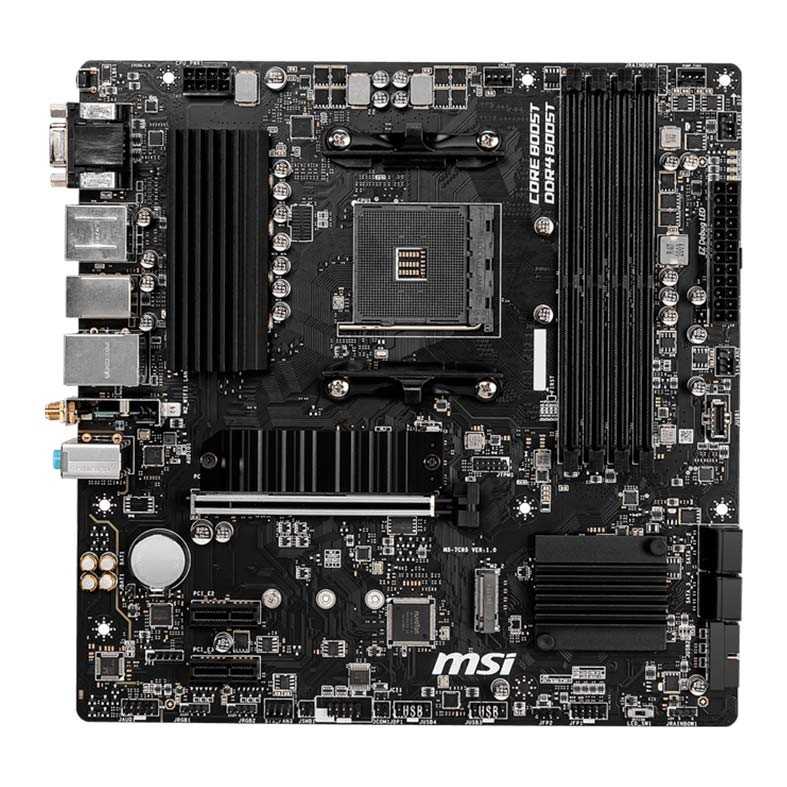
MSI B550M Pro-VDH WiFi
- Wi-Fi 5 (802.11ac) and Bluetooth 4.2 built in
- Three display outputs: HDMI, DisplayPort and VGA
- Micro-ATX — fits compact cases
- Dual M.2: PCIe 4.0 x4 + PCIe 3.0 x4, with an M.2 heatsink
- Front-panel USB-C header included
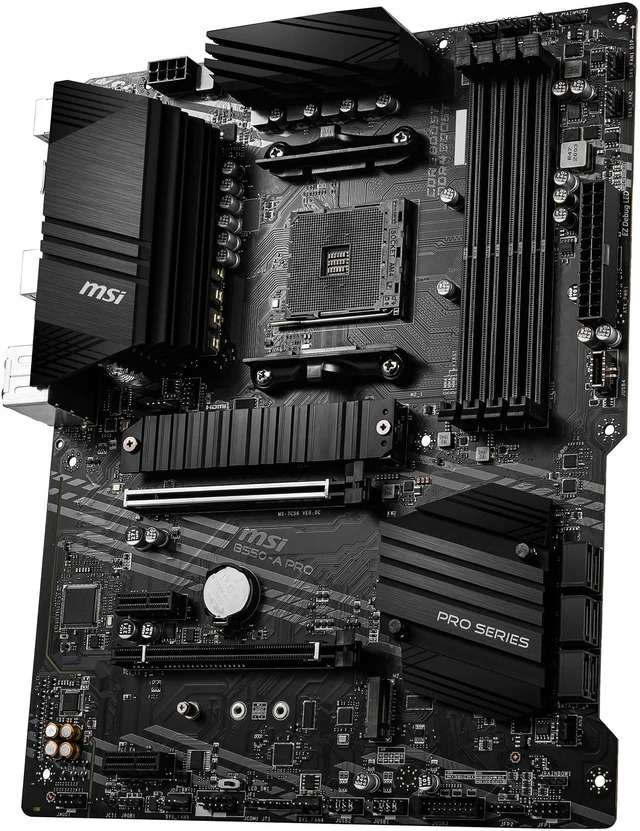
MSI B550-A Pro
- 10+2+1 Duet Rail digital power design with extended heatsink
- Four expansion slots, including a second PCIe x16 (x4)
- USB 3.2 Gen 2 Type-A and Type-C on the rear panel
- Six SATA ports for larger storage arrays
- Full ATX layout with room to work
Choose the B550M Pro-VDH WiFi if…
Your PC will not sit near a router. Wi-Fi and Bluetooth out of the box beat a cable run or a dongle, every time.
You are building around an APU. Three display outputs — VGA included — cover any monitor you already own, old or new.
Your case is micro-ATX. Or your build is a Ryzen 5 that will stay a Ryzen 5, in which case the A Pro's extra muscle buys you nothing.
Choose the B550-A Pro if…
A graphics card is in the build, or firmly in the plan. The second x16 slot and stronger VRM are bought for the PC's second and third years.
You run several SATA drives. Six ports against four is a hard limit, not a preference.
You move files over USB. The A Pro's Gen 2 ports run at 10 Gb/s; the Pro-VDH tops out at half that, everywhere.
As an Amazon Associate I earn from qualifying purchases at no extra cost to you.
Specifications: The Specs That Actually Matter
Every figure below is taken from MSI's published specifications and datasheets for these two boards, cross-checked against MSI's product data.
One figure is flagged where it appears: MSI does not publish a phase count for the Pro-VDH WiFi, so its power design is described from independent teardowns of the production board — the same basis used across our MSI coverage.
| Specification | MSI B550M Pro-VDH WiFi | MSI B550-A Pro |
|---|---|---|
| Form factor | Micro ATX, 24.4 × 24.4 cm | ATX, 30.5 × 24.4 cm |
| Socket / chipset | AMD AM4 / B550 | AMD AM4 / B550 |
| CPU support | Ryzen 5000 & 3000, 4000 G-Series (3400G / 3200G not supported) | Ryzen 5000 & 3000, 4000 G-Series (3400G / 3200G not supported) |
| VRM design | 4+2+1 phase (independent teardowns; MSI does not publish a count), heatsink on the VCore bank | 10+2+1 Duet Rail digital power with doubler design, extended heatsink |
| Memory | 4 × DDR4 DIMM, up to 128 GB, 4400 MT/s (O.C.), A-XMP | 4 × DDR4 DIMM, up to 128 GB, 4400 MT/s (O.C.), A-XMP |
| Graphics outputs (APU) | HDMI, DisplayPort, VGA (D-Sub) — three outputs | HDMI, DisplayPort |
| Expansion slots | PCIe 4.0 x16 + 2 × PCIe 3.0 x1 | PCIe 4.0 x16 + PCIe 3.0 x16 (x4, CrossFire) + 2 × PCIe 3.0 x1 |
| M.2 storage | 2 slots: PCIe 4.0 x4 + PCIe 3.0 x4, M.2 Shield Frozr heatsink | 2 slots: PCIe 4.0 x4 + PCIe 3.0 x4, M.2 Shield Frozr heatsink |
| SATA | 4 × SATA 6 Gb/s, RAID 0/1/10 | 6 × SATA 6 Gb/s, RAID 0/1/10 |
| Wireless | Intel Wireless-AC 3168: Wi-Fi 5, up to 433 Mb/s, Bluetooth 4.2 | None fitted |
| LAN | Realtek RTL8111H-series Gigabit Ethernet | Realtek RTL8111H Gigabit Ethernet |
| Audio | Realtek ALC892/ALC897, 7.1 HD | Realtek ALC892/ALC897, 7.1 HD |
| USB 3.2 (rear) | 4 × Gen 1 Type-A (5 Gb/s) — no Gen 2 | Gen 2 Type-C + Gen 2 Type-A (10 Gb/s), 2 × Gen 1 Type-A |
| Front-panel USB-C | USB 3.2 Gen 1 Type-C header | USB 3.2 Gen 1 Type-C header |
| BIOS flashing | Flash BIOS Button (no CPU/RAM/GPU needed) | Flash BIOS Button (no CPU/RAM/GPU needed) |
Variant note: MSI also sells a B550M Pro-VDH WiFi (CEC) variant. It upgrades the wireless module to Intel Wi-Fi 6 (AX200/AX210) with Bluetooth 5.2, and adds two rear USB 3.2 Gen 2 ports.
The standard board in this comparison — the one behind the common listings — is Wi-Fi 5 with Gen 1 USB only. Some retailer titles blur the two together. Check the exact model name on the box before assuming you got the upgraded wireless.
The B550-A Pro has no such split. Every B550-A Pro is the same board: wired only, Gen 2 USB included.
The Differences That Actually Matter
1. Power delivery — the widest gap between these boards
This is not a close section. The B550-A Pro runs MSI's 10+2+1 Duet Rail digital power design: ten CPU phases working through a doubler design, under an extended all-metal heatsink with high-grade thermal pads.
The Pro-VDH WiFi runs a far leaner design. MSI does not publish its phase count; independent teardowns of the production board identify a 4+2+1 arrangement, with a heatsink over the VCore bank.
For a Ryzen 5 5600 or 5500, both boards are comfortably sufficient. Stock clocks, gaming loads, everyday work — you will never feel the difference, and we will not pretend otherwise.
Step up to a Ryzen 7 5800X, and then to a Ryzen 9, and the boards separate. The A Pro's design spreads the load across more than twice the phases and sinks the heat into a much larger heatsink. Sustained all-core work — rendering, compiling, transcoding — is exactly where that headroom lives.
The Pro-VDH will run a Ryzen 7 at stock. It is simply working closer to its limits to do it, and a Ryzen 9 for heavy all-core work is beyond what we would recommend on it.
The principle from every budget-board comparison applies here in its purest form: the VRM is the one part of a motherboard you can never upgrade. The A Pro buys that insurance. The Pro-VDH spends the money on wireless instead.
2. Size and expansion — four slots against three, and a second x16 that matters
The A Pro is a full ATX board. The Pro-VDH is micro-ATX. That size difference is not cosmetic — it is where the A Pro's extra hardware physically lives.
Both boards give a graphics card the same full PCIe 4.0 x16 slot with MSI's Steel Armor reinforcement. With a G-series APU fitted, that slot runs at PCIe 3.0 speeds on both, as on every B550 board. No difference.
Below it, they part company. The A Pro adds a second PCIe x16 slot wired at x4, with AMD CrossFire support, plus two x1 slots. The Pro-VDH offers two x1 slots and stops there.
An x4 slot is where serious add-in cards live: a capture card, a 10-gigabit network card, an NVMe adapter. On the Pro-VDH, those cards either do not fit the slot layout or run strangled on a single lane. On the A Pro, they just work.
One honest caveat on the A Pro: fit a PCIe SSD in its second M.2 slot and one of its x1 slots (PCI_E3) goes unavailable. The chipset lanes are shared. It still leaves the A Pro ahead on slots — but the four-slot headline is really three-and-a-half in a dual-NVMe build.
The size cuts the other way for case choice. The Pro-VDH fits compact micro-ATX cases the A Pro simply cannot enter. If your case is small, this section is not an A Pro win at all — it is the whole decision.
3. Wireless — built in on one, absent on the other, and weaker than the name suggests
The Pro-VDH WiFi has wireless. The B550-A Pro does not. For a PC that cannot be cabled to the router, that single fact can end the comparison.
But be clear-eyed about what the Pro-VDH's wireless is. The standard board carries an Intel Wireless-AC 3168 module: Wi-Fi 5, a single antenna stream, up to 433 Mb/s, with Bluetooth 4.2.
That is honest, basic wireless. It handles browsing, video calls, game downloads and online play without drama. It is not the Wi-Fi 6 hardware fitted to newer boards, and some retailer titles claiming “AX Wi-Fi 6” for this board are describing the separate (CEC) variant, not this one.
The A Pro's answer is a PCIe Wi-Fi card in one of its x1 slots. That works well — a modern Wi-Fi 6 card will outrun the Pro-VDH's built-in module — but it is an extra purchase, and it spends a slot the Pro-VDH keeps free.
Wired networking is a dead tie. Both boards run a Realtek RTL8111H-family gigabit controller. Neither offers 2.5 Gb/s LAN; if that matters to you, neither board is your answer, and the skip-both section below says so plainly.
4. USB — Gen 2 speed is an A Pro exclusive here
Every USB port on the standard Pro-VDH WiFi is USB 3.2 Gen 1 or slower. Four Gen 1 Type-A ports on the rear, two USB 2.0 ports beside them, and that is the ceiling: 5 Gb/s, everywhere.
The B550-A Pro adds two USB 3.2 Gen 2 ports on the rear panel — one Type-A, one Type-C — running at 10 Gb/s. For an external SSD, that is the difference between a backup that takes minutes and one that takes half the time.
Front-panel connectivity is an honest tie. Both boards carry a USB 3.2 Gen 1 Type-C header, so a case with a front USB-C port works on either. Both add Gen 1 Type-A and USB 2.0 headers on top.
Total rear-panel count also favours the A Pro: eight USB ports against six. None of this decides a build alone. Together with the slot and SATA counts, it confirms the pattern — the ATX board simply has more of everything wired up.
5. Display outputs — three against two, and the third one is VGA
This section only matters for APU builds — a Ryzen G-series processor with no graphics card. If a discrete GPU is fitted, both boards' onboard outputs sit unused and this entire difference evaporates.
For those builds, the Pro-VDH is unusually generous: HDMI, DisplayPort and VGA. Three outputs, covering a modern 4K monitor, a DisplayPort panel, and the ageing VGA screen in the spare room, all at once.
The A Pro carries HDMI and DisplayPort only. For a modern desk that is genuinely enough. For a home office built around hand-me-down monitors, the missing VGA port means an adapter — or a different board.
One shared limit is worth stating plainly, because buyers get caught by it: neither board supports the Ryzen 5 3400G or Ryzen 3 3200G. Those older APUs are excluded on both. The G-series support here means the 4000 and 5000 G-series parts.
6. Storage — identical M.2 speed, different drive counts
On NVMe, there is nothing to separate these boards. Both provide two M.2 slots: a CPU-connected PCIe 4.0 x4 slot and a chipset PCIe 3.0 x4 slot, with MSI's M.2 Shield Frozr heatsink on the primary slot.
Note the second slot's speed. A full x4 link on the Pro-VDH is better than the x2 second slots found on several rival budget boards. Credit where it is due — MSI did not trim there.
The difference is SATA. The A Pro provides six SATA 6 Gb/s ports; the Pro-VDH provides four. Both support RAID 0, 1 and 10.
Four ports cover most builds: a game library drive, a bulk HDD, room to spare. Six ports serve the builders who accumulate drives — media servers, workstations, machines that grow a drive every year.
Call NVMe storage a tie and SATA an A Pro win. Do not let anyone sell you either board on M.2 speed. It is the same on both.
7. The small stuff — audio, diagnostics and flashing are shared MSI DNA
Audio is a tie. Both boards use the Realtek ALC892/ALC897 codec — the exact chip varies by production batch on both — with MSI's Audio Boost treatment. Through a headset or desktop speakers, they are indistinguishable.
Both boards carry a Flash BIOS Button. Either can be updated for a newer Ryzen processor with no CPU, memory or graphics card installed. On a mature platform being bought for value builds, that is the single most useful convenience feature there is.
Both boards include EZ Debug LEDs for troubleshooting and MSI's Core Boost and DDR4 Boost layout work. Both are built on 2 oz copper PCBs. The Pro-VDH's smaller board gives up none of the support features — only slots, ports and power phases.
Memory closes the section as another genuine tie. Four DDR4 slots, 128 GB maximum, 4400 MT/s overclocked support and A-XMP profiles on both boards. Buy the same memory kit for either.
CPU Pairing Guide
The fastest way to choose between these boards is to start from your processor. This table is the whole comparison in one view.
| Your processor | B550M Pro-VDH WiFi | B550-A Pro | Our call |
|---|---|---|---|
| Ryzen 5 5600 / 5500 | Excellent | Excellent | Pro-VDH if you need Wi-Fi; A Pro if you will upgrade |
| Ryzen 5 5600G / 5700G (APU) | Excellent — three display outputs incl. VGA | Good — HDMI + DisplayPort only | B550M Pro-VDH WiFi |
| Ryzen 7 5700X / 5800X | Workable at stock, less headroom | Excellent — VRM headroom | B550-A Pro |
| Ryzen 9 5900X / 5950X | Not recommended | Workable — the sensible ceiling | B550-A Pro at minimum; consider a stronger board |
| Ryzen 3000 series | Excellent | Excellent | Buy on features — wireless or expansion |
Read the Ryzen 9 row carefully. It is the honest limit of this entire price class, and the A Pro reaches it far more gracefully than the Pro-VDH does.
The 30-Second Decision
| If this sounds like you… | Buy this |
|---|---|
| “The PC goes nowhere near the router. I need Wi-Fi in the box.” | B550M Pro-VDH WiFi |
| “Gaming build, graphics card fitted, Ryzen 7 upgrade likely.” | B550-A Pro |
| “APU build driving the monitors I already own — one is VGA.” | B550M Pro-VDH WiFi |
| “I have five SATA drives and they are all coming over.” | B550-A Pro (six ports) |
| “Small case, simple Ryzen 5 build, done.” | B550M Pro-VDH WiFi |
| “I back up to an external SSD and hate waiting.” | B550-A Pro (USB 3.2 Gen 2) |
Ready to check today’s price?
Both boards sell through Amazon. Prices move, so check the live figure on the board that fits your build.
View on Amazon — B550M Pro-VDH WiFiView on Amazon — B550-A ProWhat You Gain. What You Give Up.
MSI B550M Pro-VDH WiFi
You gain: wireless and Bluetooth in the box, with no card to buy and no slot spent. Three display outputs including VGA. A compact board that fits small cases. Dual full-speed M.2 and a front USB-C header, untrimmed.
You give up: VRM headroom for high-end AM4 upgrades. The second x16 slot. Two SATA ports. USB 3.2 Gen 2 anywhere. And the wireless you gain is Wi-Fi 5, not Wi-Fi 6 — unless you find the (CEC) variant.
MSI B550-A Pro
You gain: a 10+2+1 power design that treats a Ryzen 9 as a ceiling rather than a risk. A second PCIe x16 slot. Six SATA ports. Rear USB 3.2 Gen 2 in both Type-A and Type-C. Room to build, and room to grow.
You give up: wireless entirely — a card costs extra and spends an x1 slot. The VGA output, if an old monitor matters. And micro-ATX case compatibility: this board needs a full-size home.
Pros and Cons
B550M Pro-VDH WiFi — Pros
- Wi-Fi and Bluetooth built in
- Three display outputs: HDMI, DisplayPort, VGA
- Second M.2 runs at full PCIe 3.0 x4
- Front-panel USB-C header
- Flash BIOS Button and M.2 heatsink included
- Fits compact micro-ATX cases
Cons
- Lean 4+2+1-class VRM limits upgrade headroom
- Wi-Fi is 1×1 Wi-Fi 5, not Wi-Fi 6
- No USB 3.2 Gen 2 ports
- Only three expansion slots, no x4 slot
- Four SATA ports
B550-A Pro — Pros
- 10+2+1 Duet Rail power with extended heatsink
- Second PCIe x16 slot (x4) with CrossFire support
- USB 3.2 Gen 2 Type-A and Type-C at the rear
- Six SATA ports
- Flash BIOS Button, EZ Debug LEDs, pump fan header
Cons
- No Wi-Fi or Bluetooth — a card costs extra
- No VGA output for legacy monitors
- Second M.2 in use disables one x1 slot
- Needs an ATX case
- Gigabit LAN only — same as the Pro-VDH
Check the Variant and the Case, Not Just the Board
Check which Pro-VDH WiFi you are getting. “B550M Pro-VDH WiFi” names two materially different wireless configurations.
The standard board carries Intel Wi-Fi 5 (Wireless-AC 3168) with Bluetooth 4.2 and Gen 1 USB only. The (CEC) variant upgrades to Wi-Fi 6 with Bluetooth 5.2 and adds two rear USB 3.2 Gen 2 ports.
Some listings blur the two, and a few titles claim Wi-Fi 6 for the standard board. Match the full model name — including the (CEC) suffix — before you pay a premium for wireless you may not receive.
Check the case first. The A Pro is a full ATX board; it does not fit micro-ATX cases, and no adapter changes that. The Pro-VDH fits both micro-ATX and ATX cases.
Decide the case before the board, or the board will decide the case for you.
Check the CPU pairing. Both boards flash with the Flash BIOS Button, so a board shipping with an older BIOS can be updated for a Ryzen 5000 processor with no spare CPU on hand.
Neither board supports the Ryzen 5 3400G or Ryzen 3 3200G. If one of those APUs is the heart of your build, both of these boards are the wrong starting point.
Check the bundle. At this price, both boxes are spartan: the board, an I/O shield, SATA cables and documentation.
The Pro-VDH adds its Wi-Fi antennas — screw them on. The A Pro's box contains no wireless anything, and never will.
The Upgrade Path Test
Judge a budget board by its second year, not its first day.
Year one, both boards run a Ryzen 5 identically. One has Wi-Fi doing quiet work in the background; the other has empty slots waiting. Nobody could tell the gaming performance apart in a blind test.
Year two, the upgrade itch arrives. A discounted Ryzen 7 or 9. A capture card. Two more hard drives. A faster external SSD habit.
The A Pro says yes to all of it. The Pro-VDH says yes to the drives it has ports for, cautiously to the processor, and no to the card.
That is the entire difference between these boards, stated plainly: the Pro-VDH was built to be complete on day one, the A Pro was built to be upgraded. Neither philosophy is wrong. They are answers to different questions.
When to Skip Both
Honesty cuts both ways. There are builders neither of these boards serves well.
Skip both if you need 2.5-gigabit wired networking — both boards stop at gigabit. Skip both if Wi-Fi 6 is a requirement rather than a bonus; the standard Pro-VDH is Wi-Fi 5, and the A Pro has nothing.
Skip both for a Ryzen 5 3400G or 3200G build — neither board supports those APUs. And skip both if you are planning heavy sustained all-core work on a Ryzen 9; a stronger VRM class exists above these boards for a reason.
For everyone else — which is most AM4 builders on a budget — one of these two is the right answer. The only question is whether your build's future is wireless convenience or raw headroom.
BIOS and Long-Term Support
AM4 is a mature platform. That is a genuine advantage for both of these boards.
The BIOS is stable. The drivers are stable. The surprises have already happened to somebody else, years ago, and been fixed.
Both boards sit on MSI's standard support pages: BIOS updates, chipset and LAN drivers, and a full CPU support list per model. The Pro-VDH WiFi and its (CEC) variant have separate support pages — download for the exact model name on your box.
Expect future BIOS releases to be about security patches and edge-case compatibility, not new features. On a mature platform, that is exactly what you want.
One habit worth keeping: before any CPU upgrade, check the support list for your board and update the BIOS first. The Flash BIOS Button makes that a ten-minute job on either board, even with the new processor still in its box.
Final Verdict
The MSI B550-A Pro is the board we would build on.
It wins this comparison on the things that decide whether a budget board ages well: power delivery, expansion and ports. Its 10+2+1 Duet Rail design leaves the door open to every AM4 processor worth upgrading to. Its second x16 slot, six SATA ports and Gen 2 USB leave the door open to everything else.
Buy the B550-A Pro for gaming builds, Ryzen 7 and 9 processors, multi-drive systems, and any PC you intend to upgrade rather than replace.
Buy the B550M Pro-VDH WiFi if the PC needs wireless out of the box. If your case is compact. Or if an APU build with the monitors you already own — VGA included — is the job at hand.
It is the more complete board on the day it arrives. Just buy it knowing its ceiling is lower, and that its Wi-Fi 5 module is a convenience, not a headline.
View on Amazon — B550M Pro-VDH WiFi
Watch Out: Similar Names, Different Boards
MSI's B550 range is a trap for the hurried buyer. Three warnings belong in every version of this guide.
First: the B550M Pro-VDH WiFi also exists without Wi-Fi, as the plain B550M Pro-VDH. Same board family, no wireless module. A listing that omits “WiFi” from the name means it.
Second: the newer MSI PRO B550M-VC WiFi is a different board entirely — Wi-Fi 6E, USB 3.2 Gen 2, a later design. Similar name, better wireless, different product. Do not let a search result swap one for the other.
Third: “B550-A Pro” is an AM4 DDR4 board. The PRO B650-A WiFi is an AM5 DDR5 board for Ryzen 7000 and newer. One letter changes the socket, the memory and the processor you need.
Slow down on the product page. Match the full model name, then the variant, then the price — in that order.
Frequently Asked Questions
Is the MSI B550-A Pro better than the B550M Pro-VDH WiFi?
As a foundation, yes. It has a much stronger power design (10+2+1 phases against a 4+2+1-class design), a second PCIe x16 slot, six SATA ports against four, and USB 3.2 Gen 2. The Pro-VDH WiFi fights back with built-in Wi-Fi and Bluetooth, three display outputs including VGA, and a smaller micro-ATX size.
Does the B550-A Pro have Wi-Fi?
No. The B550-A Pro has no wireless module and no Bluetooth — wired gigabit Ethernet only. You can add a PCIe Wi-Fi card in one of its x1 slots, which will typically be faster than the Pro-VDH's built-in module, but it is an extra purchase.
How fast is the Pro-VDH WiFi's wireless?
The standard board uses an Intel Wireless-AC 3168 module: Wi-Fi 5, single-stream, up to 433 Mb/s, with Bluetooth 4.2. That is fine for browsing, downloads and online play, but it is not Wi-Fi 6. A separate (CEC) variant of the board upgrades to Intel Wi-Fi 6 with Bluetooth 5.2 — check the exact model name before buying.
Which board should I choose for a Ryzen 7 5800X or Ryzen 9?
The B550-A Pro. Its 10+2+1 Duet Rail power design and extended heatsink handle sustained all-core loads from 8-core and 12/16-core processors far more comfortably. The Pro-VDH WiFi will run a Ryzen 7 at stock settings, but it is not the board we would choose for a Ryzen 9.
Which board is better for an APU build without a graphics card?
The B550M Pro-VDH WiFi. It provides three display outputs — HDMI, DisplayPort and VGA — so it can drive modern and legacy monitors together. The B550-A Pro provides HDMI and DisplayPort only. Note that neither board supports the Ryzen 5 3400G or Ryzen 3 3200G; G-series support covers the 4000 and 5000 series APUs.
How many drives can each board run?
Both boards run two M.2 NVMe SSDs — one PCIe 4.0 x4 and one PCIe 3.0 x4 — plus SATA drives: six ports on the B550-A Pro, four on the Pro-VDH WiFi. One A Pro caveat: fitting a PCIe SSD in its second M.2 slot makes one of its x1 slots (PCI_E3) unavailable.
Do both boards have a front-panel USB-C header?
Yes. Both provide a USB 3.2 Gen 1 Type-C front-panel header, so a case front USB-C port works on either board. The difference is at the rear: the B550-A Pro adds USB 3.2 Gen 2 Type-A and Type-C ports at 10 Gb/s, while every port on the standard Pro-VDH WiFi is Gen 1 speed or slower.
Can I update the BIOS on either board without a CPU installed?
Yes. Both boards have MSI's Flash BIOS Button, which updates the BIOS from a USB drive with no CPU, memory or graphics card fitted. That makes either board safe to buy alongside a newer Ryzen 5000 processor even if the board ships with an older BIOS.
Sources & Verification
MSI B550M PRO-VDH WIFI official specifications and datasheet, msi.com • MSI B550-A PRO official specifications, overview and datasheet, msi.com • MSI B550M PRO-VDH WIFI (CEC) specifications (variant differences) • Independent motherboard teardowns for the Pro-VDH WiFi power design, which MSI does not publish (Tom's Hardware budget B550 testing; Richtek RT8894 controller identified in reviews). Specifications verified November 2026.

James Wilson
James has been building and benchmarking PCs for over a decade and writes Honestly Compared's motherboard and component guides. His rule for every comparison: the verdict has to survive the spec sheet, not the marketing page.