Home › Motherboards › MSI B550M Pro-VDH WiFi vs MSI PRO B550M-VC WiFi
Two MSI micro-ATX B550 boards, one AM4 platform — but they were built two years apart for two different buyers. The B550M Pro-VDH WiFi is the budget all-rounder from 2020. The PRO B550M-VC WiFi is the business-line refresh from 2022, and it quietly fixes almost every connectivity shortcut the older board took.
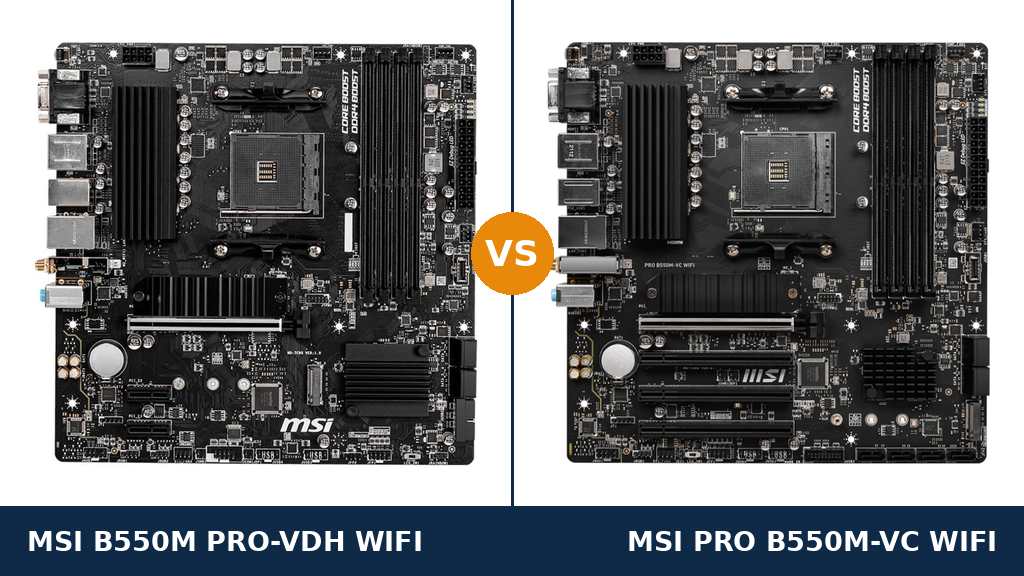
Put these two boards side by side and they look like siblings. Both are MSI micro-ATX B550 boards for socket AM4. Both take the same Ryzen processors, the same DDR4 memory and the same graphics cards.
That is because, underneath, they largely are the same platform. MSI's spec sheets agree on the memory ceiling, the M.2 layout, the display outputs and even the audio codec. If you only read the headline specs, you would wonder why both products exist.
The answer is in the fine print. The PRO B550M-VC WiFi is the newer design, and MSI used the refresh to modernise the things that age fastest: it gets Wi-Fi 6E instead of Wi-Fi 5, USB 3.2 Gen 2 ports running at twice the speed, and eight SATA ports instead of four.
The B550M Pro-VDH WiFi fights back in two places the refresh went backwards. It keeps a legacy serial port header that the VC drops entirely, and it carries double the RGB and ARGB lighting headers. It also tends to sell for less.
So this comparison is not really about performance — the platform sees to that. It is about which set of ports and radios your build actually needs, and whether the VC's connectivity upgrades are worth the extra money over a proven budget board.
Buy the MSI PRO B550M-VC WiFi for most builds. It is the same platform with the connectivity brought up to date — Wi-Fi 6E, Bluetooth 5.2, 10Gbps USB and double the SATA ports — and those are upgrades you feel every day.
Buy the MSI B550M Pro-VDH WiFi if your PC sits wired next to the router, you need a serial port for legacy or workshop hardware, or the price gap is wide enough to fund something better elsewhere in the build.
Overall scores: Pro-VDH WiFi 8.0/10 · PRO B550M-VC WiFi 8.4/10
Scores run 0–10 and are derived from the published specification sheets for both boards — hardware capability, not benchmark results. Where MSI publishes identical hardware, the scores are identical.
| Category | Pro-VDH WiFi | PRO B550M-VC WiFi |
|---|---|---|
| Power Delivery | 6.0 | 6.0 |
| Wireless & Networking | 5.5 | 9.0 |
| USB Connectivity | 6.0 | 9.0 |
| Storage | 7.0 | 9.0 |
| Expansion | 5.0 | 6.5 |
| Display Outputs | 9.0 | 9.0 |
| Memory Support | 9.0 | 9.0 |
| Overall | 8.0 | 8.4 |
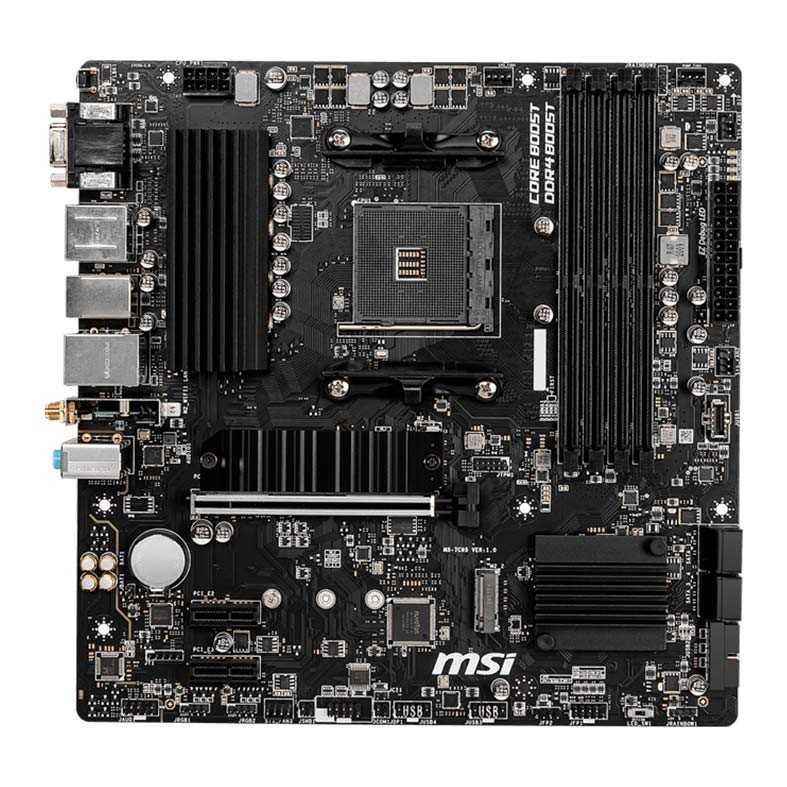
Choose the Pro-VDH WiFi if… your PC is wired or close to the router, you run legacy serial hardware, or it is the cheaper board on the day.
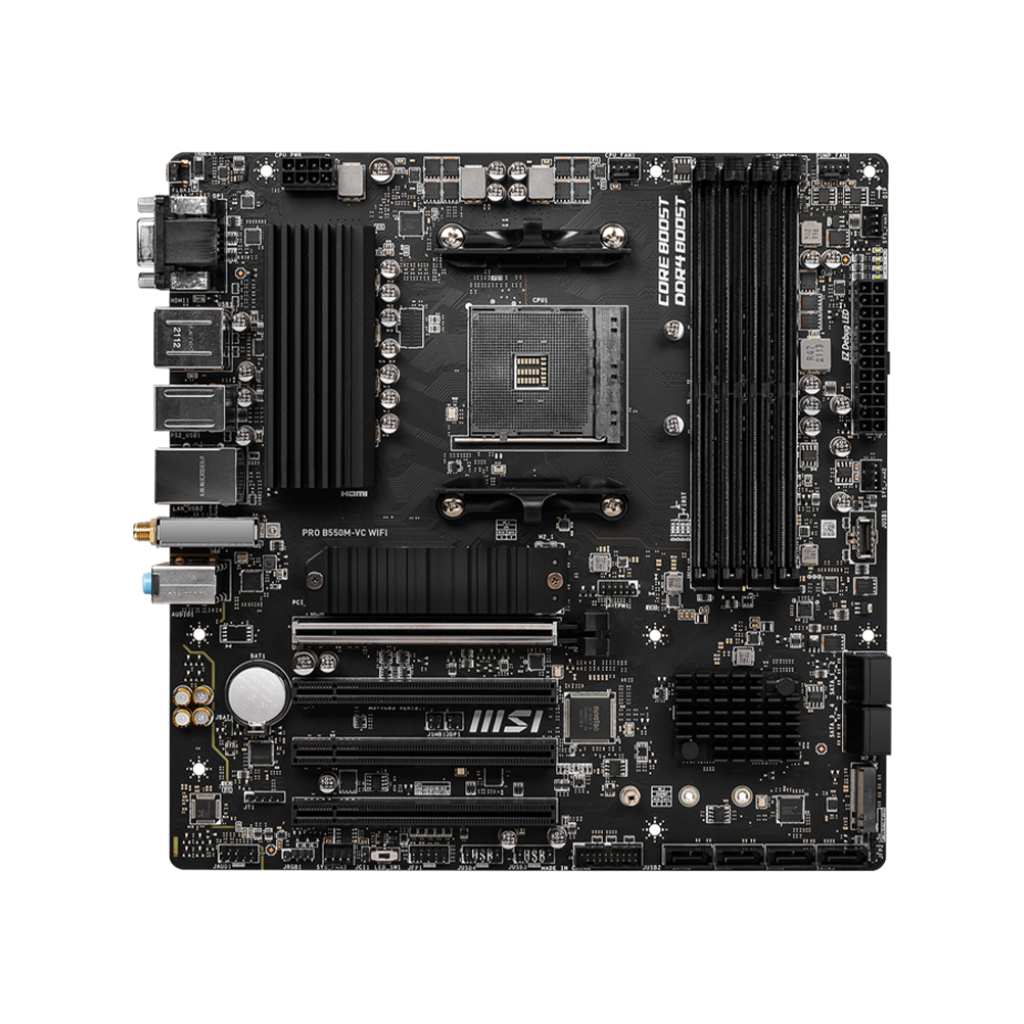
Choose the PRO B550M-VC WiFi if… you connect over Wi-Fi, move files to external SSDs, run lots of SATA drives, or want the longest-lived version of this platform.
As an Amazon Associate I earn from qualifying purchases at no extra cost to you.
| Specification | MSI B550M Pro-VDH WiFi | MSI PRO B550M-VC WiFi |
|---|---|---|
| Form factor | Micro-ATX, 24.4 × 24.4 cm | Micro-ATX, 24.4 × 24.4 cm |
| Socket / chipset | AM4 / AMD B550 | AM4 / AMD B550 |
| CPU support | Ryzen 5000 / 5000 G / 4000 G / 3000 (not 3400G / 3200G) | Ryzen 5000 / 5000 G / 4000 G / 3000 (not 3400G / 3200G) |
| Memory | 4× DDR4, up to 128GB, 4400+ MHz (OC), A-XMP | 4× DDR4, up to 128GB, 4400+ MHz (OC), A-XMP |
| PCIe x16 slot | 1× PCIe 4.0 x16, Steel Armor | 1× PCIe 4.0 x16, Steel Armor |
| Other PCIe slots | 2× PCIe 3.0 x1 | 3× full-length slots, PCIe 3.0, wired x1 |
| M.2 slots | 2 — Gen4 x4 + SATA (Shield Frozr), Gen3 x4 | 2 — Gen4 x4 + SATA (Shield Frozr), Gen3 x4 |
| SATA ports | 4× SATA 6Gb/s | 8× SATA 6Gb/s (4 chipset + 4 ASMedia ASM1064) |
| RAID | 0 / 1 / 10 (SATA and NVMe) | 0 / 1 / 10 (SATA and NVMe) |
| Rear USB | 4× USB 3.2 Gen 1, 2× USB 2.0 | 2× USB 3.2 Gen 2 (10Gbps), 2× Gen 1, 2× USB 2.0 |
| Front USB | USB-C Gen 1 header, Gen 1 header, 2× USB 2.0 headers | USB-C Gen 1 header, Gen 1 header, 2× USB 2.0 headers |
| Wired LAN | Realtek RTL8111HN Gigabit | Realtek RTL8111GN/HN Gigabit |
| Wi-Fi | Wi-Fi 5 802.11ac (Intel Wireless-AC 3168) | Wi-Fi 6E 802.11ax, 2.4 / 5 / 6 GHz (AMD module) |
| Bluetooth | 4.2 | 5.2 |
| Audio | Realtek ALC892/ALC897, 7.1, Audio Boost | Realtek ALC892/ALC897, 7.1, Audio Boost |
| Display outputs | VGA, DisplayPort, HDMI 2.1 (4K@60) | VGA, DisplayPort, HDMI 2.1 (4K@60) |
| Fan headers | 1× CPU, 1× pump, 3× system | 1× CPU, 1× pump, 3× system |
| Lighting headers | 2× 4-pin RGB, 2× 3-pin ARGB | 1× 4-pin RGB, 1× 3-pin ARGB |
| Serial (COM) header | Yes | No |
| BIOS | 256Mb UEFI, Click BIOS 5, Flash BIOS Button | 256Mb UEFI, Click BIOS 5, Flash BIOS Button |
| Troubleshooting | EZ Debug LED (CPU / DRAM / VGA / Boot) | EZ Debug LED (CPU / DRAM / VGA / Boot) |
This is the single biggest gap between the boards. The Pro-VDH WiFi carries an Intel Wireless-AC 3168 module — Wi-Fi 5 (802.11ac) on the 2.4 and 5GHz bands, with Bluetooth 4.2. It was ordinary in 2020 and it is the oldest-feeling part of the board today.
The PRO B550M-VC WiFi moves to Wi-Fi 6E. Its pre-installed AMD module adds the uncongested 6GHz band on top of 2.4 and 5GHz, supports 160MHz channels and MU-MIMO, and pairs it with Bluetooth 5.2. On a Wi-Fi 6E router, that means lower latency and far more headroom in a busy household.
If your PC is wired, none of this matters — both boards have the same class of gigabit Ethernet. But if this machine will live on wireless, the VC is not a small step up. It is two Wi-Fi generations, and the radio is the one part of a motherboard you cannot upgrade cheaply later.
One practical note: the VC's wireless runs on an AMD (MediaTek-based) module, and some owners report better results with the chipset maker's latest drivers than with the ones on MSI's page. Either way, update the Wi-Fi driver first if speeds disappoint.
The Pro-VDH WiFi tops out at USB 3.2 Gen 1 on the rear panel — four ports at 5Gbps, plus two USB 2.0. That was standard for a budget board of its era, but it caps every external drive you plug in.
The VC keeps two Gen 1 ports and upgrades the other pair to USB 3.2 Gen 2 at 10Gbps. An external NVMe SSD that saturates around 1,000MB/s on the VC will run at roughly half that on the Pro-VDH. For anyone who backs up to, or edits from, external SSDs, this is a daily difference, not a spec-sheet trophy.
Front-panel connectivity is identical: both boards have an internal USB-C header (Gen 1 speed), a Gen 1 Type-A header and two USB 2.0 headers. Neither board gives you a 10Gbps front port, so case-front speed is a wash.
Both boards have the same M.2 layout — a PCIe 4.0 x4 slot with MSI's Shield Frozr heatsink, plus a PCIe 3.0 x4 slot — and both support RAID 0, 1 and 10. For a typical gaming build with one or two NVMe drives, they are equals.
The split is in SATA. The Pro-VDH WiFi has the standard four chipset ports. The VC doubles it to eight, running four extra ports through an ASMedia ASM1064 controller. That turns the VC into a credible home-server or NAS-style board: a mirrored pair of large hard drives, a couple of 2.5-inch SSDs and an optical drive all fit at once.
Most gamers will never connect a fifth SATA device, and for them this row of the spec sheet is dead weight. But if you are consolidating an old PC's drive collection, or building a media box that will grow, eight ports is the kind of thing that is very hard to retrofit later.
Look at the photos and the VC seems to win expansion easily: below the main x16 slot it fits three full-length PCIe slots, where the Pro-VDH WiFi has two short x1 slots. Cards that need a full-length connector — some capture cards, older RAID cards, professional audio interfaces — physically fit the VC and not the older board.
Be clear-eyed about the bandwidth, though. On the VC, all three of those full-length slots are wired for x1 speed on PCIe 3.0, exactly like the Pro-VDH's two x1 slots. The VC gives you one more slot and more mechanical flexibility; it does not give any add-in card more lanes.
For a second GPU, neither board is the answer — both are single-card platforms with one CPU-fed x16 slot. This difference is about utility cards, and there the VC is genuinely more flexible.
The refresh was not all upgrades. The Pro-VDH WiFi has a serial (COM) port header on the board; the VC removes it entirely. Most home users will never notice. But serial refuses to die in workshops, labs, retail and industrial settings, where it still talks to CNC controllers, PLCs, older networking kit and point-of-sale hardware.
If you need a real COM port, this comparison is over: the Pro-VDH WiFi is the one that has it, and a USB adapter is not always an acceptable substitute for timing-sensitive legacy gear.
The Pro-VDH also doubles the lighting headers — two 4-pin RGB and two 3-pin addressable RGB, against one of each on the VC. For a showcase build with several ARGB fans and strips, the older board is simply easier to wire without splitters. The VC is a business-line board, and its lighting support is token by comparison.
Strip away the radios and ports, and the two boards converge. Memory support is identical: four slots, 128GB maximum, 4400+ MHz with A-XMP profiles, ECC unbuffered DIMMs supported. Display outputs for APU builds are identical too — VGA, DisplayPort and HDMI 2.1, each driving 4K at 60Hz where the connector allows.
Cooling and convenience hardware matches as well: one CPU fan header, a pump header rated for water cooling, three system fan headers, a Flash BIOS Button on the rear panel, EZ Debug LEDs and the same 256Mb Click BIOS 5 firmware family.
On power delivery, be wary of forum certainty. MSI does not publish a phase count for either board. Independent teardowns of the Pro-VDH WiFi describe a modest 4+2+1 arrangement, which is fine for stock Ryzen chips; there is no published evidence the VC's delivery is stronger, so we score them level and neither board is the right pick for heavy manual overclocking.
Even the audio is shared: both use a Realtek ALC892/ALC897 codec — MSI lists both part numbers, as fitted chips vary by production batch — behind MSI's Audio Boost isolation. And both boards end software support in the same place, with the VC simply shipping in the newer MSI Center era rather than the Pro-VDH's Dragon Center branding.
Because the platform is shared, pairing advice is mostly identical — the notes below flag the few places the choice of board changes the advice.
| Processor | On the Pro-VDH WiFi | On the PRO B550M-VC WiFi |
|---|---|---|
| Ryzen 5 5600 | The sweet-spot pairing. Six cores at stock speeds ask nothing of this board it cannot give. | Identical performance. Choose this board if the same build also needs Wi-Fi 6E or the extra SATA ports. |
| Ryzen 7 5700X | Runs at full stock boost without complaint; a good productivity match. | Identical. The VC's eight SATA ports make it the better base for a workstation that also stores a lot locally. |
| Ryzen 7 5700X3D / 5800X3D | The platform's gaming peak drops straight in, and the locked multiplier means power delivery is never stressed by overclocking. | Identical. If you game over Wi-Fi, the 6E radio makes this the stronger X3D pairing of the two. |
| Ryzen 9 5900X / 5950X | Supported and stable at stock settings; keep case airflow moving over the VRM area on long renders. | Same advice. Neither board is an enthusiast overclocking pick for a 16-core chip. |
| Ryzen 5 5600G (APU) | All three display outputs work, including VGA for an older monitor. Note the 3400G and 3200G are not supported. | Identical display support. The better wireless suits a living-room or office APU build that will never see a cable. |
| Memory advice | 2× 16GB DDR4-3600 is the value sweet spot; 128GB across four sticks is there if you need it. | Same recommendation. For a home server, the VC happily takes 4× 32GB ECC unbuffered sticks. |
| If you… | Buy |
|---|---|
| Connect to the internet over Wi-Fi | PRO B550M-VC WiFi |
| Use external SSDs and hate waiting on copies | PRO B550M-VC WiFi |
| Have five or more SATA drives, or plan a home server | PRO B550M-VC WiFi |
| Need a serial port for workshop or legacy hardware | B550M Pro-VDH WiFi |
| Are wiring several ARGB fans and light strips | B550M Pro-VDH WiFi |
| Are wired, short on budget, and find the Pro-VDH clearly cheaper | B550M Pro-VDH WiFi |
| Cannot decide and just want the safer long-term pick | PRO B550M-VC WiFi |
The VC is the newer, better-connected board; the Pro-VDH WiFi is the value pick with two tricks — serial and lighting headers — the refresh left behind. Check today's price on both before you decide, because the gap moves around.
View the Pro-VDH WiFi on Amazon View the PRO B550M-VC WiFi on Amazon
Watch the Pro-VDH WiFi variant trap. MSI also sells a newer CEC revision of the Pro-VDH WiFi with a Wi-Fi 6 module and faster rear USB, and some retailers title the ordinary board "Wi-Fi 6" anyway. The standard board in most listings is Wi-Fi 5 with the Intel AC3168 module. If wireless speed is why you are buying, check the wireless line of the actual listing — or buy the VC, where there is no ambiguity.
Ryzen 5000 readiness. Both boards launched before some Ryzen chips existed, so very old stock could need a BIOS update for the newest CPUs. Current retail stock ships ready, and both boards carry a Flash BIOS Button, so even an unsupported pairing can be updated with a USB stick and no CPU installed. It is a five-minute job, not a dealbreaker.
The APU exception. B550 never supported the Ryzen 5 3400G and Ryzen 3 3200G, and both of these boards exclude them explicitly. If you are carrying one of those APUs over from a B450 build, neither board here will boot it — check the CPU support list before assuming your old chip drops in.
Antennas and placement. Both boards bundle screw-on Wi-Fi antennas. On the VC, the 6GHz band has shorter range than 5GHz, so the antennas earn their keep: fit them, angle them up, and avoid burying the PC in a metal cabinet if you want the speeds the radio is capable of.
Case and cabling. Both are 24.4 × 24.4 cm micro-ATX, so any mATX or larger case works. Both provide the internal USB-C header that modern cases expect for their front port. On the VC, remember the four extra SATA ports sit on a secondary controller — enable it in BIOS if a drive on ports 5–8 does not appear.
AM4 is a finished platform, and both boards share its story. There will be no new socket-compatible CPU generation after Ryzen 5000, so the upgrade path is about moving within the range, not beyond it.
The good news is that the range has a high ceiling. Start with a Ryzen 5 5600 today and the same board will take a 5700X3D later — still one of the strongest gaming CPUs on any socket — with nothing more than a BIOS update. Your DDR4 carries over throughout, which keeps the whole path cheap.
Between these two boards, the VC ages more gracefully. Storage can grow to eight SATA drives, external drives run at full Gen 2 speed, and Wi-Fi 6E will outlast several router upgrades. The Pro-VDH WiFi's path is narrower in connectivity but identical in CPU and memory terms.
The honest limit: if you are building new with a generous budget and expect to upgrade the CPU again in three years, AM5 is the platform with a future. These B550 boards make sense because they are mature, well-understood and inexpensive — not because they are future-proof.
You want faster wired networking. Both boards stop at gigabit LAN. If you move large files around a home network, step up to a B550 board with 2.5GbE — MSI's own MAG B550 Tomahawk tier — rather than buying either of these and a network card.
You need more PCIe. One x16 slot and x1 utility slots is the ceiling here. Builders planning multiple high-bandwidth cards should look at ATX B550 or X570 boards with proper lane sharing.
You are buying for the long term. A new AM5 build costs more today, but it buys you years of CPU upgrades and DDR5. If this PC must evolve rather than be replaced, skip B550 entirely.
You found the Pro-VDH WiFi at full VC money. The Pro-VDH's case rests heavily on value. At price parity, its serial header and lighting headers are niche advantages, and the VC's connectivity wins for almost everyone.
Both boards are supported through MSI's standard channels: a product page with BIOS and driver downloads, the Click BIOS 5 firmware, and MSI Center software for monitoring and fan control (older Pro-VDH documentation refers to its predecessor, Dragon Center).
BIOS support has been the quiet strength of AM4. MSI kept both of these boards current through the AGESA updates that added later Ryzen 5000 chips, including the X3D models, years after the boards launched. Check for the latest BIOS before installing a recently released CPU.
Both boards carry MSI's three-year motherboard warranty in the US. Keep the receipt and the box label — you will need the serial number from it if you ever register a warranty claim.
One support tip specific to this pair: because the names are so similar, make sure you download BIOS and drivers from the exact product page. A Pro-VDH WiFi BIOS and a PRO B550M-VC WiFi BIOS are different files for different boards, and the Flash BIOS Button will not protect you from flashing the wrong one if you force it through the normal update route.
The PRO B550M-VC WiFi is what a platform refresh should be. MSI kept everything that made the B550M Pro-VDH WiFi a sensible budget board — the memory support, the M.2 layout, the display outputs, the troubleshooting aids — and modernised the parts that date fastest. Wi-Fi 6E, Bluetooth 5.2, 10Gbps USB and eight SATA ports are not glamorous, but they are the differences you will still be benefiting from in five years.
The Pro-VDH WiFi is not obsolete, though. It remains the only one of the pair with a serial header, it is kinder to RGB-heavy builds, and on a wired desk with a couple of drives it gives up nothing in real performance. If the price gap is wide, it is still money well saved.
For most people building on AM4 today, the VC's connectivity premium is the right spend. Buy the Pro-VDH WiFi when its two specialist advantages — serial and lighting — or a clear price advantage speak directly to your build.
View the Pro-VDH WiFi on Amazon View the PRO B550M-VC WiFi on Amazon
The PRO B550M-VC WiFi, narrowly. Gaming performance itself is identical — same chipset, same PCIe 4.0 x16 slot, same memory support — but the VC's Wi-Fi 6E radio delivers lower-latency wireless if you cannot run a cable, and its faster USB is kinder to external game libraries. Wired gamers will see no difference.
The standard board does not. It ships with an Intel Wireless-AC 3168 module: Wi-Fi 5 (802.11ac) and Bluetooth 4.2. A separate CEC revision with Wi-Fi 6 exists and some listings blur the two, so check the wireless specification on the exact listing before buying. The PRO B550M-VC WiFi has no such ambiguity — it is Wi-Fi 6E on every unit.
Yes. Both support the full Ryzen 5000 range, including the X3D chips, on a current BIOS. The 5800X3D's locked multiplier means neither board's modest power delivery is a limitation, and both boards' Flash BIOS Button makes updating for a newer CPU painless.
Because the B550 chipset never supported the 3400G or 3200G — those APUs use an older architecture that AMD excluded from B550 support, and MSI lists both chips as incompatible for these boards. They work on B450 boards, not on any B550 model.
Ten in total: two M.2 drives (one PCIe 4.0, one PCIe 3.0) plus eight SATA drives. Four of the SATA ports come from the B550 chipset and four from an ASMedia ASM1064 controller. The Pro-VDH WiFi holds six: the same two M.2 slots and four SATA ports.
It is from MSI's business PRO line, so it skips gaming styling — but the platform underneath is the same B550 hardware as its gaming-branded boards: PCIe 4.0, a steel-reinforced x16 slot, A-XMP memory tuning and the same BIOS. It plays games exactly as well as the spec sheet suggests; it just looks sober doing it.
Neither — this one is a genuine tie. Both use a Realtek ALC892/ALC897 codec (MSI lists both part numbers, as the fitted chip varies by production batch) with the same Audio Boost design. Anyone chasing better sound should budget for a USB DAC rather than choose between these boards.
Yes. Both provide an internal USB 3.2 Gen 1 Type-C header for a case's front USB-C port, alongside a Gen 1 Type-A header and two USB 2.0 headers. Neither board offers Gen 2 speed at the front panel, so front-port speed does not separate them.
Sources & Verification: All specifications are taken from MSI's official product and specification pages and the official user manuals for the B550M PRO-VDH WiFi and the PRO B550M-VC WiFi, checked against each other; where retailers disagreed, MSI's figures were used. Two notes: MSI does not publish a VRM phase count for either board (the Pro-VDH figure quoted in discussion comes from independent teardowns), and MSI's overview page for the VC still carries an older "Intel Wi-Fi 6" blurb — the current specification sheet and manual both list the AMD Wi-Fi 6E module with Bluetooth 5.2, which is what we scored. Product photos are manufacturer images supplied by MSI and its retail partners. Amazon listings were verified by model number and UPC (Pro-VDH WiFi UPC 824142219393; PRO B550M-VC WiFi UPC 824142299258).
Disclosure: Honestly Compared is reader-supported. When you buy through links on this page, we may earn an affiliate commission from Amazon, at no extra cost to you. Prices and availability change; check the product page for the latest information.
