
MSI MAG B650 Tomahawk WiFi vs ASRock B650 Steel Legend WiFi: Which Should You Buy?
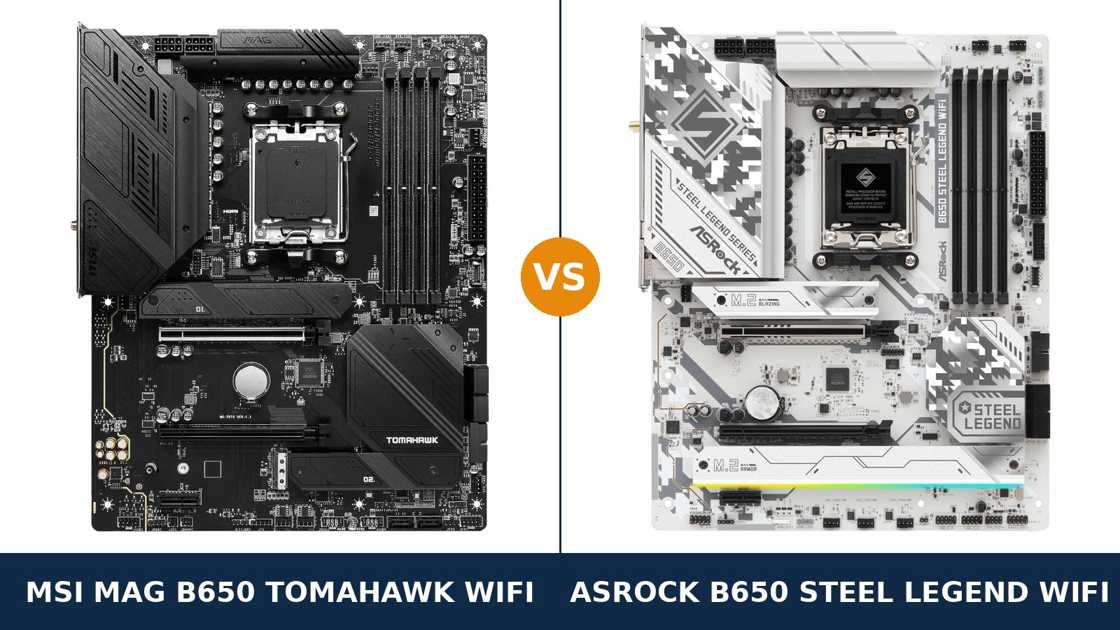
Same chipset. Same socket. Same headline power design. Same Wi-Fi standard, same LAN speed, same audio codec family.
Put the MSI MAG B650 Tomahawk WiFi and the ASRock B650 Steel Legend WiFi side by side and their spec sheets read like the same board written twice. Both run a 14+2+1 phase VRM with 80-amp stages. Both carry three M.2 slots. Both promise Wi-Fi 6E and 2.5-gigabit networking.
So why does this choice matter? Because the boards spend their budgets in opposite directions. ASRock spends on tomorrow: a PCIe 5.0 graphics slot and a Gen5 M.2 slot on a chipset where neither is guaranteed. MSI spends on today: more SATA ports, faster USB everywhere, and a higher memory ceiling.
Neither approach is wrong. One of them is wrong for your build. This guide works through every specification that separates them, all of it taken from MSI's and ASRock's own published data, and ends with the verdict we would give a friend spending their own money.
Key Takeaways
- The Steel Legend is the future-proofing pick. It is one of very few B650 boards with a PCIe 5.0 x16 graphics slot and a Gen5 M.2 slot.
- The Tomahawk is the connectivity and storage-breadth pick. Six SATA ports, three 10Gbps rear USB ports, and a 10Gbps front-panel USB-C header.
- Power delivery is a genuine tie. Both boards run 14+2+1 phases with 80A stages and dual 8-pin CPU power inputs.
- Networking and audio are near-identical. The same Realtek 2.5G LAN chip, Wi-Fi 6E on both, and flagship-class Realtek audio codecs on both.
- Colour is a real factor here. The Tomahawk is all black. The Steel Legend is a white and silver camo board built for light-coloured systems.
Quick Verdict
Buy the ASRock B650 Steel Legend WiFi for most builds. It wins the one argument that cannot be fixed later.
Its graphics slot runs at PCIe 5.0. Its fastest M.2 slot runs at Gen5 x4. When the next generation of graphics cards and SSDs arrives, this board is already wired for it — on a mid-range B650 chipset, where that is not supposed to happen.
Buy the MSI MAG B650 Tomahawk WiFi if your build leans on storage and peripherals. Six SATA ports against four. Three 10Gbps USB-A ports on the rear panel against one.
Add a front USB-C header that runs at 10Gbps instead of 5Gbps, and a memory ceiling rated 400 MT/s higher. For a workstation-style build that lives in the present tense, the Tomahawk is the more generous board.
The Scorecard
Scores below are derived directly from the manufacturer specifications compared in this guide — phase counts, slot speeds, port counts and supported standards. They are a reading aid, not benchmark results.
| Category | B650 Tomahawk WiFi | B650 Steel Legend WiFi | ||
|---|---|---|---|---|
| Power delivery | 8 / 10 | 8 / 10 | ||
| Expansion & future-proofing | 6 / 10 | 9 / 10 | ||
| Storage | 8 / 10 | 9 / 10 | ||
| Memory | 9 / 10 | 8 / 10 | ||
| USB connectivity | 9 / 10 | 8 / 10 | ||
| Networking & audio | 8 / 10 | 8 / 10 | ||
| Overall | 8.0 / 10 | 8.5 / 10 | ||
The pattern is clear. The Steel Legend wins on the silicon roadmap — the things soldered down for the life of the board. The Tomahawk wins on the rear panel and the storage cupboard, the things you touch every day.
At a Glance: Who Each Board Fits
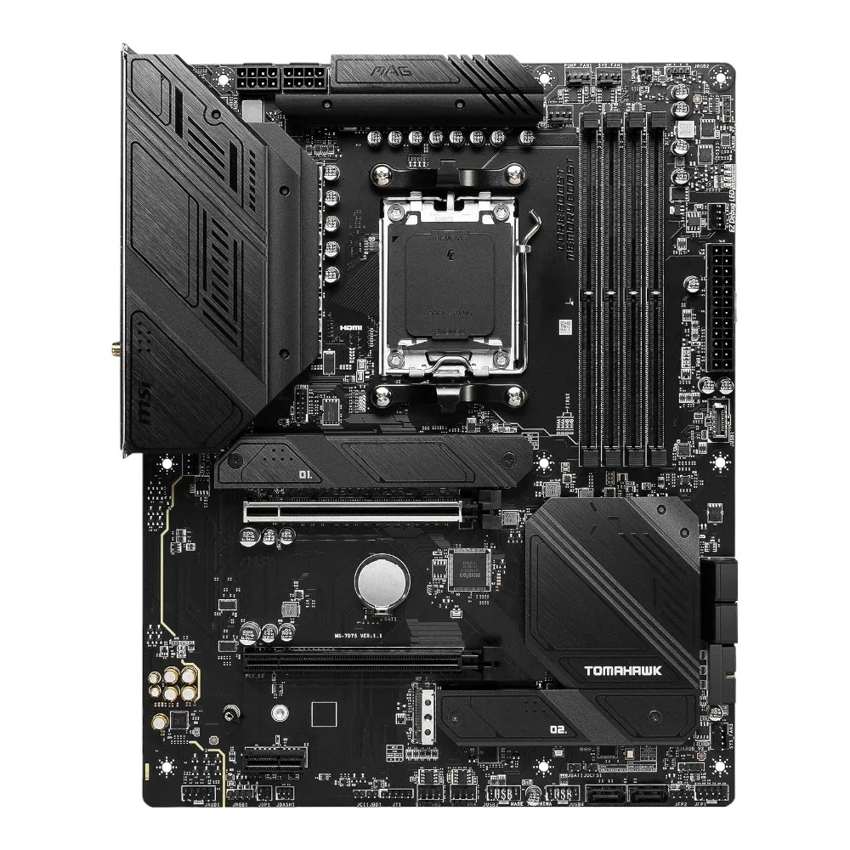
MSI MAG B650 Tomahawk WiFi
- 14+2+1 Duet Rail VRM, 80A Smart Power Stages, dual 8-pin
- Three PCIe 4.0 M.2 slots plus six SATA ports
- Rear USB: 20Gbps Type-C and three 10Gbps Type-A
- Front-panel USB-C header at 10Gbps
- DDR5 rated to 7600+ MT/s (OC), AMD EXPO
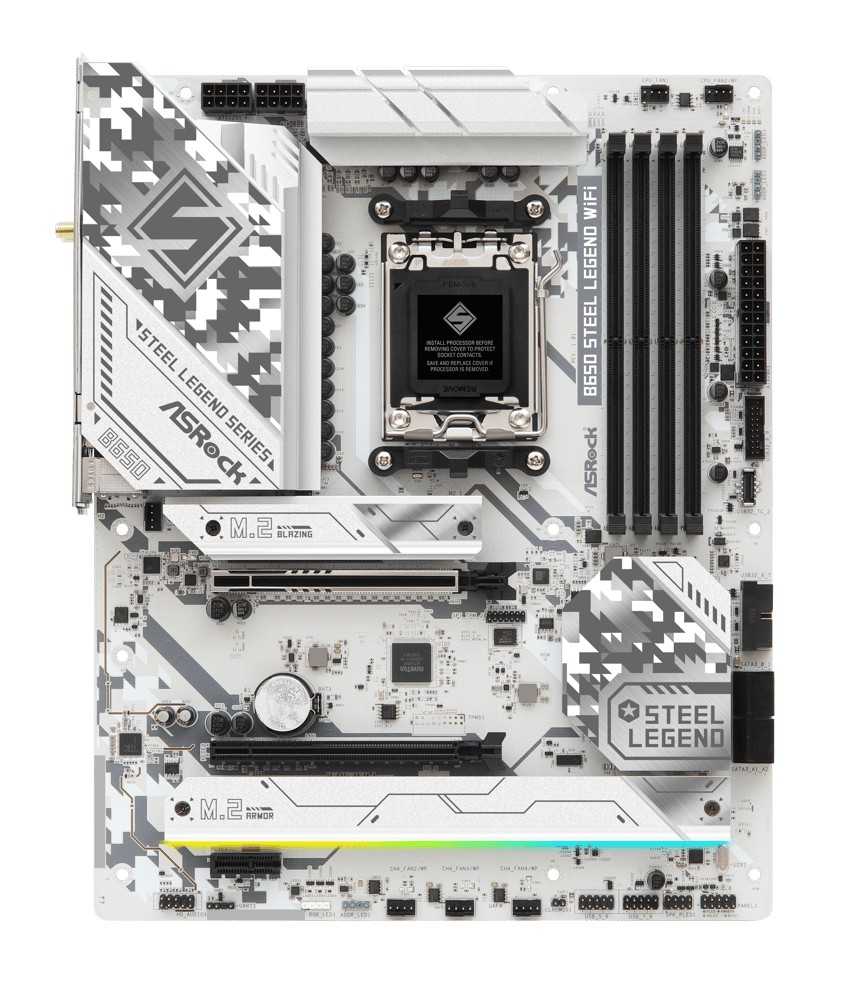
ASRock B650 Steel Legend WiFi
- 14+2+1 phase VRM, 80A Dr.MOS, 20K capacitors, 8-layer PCB
- PCIe 5.0 x16 graphics slot — rare on a B650 board
- Blazing M.2 Gen5 x4 slot plus two Gen4 x4 slots
- Wi-Fi 6E and Dragon 2.5G LAN
- White and silver camo design for light-coloured builds
Choose the MAG B650 Tomahawk WiFi if…
You are carrying hard drives and SATA SSDs over from an older machine. Six ports means nothing gets left in a drawer.
Your desk runs fast external storage, a capture device and a stack of peripherals. The Tomahawk's rear panel has three 10Gbps Type-A ports where the ASRock has one.
Your case has a front USB-C port you actually intend to use at speed. Or you are building in black, and a white board would spoil the look.
Choose the B650 Steel Legend WiFi if…
You keep a motherboard for five years or more. The Gen5 graphics slot and Gen5 M.2 slot are this board's whole argument, and they only get stronger with time.
You plan to buy a Gen5 SSD, now or at the next sale. Or your next graphics card matters more to you than your current one.
And if you are building a white or silver system, this is not a close call at all. The Steel Legend was designed for exactly that build.
As an Amazon Associate I earn from qualifying purchases at no extra cost to you.
Specifications: The Specs That Actually Matter
Every figure below is taken from MSI's and ASRock's published specifications, cross-checked against the manufacturers' product data.
Where a manufacturer's own pages disagree with each other — and both of these manufacturers manage it — the table follows the current specification page, and the note under the table explains.
| Specification | MSI MAG B650 Tomahawk WiFi | ASRock B650 Steel Legend WiFi |
|---|---|---|
| Form factor | ATX, 30.5 × 24.4 cm | ATX, 30.5 × 24.4 cm |
| Socket / chipset | AMD AM5 / B650 | AMD AM5 / B650 |
| CPU support | Ryzen 9000, 8000, 7000 series | Ryzen 9000, 8000, 7000 series |
| VRM design | 14+2+1 Duet Rail, 80A Smart Power Stages, 8+8-pin | 14+2+1 phase, 80A Dr.MOS, 8+8-pin, 20K caps |
| PCB | 6-layer, 2 oz thickened copper | 8-layer |
| Memory | 4 × DDR5, up to 256 GB, 7600+ MT/s (O.C.), EXPO | 4 × DDR5, up to 256 GB, 7200+ MT/s (O.C.), EXPO / XMP, ECC supported |
| Graphics slot | PCIe 4.0 x16, Steel Armor | PCIe 5.0 x16 |
| Other expansion | PCIe 4.0 x16 slot (x2 wired) + PCIe 3.0 x1 | PCIe 3.0 x16 slot (x4 wired) + PCIe 4.0 x1 |
| M.2 storage | 3 slots, all PCIe 4.0 x4 | 3 slots: PCIe 5.0 x4 + 2 × PCIe 4.0 x4 |
| SATA | 6 × SATA 6 Gb/s | 4 × SATA 6 Gb/s |
| Display outputs (iGPU) | HDMI 2.1 (4K 60Hz), DisplayPort 1.4 (8K 60Hz) | HDMI 2.1, DisplayPort 1.4 |
| LAN | Realtek RTL8125BG 2.5 GbE | Realtek Dragon RTL8125BG 2.5 GbE |
| Wireless | Wi-Fi 6E, Bluetooth 5.3 | Wi-Fi 6E, Bluetooth 5.2 |
| Audio | Realtek ALC4080, 7.1, optical S/PDIF out | Realtek ALC4082, 7.1, Nahimic software |
| USB (rear) | 2 × USB 2.0, 4 × 5Gbps A, 3 × 10Gbps A, 1 × 20Gbps C | 4 × USB 2.0, 4 × 5Gbps A, 1 × 10Gbps A, 1 × 20Gbps C |
| Front USB-C header | USB 3.2 Gen 2, 10 Gbps | USB 3.2 Gen 1, 5 Gbps |
| BIOS flashing | Flash BIOS Button (rear panel) | BIOS Flashback button |
| Debug aids | 4 × EZ Debug LED | Post Status Checker |
Capacity note: both manufacturers' current specification pages list a maximum memory capacity of 256 GB for these boards. Launch-era materials said less — MSI's own store has listed 128 GB, and early reproductions of ASRock's specification listed 192 GB.
In practice the point is academic. Four-slot DDR5 boards spend their lives with 32 or 64 GB fitted. Buy the kit you need; do not let a theoretical ceiling choose your motherboard.
Wireless note: MSI has fitted more than one Wi-Fi 6E module to the Tomahawk across its production run, and MSI's own materials list Bluetooth 5.2 in some places and 5.3 in others. The current specification page says 5.3, and that is the figure in the table. The Wi-Fi 6E radio itself does not change between modules.
The Differences That Actually Matter
1. PCIe 5.0 — the Steel Legend's headline, and it is a real one
Start with the difference that decides this comparison. The B650 chipset does not require PCIe 5.0 anywhere. Board makers add it by spending on PCB quality and signal routing.
ASRock spent. The Steel Legend's main slot runs at PCIe 5.0 x16, wired to the CPU. Its first M.2 slot — ASRock calls it Blazing M.2 — runs at Gen5 x4, good for twice the bandwidth of Gen4.
MSI did not spend there. Every slot on the Tomahawk is PCIe 4.0. The graphics slot, all three M.2 slots, everything.
Does Gen5 matter today? For graphics cards, barely. Current cards do not saturate a Gen4 x16 link. For SSDs, Gen5 drives exist and are faster on paper, though the real-world gap over a good Gen4 drive is narrow outside benchmarks.
Does it matter over five years? That is the honest framing. A motherboard is the one component you never casually upgrade. The Steel Legend is wired for the storage and graphics standards of the next cycle; the Tomahawk tops out at the current one.
If you replace your board with every build, this section is a draw. If you keep boards, it is the Steel Legend's strongest card — and it knows it.
2. Power delivery — a genuine tie, with different garnishes
Read the VRM lines in the spec table again. 14+2+1 phases. 80-amp power stages. Dual 8-pin CPU power connectors.
On both boards. This is as close as competing manufacturers ever get to fitting the same power supply.
The differences are in the supporting cast. ASRock builds on an 8-layer PCB and fits 20K-rated capacitors. MSI builds on a 6-layer board with 2 oz thickened copper, then spends on cooling: an extended heatsink, heavy-plated VRM heatsinks and 7 W/mK thermal pads.
Translate that into practice. Either board will run any AM5 processor AMD sells, including the 16-core Ryzen 9 parts, at full stock performance. Either will hold up under Precision Boost Overdrive tuning without becoming the weak link.
We are not going to invent a winner here. Builders with a preference for PCB layers will take the ASRock. Builders with a preference for heatsink mass will take the MSI. Both are buying far more VRM than a B650 build strictly needs, and that is a good place for a tie to land.
3. Storage — MSI takes the cupboard, ASRock takes the motorway
Both boards give you three M.2 slots. What those slots do is where they part.
The Steel Legend's set is the faster one: Gen5 x4 up top, then two Gen4 x4 slots beneath it. Every NVMe drive you fit runs at its full rated speed, full stop.
The Tomahawk's three slots are all Gen4 x4 — uniform, quick, and capped at the current standard. MSI counters with depth instead: six SATA ports against the ASRock's four.
Six SATA ports sounds old-fashioned until you price a home server, a media library or a hand-me-down drive collection. Two extra ports is two extra drives kept in service. For a storage-heavy build, that is not a footnote; it is the purchase reason.
Both boards ration lanes somewhere, and both are honest about it in their manuals. On the Tomahawk, the third M.2 slot shares bandwidth with the second PCIe slot — fill both and each runs at x2. On the Steel Legend, populating the first two SATA ports drops its second PCIe slot from x4 to x2.
Neither quirk is a scandal. Both are worth knowing before the drives go in, not after.
4. USB — the Tomahawk's home turf
Count the fast ports. On the rear panel, the Tomahawk offers three USB 3.2 Gen 2 Type-A ports at 10 Gbps. The Steel Legend offers one.
Both boards match at the top end — each has a 20Gbps Gen 2x2 Type-C on the rear — and both offer four 5Gbps Type-A ports. But the middle of the panel, where external SSDs, capture cards and fast docks actually plug in, belongs to MSI.
The front panel widens the gap. The Tomahawk's USB-C header runs at 10 Gbps. The Steel Legend's equivalent header is a Gen 1 part at 5 Gbps.
If your case has a front Type-C port and you move files through it, that difference is felt weekly. It is the single most practical day-to-day win in this entire comparison.
ASRock's defence is volume at the slow end: four rear USB 2.0 ports against MSI's two, handy for receivers, DACs and dongles. Useful, but peripherals do not need bandwidth — they need sockets, and a hub solves that problem for very little money.
5. Memory — MSI's higher ceiling, ASRock's wider net
MSI rates the Tomahawk to DDR5-7600 and beyond under overclocking. ASRock rates the Steel Legend to 7200+. On the headline number, MSI wins.
Now the context both manufacturers would rather whisper. AM5's sweet spot is DDR5-6000. That is where the memory controller runs in its happiest ratio and where EXPO kits are priced sanely.
Above 6000, gains shrink and stability becomes a lottery drawn from your individual CPU. The 7600 figure is a ceiling for memory tuners to chase, not a reason to buy the board.
ASRock's counter is quieter and, for some builders, worth more: the Steel Legend officially supports ECC unbuffered memory. The Tomahawk's specification lists non-ECC only.
Running a home server or a workstation that values data integrity? The Steel Legend is the only one of the two that even enters that conversation. Everyone else can call memory a practical tie and buy a 6000 MT/s EXPO kit for either board.
6. Networking and audio — same chips, different seasoning
Under the branding, the networking hardware is literally shared. Both boards use Realtek's RTL8125BG controller for 2.5-gigabit wired Ethernet. ASRock calls it Dragon LAN and bundles its traffic-management software; the silicon is the same.
Wireless is matched too. Wi-Fi 6E with the 6 GHz band on both boards, antennas in both boxes. MSI's current specification lists Bluetooth 5.3 against ASRock's 5.2 — a real but trivial edge, and one that has varied across the Tomahawk's production run.
Audio is the same story told by two marketing departments. MSI fits the Realtek ALC4080 under its Audio Boost 5 name and adds an optical S/PDIF output. ASRock fits the ALC4082 — a sibling codec from the same family — and adds Nahimic's software processing.
The optical output is the only hardware difference with a daily consequence, and only if you feed an AV receiver or DAC over TOSLINK. Everyone else: pick your software flavour and move on.
7. Looks, layout and the build experience
No spec table captures the most visible difference in this comparison. The Tomahawk is a black board with black heatsinks. The Steel Legend is a white PCB under silver-grey digital-camo armour.
In a white case with a window, this is not a detail. It is the decision. Mixed-colour builds look unfinished, and both manufacturers know exactly which builds they are dressing for.
The build experience itself is well served on both sides. MSI fits heatsinks over two of its M.2 slots — its M.2 Shield Frozr design — plus a four-LED EZ Debug strip for fault-finding. ASRock answers with a large alloy heatsink over its Blazing M.2 slot and its Post Status Checker LEDs.
Both boards put a BIOS flash button within reach for CPU-less updates. Both pre-install their I/O shields. Neither will fight you during assembly.
One layout note in MSI's favour: six system fan headers plus a dedicated pump header gives custom-loop and many-fan builds room to breathe without splitters. ASRock covers the standard air-cooled and AIO cases without drama.
CPU Pairing Guide
The fastest way to choose between these boards is to start from your processor. This table is the whole comparison in one view.
| Your processor | B650 Tomahawk WiFi | B650 Steel Legend WiFi | Our call |
|---|---|---|---|
| Ryzen 5 7600 / 9600X | Excellent | Excellent | Either — decide on colour and storage |
| Ryzen 7 7700X / 7800X3D / 9700X / 9800X3D | Excellent | Excellent — Gen5 slot ready for your next GPU | Steel Legend WiFi |
| Ryzen 9 7900X / 7950X / 9900X / 9950X | Excellent — VRM headroom to spare | Excellent — VRM headroom to spare | Tie; Tomahawk if the build is storage-heavy |
| Ryzen 7 8700G / Ryzen 5 8600G (APU) | Good — graphics slot drops to x8/x4 by CPU | Good — lane counts also fall on APU silicon | Either; display outputs are identical |
| Ryzen 5 8500G / 8300G | Workable — second M.2 slot unavailable on these CPUs | Workable — check ASRock's bandwidth table | Either at this level; both boards are over-specified |
Two honest cautions apply to both boards equally. First, AM5's APU processors carry fewer PCIe lanes than the desktop chips, so slot speeds fall on either board — that is the CPU talking, not the motherboard.
Second, the Ryzen 9 row flatters both VRMs because the praise is earned. A 14+2+1 design with 80A stages is workstation-grade power delivery wearing a mid-range price tag, whichever logo is printed on the heatsink.
The 30-Second Decision
| If this sounds like you… | Buy this |
|---|---|
| “I keep a motherboard for two or three CPU generations.” | B650 Steel Legend WiFi (PCIe 5.0 where it counts) |
| “I have a shelf of SATA drives coming over from my old PC.” | B650 Tomahawk WiFi (six SATA ports) |
| “My desk runs external SSDs, a dock and fast peripherals.” | B650 Tomahawk WiFi (three 10Gbps rear ports) |
| “I am building a white or silver system.” | B650 Steel Legend WiFi — not close |
| “I want a Gen5 SSD without paying X870 money.” | B650 Steel Legend WiFi |
| “My case's front USB-C port needs to run at full speed.” | B650 Tomahawk WiFi (10Gbps header) |
Ready to check today’s price?
Both boards sell through Amazon, and the gap between them moves around. Check the live figure on the board that fits your build.
View on Amazon — B650 Tomahawk WiFiView on Amazon — B650 Steel Legend WiFiWhat You Gain. What You Give Up.
MSI MAG B650 Tomahawk WiFi
You gain: the fuller storage cupboard — six SATA ports beside three Gen4 M.2 slots. The faster USB layout front and rear, including a 10Gbps front Type-C header. A higher rated memory ceiling. An optical S/PDIF output for AV receivers, and an all-black design that disappears into dark builds.
You give up: PCIe 5.0, everywhere. The graphics slot and every M.2 slot stop at Gen4, so the next generation of GPUs and SSDs runs below its ceiling. You also give up ECC memory support and two layers of PCB.
ASRock B650 Steel Legend WiFi
You gain: the only Gen5 package in this comparison — a PCIe 5.0 graphics slot and a Gen5 M.2 slot on a B650 board. An 8-layer PCB, ECC memory support, and a white camo design no black board can imitate. Every M.2 slot runs at full speed with no slot-sharing compromises among them.
You give up: two SATA ports, two 10Gbps rear USB ports, and half the front USB-C header speed. The savings ASRock made are all in the present-day connections — the parts of the board you use this year, traded for the standards you will use in three years.
Pros and Cons
B650 Tomahawk WiFi — Pros
- Six SATA ports — best in this comparison for drive hoarders
- Three 10Gbps rear USB-A plus 20Gbps Type-C
- 10Gbps front-panel USB-C header
- DDR5 rated to 7600+ MT/s (OC)
- Optical S/PDIF output and six system fan headers
Cons
- No PCIe 5.0 for graphics or storage
- Third M.2 slot shares bandwidth with the second PCIe slot
- No ECC memory support
- Only two rear USB 2.0 ports for legacy dongles
B650 Steel Legend WiFi — Pros
- PCIe 5.0 x16 graphics slot on a B650 board
- Gen5 x4 M.2 slot plus two full-speed Gen4 slots
- 8-layer PCB and 20K capacitors
- ECC unbuffered memory supported
- White and silver design for light builds
Cons
- Only four SATA ports
- Front USB-C header limited to 5 Gbps
- One 10Gbps Type-A port on the rear panel
- Using the first two SATA ports slows the second PCIe slot
Check the Exact Name and the Production Run, Not Just the Family
Check the full model name. Both ranges are mined with near-identical siblings.
ASRock sells a B650E Steel Legend WiFi — a different, higher-tier board with a stronger VRM — and a smaller B650M Steel Legend WiFi in micro-ATX. Neither is the board in this comparison.
MSI's side is no safer. The MAG B650 Tomahawk WiFi is not the B650 Gaming Plus WiFi below it, nor the X870 Tomahawk WiFi above it. Match the complete name on the listing to the name on this page.
Check the wireless module on the MSI. Tomahawk production has used more than one Wi-Fi 6E module, and MSI's own materials variously list Bluetooth 5.2 and 5.3.
Every version delivers Wi-Fi 6E. But if Bluetooth 5.3 specifically matters to you, confirm it on the box or the listing rather than assuming the badge guarantees it.
Check the CPU pairing before the board. Both boards need a current BIOS for Ryzen 9000 processors, and both can be flashed without a CPU fitted — Flash BIOS on the MSI, BIOS Flashback on the ASRock.
Buy the Steel Legend if a Gen5 SSD or a next-generation graphics card is anywhere in your plan. Buy the Tomahawk if the drives and peripherals you already own are the plan, and put any saving toward the memory kit.
Check the bundle. Expect the board, two Wi-Fi antennas and a pair of SATA cables from either box. Neither bundle stretches to extras worth deciding over.
The Upgrade Path Test
Judge an AM5 board by its third year, because the socket is built to be kept. AMD has carried AM5 through three processor generations already, and both of these boards support all of them.
Year one, the boards are interchangeable in a blind test. Same processor, same memory sweet spot, same frame rates — the graphics card decides those, and it runs at full speed in both.
Year three is where the invoices arrive. A Gen5 SSD on sale. A new graphics card generation. On the Steel Legend, both drop in and run at their rated standard. On the Tomahawk, both run — at Gen4 speeds, forever.
The Tomahawk's counter-argument is that year one lasts a long time. Its extra SATA ports and faster USB are not promises; they work the day the build is finished, for peripherals that exist now.
So the upgrade test reduces to one question. Do you trust yourself to upgrade this machine, or to replace it? Upgraders buy the Steel Legend. Replacers can buy the Tomahawk with a clear conscience.
When to Skip Both
Honesty cuts both ways. Some builders are shopping in the wrong tier entirely.
Skip both if you need USB4. That means stepping up to X870-class boards — neither B650 board here offers it. Skip both if you plan a multi-GPU or heavy add-in-card workstation; the second slots on these boards run at x2 and x4, and that ceiling is real.
Skip both if your case is micro-ATX or mini-ITX — both boards are full ATX. And skip both if extreme memory overclocking is the hobby itself; dedicated overclocking boards with two DIMM slots exist for that pursuit.
For the broad middle of AM5 builders — one graphics card, a few drives, a processor they may swap once — one of these two is the right answer. The sections above exist to tell you which.
BIOS and Long-Term Support
AM5 support is a live commitment from both manufacturers, because the socket keeps receiving new processors.
Both boards sit on actively maintained support pages: BIOS updates for each Ryzen generation, chipset and LAN drivers, and full CPU and memory compatibility lists. A Ryzen 9000 upgrade on either board is a BIOS update away, and both boards can apply it with no CPU installed.
Setup help is built in on both sides. MSI's Driver Utility Installer and ASRock's Auto Driver Installer each offer to fetch the correct drivers on first connection — a small mercy after a clean Windows install.
One habit is worth keeping on either board: update the BIOS before a processor upgrade, not after, and note which memory kit and EXPO profile you were running before you start. Platform maturity makes these updates routine, but routine is not the same as careless.
Final Verdict
The ASRock B650 Steel Legend WiFi is the board we would build on.
It wins this comparison on the only specifications that are truly permanent. Sockets can be adapted and ports can be hubbed, but a PCIe link generation is soldered down for the life of the board.
The Steel Legend gives a mid-range build a PCIe 5.0 graphics slot and a Gen5 M.2 slot — hardware headroom its chipset tier has no obligation to provide. Everything else about it, from the 80-amp VRM to the Wi-Fi 6E radio, matches the Tomahawk blow for blow.
Buy the Steel Legend WiFi for a gaming build you intend to keep and upgrade, for a Gen5 SSD in the plan, and for any white or silver system.
View on Amazon — B650 Steel Legend WiFi
Buy the MAG B650 Tomahawk WiFi if your build carries a stack of SATA drives, feeds fast peripherals all day, or needs its front USB-C port at full speed. It is the better board for the machine you are assembling this month.
It simply asks you to accept Gen4 as your ceiling — a fair trade, knowingly made.
View on Amazon — B650 Tomahawk WiFi
Frequently Asked Questions
Is the B650 Steel Legend WiFi better than the B650 Tomahawk WiFi?
For most builders, yes — narrowly. It matches the Tomahawk's power delivery, networking and audio while adding a PCIe 5.0 graphics slot and a Gen5 M.2 slot. The Tomahawk fights back with six SATA ports, more fast USB and a higher memory ceiling, so storage-heavy and peripheral-heavy builds should still take the MSI.
Does the MSI B650 Tomahawk WiFi support PCIe 5.0?
No. Every slot on the Tomahawk is PCIe 4.0 — the graphics slot at x16 and all three M.2 slots at x4. That is plenty for current graphics cards and Gen4 SSDs, but Gen5 hardware runs at Gen4 speeds. The Steel Legend's graphics slot and first M.2 slot are both PCIe 5.0.
Can both boards run a Ryzen 9 9950X?
Yes. Both run a 14+2+1 phase VRM with 80A power stages and dual 8-pin CPU power connectors, which is more delivery than any AM5 processor draws at stock or under Precision Boost Overdrive. Check the manufacturer's CPU support list and update the BIOS before fitting a 9000-series chip.
Which board is better for lots of storage?
It depends on the drives. For NVMe speed, the Steel Legend wins: one Gen5 x4 slot and two Gen4 x4 slots, all full speed. For sheer drive count, the Tomahawk wins: the same three M.2 slots plus six SATA ports against four. Mixed collections of old and new drives belong on the MSI.
Do both boards have Wi-Fi 6E and 2.5G Ethernet?
Yes. Both fit a Wi-Fi 6E module with the 6 GHz band and antennas in the box, and both use Realtek's RTL8125BG controller for wired networking — the identical chip under two brand names. MSI lists Bluetooth 5.3 on its current specification; ASRock lists Bluetooth 5.2.
Which board should I choose for a white PC build?
The Steel Legend WiFi, and it is not a contest. It has a white PCB with silver-grey camo armour designed for light-coloured systems. The Tomahawk is uniformly black. If the case has a window, match the board to the build's colour scheme first and argue about ports second.
Is DDR5-7600 support on the Tomahawk a real advantage?
Only for memory tuners. AM5's practical sweet spot is DDR5-6000, where EXPO kits run at the controller's happiest ratio. The Tomahawk's 7600+ rating gives overclockers headroom to chase; the Steel Legend's 7200+ rating covers anything a sensible build will run. Buy a 6000 MT/s EXPO kit for either board.
Which board is better for an APU build with a Ryzen 8700G?
A draw. Both provide HDMI 2.1 and DisplayPort 1.4 for the integrated graphics, and on both boards the graphics slot slows down on APU silicon because the processors carry fewer PCIe lanes. Pick on colour, storage and price. Add a discrete card later and the Steel Legend's Gen5 slot becomes the difference again.
Sources & Verification
MSI MAG B650 TOMAHAWK WIFI official product page and specification, msi.com • ASRock B650 Steel Legend WiFi official product page, specification and comparison data, asrock.com • Amazon listing data for model numbers and UPC cross-checks (MSI UPC 824142301036; ASRock MPN 90-MXBN90-A0UAYZ). Specifications verified November 2026.

James Wilson
James has been building and benchmarking PCs for over a decade and writes Honestly Compared's motherboard and component guides. His rule for every comparison: the verdict has to survive the spec sheet, not the marketing page.