
MSI MAG B650 Tomahawk WiFi vs MSI B650 Gaming Plus WiFi: Which Should You Buy?
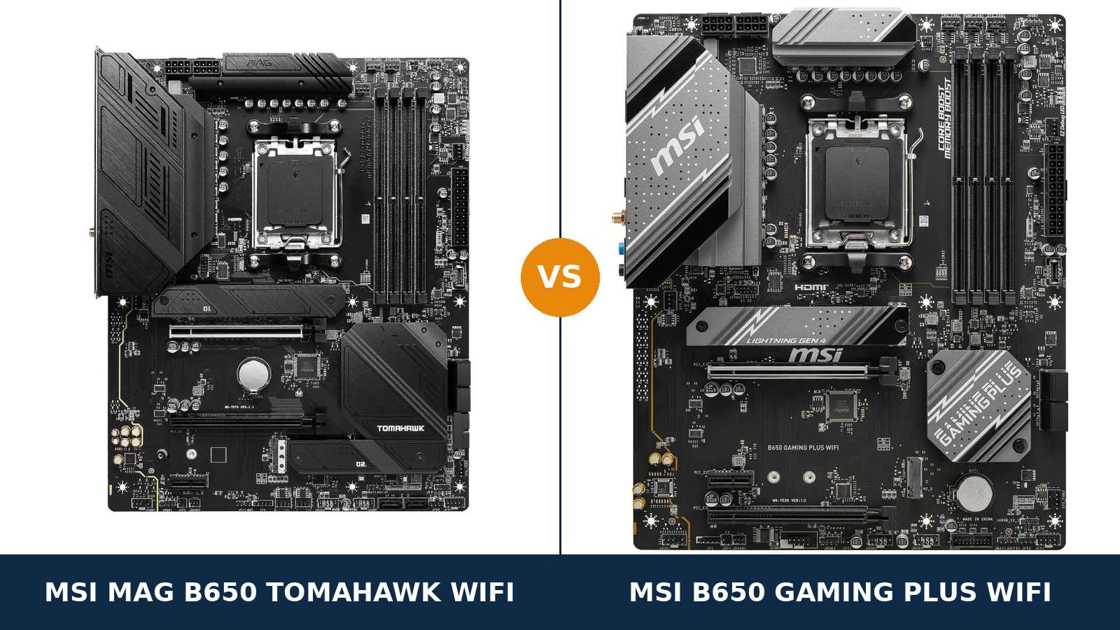
One manufacturer. One chipset. One socket. Two boards that share a spec sheet at first glance and diverge almost everywhere you look twice.
The MSI MAG B650 Tomahawk WiFi and the MSI B650 Gaming Plus WiFi are built from the same B650 toolkit. Same 2.5-gigabit LAN chip. Same Wi-Fi 6E radio. Same rear USB-C port running at 20 Gbps. Same memory controller story, same socket, same size.
So the Gaming Plus looks like the Tomahawk with a smaller invoice. Sometimes it is. But MSI did not trim this board at random — the cuts land in power delivery, storage depth and audio, and each one matters to a different kind of builder.
This guide works through every specification that separates them, all of it taken from MSI's own published data, and ends with the verdict we would give a friend spending their own money.
Key Takeaways
- The Tomahawk is the more complete board. Stronger VRM, three M.2 slots, six SATA ports and a flagship-class audio codec.
- The Gaming Plus is the value pick. It keeps the shared essentials — Wi-Fi 6E, 2.5G LAN, 20Gbps USB-C — and charges less for them.
- Networking is a genuine tie. Identical Realtek 2.5G LAN silicon and the same Wi-Fi 6E standard on both boards.
- The Gaming Plus wins one real round. Its second PCIe slot is wired for four lanes against the Tomahawk's two.
- Mind the model name. MSI sells a near-identical micro-ATX namesake and a non-WiFi variant; neither is the board in this comparison.
Quick Verdict
Buy the MSI MAG B650 Tomahawk WiFi for most builds. It is the fuller-featured board in almost every row of the table.
Its 14+2+1 power design uses 80-amp Smart Power Stages. It carries a third M.2 slot and two extra SATA ports. Its ALC4080 audio codec adds an optical output the Gaming Plus does not have at all.
Buy the MSI B650 Gaming Plus WiFi if your build is a straightforward gaming PC and the saving is real. One graphics card, one or two NVMe drives, a Ryzen 5 or Ryzen 7 — the Gaming Plus covers that build completely.
Its 12+2+1 VRM holds any AM5 chip at stock settings. Its networking is identical to the Tomahawk's. And if a second add-in card is in your future, its x4-wired second slot is genuinely the better one.
The Scorecard
Scores below are derived directly from the manufacturer specifications compared in this guide — phase counts, slot counts, port counts and supported standards. They are a reading aid, not benchmark results.
| Category | B650 Tomahawk WiFi | B650 Gaming Plus WiFi | ||
|---|---|---|---|---|
| Power delivery | 9 / 10 | 7 / 10 | ||
| Storage | 9 / 10 | 7 / 10 | ||
| Expansion | 7 / 10 | 8 / 10 | ||
| Memory | 9 / 10 | 8 / 10 | ||
| USB connectivity | 9 / 10 | 8 / 10 | ||
| Networking & audio | 9 / 10 | 6 / 10 | ||
| Overall | 8.6 / 10 | 7.3 / 10 | ||
The pattern is consistent. Where the boards share silicon, they tie. Where MSI spent extra money on the Tomahawk — power stages, storage, audio — the gap is real. The Gaming Plus claws one category back outright, and it is not the one most buyers expect.
At a Glance: Who Each Board Fits
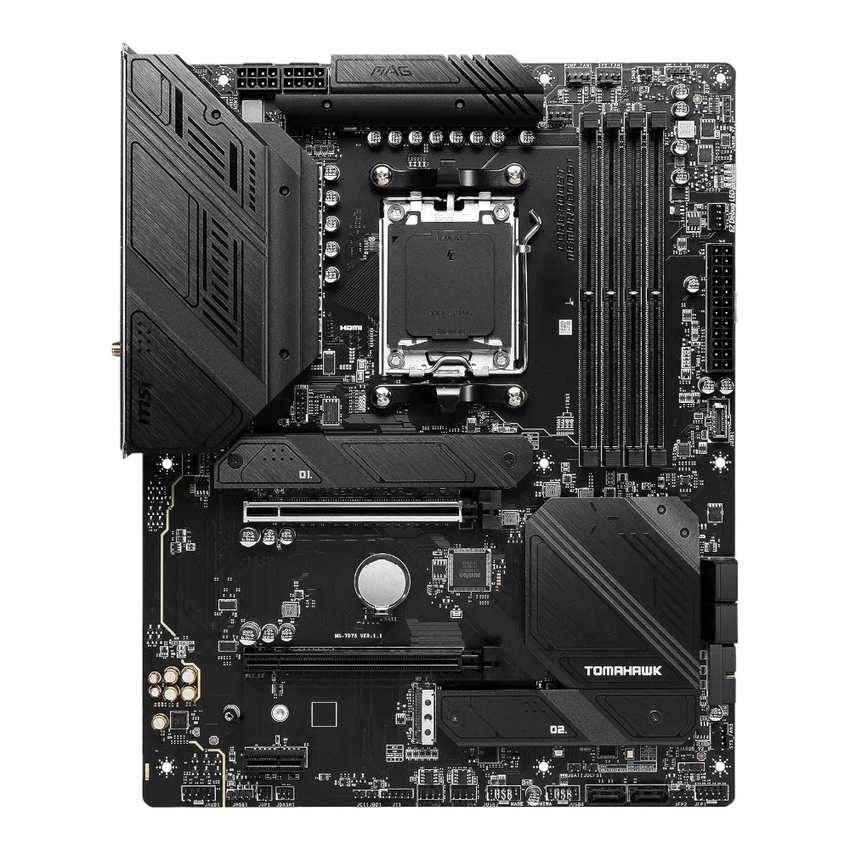
MSI MAG B650 Tomahawk WiFi
- 14+2+1 Duet Rail VRM, 80A Smart Power Stages, dual 8-pin
- Three PCIe 4.0 M.2 slots plus six SATA ports
- Realtek ALC4080 audio with optical S/PDIF output
- Ten rear USB ports, including 20Gbps Type-C
- DDR5 rated to 7600+ MT/s (OC), AMD EXPO
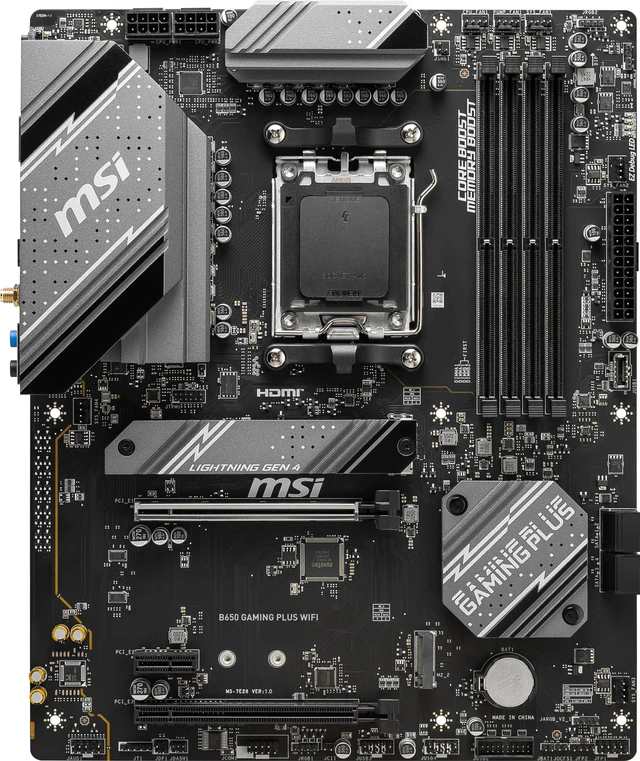
MSI B650 Gaming Plus WiFi
- 12+2+1 Duet Rail VRM, dual 8-pin CPU power
- Second PCIe x16 slot wired at x4, not x2
- Two PCIe 4.0 M.2 slots, both CPU-fed at x4
- Wi-Fi 6E and 2.5G LAN — identical to the Tomahawk
- Usually the cheaper way into the same platform
Choose the MAG B650 Tomahawk WiFi if…
You are building around a Ryzen 9, or you might upgrade to one later. The 80-amp stages and heavier heatsinks are bought for exactly that day.
Your drives are coming over from an older machine. Three M.2 slots and six SATA ports mean nothing gets left in a drawer.
You feed an AV receiver or DAC over optical, or you run several case fans and a pump. The Tomahawk has the audio output and the fan headers; the Gaming Plus has neither in the same measure.
Choose the B650 Gaming Plus WiFi if…
Your build is a Ryzen 5 or Ryzen 7 gaming PC with one graphics card and one or two SSDs. That build leaves the Tomahawk's extra hardware sitting idle.
You want the saving spent where it shows — a better graphics card, a bigger SSD, a faster memory kit.
Or you are planning a second add-in card. A capture card or storage controller runs at x4 in the Gaming Plus's second slot and x2 in the Tomahawk's. That round is not close.
As an Amazon Associate I earn from qualifying purchases at no extra cost to you.
Specifications: The Specs That Actually Matter
Every figure below is taken from MSI's published specifications for these two boards, cross-checked against MSI's product data.
Where MSI's own pages disagree with each other — and on the Gaming Plus, they do — the table follows the current specification page, and the notes under the table explain.
| Specification | MSI MAG B650 Tomahawk WiFi | MSI B650 Gaming Plus WiFi |
|---|---|---|
| Form factor | ATX, 30.5 × 24.4 cm | ATX, 30.5 × 24.4 cm |
| Socket / chipset | AMD AM5 / B650 | AMD AM5 / B650 |
| CPU support | Ryzen 9000, 8000, 7000 series | Ryzen 9000, 8000, 7000 series |
| VRM design | 14+2+1 Duet Rail, 80A Smart Power Stages, 8+8-pin | 12+2+1 Duet Rail, 8+8-pin |
| PCB | 6-layer, 2 oz thickened copper | 6-layer, 2 oz thickened copper |
| Memory | 4 × DDR5, up to 256 GB, 7600+ MT/s (O.C.), EXPO | 4 × DDR5, up to 256 GB, 7200+ MT/s (O.C.), EXPO |
| Graphics slot | PCIe 4.0 x16, Steel Armor | PCIe 4.0 x16, Steel Armor |
| Other expansion | PCIe 4.0 x16 slot (x2 wired) + PCIe 3.0 x1 | PCIe 4.0 x16 slot (x4 wired) + PCIe 3.0 x1 |
| M.2 storage | 3 slots, all PCIe 4.0 x4 | 2 slots, both PCIe 4.0 x4 from the CPU |
| SATA | 6 × SATA 6 Gb/s, RAID 0/1/10 | 4 × SATA 6 Gb/s, RAID 0/1 |
| Display outputs (iGPU) | HDMI 2.1 (4K 60Hz), DisplayPort 1.4 (8K 60Hz) | HDMI 2.1 (4K 60Hz), DisplayPort 1.4 (4K 60Hz) |
| LAN | Realtek RTL8125BG 2.5 GbE | Realtek RTL8125BG 2.5 GbE |
| Wireless | Wi-Fi 6E, Bluetooth 5.3 | Wi-Fi 6E, Bluetooth 5.3 |
| Audio | Realtek ALC4080, 7.1, optical S/PDIF out | Realtek ALC897, 7.1 |
| USB (rear) | 2 × USB 2.0, 4 × 5Gbps A, 3 × 10Gbps A, 1 × 20Gbps C | 4 × 5Gbps A, 3 × 10Gbps A, 1 × 20Gbps C |
| Front USB-C header | USB 3.2 Gen 2, 10 Gbps | USB 3.2 Gen 2, 10 Gbps |
| Fan headers | CPU + pump + 6 system | CPU + pump + 4 system |
| BIOS flashing | Flash BIOS Button (rear panel) | Flash BIOS Button (rear panel) |
| Debug aids | 4 × EZ Debug LED | 4 × EZ Debug LED |
Memory note: MSI's current specification page rates the Gaming Plus at 256 GB maximum capacity and DDR5-7200+ under overclocking. MSI's own US store page still carries the board's launch-era figures — 192 GB and 6000+.
The table uses the current specification page. In practice the point is academic: the AM5 sweet spot is DDR5-6000, and both boards run it identically.
Second-slot note: both boards' secondary slots are fed by the chipset, and both boards' manuals ration lanes somewhere. On the Tomahawk, the third M.2 slot and the second PCIe slot share bandwidth — fill both and each drops to x2.
APU note: on either board, fitting a Ryzen 8500 or 8300 series processor costs you storage. Those chips carry fewer lanes: the Tomahawk's second M.2 slot goes unavailable entirely, and the Gaming Plus's second slot drops to x2 speed. The graphics slot slows on both. That is the processor talking, not the motherboard.
The Differences That Actually Matter
1. Power delivery — where the Tomahawk's money went
This is the headline gap. The Tomahawk runs a 14+2+1 Duet Rail design built on 80-amp Smart Power Stages. The Gaming Plus runs 12+2+1 phases, and MSI does not publish a stage rating for it.
Both boards feed the processor through dual 8-pin EPS connectors. Both sit on a six-layer PCB with 2 oz thickened copper. Both wear extended heatsinks over the VRM.
What does the difference buy in practice? At stock settings, nothing you can measure in a game. A Ryzen 5 or Ryzen 7 runs at full boost on either board, all day.
The gap appears at the top of the range and under sustained load. A 16-core Ryzen 9 under Precision Boost Overdrive, rendering for hours, is fed by more phases, each carrying less current, under bigger heatsinks on the Tomahawk. That is thermal headroom the Gaming Plus simply has less of.
Here is the principle worth remembering: you can replace almost every part around a motherboard. The VRM is the one thing you are stuck with. If a Ryzen 9 is anywhere in this machine's future, this section is the decision.
2. Storage — three slots and six ports against two and four
Count the drives. The Tomahawk fits three M.2 SSDs, all running at PCIe 4.0 x4, and adds six SATA ports. The Gaming Plus fits two M.2 SSDs and four SATA ports.
The Gaming Plus's pair has one quiet virtue: both of its slots are wired directly to the CPU at full x4 speed. There is no chipset slot and no sharing arrangement to think about.
The Tomahawk's third slot is the chipset-fed one, and it shares its bandwidth with the second PCIe slot. Fill both and each runs at x2. A Gen4 drive at x2 is still fast storage — but the headline x4 disappears, and buyers deserve to know before the drives go in.
RAID quietly separates them too. The Tomahawk supports RAID 0, 1 and 10 across its SATA ports. The Gaming Plus lists RAID 0 and 1. Both support RAID 0 and 1 for NVMe arrays.
For a single boot drive and one game library, this section is a draw. The moment your build holds a shelf of drives carried over from an older PC, the Tomahawk is the only one of the two with room for all of them.
3. Expansion — the round the Gaming Plus wins outright
Both graphics slots are identical: PCIe 4.0 x16 from the CPU, Steel Armor reinforced, full speed for any current card. Neither board offers PCIe 5.0 anywhere. Tie.
Below the graphics slot, the boards swap places. The Gaming Plus's second x16 slot is wired at x4 from the chipset. The Tomahawk's is wired at x2.
An x2 slot sounds like a rounding error until you fit the card that goes there. A capture card, a 10-gigabit network adapter, an NVMe carrier — these are the cards that want four lanes, and on the Tomahawk they run at half their design speed or worse.
Most builders never fit a second card. If that is you, this section costs the Tomahawk nothing and the category still goes to MSI's cheaper board. If a streamer or storage build is the plan, the Gaming Plus is, on this one specification, the better-engineered choice.
4. Audio — a flagship codec against an honest one
The Tomahawk carries Realtek's ALC4080, the codec MSI sells as Audio Boost 5. It supports 32-bit/384 kHz playback on the front panel and — the detail that actually matters — it adds an optical S/PDIF output on the rear panel.
The Gaming Plus carries the ALC897. It is a competent 7.1 codec found across the value end of every manufacturer's range. There is no optical output.
Through a USB headset or a pair of desktop speakers, neither board will embarrass itself, and the difference is smaller than the marketing suggests. Through an AV receiver or an external DAC fed over TOSLINK, the Gaming Plus cannot play at all.
Audio is the clearest example of how MSI segmented these boards. Nothing on the Gaming Plus is broken. One output is simply missing, and whether you care is a question about your amplifier, not your PC.
5. USB — the Tomahawk's two extra sockets
Read the rear panels. Both boards offer four 5Gbps Type-A ports, three 10Gbps Type-A ports and a single 20Gbps Type-C — the fast end of these panels is identical, port for port.
The Tomahawk then adds two USB 2.0 ports the Gaming Plus does not have. Ten rear sockets against eight.
USB 2.0 is where dongles, DACs, keyboard receivers and printer cables live — devices that need a socket, not bandwidth. Two extra sockets is two fewer devices fighting over a hub.
The front panels tie exactly. Both boards provide a 10Gbps USB-C header, two 5Gbps Type-A ports and four USB 2.0 ports for the case. If your case has a front Type-C port, it runs at full speed on either board.
Verdict on connectivity: a real but modest Tomahawk win, earned entirely at the slow end of the panel.
6. Networking — the same silicon, twice
There is nothing to separate these boards here, and we will not pretend otherwise.
Wired networking is Realtek's RTL8125BG controller on both boards. 2.5-gigabit Ethernet, same chip, same performance, full stop.
Wireless is the same deal. Both boards ship with a Wi-Fi 6E module pre-installed in the Key-E slot — the 6 GHz band included — and Bluetooth 5.3. MSI fits an AMD-branded module to the Gaming Plus; the standard delivered is the same either way.
Antennas come in both boxes. Both boards' rear panels carry the same antenna fittings.
If networking is what you are shopping on, buy either board and close this tab. Decide on power delivery, storage and audio instead — the places where these two actually differ.
7. Cooling, layout and the build experience
Both boards are full ATX and share MSI's layout language: black PCBs, Steel Armor on the graphics slot, EZ Debug LEDs for fault-finding, and a Flash BIOS Button on the rear panel for CPU-less BIOS updates.
The differences are in the furniture. The Tomahawk gives you six system fan headers plus a dedicated pump header. The Gaming Plus gives you four system headers beside its pump header.
Four headers covers most air-cooled and AIO builds without complaint. Six headers — and a pump that does not have to share one — is what a custom loop or a fan-heavy case actually wants.
M.2 cooling follows the same pattern. MSI fits its Shield Frozr heatsink design to the Tomahawk's primary slots — plural, on this board. The Gaming Plus lists Shield Frozr coverage too, in slimmer form.
One genuine Gaming Plus footnote: it keeps a legacy serial COM port header the Tomahawk drops. Irrelevant to gamers, genuinely useful to anyone running industrial or point-of-sale hardware. It is that kind of board — the essentials, kept.
CPU Pairing Guide
The fastest way to choose between these boards is to start from your processor. This table is the whole comparison in one view.
| Your processor | B650 Tomahawk WiFi | B650 Gaming Plus WiFi | Our call |
|---|---|---|---|
| Ryzen 5 7600 / 9600X | Excellent | Excellent | Gaming Plus — save the difference |
| Ryzen 7 7700X / 7800X3D / 9700X / 9800X3D | Excellent | Excellent at stock settings | Either; Tomahawk for heavy PBO tuning |
| Ryzen 9 7900X / 7950X / 9900X / 9950X | Excellent — 80A stages, headroom to spare | Workable at stock; works hardest under sustained all-core load | B650 Tomahawk WiFi |
| Ryzen 7 8700G / Ryzen 5 8600G (APU) | Good — graphics slot drops to x8 by CPU | Good — graphics slot drops to x8 by CPU | Either; display outputs are near-identical |
| Ryzen 5 8500G / 8300G | Workable — second M.2 slot unavailable on these CPUs | Workable — second M.2 slot slows to x2 | Either; both boards are over-specified here |
Two honest cautions apply to both boards equally. First, AM5's APU processors carry fewer PCIe lanes than the desktop chips, so slot speeds fall on either board — that is the CPU talking, not the motherboard.
Second, read the Ryzen 9 row carefully. It is where the price gap between these boards stops being marketing and starts being power stages.
The 30-Second Decision
| If this sounds like you… | Buy this |
|---|---|
| “A Ryzen 9 is going in now, or in two years.” | B650 Tomahawk WiFi (80A power stages) |
| “Ryzen 5 gaming build, one GPU, one SSD, done.” | B650 Gaming Plus WiFi |
| “I have a stack of SATA drives from my old PC.” | B650 Tomahawk WiFi (six SATA ports) |
| “I stream, and a capture card is in the plan.” | B650 Gaming Plus WiFi (x4 second slot) |
| “My amplifier takes an optical input.” | B650 Tomahawk WiFi (S/PDIF out) |
| “The saving buys a bigger SSD or a faster kit.” | B650 Gaming Plus WiFi |
Ready to check today’s price?
Both boards sell through Amazon, and the gap between them moves around. Check the live figure on the board that fits your build.
View on Amazon — B650 Tomahawk WiFiView on Amazon — B650 Gaming Plus WiFiWhat You Gain. What You Give Up.
MSI MAG B650 Tomahawk WiFi
You gain: the stronger power supply — 14+2+1 phases on published 80-amp stages under heavier heatsinks. Deeper storage: a third M.2 slot and six SATA ports with RAID 10. The ALC4080 codec with an optical output. Two extra rear USB ports, six system fan headers, and a memory rating 400 MT/s higher.
You give up: money, first of all — this is the pricier board. And one specification where the cheaper board is flatly better: the second PCIe slot runs at x2 here, against x4 on the Gaming Plus. A second serious add-in card is the one build this board serves worse.
MSI B650 Gaming Plus WiFi
You gain: the lower price for the same platform essentials — Wi-Fi 6E, 2.5G LAN, a 20Gbps rear USB-C port, four DDR5 slots and a 10Gbps front USB-C header. A second slot wired at x4 for add-in cards. And a pair of M.2 slots that are both CPU-fed at full speed, with no sharing rules to memorise.
You give up: VRM headroom at the top of the CPU range. The third M.2 slot and two SATA ports. Optical audio output. Two rear USB sockets and two fan headers. Every saving on this board comes out of depth, not out of day-one performance.
Pros and Cons
B650 Tomahawk WiFi — Pros
- 14+2+1 VRM with published 80A Smart Power Stages
- Three M.2 slots plus six SATA ports, RAID 10
- ALC4080 audio with optical S/PDIF output
- Ten rear USB ports including 20Gbps Type-C
- Six system fan headers plus a pump header
Cons
- Second PCIe slot wired at only x2
- Third M.2 slot shares bandwidth with that slot
- No PCIe 5.0 anywhere — same as the Gaming Plus
- The pricier of the two boards
B650 Gaming Plus WiFi — Pros
- Lowest price into this feature set: Wi-Fi 6E, 2.5G LAN, 20Gbps USB-C
- Second PCIe slot wired at x4
- Both M.2 slots CPU-fed at full x4 speed
- Dual 8-pin CPU power and a 12+2+1 VRM
- Legacy serial header for specialist hardware
Cons
- ALC897 audio, no optical output
- Only two M.2 slots and four SATA ports
- No published VRM stage rating
- Four system fan headers
- No PCIe 5.0 anywhere
Check the Exact Name, Not Just the Family
Check the full model name. This corner of MSI's range is mined with near-identical siblings, and three of them will happily take your money by mistake.
The board in this comparison is the MSI B650 Gaming Plus WiFi — full ATX. MSI also sells a B650M Gaming Plus WiFi: a micro-ATX board with a smaller layout and a 10+2+1 power design. The single letter changes the product.
There is also a non-WiFi B650 Gaming Plus in some regions. And the Tomahawk name spans chipsets: the MAG B650 Tomahawk WiFi here is not the X870 Tomahawk WiFi above it or the B550 Tomahawk behind it.
Check the specification source. Reseller pages and even MSI's own US store still carry the Gaming Plus's launch-era memory figures — DDR5-6000+ and a 192 GB ceiling.
MSI's current specification page rates the board at 7200+ and 256 GB. The hardware did not change; the published support did. Buy on the current page's numbers.
Check the CPU pairing. Both boards need a current BIOS for Ryzen 9000 processors, and both can be flashed with no CPU fitted, using the rear-panel Flash BIOS Button.
Buy the Tomahawk if a Ryzen 9, a drive collection or an optical-fed amplifier is in the picture. Buy the Gaming Plus for a focused gaming build, and put the saving toward the parts you will actually see working.
Check the bundle. Expect the board, Wi-Fi antennas and a pair of SATA cables from either box. The Gaming Plus adds its EZ M.2 clip for tool-less drive fitting. Neither bundle stretches to extras worth deciding over.
The Upgrade Path Test
Judge an AM5 board by its third year, because the socket is built to be kept. AMD has carried AM5 through three processor generations already, and both of these boards support all of them.
Year one, in a Ryzen 5 or Ryzen 7 gaming build, the boards are interchangeable in a blind test. Same frame rates — the graphics card decides those, and it runs at full x16 speed in both.
Year three is where the invoices arrive. A Ryzen 9 on sale is a drop-in upgrade on the Tomahawk and a harder question on the Gaming Plus. A third NVMe drive fits the Tomahawk and not the Gaming Plus. The drives you retired in year one come back out of the drawer — if the SATA ports exist.
The Gaming Plus's counter-argument is honest: most builders never make those upgrades. They replace the whole machine. For them, the Tomahawk's depth is insurance against a future that never arrives, and the saving was the smarter spend all along.
So the upgrade test reduces to one question. Do you trust yourself to upgrade this machine, or to replace it? Upgraders buy the Tomahawk. Replacers can buy the Gaming Plus with a clear conscience.
When to Skip Both
Honesty cuts both ways. Some builders are shopping in the wrong tier entirely.
Skip both if you need PCIe 5.0. Neither board offers it for the graphics slot or storage — that means a B650E board, or stepping up to X870. Skip both if you need USB4, which lives in the same higher tier.
Skip both if your case is micro-ATX or mini-ITX. Both boards here are full ATX; MSI sells smaller Gaming Plus and Mortar variants for those cases.
And skip both if extreme memory overclocking is the hobby itself. Two-slot overclocking boards exist for that pursuit, and neither of these is one.
For the broad middle of AM5 builders — one graphics card, a few drives, a processor they may swap once — one of these two is the right answer. The sections above exist to tell you which.
BIOS and Long-Term Support
AM5 support is a live commitment from MSI, because the socket keeps receiving new processors.
Both boards sit on actively maintained support pages: BIOS updates for each Ryzen generation, chipset and LAN drivers, and full CPU and memory compatibility lists. A Ryzen 9000 upgrade on either board is a BIOS update away, and both boards can apply it with no CPU installed.
Both carry the same four-LED EZ Debug strip, which turns a failed first boot from a guessing game into a glance at the board. On a first build, that strip is worth more than most headline features.
One habit is worth keeping on either board: update the BIOS before a processor upgrade, not after, and note which memory kit and EXPO profile you were running before you start. Platform maturity makes these updates routine, but routine is not the same as careless.
Final Verdict
The MSI MAG B650 Tomahawk WiFi is the board we would build on.
It wins this comparison on depth. A 14+2+1 power design on published 80-amp stages. Three M.2 slots and six SATA ports. An audio codec with an optical output. Ten rear USB ports and the fan headers for a serious cooling setup.
None of that is garnish. It is the set of things that decide whether a motherboard absorbs your next three upgrades or forces the next replacement.
Buy the Tomahawk WiFi for Ryzen 9 processors, storage-heavy builds, optical-fed audio setups, and any PC you intend to upgrade rather than replace.
View on Amazon — B650 Tomahawk WiFi
Buy the B650 Gaming Plus WiFi if the build is a Ryzen 5 or Ryzen 7 gaming PC with one graphics card. If a capture card or second add-in card is planned — its x4 slot is the better tool. Or if the saving funds a component you will notice every day.
It is a sensible, honest value board. Just buy it knowing the savings come from depth you may want later, not from performance you would feel today.
View on Amazon — B650 Gaming Plus WiFi
Frequently Asked Questions
Is the B650 Tomahawk WiFi better than the B650 Gaming Plus WiFi?
For most builders, yes. It has a stronger VRM (14+2+1 phases with 80A Smart Power Stages against 12+2+1), a third M.2 slot, six SATA ports against four, and the ALC4080 audio codec with an optical output. The Gaming Plus fights back with a lower price and one genuine win: its second PCIe slot is wired at x4 against the Tomahawk's x2.
What is the difference between the B650 Gaming Plus WiFi and the B650M Gaming Plus WiFi?
Size and depth. The board in this comparison is full ATX with a 12+2+1 power design. The B650M is a smaller micro-ATX board with a 10+2+1 design and a different slot layout. The names differ by one letter, so match the full model name on the listing before ordering.
Can both boards run a Ryzen 9 9950X?
Yes, with different margins. The Tomahawk's 14+2+1 design with 80A stages and dual 8-pin power is built for sustained all-core loads from a 16-core chip. The Gaming Plus will run the same processor at stock settings, but its 12+2+1 stage works harder under long rendering loads. For a Ryzen 9 workstation, take the Tomahawk. Check MSI's CPU support list and update the BIOS first either way.
Do both boards have Wi-Fi 6E and 2.5G Ethernet?
Yes. Both ship with a Wi-Fi 6E module including the 6 GHz band, Bluetooth 5.3, and antennas in the box. Both use Realtek's RTL8125BG controller for wired networking — the identical chip on both boards, so wired performance is a true tie.
Does either board support PCIe 5.0?
No. Every slot on both boards is PCIe 4.0 — the graphics slot at x16 and the M.2 slots at x4. That is plenty for current graphics cards and Gen4 SSDs, but if Gen5 support matters to you, look at B650E or X870 boards instead.
Which board is better for lots of storage?
The Tomahawk, clearly. It fits three M.2 SSDs and six SATA drives, with RAID 0, 1 and 10 on the SATA side. The Gaming Plus fits two M.2 SSDs and four SATA drives. Note the Tomahawk's one quirk: its third M.2 slot shares bandwidth with its second PCIe slot, so filling both drops each to x2.
Which board has better audio?
The Tomahawk. Its Realtek ALC4080 codec supports 32-bit/384 kHz front-panel playback and adds an optical S/PDIF output for AV receivers and external DACs. The Gaming Plus uses the ALC897 — a perfectly serviceable 7.1 codec, but with no optical output. Headset and speaker users will be fine on either.
Is DDR5-7600 support on the Tomahawk a real advantage?
Only for memory tuners. AM5's practical sweet spot is DDR5-6000, where EXPO kits run at the memory controller's happiest ratio. The Tomahawk's 7600+ rating gives overclockers headroom to chase; the Gaming Plus's 7200+ rating covers anything a sensible build will run. Buy a 6000 MT/s EXPO kit for either board.
Sources & Verification
MSI MAG B650 TOMAHAWK WIFI official product page and specification, msi.com • MSI B650 GAMING PLUS WIFI official product page and specification, msi.com • MSI-US store product data for both boards • Amazon listing data for model numbers and ASIN cross-checks (Tomahawk UPC 824142301036; Gaming Plus model 7E26-001R). Specifications verified November 2026.

James Wilson
James has been building and benchmarking PCs for over a decade and writes Honestly Compared's motherboard and component guides. His rule for every comparison: the verdict has to survive the spec sheet, not the marketing page.