
MSI MAG B650 Tomahawk WiFi vs Gigabyte B650 Aorus Elite AX: Which Should You Buy?
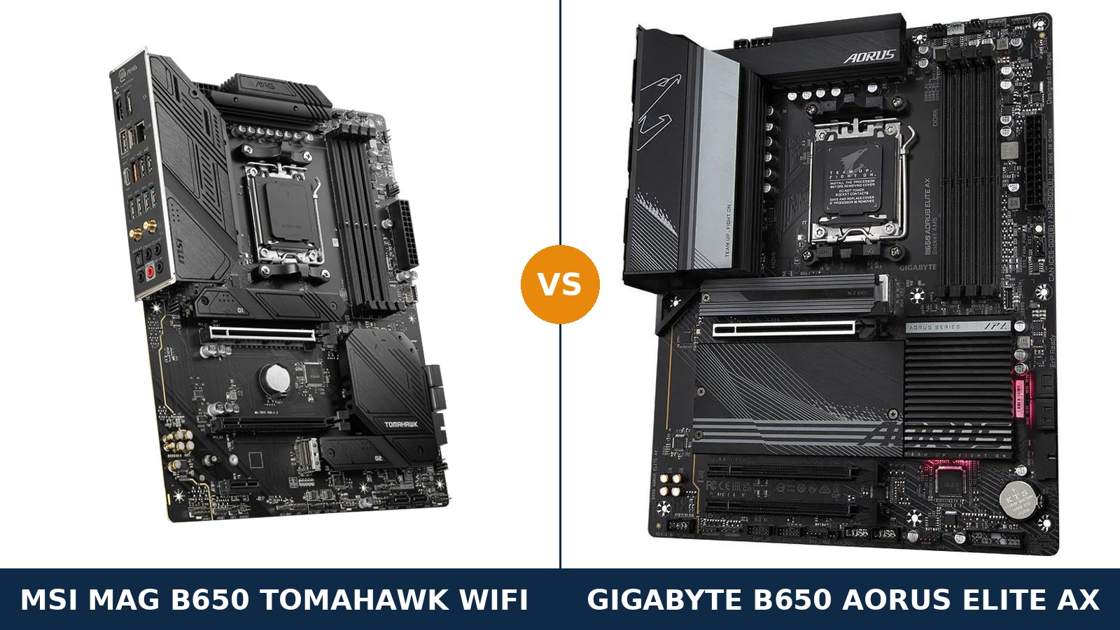
Two boards. Same chipset. Same socket. Near-identical power designs on paper.
The MSI MAG B650 Tomahawk WiFi and the Gigabyte B650 Aorus Elite AX are the two AM5 boards most builders end up choosing between. Both carry three M.2 slots, 2.5-gigabit LAN and Wi-Fi 6E. On a retailer's comparison table, they look interchangeable.
They are not. One puts its fastest storage slot a generation ahead. The other answers with better audio, more SATA ports and the fastest rear USB-C in the class. The differences are specific, checkable, and they decide which board belongs in your build.
Every specification below comes from MSI's and Gigabyte's own published data and manuals. The verdict at the end is the one we would give a friend spending their own money.
Key Takeaways
- The Tomahawk is the more complete board. Stronger power stages, the better audio codec, six SATA ports and a 20-gigabit rear USB-C.
- The Aorus Elite AX owns the future-proofing headline. Its primary M.2 slot runs PCIe 5.0; the MSI's storage tops out at PCIe 4.0.
- Neither board gives the graphics card PCIe 5.0. Both x16 slots are PCIe 4.0 — Gen 5 here is a storage story only.
- Check the Gigabyte's revision before buying. The Wi-Fi module changes between PCB revisions 1.0, 1.1 and 1.2.
- USB honours split. Gigabyte has more rear ports and the faster front-panel header; MSI has the faster rear Type-C.
Quick Verdict
Buy the MSI MAG B650 Tomahawk WiFi for most builds. It is the more rounded board.
Its 80-amp power stages feed through dual 8-pin connectors. Its ALC4080 audio comes with an optical output the Gigabyte lacks. It keeps six SATA ports for builders with legacy drives.
Nothing on the spec sheet is weak. That consistency is what wins this comparison.
Buy the Gigabyte B650 Aorus Elite AX if a Gen 5 SSD is in your plan. It is the only one of the two that can run one at full speed.
It also suits cases with a front USB-C port — its internal header runs at 20 gigabits against the MSI's 10 — and it typically asks less money for the privilege. Just check which revision is in the box.
The Scorecard
Scores below are derived directly from the manufacturer specifications compared in this guide — phase counts, slot counts, port counts and supported standards. They are a reading aid, not benchmark results.
| Category | MAG B650 Tomahawk WiFi | B650 Aorus Elite AX | ||
|---|---|---|---|---|
| Power delivery | 9 / 10 | 8 / 10 | ||
| Storage | 8 / 10 | 9 / 10 | ||
| Expansion | 8 / 10 | 6 / 10 | ||
| USB connectivity | 8 / 10 | 8 / 10 | ||
| Networking | 8 / 10 | 8 / 10 | ||
| Audio | 9 / 10 | 7 / 10 | ||
| Overall | 8.4 / 10 | 7.8 / 10 | ||
The pattern is clear. The Gigabyte wins the single biggest headline — PCIe 5.0 storage. The MSI wins or ties almost everywhere else, and wins the categories you use every day.
At a Glance: Who Each Board Fits
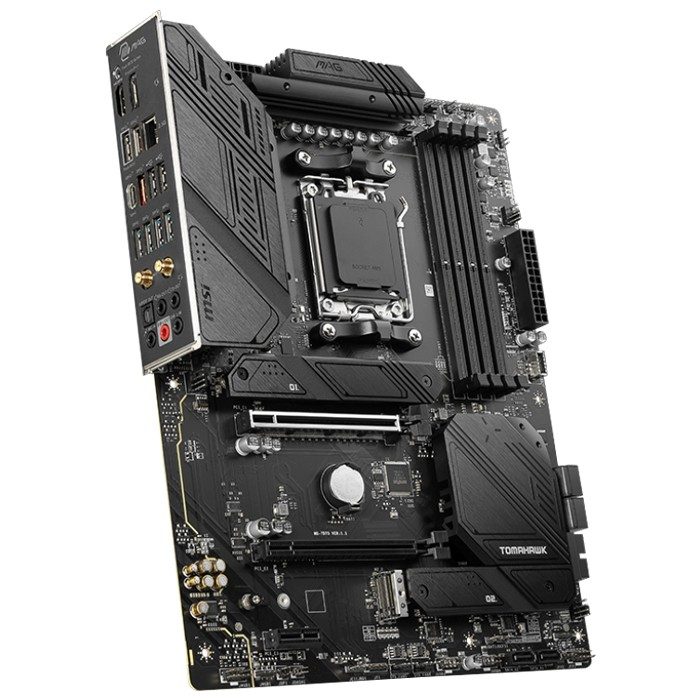
MSI MAG B650 Tomahawk WiFi
- 14+2+1 Duet Rail VRM, 80A power stages, dual 8-pin EPS
- Three PCIe 4.0 x4 M.2 slots plus six SATA ports
- Realtek ALC4080 audio with optical S/PDIF output
- 20 Gb/s USB-C on the rear panel
- Second expansion slot runs at x2, not x1
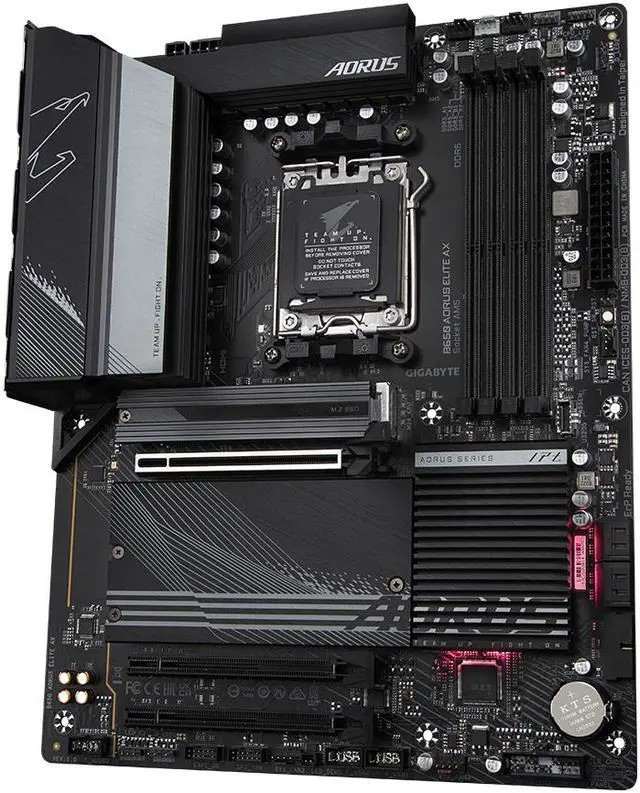
Gigabyte B650 Aorus Elite AX
- Twin 14+2+1 phase VRM, 70A stages, 8-layer PCB
- PCIe 5.0 x4 primary M.2 slot — Gen 5 SSD ready
- 20 Gb/s front-panel USB-C header
- Twelve rear USB ports, the most in this pairing
- EZ-Latch quick-release PCIe and M.2 fittings
Choose the MAG B650 Tomahawk WiFi if…
You are building around a Ryzen 9, or you want the VRM headroom to drop one in later.
You still run SATA drives. Six ports against four is a real difference for a storage-heavy build or a home-server second life.
You care about onboard audio — a headset amp, a 5.1 receiver over optical, or both. Or you plug fast storage into the rear panel and want the 20-gigabit Type-C there.
Choose the B650 Aorus Elite AX if…
A PCIe 5.0 SSD is in the build, or firmly in the upgrade plan. On the MSI, that drive would run at half its rated speed.
Your case has a front USB-C port you intend to use at full tilt. The Gigabyte's internal header is twice as fast.
Or it is simply the cheaper board when you order. Its compromises are narrow, specific, and easy to live with if none of them touches your build.
As an Amazon Associate I earn from qualifying purchases at no extra cost to you.
Specifications: The Specs That Actually Matter
Every figure below is taken from MSI's and Gigabyte's published specifications and manuals, cross-checked against the manufacturers' product data.
The Gigabyte exists in several PCB revisions. The table reflects the current specification; the one revision difference that changes what lands in your box gets its own note under the table.
| Specification | MSI MAG B650 Tomahawk WiFi | Gigabyte B650 Aorus Elite AX |
|---|---|---|
| Form factor | ATX, 30.5 × 24.4 cm | ATX, 30.5 × 24.4 cm |
| Socket / chipset | AMD AM5 / B650 | AMD AM5 / B650 |
| CPU support | Ryzen 9000, 8000, 7000 series | Ryzen 9000, 8000, 7000 series |
| VRM design | 14+2+1 Duet Rail, 80A Smart Power Stages, dual 8-pin EPS | Twin 14+2+1 phases, 70A power stages |
| PCB | 6-layer, 2 oz thickened copper | 8-layer, 2× copper |
| Memory | 4 × DDR5 DIMM, up to 256 GB, 7600+ MT/s (O.C.), EXPO | 4 × DDR5 DIMM, up to 256 GB, 8000 MT/s (O.C.), EXPO + XMP |
| Graphics outputs (iGPU) | HDMI 2.1 (4K@60), DisplayPort 1.4 (8K@60) | HDMI (4K@60), DisplayPort (4K@144) |
| Expansion slots | PCIe 4.0 x16 + PCIe 4.0 x16-length (x2) + PCIe 3.0 x1 | PCIe 4.0 x16 + 2× PCIe 3.0 x16-length (x1) |
| M.2 storage | 3 slots, all PCIe 4.0 x4, Shield Frozr heatsinks | 3 slots: PCIe 5.0 x4 + 2× PCIe 4.0 x4, Thermal Guard heatsinks |
| SATA | 6 × SATA 6 Gb/s | 4 × SATA 6 Gb/s |
| USB (rear) | 10 ports: 20 Gb/s Type-C, 3× 10 Gb/s A, 4× 5 Gb/s A, 2× USB 2.0 | 12 ports: 10 Gb/s Type-C, 2× 10 Gb/s A, 5× 5 Gb/s A, 4× USB 2.0 |
| USB (front headers) | Type-C 10 Gb/s, 2× 5 Gb/s A, 4× USB 2.0 | Type-C 20 Gb/s (Gen 2x2), 2× 5 Gb/s A, 4× USB 2.0 |
| LAN | Realtek RTL8125BG 2.5 GbE | Realtek 2.5 GbE |
| Wireless | Wi-Fi 6E + Bluetooth 5.3, fixed specification | Wi-Fi 6E + Bluetooth 5.2 or 5.3 — module varies by PCB revision |
| Audio | Realtek ALC4080, 7.1, optical S/PDIF out (Audio Boost 5) | Realtek HD codec, 7.1, three rear jacks, no optical output |
| BIOS flashing | Flash BIOS Button on rear panel | Q-Flash Plus button on rear panel |
Revision note: the Aorus Elite AX's wireless module depends on the PCB revision printed on the box and the corner of the board. Revision 1.0 carries an AMD RZ616 Wi-Fi 6E module with Bluetooth 5.2. Revision 1.1 carries an Intel AX210 with Bluetooth 5.3. Revision 1.2 carries a Realtek RTL8852CE, also Bluetooth 5.3.
All three are Wi-Fi 6E and all three work. But if the Intel module matters to you — for driver support, say — the revision is the thing to check before the box is opened, not after.
One more reading note: Gigabyte's launch-era materials quoted memory support “up to 6600 and beyond”; its current specification lists modules up to 8000 MT/s (O.C.). Either figure sits far beyond the DDR5-6000 range AM5 processors actually favour, so treat memory as level in practice.
The Differences That Actually Matter
1. Power delivery — same phase count, different muscle
Both boards advertise a 14+2+1 phase design. Read one line deeper and they separate.
The MSI's core stages are rated at 80 amps, in its Duet Rail arrangement, fed by two 8-pin EPS connectors. The Gigabyte's stages are 70-amp parts. For any Ryzen processor you can buy, both are comfortably sufficient — a Ryzen 9 at full tilt will not trouble either board.
The Gigabyte claws ground back underneath the VRM. Its PCB is an 8-layer, 2× copper design against the MSI's 6-layer board, which helps signal integrity and spreads heat through the board itself.
Cooling hardware is strong on both: extended, fully covered VRM heatsinks, with a heatpipe in the Gigabyte's thermal design.
Call it a narrow MSI win on stage rating and power connectors, with an honest note that the Gigabyte's PCB is the better piece of laminate. In daily use, this section should not decide your purchase alone.
2. Storage — the headline difference, and it belongs to Gigabyte
Here is the gap that matters most. The Aorus Elite AX's primary M.2 slot, wired to the CPU, runs PCIe 5.0 x4. Fit a Gen 5 SSD and it runs at full speed — sequential figures roughly double the Gen 4 ceiling.
All three of the Tomahawk's M.2 slots are PCIe 4.0 x4. A Gen 5 drive fitted to the MSI works perfectly — at Gen 4 speeds. You pay for bandwidth you never see.
Both boards back the headline slot with two further PCIe 4.0 x4 M.2 slots, and both cover their slots with proper heatsinks: M.2 Shield Frozr on the MSI, Thermal Guard on the Gigabyte.
Then the MSI counters on the older standard. It keeps six SATA ports; the Gigabyte keeps four. Two extra ports sound trivial until the build inherits a pair of hard drives and a SATA SSD from the last machine — a common AM5 upgrade story.
Two MSI footnotes belong here, straight from its specification. The second M.2 slot goes unavailable with a Ryzen 8500 or 8300 installed, and the third slot shares bandwidth with the second PCIe slot — fill both and each runs at x2. The Gigabyte's manual carries no equivalent sharing note for its third slot.
Verdict on storage: Gigabyte for speed at the top end, MSI for volume at the legacy end.
3. USB — a split decision, front against rear
Count the rear panel first. The Gigabyte wins it, twelve ports to ten, including five 5-gigabit Type-A ports and four USB 2.0 ports.
Now weigh the fastest port on each panel. The MSI's rear Type-C runs at 20 gigabits — USB 3.2 Gen 2x2. The Gigabyte's rear Type-C runs at 10. For an external SSD enclosure plugged in at the back, the MSI is twice as quick.
Then walk to the front of the case, where the result inverts. The Gigabyte's internal Type-C header is the 20-gigabit part; the MSI's front header is 10 gigabits. Whichever board you buy, one of your Type-C ports is the fast one — the boards simply disagree about where it lives.
So decide by your desk, not by the totals. Fast drive at the front of the case? Gigabyte. Fast drive behind the machine? MSI. Rear port count breaks any remaining tie toward Gigabyte.
4. Audio — the clearest win in the comparison
The Tomahawk runs Realtek's ALC4080, the flagship codec in this class, under MSI's Audio Boost 5 design. It offers 7.1 output, five analogue jacks and — the detail that decides it — an optical S/PDIF output on the rear panel.
The Gigabyte uses a Realtek HD codec that Gigabyte, unusually, does not name in its specification. The rear panel offers three audio jacks and no optical output. High-end audio capacitors are fitted, and for a headset or desktop speakers it is honestly fine.
But “fine” is the ceiling. If your audio runs to a receiver, a soundbar or a DAC over optical, the Gigabyte simply cannot connect the way the MSI can. If you use USB or HDMI audio, this entire section washes out to a tie.
For everyone in between — analogue headphones, powered speakers, a gaming headset — the MSI's newer codec and fuller jack set make it the safer board for ears.
5. Expansion — the second slot tells the story
First, the shared headline neither brand shouts about: both graphics slots are PCIe 4.0 x16. On a B650 board that is normal — PCIe 5.0 for graphics is the B650E's party trick — and today's graphics cards lose nothing measurable at Gen 4.
Below the graphics slot, the boards differ in the fine print. The MSI's second x16-length slot runs at PCIe 4.0 x2 from the chipset. The Gigabyte's two extra x16-length slots each run at PCIe 3.0 x1.
x2 at Gen 4 is four times the bandwidth of x1 at Gen 3. A capture card, a fast network card or an extra NVMe adapter card all prefer the MSI's slot. The Gigabyte's pair are realistically for low-bandwidth cards only.
Both boards drop the graphics slot to x8 with a Ryzen 8000-series Phoenix 1 processor fitted, and to x4 with Phoenix 2 — that is a processor limitation, identical on both, and worth knowing before an APU build.
One Gigabyte convenience deserves its due: EZ-Latch fittings make removing a large graphics card genuinely easier. MSI counters with its EZ M.2 clips. Small things — until you are doing them with your hand wedged under a three-slot GPU.
6. Memory — a tie wearing two different numbers
Four DDR5 slots each. Up to 256 GB each, on 64 GB modules. EXPO profiles on both — and the Gigabyte adds formal XMP support alongside, a small kindness if your kit came from an Intel build.
The headline ceilings differ: 7600+ MT/s on the MSI's page, 8000 MT/s on the Gigabyte's current specification. Both numbers are overclocking ceilings, not promises. What a kit actually runs at depends on the processor's memory controller and the modules themselves.
The practical truth for AM5 has not changed: DDR5-6000 with tight timings is the sweet spot for Ryzen gaming builds, and both boards reach it without breaking a sweat.
Score memory a tie. If a specification sheet tries to sell you either board on its memory ceiling, it is selling you the least important number on the page.
7. Networking and the small stuff — level, with one lottery
Wired networking is identical: a Realtek 2.5-gigabit controller on each board. Wireless is Wi-Fi 6E with Bluetooth on each board. On paper, a draw.
The difference is certainty. The MSI's wireless specification is fixed: Wi-Fi 6E, Bluetooth 5.3, the same module in every box. The Gigabyte's module is the revision lottery from the note under the spec table — AMD, Intel or Realtek silicon depending on when the board was made.
All three modules perform the same job. The lottery matters only if you have a preference — Linux driver support, say, where the Intel AX210 of revision 1.1 has the longest track record. Everyone else can ignore it.
Diagnostics split the pair slightly. MSI fits its four EZ Debug LEDs and a pre-installed I/O shield. Gigabyte fits status LEDs of its own, and both boards put their BIOS flash buttons on the rear panel. Fan control is a wash — a pump header and full fan suites on each — so neither limits a sensible cooling setup.
CPU Pairing Guide
The fastest way to choose between these boards is to start from your processor. This table is the whole comparison in one view.
| Your processor | MAG B650 Tomahawk WiFi | B650 Aorus Elite AX | Our call |
|---|---|---|---|
| Ryzen 5 7600 / 9600X | Excellent | Excellent | Buy whichever is cheaper |
| Ryzen 7 7700X / 9700X | Excellent | Excellent | Tie — decide on storage and USB |
| Ryzen 7 7800X3D / 9800X3D | Excellent — VRM headroom to spare | Excellent | Tomahawk, by a nose |
| Ryzen 9 7900X / 7950X / 9950X | Excellent — 80A stages, dual 8-pin | Very good — 70A stages cope fine | Tomahawk for sustained all-core work |
| Ryzen 5 8500G / 8300G (APU) | Good — second M.2 slot unavailable, x16 slot at x4 | Good — x16 slot at x4 | Aorus Elite AX; the MSI loses an M.2 slot here |
| Ryzen 7 8700G (APU) | Very good — x16 slot at x8 | Very good — x16 slot at x8 | Tie — both display outputs serve an APU well |
Read the APU rows carefully. The lane limits come from the processors, not the boards — but the MSI's dead second M.2 slot on the smallest APUs is worth knowing before you order.
Ready to check today’s price?
Both boards sell through Amazon. Prices move, so check the live figure on the board that fits your build.
View on Amazon — MAG B650 Tomahawk WiFiView on Amazon — B650 Aorus Elite AXThe 30-Second Decision
| If this sounds like you… | Buy this |
|---|---|
| “A Gen 5 SSD is the point of this build.” | B650 Aorus Elite AX |
| “Ryzen 9, long renders, no throttling excuses.” | MAG B650 Tomahawk WiFi |
| “My receiver connects by optical cable.” | MAG B650 Tomahawk WiFi |
| “My case's front USB-C has to run at full speed.” | B650 Aorus Elite AX |
| “I am bringing SATA drives over from my old PC.” | MAG B650 Tomahawk WiFi (6 ports) |
| “Gaming build, Ryzen 5 or 7, one fast SSD.” | Whichever is cheaper — honestly |
What You Gain. What You Give Up.
MSI MAG B650 Tomahawk WiFi
You gain: the stronger power stage set with dual 8-pin feeds. The class's better audio, with an optical output. Six SATA ports and a second expansion slot with four times the Gigabyte's bandwidth. The fastest rear USB-C of the pair, and a wireless specification that is the same in every box.
You give up: PCIe 5.0 storage entirely — every M.2 slot is Gen 4. The front USB-C header runs at half the Gigabyte's speed. And two rear USB ports against the Gigabyte's count.
Gigabyte B650 Aorus Elite AX
You gain: a Gen 5 M.2 slot that keeps the board current for the next SSD generation. The faster front-panel USB-C header, the fuller rear port count, an 8-layer PCB, and tool-free EZ-Latch fittings that make GPU swaps painless.
You give up: the optical audio output and the named flagship codec. Two SATA ports. A usable-bandwidth second expansion slot. And certainty about which Wi-Fi module is in the box, unless you check the revision.
Pros and Cons
MAG B650 Tomahawk WiFi — Pros
- 80A power stages with dual 8-pin EPS feeds
- ALC4080 audio with optical S/PDIF output
- Six SATA ports — rare on modern boards
- 20 Gb/s rear USB-C
- Second slot at x2; EZ Debug LEDs; fixed Wi-Fi spec
Cons
- No PCIe 5.0 anywhere — storage tops out at Gen 4
- Front USB-C header is 10 Gb/s, not 20
- Second M.2 slot disabled on Ryzen 8500/8300
- Third M.2 slot shares bandwidth with the x2 slot
B650 Aorus Elite AX — Pros
- PCIe 5.0 x4 primary M.2 slot
- 20 Gb/s front-panel USB-C header
- Twelve rear USB ports
- 8-layer 2× copper PCB
- EZ-Latch PCIe and M.2 fittings
Cons
- Unnamed audio codec, no optical output
- Only four SATA ports
- Extra slots run at x1 — limited real use
- Wi-Fi module varies by revision
- Name collides with the different V2 and ICE variants
Check the Revision, the Variant and the BIOS
Check the Gigabyte's revision. As the note under the spec table explains, revisions 1.0, 1.1 and 1.2 of the Aorus Elite AX carry three different Wi-Fi modules. The revision is printed on the box label and in the corner of the PCB.
None of the three is a bad board. But if you want the Intel AX210 — revision 1.1 — that is a question to settle with the listing before money moves, because returns-for-a-preference are a miserable way to spend a week.
Check the variant name, letter by letter. The B650 Aorus Elite AX V2 is a different motherboard with a lighter 12+2+2 VRM, and the AX ICE is the white version of this board. A listing that just says “Aorus Elite AX” needs its full title read before you trust its spec list.
The MSI has no such maze. MAG B650 Tomahawk WiFi names one board, one specification, worldwide.
Check the BIOS against your CPU. Both boards launched before the Ryzen 9000 series existed. New stock ships ready; older stock may need an update first.
Either way you are covered: both boards flash from a rear-panel button with no processor installed — Flash BIOS Button on the MSI, Q-Flash Plus on the Gigabyte. Ten minutes with a USB stick settles it.
Check the bundle. Expect the board, Wi-Fi antennas and SATA cables from both. The MSI's I/O shield comes pre-installed.
The Upgrade Path Test
AM5 is a socket with a future, and both boards are bought for it. Judge them by the second build, not the first.
The processor path is identical and generous: Ryzen 7000 today, 9000 tomorrow, and whatever AMD ships next for AM5 after that. Both VRMs are sized for the top of the range, so the CPU upgrade never forces a board upgrade on either.
Storage is where the paths fork. The Gigabyte's Gen 5 slot means the next SSD generation drops straight in at full speed, years from now. The MSI owner making the same upgrade gets Gen 4 speeds from a Gen 5 drive — fine, but a ceiling.
Neither answer is wrong. They are two different bets on what your PC accumulates over five years: faster drives, or more of everything else.
When to Skip Both
Honesty cuts both ways. Some builders should walk past this entire pairing.
Skip both if a PCIe 5.0 graphics slot is non-negotiable. That means a B650E board at minimum — neither of these wired its x16 slot for Gen 5, and no BIOS update will change that.
Skip both if your case is micro-ATX or smaller. Both are full ATX boards; the B650M Aorus Elite AX exists for the Gigabyte's side of that need.
Skip both if you need USB4 or Thunderbolt-class connectivity on the rear panel. That feature lives further up the AM5 range, on X870-class boards.
And skip both if you are building the cheapest possible AM5 system. Capable boards exist below these two; you would be paying for VRM and connectivity a Ryzen 5 office build never touches.
Final Verdict
The MSI MAG B650 Tomahawk WiFi is the board we would build on.
It does not own the single biggest headline in this comparison. The Gigabyte does — and if PCIe 5.0 storage is your priority, stop reading and buy the Aorus Elite AX with our blessing.
For everyone else, the Tomahawk is the more complete motherboard. Stronger power stages. Better audio with the connections to use it. More storage ports of the ordinary kind. A second expansion slot with real bandwidth. The fastest rear USB-C. It wins the comparison the way good boards usually do: not with one trick, but by having no weak line on its spec sheet.
Buy the Tomahawk for Ryzen 9 builds, audio-conscious setups, SATA-heavy storage, and any AM5 machine you intend to grow rather than replace.
View on Amazon — MAG B650 Tomahawk WiFi
Buy the Aorus Elite AX if a Gen 5 SSD is in the plan, if your case's front USB-C must run at 20 gigabits, or if it is meaningfully cheaper when you order.
It is an excellent board with one genuine superpower. Just buy it knowing which revision is in the box.
View on Amazon — B650 Aorus Elite AX
Watch Out: Similar Names, Different Boards
AM5 board names are a trap for the hurried buyer. Three warnings belong in every version of this guide.
First: the B650 Aorus Elite AX, the AX V2 and the AX ICE are three separate products. The V2 carries a different, lighter 12+2+2 phase VRM. The ICE is this board in white. Listings shorten all three to similar titles — match the full name before you match the price.
Second: the B650M Aorus Elite AX is a smaller micro-ATX board with two M.2 slots, not this ATX board with three. The single letter changes the product.
Third: “Tomahawk” spans two platforms in MSI's range. The MAG B650 Tomahawk WiFi in this guide is the AM5 board; the older B550 Tomahawk is an AM4 board that fits none of these processors or memory.
Slow down on the product page. Match the full model name, then the revision, then the price — in that order.
Case, Power and Cabling Notes
Both boards are full ATX, 30.5 × 24.4 cm. They fit ATX mid-towers and larger; neither fits a micro-ATX or mini-ITX case.
The MSI takes a 24-pin main connector plus two 8-pin EPS CPU connectors — any reputable modern power supply covers this without adapters.
Front-panel wiring is equally painless on both: a USB Type-C header, a USB 3.2 Gen 1 header for Type-A case ports, and USB 2.0 headers. Remember the speed split from the differences section — the Gigabyte's front Type-C runs at 20 Gb/s, the MSI's at 10.
Cooling headers will not limit either build: the MSI provides CPU, pump and six system fan headers, and the Gigabyte answers with Smart Fan 6 control across its own full header set.
One shared convenience: both boards put their BIOS flash button on the rear panel. Firmware updates with an empty socket are a two-minute job on either — genuinely useful on a platform that keeps gaining new processors.
BIOS and Long-Term Support
AM5 is AMD's current desktop platform, and both manufacturers treat these boards as front-line products.
Both sit on full support pages: BIOS updates as new Ryzen generations land, chipset and LAN drivers, and a per-board CPU support list that tells you exactly which BIOS a given processor needs.
The habit worth keeping is the same on both: before any CPU upgrade, check the support list, update the BIOS while the old processor is still installed — or use the rear-panel flash button with no processor at all — and only then swap the chip.
Frequently Asked Questions
Is the MSI B650 Tomahawk WiFi better than the Gigabyte B650 Aorus Elite AX?
For most builders, yes — narrowly. It has stronger 80A power stages, the better audio codec with an optical output, six SATA ports against four, and a faster rear USB-C. The Gigabyte strikes back with the comparison's biggest single feature: a PCIe 5.0 M.2 slot. If Gen 5 storage matters, the Gigabyte is the better buy.
Does either board have a PCIe 5.0 graphics card slot?
No. Both boards run their x16 slot at PCIe 4.0. On the Gigabyte, PCIe 5.0 reaches only the primary M.2 slot; the MSI has no PCIe 5.0 connectivity at all. Current graphics cards lose nothing measurable at Gen 4, but if a Gen 5 GPU slot is a hard requirement, look at B650E boards instead.
Can I run a PCIe 5.0 SSD on these boards?
On the Gigabyte, yes — its primary M.2 slot (M2A_CPU) runs PCIe 5.0 x4 and accepts Gen 5 drives at full speed. On the MSI, a Gen 5 drive works but runs at PCIe 4.0 speeds, because all three of its M.2 slots are Gen 4. Both boards take three M.2 drives in total.
Which board is better for a Ryzen 9 7950X or 9950X?
The MSI, on paper. Both boards run a 14+2+1 design that handles Ryzen 9 processors at stock and PBO settings, but the Tomahawk's 80A stages and dual 8-pin EPS feeds give it more headroom than the Gigabyte's 70A stages. For a Ryzen 7 or 5, the difference disappears entirely.
Which Wi-Fi module will my B650 Aorus Elite AX have?
It depends on the PCB revision. Revision 1.0 uses an AMD RZ616 module (Bluetooth 5.2), revision 1.1 an Intel AX210 (Bluetooth 5.3), and revision 1.2 a Realtek RTL8852CE (Bluetooth 5.3). All are Wi-Fi 6E. The revision is printed on the box and the corner of the board — check before buying if the module matters to you.
Do both boards work with Ryzen 9000 processors out of the box?
The processors fit both boards, but BIOS support depends on the board's age. Stock built before the Ryzen 9000 launch may need a BIOS update first. Both boards can be flashed from a rear-panel button with no CPU installed — Flash BIOS Button on the MSI, Q-Flash Plus on the Gigabyte — so this is a ten-minute task, never a blocker.
Which board has better onboard audio?
The MSI. Its Realtek ALC4080 codec is the flagship part in this class, and the rear panel adds an optical S/PDIF output the Gigabyte lacks. Gigabyte does not name its codec in the specification and provides three rear audio jacks. For USB headsets or HDMI audio, the difference disappears.
Is the B650 Aorus Elite AX V2 the same motherboard?
No. The V2 is a separate, later product with a lighter 12+2+2 phase VRM design. The board in this comparison is the original B650 Aorus Elite AX with the twin 14+2+1 phase design. Confirm the full model name on the product page before ordering.
Sources & Verification
MSI MAG B650 TOMAHAWK WIFI official specifications and product overview, msi.com • GIGABYTE B650 AORUS ELITE AX (rev. 1.2) official specifications, gigabyte.com • GIGABYTE B650 AORUS ELITE AX user manual, revision 1203 (specifications chapter, including the per-revision wireless module table) • Manufacturer product data via Newegg, Best Buy and PC Case Gear listings for both boards. Specifications verified November 2026.

James Wilson
James has been building and benchmarking PCs for over a decade and writes Honestly Compared's motherboard and component guides. His rule for every comparison: the verdict has to survive the spec sheet, not the marketing page.