
MSI MAG B850 Tomahawk MAX WiFi vs MSI B850 Gaming Plus WiFi: Which Should You Buy?
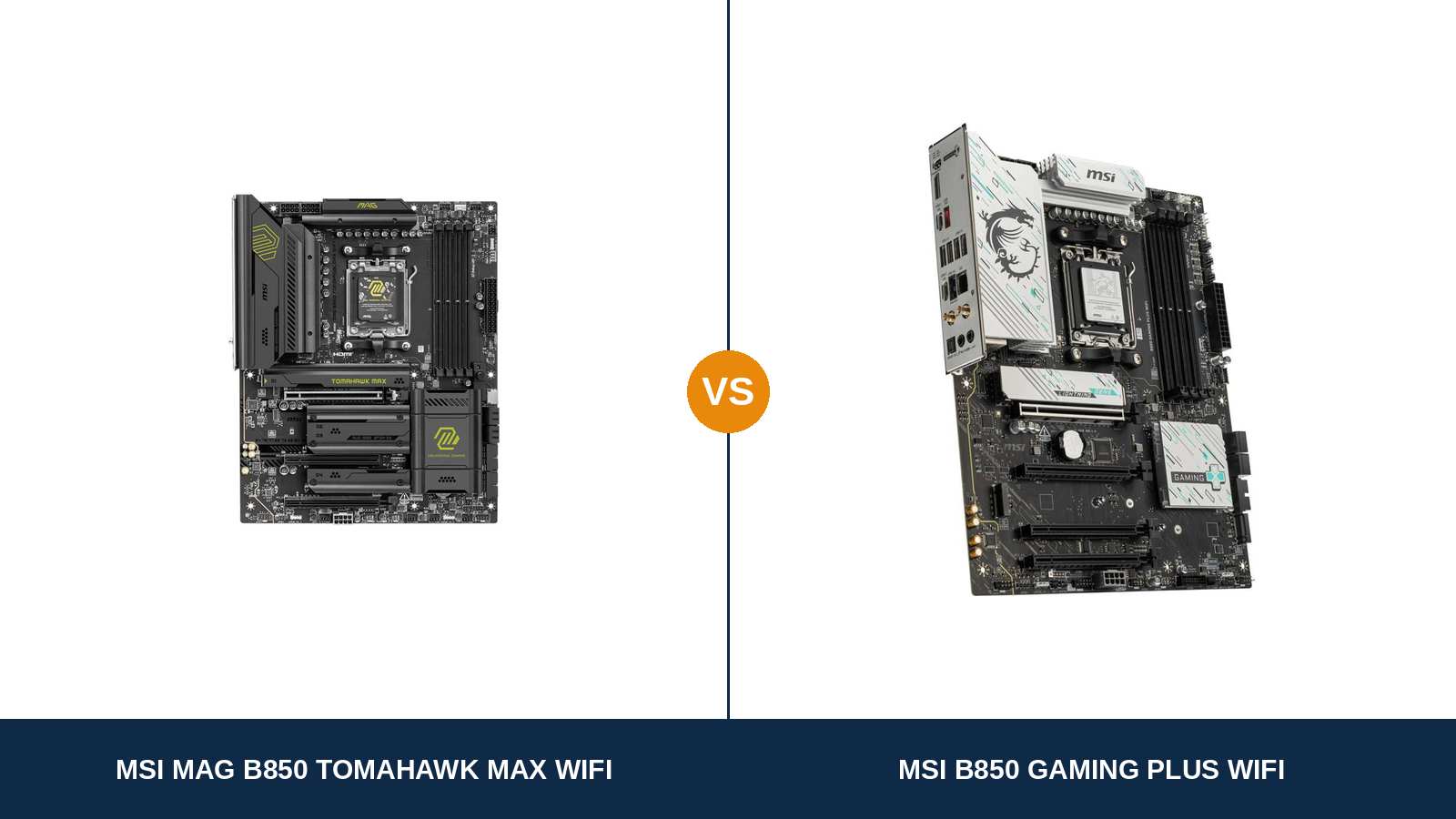
Start with a small embarrassment: the board you searched for does not exist. MSI sells no product actually called the “B850 Tomahawk”.
What it sells is the MAG B850 Tomahawk MAX WiFi — four extra words deep, model 7E62, and the board compared here. Beside it sits the B850 Gaming Plus WiFi, wearing the shorter name and, usually, the smaller price tag.
That naming gap is the whole comparison in miniature. The Tomahawk MAX is where MSI spent money on things a product photo cannot show: power stages, PCB layers, storage lanes, audio circuitry. The Gaming Plus keeps the same platform skeleton and hands that reinforcement back.
So the real question is not which board is better — on paper, that answers itself. It is whether the reinforcement is worth paying for in the PC you are actually building.
Every figure below comes from MSI's own specification pages and datasheets for these two exact models.
Key Takeaways
- The Tomahawk MAX WiFi is the stronger board, clearly. A 14+2+1 VRM on 80A stages, an 8-layer PCB, four M.2 slots and ALC4080 audio put it a class ahead.
- The Gaming Plus WiFi is the value play, and a good one. Identical 5G LAN, Wi-Fi 7, Gen5 graphics slot and memory ceiling, for less money.
- The Gaming Plus wins two rounds outright. It fits four expansion cards to the Tomahawk's three, and it alone keeps RAID support on its SATA ports.
- One display output each — and not the same one. The Tomahawk offers HDMI 2.1 only; the Gaming Plus, DisplayPort only. APU builders must pick by screen.
- Name discipline matters with this pair. A WIFI6E Gaming Plus and a Tomahawk MAX WiFi II both exist, and neither is in this guide.
Quick Verdict
Buy the MSI MAG B850 Tomahawk MAX WiFi if your build has any ambition beyond today. It is the more complete motherboard here.
Its 14+2+1 Duet Rail VRM drives 80A Smart Power Stages across an 8-layer, 2oz-copper board. It swallows four NVMe drives, two at PCIe 5.0 speed. Its audio, rear USB count and fan headers are enthusiast-grade fittings.
Ryzen 9 in the cart, or in the two-year plan? Stop reading and buy this one.
Buy the MSI B850 Gaming Plus WiFi if your build is a Ryzen 5 or Ryzen 7 gaming PC and the saving can go somewhere visible. The daily experience is the same platform: B850 chipset, Gen5 GPU slot, 5-gigabit Ethernet, Wi-Fi 7.
It even claws back features the dearer board drops — a fourth expansion slot, SATA RAID, the DisplayPort a desk-monitor APU build wants. Redirect the difference into the graphics card and it is the smarter purchase.
The Scorecard
Scores below are derived directly from the manufacturer specifications compared in this guide — phase counts, slot counts, port counts and supported standards. They are a reading aid, not benchmark results.
| Category | MAG B850 Tomahawk MAX WiFi | B850 Gaming Plus WiFi | ||
|---|---|---|---|---|
| Power delivery | 9 / 10 | 7 / 10 | ||
| Storage | 9 / 10 | 7 / 10 | ||
| Expansion | 7 / 10 | 8 / 10 | ||
| Memory | 9 / 10 | 8 / 10 | ||
| Networking & audio | 9 / 10 | 7 / 10 | ||
| USB & connectivity | 9 / 10 | 7 / 10 | ||
| Display outputs (APU builds) | 8 / 10 | 7 / 10 | ||
| Overall | 8.6 / 10 | 7.3 / 10 | ||
Read the table the way it was written: the Tomahawk MAX leads almost everywhere a specification can be counted, and the Gaming Plus answers on price and two specific features. Whether the lead matters is a question about your build, not the boards.
At a Glance: Who Each Board Fits
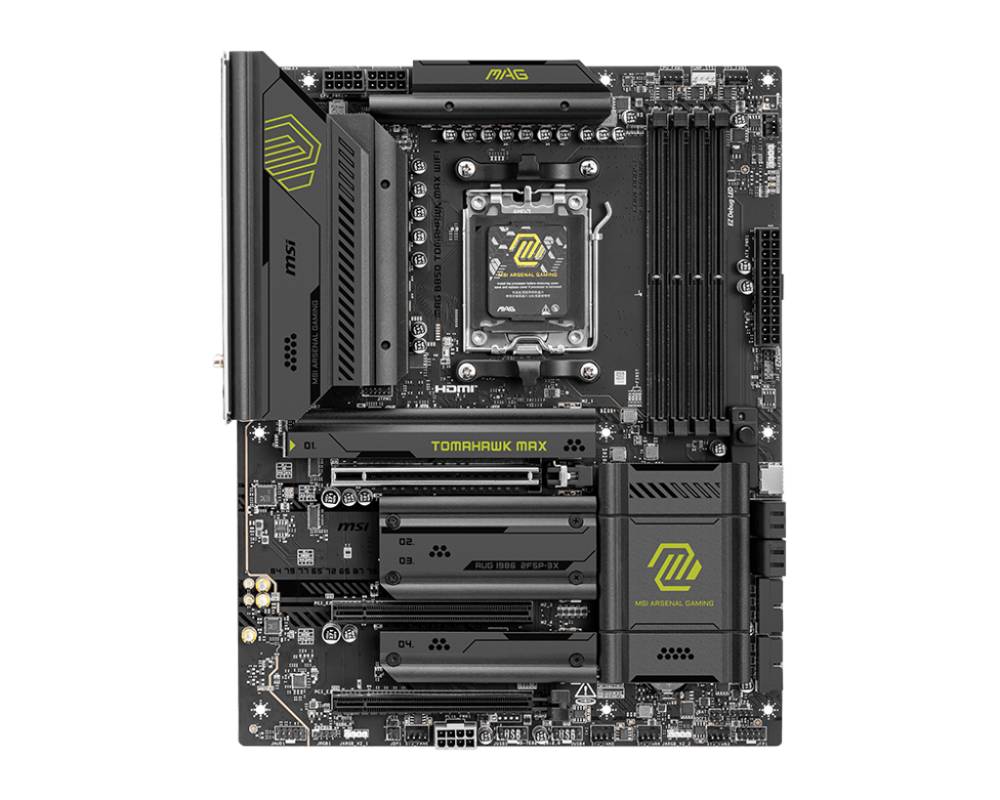
MSI MAG B850 Tomahawk MAX WiFi
- 14+2+1 Duet Rail VRM with 80A Smart Power Stages
- 8-layer PCB with 2oz copper
- Four M.2 slots — two PCIe 5.0, two PCIe 4.0
- ALC4080 USB audio with Audio Boost 5 circuitry
- 20Gbps front USB-C header and ten rear USB ports
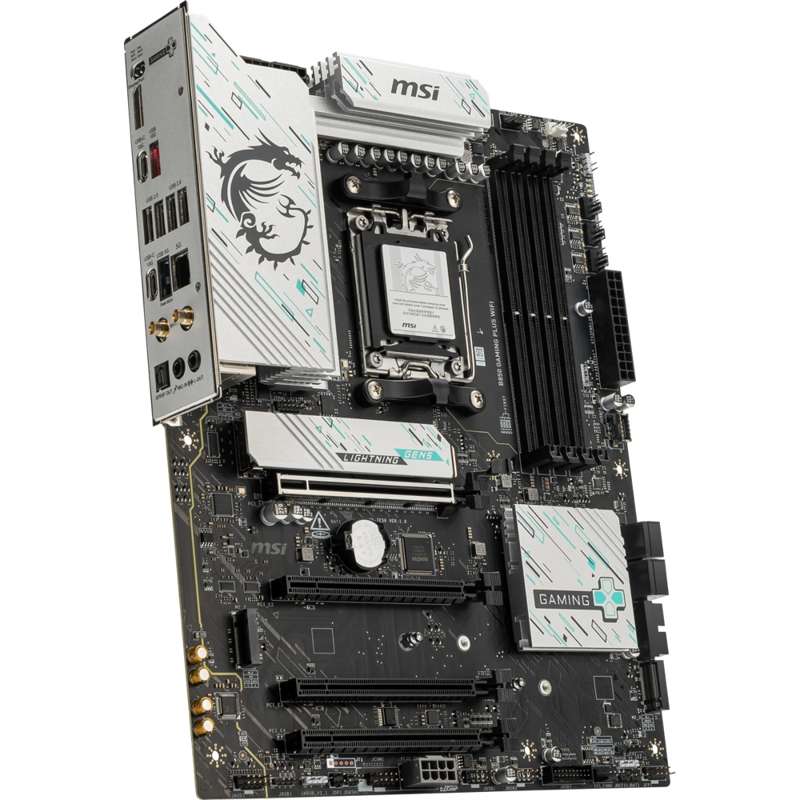
MSI B850 Gaming Plus WiFi
- 12+2+1 Duet Rail power design, dual 8-pin EPS
- Four PCIe slots for add-in cards
- Three M.2 slots, including one PCIe 5.0 x4
- RAID 0/1 across both SATA and NVMe drives
- DisplayPort 1.2 output for graphics-free builds
Choose the MAG B850 Tomahawk MAX WiFi if…
You are building around a Ryzen 9, or around an X3D chip you intend to keep for years. Headroom is the product here, and this board has it.
You fill drive bays. Four M.2 slots — two of them Gen5 — mean your next SSD purchase does not start with an eviction.
You listen through analogue headphones plugged into the PC, run a desk full of fast USB gear, or own a case full of fans. The Tomahawk wins all three.
Choose the B850 Gaming Plus WiFi if…
Your processor is a Ryzen 5 or Ryzen 7 and money is finite. Every specification a gaming build touches daily is present here.
You want a spare slot for a capture card, a sound card or a second network adapter. The Gaming Plus physically fits one more card.
You are bringing SATA drives over in a mirrored or striped array — only this board supports that — or your graphics-free build needs DisplayPort.
As an Amazon Associate I earn from qualifying purchases at no extra cost to you.
Specifications: The Specs That Actually Matter
Every figure here is lifted from MSI's published specifications and datasheets for these two models.
| Specification | MSI MAG B850 Tomahawk MAX WiFi | MSI B850 Gaming Plus WiFi |
|---|---|---|
| Form factor | ATX, 243.84 × 304.8 mm | ATX, 243.84 × 304.8 mm |
| Socket / chipset | AMD AM5 / B850 | AMD AM5 / B850 |
| CPU support | Ryzen 9000, 8000 and 7000 series | Ryzen 9000, 8000 and 7000 series |
| VRM design | 14+2+1 Duet Rail, 80A Smart Power Stages, 8-layer 2oz PCB | 12+2+1 Duet Rail Power System |
| CPU power | 2 × 8-pin EPS + supplemental 8-pin PCIe power | 2 × 8-pin EPS + supplemental 8-pin PCIe power |
| Memory | 4 × DDR5, up to 256 GB, 8400+ MT/s (OC) | 4 × DDR5, up to 256 GB, 8200+ MT/s (OC) |
| Graphics slot | PCIe 5.0 x16 (from CPU) | PCIe 5.0 x16 (from CPU) |
| Expansion slots | 3: x16 Gen5, x4 Gen4, x1 Gen3 | 4: x16 Gen5, x4 Gen4, 2 × x1 Gen3 |
| M.2 storage | 4 slots: 2 × PCIe 5.0 x4, 1 × PCIe 4.0 x4, 1 × PCIe 4.0 x2 | 3 slots: 1 × PCIe 5.0 x4, 1 × PCIe 4.0 x4, 1 × PCIe 4.0 x2 |
| SATA / RAID | 4 × SATA 6 Gb/s, RAID 0/1/10 (NVMe only) | 4 × SATA 6 Gb/s, RAID 0/1 (SATA and NVMe) |
| LAN | Realtek 8126VB 5 Gbps | Realtek 8126VB 5 Gbps |
| Wireless | Wi-Fi 7, Bluetooth 5.4 | Wi-Fi 7, Bluetooth 5.4 |
| Audio | Realtek ALC4080 (USB), Audio Boost 5, S/PDIF out | Realtek ALC897, 7.1 HD, S/PDIF out |
| Display output | 1 × HDMI 2.1 FRL (8K @ 60 Hz) | 1 × DisplayPort 1.2 (4K @ 60 Hz) |
| USB (rear) | 10 ports: 4 × USB 2.0, 3 × Type-A up to 10Gbps, 3 × Type-C 10Gbps | 8 ports: 4 × USB 2.0, 1 × Type-A 5Gbps, 1 × Type-A 10Gbps, 2 × Type-C 10Gbps |
| USB-C front panel | USB 20Gbps header | USB 5Gbps header |
| Fan headers | 8 (CPU, pump combo, 6 × system) | 6 (CPU, pump combo, 4 × system) |
| Debug / extras | EZ Debug LED, EZ Memory Detection LED, EZ PCIe Release, EZ M.2 Shield Frozr II, Flash BIOS Button | EZ Debug LED, EZ M.2 Shield Frozr II, Flash BIOS Button |
Variant note: exact names, checked twice. A listing titled “B850 GAMING PLUS WIFI6E” describes a lesser board — Wi-Fi 6E, 2.5G LAN, a PCIe 4.0 graphics slot — and a “TOMAHAWK MAX WIFI II” is a later, separate Tomahawk.
This guide covers the Wi-Fi 7 Gaming Plus WiFi and the original MAG B850 Tomahawk MAX WiFi, MSI model 7E62.
The Differences That Actually Matter
1. Power delivery — where the MAX earns its name
The Tomahawk MAX feeds its socket through a 14+2+1 Duet Rail design built on 80A Smart Power Stages. Underneath it sits an 8-layer PCB with 2oz copper, which moves current and heat better than a mainstream layup.
The Gaming Plus answers with a 12+2+1 Duet Rail system. Respectable, current, and honestly specified — just built to a lower ceiling.
Both boards take dual 8-pin EPS connectors plus a supplemental PCIe power input at the bottom edge, so cabling is a wash.
What does the gap buy in practice? Nothing, for a Ryzen 5 9600X or Ryzen 7 9700X at stock settings — those chips cannot stress either design, and games will not separate the boards by a frame.
It buys composure at the top of the range. A Ryzen 9 9950X pulling sustained all-core loads for hours is precisely the workload the extra phases, heavier stages and thicker board were specified for.
Hold on to the governing rule of motherboard buying: every other component can be swapped later; the VRM cannot. If a flagship CPU sits anywhere in your future, buy the headroom today.
2. Storage — the fourth slot, and the second Gen5
Four M.2 slots on the Tomahawk MAX: two wired at PCIe 5.0 x4, one at PCIe 4.0 x4, one at PCIe 4.0 x2.
The Gaming Plus fits three: a single Gen5 x4, a Gen4 x4 and a Gen4 x2. A fast boot drive and two game drives fit comfortably; a fourth drive ends the conversation.
The second Gen5 bay is the subtle win: your next Gen5 drive lands in a full-speed slot instead of demoting the drive you already own.
Neither board hands out lanes for free. Fill the Tomahawk's third M.2 slot and its third PCIe slot falls to x2 — unless a BIOS setting pins that slot at x4 and switches the M.2 slot off instead. The Gaming Plus plays the same game in reverse: populate its second or fourth PCIe slot and the third M.2 drops to x2. Read the sharing notes before a big storage weekend.
And then, the fightback. The Gaming Plus supports RAID 0 and 1 across both SATA and NVMe storage; the Tomahawk's RAID 0/1/10 covers NVMe only, and its SATA ports cannot form an array. New gaming PCs rarely run SATA arrays — but owners migrating a mirrored pair out of an older machine are the exception, and for them the cheaper board is the only one that works.
3. Expansion — the round the Tomahawk loses
The graphics slot is identical: PCIe 5.0 x16, fed by the CPU, on both boards. Fit an 8000-series G processor and it runs at x8 on both (x4 behind the entry 8500 and 8300) — platform behaviour, not a board decision.
Count what sits below it: four slots in total — the x16, an x16-length slot wired for PCIe 4.0 x4, and a pair of x1 slots.
The Tomahawk carries three. The x16, the x4-wired slot, one x1. Its fourth M.2 bay occupies the room the extra slot would have needed.
Most builders will never feel this — one graphics card is the entire expansion history of a typical gaming PC. Streamers, capture-card owners and anyone eyeing a fast add-in network card should feel it, though: on the Tomahawk, the upgrade path narrows sooner. This round belongs to the Gaming Plus, without qualification.
4. Audio — two different classes of onboard sound
The Gaming Plus carries the Realtek ALC897, the 7.1 HD codec MSI fits across its mainstream range, with optical S/PDIF output. Headsets and desktop speakers sound as they should.
The Tomahawk MAX specifies the Realtek ALC4080, a USB-interface codec, wrapped in MSI's Audio Boost 5 circuitry. That is a deliberate jump in class, not a spec-sheet shuffle.
MSI rates the front-panel output at up to 32-bit/384kHz playback — territory the mainstream codec does not enter.
The caveat is hardware-shaped: a USB headset brings its own audio chain and bypasses all of this. Analogue listeners collect the benefit, and for them it is audible, not theoretical.
5. USB and the rear panel — more of everything, faster at the front
Turn both boards around. The Tomahawk MAX presents ten rear USB ports: four USB 2.0, one 5Gbps Type-A, two 10Gbps Type-A and three 10Gbps Type-C.
The Gaming Plus presents eight: the same four USB 2.0, one 5Gbps and one 10Gbps Type-A, two 10Gbps Type-C.
An ordinary desk saturates neither panel. A loaded one — sim wheel, pedals, capture gear, external drives — starts counting spare 10Gbps ports, and the Tomahawk has more to count.
The single largest gap, though, is at the front of the case: the Gaming Plus supplies its front USB-C header at 5Gbps, while the Tomahawk's runs at 20Gbps.
Feed a fast portable SSD through that case port and the Tomahawk moves data four times as quickly; charge a phone from it and the difference never materialises.
Cooling follows the pattern: six headers cover a typical case, while the Tomahawk's eight serve fan-dense builds without splitters.
6. Display outputs — one port apiece, chosen for different rooms
Skip this section if a graphics card is in your build — with one fitted, neither board's display output ever lights up.
It matters for integrated-graphics builds — an 8700G system, or a machine waiting out GPU prices — and here the two boards disagree.
The Tomahawk MAX offers exactly one output: HDMI 2.1 with FRL, rated at 8K and 60 Hz. It is the modern television standard, and under a TV it is the correct port by a distance.
The Gaming Plus offers exactly one output: DisplayPort 1.2, good for 4K at 60 Hz — an older standard, but the native language of desk monitors.
So there is no overall winner to declare — only a screen-dependent one. Desk monitor: the Gaming Plus's lone port is the useful one. Television: the Tomahawk's, and it is not close.
7. Memory and networking — the tie, and the tie that flatters the cheaper board
Memory first, with the marketing filtered out. Both boards accept four DDR5 modules and up to 256 GB of it.
The Tomahawk's validated overclocking ceiling reads higher — 8400+ MT/s against 8200+. Treat both figures as limits MSI validated, not speeds any given kit is promised to reach; your processor's memory controller has the final word. For gaming, a decent 6000 MT/s kit is the rational purchase on either board, and the 200 MT/s of headline difference will never appear in a frame rate.
Networking is a flat tie, and an unusually generous one: identical Realtek 8126VB 5-gigabit Ethernet, identical Wi-Fi 7 module, identical Bluetooth 5.4.
MSI trimmed the Gaming Plus in many places, but not here — its network hardware is the Tomahawk's, component for component.
The small extras lean the other way: the Tomahawk adds an EZ Memory Detection LED for DDR5 training faults and EZ PCIe Release for painless GPU removal. Shared ground includes the EZ M.2 Shield Frozr II heatsinks, EZ Debug LEDs, pre-installed I/O shields and a Flash BIOS Button.
CPU Pairing Guide
Start from the processor and the choice usually makes itself.
| Your processor | MAG B850 Tomahawk MAX WiFi | B850 Gaming Plus WiFi | Our call |
|---|---|---|---|
| Ryzen 9 9950X / 9900X | Excellent — VRM and PCB built for it | Workable — the sensible ceiling | MAG B850 Tomahawk MAX WiFi |
| Ryzen 7 9800X3D / Ryzen 9 9950X3D | Excellent — headroom to keep it for years | Excellent | Tomahawk for a long-keep build; either for gaming today |
| Ryzen 7 9700X / Ryzen 5 9600X | Excellent | Excellent | Gaming Plus WiFi — put the saving in the GPU |
| Ryzen 7 8700G / 8600G (APU) | Good — HDMI 2.1 suits a TV | Good — DisplayPort suits a desk monitor | Whichever output your screen needs; GPU slot runs x8 on both |
| Ryzen 5 7600 / 7500F | Excellent | Excellent | Gaming Plus WiFi, unless the Tomahawk is on sale |
Linger on the Ryzen 9 row. Both boards run a flagship chip; the honest distinction is the electrical and thermal headroom surrounding it while it works — and headroom is the Tomahawk's entire sales pitch. The APU row cuts the other way: behind an 8000-series G chip the graphics slot drops to x8 equally, so the output connector, not the badge, decides that row.
Ready to check today’s price?
Both boards sell through Amazon. Prices move, so check the live figure on the board that fits your build.
View on Amazon — MAG B850 Tomahawk MAX WiFiView on Amazon — B850 Gaming Plus WiFiThe 30-Second Decision
| If this sounds like you… | Buy this |
|---|---|
| “One board that handles any AM5 CPU I might buy, for years.” | MAG B850 Tomahawk MAX WiFi |
| “Ryzen 5 or 7 gaming build — every spare dollar goes to the graphics card.” | B850 Gaming Plus WiFi |
| “I want two Gen5 SSDs, or four NVMe drives in total.” | MAG B850 Tomahawk MAX WiFi |
| “I am migrating a SATA RAID array from my old PC.” | B850 Gaming Plus WiFi |
| “APU build on a desk monitor, no graphics card yet.” | B850 Gaming Plus WiFi (DisplayPort) |
| “APU build under the TV.” | MAG B850 Tomahawk MAX WiFi (HDMI 2.1) |
| “I plug good headphones straight into the PC.” | MAG B850 Tomahawk MAX WiFi (ALC4080) |
| “I need a slot free for a capture or network card later.” | B850 Gaming Plus WiFi (4 slots) |
What You Gain. What You Give Up.
MSI MAG B850 Tomahawk MAX WiFi
You gain: the reinforced foundation — 80A power stages on an 8-layer, 2oz-copper board. Room for four NVMe drives, half of them Gen5. The ALC4080 audio chain, a ten-port rear panel, a 20Gbps front USB-C header, eight fan headers and the deeper diagnostics toolkit.
You give up: a noticeable sum over the Gaming Plus. The fourth expansion slot, sacrificed to the extra drive bay. Any form of SATA array. And DisplayPort altogether — HDMI is the sole way out to a screen.
MSI B850 Gaming Plus WiFi
You gain: the same platform core for less money — B850 chipset, Gen5 graphics slot, 5-gigabit Ethernet, Wi-Fi 7, a 256 GB memory ceiling. Alongside it come a fourth expansion slot, RAID support on SATA drives, and the DisplayPort an APU build on a monitor requires.
You give up: electrical headroom under flagship processors. One M.2 bay, and with it the second Gen5 slot. The ALC4080 audio tier. A pair of rear USB ports, the faster front USB-C header, and two fan headers.
Pros and Cons
MAG B850 Tomahawk MAX WiFi — Pros
- Strongest VRM in this pairing: 80A stages, 8-layer board
- Four M.2 bays, two wired for PCIe 5.0
- ALC4080 USB audio with Audio Boost 5
- Ten rear USB ports and a 20Gbps front USB-C header
- Eight fan headers; EZ Memory Detection LED
Cons
- The expensive option of the two
- Three expansion slots, not four
- SATA ports cannot form a RAID array
- HDMI is the only display output
- Third M.2 bay shares lanes with the third PCIe slot
B850 Gaming Plus WiFi — Pros
- Tomahawk-grade networking: 5G LAN and Wi-Fi 7
- Four expansion slots, the most here
- RAID arrays on SATA as well as NVMe
- DisplayPort output suits monitor-based APU builds
- Cheaper entry into the same B850 platform
Cons
- VRM runs out of road at Ryzen 9 loads
- One Gen5 M.2 slot out of three
- ALC897 audio sits a class below the ALC4080
- Front USB-C header capped at 5Gbps
- DisplayPort 1.2 is showing its age
Check the Exact Model Name, Not Just the Family
Check which Tomahawk the listing describes. The board in this guide is the original MAG B850 TOMAHAWK MAX WIFI, MSI model 7E62.
MSI has since listed a MAG B850 TOMAHAWK MAX WIFI II — a later, separate model. Some retailers also tag the original with a “V1” suffix. When a price looks suspiciously generous, read the full model name before the discount.
Check which Gaming Plus the listing describes. Three near-identical names hide three different products.
Ours is the Wi-Fi 7 board with 5-gigabit LAN and a PCIe 5.0 graphics slot, sold as the B850 GAMING PLUS WIFI. Its WIFI6E namesake steps down to Wi-Fi 6E, 2.5G LAN and a PCIe 4.0 slot — last generation's networking behind this generation's name.
The B850 GAMING PLUS WIFI PZ is the Project Zero board — connectors on the rear face, for back-connect cases only.
The Upgrade Path Test
A motherboard should be judged in its third year of service, not on delivery day.
In year one, a Ryzen 5 or 7 beside a mid-range graphics card behaves identically on both boards; no game will tell you which one is under your desk.
Years two and three are where the boards diverge. A flagship CPU bought on sale. A second Gen5 drive. Headphones good enough to expose ordinary onboard audio.
The Tomahawk absorbs all of it without negotiation — its VRM was sized for the flagship chips before they were discounted, and its spare Gen5 bay is waiting empty. The Gaming Plus absorbs the processor with less margin, then asks you to arbitrate between storage growth and its spare expansion slots; its graceful axis is the one the Tomahawk surrendered: add-in cards.
Stated plainly: one board was engineered to be upgraded through the platform's life, the other to be sufficient on day one, at a price that leaves budget for the components you watch working.
When to Skip Both
Neither board is the answer for everyone, and pretending otherwise helps nobody.
Skip both for a compact build. Micro-ATX and Mini-ITX B850 boards exist, and wedging a full ATX board into a small case is a compromise dressed as a saving.
Skip both if you need several full-bandwidth add-in cards at once, or workstation provisions such as validated ECC memory support — the honest answer there is a higher board class.
Skip both if a fast front-panel USB-C port is essential on a fixed budget — the Gaming Plus caps that header at 5Gbps, and the board that does it properly costs more.
And skip the Gaming Plus alone if a Ryzen 9 is already in the parts list — that is not a value decision, it is a mismatch.
Final Verdict
The MSI MAG B850 Tomahawk MAX WiFi is the board we would build on.
The victory is built from parts that can never be retrofitted: under sustained flagship loads, the 80A stages and 8-layer board hold a composure the 12+2+1 design cannot be upgraded into.
Storage tells the same story in longerhand: four bays, two of them Gen5, against three bays and one. Layer in the ALC4080 audio, the ten-port rear panel, the 20Gbps front header and the eight fan headers, and the Tomahawk's everyday surface is larger everywhere you touch it.
Buy the Tomahawk MAX WiFi when the processor is a Ryzen 9 or an X3D chip, when drives multiply, when headphones plug straight into the PC — or when this board has to serve through upgrades instead of being replaced by them.
View on Amazon — MAG B850 Tomahawk MAX WiFi
Buy the B850 Gaming Plus WiFi when a Ryzen 5 or Ryzen 7 anchors the build and the price gap can be spent where it is visible — the graphics card, the memory kit. Nothing about the daily platform changes: same chipset, same networking, same Gen5 GPU slot — plus an extra expansion slot and the SATA RAID the dearer board dropped.
Choose it with your eyes open and it is the shrewd buy. What you surrender is ceiling, not present-day performance.
View on Amazon — B850 Gaming Plus WiFi
Watch Out: Similar Names, Different Boards
MSI's B850 range punishes hurried buyers. Four name traps account for most mis-orders with this pair of boards.
First: there is no plain “B850 Tomahawk” — on B850 the Tomahawk is the MAG B850 TOMAHAWK MAX WIFI, and MSI's US store drops the MAG prefix from that name. Same board, shorter label; a listing that cannot produce the full name deserves suspicion.
Second: the MAG B850 TOMAHAWK MAX WIFI II is a later model in its own right, and some shops sell the original with a “V1” suffix. This guide covers the original. Hunt for the “II” before comparing prices between listings.
Third: the B850 GAMING PLUS WIFI6E is not this article's Gaming Plus. Wi-Fi 6E, 2.5G LAN and a PCIe 4.0 graphics slot make it a lesser specification separated by two characters.
Fourth: the B850 GAMING PLUS WIFI PZ relocates the connectors to the back of the board for Project Zero cases — a different physical product, not a revision of this one.
Verify the complete model name before the Wi-Fi badge, and the Wi-Fi badge before the price.
Case, Power and Cabling Notes
The shared footprint is full ATX — 243.84 × 304.8 mm on standard standoffs — so any case that accepts one accepts the other.
Power cabling matches too: a 24-pin main connector and two 8-pin EPS leads for the CPU. Every reputable modern PSU supplies those natively.
Each board also asks for the supplemental 8-pin PCIe connector along its bottom edge. Plug it in; it steadies power delivery to the slots, which matters most beside a hungry graphics card.
BIOS and Long-Term Support
MSI supports the pair through the same channels: BIOS releases, chipset and LAN drivers, and a CPU support list maintained per model.
Recovery hardware is fitted to both — a Flash BIOS Button and a Clear CMOS button on each rear panel. A failed overclock or an outdated BIOS becomes a short job at the desk, not a returns process.
Diagnostics are where support tilts. EZ Debug LEDs are common to both boards, but only the Tomahawk adds the EZ Memory Detection LED, aimed at DDR5 training failures — the most common first-boot panic on this platform.
Future BIOS releases will track the same priorities for each board: new processor support, wider memory compatibility, security fixes.
One habit: ahead of any CPU swap, confirm the chip on your model's support list and update the BIOS first — Flash BIOS runs the update with the new processor still boxed.
Frequently Asked Questions
Is the Tomahawk MAX WiFi worth the extra money over the Gaming Plus WiFi?
For Ryzen 9 processors, storage-heavy systems and analogue headphone users, yes: the premium buys a stronger VRM, four M.2 slots with two at Gen5, and ALC4080 audio. For a Ryzen 5 or 7 gaming PC, the Gaming Plus delivers the same platform for less — spend the saving on the graphics card.
What exactly is the board people call the “B850 Tomahawk”?
It is the MAG B850 Tomahawk MAX WiFi, MSI model 7E62 — the only Tomahawk MSI makes on B850. Watch for two complications: a later MAX WIFI II model now exists alongside it, and MSI's US store drops the MAG prefix from the original's name. Read the complete model name before ordering.
Will both boards run a Ryzen 7 9800X3D or Ryzen 9 9950X?
Yes. Support covers the Ryzen 9000, 8000 and 7000 families on either board, and each carries a Flash BIOS Button for updates with no processor fitted. What separates them is headroom: the Tomahawk's 80A stages surround flagship chips with considerably more of it.
How many NVMe drives fit on each board, and how many run at Gen5 speed?
Four on the Tomahawk: two PCIe 5.0 x4, one PCIe 4.0 x4 and one PCIe 4.0 x2. Three on the Gaming Plus: one PCIe 5.0 x4, one PCIe 4.0 x4 and one PCIe 4.0 x2. Either layout is backed by four SATA ports. Before filling the Tomahawk completely, read its lane-sharing notes — the third M.2 bay and the third PCIe slot divide bandwidth between them.
Which board suits an APU build with no graphics card?
Your screen decides. The Gaming Plus owns the only DisplayPort (1.2, up to 4K at 60 Hz), the natural fit for a desk monitor. The Tomahawk owns the only HDMI (2.1, up to 8K at 60 Hz), the natural fit for a television. With one output per board, the choice is made before you order. Note, too, that an 8000-series APU narrows the graphics slot to x8 on both boards, should a graphics card arrive later.
Is networking identical on the two boards?
Yes, completely. The Ethernet controller is the same Realtek 8126VB 5-gigabit part on both, and the wireless specification — Wi-Fi 7 with Bluetooth 5.4 — matches as well. One caution concerns a third board: the separate WIFI6E edition downgrades both, to Wi-Fi 6E and 2.5G Ethernet.
Can I build a RAID array on either board?
On the Gaming Plus, arrays work across everything it connects: RAID 0 and 1 span its SATA and NVMe storage alike. The Tomahawk restricts its RAID 0, 1 and 10 support to NVMe drives only. Its SATA ports have no array mode — the deciding detail if a mirrored SATA pair is coming over from an older PC.
Sources & Verification
MSI MAG B850 TOMAHAWK MAX WIFI official specifications, msi.com • MSI B850 GAMING PLUS WIFI official specifications and global datasheet, msi.com • MSI-US Store product data for MAG B850 TOMAHAWK MAX WIFI (14+2+1 Duet Rail, Audio Boost 5, EZ features) • Manufacturer product data via retail listings for model numbers and variant names. Specifications verified November 2026.

James Wilson
James has been building and benchmarking PCs for over a decade and writes Honestly Compared's motherboard guides. His rule for every comparison: the verdict has to survive the spec sheet, not the marketing page.