
MSI MAG B550 Tomahawk vs Gigabyte B550 Aorus Elite V2: Which Should You Buy?
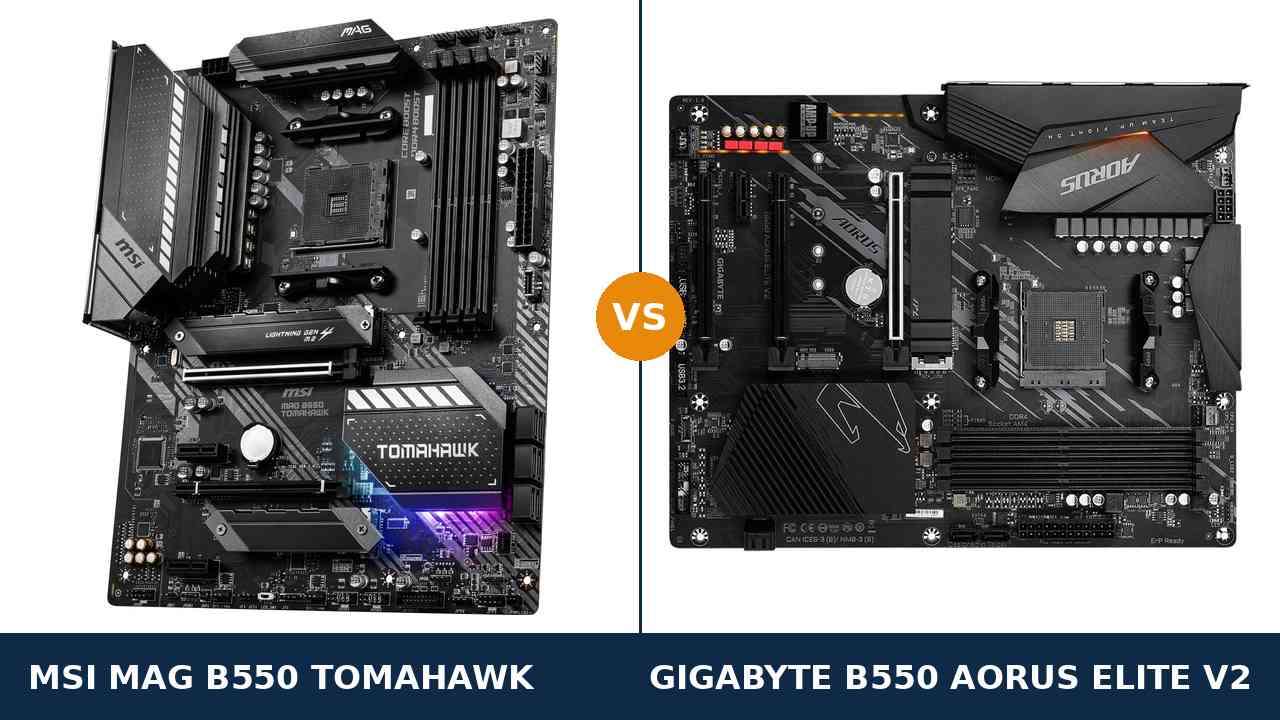
These are the two B550 boards that show up in almost every “best AM4 motherboard” conversation. Both are full ATX. Both carry serious power delivery. Both were built to outlast the budget boards below them.
That is exactly what makes the choice awkward. The MSI MAG B550 Tomahawk and the Gigabyte B550 Aorus Elite V2 match each other on the headline specs — dual M.2 storage, 2.5-gigabit networking, the same ALC1200 audio codec, front USB-C on both.
The separation is in the second layer of the spec sheet. One board gives you a second network port and six SATA connectors. The other answers with more VRM phases on paper and one more USB port on the back.
This guide works through both manufacturers’ published specifications line by line. No marketing claims, no borrowed benchmark numbers — just the hardware, and a verdict you can act on.
Key Takeaways
- The Tomahawk is the more complete board. Dual LAN, six SATA ports, a full-speed x4 second slot and heatsinks on both M.2 slots.
- The Elite V2 has the stronger VRM on paper. Its 12+2 phase twin design with 50A DrMOS stages out-counts the Tomahawk’s 10+2+1 — though both run any AM4 processor.
- Storage speed and audio are ties. Both boards run dual PCIe x4 M.2 and the same Realtek ALC1200 codec with optical output.
- Watch the Elite V2’s revisions. The article is based on rev. 1.0/1.1; rev. 1.5 changes the M.2 cooling, and the AX V2 is a different, Wi-Fi board.
- APU builders should note the fine print. The Elite V2’s rear Gen 2 USB drops to Gen 1 speeds behind a G-series APU; its DisplayPort 1.4 and HDMI 2.1 are the better-specified display pair.
Quick Verdict
Buy the MSI MAG B550 Tomahawk for most builds. It is the board with fewer asterisks.
It is the only one here with two wired network ports. It carries six SATA connectors against four. Its second full-length slot runs at x4 instead of x2. And both of its M.2 slots wear heatsinks, not just the first.
None of that is glamorous. All of it is the kind of thing you are glad you bought two years later.
Buy the Gigabyte B550 Aorus Elite V2 if power delivery is your priority, or it is the cheaper board when you order. Its 12+2 phase DrMOS VRM is the stronger design on paper, and it adds a seventh rear USB port.
For an APU build it is also the safer pick on display outputs, with DisplayPort 1.4 and HDMI 2.1 both specified by name. Just read the revision and USB notes below before you pay.
The Scorecard
Scores below are derived directly from the manufacturer specifications compared in this guide — phase counts, slot counts, port counts and supported standards. They are a reading aid, not benchmark results.
| Category | MAG B550 Tomahawk | B550 Aorus Elite V2 | ||
|---|---|---|---|---|
| Power delivery | 9 / 10 | 9 / 10 | ||
| Storage | 9 / 10 | 8 / 10 | ||
| Expansion | 8 / 10 | 7 / 10 | ||
| Memory | 9 / 10 | 8 / 10 | ||
| Networking & audio | 9 / 10 | 8 / 10 | ||
| USB & connectivity | 8 / 10 | 8 / 10 | ||
| Display outputs (APU builds) | 8 / 10 | 9 / 10 | ||
| Overall | 8.8 / 10 | 8.5 / 10 | ||
The scores tell the story honestly. The Elite V2 matches or beats the Tomahawk on the silicon — power stages and display outputs. The Tomahawk pulls ahead on everything bolted around it: ports, slots, storage connectors and cooling.
At a Glance: Who Each Board Fits
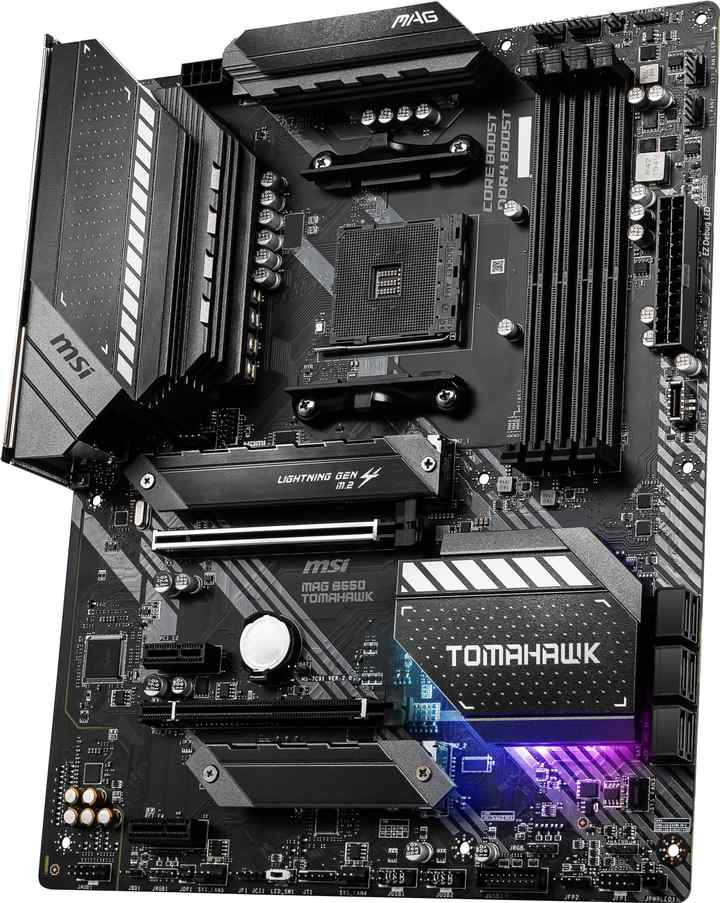
MSI MAG B550 Tomahawk
- 10+2+1 Duet Rail VRM with extended heatsinks
- Dual LAN: 2.5 Gb/s plus a second Gigabit port
- Six SATA ports; both M.2 slots heatsinked
- Second x16 slot runs at full x4 speed
- Rear USB-C at Gen 2 speed, Flash BIOS Button
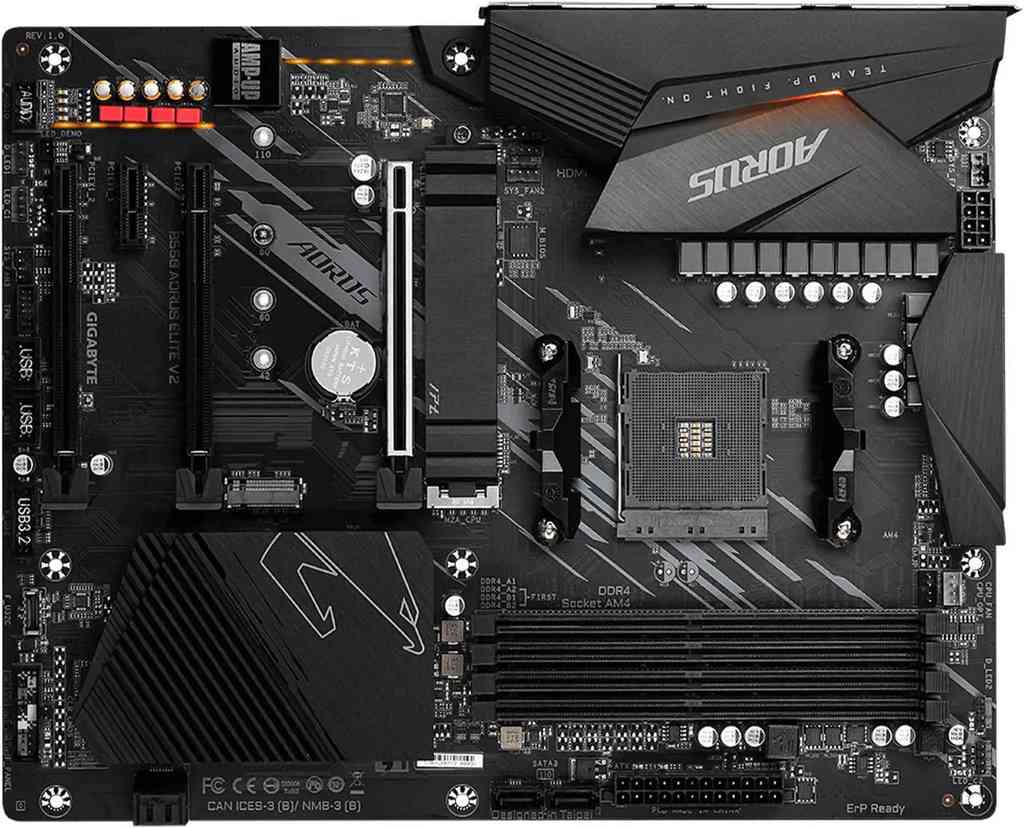
Gigabyte B550 Aorus Elite V2
- 12+2 phase twin VRM, 50A DrMOS, enlarged heatsinks
- Realtek 2.5GbE LAN, ALC1200 audio with optical out
- Seven rear USB ports, two of them Gen 2
- DisplayPort 1.4 + HDMI 2.1 for APU builds
- 256 Mbit BIOS with Q-Flash Plus button
Choose the MAG B550 Tomahawk if…
You run wired networking seriously — a NAS, a home server role, or a second network segment. The dual LAN ports are unique in this pairing.
You still own SATA drives. Four SSDs and two hard drives fit here without adapters; they do not fit on the Gigabyte.
You plan a second serious add-in card one day. The x4 slot runs it at full speed.
Choose the B550 Aorus Elite V2 if…
Power delivery is the spec you care about most. Twelve plus two DrMOS stages is the stronger paper design.
You are building on an APU and want Gigabyte’s named DisplayPort 1.4 and HDMI 2.1 outputs.
Or it is simply the cheaper of the two on the day you order. The gap between these boards is real but narrow, and price is a legitimate tiebreaker.
As an Amazon Associate I earn from qualifying purchases at no extra cost to you.
Specifications: The Specs That Actually Matter
Every figure below comes from MSI’s and Gigabyte’s published specifications and product data. Where a board exists in several hardware revisions, the Gigabyte figures reflect revision 1.0/1.1 — the widely sold version, and the one the revision notes under the table explain.
| Specification | MSI MAG B550 Tomahawk | Gigabyte B550 Aorus Elite V2 |
|---|---|---|
| Form factor | ATX, 30.5 × 24.4 cm | ATX, 30.5 × 24.4 cm |
| Socket / chipset | AMD AM4 / B550 | AMD AM4 / B550 |
| CPU support | Ryzen 5000 & 3000, 4000 G-Series (not 3200G/3400G) | Ryzen 5000, 5000 G, 4000 G, 3000, 3000 G series |
| VRM design | 10+2+1 Duet Rail, digital PWM, extended heatsinks | 12+2 phase digital twin, 50A DrMOS, enlarged heatsinks |
| Memory | 4 × DDR4 DIMM, up to 128 GB, 5100 MT/s+ (O.C.) | 4 × DDR4 DIMM, up to 128 GB, 4733 MT/s (O.C.), XMP |
| Graphics outputs (APU) | HDMI, DisplayPort | DisplayPort 1.4, HDMI 2.1 |
| Expansion slots | PCIe 4.0 x16 Steel Armor + PCIe 3.0 x16 (x4) + 2 × PCIe 3.0 x1 | PCIe 4.0 x16 + PCIe 3.0 x16 (x2) + PCIe 3.0 x16 (x1) + PCIe 3.0 x1 |
| M.2 storage | 2 slots: PCIe 4.0 x4 (22110) + PCIe 3.0 x4; heatsinks on both slots | 2 slots: PCIe 4.0 x4 (22110) + PCIe 3.0 x4 (22110); Thermal Guard on one slot |
| SATA | 6 × SATA 6 Gb/s, RAID 0/1/10 | 4 × SATA 6 Gb/s, RAID 0/1/10 |
| LAN | Realtek 2.5 Gb/s + Realtek Gigabit (dual LAN) | Realtek 2.5GbE (2.5 Gb/s) |
| Audio | Realtek ALC1200, 7.1 HD, optical S/PDIF out | Realtek ALC1200, 7.1 HD, optical S/PDIF out |
| USB (rear panel) | 6 ports: USB 3.2 Gen 2 Type-C + Type-A, 2 × Gen 1, 2 × USB 2.0 | 7 ports: 2 × USB 3.2 Gen 2, 3 × Gen 1, 2 × USB 2.0 |
| Front-panel USB-C | USB 3.2 Gen 1 Type-C header | USB 3.2 Gen 1 Type-C header |
| BIOS flashing | Flash BIOS Button (no CPU/RAM/GPU needed) | Q-Flash Plus with rear-panel button, 256 Mbit flash |
| Wi-Fi | None | None (separate AX V2 Wi-Fi model exists) |
Revision note: the B550 Aorus Elite V2 exists in several revisions. Revisions 1.0/1.1 — the basis for this article — ship one M.2 Thermal Guard. Gigabyte’s rev. 1.5 page advertises dual Thermal Guards.
The Elite V2’s rear USB 3.2 Gen 2 ports are also CPU-dependent on Gigabyte’s own spec sheet: full Gen 2 speed with Ryzen 5000 and 3000 processors, Gen 1 speed with G-series APUs. The Tomahawk’s rear Gen 2 ports carry no such condition.
One more support note: the Tomahawk’s CPU list excludes the Ryzen 3 3200G and Ryzen 5 3400G. Builders recycling one of those APUs should take the Elite V2, whose support list includes the 3000 G-series.
The Differences That Actually Matter
1. Power delivery — Gigabyte wins the paper round
Start where Gigabyte is strongest. The Elite V2 runs a 12+2 phase twin digital VRM built on 50A DrMOS power stages, under enlarged heatsinks.
The Tomahawk counters with MSI’s 10+2+1 Duet Rail design and a digital PWM controller, also under substantial extended heatsinks. Fewer phases, arranged differently.
On paper, the Elite V2’s array is the stronger design. More stages, each rated at 50 amps, sharing the load across the socket.
In practice, this is where honesty matters: both boards will run a Ryzen 9 5950X at stock settings without the VRM becoming the story. Neither will throttle a Ryzen 7. For overclockers pushing manual voltages, the Gigabyte’s paper margin is worth having — for everyone else, it is headroom you will never visit.
We score power delivery level. The deciding differences in this comparison live elsewhere.
2. Networking — one board has a second port, and it matters
Both boards carry a Realtek 2.5-gigabit primary port. On headline speed, a tie.
The Tomahawk then adds a second, gigabit Realtek port. The Elite V2 has nothing behind its single 2.5GbE.
A second wired port sounds like a server-room concern until it is not. It is the NAS on its own segment. The direct cable to a second machine. The separate network for a home lab, a stream PC, or a backup link when the main one misbehaves.
If none of that will ever apply to you, score this section a tie and move on. If any of it might, the Tomahawk is the only candidate in the room — no USB adapter fully replaces a proper second port.
3. Storage — same M.2 speed, different SATA reality
On NVMe, these boards are functionally identical. Each offers a CPU-connected PCIe 4.0 x4 slot and a second PCIe 3.0 x4 slot from the chipset, both accepting drives up to 22110 length.
The cooling differs. MSI fits its M.2 Shield Frozr heatsinks to both slots. The Elite V2 in rev. 1.0/1.1 form fits one Thermal Guard — the second drive runs bare, under whatever airflow your case provides. Only rev. 1.5 boards guard both slots.
Then there is SATA, and here the gap is plain: six ports on the Tomahawk, four on the Elite V2.
Two ports is nothing to a build with a single bulk hard drive. It is everything to the builder migrating four SATA SSDs and a pair of archive drives out of an older machine. Count your drives before you choose, not after.
4. Expansion — four slots that are not what they seem
Count the Elite V2’s slots and it looks like the expansion winner: four physical slots against the Tomahawk’s three.
Read the wiring and the picture flips. Below its PCIe 4.0 x16 graphics slot, the Elite V2’s two extra full-length slots run at x2 and x1. They accept long cards; they feed them slowly.
The Tomahawk’s second full-length slot runs at x4. That is the difference between a capture card, a fast network card or an NVMe adapter running at full speed — and running at half.
For a single-graphics-card build, none of this matters; both boards give the GPU the same full PCIe 4.0 x16. For anyone who keeps a PC long enough to add hardware to it, the Tomahawk’s slot layout is the more useful one.
5. USB — more ports on one, a faster socket type on the other
The Elite V2 wins the rear-panel count: seven USB ports to the Tomahawk’s six, with two of them at USB 3.2 Gen 2 speed.
The Tomahawk’s six include something the Gigabyte lacks at the back — a Gen 2 Type-C port. The Elite V2’s rear Gen 2 pair are both Type-A. Both boards do provide a front-panel USB-C header, at Gen 1 speed, so a modern case port works either way.
Now the caveat from Gigabyte’s own spec sheet, flagged under the table: the Elite V2’s rear Gen 2 ports only run at Gen 2 speed behind Ryzen 5000 and 3000 processors. Fit a G-series APU and they fall back to Gen 1.
With a discrete-graphics build on a Ryzen 5000 chip, call this section a narrow Elite V2 win on count. For an APU build, the Tomahawk’s unconditional Gen 2 — in both plug shapes — is the better arrangement.
6. Display outputs — the APU builder’s section
None of this matters with a graphics card fitted. Both boards’ display outputs sit idle. Skip ahead if that is your build.
For an APU build, the outputs are the build. Gigabyte specifies the Elite V2’s pair by name: DisplayPort 1.4 and HDMI 2.1 — a combination that drives a modern high-refresh or 4K monitor properly.
MSI fits the Tomahawk with HDMI and DisplayPort outputs as well, so dual-monitor APU desktops are possible on either board. The Gigabyte simply publishes the stronger, fully specified pair, and that is what we score.
One caution belongs here: check the Tomahawk’s CPU list before pairing it with an older APU. The Ryzen 3 3200G and 5 3400G are not on it, while Gigabyte’s support list covers the 3000 G-series.
7. Memory and audio — the honest ties
Memory first. Both boards take four DDR4 DIMMs up to 128 GB. MSI quotes the higher headline overclocking figure — 5100 MT/s and beyond against Gigabyte’s 4733 MT/s.
Treat that headline with the suspicion all memory headlines deserve. What a kit actually runs at is decided by your processor’s memory controller and the modules themselves, and sensible AM4 gaming memory sits far below either ceiling. We give the Tomahawk the scorecard point for the higher published figure and call the real-world difference negligible.
Audio is simpler: there is no difference. Both boards use Realtek’s ALC1200 codec in a 7.1 HD implementation, and both provide an optical S/PDIF output — a genuinely useful inclusion at this level for AV receivers and soundbars.
Through headphones or desktop speakers, these two boards sound the same because, on this spec, they are the same. Buy on the other sections.
CPU Pairing Guide
The quickest way to settle this pairing is to start from your processor. This table is the whole comparison in one view.
| Your processor | MAG B550 Tomahawk | B550 Aorus Elite V2 | Our call |
|---|---|---|---|
| Ryzen 5 5600 / 5500 | Excellent | Excellent | Either — buy on price |
| Ryzen 5 5600G / 5700G (APU) | Excellent — Gen 2 USB at full speed | Excellent displays; rear Gen 2 drops to Gen 1 | Tomahawk for USB, Elite V2 for displays |
| Ryzen 3 3200G / 3400G (older APU) | Not supported | Supported | B550 Aorus Elite V2 |
| Ryzen 7 5700X / 5800X | Excellent | Excellent | Either — both VRMs are comfortably sufficient |
| Ryzen 9 5900X / 5950X | Excellent at stock | Excellent at stock, stronger VRM on paper | Elite V2 if you overclock; Tomahawk otherwise |
| Ryzen 3000 series | Excellent | Excellent | Either — buy on price |
Read the older-APU row carefully if you are recycling parts. It is the one row in this guide where a board is simply not an option, and it is easy to miss on a retailer page.
Ready to check today’s price?
Both boards sell through Amazon. Prices move, so check the live figure on the board that fits your build.
View on Amazon — MAG B550 TomahawkView on Amazon — B550 Aorus Elite V2The 30-Second Decision
| If this sounds like you… | Buy this |
|---|---|
| “I have a NAS, a second machine, or any use for two network ports.” | MAG B550 Tomahawk |
| “I am migrating a stack of SATA drives from my old PC.” | MAG B550 Tomahawk (six ports) |
| “Power delivery is the spec I refuse to compromise on.” | B550 Aorus Elite V2 (12+2 DrMOS) |
| “APU build, no graphics card, modern monitor.” | B550 Aorus Elite V2 (DP 1.4 + HDMI 2.1) |
| “I will add a capture card or fast network card later.” | MAG B550 Tomahawk (x4 second slot) |
| “My old Ryzen 5 3400G is going in it.” | B550 Aorus Elite V2 (only supported option) |
| “Honestly, whichever is cheaper this week.” | Legitimate — the gap is narrow for simple builds |
What You Gain. What You Give Up.
MSI MAG B550 Tomahawk
You gain: a second wired network port nobody else in this class bothers with. Six SATA connectors. A second slot that runs at x4. Heatsinks on both M.2 slots, and rear Gen 2 USB that runs at full speed behind any supported processor.
You give up: the VRM phase-count bragging rights — 10+2+1 against 12+2 DrMOS. One rear USB port. And support for the oldest G-series APUs, the 3200G and 3400G.
Gigabyte B550 Aorus Elite V2
You gain: the stronger power-delivery design on paper, with 50A DrMOS stages under enlarged heatsinks. Seven rear USB ports. Fully specified DisplayPort 1.4 and HDMI 2.1 outputs, and a 256 Mbit BIOS chip.
You give up: the second LAN port and two SATA connectors. The second M.2 heatsink on rev. 1.0/1.1 boards. And full Gen 2 speed from the rear ports whenever an APU is fitted.
Pros and Cons
MAG B550 Tomahawk — Pros
- Dual LAN: 2.5 Gb/s plus Gigabit
- Six SATA ports for drive-heavy builds
- Both M.2 slots heatsinked
- Second x16 slot wired at x4
- Rear USB-C at Gen 2 speed
- Higher published memory ceiling (5100+ MT/s)
Cons
- No support for Ryzen 3 3200G / 5 3400G
- Six rear USB ports, one fewer than the Elite V2
- VRM is out-counted on paper by the Gigabyte
- No Wi-Fi
B550 Aorus Elite V2 — Pros
- 12+2 phase DrMOS VRM, 50A stages
- Seven rear USB ports, two at Gen 2
- DisplayPort 1.4 + HDMI 2.1, both specified
- ALC1200 audio with optical S/PDIF
- Supports the full AM4 APU range, incl. 3400G
- 256 Mbit BIOS with Q-Flash Plus
Cons
- Single LAN port
- Only four SATA ports
- One M.2 Thermal Guard on rev. 1.0/1.1
- Rear Gen 2 USB slows to Gen 1 behind APUs
- Extra x16-length slots run at only x2 and x1
- No Wi-Fi (that is the AX V2)
Check the Revision, the Variant and the Listing
Check the Elite V2 revision. “B550 Aorus Elite V2” covers several hardware revisions, and they are not identical.
Revisions 1.0/1.1 — the basis of this comparison — ship a single M.2 Thermal Guard. Revision 1.5 boards advertise dual Thermal Guards. The revision is printed on the box label and the corner of the PCB; check it if M.2 cooling on the second slot matters to you.
Do not confuse the Elite V2 with the AX V2. The B550 Aorus Elite AX V2 is a separate model that adds Wi-Fi. If a listing shows antennas or Wi-Fi in the title, it is not the board compared here.
The same warning applies to the original B550 Aorus Elite — the pre-V2 board — and to the smaller B550M Aorus Elite. Match the full name, including “V2”, before you pay.
On the MSI side, mind the Tomahawk family tree. The MAG B550 Tomahawk in this guide is the wired AM4 board. The MAG B550 Tomahawk MAX WiFi is a later, different model, and the newer B650 and X870 Tomahawks are AM5 boards that will not take your DDR4 or your AM4 processor.
Check your APU against the Tomahawk’s CPU list. The Ryzen 3 3200G and Ryzen 5 3400G are excluded. Every other mainstream AM4 chip is covered by both boards, and both flash their BIOS without a CPU installed — the Tomahawk by its Flash BIOS Button, the Elite V2 by Q-Flash Plus.
Check the bundle. Both boxes are workmanlike: board, I/O shield (pre-installed on the Aorus), SATA cables and documentation. Neither includes Wi-Fi antennas, because neither board has Wi-Fi.
The Upgrade Path Test
Judge a mid-range board by the upgrades it says yes to in year two and three.
Processor upgrades are a wash. AM4 tops out at the Ryzen 9 5950X and the 5800X3D, and both of these VRMs run those chips at stock without drama. The Elite V2’s extra paper headroom only enters the conversation for manual overclocking.
Storage upgrades favour the Tomahawk. Two more SATA ports and a heatsink on the second M.2 slot mean the drive you add later lands properly cooled and connected.
Expansion upgrades favour the Tomahawk too. Its x4 second slot takes a capture card, a 10-gigabit adapter or an NVMe carrier at full speed; the Elite V2’s long slots feed the same cards at x2 or x1.
Networking is the Tomahawk’s permanent advantage. A second port cannot be retrofitted cleanly — the day you buy a NAS or build a second machine, it is simply there.
The Elite V2’s counter-argument is day one, not year three: the stronger VRM design and the extra rear USB port are things you own from the first boot. Decide which timeline you are buying for.
When to Skip Both
Honesty cuts both ways. Some builders are served by neither board.
Skip both if you need Wi-Fi on the board itself — MSI sells a Tomahawk MAX WiFi and Gigabyte sells the Elite AX V2 for exactly that. Skip both if you are building small: both are full ATX, and micro-ATX versions of this formula exist.
Skip both if you are moving to a new platform anyway. AM4 is a finished socket; if this build has no existing AM4 processor or DDR4 to reuse, the AM5 equivalents of these boards are the longer-lived buy.
And skip both if you need more than two M.2 slots or PCIe 5.0 storage. Neither board offers them at any price.
For everyone else — the large majority of AM4 builders keeping a platform alive — one of these two is the right answer, and the sections above say which.
BIOS and Long-Term Support
AM4 is a mature platform, and maturity is a genuine feature at this point in its life.
Both boards sit on active manufacturer support pages with full CPU support lists per revision, BIOS updates, and chipset and LAN drivers. Expect future BIOS releases to be about security and edge-case compatibility rather than features.
Both boards also protect you during updates: the Tomahawk’s Flash BIOS Button and the Elite V2’s Q-Flash Plus can each rewrite the BIOS with no processor, memory or graphics card installed. The Elite V2’s 256 Mbit flash chip is generously sized for a platform this stable.
One habit applies equally to both: before fitting a newer processor, check the support list for your board’s revision and update the BIOS first. On either board, that is a ten-minute job.
Final Verdict
The MSI MAG B550 Tomahawk is the board we would buy.
It does not win on the spec that gets printed in bold — the Elite V2’s VRM takes that round. It wins on the accumulation of everything around the socket: two network ports, six SATA connectors, both M.2 slots cooled, a properly wired second slot, and USB that runs at its rated speed behind any processor it supports.
Those are the specs that decide whether a board still fits your life in three years. On all of them, the Tomahawk is the more complete tool.
Buy the Tomahawk for drive-heavy builds, wired-network setups, and any PC you intend to keep upgrading.
View on Amazon — MAG B550 Tomahawk
Buy the B550 Aorus Elite V2 if power delivery is your priority, if you are running an older APU the Tomahawk does not support, or if it is meaningfully cheaper when you order.
It is an excellent board with the stronger VRM in this pairing. It loses this comparison on breadth, not on quality — and for a straightforward single-drive gaming build, you may never feel the difference.
View on Amazon — B550 Aorus Elite V2
Watch Out: Similar Names, Different Boards
B550 naming is a minefield, and these two product families are among the worst offenders. Three warnings belong in every version of this guide.
First: the B550 Aorus Elite V2, the original B550 Aorus Elite, the B550M Aorus Elite and the B550 Aorus Elite AX V2 are four different products. Only the AX V2 has Wi-Fi. Only the V2 boards carry the revised specifications used in this comparison.
Second: the MAG B550 Tomahawk is not the MAG B550 Tomahawk MAX WiFi, and neither is related to the B650 or X870 Tomahawks beyond the badge. The AM5 boards need a different processor and different memory.
Third: a listing title that says only “Aorus Elite” is not enough. Sellers abbreviate, and the abbreviation hides the revision, the form factor and the Wi-Fi question all at once.
Slow down on the product page. Match the full model name, then the revision, then the price — in that order.
Case, Power and Cabling Notes
Both boards are full ATX, 30.5 × 24.4 cm. They need an ATX-capable case; neither will fit a micro-ATX-only enclosure.
Both provide a front-panel USB 3.2 Gen 1 Type-C header, so the USB-C port on a modern case works with either board. Both also cover the usual front USB and audio headers without adapters.
Cable management differs slightly in practice. The Tomahawk’s six SATA ports give you routing options for a full drive cage; the Elite V2’s four keep a simple build’s cabling tidier by having less of it.
And one shared note for APU builders: with no graphics card fitted, leave a slot’s worth of clearance below the processor socket anyway. Both boards run warm VRM heatsinks by design, and free airflow over them is the cheapest cooling you will ever buy.
Frequently Asked Questions
Is the MSI MAG B550 Tomahawk better than the Gigabyte B550 Aorus Elite V2?
For most builders, yes — narrowly. The Elite V2 has the stronger VRM on paper (12+2 DrMOS against 10+2+1), but the Tomahawk answers with dual LAN, six SATA ports instead of four, a faster x4 second slot and heatsinks on both M.2 slots. Which board is “better” depends on which of those lists sounds like your PC.
Which board has the better VRM?
The Gigabyte B550 Aorus Elite V2, on specification: a 12+2 phase twin digital design using 50A DrMOS stages, against MSI’s 10+2+1 Duet Rail arrangement. In practice both boards run every AM4 processor, including the Ryzen 9 5950X, at stock settings without issue — the Gigabyte’s advantage is headroom for manual overclocking.
Can both boards run a Ryzen 9 5950X?
Yes. Both are on their manufacturers’ CPU support lists for the full Ryzen 5000 range, and both VRMs are sized for it. Update the BIOS before fitting a late-release processor, and remember the Tomahawk’s one support gap: the older Ryzen 3 3200G and Ryzen 5 3400G APUs are not supported.
Does either board have Wi-Fi?
No. Both are wired-only boards with 2.5-gigabit Ethernet. If you need wireless, look at the MSI MAG B550 Tomahawk MAX WiFi or the Gigabyte B550 Aorus Elite AX V2 instead — and note those are different models with their own listings, not variants of the boards compared here.
Why does the Elite V2’s USB speed depend on the processor?
Because Gigabyte’s own specification says so. The Elite V2’s rear USB 3.2 Gen 2 ports draw their connection from the processor, so they run at Gen 2 speed behind Ryzen 5000 and 3000 chips but fall back to Gen 1 speed behind G-series APUs. The Tomahawk’s rear Gen 2 ports carry no such condition.
How many SATA drives can I connect to each board?
Six on the MSI MAG B550 Tomahawk, four on the Gigabyte B550 Aorus Elite V2. Both also offer two M.2 slots for NVMe drives. If you are migrating several SATA SSDs or hard drives from an older build, that two-port difference is one of the most practical in this comparison.
What is the difference between the Elite V2 revisions?
The headline change is M.2 cooling: revisions 1.0/1.1 ship one Thermal Guard, while rev. 1.5 advertises dual Thermal Guards. The core specification — VRM, LAN, USB, slots — is consistent across the V2 revisions in this comparison. The revision is printed on the box label and the corner of the board.
Is the B550 Aorus Elite V2 the same as the AX V2?
No. The B550 Aorus Elite AX V2 is a separate model that adds Wi-Fi and Bluetooth. The board compared here — the plain Elite V2 — is wired-only. If a listing mentions antennas or wireless, you are looking at the AX model.
Sources & Verification
MSI MAG B550 TOMAHAWK official specifications and datasheet, msi.com • GIGABYTE B550 AORUS ELITE V2 (rev. 1.0/1.1) official specifications, gigabyte.com • Gigabyte B550 Aorus Elite V2 (rev. 1.5) product page for the Thermal Guard revision note • Manufacturer product data via Newegg listings N82E16813145249 (Elite V2) for revision and bundle details • Audio codec note: MSI’s spec summary lists the Tomahawk codec as ALC1200/ALC1220P by production run; independent reviews identify the fitted codec as ALC1200, which this guide uses. Specifications verified November 2026.

James Wilson
James has been building and benchmarking PCs for over a decade and writes Honestly Compared’s motherboard and component guides. His rule for every comparison: the verdict has to survive the spec sheet, not the marketing page.