
MSI MAG B550 Tomahawk vs MSI B450 Tomahawk Max: Which Should You Buy?
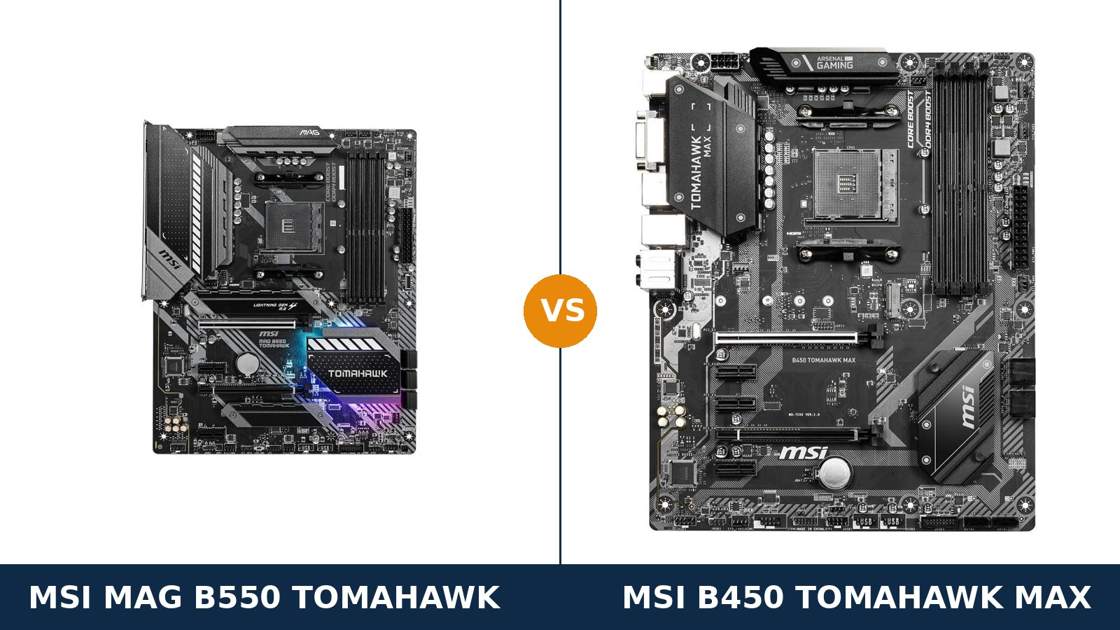
Same name. Same socket. Same Tomahawk badge — one generation apart.
The MSI MAG B550 Tomahawk and the B450 Tomahawk Max are the two most recommended AM4 gaming boards of their eras, and they still sit side by side in listings today. That makes this the AM4 comparison that causes the most confusion.
Here is the short version of the problem: the B450 Tomahawk Max was so good that owners reasonably ask whether the B550 version is worth paying for at all. In some builds, honestly, it is not. In others, the gap is a full platform generation.
This guide separates the two properly. Every specification comes from MSI's own published data. The verdict splits cleanly by what you already own and what you plan to run.
Key Takeaways
- The MAG B550 Tomahawk is the better board, full stop. PCIe 4.0, a far stronger VRM, dual M.2 with heatsinks, and dual LAN including 2.5G.
- The B450 Tomahawk Max still makes sense as a budget buy — and if you already own one, a BIOS update takes it to Ryzen 5000. Do not replace it on reflex.
- CPU support cuts both ways. The B550 drops 1st and 2nd Gen Ryzen and the 3200G/3400G APUs entirely; the B450 runs them all.
- Storage is the biggest practical gap. Two M.2 slots on the B550, one on the B450 — and the B450 loses two SATA ports when that slot is filled.
- Neither board has Wi-Fi. The B550 Tomahawk MAX WiFi is a separate, different model — do not confuse the listings.
Quick Verdict
Buy the MSI MAG B550 Tomahawk for any new AM4 build. It is the more capable board in almost every measurable way.
PCIe 4.0 for the graphics card and first SSD. A 10+2+1 Duet Rail power design under serious heatsinks. Two M.2 slots, both with heatsinks. 2.5G LAN next to a second gigabit port. This is the board a Ryzen 7 or Ryzen 9 build deserves.
Buy the MSI B450 Tomahawk Max if the budget is strict, your parts are older, or the price gap is wide. For a Ryzen 5 build with a PCIe 3.0 graphics card and one NVMe drive, it delivers the same gaming experience for less money.
And if you already own the B450 Tomahawk Max, the verdict is different again: update the BIOS, drop in a Ryzen 5000 chip, and keep your money. The case for replacing it is narrower than the internet suggests.
The Scorecard
Scores below are derived directly from the manufacturer specifications compared in this guide — phase designs, slot counts, port counts and supported standards. They are a reading aid, not benchmark results.
| Category | MAG B550 Tomahawk | B450 Tomahawk Max | ||
|---|---|---|---|---|
| Power delivery | 9 / 10 | 6 / 10 | ||
| PCIe platform | 10 / 10 | 5 / 10 | ||
| Storage | 9 / 10 | 6 / 10 | ||
| CPU compatibility breadth | 7 / 10 | 9 / 10 | ||
| Networking | 9 / 10 | 6 / 10 | ||
| Audio & USB | 8 / 10 | 7 / 10 | ||
| Memory | 9 / 10 | 8 / 10 | ||
| Overall | 8.7 / 10 | 6.7 / 10 | ||
Read the scorecard carefully and one row jumps out: CPU compatibility breadth is the B450's win, and it is a big one. The older board accepts processors the newer board flatly refuses. Everything else runs the other way.
At a Glance: Who Each Board Fits
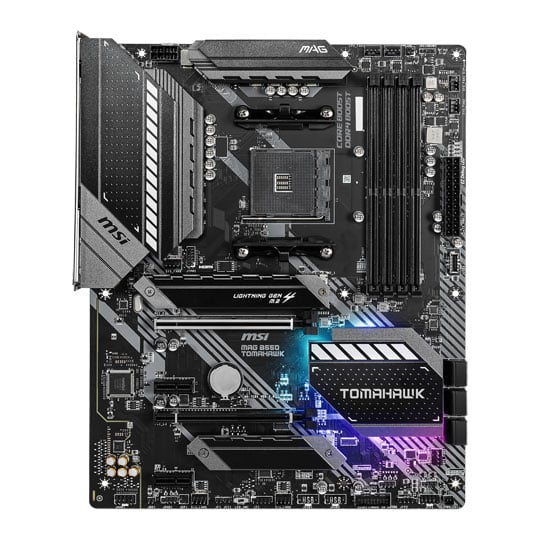
MSI MAG B550 Tomahawk
- PCIe 4.0 x16 graphics slot and Gen 4 M.2 slot
- 10+2+1 Duet Rail VRM with extended heatsinks
- Two M.2 slots, both with Shield Frozr heatsinks
- Dual LAN: 2.5G (RTL8125B) + Gigabit (RTL8111H)
- Realtek ALC1200 audio, front USB-C header
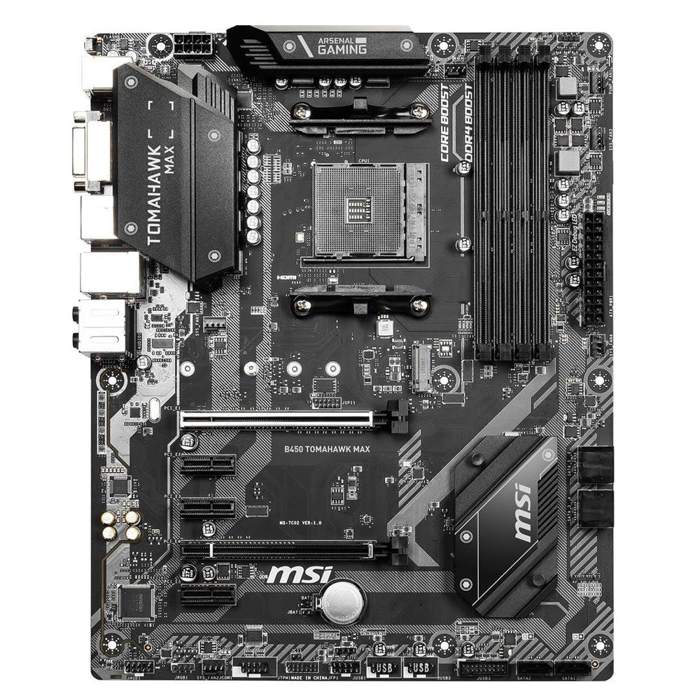
MSI B450 Tomahawk Max
- PCIe 3.0 platform — the full B450 feature set
- Supports Ryzen 1000 through 5000 with BIOS updates
- One Turbo M.2 slot at PCIe 3.0 x4 (32 Gb/s)
- Flash BIOS Button and a full-size BIOS chip
- Usually the cheaper board by a wide margin
Choose the MAG B550 Tomahawk if…
You are building new with a Ryzen 5000 or Ryzen 3000 processor. You want PCIe 4.0 storage now, or a PCIe 4.0 graphics card running at full specification.
You plan a Ryzen 7 or Ryzen 9, now or later. You want a second M.2 slot that does not cost you SATA ports. Or your network is 2.5-gigabit and you intend to use it.
Choose the B450 Tomahawk Max if…
Your processor is a Ryzen 1000, 2000, or an APU like the 3400G — the B550 cannot run them at all.
Your build is a Ryzen 5 with a PCIe 3.0 graphics card and a single NVMe drive, and the B450 is meaningfully cheaper. Or you found one used at a price the B550 cannot touch.
As an Amazon Associate I earn from qualifying purchases at no extra cost to you.
Specifications: The Specs That Actually Matter
Every figure below is taken from MSI's published specifications and datasheets for these two boards.
Where MSI's own pages disagree with each other, the table uses the current global specification, and the note under the table explains the case that matters.
| Specification | MSI MAG B550 Tomahawk | MSI B450 Tomahawk Max |
|---|---|---|
| Form factor | ATX | ATX |
| Socket / chipset | AMD AM4 / B550 | AMD AM4 / B450 |
| CPU support | Ryzen 5000 & 3000, 4000 G-Series (not 3200G/3400G) | Ryzen 1000–5000 incl. Vega APUs & Athlon (BIOS update for 5000) |
| VRM design | 10+2+1 Duet Rail, digital PWM, extended heatsinks | Core Boost design, extended heatsink |
| Memory | 4 × DDR4 DIMM, up to 128 GB, 5100 MT/s+ (O.C.) | 4 × DDR4 DIMM, up to 128 GB, 4133 MT/s (O.C.) |
| Graphics slot | PCIe 4.0 x16 (Steel Armor), CPU lanes | PCIe 3.0 x16 (Steel Armor), CPU lanes |
| Other expansion | PCIe 3.0 x16 (x4) + 2 × PCIe 3.0 x1 | PCIe 2.0 x16 (x4) + 3 × PCIe 2.0 x1 |
| M.2 storage | 2 slots: PCIe 4.0 x4 + SATA (22110) and PCIe 3.0 x4, both with heatsinks | 1 slot: PCIe 3.0 x4 / SATA (Turbo M.2) |
| SATA | 6 × SATA 6 Gb/s, RAID 0/1/10 | 6 × SATA 6 Gb/s, RAID 0/1/10 (ports 5/6 disable with M.2 fitted) |
| LAN | 2.5G Realtek RTL8125B + Gigabit RTL8111H (dual LAN) | Gigabit Realtek RTL8111H |
| Audio | Realtek ALC1200, 7.1 HD, optical S/PDIF out | Realtek ALC892, 7.1 HD |
| Display outputs (APU) | HDMI + DisplayPort | HDMI + DVI-D |
| USB (rear) | USB 3.2 Gen 2 Type-C + Type-A, 2 × Gen 1, 2 × USB 2.0 | USB 3.2 Gen 2 Type-C + Type-A, 2 × Gen 1, 2 × USB 2.0 |
| Front USB-C header | Yes — USB 3.2 Gen 1 Type-C | No (USB 3.2 Gen 1 Type-A header only) |
| BIOS flashing | Flash BIOS Button (no CPU/RAM/GPU needed) | Flash BIOS Button (no CPU/RAM/GPU needed) |
| Wi-Fi | None | None |
Variant note: the B450 Tomahawk Max is the original “Max” board (model MS-7C02). MSI later sold a B450 Tomahawk Max II with near-identical specifications, and the plain B450 Tomahawk (no Max) is an earlier board with a smaller BIOS chip and lower memory ceiling. They are three different products — the buying guide below explains how to tell them apart.
Support note: MSI's datasheet for the B450 Tomahawk Max lists Ryzen 1st–3rd Gen support because it predates Ryzen 5000. MSI's current specification page lists support up to Ryzen 9 — Ryzen 5000 support arrived by BIOS update, and the board's Flash BIOS Button makes applying it straightforward.
The Differences That Actually Matter
1. PCIe 4.0 vs 3.0 — the generational gap, stated honestly
This is the headline difference, and it deserves a straight answer rather than hype.
The B550 Tomahawk's main slot runs PCIe 4.0 x16 from the processor. The B450 Tomahawk Max's runs PCIe 3.0 x16. Per lane, Gen 4 doubles the bandwidth.
For graphics cards, today's practical impact is small. Most GPUs lose little or nothing at Gen 3 x16. Cards with cut-down x8 or x4 links are the exception — on those, a Gen 3 slot squeezes an already narrow pipe.
For storage, the impact is direct and permanent. A Gen 4 NVMe drive in the B550's first M.2 slot runs at its full rated link speed. In the B450, the same drive is capped at Gen 3 x4 — MSI rates that slot at 32 Gb/s.
Buy the B550 and both of your fastest devices run at full specification. Buy the B450 and both run one generation behind. Whether that matters depends entirely on the parts you pair with them.
2. Power delivery — not a close contest
MSI built the B550 Tomahawk's power design to a visibly higher standard. A 10+2+1 Duet Rail system with a digital PWM controller, an extended heatsink arrangement, and a 6-layer PCB with 2oz thickened copper.
The B450 Tomahawk Max uses MSI's earlier Core Boost layout under a single extended heatsink. It earned a strong reputation in its day — it was the B450 board reviewers pointed to when other boards' VRMs overheated.
Context matters, though. “Best of B450” and “B550 Tomahawk class” are different leagues.
For Ryzen 5 and Ryzen 7 processors at stock or lightly tuned settings, both boards do the job. Push toward a Ryzen 9 5900X or 5950X — sustained all-core current, hour after hour — and the B550's design is the one with genuine headroom.
As with every board comparison: the VRM is the component you can never upgrade later. If a flagship AM4 chip is anywhere in your future, this section decides the purchase on its own.
3. Storage — two slots against one, and a SATA catch
The B550 Tomahawk carries two M.2 slots. The first runs PCIe 4.0 x4 (or 3.0, by processor) and also accepts SATA M.2 drives and long 22110 modules. The second runs PCIe 3.0 x4 from the chipset.
Both slots wear MSI's M.2 Shield Frozr heatsinks. Gen 4 drives run hot; a heatsink is not a cosmetic extra at those speeds.
The B450 Tomahawk Max carries one M.2 slot. It is a good slot — PCIe 3.0 x4, SATA support, MSI's Turbo M.2 — but it is the only one.
Then comes the catch B450 buyers learn late: fitting an M.2 drive disables SATA ports 5 and 6. Six SATA ports become four. If your build mixes an NVMe boot drive with several SATA drives, plan the cabling around that.
The B550 has one sharing note of its own, and it is far gentler: filling the second M.2 slot alongside both small PCIe slots drops that M.2 to x2 speed and disables the last x1 slot. Your six SATA ports stay live throughout.
Verdict on storage: the B550 wins on count, on speed, on cooling and on flexibility. This is the section where the generation gap is impossible to argue with.
4. CPU support — the B450's genuine, underrated win
Now the difference that runs the other way, and it is a real one.
The B550 chipset does not support 1st or 2nd Gen Ryzen. MSI states it plainly: the B550 Tomahawk supports Ryzen 5000 and 3000 series, plus 4000 G-Series — and is explicitly not compatible with the Ryzen 5 3400G or Ryzen 3 3200G.
The B450 Tomahawk Max supports the entire AM4 story. Ryzen 1000, 2000 and 3000 out of the box — the “Max” in the name marks the larger BIOS chip MSI fitted so support would not run out of room. Ryzen 5000 arrives by BIOS update, up to Ryzen 9.
It also runs the APUs the B550 refuses: the 2200G, 2400G, 3200G and 3400G, plus Athlon chips with Radeon graphics. For a no-graphics-card build on an older APU, the B450 is not the budget option. It is the only option of these two.
If your processor predates Ryzen 3000, this comparison is already over. The B550 Tomahawk cannot run your chip at any price.
5. Networking and audio — a rout
The B550 Tomahawk has two wired network controllers: a Realtek RTL8125B running 2.5-gigabit, and an RTL8111H gigabit port beside it. Home servers, NAS boxes and fast local networks all benefit; a second port is also genuinely useful for networking a VM or a streaming PC.
The B450 Tomahawk Max has the single RTL8111H gigabit port. Perfectly serviceable. Entirely ordinary.
Audio follows the same pattern. The B550 uses the Realtek ALC1200 codec with an optical S/PDIF output on the rear panel. The B450 uses the older ALC892, with no optical out.
Neither gap decides a gaming build by itself. Together they describe the B550's positioning accurately: this is a board specified like a class above, because it is one.
6. USB and display outputs — small differences, specific consequences
On the rear panel, the boards are surprisingly close. Both give you USB 3.2 Gen 2 in Type-C and Type-A (10 Gb/s), two Gen 1 ports and two USB 2.0 ports. Both have a Flash BIOS Button and a PS/2 combo port.
The front-panel headers are where they split. The B550 Tomahawk provides a USB 3.2 Gen 1 Type-C header for a case's front USB-C port. The B450 provides only a Type-A Gen 1 header — a front USB-C port on your case will sit unconnected.
Display outputs matter only for APU builds, and there the split is generational too. The B550 offers HDMI plus DisplayPort. The B450 offers HDMI plus DVI-D.
An APU build on the B450 drives one modern monitor happily over HDMI. A second, older monitor on DVI-D is its ceiling. The B550's DisplayPort is the output you want for a high-refresh or high-resolution panel.
7. Memory — a paper gap, a practical tie
MSI rates the B550 Tomahawk's memory overclocking ceiling at 5100 MT/s and above. The B450 Tomahawk Max is rated to 4133 MT/s. Both boards take four DIMMs and up to 128 GB.
Those ceilings look decisive. In real builds, they mostly are not.
AM4 processors reward memory in the 3200–3600 MT/s range with tight timings; beyond that, gains thin out and stability depends on your individual chip's memory controller. Both boards run that sweet spot all day.
Where the B550's higher ceiling earns its keep is headroom: faster kits, looser silicon, future tinkering. Where it does not is any normal gaming build you can spec today. Call memory a tie in practice, a B550 win on paper — and let other sections decide your purchase.
CPU Pairing Guide
Start from the processor and this comparison usually resolves itself. This table is the whole guide in one view — including the row most comparisons refuse to print.
| Your situation | MAG B550 Tomahawk | B450 Tomahawk Max | Our call |
|---|---|---|---|
| Ryzen 1000 / 2000 (e.g. 2600, 2700X) | Not supported | Excellent | B450 Tomahawk Max — the only choice |
| Ryzen 3200G / 3400G APU build | Not supported (MSI states this explicitly) | Excellent | B450 Tomahawk Max |
| Ryzen 3000 (3600, 3700X) | Excellent, PCIe 4.0 unlocked | Excellent, ready out of the box | B550 for new builds; B450 if the price gap is wide |
| Ryzen 5000 (5600, 5700X, 5800X) | Excellent, ready out of the box | Very good after a BIOS update | B550 Tomahawk for new builds |
| Ryzen 9 5900X / 5950X | Excellent — VRM built for it | Workable at stock; VRM is the ceiling | B550 Tomahawk |
| Ryzen 5600G / 5700G APU build | Excellent — DisplayPort output | Good after BIOS update — HDMI/DVI only | B550 Tomahawk |
| You already own the B450 Tomahawk Max | A sidegrade, not an upgrade | BIOS update unlocks Ryzen 5000 | Keep the B450 — update, don't replace |
That last row deserves emphasis. The B450 Tomahawk Max with a current BIOS runs the same Ryzen 5000 processors as the B550. What it cannot give you is PCIe 4.0, a second M.2 slot and 2.5G networking. If none of those three is on your shopping list, replacing it buys you almost nothing.
Ready to check today’s price?
Both boards sell through Amazon. Prices move, so check the live figure on the board that fits your build.
View on Amazon — MAG B550 TomahawkView on Amazon — B450 Tomahawk MaxThe 30-Second Decision
| If this sounds like you… | Buy this |
|---|---|
| “New build, Ryzen 5000, want it done properly.” | MAG B550 Tomahawk |
| “My processor is a Ryzen 2600 / 2700X / 3400G.” | B450 Tomahawk Max — the B550 can't run it |
| “I already own the B450 Tomahawk Max.” | Neither — update its BIOS instead |
| “Budget Ryzen 5 build, one SSD, PCIe 3.0 graphics card.” | B450 Tomahawk Max, if clearly cheaper |
| “Gen 4 NVMe drive and a second M.2 later.” | MAG B550 Tomahawk |
| “Ryzen 9, long rendering or compiling sessions.” | MAG B550 Tomahawk (VRM headroom) |
What You Gain. What You Give Up.
MSI MAG B550 Tomahawk
You gain: PCIe 4.0 for graphics and storage. A 10+2+1 Duet Rail VRM with real headroom. A second M.2 slot, with heatsinks on both. Dual LAN with 2.5G, the better audio codec with optical out, DisplayPort for APUs, and a front USB-C header.
You give up: support for every AM4 processor before Ryzen 3000 — including the popular 3400G and 3200G APUs. And you pay more for the privilege; the B550 Tomahawk sits in a higher price class than the B450 ever did.
MSI B450 Tomahawk Max
You gain: the widest CPU support on AM4, from a 2017 Ryzen 5 1600 to a Ryzen 9 with a BIOS update. Out-of-the-box readiness for Ryzen 3000, a Flash BIOS Button, and a price — especially used — that the B550 cannot approach.
You give up: PCIe 4.0 entirely. The second M.2 slot. Two SATA ports whenever the M.2 slot is occupied. 2.5G networking, the front USB-C header, and the VRM headroom a Ryzen 9 really wants.
Pros and Cons
MAG B550 Tomahawk — Pros
- PCIe 4.0 x16 and Gen 4 M.2 — full-speed modern parts
- 10+2+1 Duet Rail VRM, extended heatsinks, 6-layer PCB
- Dual M.2 with Shield Frozr heatsinks fitted
- Dual LAN: 2.5G + Gigabit
- ALC1200 audio with optical S/PDIF
- DisplayPort output and front USB-C header
Cons
- No support for Ryzen 1000/2000 or 3200G/3400G
- Pricier than the B450 by a clear margin
- No Wi-Fi (the MAX WiFi is a different model)
- Second M.2 shares lanes with the small PCIe slots
B450 Tomahawk Max — Pros
- Runs every AM4 generation, Ryzen 1000 to 5000
- Ryzen 3000-ready out of the box; big 32 MB BIOS chip
- Flash BIOS Button — CPU-free BIOS updates
- Proven, well-cooled VRM for its class and era
- Frequently far cheaper, new or used
Cons
- PCIe 3.0 only — GPU and SSD both capped a generation back
- Single M.2 slot, and it disables SATA ports 5/6
- Single gigabit LAN, older ALC892 audio
- No front USB-C header; DVI-D instead of DisplayPort
- Ryzen 5000 needs a BIOS update before it will boot
Know Exactly Which Tomahawk You Are Buying
Separate the Max from the Max II. This comparison is about the original B450 Tomahawk Max (MS-7C02). MSI later released a Tomahawk Max II with near-identical specifications — same chipset, same memory ceiling, same layout philosophy.
If a listing says Max II, you are looking at the younger sibling, not this board. Its specifications are close enough that this guide's verdict logic still applies, but check the model name on the box and the silkscreen before paying.
Separate both from the plain B450 Tomahawk. The original 2018 Tomahawk (no Max) has a smaller BIOS chip and a lower memory ceiling. The Max exists precisely because that BIOS chip ran out of room for newer processors.
And separate the B550 Tomahawk from the B550 Tomahawk MAX WiFi. Despite the similar name, that is a different, later model with Wi-Fi 6E onboard. This guide's board — the MAG B550 Tomahawk — is wired-only. If a listing shows antennas, it is not the board in this comparison.
Check the BIOS version on a B450 purchase. A B450 Tomahawk Max boots Ryzen 3000 out of the box. For Ryzen 5000 it needs a later BIOS — and the Flash BIOS Button means you can apply that update with nothing but a power supply and a USB stick, before the processor is even installed.
Check the bundle. Both boards ship with the essentials: SATA cables, M.2 screws and documentation. The B550 Tomahawk's I/O shield comes pre-installed; on the B450 it is a separate piece in the box. Neither includes Wi-Fi antennas, because neither has Wi-Fi to attach them to.
The Upgrade Path Test
Judge these boards by the second processor, not the first.
The B450 Tomahawk Max has the most romantic upgrade story on AM4: buy it with a Ryzen 2600, run a 3600 two years later, flash the BIOS and finish on a 5800X. One board, three generations, no waste. No B550 board can tell that story — it refuses the first chapter.
The B550 Tomahawk's story starts at Ryzen 3000 and runs forward with more muscle. Gen 4 storage when you want it. A second M.2 slot when the first fills. A VRM that treats a Ryzen 9 as a normal workload rather than a stress test.
Both stories end at the same place: AM4's ceiling. Neither board takes DDR5 or Ryzen 7000. Whichever you buy, you are buying the best version of a finished platform — mature, stable and fully understood.
So the upgrade question is not “which board lasts longer?” It is “which part of AM4's life are you buying into — its beginning, or its peak?”
When to Skip Both
Honesty cuts both ways. Some builders should buy neither board in this comparison.
Skip both if you need Wi-Fi on the board itself. MSI sells a B550 Tomahawk MAX WiFi for exactly that, and it is a different product from the one tested here.
Skip both if you want two PCIe 4.0 M.2 drives at full speed. On B550, the second slot is a chipset Gen 3 slot; dual Gen 4 storage is X570 territory.
Skip both if your case is mini-ITX or compact micro-ATX. Both of these are full ATX boards and will not physically fit.
And skip both if you are starting entirely fresh with no AM4 parts on hand and no price pressure. Ryzen's newer AM5 platform is where a no-compromises new build belongs. These two boards are for builders with AM4 parts, AM4 budgets, or AM4 sense.
BIOS and Long-Term Support
Both boards live on MSI's standard support pages: BIOS releases, chipset and audio drivers, and a per-model CPU support list. Check that list before any processor purchase — it is the document that settles compatibility arguments.
Both boards also carry MSI's Flash BIOS Button. A BIOS update with no CPU, no memory and no graphics card installed is the single most useful support feature a long-lived board can have, and it is why the B450 Tomahawk Max aged so gracefully into Ryzen 5000 support.
Expect future BIOS releases for both boards to be about security and edge-case compatibility rather than new capability. On a finished platform, that is the correct kind of boring.
One habit protects either purchase: update the BIOS before a CPU upgrade, not after a failed boot. Both boards make that a ten-minute job.
Final Verdict
The MSI MAG B550 Tomahawk is the board we would buy — for a new build, it is not a difficult call.
It wins on the hardware that defines a board's working life: PCIe 4.0 where the fast parts plug in, a power design with headroom to spare, two cooled M.2 slots, and networking a class above. The B450's counter-arguments are about price and the past, not about capability.
Buy the MAG B550 Tomahawk for any new Ryzen 3000 or 5000 build — above all with a Ryzen 7 or Ryzen 9, a Gen 4 SSD, or a second M.2 drive in the plan.
View on Amazon — MAG B550 Tomahawk
Buy the B450 Tomahawk Max if your processor is older than Ryzen 3000, if your APU is a 3200G or 3400G, or if its price undercuts the B550 by enough to fund a better graphics card. In a Ryzen 5 gaming build, that trade can be the smartest money in the whole PC.
And if the B450 Tomahawk Max is already in your case, our verdict is to keep it. Flash the BIOS, fit the Ryzen 5000 chip, and spend the board money somewhere it will actually be felt.
View on Amazon — B450 Tomahawk Max
Frequently Asked Questions
Is the B550 Tomahawk worth it over the B450 Tomahawk Max?
For a new build, yes. You get PCIe 4.0 for the graphics card and first SSD, a much stronger 10+2+1 VRM, a second M.2 slot with heatsinks, and dual LAN with 2.5G. If you already own the B450 Tomahawk Max, though, the upgrade is far harder to justify — a BIOS update gives it the same Ryzen 5000 support.
Does the B450 Tomahawk Max support Ryzen 5000?
Yes, with a BIOS update. MSI's current specification lists support up to Ryzen 9, and the board's Flash BIOS Button lets you apply the update without a compatible CPU installed. Check MSI's CPU support list for the exact BIOS version your chip requires.
Can the B550 Tomahawk run a Ryzen 5 2600 or a 3400G?
No. MSI explicitly lists the B550 Tomahawk as supporting Ryzen 5000 and 3000 series plus 4000 G-Series, and as not compatible with the Ryzen 5 3400G and Ryzen 3 3200G. Processors older than Ryzen 3000 need a B450 board like the Tomahawk Max.
What does “Max” mean on the B450 Tomahawk Max?
It marks MSI's refreshed board with a larger 32 MB BIOS chip, fitted so the BIOS could keep supporting new processor generations without running out of space. It is why the Max boots Ryzen 3000 out of the box and later took Ryzen 5000 by update. The plain B450 Tomahawk (no Max) has the smaller chip.
How many M.2 drives can each board take?
The B550 Tomahawk takes two: a PCIe 4.0 x4 slot (also SATA, up to 22110 length) and a PCIe 3.0 x4 chipset slot, both with heatsinks. The B450 Tomahawk Max takes one PCIe 3.0 x4 / SATA drive — and fitting it disables SATA ports 5 and 6.
Does either board have Wi-Fi?
No. Both are wired-only; the B550 Tomahawk adds a 2.5G port the B450 lacks, but neither has a wireless module. MSI sells a separate B550 Tomahawk MAX WiFi model — a different board from the one in this comparison.
Is the B450 Tomahawk Max the same as the Max II?
No. The Max II is a later MSI variant with near-identical headline specifications. This comparison covers the original Tomahawk Max (MS-7C02). If you are buying, confirm which model the listing actually is — the name on the box and the board's silkscreen will tell you.
Will a Gen 4 NVMe SSD work in the B450 Tomahawk Max?
Yes, but at Gen 3 speeds. The slot itself is PCIe 3.0 x4, so a Gen 4 drive runs with its bandwidth halved. It works perfectly well — you simply do not get the performance you paid for, which is one of the B550 Tomahawk's clearest advantages.
Sources & Verification
MSI MAG B550 TOMAHAWK official specifications and product page, msi.com • MSI MAG B550 TOMAHAWK datasheet (storage-asset.msi.com) • MSI B450 TOMAHAWK MAX official specifications, msi.com / us.msi.com • MSI B450 TOMAHAWK MAX datasheet (storage-asset.msi.com) • MSI retail product data for MAG B550 TOMAHAWK and B450 TOMAHAWK MAX (ASIN-verified listings). Specifications verified November 2026.

James Wilson
James has been building and benchmarking PCs for over a decade and writes Honestly Compared's motherboard and component guides. His rule for every comparison: the verdict has to survive the spec sheet, not the marketing page.