
MSI MAG B550 Tomahawk vs MAG B550 Tomahawk MAX WiFi: Which Should You Buy?
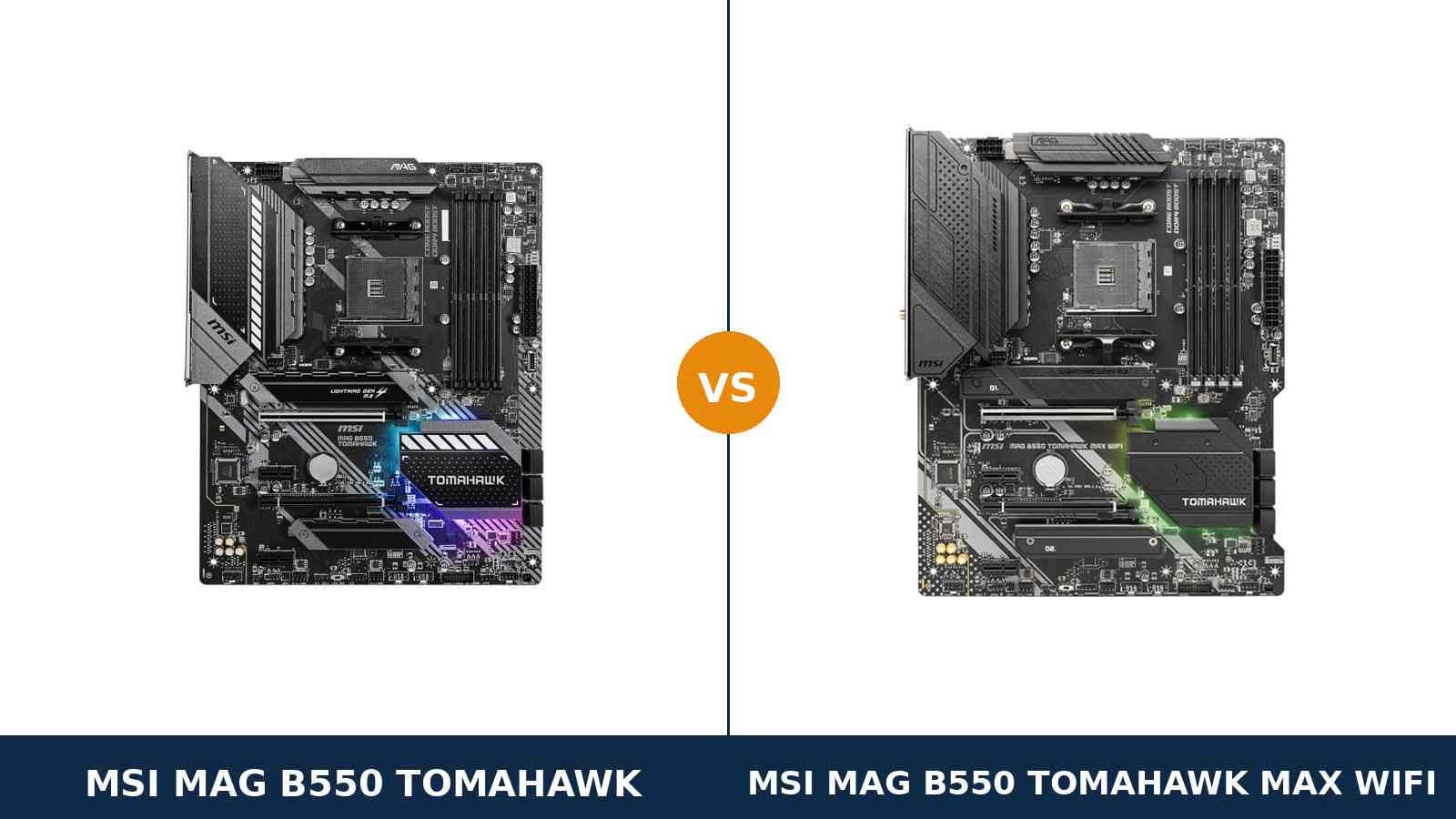
Same name. Same board, almost. One suffix doing a lot of work.
The MAG B550 Tomahawk is one of the most recommended AM4 boards ever made. The MAG B550 Tomahawk MAX WiFi is MSI's later refresh of it — a separate model with its own product page, its own manual and its own listing.
Most of the hardware carries over untouched. The power delivery, the storage, the slots, the memory support: identical, line for line.
What changes is the networking — and one quiet downgrade almost nobody mentions. The MAX WiFi gains Wi-Fi 6E and Bluetooth. In exchange, it gives up the original's second LAN port and its stronger audio codec.
So this is not a “newer is better” story. It is a trade. This guide prices that trade honestly, from MSI's own specifications.
Key Takeaways
- The platform is identical. Same 10+2+1 VRM, same slots, same storage, same memory ceiling, same USB layout.
- The MAX WiFi adds real wireless. Wi-Fi 6E with the 6GHz band, Bluetooth 5.2, and antennas in the box.
- The original fights back on wires. It keeps dual LAN — 2.5G plus Gigabit — where the MAX WiFi has a single 2.5G port.
- The original also wins audio on paper. Its ALC1200 codec outranks the MAX WiFi's ALC897.
- Buy on your desk, not the spec sheet. No Ethernet cable at your desk? MAX WiFi. Wired rig with a NAS or a second network? Original.
Quick Verdict
Buy the MAG B550 Tomahawk MAX WiFi for most builds. It is the more complete board for how most PCs actually connect in 2026.
Wi-Fi 6E and Bluetooth are built in, on a proper pre-installed module with real antennas. No add-in card eating a slot. No dongle.
Everything that made the original great is still here. The VRM, the storage and the expansion layout are unchanged.
Buy the original MAG B550 Tomahawk if your PC lives on a cable. It is the only one of the two with dual LAN.
It also carries the better audio codec. And if you will never use wireless, you should not pay for a radio you will never switch on.
The Scorecard
Scores below are derived directly from the manufacturer specifications compared in this guide — phase counts, slot counts, port counts and supported standards. They are a reading aid, not benchmark results.
| Category | MAG B550 Tomahawk | MAG B550 Tomahawk MAX WiFi | ||
|---|---|---|---|---|
| Power delivery | 9 / 10 | 9 / 10 | ||
| Networking & wireless | 7 / 10 | 9 / 10 | ||
| Storage | 9 / 10 | 9 / 10 | ||
| Expansion | 8 / 10 | 8 / 10 | ||
| Memory | 9 / 10 | 9 / 10 | ||
| USB & rear I/O | 8 / 10 | 8 / 10 | ||
| Audio | 8 / 10 | 7 / 10 | ||
| Overall | 8.3 / 10 | 8.5 / 10 | ||
Read the table the way it is written: five dead ties, one big MAX WiFi win, one small original win. The overall gap is exactly as narrow as it looks.
At a Glance: Who Each Board Fits
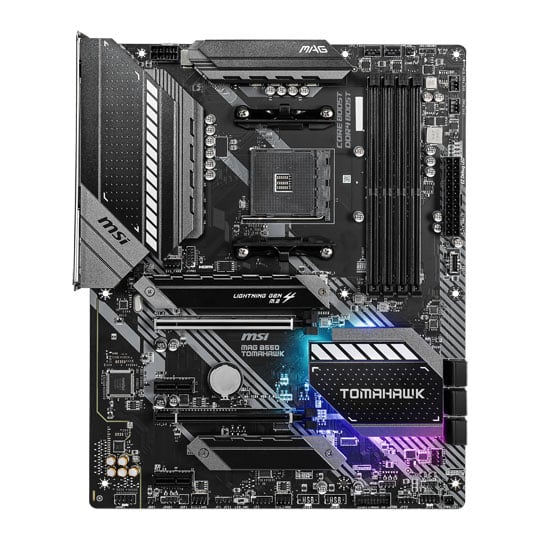
MSI MAG B550 Tomahawk
- 10+2+1 Duet Rail VRM with extended heatsink
- Dual LAN: Realtek 2.5G + Gigabit
- Realtek ALC1200 audio codec
- Dual M.2 with Shield Frozr heatsinks on both slots
- No Wi-Fi, no Bluetooth — wired only
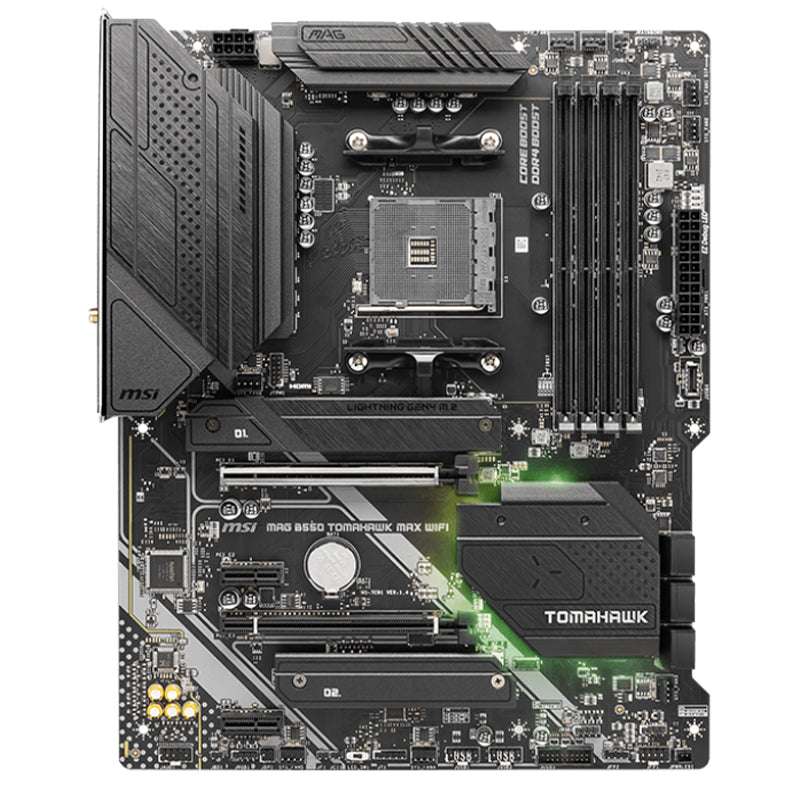
MSI MAG B550 Tomahawk MAX WiFi
- Same 10+2+1 Duet Rail VRM and board layout
- AMD Wi-Fi 6E module with Bluetooth 5.2
- Single Realtek 2.5G LAN port
- Realtek ALC897 audio codec
- Two antenna connectors on the rear panel
Choose the MAG B550 Tomahawk if…
Your desk has an Ethernet cable, and it is staying there. The original is the wired board of the two.
You run a second network — a NAS, a home server, a direct link to another machine. Dual LAN is a feature no setting can add to the MAX WiFi later.
You listen through good headphones plugged straight into the board. The ALC1200 is the stronger codec, and it costs you nothing.
Choose the MAG B550 Tomahawk MAX WiFi if…
There is no cable at your desk, and running one is not happening. Wi-Fi 6E is not a garnish on a modern build; for many homes it is the connection.
You use Bluetooth controllers, headsets or peripherals. The MAX WiFi has Bluetooth 5.2 built in; the original has none at all.
You want the board that asks nothing of you later. Wireless done properly, from day one, without surrendering an expansion slot to a card.
As an Amazon Associate I earn from qualifying purchases at no extra cost to you.
Specifications: The Specs That Actually Matter
Every figure below is taken from MSI's published specifications, datasheets and user manuals for the two models. Where the two boards match, we say so once, plainly.
| Specification | MSI MAG B550 Tomahawk | MSI MAG B550 Tomahawk MAX WiFi |
|---|---|---|
| Form factor | ATX, 30.5 × 24.4 cm | ATX, 30.5 × 24.4 cm |
| Socket / chipset | AMD AM4 / B550 | AMD AM4 / B550 |
| CPU support | Ryzen 5000, 5000 G, 4000 G, 3000 series | Ryzen 5000, 5000 G, 4000 G, 3000 series |
| VRM design | 10+2+1 Duet Rail, digital PWM, extended heatsink | 10+2+1 Duet Rail, digital PWM, extended heatsink |
| Memory | 4 × DDR4 DIMM, up to 128 GB, 5100+ MT/s (O.C.), A-XMP | 4 × DDR4 DIMM, up to 128 GB, 5100+ MT/s (O.C.), A-XMP |
| Expansion slots | PCIe 4.0 x16 + PCIe 3.0 x16 (x4) + 2 × PCIe 3.0 x1 | PCIe 4.0 x16 + PCIe 3.0 x16 (x4) + 2 × PCIe 3.0 x1 |
| M.2 storage | 2 slots: PCIe 4.0 x4 + PCIe 3.0 x4, Shield Frozr heatsinks on both | 2 slots: PCIe 4.0 x4 + PCIe 3.0 x4, Shield Frozr heatsinks on both |
| SATA | 6 × SATA 6 Gb/s, RAID 0/1/10 | 6 × SATA 6 Gb/s, RAID 0/1/10 |
| Wired LAN | Realtek 2.5G (RTL8125B) + Realtek Gigabit (RTL8111H) | Realtek 2.5G (RTL8125B) only |
| Wireless | None | AMD Wi-Fi 6E (up to 2400 Mbps), Bluetooth 5.2 |
| Audio | Realtek ALC1200, 7.1 HD, optical S/PDIF | Realtek ALC897, 7.1 HD, optical S/PDIF |
| Graphics outputs (APU) | HDMI 2.1, DisplayPort 1.4 | HDMI 2.1, DisplayPort 1.4 |
| USB (rear) | USB-C Gen 2, USB-A Gen 2, 2 × USB-A Gen 1, 2 × USB 2.0 | USB-C Gen 2, USB-A Gen 2, 2 × USB-A Gen 1, 2 × USB 2.0 |
| Fan headers | 8 (CPU + pump + 6 system) | 8 (CPU + pump + 6 system) |
| BIOS flashing | Flash BIOS Button (no CPU/RAM/GPU needed) | Flash BIOS Button (no CPU/RAM/GPU needed) |
Two notes before you quote this table. First, the memory figure: MSI's current product pages headline 5100+ MT/s (O.C.) for both boards, while the A-XMP list printed in the manuals tops out at 4866+. We use the current page figure for both, so the comparison stays level.
Second, the audio row: MSI's specification summary for the original Tomahawk prints “ALC1200 / ALC1220P”, reflecting production variance; MSI's own datasheet names the fitted codec as ALC1200, and that is the figure used here. The MAX WiFi's ALC897 is stated plainly in its manual.
The Differences That Actually Matter
1. Wireless — the whole point of the MAX WiFi
The MAX WiFi carries an AMD Wi-Fi 6E module, pre-installed in an M.2 Key-E slot. It covers the 2.4GHz, 5GHz and 6GHz bands, with MU-MIMO and speeds MSI rates up to 2400 Mbps.
Bluetooth 5.2 rides along. Controllers, headsets, mice and keyboards pair directly with the PC.
Two antenna connectors sit on the rear panel, and the antennas are in the box. This is a proper installation, not a USB dongle hanging off the back.
The original Tomahawk has none of this. No Wi-Fi. No Bluetooth. If you need either, you are shopping for an add-in card the day the board arrives.
That card will take one of the board's two PCIe x1 slots. The MAX WiFi keeps both of its x1 slots free, because its wireless lives on the Key-E slot instead.
For a build that will never touch wireless, all of this is dead weight. For a build in a rented flat, a bedroom, or anywhere the router is two rooms away, it is the single biggest difference between these boards.
2. Wired networking — where the original quietly wins
Here is the trade nobody puts on the box. The original Tomahawk runs two wired controllers: a Realtek RTL8125B at 2.5G and a Realtek RTL8111H at Gigabit speed.
The MAX WiFi keeps the 2.5G port and drops the second one. Its rear panel spends that space on the antenna connectors instead.
For a single cable to a router, nothing changes. Both boards give you the same 2.5G link, and both ship MSI's LAN Manager software for prioritising game traffic.
Dual LAN earns its keep in specific setups. A direct cable to a NAS while the other port faces the router. A home server pulling double duty. A streaming PC bridging networks. If any of that sounds like your desk, the original is not the budget option — it is the only option of the two.
3. Audio — a small, real step down on the MAX WiFi
The original Tomahawk's ALC1200 codec is the stronger part. It sits in MSI's Audio Boost design with quality capacitors and an optical S/PDIF output.
The MAX WiFi uses the ALC897. It is a competent mainstream codec, and it keeps the same 7.1 output and the same optical S/PDIF. But on paper, and in MSI's own range order, it is a step down.
How much does it matter? Through typical gaming headsets and desktop speakers, most listeners will never separate them. Through good wired headphones driven straight from the rear jacks, the ALC1200 board is the safer buy.
Using a USB headset or an external DAC? Then the codec never enters your signal path at all, and this entire section scores a draw for you.
4. Power delivery, memory and storage — the honest tie
Both boards run MSI's 10+2+1 Duet Rail power system with a digital PWM controller, Core Boost layout and the same extended heatsink over the power stages.
Both feed the CPU from a single 8-pin connector. Both sit on a 2oz-thickened-copper PCB. There is no version of this comparison where one board's VRM outmuscles the other's — they are the same design.
Memory is the same story. Four DDR4 slots, 128 GB ceiling, the same 5100+ MT/s overclocking headline, the same A-XMP profiles.
Storage matches too. A Lightning Gen 4 M.2 slot at PCIe 4.0 x4, a second M.2 at PCIe 3.0 x4, heatsinks over both, and six SATA ports with RAID.
Anyone trying to sell you one of these boards over the other on VRM, RAM or SSD speed is inventing a difference. MSI did not change the platform. It changed the radios.
5. Expansion — same slots, same sharing rule
The slot layout is identical. A steel-reinforced PCIe 4.0 x16 slot for the graphics card. A second x16-length slot wired at PCIe 3.0 x4. Two PCIe 3.0 x1 slots for small cards.
Both boards support 2-way AMD CrossFire on paper, which in 2026 is a trivia answer rather than a buying reason. The x4 slot's real job is capture cards, fast network cards and extra NVMe adapters.
Both boards also share the same lane-sharing rule, and it is worth knowing before you fill every slot. Populate the second M.2 and both small slots at once, and the x4 slot drops out entirely while the second M.2 narrows to x2 speed.
The one asymmetry is hidden. The MAX WiFi's wireless module occupies its Key-E slot, so that slot is spoken for. The original has no wireless module at all — which sounds like a win, until you remember it also has no wireless.
6. USB, display outputs and the rear panel — a wash
Count the USB ports and the two boards tie exactly. On the rear: one USB 3.2 Gen 2 Type-C, one Gen 2 Type-A, two Gen 1 Type-A and two USB 2.0. At the front: a Gen 1 Type-C header, a Gen 1 header and two USB 2.0 headers.
Display outputs tie too. HDMI 2.1 and DisplayPort 1.4, each good for 4K at 60Hz from a Ryzen APU. Fit a graphics card and, as always, both boards' outputs sit idle.
Both boards give you a Flash BIOS Button, a PS/2 combo port, EZ Debug LEDs and a pre-installed I/O shield. The rear panels differ in exactly two places: the original's second LAN port, and the MAX WiFi's antenna posts where that port used to be.
That is the whole comparison in one image, really. Same panel. One socket swapped from copper to radio.
7. The name — MAX does not mean bigger here
Buyers who know MSI's B450 boards bring an assumption to this matchup. On B450, “MAX” meant a larger BIOS chip and guaranteed Ryzen 3000 support out of the box.
Forget it here. The B550 Tomahawk MAX WiFi is not a beefed-up Tomahawk. It is the same platform reissued with a wireless module and a single LAN port.
Both boards support the same processors. Both flash the same way, with the same Flash BIOS Button. Neither needs the other's BIOS to run any AM4 chip.
Read “MAX WiFi” as a trim level, not a tier. You are choosing an options list, not an upgrade.
CPU Pairing Guide
Because the platform underneath is identical, no processor separates these boards. This table is still the fastest way to see where each one fits — read the last column for the part that actually changes with the CPU.
| Your processor | MAG B550 Tomahawk | MAG B550 Tomahawk MAX WiFi | Our call |
|---|---|---|---|
| Ryzen 5 5600 / 5500 | Excellent | Excellent | Buy on networking, not CPU |
| Ryzen 5 5600G / 5700G (APU) | Excellent — DP + HDMI | Excellent — DP + HDMI | Dead tie; display outputs match |
| Ryzen 7 5700X / 5800X | Excellent — full VRM headroom | Excellent — full VRM headroom | Same 10+2+1 VRM on both |
| Ryzen 7 5800X3D | Excellent — AM4's gaming endgame | Excellent — AM4's gaming endgame | Either; update the BIOS first |
| Ryzen 9 5900X / 5950X | Workable — the sensible ceiling | Workable — the sensible ceiling | Identical limits on both boards |
| Ryzen 3000 series | Excellent | Excellent | Buy whichever fits your desk |
One support note applies to both boards equally: neither officially supports the Ryzen 5 3400G or Ryzen 3 3200G. Those Zen+ APUs sit outside the B550 support list, MAX badge or not.
Ready to check today’s price?
Both boards sell through Amazon. Prices move, so check the live figure on the board that fits your build.
View on Amazon — MAG B550 TomahawkView on Amazon — MAG B550 Tomahawk MAX WiFiThe 30-Second Decision
| If this sounds like you… | Buy this |
|---|---|
| “There is no Ethernet socket anywhere near my desk.” | MAG B550 Tomahawk MAX WiFi |
| “My PC is wired, and it is staying wired.” | MAG B550 Tomahawk |
| “I run a NAS or a second network off my PC.” | MAG B550 Tomahawk (dual LAN) |
| “I pair Bluetooth controllers and headsets constantly.” | MAG B550 Tomahawk MAX WiFi |
| “Good headphones, plugged straight into the board.” | MAG B550 Tomahawk (ALC1200) |
| “I just want the safe default for a gaming build.” | MAG B550 Tomahawk MAX WiFi |
What You Gain. What You Give Up.
MSI MAG B550 Tomahawk
You gain: dual LAN — a 2.5G port and a Gigabit port, side by side. The stronger ALC1200 audio codec. And a board that spends nothing on hardware a wired desk will never use.
You give up: all wireless. No Wi-Fi for the rooms a cable cannot reach, no Bluetooth for controllers and headsets — unless you spend an x1 slot and extra money on a card later.
MSI MAG B550 Tomahawk MAX WiFi
You gain: Wi-Fi 6E across all three bands and Bluetooth 5.2, factory-fitted with antennas included. Both x1 slots stay free, and the identical Tomahawk platform sits underneath it all.
You give up: the second LAN port — one 2.5G socket is all you get. And the ALC1200 steps down to an ALC897. The MAX badge adds a radio; it quietly removes two wired features to do it.
Pros and Cons
MAG B550 Tomahawk — Pros
- Dual LAN: 2.5G + Gigabit
- ALC1200 — the better audio codec
- Proven 10+2+1 VRM, dual M.2 heatsinks
- Nothing fitted that a wired build wastes
- Flash BIOS Button and EZ Debug LEDs
Cons
- No Wi-Fi and no Bluetooth, at all
- Wireless later costs a card and an x1 slot
- Same age as the platform — no PCIe 5.0 path
MAG B550 Tomahawk MAX WiFi — Pros
- Wi-Fi 6E with 6GHz band and Bluetooth 5.2
- Identical VRM, storage and expansion
- Antennas included, module factory-fitted
- Keeps both PCIe x1 slots free
- Same Flash BIOS Button and debug LEDs
Cons
- Single LAN port — dual LAN is gone
- ALC897 audio is a step down
- Costs more than the original, typically
- Key-E slot is occupied by the radio
Buy the Exact Model — the Names Are a Minefield
Match the full name, character for character. “MAG B550 TOMAHAWK” and “MAG B550 TOMAHAWK MAX WIFI” are two listings, two boxes, two boards.
Check the rear panel in the listing photos before you pay. Antenna connectors mean the MAX WiFi. Two LAN ports mean the original. That ten-second check settles what the title garbled.
Check the wireless module description. The MAX WiFi's radio is an AMD Wi-Fi 6E module with Bluetooth 5.2 — that wording appears in MSI's own specification. A listing that says Wi-Fi 6 (not 6E), or says nothing about Bluetooth, is not describing this board.
Mind the Renewed trap. Amazon also carries a refurbished “Renewed” listing for the MAX WiFi under a different product code. If the price looks too good for a new board, read the condition line before you celebrate.
Check the antennas are in the box. The MAX WiFi ships with its antenna set. A used or open-box board missing them still works — at whatever range the bare connectors manage, which is poor. Price accordingly.
Check your CPU against the support list. Both boards take Ryzen 5000, 5000 G, 4000 G and 3000 series chips. Neither takes the 3400G or 3200G. For a 5800X3D, update the BIOS first — the Flash BIOS Button means you can do it before the CPU is even installed.
The Upgrade Path Test
Judge these boards by what changes around them, because the platform underneath never will.
On processing and graphics, the two age identically. Same socket, same VRM, same PCIe 4.0 ceiling. A Ryzen 7 dropped in three years from now will not know which Tomahawk it is sitting in.
Where they age differently is the room around the PC. Move house, move rooms, move the router — and the wired-only board suddenly needs a cable run or a wireless card.
The MAX WiFi absorbs that change without opening the case. The original absorbs a different one: add a NAS, a server or a second wired device, and its spare LAN port is already waiting.
Neither board escapes AM4's shared horizon. DDR4 and PCIe 4.0 are the end of this road for both. Buy either knowing the next platform jump means a new board regardless — so you may as well buy the one that fits your desk today.
When to Skip Both
Skip both if you are starting fresh and can stretch to AM5. A B650 board buys you DDR5 and PCIe 5.0 — a platform with years of new CPUs ahead of it, which neither Tomahawk can offer.
Skip both if your case is micro-ATX or smaller. These are full ATX boards; MSI's Mortar line is the same idea in the smaller format.
Skip both if you need Wi-Fi 7 or 10-gigabit networking built in. Neither radio nor LAN controller here reaches that far, and no BIOS update will change it.
And skip both if your build is an APU-only machine on the tightest budget. You would be paying for a VRM and expansion layout you will never load. Cheaper B550 boards exist for that job, and they are honest value.
Final Verdict
The MAG B550 Tomahawk MAX WiFi is the board we would buy for most builds.
Not because it is newer. Because the thing it adds — proper Wi-Fi 6E and Bluetooth, factory-fitted — is the thing most builders actually end up needing, and retrofitting it costs a slot, a card and an afternoon.
Everything underneath the radios is the Tomahawk people already trust. The same VRM. The same storage. The same slots. MSI changed the connectivity, and for a typical gaming PC, the exchange favours the MAX.
Buy the MAX WiFi if your PC will ever sit beyond cable range of the router, or if Bluetooth peripherals live on your desk.
View on Amazon — MAG B550 Tomahawk MAX WiFi
Buy the original Tomahawk if the PC is wired for life. Its dual LAN is a genuine feature the MAX cannot imitate, its codec is the better one, and you will never miss a radio you never switch on.
It remains a superb board. It is simply the specialist of the two now: the wired one.
View on Amazon — MAG B550 Tomahawk
Watch Out: Similar Names, Different Boards
MSI's Tomahawk family tree confuses buyers every week. Three warnings belong in this guide.
First: the B450 Tomahawk MAX is a different, older board on the B450 chipset. It shares the name and the socket and nothing else — no PCIe 4.0, a weaker layout, a different price class. Listings shorten names; check for “B550” before anything else.
Second: the MAG B550M Mortar and Mortar WiFi are micro-ATX relatives, not smaller versions of these boards. Different format, different slot layout, different rear panel. The “M” in the name is the tell.
Third: if you want wireless and the ALC1200-class audio this MAX gives up, MSI's own MPG B550 Gaming Carbon WiFi is the step-up that combines them. It is a different board at a higher tier — but it is the honest answer to “why not both?”
Case, Power and Cabling Notes
Both boards are full ATX, 30.5 × 24.4 cm, with identical mounting and layout. Anything that fits one fits the other, down to the last standoff.
Power is simple on both: a 24-pin main connector and a single 8-pin EPS for the CPU. No second CPU power cable to route, no adapter games with older power supplies.
Front-panel wiring matches too. Both boards offer a USB 3.2 Gen 1 Type-C header, so a case with a front USB-C port works fully on either — a detail cheaper B550 boards often drop.
One MAX WiFi note: the antennas screw onto the rear panel and want a clear line to the room. Tucked hard against a wall or inside a metal cabinet, any Wi-Fi suffers. Give them air and the 6GHz band rewards you.
Fan control is a wash. Eight headers each — CPU, pump and six system — with MSI's Smart Fan controls in the BIOS. Neither board will limit a sensible cooling setup, air or liquid.
BIOS and Long-Term Support
AM4 is a finished, mature platform, and for both of these boards that is a strength. The BIOS is stable, the drivers are stable, and the platform's surprises are all behind it.
Both boards live on MSI's standard support pages: BIOS updates with newer AGESA versions, chipset, LAN, audio and wireless drivers, and a full CPU support list per model.
Expect future updates to be about security fixes and edge-case compatibility rather than new features. On a mature platform, that is exactly what you want to hear.
One habit covers both boards: before any CPU upgrade, check the support list for your exact model and update the BIOS first. With the Flash BIOS Button, that is a ten-minute job even with the new processor still sealed in its box.
Frequently Asked Questions
What is the difference between the B550 Tomahawk and the Tomahawk MAX WiFi?
Networking and audio. The MAX WiFi adds an AMD Wi-Fi 6E module with Bluetooth 5.2, but drops the original's second LAN port (keeping a single 2.5G port) and steps the audio codec down from ALC1200 to ALC897. The VRM, memory support, slots, storage and USB layout are identical.
Does the regular MSI MAG B550 Tomahawk have Wi-Fi or Bluetooth?
No. The original Tomahawk is wired-only: dual LAN (2.5G plus Gigabit), but no wireless module of any kind. Adding Wi-Fi later means a PCIe add-in card or a USB adapter. The MAX WiFi is the model with wireless built in.
Is the MAX WiFi a stronger board than the regular Tomahawk?
No — and that is the most common misconception about it. On B550, “MAX” does not mean a bigger BIOS chip or a beefier VRM the way it did on B450. Both boards share the same 10+2+1 Duet Rail power design and support the same processors. The MAX WiFi is a different trim, not a higher tier.
Which board is better for a wired gaming setup?
The original Tomahawk, narrowly. Both boards offer the same Realtek 2.5G port for your main connection, but the original adds a second Gigabit port for a NAS, server or second network, and its ALC1200 codec is the better of the two for wired headphones.
Do both boards support the Ryzen 7 5800X3D?
Yes. Both support the full Ryzen 5000 range, including the 5800X3D, on the same 10+2+1 VRM. Update to a current BIOS before installing it — both boards have a Flash BIOS Button, so you can update with no CPU installed. Note that neither board supports the older Ryzen 5 3400G or Ryzen 3 3200G.
Can I add Wi-Fi to the regular B550 Tomahawk later?
Yes. A PCIe x1 Wi-Fi card is the clean route, and the Tomahawk has two x1 slots. It works fine — it just costs extra, occupies a slot, and is exactly the errand the MAX WiFi exists to save you. A USB Wi-Fi adapter is the other option, but it is the weakest of the three for speed and stability.
Do both boards support PCIe 4.0 graphics cards and SSDs?
Yes, identically. With a Ryzen 3000 or 5000 processor (excluding the G-series APUs, which run PCIe 3.0), the main x16 slot and the first M.2 slot run at PCIe 4.0 speeds on both boards. The second M.2 slot is PCIe 3.0 x4 on both, and both boards fit heatsinks over both M.2 slots.
Which Tomahawk should I buy for a PC in a bedroom or rented flat?
The MAX WiFi. If there is no Ethernet socket in the room, the original board cannot get online without a cable run or an add-in card. The MAX WiFi's 6E module covers 2.4GHz, 5GHz and 6GHz bands, and its Bluetooth handles controllers and headsets without dongles.
Sources & Verification
MSI MAG B550 TOMAHAWK official specifications and datasheet, msi.com • MSI MAG B550 TOMAHAWK MAX WIFI official specifications, datasheet and user manual, msi.com • MSI-US Official Store product pages for both models • Amazon listing data for both models, cross-checked against price-tracking records. Specifications verified November 2026.

James Wilson
James has been building and benchmarking PCs for over a decade and writes Honestly Compared's motherboard and component guides. His rule for every comparison: the verdict has to survive the spec sheet, not the marketing page.