
MSI MAG B550 Tomahawk vs MSI MPG X570 Gaming Plus: Which Should You Buy?
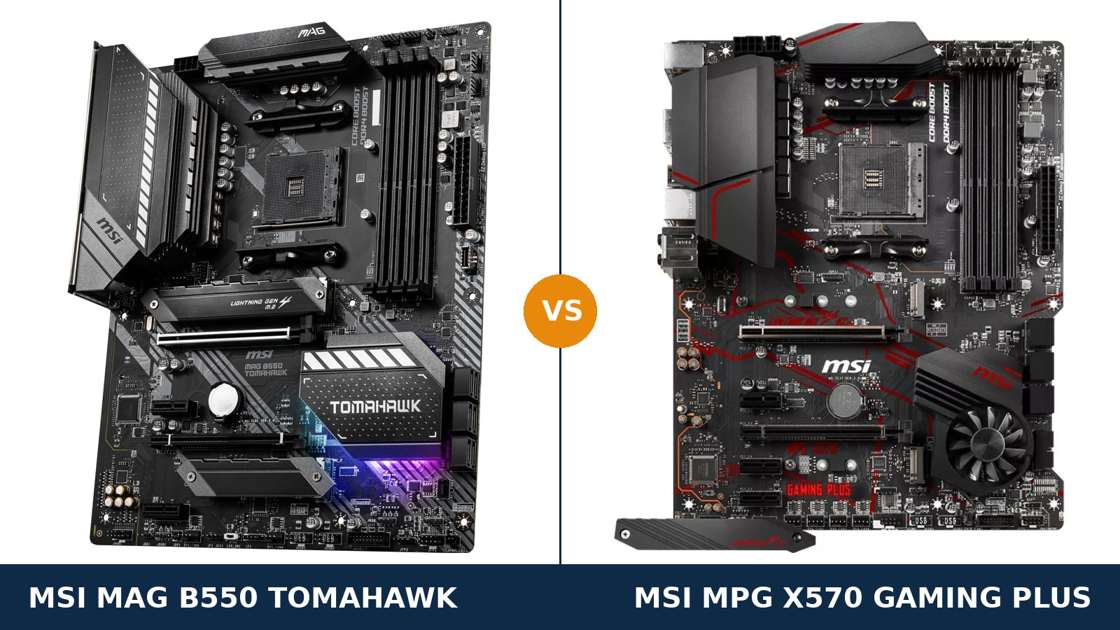
This is the AM4 chipset fight, fought inside one brand. B550 against X570. Newer against flagship.
The received wisdom says X570 wins by default. It was AMD's top chipset, with PCIe 4.0 lanes everywhere. The B550 Tomahawk was supposed to be the sensible mid-range alternative.
Read MSI's own spec sheets and the story flips. The Tomahawk is the newer, more deliberate design. The Gaming Plus is an early X570 board built to a price — and in several places it shows.
Below, both boards are compared specification by specification from MSI's published data. The chipset difference is real, and it matters. It just does not point the way most buyers assume.
Key Takeaways
- The B550 Tomahawk is the better board for most builders. Stronger power delivery, dual LAN with 2.5G, and no chipset fan.
- X570's Gen4 chipset lanes are the Gaming Plus's one structural win — its second full-length slot runs at PCIe 4.0 x4. Its second M.2 slot, surprisingly, does not run Gen4 at all.
- The Gaming Plus has a chipset fan. It stops at low load, but it is a moving part the Tomahawk simply does not have.
- Own a Ryzen 2000-series chip or a 3200G/3400G? The Tomahawk refuses them outright. The Gaming Plus is your only option of the two.
- Neither board has Wi-Fi. Both are wired-only designs with a Flash BIOS Button on the rear panel.
Quick Verdict
Buy the MSI MAG B550 Tomahawk for most AM4 builds. It is the more complete motherboard.
Its 10+2+1 Duet Rail power system feeds the CPU through 60A power stages under a proper extended heatsink. It carries two LAN ports, one of them 2.5-gigabit. Its chipset is passively cooled, so there is no small fan to wear out in year four.
For a Ryzen 5, 7 or 9 build you intend to keep, this is the board that respects the rest of your parts list.
Buy the MSI MPG X570 Gaming Plus if your parts bin decides for you. It accepts older Ryzen 2000-series processors and the 3200G/3400G APUs the Tomahawk rejects.
It also gives you a second full-length PCIe slot running at Gen4 speed, more rear USB ports, and the better audio codec. If those are your priorities — or it is simply the cheaper board on the day — it remains a capable foundation for a stock-clocked build.
The Scorecard
Scores below are derived directly from the manufacturer specifications compared in this guide — phase counts, slot counts, port counts and supported standards. They are a reading aid, not benchmark results.
| Category | B550 Tomahawk | X570 Gaming Plus | ||
|---|---|---|---|---|
| Power delivery | 9 / 10 | 6 / 10 | ||
| Expansion & chipset bandwidth | 7 / 10 | 8 / 10 | ||
| Storage | 8 / 10 | 8 / 10 | ||
| Memory | 9 / 10 | 7 / 10 | ||
| Networking | 9 / 10 | 6 / 10 | ||
| Audio & display outputs | 8 / 10 | 7 / 10 | ||
| CPU compatibility | 8 / 10 | 9 / 10 | ||
| Overall | 8.3 / 10 | 7.3 / 10 | ||
The pattern is consistent. The Gaming Plus wins where the X570 chipset itself does the work. The Tomahawk wins almost everywhere MSI's board design does the work — and board design is most of what you live with.
At a Glance: Who Each Board Fits
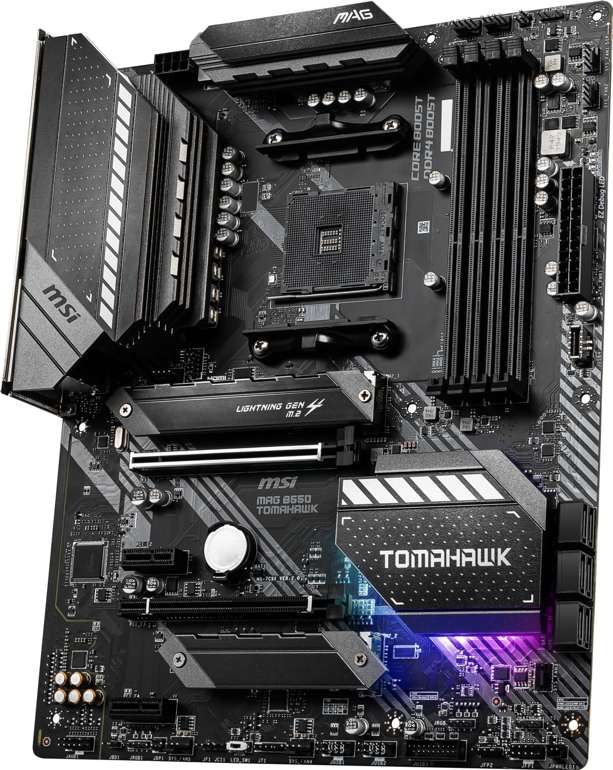
MSI MAG B550 Tomahawk
- 10+2+1 Duet Rail VRM with 60A power stages
- Dual LAN: 2.5G + Gigabit Ethernet
- Passively cooled B550 chipset — no fan
- HDMI + DisplayPort outputs for APU builds
- Front-panel USB-C header on board
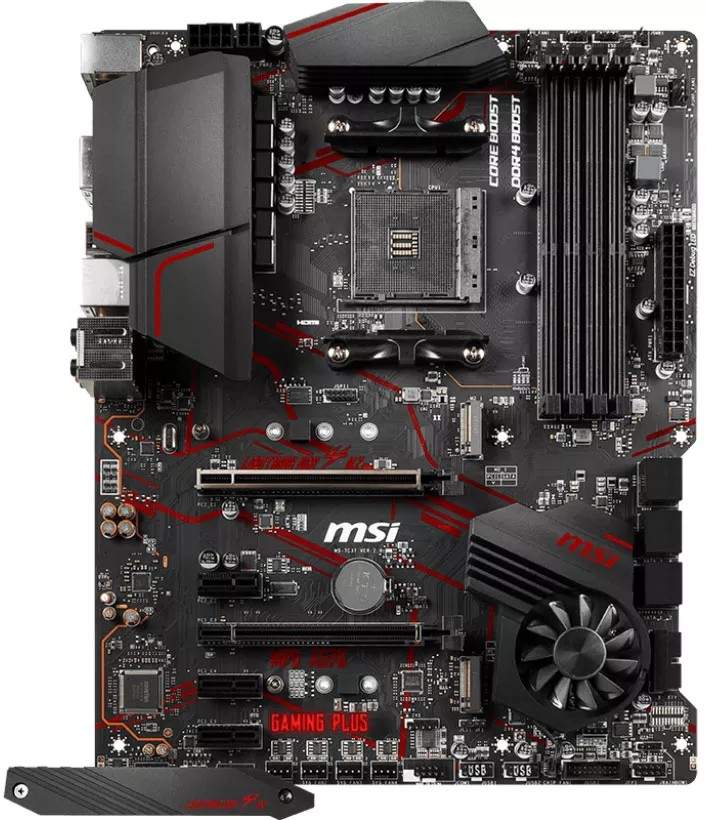
MSI MPG X570 Gaming Plus
- X570 chipset with Gen4 lanes beyond the CPU slots
- Second full-length PCIe slot runs Gen4 x4
- Actively cooled chipset with Zero Frozr fan stop
- ALC1220 audio codec — the better of the two
- Accepts Ryzen 2000-series and 3200G/3400G chips
Choose the B550 Tomahawk if…
You are building around a Ryzen 5000, 4000 G-Series or 3000-series processor and want the strongest foundation under it.
You move files across a home network, run a NAS, or simply want 2.5G Ethernet ready before you need it. The second gigabit port is a genuine bonus for tinkerers.
You value silence and longevity. A passively cooled chipset can never develop fan whine, because there is no fan.
Choose the X570 Gaming Plus if…
Your processor is a Ryzen 2000-series chip, a 3200G or a 3400G. The Tomahawk will not even POST with those — this decision makes itself.
You want a second full-length slot wired for PCIe 4.0 — for a second fast NVMe adapter card, for example — rather than Gen3.
Or you need the extra rear USB ports and the stronger audio codec, and your build will run at stock clocks.
As an Amazon Associate I earn from qualifying purchases at no extra cost to you.
Specifications: The Specs That Actually Matter
Every figure below is taken from MSI's published specifications, datasheets and manuals for these two boards, cross-checked against MSI's retail product data.
One warning before the table: both boards have near-identical names to other MSI products. The buying-guide section below covers the variants that trap buyers.
| Specification | MSI MAG B550 Tomahawk | MSI MPG X570 Gaming Plus |
|---|---|---|
| Form factor | ATX, 30.5 × 24.4 cm | ATX, 30.5 × 24.4 cm |
| Socket / chipset | AMD AM4 / B550 | AMD AM4 / X570 |
| CPU support | Ryzen 5000, 4000 G, 3000 series — NOT 3400G/3200G, no 2000 series | Ryzen 5000 (BIOS update), 3000, 2000 series + Vega APUs incl. 3400G/3200G |
| VRM design | 10+2+1 Duet Rail, 60A power stages, digital PWM | Core Boost, IR digital PWM, doubled discrete design, 8+4-pin CPU power |
| PCB | 6-layer, 2 oz thickened copper | — |
| Memory | 4 × DDR4 DIMM, up to 128 GB, 5100+ MT/s (O.C.), A-XMP | 4 × DDR4 DIMM, up to 128 GB, 4400+ MT/s (O.C.), A-XMP |
| Graphics outputs (APU) | HDMI + DisplayPort (DP up to 4096×2160 @60Hz) | HDMI 1.4 only (4096×2160 @24Hz) |
| Expansion slots | PCIe 4.0 x16 + PCIe 3.0 x16 (x4) + 2 × PCIe 3.0 x1 | PCIe 4.0 x16 + PCIe 4.0 x16 (x4) + 3 × PCIe 3.0 x1 |
| M.2 storage | 2 slots: PCIe 4.0 x4 / SATA (22110) + PCIe 3.0 x4 (2280); heatsinks on both slots | 2 slots: PCIe 4.0 x4 (22110) + PCIe 3.0 x4 / SATA (2280); Shield Frozr on primary slot |
| SATA | 6 × SATA 6 Gb/s, RAID 0/1/10 | 6 × SATA 6 Gb/s (4 chipset + 2 ASMedia), RAID 0/1/10 |
| LAN | Realtek RTL8125B 2.5 GbE + RTL8111H 1 GbE (dual ports) | Realtek RTL8111H 1 GbE (single port) |
| Audio | Realtek ALC1200, 7.1 HD, Audio Boost | Realtek ALC1220, 7.1 HD, Audio Boost 4 |
| USB (rear) | 2 × USB 3.2 Gen 2 (Type-A + Type-C, 10 Gb/s), 2 × Gen 1, 2 × USB 2.0 | 2 × USB 3.2 Gen 2 (Type-A + Type-C, 10 Gb/s), 4 × Gen 1, 2 × USB 2.0 |
| USB (front headers) | USB 3.2 Gen 1 Type-C header + Gen 1 header + 2 × USB 2.0 headers | 2 × USB 3.2 Gen 1 headers + 2 × USB 2.0 headers, no Type-C header |
| Chipset cooling | Passive heatsink — no fan, nothing to wear out | Frozr fan (double ball bearing), Zero Frozr fan-stop at low load |
| BIOS flashing | Flash BIOS Button on rear panel | Flash BIOS Button on rear panel |
Variant note: MSI's current specification page lists the Tomahawk's audio codec as “ALC1200 / ALC1220P” — later production runs substituted the ALC1220P. Either way it sits a step behind the Gaming Plus's ALC1220 in MSI's own hierarchy, so the audio verdict below stands for both versions.
Support note: the Gaming Plus's Ryzen 5000 support arrives by BIOS update. A board from early stock may need its BIOS flashed before a 5000-series chip will boot — which is exactly what its rear-panel Flash BIOS Button is for.
The Differences That Actually Matter
1. The chipset divide — Gen4 lanes, and the fan that comes with them
Start with the honest headline: the X570 chipset is the more capable silicon.
On the Gaming Plus, the chipset itself supplies PCIe 4.0 lanes. Its second full-length slot runs at Gen4 x4. The link between chipset and CPU is Gen4, too.
On the Tomahawk, everything beyond the CPU's own lanes is Gen3. The second slot runs at PCIe 3.0 x4, and the chipset uplink is Gen3 x4. For a graphics card and one fast SSD — both fed directly by the CPU — you will never feel this. It only shows in stacked storage and add-in cards.
Then comes the catch, and it is printed in MSI's own manual: the Gaming Plus's second M.2 slot, fed by that Gen4 chipset, runs at PCIe 3.0 x4. The X570 badge does not deliver a second Gen4 SSD slot on this board.
And the Gen4 chipset runs hot enough to need active cooling. Look at the board photo: a small fan sits inside the chipset heatsink.
MSI's Frozr design uses double ball bearings, and Zero Frozr stops the fan entirely at low load. Credit where due — it is silent most of the time.
But a fan is a moving part with a lifespan, mounted where a large graphics card can crowd it. The Tomahawk's B550 chipset needs no fan at all. In year five, that difference is not theoretical.
2. Power delivery — the Tomahawk's home turf
This is the section the whole comparison turns on.
The Tomahawk runs MSI's 10+2+1 Duet Rail Power System. Ten 60A power stages feed the CPU. A digital PWM controller runs the show, and an extended heatsink with 7W/mK thermal pads sits over the lot.
Underneath sits a 6-layer PCB with 2 oz thickened copper. This is power delivery designed by people expecting Ryzen 9 chips and long renders.
The Gaming Plus uses MSI's Core Boost layout with an IR digital PWM — and an older recipe underneath. Teardowns show discrete MOSFETs in a doubled configuration: fewer real phases, working harder, through less efficient parts.
The 8+4-pin CPU power connectors look serious. Connectors are not capability. The components behind them decide what a VRM can sustain.
Independent thermal testing made this board's power section famous for the wrong reasons: feed it a high-core-count Ryzen under sustained all-core load and it runs hotter than it should, sooner than it should.
At stock clocks with a Ryzen 5 or 7 and decent case airflow, the Gaming Plus is fine. It was built for exactly that. Push toward a Ryzen 9 or heavy overclocking and the Tomahawk is not merely better — it is playing a different sport.
3. Networking — two ports and a speed class apart
The Tomahawk has two Ethernet ports. The Gaming Plus has one. That sentence could end the section, but the speeds matter too.
The Tomahawk's main port is a Realtek RTL8125B running 2.5-gigabit Ethernet, backed by MSI's LAN Manager prioritisation. A second RTL8111H gigabit port sits beside it.
Dual LAN sounds like a spec-sheet trophy until the day it isn't: a NAS on one port and your router on the other. A home server pulling double duty. A direct link to another machine for fast transfers.
The Gaming Plus offers a single gigabit port from the same RTL8111H controller. Perfectly adequate for a gaming PC on a gigabit connection. Nothing more.
If your internet, router or home network runs faster than gigabit — increasingly common — only one of these boards can use that speed wired. It is not the X570.
4. Storage — heatsinks, SATA modes and one lane-sharing trap
Both boards take two M.2 drives and six SATA drives. The headlines tie. The details do not.
The primary slot is identical in spirit: CPU-fed PCIe 4.0 x4 on both, accepting drives up to 22110 length. The Tomahawk's primary slot additionally accepts SATA-mode M.2 drives; the Gaming Plus's is PCIe-only.
The second slot flips the script. The Tomahawk's is PCIe-only at Gen3 x4. The Gaming Plus's second slot accepts SATA M.2 drives as well — handy if you are migrating an older SATA stick SSD from a previous build.
Cooling separates them more clearly. The Tomahawk fits M.2 Shield Frozr heatsinks over both slots, built in.
The Gaming Plus includes the Shield Frozr as an accessory for the primary slot. The second drive sits bare. Gen3 drives run cooler than Gen4, so this is a modest edge — but it is the Tomahawk's.
One Tomahawk trap deserves printing: MSI's manual warns that populating the second M.2 slot alongside both neighbouring PCIe slots makes the second x16 slot unavailable and drops the M.2 slot to x2. Fill slots in a sensible order and you will never meet this limit.
Verdict: a genuine draw on capacity, a small Tomahawk win on cooling, a small Gaming Plus win on second-slot flexibility.
5. Memory and APU outputs — ceilings and a 24 Hz embarrassment
Both boards carry four DDR4 slots and 128 GB maximum capacity. For real-world kits — 3200 to 3600 MT/s — they behave identically.
The difference is the validated ceiling. MSI rates the Tomahawk's memory overclocking to 5100+ MT/s. The Gaming Plus stops at 4400+ MT/s.
Almost nobody runs DDR4 at either figure daily. But the ceiling tells you something about the memory layout and signal integrity MSI engineered into each board. The newer board is built to the higher standard.
APU builders get a sharper contrast. The Tomahawk offers HDMI and DisplayPort, and its DisplayPort drives 4096×2160 at 60Hz — a proper 4K desktop from integrated graphics.
The Gaming Plus offers HDMI alone, and MSI's manual rates that port as HDMI 1.4: 4096×2160 at 24Hz. Twenty-four hertz is a slideshow, not a desktop.
With a discrete graphics card fitted, none of this matters — the card's outputs take over. For a 5600G or 5700G build without one, the Tomahawk is the only serious choice of the two.
6. USB and the rear panel — quantity versus the modern header
Count the rear panel and the Gaming Plus wins it. Eight USB ports against six.
Both boards offer the same headline pair: a USB 3.2 Gen 2 Type-A and Type-C at 10 Gb/s. Below that, the Gaming Plus doubles the Gen 1 Type-A count, four against two. Both keep a pair of USB 2.0 ports for peripherals.
Both also carry a Flash BIOS Button on the rear panel — update the BIOS with no CPU installed. On boards of this age, buying used or from old stock, that feature is worth real money.
Then turn to the front panel, and the result inverts. The Tomahawk has a USB 3.2 Gen 1 Type-C header for your case's front USB-C port. The Gaming Plus has no front Type-C header at all.
Own a modern case with a front USB-C socket? On the Gaming Plus that port stays dead, or needs an adapter card eating a slot. On the Tomahawk it just works.
The Tomahawk also arrives with its I/O shield pre-installed — a small mercy anyone who has forgotten one mid-build will appreciate. Small things, but builds are made of them.
7. CPU compatibility — the trap that overrides everything
Every section above assumes your processor works in both boards. For a large group of upgraders, it does not.
MSI states it plainly for the Tomahawk: Ryzen 5000 and 3000 series, plus 4000 G-Series — and explicitly not compatible with the Ryzen 5 3400G or Ryzen 3 3200G. Ryzen 2000-series chips are not on the list at all. B550 was never built for them.
The Gaming Plus, as an X570 board, covers the older generations. Ryzen 2000-series processors and the Vega-graphics APUs, 3200G and 3400G included, are supported. Ryzen 5000 support was added by BIOS update.
So the upgrade maths splits cleanly. Dropping a modern chip into a fresh build? Both boards are candidates, and the Tomahawk wins on merit.
Carrying a Ryzen 5 2600 or a 3400G forward into a new board? The Tomahawk is not a worse choice. It is no choice at all.
Check your processor before you weigh a single other specification in this guide. Compatibility is the one comparison that ends 100 to nil.
CPU Pairing Guide
The fastest way to choose between these boards is to start from your processor. This table is the whole comparison in one view.
| Your processor | B550 Tomahawk | X570 Gaming Plus | Our call |
|---|---|---|---|
| Ryzen 5 2600 / 2600X | Not supported | Excellent | X570 Gaming Plus — the only option |
| Ryzen 3 3200G / Ryzen 5 3400G | Not supported | Excellent | X570 Gaming Plus — the only option |
| Ryzen 5 5600 / 5600X | Excellent | Excellent | Tomahawk, unless the Gaming Plus is far cheaper |
| Ryzen 5 5600G / Ryzen 7 5700G (APU) | Excellent — DisplayPort 4K @60Hz | Workable — HDMI 1.4 caps 4K at 24Hz | B550 Tomahawk |
| Ryzen 7 5700X / 5800X | Excellent — VRM in its comfort zone | Good at stock clocks | B550 Tomahawk |
| Ryzen 9 5900X / 5950X | Excellent — built for this class | Workable at stock; the VRM is the limit | B550 Tomahawk, clearly |
| Ryzen 7 5800X3D (gaming) | Excellent | Good at stock | B550 Tomahawk |
Read the first two rows before any other. More second-hand buyers are caught by AM4's generational split than by any other line in this comparison.
Ready to check today’s price?
Both boards sell through Amazon. Prices move, so check the live figure on the board that fits your build.
View on Amazon — B550 TomahawkView on Amazon — X570 Gaming PlusThe 30-Second Decision
| If this sounds like you… | Buy this |
|---|---|
| “New build, Ryzen 5000, I want the strongest board under it.” | B550 Tomahawk |
| “I have a Ryzen 2600 or a 3400G and I am keeping it.” | X570 Gaming Plus — the Tomahawk cannot run it |
| “APU build, no graphics card, 4K monitor.” | B550 Tomahawk (DisplayPort) |
| “I need a second full-length slot at PCIe 4.0 speed.” | X570 Gaming Plus |
| “My NAS and network run at 2.5G.” | B550 Tomahawk |
| “I hate fan noise and moving parts.” | B550 Tomahawk (passive chipset) |
| “Stock clocks, simple build, whichever is cheaper today.” | Legitimate — check both listings |
What You Gain. What You Give Up.
MSI MAG B550 Tomahawk
You gain: the stronger power design in this comparison, by a distance — 10+2+1 Duet Rail with 60A stages. Dual LAN with 2.5G Ethernet. A silent, fanless chipset. DisplayPort for APU builds and a front USB-C header.
You give up: the older processors — Ryzen 2000-series and the 3200G/3400G simply do not run. Chipset expansion is Gen3 only, and two of the rear USB ports its rival offers. The second M.2 slot takes NVMe drives only, no SATA sticks.
MSI MPG X570 Gaming Plus
You gain: the widest CPU support of the two, reaching back to Ryzen 2000. A second full-length slot at PCIe 4.0 x4. The better audio codec, ALC1220. Eight rear USB ports, and a second M.2 slot that also accepts SATA drives.
You give up: VRM quality — the doubled discrete design is the board's ceiling and its reputation. 2.5G Ethernet, DisplayPort, and the front USB-C header. And you take on a chipset fan: managed intelligently, but present, and ageing with the board.
Pros and Cons
B550 Tomahawk — Pros
- 10+2+1 Duet Rail VRM with 60A power stages
- Dual LAN, including 2.5G Ethernet
- No chipset fan — passive and silent
- DisplayPort output for 4K60 APU desktops
- Front USB-C header and pre-installed I/O shield
- M.2 heatsinks fitted over both slots
Cons
- No Ryzen 2000-series or 3200G/3400G support
- Chipset slots and second M.2 limited to PCIe 3.0
- Only six rear USB ports
- ALC1200 codec trails the ALC1220
- No Wi-Fi — same as the Gaming Plus
X570 Gaming Plus — Pros
- Supports Ryzen 2000-series and Vega APUs
- Second x16 slot runs at PCIe 4.0 x4
- ALC1220 codec with Audio Boost 4
- Eight rear USB ports, Gen 2 Type-C included
- Second M.2 slot accepts SATA drives too
- Zero Frozr stops the chipset fan at low load
Cons
- Doubled discrete VRM runs hot under Ryzen 9 loads
- Chipset fan is a moving part that can age badly
- Single gigabit LAN — no 2.5G
- HDMI 1.4 is the only display output
- No front-panel USB-C header
- Second M.2 slot is Gen3 despite the X570 badge
Check the Name, the Bundle and the BIOS, Not Just the Board
Check the name — twice. MSI's naming department owes buyers an apology.
The MAG B550 Tomahawk in this comparison is the wired-only original. The B550 Tomahawk MAX WiFi is a different, later board with Wi-Fi 6E — and MSI has since added a further Tomahawk WiFi variant with reduced wired connectivity. A listing that just says “Tomahawk” is under-specified; confirm the full model name before paying.
The Gaming Plus name is shared across chipsets too. An MPG B550 Gaming Plus exists, and it is not this board. Check for “X570” in the model name, every time.
Check the BIOS. The Gaming Plus predates Ryzen 5000. Old stock may ship with a BIOS too early for a 5000-series processor.
The fix is built in: the rear-panel Flash BIOS Button updates the BIOS with no CPU installed. The Tomahawk has the same button. On either board, flash first, build second, and the problem never happens.
Check the bundle. Both boxes are honest mid-range fare: board, SATA cables, documentation, driver media.
Two bundle details differ. The Tomahawk's I/O shield is pre-installed, saving a fiddly step. The Gaming Plus's M.2 Shield Frozr is a separate accessory plate for the primary slot — make sure it is actually in the box if you are buying used, because it is exactly the kind of part that goes missing.
Check the power connectors. The Gaming Plus carries 8+4-pin CPU power sockets. The extra 4-pin is headroom for extreme overclocking, not a daily requirement — the board runs on the 8-pin alone. Do not reject a power supply over a connector you will never load.
The Upgrade Path Test
Judge an AM4 board by the system it becomes, because AM4's whole appeal is the drop-in upgrade.
Start both boards with a Ryzen 5. In year one, honestly, they feel like the same machine.
Then the cheap Ryzen 9 upgrade appears, as it has for so many AM4 owners. The Tomahawk takes it in stride — its power section was specified for exactly this class of chip.
The Gaming Plus takes it too, at stock clocks, with its VRM working at the top of its comfortable range and its case airflow suddenly mattering. Possible is not the same as advisable.
Storage tells a similar story. Both boards start with one Gen4 drive. The builder who later fills every slot discovers the Tomahawk's heatsink coverage and the Gaming Plus's Gen4 second slot — small edges, in opposite directions.
And hanging over the Gaming Plus's long game is that chipset fan. It may run quietly for a decade. If it does not, it is the one component in either build that cannot be swapped for a better one in an afternoon.
When to Skip Both
Honesty cuts both ways. There are builders neither of these boards serves.
Skip both if you need Wi-Fi on the board — MSI sells MAX WiFi and Gaming Edge variants for that. Skip both if you are planning heavy Ryzen 9 overclocking; that is what the MEG tier and its rivals exist for.
Skip both if you are starting completely fresh with no AM4 parts to reuse. AM5 and DDR5 are the current platform, and a new-build budget usually belongs there.
Skip the Gaming Plus specifically if a silent PC matters to you. Skip the Tomahawk specifically if your processor predates Ryzen 3000 — no section of this guide can argue around a board that will not POST.
For the large middle ground — AM4 builders with a 3000-series chip or newer, upgrading or building wired and air-cooled — one of these two is the answer. Usually the same one.
BIOS and Long-Term Support
AM4 is a finished, mature platform. That cuts in both boards' favour.
MSI maintains both boards on its standard support pages: BIOS updates, drivers, and a full CPU support list per model. Expect future BIOS releases to be about compatibility and security polish, not new features — the correct kind of boring.
The Flash BIOS Button on both rear panels makes those updates unusually safe to apply. No bootable CPU is required, which is precisely the situation used-board buyers find themselves in.
One habit before any processor swap: check the CPU support list for your exact chip, update the BIOS while the old processor is still installed if you can, and keep the board's boxed accessories — on the Gaming Plus, that Shield Frozr plate is part of the product.
Final Verdict
The MSI MAG B550 Tomahawk is the board we would build on.
It wins this comparison the way good mid-range boards should: by being better at the things that cannot be upgraded later. Power delivery, networking, cooling design.
The X570 badge promises the flagship experience. On this particular board, the flagship silicon was paired with a budget power section, a lone gigabit port and a fan. The Tomahawk's spec sheet reads like the correction.
Buy the Tomahawk for Ryzen 5000, 4000 G and 3000 builds — gaming, workstation or home server — and for anyone who keeps a motherboard through more than one processor.
View on Amazon — B550 Tomahawk
Buy the Gaming Plus if your processor is a Ryzen 2000-series chip or a 3200G/3400G — it is your only route of the two. Or if the Gen4 second slot, ALC1220 audio and extra rear USB ports match your build exactly, at stock clocks.
It is an honest entry point to X570. Just buy it for what it uniquely offers — compatibility and chipset lanes — not for the badge.
View on Amazon — X570 Gaming Plus
Frequently Asked Questions
Is B550 better than X570?
As chipsets, X570 offers more: PCIe 4.0 lanes from the chipset itself and wider CPU support. As finished motherboards, it depends on the board. In this matchup the B550 Tomahawk is the better-built product — stronger VRM, dual LAN, no chipset fan — while the Gaming Plus keeps the chipset-level advantages: a Gen4 second slot and support for older processors.
Does the MSI MPG X570 Gaming Plus have a chipset fan?
Yes. Its Frozr heatsink contains a small fan with double ball bearings to cool the X570 chipset. MSI's Zero Frozr system stops the fan completely at low load and offers Boost, Balance and Silence modes, so it is silent in light use — but it remains a moving part the fanless B550 Tomahawk does not have.
Can the B550 Tomahawk run a Ryzen 5 3400G or Ryzen 2000-series CPU?
No. MSI explicitly lists the Tomahawk as not compatible with the Ryzen 5 3400G and Ryzen 3 3200G, and Ryzen 2000-series processors are not supported on B550 at all. The X570 Gaming Plus supports both, which makes it the only choice of the two for those chips.
Which board is better for a Ryzen 9 5900X or 5950X?
The B550 Tomahawk. Its 10+2+1 Duet Rail power system with 60A power stages and an extended heatsink was designed for this class of processor. The Gaming Plus will run a Ryzen 9 at stock settings with good case airflow, but its doubled discrete VRM runs hotter under sustained all-core loads and leaves less headroom.
Does the X570 Gaming Plus support two Gen4 M.2 SSDs?
No. Only its primary, CPU-connected M.2 slot runs at PCIe 4.0 x4. The second slot, fed by the X570 chipset, is specified by MSI at PCIe 3.0 x4 (with SATA support). The B550 Tomahawk has the same arrangement in practice: one Gen4 x4 slot and one Gen3 x4 slot.
Which board is better for an APU build with a 5700G?
The B550 Tomahawk. It provides both HDMI and DisplayPort, and the DisplayPort output supports 4096×2160 at 60Hz for a proper 4K desktop. The Gaming Plus offers HDMI 1.4 only, which MSI rates at 4096×2160 at 24Hz — fine for a media display, poor for a desktop monitor.
Do either of these boards have Wi-Fi?
No. Both are wired-Ethernet boards — the Tomahawk with 2.5G plus gigabit ports, the Gaming Plus with a single gigabit port. For wireless, look at the B550 Tomahawk MAX WiFi or the MPG X570 Gaming Edge WiFi instead, or add a PCIe Wi-Fi card.
Can I update the BIOS on these boards without a CPU installed?
Yes. Both boards have a Flash BIOS Button on the rear panel, which updates the BIOS from a USB stick with no processor, memory or graphics card fitted. This matters most for the Gaming Plus, whose Ryzen 5000 support arrives by BIOS update and whose early stock may predate it.
Sources & Verification
MSI MAG B550 TOMAHAWK official product page, specification page and datasheet, msi.com • MSI MPG X570 GAMING PLUS official product page, specification page, datasheet and user manual, msi.com • MSI retail product data for MAG B550 TOMAHAWK (10+2+1 Duet Rail, ASIN-verified listings) and MPG X570 GAMING PLUS (ASIN-verified listings). Specifications verified November 2026.

James Wilson
James has been building and benchmarking PCs for over a decade and writes Honestly Compared's motherboard and component guides. His rule for every comparison: the verdict has to survive the spec sheet, not the marketing page.