
MSI MPG B550 Gaming Carbon WiFi vs MSI MAG B550 Tomahawk: Which Should You Buy?
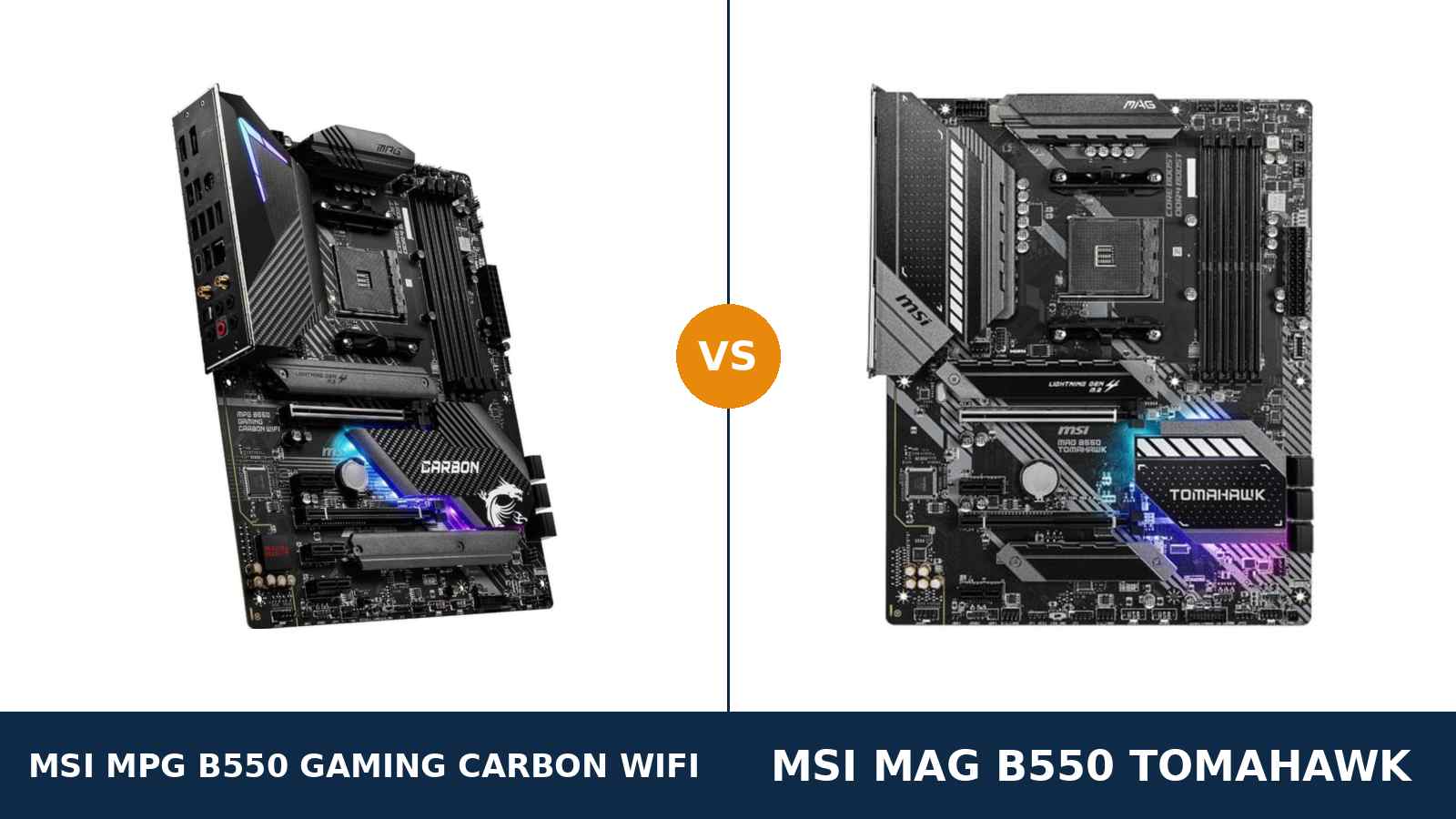
Same brand. Same chipset. Same socket. Two very different ideas about what a gaming board should be.
The MSI MPG B550 Gaming Carbon WiFi is the showpiece: carbon-fibre covers, built-in Wi-Fi 6, a doubled-up power design and an aluminium lid. The MSI MAG B550 Tomahawk is the workhorse: fewer frills, a second LAN port, and a reputation earned the plain way.
Builders cross-shop them constantly, because the spec sheets overlap almost everywhere — dual M.2, USB 3.2 Gen 2, the same audio codec, the same memory ceiling. The real differences hide in the power design, the rear panel and one lane-sharing rule buried in a manual footnote.
This guide settles it properly. Every specification below comes from MSI's own published data. Every claim can be checked. And the verdict at the end is the same one we would give a friend spending their own money.
Key Takeaways
- The Carbon WiFi is the more complete board. Stronger VRM, Wi-Fi 6 built in, more expansion slots and the better APU display outputs.
- The Tomahawk fights back with dual LAN. A 2.5-gigabit port plus a gigabit port, where the Carbon offers one port and wireless.
- Storage and memory are a near tie. Both run a Gen 4 + Gen 3 M.2 pair under heatsinks; only the Carbon makes its second slot share lanes in one crowded configuration.
- Audio is a genuine tie. Both boards use the Realtek ALC1200 codec with optical S/PDIF.
- Neither board runs a Ryzen 3 3200G or Ryzen 5 3400G. MSI excludes those two APUs on both, so plan your processor first.
Quick Verdict
Buy the MSI MPG B550 Gaming Carbon WiFi for most gaming builds. It is the fuller-featured board in almost every direction.
Its 12+2+1 phase power design is fed by 8+4 pin connectors. Intel Wi-Fi 6 is built in. It carries three x1 slots to the Tomahawk's two, and its HDMI 2.1 output makes it the better APU board.
Buy the MSI MAG B550 Tomahawk if your desk is wired and your network matters. It is the rare board with two LAN ports — 2.5-gigabit and gigabit side by side.
Its second M.2 slot also runs at full speed with no conditions attached. If you stream, serve files or simply never want wireless, the Tomahawk's compromises may not be compromises at all.
The Scorecard
Scores below are derived directly from the manufacturer specifications compared in this guide — phase counts, slot counts, port counts and supported standards. They are a reading aid, not benchmark results.
| Category | MPG B550 Gaming Carbon WiFi | MAG B550 Tomahawk | ||
|---|---|---|---|---|
| Power delivery | 9.5 / 10 | 9 / 10 | ||
| Storage | 9 / 10 | 9 / 10 | ||
| Expansion | 9 / 10 | 8 / 10 | ||
| Memory | 9 / 10 | 9 / 10 | ||
| USB & front panel | 8.5 / 10 | 8 / 10 | ||
| Networking & audio | 9 / 10 | 9 / 10 | ||
| Overall | 9.1 / 10 | 8.8 / 10 | ||
The pattern is consistent. The Carbon WiFi wins on hardware you cannot retrofit — power delivery, wireless, slot count. The Tomahawk wins on the one wired trick the Carbon cannot copy: a second network port.
At a Glance: Who Each Board Fits
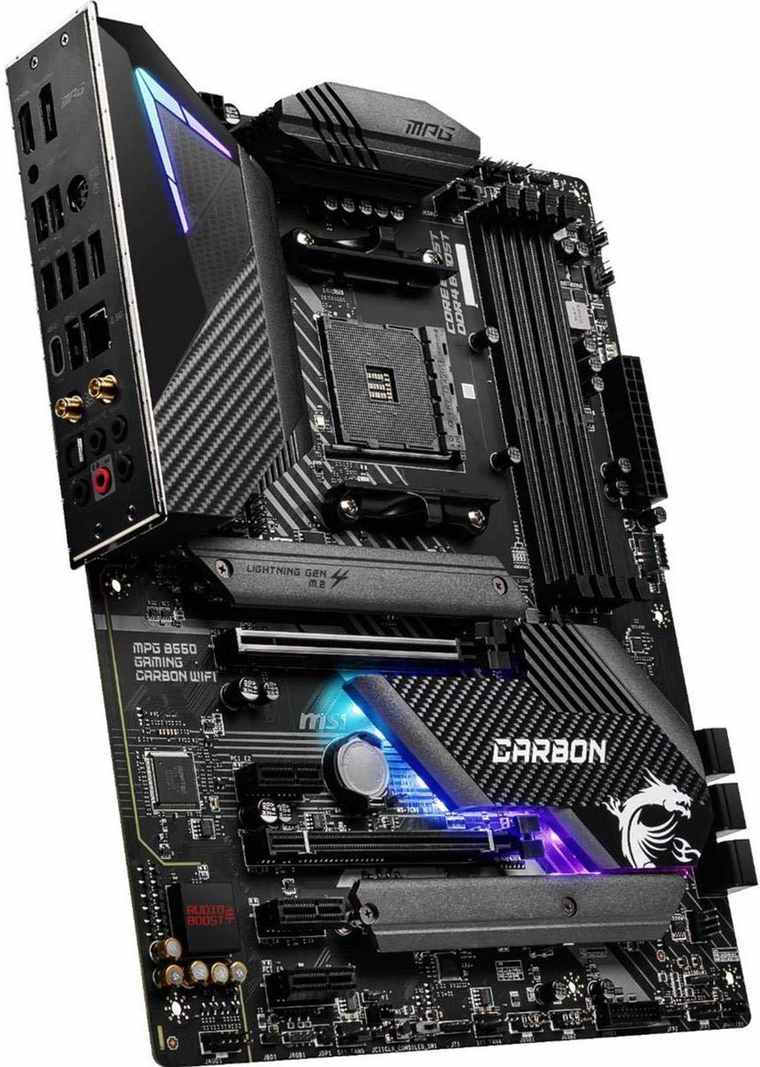
MSI MPG B550 Gaming Carbon WiFi
- 12+2+1 phase digital VRM with doubler design, 8+4 pin CPU power
- Intel Wi-Fi 6 AX200 and Bluetooth built in
- Three PCIe x1 slots plus a second x16 slot (x4)
- HDMI 2.1 + DisplayPort outputs for APU builds
- Carbon-fibre covers, full aluminium VRM cover, Mystic Light
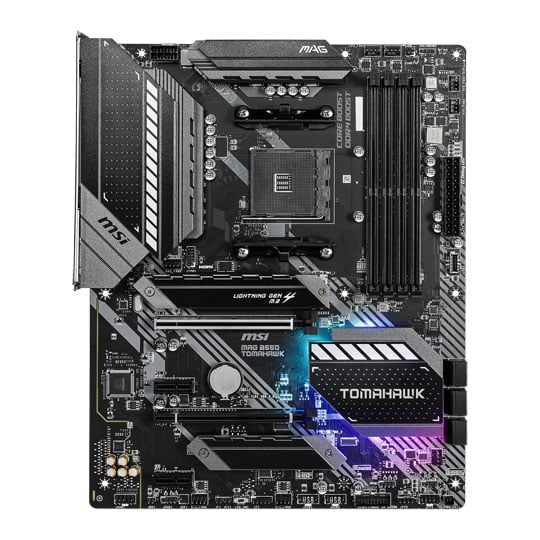
MSI MAG B550 Tomahawk
- 10+2+1 phase Duet Rail VRM with extended heatsink
- Dual LAN: Realtek 2.5GbE plus gigabit Ethernet
- Second M.2 slot at full PCIe 3.0 x4, no conditions
- Front USB-C header and Flash BIOS Button
- No Wi-Fi — wired networking only
Choose the MPG B550 Gaming Carbon WiFi if…
Your PC cannot sit next to the router. Wi-Fi 6 is built in, with Bluetooth for headsets and controllers in the same module.
You are planning a Ryzen 9, now or later. The doubled power design and the extra 4-pin CPU connector are headroom the Tomahawk does not offer.
You want the board to look the part. Carbon-fibre trim, a full aluminium cover and the MPG light strip make it the showpiece of the two.
Choose the MAG B550 Tomahawk if…
Your build is wired, permanently. Two LAN ports let the PC game on one network and talk to a NAS or a second network on the other.
You will fill both M.2 slots and the second PCIe x16 slot at the same time. The Tomahawk is the board that lets everything run at full speed together.
Or it is meaningfully cheaper when you order. The platform underneath — storage, memory, audio, USB Gen 2 — is the same.
As an Amazon Associate I earn from qualifying purchases at no extra cost to you.
Specifications: The Specs That Actually Matter
Every figure below is taken from MSI's published specifications, datasheets and manuals for the two boards.
Where MSI's own documents disagree with each other — and in two places they do — the table follows MSI's current specification page, and the notes under the table say so.
| Specification | MSI MPG B550 Gaming Carbon WiFi | MSI MAG B550 Tomahawk |
|---|---|---|
| Form factor | ATX, 30.5 × 24.4 cm | ATX, 30.5 × 24.4 cm |
| Socket / chipset | AMD AM4 / B550 | AMD AM4 / B550 |
| CPU support | Ryzen 5000, 5000 G, 4000 G, 3000 series (not 3400G / 3200G) | Ryzen 5000, 5000 G, 4000 G, 3000 series (not 3400G / 3200G) |
| VRM design | 12+2+1 phase digital, doubler design, 8+4 pin CPU power | 10+2+1 phase Duet Rail, 8-pin CPU power |
| PCB | 6-layer, 2 oz thickened copper | Standard MSI ATX layout, extended VRM heatsink |
| Memory | 4 × DDR4 DIMM, up to 128 GB, 5100+ MT/s (O.C.), A-XMP | 4 × DDR4 DIMM, up to 128 GB, 5100+ MT/s (O.C.), A-XMP |
| Graphics outputs (APU) | HDMI 2.1 (4K@60), DisplayPort (4K@60) | HDMI 1.4 (4K@30), DisplayPort (4K@60) |
| Expansion slots | PCIe 4.0 x16 + PCIe 3.0 x16 (x4) + 3 × PCIe 3.0 x1 | PCIe 4.0 x16 + PCIe 3.0 x16 (x4) + 2 × PCIe 3.0 x1 |
| M.2 storage | 2 slots: PCIe 4.0 x4 + PCIe 3.0 x4, both with Shield Frozr heatsinks | 2 slots: PCIe 4.0 x4 + PCIe 3.0 x4, both with Shield Frozr heatsinks |
| SATA | 6 × SATA 6 Gb/s, RAID 0/1/10 | 6 × SATA 6 Gb/s, RAID 0/1/10 |
| LAN | Realtek RTL8125B 2.5GbE (single port) | Realtek RTL8125B 2.5GbE + RTL8111H GbE (dual port) |
| Wireless | Intel Wi-Fi 6 AX200 (up to 2.4 Gbps) + Bluetooth | None fitted |
| Audio | Realtek ALC1200, 7.1 HD, optical S/PDIF | Realtek ALC1200, 7.1 HD, optical S/PDIF |
| USB 3.2 (rear) | Gen 2 Type-C + Gen 2 Type-A + 2 × Gen 1 Type-A, plus 4 × USB 2.0 | Gen 2 Type-C + Gen 2 Type-A + 2 × Gen 1 Type-A, plus 2 × USB 2.0 |
| Front panel USB | USB 3.2 Gen 1 Type-C header + Gen 1 Type-A headers | USB 3.2 Gen 1 Type-C header + Gen 1 Type-A headers |
| Fan headers | 8 (CPU + pump + 6 system) | 8 (CPU + pump + 6 system) |
| BIOS flashing | Flash BIOS Button + optimised Clear CMOS | Flash BIOS Button |
Memory note: MSI's current specification pages list both boards at 5100+ MT/s (O.C.). The launch datasheets printed 4866 (O.C.). The table uses MSI's current figure for both boards equally.
Bluetooth note: MSI's current specification page lists Bluetooth 5.2 for the Carbon WiFi; its launch datasheet says 5.1 for the same AX200 module. Either way it is the same Intel Wi-Fi 6 hardware doing the work.
Audio note: MSI's specification summary prints “ALC1200 / ALC1220P” for the Tomahawk. Its datasheet and independent teardowns identify the fitted codec as the ALC1200, which is what this guide uses.
The Differences That Actually Matter
1. Power delivery — the Carbon's doubler against the Tomahawk's Duet Rail
This is the headline hardware gap. The Carbon WiFi runs a 12+2+1 phase digital power design built with doublers, fed by 8+4 pin CPU power connectors.
The Tomahawk runs MSI's 10+2+1 phase Duet Rail design on a single 8-pin connector. It is a strong design — strong enough that it anchors boards well above this price class in reputation.
For a Ryzen 5 5600 or a Ryzen 7 5800X, both are far beyond sufficient. Neither will throttle, complain or be the reason a frame drops.
The gap opens at the top of the stack. A Ryzen 9 5950X under sustained all-core load is exactly the workload the Carbon's extra phases, extra connector and 6-layer, 2 oz copper PCB were built for.
The Carbon also wraps its power stages in a full aluminium cover with 7W/mK choke thermal pads. The Tomahawk's extended heatsink is honest metal and does its job. The Carbon's is simply more of it.
Principle worth keeping: the VRM is the one part of a motherboard you can never upgrade. If a Ryzen 9 is anywhere in your future, this section decides the comparison.
2. Wireless — built in, or not at all
The Carbon WiFi carries an Intel Wi-Fi 6 AX200 module: up to 2.4 Gbps, MU-MIMO, Bluetooth in the same package. The antenna posts sit on the rear panel, next to the audio jacks.
The Tomahawk has no wireless hardware at all. None. If your PC lives in a room without an Ethernet run, the Tomahawk needs a PCIe wireless card or a powerline kit before it connects to anything.
That add-in card is not free, and it spends one of the Tomahawk's only two x1 slots. Buyers comparing prices should compare the Tomahawk plus a Wi-Fi card against the Carbon as it ships.
For a wired desk, this entire section evaporates — and the Tomahawk's answer to networking is waiting in the next section. But for everyone else, this is the difference you will feel on day one.
3. Wired networking — the Tomahawk's second port
Here is the Tomahawk's signature trick, and almost no rival in its class offers it: two Ethernet ports. A Realtek RTL8125B 2.5-gigabit port, and a Realtek RTL8111H gigabit port beside it.
The Carbon WiFi has the same 2.5-gigabit Realtek chip — and nothing else wired. One port, full stop.
Why does a second port matter? A gaming PC that also pulls files from a NAS. A streamer's machine splitting game traffic from local network traffic. A home-lab box bridging two networks. A fallback when one cable run fails.
Most builders will never use it. But the builders who need it cannot retrofit it without spending a slot — the same slot arithmetic that works against the Tomahawk on wireless works for it here.
Call networking an honest split decision: wireless and one fast port on the Carbon, two wired ports and no wireless on the Tomahawk. Your house decides which half matters.
4. Storage — a tie on paper, one footnote apart
Line up the storage rows and they match. Both boards: a CPU-connected Lightning Gen 4 M.2 slot at PCIe 4.0 x4. A second chipset M.2 at PCIe 3.0 x4. Heatsinks — MSI's M.2 Shield Frozr — over both slots on both boards. Six SATA ports, RAID 0/1/10.
Boot drives, game libraries and upgrade room are identical for the overwhelming majority of builds. Do not let anyone sell you either board on storage headlines.
The footnote belongs to the Carbon. Its manual states that if the second M.2 slot, the second x1 slot and the second x16 slot are all populated at once, the x16 slot drops out and the second M.2 falls back to x2 speed.
The Tomahawk has no equivalent condition: its second M.2 runs at full x4 alongside everything else, with no SATA ports sacrificed either.
Realistically, the rule only bites a builder running two M.2 drives and two add-in cards at once. That builder exists — capture card plus storage controller plus dual NVMe — and for them, this footnote outranks the VRM.
5. Expansion — five slots against four
Both boards give the graphics card the same PCIe 4.0 x16 slot with Steel Armor reinforcement. Both add a second x16-length slot wired at x4, and both support 2-way CrossFire on paper.
Below that, the Carbon pulls ahead quietly: three PCIe 3.0 x1 slots against the Tomahawk's two.
One extra x1 slot sounds trivial until the build grows. A sound card. A capture card. A USB expansion card. A wireless card — though on the Carbon, that one is already handled.
The Tomahawk owner who needs wireless and a capture card has spent both x1 slots on day one. The Carbon owner has a spare left over. Expansion is insurance, and the Carbon sells one more policy.
6. Display outputs — the APU builder's quiet decider
None of this matters with a discrete graphics card fitted. Both boards' onboard outputs sit dark. Skip to the next section if that is your build.
For a Ryzen 5 5600G or 5700G build with no graphics card, the outputs are the whole display story — and they differ.
The Carbon pairs HDMI 2.1 with DisplayPort, both good for 4096×2160 at 60 Hz. The Tomahawk pairs DisplayPort with HDMI 1.4, which caps HDMI at 4K@30.
A 4K desktop over the Tomahawk's HDMI port runs at 30 Hz — usable, but visibly sluggish. Run it over DisplayPort, or pick the Carbon, and the problem disappears.
One shared warning applies to both boards equally: neither supports the Ryzen 3 3200G or Ryzen 5 3400G. Those two older APUs are excluded in MSI's own CPU lists for both boards. Check your exact processor against MSI's support list before ordering either.
7. The small stuff — memory, audio, USB and light
Memory is a tie and we will not pretend otherwise. Four DDR4 slots, 128 GB ceiling, the same 5100+ MT/s headline on MSI's current pages, A-XMP profiles on both.
Audio is a tie too. Both boards run the Realtek ALC1200 codec with five rear jacks and optical S/PDIF. Same chip, same Audio Boost tuning philosophy. Through a headset or desktop speakers, there is nothing to separate them.
USB is a tie at the fast end: both offer a rear USB 3.2 Gen 2 Type-C and Type-A pair, two Gen 1 Type-A ports, and a front-panel Gen 1 Type-C header for a modern case.
The Carbon's small edges are at the margins: four rear USB 2.0 ports against two, for the keyboard-mouse-dongle crowd. And the full Mystic Light treatment — the MPG series' lighting strip and carbon covers are a look the Tomahawk's military grey simply is not chasing.
Fan control is level: eight headers each, including a dedicated pump header on both. Neither board will limit a serious cooling setup.
Pattern confirmed: the Carbon is the fuller-featured board almost everywhere. The Tomahawk is the focused one. Its focus just happens to be wired networking.
CPU Pairing Guide
The fastest way to choose between these boards is to start from your processor. This table is the whole comparison in one view.
| Your processor | MPG B550 Gaming Carbon WiFi | MAG B550 Tomahawk | Our call |
|---|---|---|---|
| Ryzen 5 5600 / 5500 | Excellent | Excellent | Buy on networking: Wi-Fi vs dual LAN |
| Ryzen 5 5600G / 5700G (APU) | Excellent — HDMI 2.1 for 4K@60 | Good — use DisplayPort for 4K@60 | Carbon WiFi, especially over HDMI |
| Ryzen 7 5700X / 5800X | Excellent | Excellent | Either — both VRMs are ample |
| Ryzen 7 5800X3D | Excellent | Excellent | Either — gaming load suits both |
| Ryzen 9 5900X / 5950X | Excellent — 12+2+1 phases, 8+4 pin | Good — capable, less headroom | Carbon WiFi for sustained all-core work |
| Ryzen 3 3200G / Ryzen 5 3400G | Not supported | Not supported | Neither — pick a different board |
| Ryzen 3000 series | Excellent | Excellent | Buy on networking and price |
Read the Ryzen 9 row carefully. It is where the Carbon's power design stops being a specification and starts being the reason to buy it. And read the 3200G row before assuming any AM4 board takes any AM4 chip.
Ready to check today’s price?
Both boards sell through Amazon. Prices move, so check the live figure on the board that fits your build.
View on Amazon — MPG B550 Gaming Carbon WiFiView on Amazon — MAG B550 TomahawkThe 30-Second Decision
| If this sounds like you… | Buy this |
|---|---|
| “My PC lives nowhere near the router.” | MPG B550 Gaming Carbon WiFi (Wi-Fi 6 built in) |
| “A Ryzen 9 is in the plan, now or later.” | MPG B550 Gaming Carbon WiFi (12+2+1 VRM, 8+4 pin) |
| “My PC games and serves files to the house.” | MAG B550 Tomahawk (dual LAN) |
| “Two NVMe drives, a capture card and more, all at once.” | MAG B550 Tomahawk (no lane-sharing footnote) |
| “APU build on a 4K monitor over HDMI.” | MPG B550 Gaming Carbon WiFi (HDMI 2.1) |
| “Whichever one is on sale this week.” | Legitimate for a Ryzen 5 / 7 wired build |
What You Gain. What You Give Up.
MSI MPG B550 Gaming Carbon WiFi
You gain: the strongest power design of the two, with doublers and an 8+4 pin feed for Ryzen 9 headroom. Wi-Fi 6 and Bluetooth built in. A third x1 slot. HDMI 2.1 for APU builds. The carbon-and-aluminium flagship look.
You give up: the second LAN port — wired networking is one 2.5-gigabit connection and nothing more. And you accept the manual's lane-sharing footnote if you fill the second M.2 and both lower slots at once.
MSI MAG B550 Tomahawk
You gain: dual LAN — 2.5-gigabit plus gigabit — that the Carbon cannot match. A second M.2 slot that runs at full speed with no conditions. The same storage, memory, audio and Gen 2 USB platform for typically less money.
You give up: wireless entirely, unless you spend an x1 slot and extra money adding it. One x1 slot of expansion. HDMI 2.1 for APU builds. And a little VRM headroom at the very top of the CPU stack.
Pros and Cons
MPG B550 Gaming Carbon WiFi — Pros
- 12+2+1 phase VRM with 8+4 pin power
- Intel Wi-Fi 6 AX200 + Bluetooth built in
- Three PCIe x1 slots, five slots total
- HDMI 2.1 — the better APU board
- 6-layer PCB, full aluminium VRM cover
Cons
- Single LAN port only
- Lane-sharing footnote in one crowded layout
- Usually the pricier of the two
- Carbon styling will not suit every build
MAG B550 Tomahawk — Pros
- Dual LAN: 2.5GbE + GbE on one board
- Second M.2 at full x4, no trade-offs
- 10+2+1 VRM with a proven reputation
- Front USB-C header and Flash BIOS Button
- Typically the cheaper way into this platform
Cons
- No Wi-Fi or Bluetooth fitted
- Only two PCIe x1 slots
- HDMI 1.4 limits APU builds over HDMI
- Single 8-pin CPU power connector
Check the Name, the Bundle and the BIOS, Not Just the Board
Check the name — twice. MSI sells an MPG B550 Gaming Plus, an MPG B550 Gaming Edge WiFi and this MPG B550 Gaming Carbon WiFi. They are three different boards at three different levels.
It also sells a MAG B550 Tomahawk MAX WiFi. That board adds wireless to a Tomahawk badge but steps the audio codec down — it is not this comparison's Tomahawk, and it is not a Carbon either.
Check the bundle. The Carbon WiFi should arrive with its Wi-Fi antennas in the box. No antennas, no wireless — chase the seller before you build, not after.
The Tomahawk's box is the plainer affair: board, I/O shield, SATA cables, documentation. Neither board needs anything exotic from the power supply — one 8-pin EPS covers the Tomahawk, and the Carbon's extra 4-pin is headroom, not a requirement.
Check the CPU pairing. Both boards exclude the Ryzen 3 3200G and Ryzen 5 3400G in MSI's own support lists. Both flash with a rear button, so an older BIOS is a ten-minute fix rather than a blocker for Ryzen 5000.
Buy the Carbon if wireless, a Ryzen 9 or the flagship look is in the plan. Buy the Tomahawk for a wired desk, and put the saving toward the graphics card, where it will actually be felt.
The Upgrade Path Test
Judge a board by its second year, not its first day.
Year one, both boards run a Ryzen 5 or 7 and a mid-range graphics card identically. Storage speed, memory support, audio and USB are the same platform wearing two different coats.
Year two, the paths fork. The discounted Ryzen 9 arrives: the Carbon's power design shrugs, the Tomahawk copes at stock and works harder doing it.
The house changes too. Move the PC to a room without Ethernet and the Carbon connects before you have finished unpacking. The Tomahawk waits for a wireless card — and gives up a slot to hold it.
Run the other experiment: fill every slot and both M.2 bays at once, and the Tomahawk is the one still running everything at full speed, second LAN port humming.
That is the honest summary of this comparison. The Carbon upgrades better in the directions most gaming PCs grow. The Tomahawk wins the one growth path that runs through a wired network.
When to Skip Both
Honesty cuts both ways. There are builders neither of these boards serves well.
Skip both if your processor is a Ryzen 3 3200G or Ryzen 5 3400G — MSI excludes them on both boards, full stop. Skip both if your case is micro-ATX; these are full-size ATX boards.
Skip both if you need more than two M.2 slots without adapter cards, or front-panel USB at Gen 2 speeds — both boards' front Type-C headers run at Gen 1.
Skip both if you are shopping the used market for the cheapest possible AM4 entry. Boards a tier down run a Ryzen 5 just as fast, and the savings are real.
For everyone else — which is most B550 builders — one of these two is the right answer. The only question is whether your network arrives through the air or through a second cable.
Final Verdict
The MSI MPG B550 Gaming Carbon WiFi is the board we would build on.
It wins this comparison on the hardware that cannot be added later. The 12+2+1 phase power design outmuscles the Tomahawk's. Wi-Fi 6 is soldered in rather than slotted in. The third x1 slot, the HDMI 2.1 output and the 6-layer board all lean the same way.
Buy the Carbon WiFi for gaming builds that need wireless, for Ryzen 9 processors, and for any PC you intend to upgrade rather than replace.
View on Amazon — MPG B550 Gaming Carbon WiFi
Buy the MAG B550 Tomahawk if your desk is wired and staying wired. If two LAN ports solve a real problem in your network. Or if it is meaningfully cheaper when you order, and your build is a Ryzen 5 or 7.
It remains one of the most sensible B550 boards ever sold. Just buy it knowing its savings come from wireless and expansion — and that its dual LAN is a feature the Carbon's owner cannot copy at any price.
View on Amazon — MAG B550 Tomahawk
Watch Out: Similar Names, Different Boards
MSI's B550 range is a naming maze. Three warnings belong in every version of this guide.
First: the MPG B550 Gaming Carbon WiFi is not the MPG B550 Gaming Edge WiFi, and neither is the MPG B550 Gaming Plus. The Carbon sits at the top of that trio; the listings blur together in search results, so match the full name on the box.
Second: the MAG B550 Tomahawk MAX WiFi is a different board from the MAG B550 Tomahawk in this comparison — it adds Wi-Fi and changes the audio codec. And the older B450 Tomahawk family shares nothing but the name and the badge.
Third: “Carbon” is a trim, not a chipset. MSI sells Carbon boards on newer platforms too. An MPG Carbon listing without “B550” in the title is a different socket's board entirely.
Slow down on the product page. Match the full model name, then the wireless spec, then the price — in that order.
Case, Power and Cabling Notes
Both boards are full ATX, 30.5 × 24.4 cm. They need an ATX case; neither will fit a micro-ATX-only enclosure.
Both take a standard 24-pin main power connector. The Tomahawk adds a single 8-pin EPS CPU connector. The Carbon adds an 8+4 pin pair — any reputable modern power supply covers either without adapters.
Front-panel connections are equally painless on both. A USB 3.2 Gen 1 Type-C header serves a modern case's front port, with Gen 1 Type-A and USB 2.0 headers for the rest.
One Carbon detail worth planning around: its antennas screw onto the rear panel, so leave clearance behind the case rather than pushing it flush to a wall.
And one shared limitation: neither board's front Type-C header runs at Gen 2 speed. A case advertising 10 Gbps front USB-C will run that port at Gen 1 rates on either board.
BIOS and Long-Term Support
AM4 is a mature platform. That is a genuine advantage for both of these boards.
The BIOS is stable. The drivers are stable. The surprises have already happened to somebody else, years ago, and been fixed.
Both boards sit on MSI's standard support pages: BIOS updates, chipset, LAN and wireless drivers, and a full CPU support list per model.
Expect future BIOS releases to be about security patches and edge-case compatibility, not new features. On a mature platform, that is exactly what you want.
One habit worth keeping: before any CPU upgrade, check the support list for your board and update the BIOS first. The Flash BIOS Button makes that a ten-minute job on either board, even with the new processor still in its box.
Frequently Asked Questions
Is the MPG B550 Gaming Carbon WiFi better than the MAG B550 Tomahawk?
For most builders, yes. It has a stronger VRM (12+2+1 phases with an 8+4 pin feed against 10+2+1 on a single 8-pin), built-in Wi-Fi 6, three x1 slots instead of two, and HDMI 2.1 for APU builds. The Tomahawk fights back with dual LAN ports and a second M.2 slot that never shares lanes.
Does the MAG B550 Tomahawk have Wi-Fi?
No. The Tomahawk is wired-only, with two Ethernet ports instead: a Realtek 2.5-gigabit port and a gigabit port. Wireless means adding a PCIe card, which spends one of its two x1 slots. MSI sells a separate Tomahawk MAX WiFi variant, but that is a different board with a different audio codec.
Which board is better for a Ryzen 9 5950X?
The Carbon WiFi. Its 12+2+1 phase digital power design with doublers, 8+4 pin CPU power connectors and 6-layer PCB with 2 oz copper is built for sustained all-core loads. The Tomahawk will run a 5950X, but with less power and thermal headroom in reserve.
Can I run two M.2 SSDs on either board?
Yes. Both boards have two M.2 slots — a PCIe 4.0 x4 slot connected to the CPU and a PCIe 3.0 x4 slot from the chipset — both under heatsinks, plus six SATA ports. One caution on the Carbon: fill its second M.2, second x1 and second x16 slots all at once and the x16 slot drops out while the second M.2 falls to x2 speed. The Tomahawk has no equivalent condition.
Which board should I choose for an APU build without a graphics card?
The Carbon WiFi. Its HDMI 2.1 output runs a 4K monitor at 60 Hz, as does its DisplayPort. The Tomahawk's HDMI port is version 1.4 and caps at 4K@30, though its DisplayPort also reaches 4K@60. Remember that neither board supports the Ryzen 3 3200G or Ryzen 5 3400G.
Why would anyone need two LAN ports?
For a PC that does two network jobs at once: gaming on one connection while pulling files from a NAS on the other, separating streaming traffic, bridging networks in a home lab, or keeping a wired fallback. Most builders never use the Tomahawk's second port — but it cannot be added to the Carbon without spending an expansion slot.
Do both boards support Ryzen 5000 processors?
Yes. Both are AM4 B550 boards supporting Ryzen 5000, 5000 G-Series, 4000 G-Series and 3000 series processors. Both offer a Flash BIOS Button, so the BIOS can be updated for a newer CPU without an older processor installed. Always confirm your exact CPU on MSI's support list — the 3200G and 3400G are excluded on both boards.
Is the Carbon WiFi worth it for gaming?
Yes, if you will use what it adds. With the same graphics card fitted, frame rates are decided by the GPU and CPU, not the board — both give the card a full PCIe 4.0 x16 slot. The Carbon earns its premium in Wi-Fi 6, power headroom for future CPUs and expansion room, not in today's frame rates.
Sources & Verification
MSI MPG B550 GAMING CARBON WIFI official specifications and product page, msi.com • MSI MPG B550 GAMING CARBON WIFI datasheet and user manual (E7C90) • MSI MAG B550 TOMAHAWK official specifications, datasheet and user manual • MSI retail product data for MPG B550 Gaming Carbon WiFi (12+2+1 phase, ASIN-verified listing) and MAG B550 Tomahawk (10+2+1 phase, ASIN-verified listing). Specifications verified November 2026.

James Wilson
James has been building and benchmarking PCs for over a decade and writes Honestly Compared's motherboard and component guides. His rule for every comparison: the verdict has to survive the spec sheet, not the marketing page.