
MSI MPG B550 Gaming Plus vs ASUS ROG Strix B550-F Gaming: Which Should You Buy?
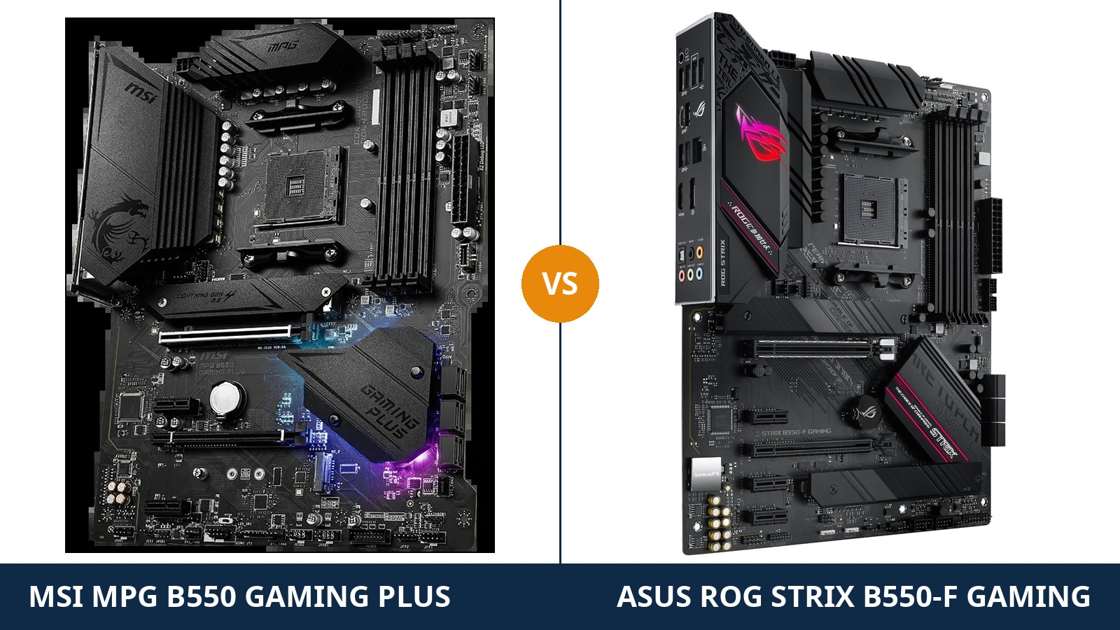
Two ATX boards. Same chipset. Same socket. Same four memory slots, same dual M.2 storage, same six SATA ports.
Read the headline specifications and these two boards look interchangeable. They are not — and the gap is not where most buyers look for it.
The real differences hide in the supporting cast: power stages, network chip, audio codec, and one front-panel header that one board has and the other does not. None of it can be upgraded later without replacing the board.
Every specification below comes from MSI's and ASUS's own published data, and every claim can be checked. The verdict at the end is the same one we would give a friend spending their own money.
Key Takeaways
- The Strix B550-F is the more complete board. Stronger power stages, 2.5-gigabit Ethernet and the best audio in this class.
- The Gaming Plus is the value pick — the same platform essentials for less money, plus a front-panel USB-C header the Strix lacks entirely.
- Storage and memory are a dead tie. Do not let either board be sold to you on those.
- Neither board has Wi-Fi. The Strix name covers separate Wi-Fi variants — check the exact model before you buy.
- Networking is the widest gap. Intel 2.5 Gb Ethernet against a basic gigabit chip is not a rounding error.
Quick Verdict
Buy the ASUS ROG Strix B550-F Gaming for most builds. It is the better-equipped board, and the advantages sit in hardware you keep for the life of the PC.
Its 12+2 power stages feed high-core-count Ryzen chips with more headroom. Its Intel 2.5 Gb Ethernet is a generation ahead of the MSI's gigabit chip. Its SupremeFX audio is the strongest onboard sound either brand fits at this level.
Buy the MSI MPG B550 Gaming Plus if the budget is doing the talking. It keeps everything a sensible build actually uses: four DIMM slots, dual M.2, a full-speed PCIe 4.0 graphics slot, a proper 8+4-pin power input.
And it lands one punch of its own: a front-panel USB-C header. If your case has a front Type-C port, the Strix leaves it dead. The Gaming Plus connects it.
The Scorecard
Scores below are derived directly from the manufacturer specifications compared in this guide — phase counts, slot counts, port counts and supported standards. They are a reading aid, not benchmark results.
| Category | MPG B550 Gaming Plus | ROG Strix B550-F | ||
|---|---|---|---|---|
| Power delivery | 8 / 10 | 9 / 10 | ||
| Expansion | 7 / 10 | 8 / 10 | ||
| Storage | 8 / 10 | 8 / 10 | ||
| Memory | 9 / 10 | 9 / 10 | ||
| Networking | 6 / 10 | 8 / 10 | ||
| Audio | 7 / 10 | 9 / 10 | ||
| USB connectivity | 8 / 10 | 8 / 10 | ||
| Overall | 7.6 / 10 | 8.4 / 10 | ||
At a Glance: Who Each Board Fits
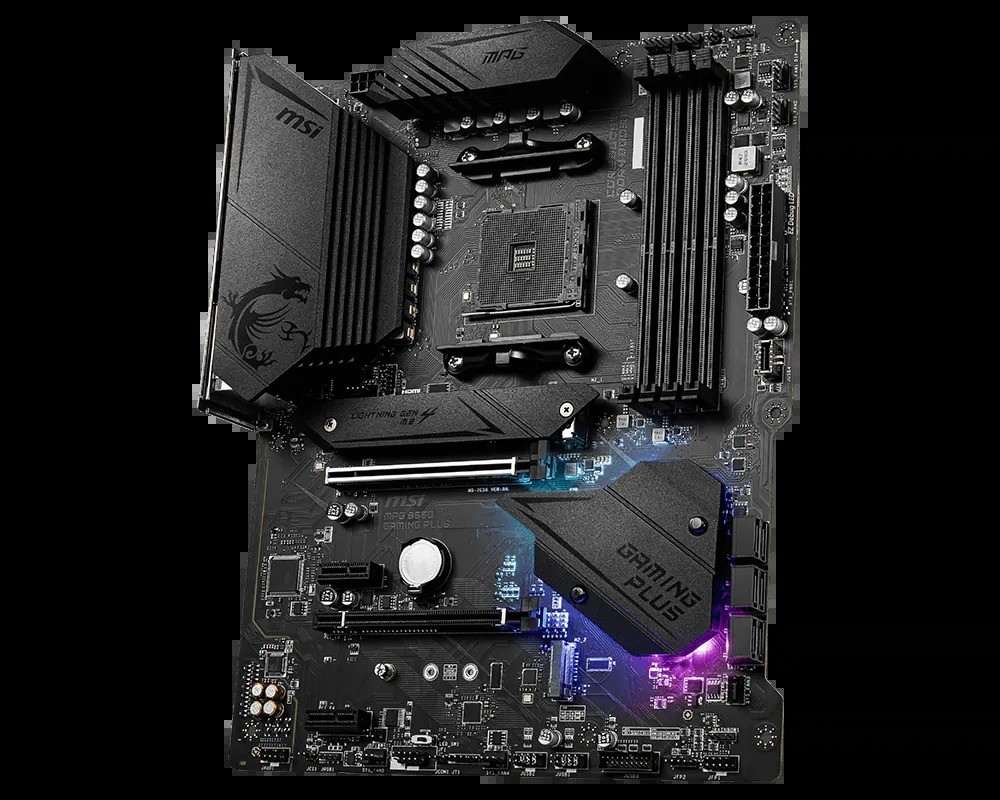
MSI MPG B550 Gaming Plus
- 10+2+1 Duet Rail VRM, 8+4-pin CPU power input
- Front-panel USB 3.2 Gen 1 Type-C header
- Dual M.2 with Shield Frozr heatsink on the primary slot
- Realtek gigabit LAN and ALC892 audio
- Usually the cheaper of the two boards
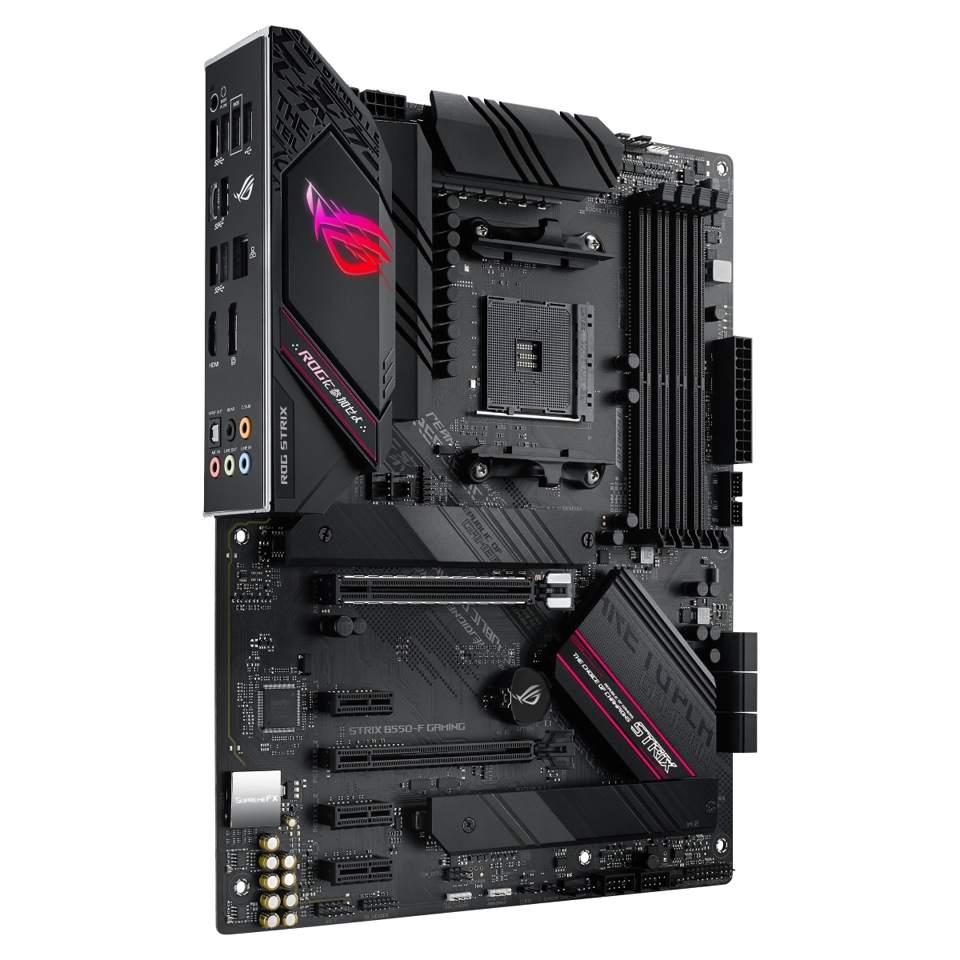
ASUS ROG Strix B550-F Gaming
- 12+2 power stages with ProCool 8+4-pin connectors
- Intel I225-V 2.5 Gb Ethernet with LANGuard
- ROG SupremeFX S1220A audio, 120 dB SNR playback
- Eight rear USB ports and Q-LED debug lights
- No Wi-Fi and no front USB-C header on this model
Choose the MSI MPG B550 Gaming Plus if…
Your budget has a hard ceiling. The saving over the Strix buys memory, storage or a better graphics card — things you will actually feel.
Your case has a front USB-C port. This is the only one of the two boards that can connect it.
Your network is gigabit and staying that way. Ryzen 5 or 7, one graphics card: the Gaming Plus covers that build completely.
Choose the ASUS ROG Strix B550-F Gaming if…
You want the strongest foundation in the class. A Ryzen 9 today, or as a later upgrade, sits more comfortably on its power stages.
Your router, switch or NAS already runs 2.5-gigabit Ethernet — or soon will. The Intel chip is ready for it on day one.
You drive good headphones straight from the board. SupremeFX is the one onboard audio setup here that rewards them.
As an Amazon Associate I earn from qualifying purchases at no extra cost to you.
Specifications: The Specs That Actually Matter
Every figure below is taken from MSI's and ASUS's published specifications and product data.
This table covers the exact models named in the title — the wired Strix B550-F Gaming, not its Wi-Fi siblings. The notes under the table cover the traps.
| Specification | MSI MPG B550 Gaming Plus | ASUS ROG Strix B550-F Gaming |
|---|---|---|
| Form factor | ATX, 30.5 × 24.4 cm | ATX, 30.5 × 24.4 cm |
| Socket / chipset | AMD AM4 / B550 | AMD AM4 / B550 |
| CPU support | Ryzen 5000, 5000 G, 4000 G, 3000 series | Ryzen 5000, 5000 G, 4000 G, 3000 series |
| VRM design | 10+2+1 Duet Rail, digital PWM, 8+4-pin CPU power | 12+2 power stages, ProCool 8+4-pin CPU power |
| Memory | 4 × DDR4 DIMM, up to 128 GB, 4400+ MT/s (O.C.), A-XMP | 4 × DDR4 DIMM, up to 128 GB, OptiMem II |
| Graphics outputs (APU) | HDMI, DisplayPort | HDMI 2.1 (4K@60), DisplayPort 1.2 |
| Expansion slots | PCIe 4.0 x16 + PCIe 3.0 x16 (x4) + 2 × PCIe 3.0 x1 | PCIe 4.0 x16 SafeSlot + PCIe 3.0 x16 (x4) + 3 × PCIe 3.0 x1 |
| M.2 storage | 2 slots: PCIe 4.0 x4 (CPU) + PCIe 3.0 x4 (chipset), Shield Frozr on primary slot | 2 slots: PCIe 4.0 x4 + PCIe 3.0 x4, both accept 22110 drives; heatsink on primary slot |
| SATA | 6 × SATA 6 Gb/s, RAID 0/1/10 | 6 × SATA 6 Gb/s, RAID 0/1/10 (ports 5/6 disabled if M.2_2 populated) |
| LAN | Realtek RTL8111H, 1 Gb/s | Intel I225-V, 2.5 Gb/s, LANGuard |
| Audio | Realtek ALC892, 7.1 HD, optical S/PDIF out | ROG SupremeFX S1220A, 7.1 HD, 120 dB SNR playback, optical S/PDIF out |
| USB (rear) | 8 ports: 2 × USB 3.2 Gen 2 (Type-A + Type-C), 2 × Gen 1, 4 × USB 2.0 | 8 ports: 2 × USB 3.2 Gen 2 (Type-A + Type-C), 4 × Gen 1, 2 × USB 2.0 |
| Front USB-C header | Yes — USB 3.2 Gen 1 Type-C | None |
| BIOS flashing | Flash BIOS Button (no CPU/RAM/GPU needed) | BIOS FlashBack button (no CPU/RAM/GPU needed) |
| Wi-Fi | None | None (separate Wi-Fi variants exist) |
Variant note: “ROG Strix B550-F Gaming” names three different products; the base board in this comparison is wired-only. The B550-F Gaming (Wi-Fi) and the later WiFi II add wireless modules and their own listings. Antenna posts in the product photos mean a Wi-Fi variant — not the board priced and specced here.
Memory note: ASUS publishes the Strix's ceiling per processor generation — 4400 MT/s (O.C.) with 3rd Gen Ryzen, higher for later chips — so we print no single figure and score memory as the practical tie it is.
The Differences That Actually Matter
1. Power delivery — the Strix brings more, and better, stages
Both boards feed the processor through a full 8+4-pin CPU power input. That is where the similarity ends.
The Strix runs a 12+2 arrangement of integrated power stages, under alloy chokes and substantial heatsinks, behind ASUS's metal-shelled ProCool connectors — hardware built to feed hungry processors all day.
The Gaming Plus runs MSI's 10+2+1 Duet Rail design with a digital PWM controller. The phase count looks close on paper; the components behind the numbers are a class apart — discrete MOSFETs against integrated stages.
In a real build? For a Ryzen 5 5600 or Ryzen 7 5800X at stock settings, honestly, nothing you can feel. Both boards run those chips flat out, indefinitely.
Step up to a Ryzen 9 5900X or 5950X under sustained all-core load — rendering, compiling, simulation — and the Strix runs its stages at a smaller fraction of their capacity. Cooler stages, more headroom.
Remember the rule: you can upgrade everything around a motherboard except its power delivery. If a Ryzen 9 is in your future, that argues for the Strix. If it is not, the Gaming Plus's VRM is not a weakness — it is a saving.
2. Networking — a generation apart, and neither has Wi-Fi
This is the widest honest gap in the comparison.
The Strix carries Intel's I225-V controller: 2.5-gigabit Ethernet, with ASUS LANGuard surge protection. Plug it into a router or switch and file transfers, NAS backups and game downloads move at two and a half times the speed of gigabit.
The Gaming Plus carries Realtek's RTL8111H: plain gigabit Ethernet. It is a proven, stable chip, exactly as fast as the network most homes still run. But it will never be faster than that.
Be clear about the counterfactual. If every device on your network is gigabit, both boards perform identically today. The Strix's advantage is a future you may or may not buy into — a 2.5G switch, a faster NAS, a better router.
One shared limitation matters more to some buyers: neither board has Wi-Fi — no wireless module on either PCB.
Need wireless on the ASUS side? The separate Strix B550-F Gaming (Wi-Fi) and WiFi II models exist — different products, different listings. On the MSI side, you would step to a different model, or add a PCIe Wi-Fi card.
3. Audio — SupremeFX is a real advantage, not a sticker
Motherboard audio is usually marketing fog. Here it is a measurable difference.
The Strix's ROG SupremeFX setup is built on the S1220A codec. ASUS rates it at 120 dB signal-to-noise on playback and 113 dB on recording.
Around the codec sits the supporting cast that actually delivers those numbers: dual operational amplifiers, premium audio capacitors, shielding over the audio section, and impedance sensing that matches the output to your headphones.
The Gaming Plus uses Realtek's ALC892 — an honest, widely used codec with 7.1 output and optical S/PDIF, which the Strix also provides. Through typical headsets and desktop speakers, it sounds perfectly fine.
But put a good pair of wired headphones on both boards and the difference is audible: cleaner background, stronger drive, less hiss at high volume. If you record voice — streaming, calls, content — the Strix's cleaner input matters just as much.
Own a DAC or a USB headset? Those bypass onboard audio entirely, and this round stops mattering. For everyone running analogue headphones from the rear panel, it goes to ASUS, decisively.
4. Storage — identical speeds, different fine print
Storage is where the spec sheets converge almost completely.
Both boards: a CPU-connected PCIe 4.0 x4 M.2 slot for a fast boot drive. A second chipset M.2 at PCIe 3.0 x4. Six SATA ports with RAID 0, 1 and 10.
Both put a heatsink over the primary M.2 slot — MSI calls its cover M.2 Shield Frozr. A Gen 4 drive runs at the same speed, at the same temperature, in either board.
The differences are in the margins: both Strix slots accept longer 22110 drives as well as the standard 2280, while the Gaming Plus is a 2280 board in practice — which covers the drives almost everyone buys.
And the Strix has a documented trade: populate its second M.2 slot and SATA ports 5 and 6 switch off. Most builders never notice. If you planned on two M.2 drives plus a wall of SATA storage, read ASUS's manual before ordering.
Verdict: a tie. Anyone who sells you either board on storage speed is selling a fiction.
5. USB — a split decision: rear panel to ASUS, front panel to MSI
Count the rear ports and this looks like another tie. Eight on each board. Two USB 3.2 Gen 2 ports on each — one Type-A, one Type-C.
Look closer and the mixes differ. The Strix backs its Gen 2 pair with four Gen 1 ports and just two USB 2.0. The Gaming Plus offers two Gen 1 ports and four USB 2.0.
For fast external storage on the rear panel, the Strix's mix is the more useful one.
Then the front panel flips the result. The Gaming Plus provides a USB 3.2 Gen 1 Type-C header for your case's front port. The Strix provides none — ASUS left it off this model entirely.
If your case has a front USB-C port, on the Strix it is a decorative hole. On the Gaming Plus it works.
Score it by your desk: rear-panel speed takes the Strix, a modern case takes the Gaming Plus. We score the category level and let your case decide.
6. Expansion — one extra slot, honestly weighed
Your graphics card gets a full PCIe 4.0 x16 slot on both boards. On the Strix it is a SafeSlot — a metal frame moulded into the slot, built to survive heavy cards and transport.
Below it, both boards offer a PCIe 3.0 x16 slot wired at x4 — the home for a capture card, a storage controller or a network card.
The Strix adds three PCIe 3.0 x1 slots; the Gaming Plus adds two. One extra small slot is a modest edge, and we will not inflate it.
Two honest footnotes. First, ASUS states the Strix's x4 slot shares bandwidth with its three x1 slots — populate everything and they negotiate. Second, with a G-series APU fitted, the main graphics slot on any B550 board runs at PCIe 3.0 speeds. That applies to both, equally.
Planning a streaming rig with a capture card and a sound card? The Strix's extra slot is worth having. Graphics card and nothing else? This section changes nothing.
7. Display outputs, debug help and the small stuff
APU builders first: both boards drive a monitor without a graphics card. The Strix pairs HDMI 2.1 — rated for 4K at 60 Hz — with DisplayPort 1.2.
MSI lists HDMI and DisplayPort without version headlines. For a 4K office display on integrated graphics, the Strix's rated HDMI 2.1 is the cleaner specification.
Troubleshooting separates them too. The Strix carries ASUS's Q-LED debug lights — four LEDs that tell you whether a failed boot stopped at the CPU, memory, graphics card or boot device — and a pre-mounted I/O shield.
The Gaming Plus has no debug equivalent, but matches the Strix where it counts most: a BIOS flash button on the rear panel, so either board's BIOS can be updated with no processor, memory or graphics card installed.
Lighting and software are a wash: MSI's Mystic Light against ASUS's Aura Sync, each with addressable and standard RGB headers. Buy on the hardware, not the light show.
CPU Pairing Guide
The fastest way to choose between these boards is to start from your processor. This table is the whole comparison in one view.
| Your processor | MPG B550 Gaming Plus | ROG Strix B550-F | Our call |
|---|---|---|---|
| Ryzen 5 5600 / 5500 | Excellent | Excellent | Buy the Gaming Plus and bank the saving |
| Ryzen 5 5600G / 5700G (APU) | Excellent — HDMI + DisplayPort | Excellent — HDMI 2.1 rated 4K@60 | Either; Strix for a 4K desktop |
| Ryzen 7 5700X / 5800X | Excellent | Excellent — more VRM headroom | Gaming Plus on value, Strix on headroom |
| Ryzen 9 5900X / 5950X | Workable at stock settings | Excellent — the right tool | ROG Strix B550-F |
| Ryzen 3000 series | Excellent | Excellent | Buy whichever is cheaper |
Read the Ryzen 9 row carefully. The Gaming Plus will run a 5950X — MSI supports it — but “supported” and “the board we would choose for it” are different sentences. For sustained 16-core work, the Strix's power stages are the honest recommendation.
Ready to check today’s price?
Both boards sell through Amazon. Prices move, so check the live figure on the board that fits your build.
View on Amazon — MPG B550 Gaming PlusView on Amazon — ROG Strix B550-FThe 30-Second Decision
| If this sounds like you… | Buy this |
|---|---|
| “I want the strongest all-round B550 board and will pay for it.” | ASUS ROG Strix B550-F Gaming |
| “My network is going 2.5-gigabit, or already has.” | ASUS ROG Strix B550-F Gaming (Intel 2.5G) |
| “I use good wired headphones straight from the PC.” | ASUS ROG Strix B550-F Gaming (SupremeFX) |
| “My case has a front USB-C port I actually want to use.” | MSI MPG B550 Gaming Plus |
| “Ryzen 5 or 7, gigabit network, budget matters.” | MSI MPG B550 Gaming Plus |
| “A Ryzen 9 upgrade is in my future.” | ASUS ROG Strix B550-F Gaming |
| “Whichever one is on sale this week.” | Legitimate for simple builds — the gap is features, not frame rates |
What You Gain. What You Give Up.
MSI MPG B550 Gaming Plus
You gain: the lower price for the same platform essentials — four DIMM slots, dual M.2, PCIe 4.0 x16, an 8+4-pin power input. A front-panel USB-C header the Strix cannot match at any price. And a VRM that is honestly sufficient for every Ryzen up to the 8-core chips.
You give up: 2.5-gigabit Ethernet, now and permanently. A tier of audio quality. VRM headroom for carefree Ryzen 9 upgrades, and one x1 expansion slot.
ASUS ROG Strix B550-F Gaming
You gain: the strongest supporting cast in the class — 12+2 power stages, Intel 2.5G Ethernet, SupremeFX audio with a rated 120 dB output. Debug LEDs, a pre-mounted I/O shield, an extra x1 slot, and 22110 support in both M.2 slots.
You give up: the front-panel USB-C header — a genuinely strange omission at this level. Two SATA ports whenever the second M.2 slot is populated. And a slice of budget that could have gone to components you touch every day.
Pros and Cons
MPG B550 Gaming Plus — Pros
- Lowest price into the same platform essentials
- Front-panel USB-C header — the Strix has none
- 10+2+1 VRM with full 8+4-pin power input
- Dual M.2 with a heatsink on the primary slot
- Flash BIOS Button, no CPU needed
Cons
- Gigabit LAN only — no upgrade path
- ALC892 audio is a tier below SupremeFX
- Four of its eight rear USB ports are USB 2.0
- Ryzen 9 is workable, not recommended
- No Wi-Fi
ROG Strix B550-F — Pros
- 12+2 power stages — Ryzen 9 ready
- Intel I225-V 2.5 Gb Ethernet
- SupremeFX S1220A audio, 120 dB SNR
- Q-LED debug lights and pre-mounted I/O shield
- Three x1 slots; 22110 drives in both M.2 slots
Cons
- No front-panel USB-C header
- Second M.2 slot disables SATA ports 5/6
- Higher price for the same chipset platform
- No Wi-Fi on this variant
- x4 slot shares bandwidth with the x1 slots
Check the Exact Model Name, Not Just the Family
On the ASUS side, the name is a minefield. “ROG Strix B550-F Gaming” is the wired board in this comparison.
The B550-F Gaming (Wi-Fi) is a second product; the WiFi II is a third, with a different wireless module again. None of the three shares a listing.
Check the rear panel in the product photos. Antenna posts mean a Wi-Fi variant — a fine board, but not this one, and not at this board's price or ASIN.
On the MSI side, watch the letters. The MPG B550 Gaming Plus is a full-ATX board. The MAG B550M Mortar and the B550M Pro-VDH WiFi are micro-ATX boards from different MSI lines, with different VRMs and different feature sets.
An “M” in the name changes the board — match the full model string on the box to the one in this guide.
Check the processor pairing. Both boards flash their BIOS with nothing but a power supply and a USB stick — Flash BIOS Button on the MSI, BIOS FlashBack on the ASUS. A board that ships with an older BIOS is a ten-minute fix, not a dead end.
Check the bundle. ASUS publishes the Strix's box contents: four SATA cables, an addressable RGB extension cable, M.2 screw and rubber packs. Neither board includes Wi-Fi antennas, because neither has Wi-Fi — antennas in the box mean a different model than the one you ordered.
The Upgrade Path Test
Judge these boards by their second year, not their first day.
Year one, both run a Ryzen 5 or 7 and a mid-range graphics card identically. Nobody could tell them apart in a blind gaming test — the graphics card decides frame rates, not the board.
Year two, the paths diverge. The discounted Ryzen 9 arrives, and the Strix takes it without a second thought while the Gaming Plus takes it with a caveat.
The home network gets a 2.5-gigabit switch, and the Strix is already wired for it. The Gaming Plus needs a network card — into one of its two x1 slots.
The divergence runs both ways: buy a modern case in year two and its front USB-C port works on the Gaming Plus and stays dark on the Strix. No card fixes a missing header cleanly.
That is the honest summary: the Strix was built to absorb upgrades to the PC's core. The Gaming Plus was built to be enough, cheaply, with one eye on the modern case. Choose the future you are actually likely to buy.
When to Skip Both
Honesty cuts both ways. Some builders are served by neither board.
Skip both if Wi-Fi must be built in. ASUS sells the Strix B550-F in Wi-Fi variants for exactly that, and MSI's B550 range has wireless models of its own.
Skip both if you need more than two M.2 slots, or a second full-speed Gen 4 slot for storage. That is X570 territory.
Skip both if this is a brand-new platform purchase with no AM4 parts on hand. Ryzen's newer AM5 socket is where new money gets the longest runway.
And skip both if you are building in a micro-ATX case. These are full-size ATX boards; neither will fit, and both brands sell smaller B550 boards that will.
For everyone else, one of these two is the right answer — the only question is whether your money buys peak supporting hardware, or the same platform for less.
Final Verdict
The ASUS ROG Strix B550-F Gaming is the board we would build on.
It wins this comparison on the hardware that surrounds the processor — the parts of a motherboard that decide how it ages. Its 12+2 power stages take every AM4 processor worth owning, including the 16-core flagships.
Its Intel 2.5-gigabit Ethernet is ready for the network you will own in three years, not just the one you own today. Its SupremeFX audio is the best onboard sound in this class, with the ratings to prove it.
Buy the Strix for Ryzen 9 processors, fast wired networks, serious headphones, and any build you intend to upgrade rather than replace.
View on Amazon — ROG Strix B550-F
Buy the MSI MPG B550 Gaming Plus if the budget is real and the build is sensible. A Ryzen 5 or 7, a gigabit network, a single graphics card — it runs that PC exactly as fast as the Strix does, and it connects the front USB-C port the Strix leaves dead.
It is the honest value pick of this pairing. Just buy it knowing the savings come from the supporting hardware, not from today's performance.
View on Amazon — MPG B550 Gaming Plus
Watch Out: Similar Names, Different Boards
AM4 board names are a trap for the hurried buyer. Three warnings belong in every version of this guide.
First: the ROG Strix B550-F Gaming, the B550-F Gaming (Wi-Fi) and the B550-F Gaming WiFi II are three different products. Only the first is this comparison's board. The others add Wi-Fi and carry different listings and prices.
Second: MSI's MPG and MAG lines are not the same line. The MPG B550 Gaming Plus here is not the MAG B550 Tomahawk, and neither is the micro-ATX MAG B550M Mortar. The names rhyme; the boards do not match.
Third: ASUS also sells a ROG Strix B550-E Gaming and a B550-I Gaming. One letter is a different motherboard — different size, layout and specifications.
Slow down on the product page. Match the full model name, then the variant, then the price — in that order.
Case, Power and Cabling Notes
Both boards are full ATX, 30.5 × 24.4 cm. They need an ATX or larger case, and they fill it properly.
Both take a standard 24-pin main power connector plus an 8+4-pin EPS CPU power input. Check your power supply has both EPS connectors — most modern units do, but older or smaller PSUs sometimes ship with a single 8-pin, which runs either board with mid-range processors only. The full input is the right setup for Ryzen 9.
Front-panel wiring favours the MSI. Its USB 3.2 Gen 1 Type-C header runs a case's front USB-C port, and a Gen 1 Type-A header covers the rest. The Strix offers the Type-A header and USB 2.0 headers only.
One Strix convenience repays you at build time: the I/O shield is pre-mounted. It sounds trivial until you have fitted the loose kind — no sharp tabs, no forgotten shield discovered after the build.
BIOS and Long-Term Support
AM4 is a mature platform, and that maturity is a genuine asset for both boards.
The BIOS and drivers are stable. The surprises already happened to somebody else, years ago, and were fixed in AGESA updates.
Both boards sit on their makers' standard support pages: BIOS updates, chipset and LAN drivers, full CPU support lists and manuals. ASUS gives the Strix a generous 256 Mb BIOS chip to hold those updates.
Expect future releases to be about security patches and edge-case compatibility rather than new features. On a mature platform, that is exactly what you want.
One habit worth keeping: before any CPU upgrade, check the support list for your exact board and update the BIOS first. The flash buttons on both boards make that a ten-minute job, even with the new processor still in its box.
Frequently Asked Questions
Is the ROG Strix B550-F better than the MPG B550 Gaming Plus?
For most builders, yes. It has stronger power delivery (12+2 power stages against 10+2+1), Intel 2.5 Gb Ethernet against gigabit, and SupremeFX S1220A audio against the ALC892. The Gaming Plus fights back on price and with a front-panel USB-C header the Strix lacks.
Can the MSI MPG B550 Gaming Plus run a Ryzen 9 5900X or 5950X?
Yes — both are on MSI's support list, and the board has a full 8+4-pin power input. At stock settings it works. For sustained all-core workloads we would still choose the Strix, whose power stages run with more headroom.
Does either motherboard have Wi-Fi?
No. Both boards are wired-only, with Ethernet as the network connection. ASUS sells separate B550-F Gaming (Wi-Fi) and WiFi II variants; if you need wireless on the MSI side, choose a different model or add a PCIe Wi-Fi card.
Which board has 2.5-gigabit Ethernet?
The ASUS ROG Strix B550-F Gaming, via its Intel I225-V controller. The MSI MPG B550 Gaming Plus uses Realtek's RTL8111H gigabit chip — exactly as fast on a gigabit network, but with no headroom beyond it.
Can I fit two M.2 SSDs on either board?
Yes. Both boards have two M.2 slots — PCIe 4.0 x4 from the CPU and PCIe 3.0 x4 from the chipset — plus six SATA ports. Note the ASUS trade: populating its second M.2 slot disables SATA ports 5 and 6.
Which board is better for an APU build without a graphics card?
Both work well. The Strix pairs DisplayPort 1.2 with HDMI 2.1 rated for 4K at 60 Hz, which makes it the cleaner pick for a 4K desktop on a Ryzen 5600G or 5700G. The Gaming Plus offers HDMI and DisplayPort and covers 1440p desktops just as well.
Does the Gaming Plus have a front-panel USB-C header?
Yes — a USB 3.2 Gen 1 Type-C header, so a case's front USB-C port works at Gen 1 speeds. The Strix B550-F has no front Type-C header at all; a front USB-C port on your case would go unconnected.
Which board should I buy on a tight budget?
The MSI MPG B550 Gaming Plus. It delivers the same platform essentials — four DIMM slots, dual M.2, PCIe 4.0 x16 graphics, BIOS flashing without a CPU — for less money. Put the saving toward memory, storage or the graphics card, where it will actually be felt.
Sources & Verification
MSI MPG B550 Gaming Plus official specifications and datasheet, msi.com • ASUS ROG Strix B550-F Gaming official specifications, rog.asus.com • MSI and ASUS retail product data for MPG B550 Gaming Plus (10+2+1 Duet Rail power design, ASIN-verified listing) and ROG Strix B550-F Gaming (12+2 power stages, Intel I225-V, SupremeFX S1220A; ASIN-verified listing). Codec note: MSI's datasheet names the Gaming Plus codec as ALC892; some MSI summary pages print ALC892/ALC897 for different production runs. Specifications verified November 2026.

James Wilson
James has been building and benchmarking PCs for over a decade and writes Honestly Compared's motherboard and component guides. His rule for every comparison: the verdict has to survive the spec sheet, not the marketing page.