
MSI MPG B550 Gaming Plus vs MSI B550-A Pro: Which Should You Buy?
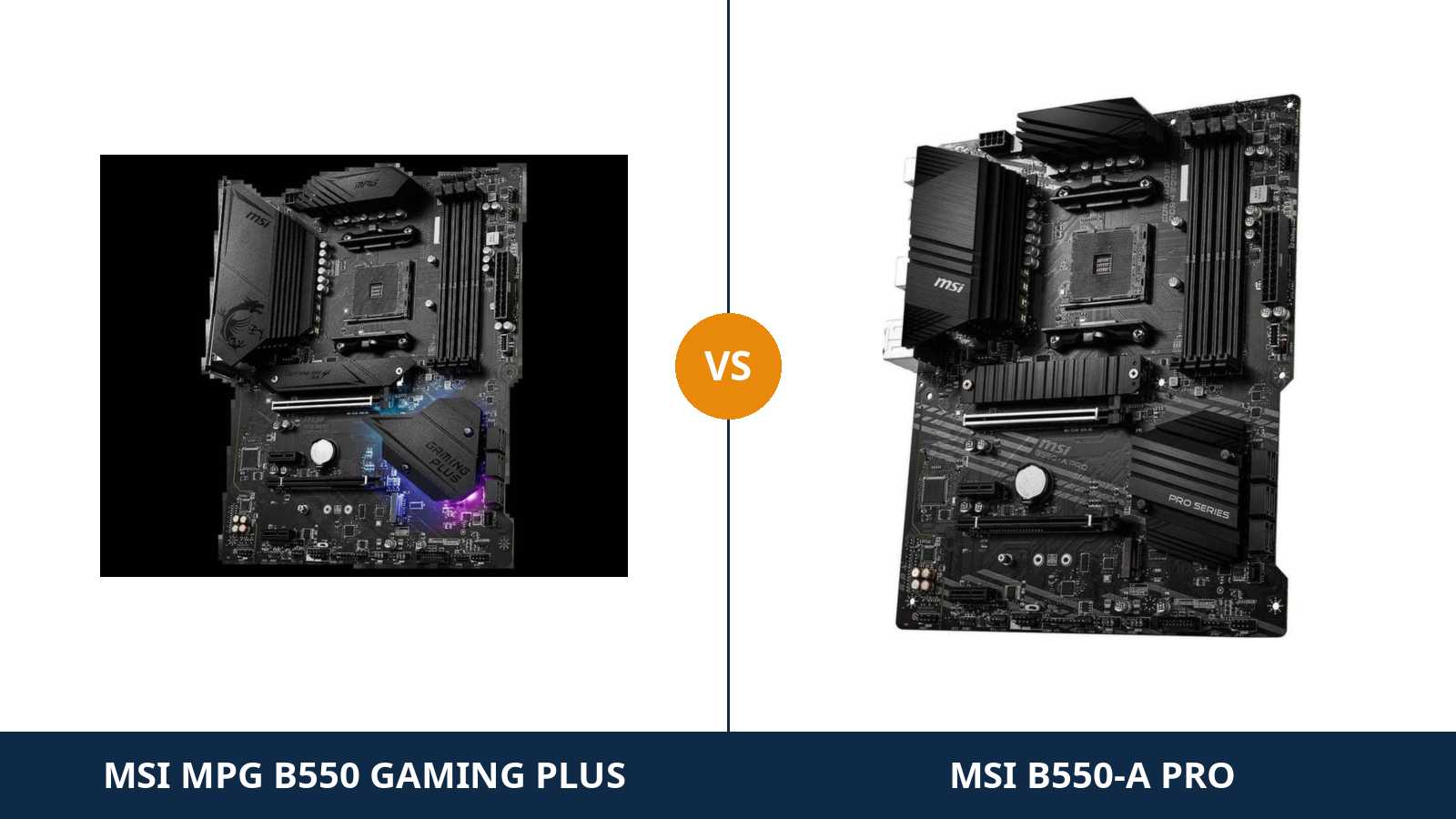
Two MSI boards. Same chipset. Same socket. Same power design, same storage, same USB, same network chip.
Read the specification tables side by side and the MPG B550 Gaming Plus and the B550-A Pro look like a printing error — one board listed twice under two names. They are not the same product. But they are far closer than the gaming branding suggests.
The real differences are small and easy to miss: an optical audio output, a pre-installed I/O shield — and one lane-sharing rule that quietly deletes an expansion slot on one board but not the other.
This guide settles it properly. Every specification below comes from MSI's own published data. And the verdict is the one we would give a friend spending their own money: for most builders, the plainer board is the smarter buy.
Key Takeaways
- The core hardware is identical. Same 10+2+1 Duet Rail VRM, same dual M.2 layout, same six SATA ports, same gigabit LAN chip, same audio codec.
- The B550-A Pro keeps its x4 slot alive with two NVMe drives fitted. The Gaming Plus switches its x4 slot off entirely when the second M.2 slot is populated.
- The Gaming Plus is the audio and showpiece pick. It adds an optical S/PDIF output, a pre-installed I/O shield, an LED control switch and full gaming trim.
- Neither board has Wi-Fi or 2.5-gigabit LAN. If either is non-negotiable, you are shopping in the wrong tier of MSI's range.
- Buy on the differences, not the badge. The MPG tax buys presentation only.
Quick Verdict
Buy the MSI B550-A Pro for most builds. It is the same foundation without the garnish.
Identical power delivery. Identical storage. Identical USB, right down to the front-panel Type-C header. And when you fit a second NVMe drive, it gives up an x1 slot instead of the x4 slot the Gaming Plus sacrifices.
For a gaming PC, a workstation or a home server, that is the better trade — and the Pro Series board is usually the cheaper way to get it.
Buy the MSI MPG B550 Gaming Plus if your build lives in a glass case or feeds a sound system. The optical S/PDIF output is a genuine functional win for AV receivers and soundbars.
Add the pre-installed I/O shield, the one-button LED kill switch and the dragon-etched heatsinks, and the Gaming Plus is the board you buy when the build is also a display piece.
The Scorecard
Scores below are derived directly from the manufacturer specifications compared in this guide — phase counts, slot counts, port counts and supported standards. They are a reading aid, not benchmark results.
| Category | MPG B550 Gaming Plus | B550-A Pro | ||
|---|---|---|---|---|
| Power delivery | 9 / 10 | 9 / 10 | ||
| Expansion & lane sharing | 7 / 10 | 8 / 10 | ||
| Storage | 9 / 10 | 9 / 10 | ||
| Memory | 9 / 10 | 9 / 10 | ||
| Networking & audio | 7 / 10 | 6 / 10 | ||
| USB & rear panel | 8 / 10 | 8 / 10 | ||
| Extras & trim | 8 / 10 | 7 / 10 | ||
| Overall | 7.8 / 10 | 8.0 / 10 | ||
The pattern is unusual for a comparison: near-total parity. The A Pro edges the overall score on one engineering detail — what its second M.2 slot costs you — and on value. The Gaming Plus wins its points back on audio connections and presentation.
At a Glance: Who Each Board Fits
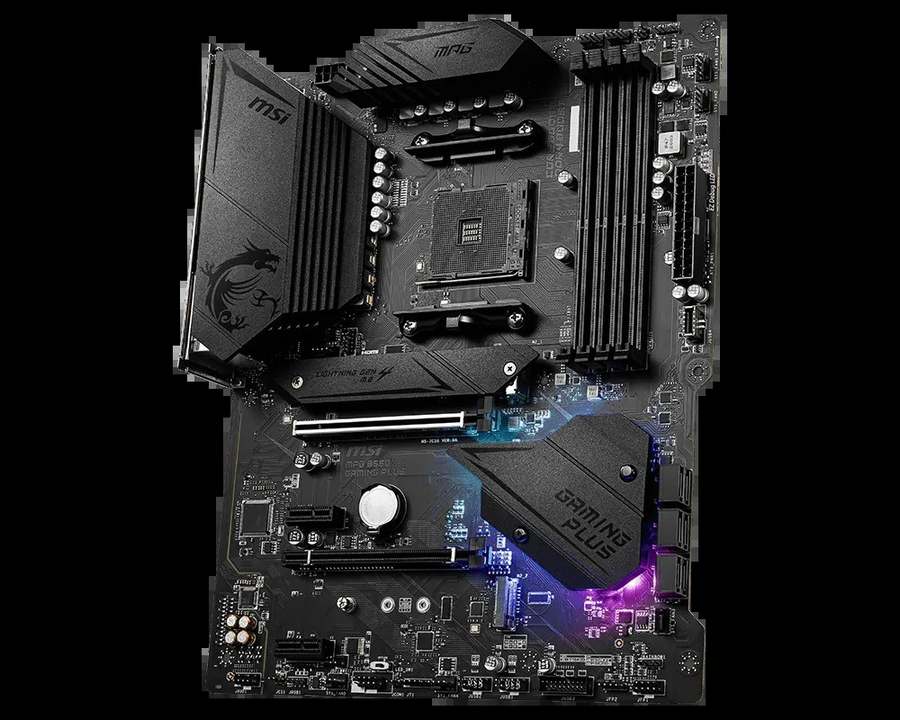
MSI MPG B550 Gaming Plus
- 10+2+1 Duet Rail VRM, 8+4-pin CPU power, extended heatsink
- Optical S/PDIF output alongside 7.1 HD audio
- Pre-installed I/O shield and EZ LED Control switch
- Mystic Light RGB headers and dragon-etched gaming heatsinks
- Second M.2 in use disables the PCIe x4 slot
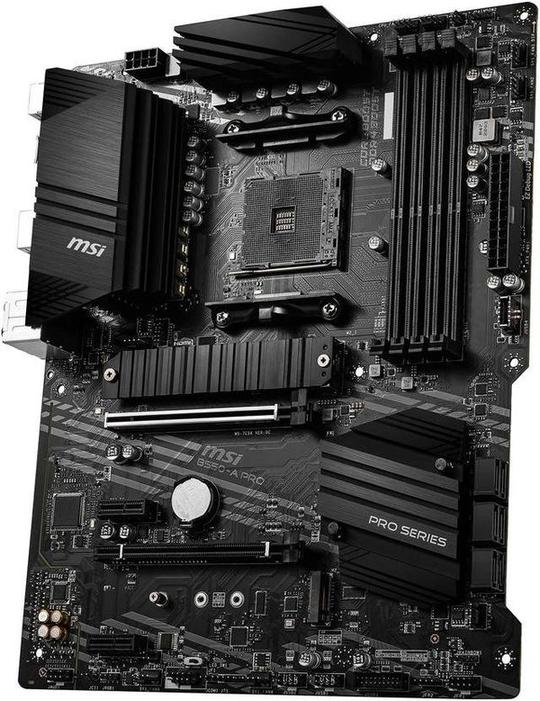
MSI B550-A Pro
- The same 10+2+1 Duet Rail VRM and extended heatsink
- Keeps the PCIe x4 slot with both M.2 slots populated
- EZ Debug LEDs and a serial port header for troubleshooting
- PCI-E Steel Armor on the main graphics slot
- Plain Pro Series styling — no RGB trim, separate I/O shield
Choose the MPG B550 Gaming Plus if…
Your PC connects to an AV receiver, a soundbar or a DAC over optical. That single port is the Gaming Plus's clearest functional advantage.
Your case has a glass panel and the build is meant to be looked at. Etched heatsinks, RGB headers and an LED off-switch are this board's home turf.
Or you will never fit a second NVMe drive alongside an expansion card. If the lane-sharing trap can never spring on your build, it costs you nothing.
Choose the B550-A Pro if…
You want the hardware, not the presentation. Every specification that affects performance is present here, at the Pro Series price.
You plan two NVMe drives and a capture card, a network card or another x4 device. The A Pro is the only one of the two that runs all three at once.
Or you are building a workstation, a home server or an office machine. EZ Debug LEDs and a serial header are worth more there than RGB.
As an Amazon Associate I earn from qualifying purchases at no extra cost to you.
Specifications: The Specs That Actually Matter
Every figure below is taken from MSI's published specifications and datasheets for these two boards, cross-checked against the manufacturer's product data.
It is the shortest version of this review: row after row of ties, broken by a handful of small differences.
| Specification | MSI MPG B550 Gaming Plus | MSI B550-A Pro |
|---|---|---|
| Form factor | ATX, 30.5 × 24.4 cm | ATX, 30.5 × 24.4 cm |
| Socket / chipset | AMD AM4 / B550 | AMD AM4 / B550 |
| CPU support | Ryzen 5000, 5000 G, 4000 G, 3000 series | Ryzen 5000, 5000 G, 4000 G, 3000 series |
| VRM design | 10+2+1 Duet Rail digital power, extended heatsink, 8+4-pin CPU power | 10+2+1 Duet Rail digital power, extended heatsink, 8+4-pin CPU power |
| Memory | 4 × DDR4 DIMM, up to 128 GB, 4400 MT/s (O.C.), A-XMP | 4 × DDR4 DIMM, up to 128 GB, 4400 MT/s (O.C.), A-XMP |
| Graphics outputs (APU) | HDMI, DisplayPort | HDMI, DisplayPort |
| Expansion slots | PCIe 4.0 x16 + PCIe 3.0 x16 (x4) + 2 × PCIe 3.0 x1 | PCIe 4.0 x16 + PCIe 3.0 x16 (x4) + 2 × PCIe 3.0 x1 |
| Lane sharing | Second M.2 populated → PCIe x4 slot disabled | Second M.2 populated → one PCIe x1 slot disabled; x4 slot stays live |
| M.2 storage | 2 slots: PCIe 4.0 x4 (CPU) + PCIe 3.0 x4 (chipset), M.2 Shield Frozr heatsink | 2 slots: PCIe 4.0 x4 (CPU) + PCIe 3.0 x4 (chipset), M.2 Shield Frozr heatsink |
| SATA | 6 × SATA 6 Gb/s, RAID 0/1/10 | 6 × SATA 6 Gb/s, RAID 0/1/10 |
| LAN | Realtek RTL8111H Gigabit Ethernet | Realtek RTL8111H Gigabit Ethernet |
| Audio | Realtek ALC892, 7.1 HD Audio Boost, optical S/PDIF out | Realtek ALC892, 7.1 HD Audio Boost, analogue jacks only |
| USB 3.2 (rear) | Gen 2 Type-A + Gen 2 Type-C (10 Gb/s), 2 × Gen 1 Type-A | Gen 2 Type-A + Gen 2 Type-C (10 Gb/s), 2 × Gen 1 Type-A |
| Front-panel USB-C | USB 3.2 Gen 1 Type-C header | USB 3.2 Gen 1 Type-C header |
| I/O shield | Pre-installed | Separate shield in the box |
| Lighting & extras | Mystic Light RGB headers, EZ LED Control switch | EZ Debug LEDs, serial port header |
| BIOS flashing | Flash BIOS Button (no CPU/RAM/GPU needed) | Flash BIOS Button (no CPU/RAM/GPU needed) |
Lane-sharing note: this is the one row in the table with real consequences. On the Gaming Plus, MSI's manual is blunt — populate the second M.2 slot and the PCIe 3.0 x16 (x4) slot is disabled.
On the B550-A Pro, the second M.2 slot shares its lanes with an x1 slot instead. Fit two NVMe drives there and you lose the smallest slot on the board, not the most useful one.
Audio codec note: MSI's specification summary lists the codec on both boards as “ALC892/ALC897” — the fitted chip varies by production run. MSI's datasheets name the ALC892, which is the figure used here. Either way, the two boards match; only the Gaming Plus adds the optical output.
CPU support note: both boards support the same processor list, and both exclude the older Ryzen 5 3400G and Ryzen 3 3200G. Check MSI's CPU support list for your exact chip and BIOS version before ordering.
The Differences That Actually Matter
1. The honest headline — underneath, this is the same motherboard
Start with what does not differ, because it is most of the board.
Both run MSI's 10+2+1 Duet Rail digital power design under an extended heatsink, fed by 8+4-pin CPU power. Both carry two M.2 slots at PCIe 4.0 x4 and PCIe 3.0 x4, six SATA ports, and an M.2 Shield Frozr heatsink.
Both use the same Realtek RTL8111H gigabit LAN chip and the same audio codec. Both put USB 3.2 Gen 2 Type-A and Type-C on the rear panel, and both offer a front-panel USB-C header.
In a blind performance test, nobody could separate these boards. Not in games, not in renders, not in file transfers. Any review that claims otherwise is inventing differences.
So this comparison is not about which board is faster. It is about which board's short list of extras matches your build — and which one's hidden compromise you will never meet.
2. Power delivery — a genuine, complete tie
The 10+2+1 Duet Rail design is the strongest thing about both boards, and it is shared down to the heatsink.
Ten VCore phases working through MSI's Duet Rail layout spread the load the way a board in the class above does. The extended heatsink is a real slab of finned metal, not a decorative cover.
The 8+4-pin CPU power input matters too. Cheaper B550 boards make do with a single 8-pin. Both of these boards take the fuller feed, which is what you want behind a high-core-count processor under sustained load.
Practically: a Ryzen 5 5600 is effortless on either board. A Ryzen 7 5800X is comfortable. A Ryzen 9 5900X or 5950X is a legitimate pairing on both — the sensible ceiling of the B550 platform.
If power delivery is your deciding factor, stop here. It does not decide this comparison. Buy on the sections that follow.
3. The M.2 lane-sharing trap — the one engineering difference
Both boards have two M.2 slots and four expansion slots. On paper, expansion is a tie. In use, it is not.
B550 has a fixed pool of chipset lanes, and every board maker decides what the second M.2 slot borrows from. MSI made opposite choices on these two boards.
On the Gaming Plus, the second M.2 slot shares with the PCIe x4 slot. Populate M.2_2 and the x4 slot switches off — completely, per MSI's manual.
On the B550-A Pro, the second M.2 slot shares with one of the x1 slots. Populate it and you lose the least valuable slot on the board. The x4 slot keeps working.
Why does the x4 slot matter? Because it is where the useful add-in cards live: capture cards, fast network cards, additional NVMe adapters, professional audio interfaces.
Two NVMe drives plus one such card is an entirely ordinary third-year upgrade. The A Pro absorbs it without blinking. The Gaming Plus makes you choose which device to unplug.
If your build will only ever hold one NVMe drive, this section is academic. If there is any chance of a second drive and a card coexisting, it is the whole comparison.
4. Audio — same codec, one extra output
The audio hardware starts identical: MSI's Audio Boost implementation around the Realtek ALC892 codec, with the ALC897 fitted on some production runs of both boards.
Through analogue jacks, the boards are indistinguishable. Same codec family, same 7.1 HD output.
The difference is a single small square port on the Gaming Plus's rear panel: an optical S/PDIF output. The A Pro does not have one.
Optical is the native language of AV receivers, soundbars and many external DACs. If your PC shares a room with a home-theatre system, that port is the difference between a one-cable digital connection and a workaround.
For a headset or desktop speakers, it changes nothing. Judge this section entirely by what sits at the other end of your audio cable.
5. Trim, lighting and the small mercies
Here is where the Gaming Plus spends its money — and some of it is genuinely useful, not just decorative.
Its I/O shield comes pre-installed. Anyone who has finished a build and spotted the forgotten shield on the desk knows its worth. The A Pro ships its shield loose in the box, in the traditional way.
The Gaming Plus adds an EZ LED Control switch: one physical button that turns the board's lighting on or off. Its Mystic Light headers and dragon-etched heatsinks complete the showpiece brief.
The A Pro's extras point the other way. EZ Debug LEDs that tell you which stage a failed boot stopped at. A serial port header — a Pro Series inheritance that still earns its keep with industrial and point-of-sale hardware.
Neither list is better in the abstract. One serves a gaming room. The other serves a workbench. You already know which room your PC lives in.
6. Networking and USB — the tie nobody advertises
Both boards carry the Realtek RTL8111H. That is gigabit Ethernet: honest, mature and fast enough for the vast majority of home connections.
It is also the ceiling of both boards. Neither offers 2.5-gigabit LAN, and neither includes Wi-Fi or Bluetooth. MSI reserves those for the boards above these in its range.
USB is equally matched. Two 10 Gb/s ports at the rear — one Type-A, one Type-C — plus two Gen 1 Type-A and four USB 2.0 ports. A front-panel USB-C header on both, which cheaper B550 boards often omit.
If wired gigabit covers your needs, networking decides nothing here. If it does not, the answer is a different board — not the other one of these.
7. Positioning — what the MPG badge actually costs
MSI sells the Gaming Plus under its MPG gaming line and the A Pro under Pro Series. The ranges have different jobs.
Pro Series is MSI's value-engineering line: keep every specification that affects work, remove everything that only affects appearance. The A Pro is that philosophy executed cleanly.
MPG adds presentation on top of the same engineering: styled heatsinks, lighting control, the pre-installed shield, the optical port. None of it makes a game run faster. Some of it makes a build nicer to live with.
Street prices move, and we do not print figures that will be stale tomorrow. The structure is stable, though: the A Pro is positioned as the cheaper board, and the Gaming Plus asks a premium for its trim list.
Pay that premium only for a named feature you will use — the optical output, the lighting, the shield. Paying it for the badge alone is how budgets leak.
CPU Pairing Guide
Start from your processor. On this pairing, the table's honest answer is “either” more often than not — which is itself the finding.
| Your processor | MPG B550 Gaming Plus | B550-A Pro | Our call |
|---|---|---|---|
| Ryzen 5 5600 / 5500 | Excellent | Excellent | Either — decide on trim and price |
| Ryzen 5 5600G / 5700G (APU) | Excellent — HDMI + DisplayPort | Excellent — HDMI + DisplayPort | Either — identical display outputs |
| Ryzen 7 5700X / 5800X | Excellent — full VRM headroom | Excellent — full VRM headroom | Either — the shared VRM decides nothing |
| Ryzen 9 5900X / 5950X | Strong — 8+4-pin feed, extended heatsink | Strong — 8+4-pin feed, extended heatsink | Either; consider X570 for heavy all-core work |
| Ryzen 3000 series | Excellent | Excellent | Either — buy whichever is cheaper |
One pairing warning applies to both boards equally: the Ryzen 5 3400G and Ryzen 3 3200G are not on either board's support list. Those APUs predate the platform.
The 30-Second Decision
| If this sounds like you… | Buy this |
|---|---|
| “I want the hardware and nothing but the hardware.” | B550-A Pro |
| “Two NVMe drives and a capture card are in my future.” | B550-A Pro — the x4 slot survives |
| “My PC feeds an AV receiver or soundbar.” | MPG B550 Gaming Plus — optical S/PDIF |
| “Glass case, lit build, and I want it to look the part.” | MPG B550 Gaming Plus |
| “Workstation or home server that must be easy to troubleshoot.” | B550-A Pro — EZ Debug LEDs, serial header |
| “Whichever one is on sale this week.” | Legitimate — if you will never meet the lane-sharing trap |
Ready to check today’s price?
Both boards sell through Amazon. Prices move, so check the live figure on the board that fits your build.
View on Amazon — MPG B550 Gaming PlusView on Amazon — B550-A ProWhat You Gain. What You Give Up.
MSI MPG B550 Gaming Plus
You gain: the optical S/PDIF output for receivers and soundbars. A pre-installed I/O shield. A hardware switch that kills the lighting. RGB headers and heatsinks styled to be seen through glass.
You give up: the x4 expansion slot the moment a second NVMe drive goes in. And usually some money — the gaming trim is not free, and none of it improves a single frame rate.
MSI B550-A Pro
You gain: every performance-relevant specification on this page, at the Pro Series position in the range. An x4 slot that survives a dual-NVMe build. Debug LEDs that shorten a bad evening of troubleshooting.
You give up: the optical audio output. The pre-installed shield. Any pretence of showmanship — this is a plain black board that disappears into a case and gets on with it.
Pros and Cons
MPG B550 Gaming Plus — Pros
- Optical S/PDIF out — the only one of the two
- Pre-installed I/O shield
- EZ LED Control switch and Mystic Light headers
- Same strong 10+2+1 VRM as the A Pro
- Front-panel USB-C header included
Cons
- Second M.2 disables the PCIe x4 slot
- Gigabit LAN only, no Wi-Fi — same as the A Pro
- Premium charged for presentation, not performance
- Separate Wi-Fi models exist; this is not one
B550-A Pro — Pros
- Identical VRM, storage and USB to the Gaming Plus
- x4 slot stays live with both M.2 slots populated
- EZ Debug LEDs and a serial port header
- PCI-E Steel Armor on the graphics slot
- Positioned as the value buy in MSI's range
Cons
- No optical S/PDIF output
- Loose I/O shield — fit it before the board, not after
- Plain styling; no lighting trim
- Gigabit LAN only, no Wi-Fi
Check the Name Carefully — MSI Sells a Near-Identical Namesake
Beware the B550M-A Pro. This is the single most expensive typo in this corner of MSI's catalogue.
The B550M-A Pro is a different, much smaller micro-ATX board: one M.2 slot, four SATA ports, a single 4-pin CPU power connector and a fraction of this board's power design. One letter separates it from the B550-A Pro in this comparison.
Before ordering, confirm the listing says B550-A Pro, full ATX, and shows six SATA ports and two M.2 slots. If the photo shows a small square board, you are looking at the wrong product.
Check the Gaming Plus against its own family. The MPG B550 Gaming Edge WiFi and Gaming Carbon WiFi sit above it with wireless and stronger networking. The board in this comparison is the wired Gaming Plus — no antenna posts in the photos, no Wi-Fi in the box.
Check the BIOS before the build. Both boards carry MSI's Flash BIOS Button. A board from early stock can be updated for a Ryzen 5000 processor with no CPU, memory or graphics card installed.
There is no need to pay a retailer for a BIOS update service on either of these boards.
Check the bundle. Expect the board, two SATA cables, documentation and — on the A Pro — the loose I/O shield. Put the shield somewhere safe the moment the box opens.
Neither box includes Wi-Fi antennas, because neither board has Wi-Fi. A listing that shows antennas is showing you a different model.
The Upgrade Path Test
Judge a board like this by its third year, not its first day. These two start that test level.
Year one, both run a Ryzen 5 or 7 and a mid-range graphics card identically. The VRM, the storage and the USB are the same. Owners of either board would swap systems and notice nothing.
Year two, storage fills up. A second NVMe drive is the most common upgrade on the platform, and both boards take one at full PCIe 3.0 x4 speed.
Year three, the builds diverge. Add a capture card, a faster network card or an NVMe expansion card beside those two drives, and the A Pro simply has a working slot waiting. The Gaming Plus asks you to retire the second drive first.
That is the honest shape of this comparison: one board's ceiling is set by a lane-sharing rule, the other's is not. Everything else is taste — in audio outputs and in aesthetics.
When to Skip Both
Honesty cuts both ways. There are builders neither of these boards serves.
Skip both if you need Wi-Fi on the board itself. MSI sells Gaming Edge and Carbon variants for that; adding a card is the other route, and it spends the slot this comparison just spent three sections protecting.
Skip both if your network runs at 2.5 Gb/s or faster and you want to use it. The RTL8111H is a gigabit chip, and no setting changes that. MSI's own MAG B550 Tomahawk class is the step up.
Skip both if your case is micro-ATX. These are full ATX boards, and no optimism will make 30.5 cm fit a 24.4 cm tray.
And skip both if you are building a heavy all-core Ryzen 9 workstation that will run at full load for days. The VRM here is strong for B550, but X570 boards exist for exactly that duty cycle.
For everyone else — most AM4 builders — one of these two is the right answer, and the choice comes down to a port, a slot rule and a coat of paint.
Final Verdict
The MSI B550-A Pro is the board we would buy.
Not because it is faster. It is not — nothing measurable separates these boards in performance. It wins because it makes the two decisions a value board should make.
It spends nothing on presentation. And when its second M.2 slot borrows lanes, it borrows them from the slot you will miss least, keeping the x4 slot alive for the upgrades that actually happen.
Buy the B550-A Pro for gaming builds, workstations, home servers and any PC where the budget should buy hardware rather than trim.
Buy the MPG B550 Gaming Plus if the optical output feeds your sound system. If the build sits behind glass and lighting control matters. Or if you are certain a second NVMe drive and an x4 card will never need to coexist in your case.
It is the same strong board wearing its best suit. Just know exactly which extras the suit includes — and which slot it quietly pockets.
View on Amazon — MPG B550 Gaming Plus
Watch Out: Similar Names, Different Boards
MSI's B550 range is a minefield of near-identical names. Three warnings belong in every version of this guide.
First: the B550-A Pro is not the B550M-A Pro. The M makes it a smaller, far weaker micro-ATX board with one M.2 slot and a single 4-pin CPU power connector. Check for the M before you check the price.
Second: the MPG B550 Gaming Plus is not the MPG B550 Gaming Edge WiFi or the Gaming Carbon WiFi. Those are higher boards with wireless and faster networking. Similar dragon, different specification — and different prices.
Third: the B550-A Pro is not the older B450-A Pro or the B550M Pro series. Each generation reuses the Pro name on different hardware. Match the full model name, chipset first, before anything else on the page.
Slow down on the product page. Match the full model name, then the slot and port counts, then the price — in that order.
Case, Power and Cabling Notes
Both boards are full ATX, 30.5 × 24.4 cm. They need an ATX case; neither fits a micro-ATX-only chassis.
Both take a standard 24-pin main power connector and an 8+4-pin EPS CPU power feed. Most reputable modern power supplies provide both cables; on a budget unit with a single 8-pin EPS lead, the boards still run, but the fuller feed is the right match for Ryzen 9 upgrades.
Front-panel connections match too. Both provide a USB 3.2 Gen 1 Type-C header and a Gen 1 Type-A header for case front ports, plus USB 2.0 headers for the rest — a better front-panel offering than most of the B550 class manages.
Cooling control is shared MSI practice: a CPU fan header, a pump header and system fan headers, all PWM-capable with fan-stop behaviour in the BIOS. Neither board will limit a sensible air or liquid cooling setup.
Note where the A Pro's EZ Debug LEDs sit before the side panel goes on. They earn their keep the one evening a boot fails — but only if you can see them.
BIOS and Long-Term Support
AM4 is a mature platform. That is a genuine advantage for both of these boards.
The BIOS is stable. The drivers are stable. The surprises have already happened to somebody else, years ago, and been fixed.
Both boards sit on MSI's standard support pages: BIOS updates, chipset, LAN and audio drivers, and a full CPU support list per model. MSI publishes no warranty distinction between its Pro Series and MPG lines in the data we checked, so treat support as shared.
Expect future BIOS releases to be about security patches and edge-case compatibility, not new features. On a mature platform, that is exactly what you want.
One habit worth keeping: before any CPU upgrade, check the support list for your board and update the BIOS first. The Flash BIOS Button makes that a ten-minute job on either board, even with the new processor still in its box.
Frequently Asked Questions
Is the B550-A Pro better than the MPG B550 Gaming Plus?
For most builders, yes — narrowly. The core hardware is identical: the same 10+2+1 Duet Rail VRM, dual M.2 storage, six SATA ports, gigabit LAN and audio codec. The A Pro wins on its gentler lane sharing (a second NVMe drive costs an x1 slot, not the x4 slot) and its value positioning. The Gaming Plus wins on optical audio output and gaming trim.
What happens when I fit two NVMe drives to the Gaming Plus?
The second M.2 slot works at full PCIe 3.0 x4 speed, but populating it disables the board's PCIe 3.0 x16 (x4) expansion slot, per MSI's manual. On the B550-A Pro, the same upgrade only disables one PCIe x1 slot, leaving the x4 slot available for a capture card or network card.
Do both boards support Ryzen 5000 processors?
Yes. Both are AM4 B550 boards supporting Ryzen 5000, 5000 G-Series, 4000 G-Series and 3000 series processors. Both carry MSI's Flash BIOS Button, so the BIOS can be updated for a newer CPU without an older processor installed. Note that neither board supports the Ryzen 5 3400G or Ryzen 3 3200G.
Which board is better for a Ryzen 9 5950X?
Either — this is a genuine tie. Both boards run the same 10+2+1 Duet Rail power design with an extended heatsink and an 8+4-pin CPU power input, which is the hardware that decides high-core-count behaviour. For sustained all-core workstation loads, though, consider whether an X570 board is the more appropriate class.
Does either board have Wi-Fi or 2.5G LAN?
No. Both boards provide a single Realtek RTL8111H gigabit Ethernet port and no wireless module. If you need Wi-Fi or 2.5-gigabit networking built in, look at MSI's higher B550 boards, such as the Gaming Edge WiFi or the MAG B550 Tomahawk.
What is the difference between the B550-A Pro and the B550M-A Pro?
They are entirely different boards. The B550-A Pro in this comparison is a full ATX board with two M.2 slots, six SATA ports and a 10+2+1 power design. The B550M-A Pro is a smaller micro-ATX board with one M.2 slot, four SATA ports and a much leaner specification. The names differ by one letter; the hardware differs by a class.
Can I connect either board to a soundbar or AV receiver?
Yes, but the connection differs. The Gaming Plus has an optical S/PDIF output — the clean one-cable digital route to a receiver, soundbar or DAC. The B550-A Pro has analogue audio jacks only, so you would connect over analogue, or digitally via your graphics card's HDMI output instead.
Do the boards have a front-panel USB-C header?
Yes, both of them. Each provides a USB 3.2 Gen 1 Type-C front-panel header alongside the usual Type-A header — a feature many B550 boards omit. If your case has a front USB-C port, it will work on either board.
Sources & Verification
MSI MPG B550 GAMING PLUS official specifications and datasheet, msi.com • MSI B550-A PRO official specifications and datasheet, msi.com • MSI user manuals for both boards (lane-sharing rules, power connectors) • MSI retail product data (VRM configuration, codec variance). Specifications verified November 2026.

James Wilson
James has been building and benchmarking PCs for over a decade and writes Honestly Compared's motherboard and component guides. His rule for every comparison: the verdict has to survive the spec sheet, not the marketing page.