
MSI MPG B550 Gaming Plus vs MSI MAG B550 Tomahawk: Which Should You Buy?
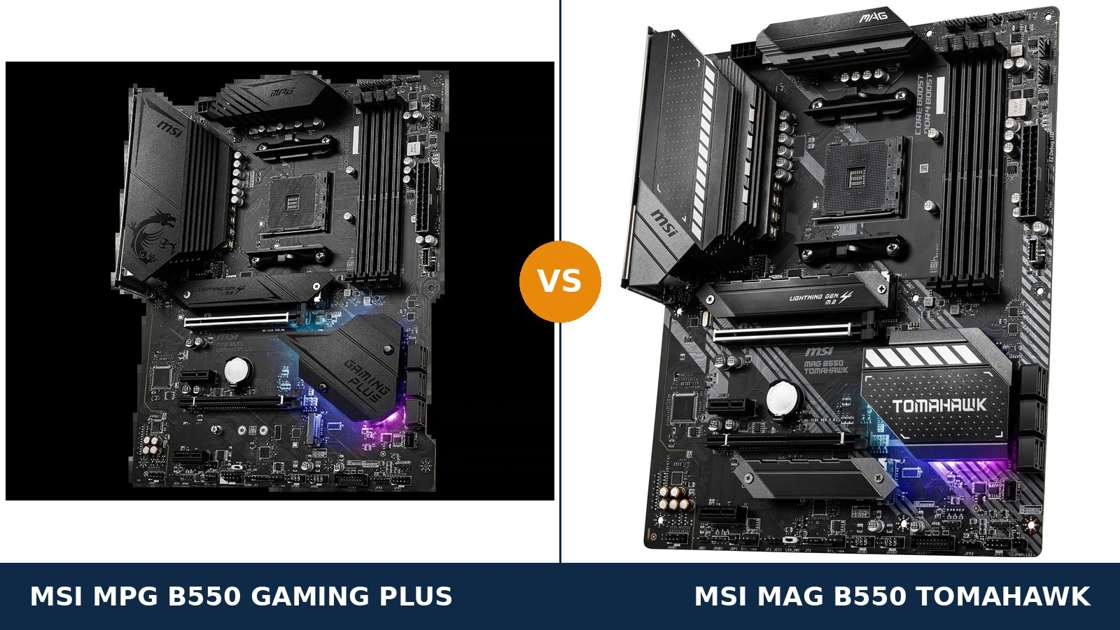
Same brand. Same chipset. Same socket. Even the same VRM headline.
Put the two spec sheets side by side and they read like the same motherboard written out twice. Both claim a 10+2+1 Duet Rail power design. Both offer PCIe 4.0, two M.2 slots, four DDR4 slots and a front-panel USB-C header.
They are not the same board. MSI built them for two different buyers, and the money went to different places.
The Tomahawk spends its budget on hardware: 60-amp power stages, two Ethernet ports including 2.5-gigabit, a better audio codec and heatsinks on both M.2 slots. The Gaming Plus spends its budget on value — and usually sells for less.
This guide separates them properly. Every specification below comes from MSI's own published data. Every claim can be checked. And the verdict at the end is the same one we would give a friend spending their own money.
Key Takeaways
- The Tomahawk is the better board. Stronger power stages, dual LAN, better audio and more memory headroom.
- The Gaming Plus is the better value. The same platform essentials, the same slots and storage — usually for less money.
- The VRM headline is a trap. Both boards say 10+2+1, but the Tomahawk's 60A Smart Power Stages are a class above the Gaming Plus's discrete MOSFETs.
- Storage and expansion look tied — with one catch. Fit a second M.2 drive to the Gaming Plus and its x4 expansion slot switches off.
- Neither board has Wi-Fi. And neither runs a Ryzen 5 3400G or Ryzen 3 3200G. Check both points before you buy.
Quick Verdict
Buy the MSI MAG B550 Tomahawk for most builds. It is the more complete board.
Its VRM uses proper 60A Smart Power Stages under a larger heatsink. It carries two LAN ports, one of them 2.5-gigabit. Its ALC1200 audio sits a tier above, and both of its M.2 slots wear heatsinks.
For a gaming PC you plan to keep, upgrade and lean on, this is the stronger foundation. The spec sheet gaps are small but they all point the same way.
Buy the MSI MPG B550 Gaming Plus if the price gap is real and your build is simple. A Ryzen 5, one graphics card, wired gigabit internet.
For that build, the Gaming Plus gives up nothing you will feel day to day. Put the saving toward memory or storage, where it will actually show.
The Scorecard
Scores below are derived directly from the manufacturer specifications compared in this guide — power-stage ratings, port counts, slot counts and supported standards. They are a reading aid, not benchmark results.
| Category | MPG B550 Gaming Plus | MAG B550 Tomahawk | ||
|---|---|---|---|---|
| Power delivery | 7.5 / 10 | 9.0 / 10 | ||
| Networking | 5.0 / 10 | 9.5 / 10 | ||
| Audio | 7.0 / 10 | 8.5 / 10 | ||
| Storage | 8.0 / 10 | 9.0 / 10 | ||
| Memory | 8.0 / 10 | 9.0 / 10 | ||
| Expansion | 7.5 / 10 | 8.5 / 10 | ||
| Overall | 7.8 / 10 | 8.8 / 10 | ||
The pattern never changes direction. The Tomahawk wins every hardware category that costs money to improve. The Gaming Plus wins the only contest left: the price.
At a Glance: Who Each Board Fits
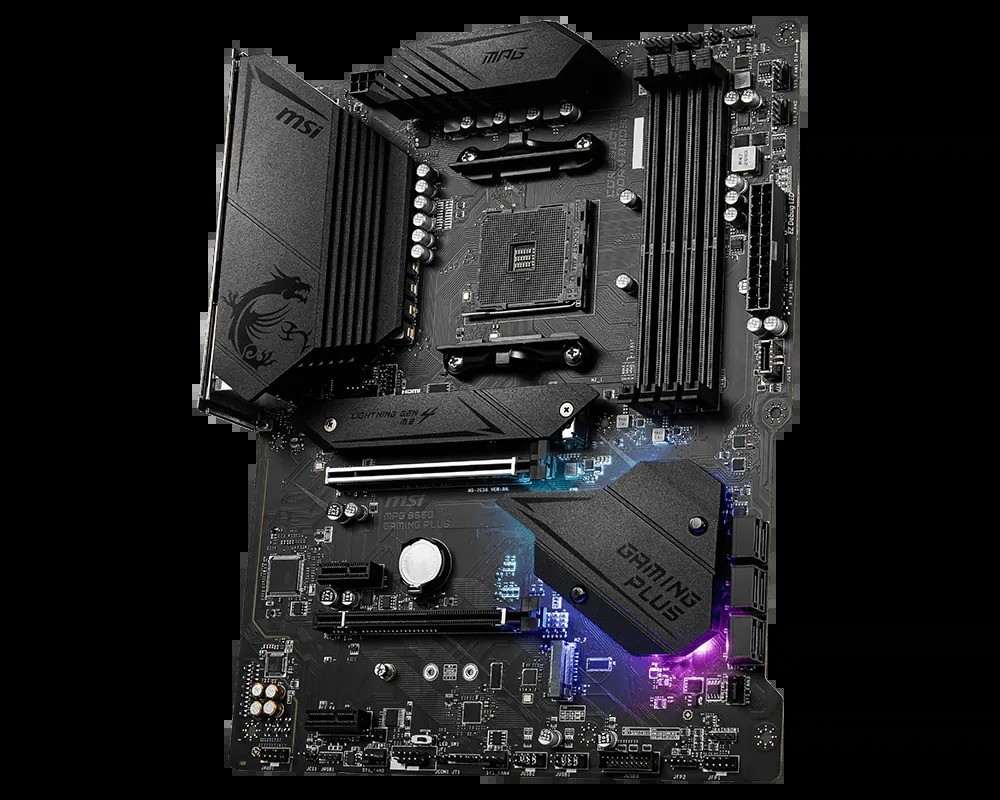
MSI MPG B550 Gaming Plus
- 10+2+1 Duet Rail VRM, extended heatsink, 8+4-pin CPU power
- Single Realtek gigabit LAN (RTL8111H)
- Realtek ALC892 audio with optical S/PDIF output
- Dual M.2 (Gen4 x4 + Gen3 x4), Shield Frozr on the primary slot
- Usually the cheaper of the two boards
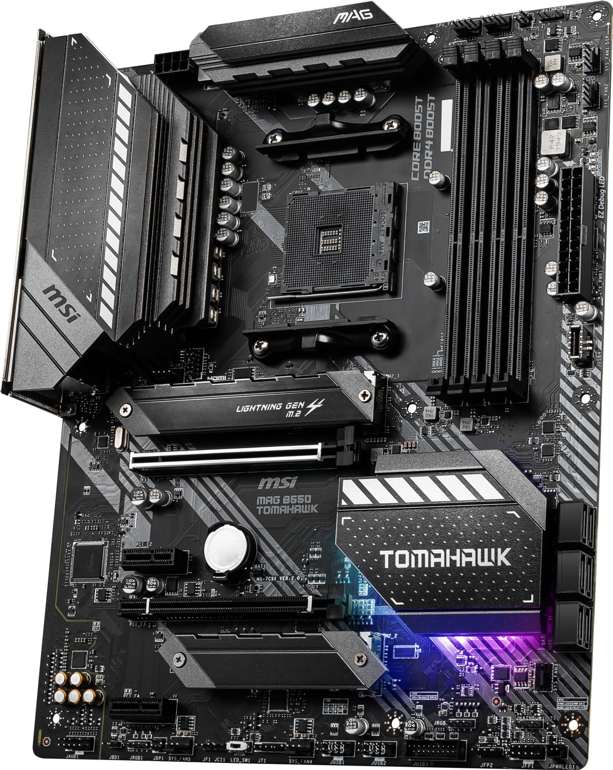
MSI MAG B550 Tomahawk
- 10+2+1 Duet Rail VRM with 60A Smart Power Stages
- Dual LAN: 2.5 GbE (RTL8125B) plus gigabit (RTL8111H)
- Realtek ALC1200 audio with optical S/PDIF output
- Heatsinks on both M.2 slots; memory support to 5100+ MT/s (O.C.)
- Eight 4-pin fan headers — the fuller cooling setup
Choose the MPG B550 Gaming Plus if…
You are building around a Ryzen 5 or Ryzen 7. One graphics card. One or two SSDs. Wired gigabit internet that already fills your connection.
You would rather spend the difference on RAM or storage. On a simple build, that trade is the smart one.
Or you simply like the MPG styling — the dragon heatsink and RGB underglow are this board's party trick, and there is no shame in it.
Choose the MAG B550 Tomahawk if…
You keep your boards for years and upgrade around them. A Ryzen 9 is in the plan, or might be.
You have a NAS, a home server, or a 2.5-gigabit network switch. Or you want the second LAN port as a spare, a direct link, or a streaming PC connection.
You listen through good headphones and will actually hear the better audio codec. Buy the hardware once.
As an Amazon Associate I earn from qualifying purchases at no extra cost to you.
Specifications: The Specs That Actually Matter
Every figure below is taken from MSI's published specifications, datasheets and manuals, cross-checked against the manufacturer's product data.
Both boards are full ATX on the same chipset, so the table concentrates on where they actually diverge. Two production-variant notes follow it — read them before quoting any single figure back at us.
| Specification | MSI MPG B550 Gaming Plus | MSI MAG B550 Tomahawk |
|---|---|---|
| Form factor | ATX, 30.5 × 24.4 cm | ATX, 30.5 × 24.4 cm |
| Socket / chipset | AMD AM4 / B550 | AMD AM4 / B550 |
| CPU support | Ryzen 5000, 5000 G, 4000 G, 3000 series — not 3400G / 3200G | Ryzen 5000, 5000 G, 4000 G, 3000 series — not 3400G / 3200G |
| VRM design | 10+2+1 Duet Rail, discrete MOSFETs, extended heatsink, 8+4-pin CPU power | 10+2+1 Duet Rail, 60A Smart Power Stages, digital PWM, extended heatsink, 8-pin CPU power |
| Memory | 4 × DDR4 DIMM, up to 128 GB, 4400+ MT/s (O.C.), A-XMP | 4 × DDR4 DIMM, up to 128 GB, 5100+ MT/s (O.C.), A-XMP |
| Graphics outputs (APU) | HDMI + DisplayPort | HDMI + DisplayPort |
| Expansion slots | PCIe 4.0 x16 + PCIe 3.0 x16 (x4) + 2 × PCIe 3.0 x1 | PCIe 4.0 x16 + PCIe 3.0 x16 (x4) + 2 × PCIe 3.0 x1 |
| M.2 storage | 2 slots: PCIe 4.0 x4 (CPU) + PCIe 3.0 x4 (chipset); Shield Frozr heatsink on slot 1 only | 2 slots: PCIe 4.0 x4 / SATA (up to 22110) + PCIe 3.0 x4; heatsinks on both slots |
| SATA | 6 × SATA 6 Gb/s, RAID 0/1/10 | 6 × SATA 6 Gb/s, RAID 0/1/10 |
| LAN | Realtek RTL8111H, 1 Gb/s (single port) | Realtek RTL8125B 2.5 Gb/s + RTL8111H 1 Gb/s (dual ports) |
| Audio | Realtek ALC892, 7.1 HD, Audio Boost, optical S/PDIF out | Realtek ALC1200, 7.1 HD, Audio Boost, optical S/PDIF out |
| USB (rear) | 2 × USB 3.2 Gen 2 (Type-A + Type-C), 2 × Gen 1, 4 × USB 2.0 | 2 × USB 3.2 Gen 2 (Type-A + Type-C), 2 × Gen 1, 2 × USB 2.0 |
| USB (front headers) | USB 3.2 Gen 1 Type-C header + Gen 1 header + 2 × USB 2.0 headers | USB 3.2 Gen 1 Type-C header + Gen 1 header + 2 × USB 2.0 headers |
| Fan headers | 6 × 4-pin (CPU, pump, 4 × system) | 8 × 4-pin (CPU, pump, 6 × system) |
| BIOS flashing | Flash BIOS Button (no CPU/RAM/GPU needed) | Flash BIOS Button (no CPU/RAM/GPU needed) |
Variant notes: MSI's current specification summary lists the Gaming Plus audio as “ALC892/ALC897” and the Tomahawk's as “ALC1200/ALC1220P” — MSI fits either codec depending on production run. This guide uses the launch figures (ALC892, ALC1200); independent teardowns of the Tomahawk confirm the ALC1200 on retail boards.
The Tomahawk's memory ceiling moved, too. Its 2020 datasheet says 4866+ MT/s; MSI's current product page says 5100+. The table uses the current figure. Either way, it clears the Gaming Plus's 4400+.
The Differences That Actually Matter
1. Power delivery — the same headline, different hardware
Both boards print “10+2+1 Duet Rail” on the box. That is where the similarity ends.
The Tomahawk builds those phases from 60-amp Smart Power Stages — integrated, efficient, and the same class of component MSI fits to boards costing far more. A digital PWM controller runs them, and a larger extended heatsink cools them.
The Gaming Plus reaches the same phase count with discrete MOSFETs. It is the older, cheaper way to build a VRM. It works, but it runs less efficiently phase for phase.
For a Ryzen 5 or Ryzen 7 at stock settings, both boards are comfortably sufficient. You will never feel the difference in a game.
The gap opens at the top of the stack. A Ryzen 9 under sustained all-core load is where 60-amp stages and the bigger heatsink earn their money: cooler power delivery, more headroom, less drama.
One irony worth noting. The Gaming Plus takes an 8+4-pin CPU power feed; the Tomahawk takes a single 8-pin.
Do not let that swing you. A single 8-pin EPS connector delivers far more power than any AM4 processor can draw at sane settings. MSI left the extra connector off because the stages behind it did not need it.
Here is the principle: phase counts are marketing. Power-stage ratings are hardware. The Tomahawk wins this section on hardware.
2. Networking — the biggest functional gap in this comparison
The Tomahawk carries two Ethernet ports. One is Realtek's RTL8125B at 2.5 Gb/s. The other is a standard gigabit port.
The Gaming Plus carries one gigabit port, driven by the older RTL8111H. That is the whole of its wired networking.
If your internet connection is gigabit or slower and that is all the board will ever do, this difference is worth nothing to you. Be honest about that, and the Gaming Plus looks fine.
But the moment a second device enters the picture, the Tomahawk pulls away. A NAS that can actually be fed at 2.5 Gb/s. A home server. A direct cable link to a streaming or backup PC. A spare port when the first one's cable, switch port or driver misbehaves.
Networking is the hardest feature to retrofit well. A PCIe network card costs money and a slot.
Buy the board that already has the ports. For networked homes, this section alone can decide the comparison.
3. Audio — a real tier apart, if your headphones can tell
The Tomahawk uses Realtek's ALC1200 codec with MSI's Audio Boost treatment. The Gaming Plus uses the ALC892, also with Audio Boost.
On paper and on the test bench, the ALC1200 is the cleaner chip: better signal quality, a tier above in Realtek's range. Both boards add optical S/PDIF output, which neither budget board in our last comparison managed on both sides — here it is a tie.
Through a cheap headset or basic desktop speakers, you will not reliably hear the difference. We will not pretend otherwise.
Through good headphones, a headphone amplifier, or powered monitors, the Tomahawk's cleaner output is the one you want feeding them. Audio is a chain, and the codec is its first link.
Buyers with a USB DAC bypass both codecs entirely. For them, this section scores a draw — and the money question returns to price.
4. Storage — heatsinks, lengths, and one lane-sharing trap
The raw layout is identical. Each board has a CPU-connected PCIe 4.0 x4 M.2 slot, a second chipset M.2 at PCIe 3.0 x4, and six SATA ports with RAID 0/1/10.
Boot drives and game libraries will perform the same on both. Nobody's loading screen can tell these boards apart.
The differences are in the details. The Tomahawk fits heatsinks to both M.2 slots. The Gaming Plus fits its M.2 Shield Frozr to the primary slot only, leaving a second drive to fend for itself.
The Tomahawk's primary slot also accepts 22110-length drives. A niche point — most consumer SSDs are 2280 — but it is free flexibility.
Then there is the trap, and it belongs to the Gaming Plus. Its second M.2 slot shares lanes with the x4 expansion slot (PCI_E3).
Fit a drive in M.2_2 and the x4 slot switches off. You can have the second SSD or the slot, not both.
The Tomahawk's manual carries a narrower version of the same rule: its x4 slot only drops out in a fully loaded board, when the second M.2 and both remaining slots are populated at once. In normal two-drive builds, the Tomahawk keeps its slot.
Planning two NVMe drives plus a capture card, sound card or network card? That plan only survives on the Tomahawk.
5. Memory — a ceiling you will probably never touch
Both boards take four DDR4 sticks and up to 128 GB. Both run A-XMP profiles. For the 3200–3600 MT/s kits almost everyone buys, they are equals.
The difference sits at the top of the spec sheet. MSI rates the Tomahawk for 5100+ MT/s overclocked memory. The Gaming Plus stops at 4400+.
That gap matters to exactly one buyer: the memory tuner, running four high-frequency sticks or chasing tight timings on a Ryzen 7 or 9. The Tomahawk's higher validated ceiling is a sign of the stronger memory layout behind it.
Everyone else can call memory a tie and move on. One caution applies to both boards equally: headline speeds are overclocking figures, and your processor's memory controller has the final say.
6. Cooling and fan control — quiet advantages
Neither board needs a chipset fan; B550's passive heatsinks are one of the platform's quiet pleasures. Both boards get extended VRM heatsinks and 2 oz copper PCBs, too.
The Tomahawk pulls ahead on fan headers: eight 4-pin headers — CPU, pump and six system — against the Gaming Plus's six.
Six headers cover most builds. Eight cover a full-tower case with a radiator, push-pull fans and room to spare, without splitters.
It is a small section with a predictable winner. The Tomahawk simply leaves more room to grow a cooling setup over the board's life.
7. The small stuff — USB, lighting and looks
Rear-panel USB is a genuine Gaming Plus win. It offers four USB 2.0 ports at the back against the Tomahawk's two, alongside the same pair of 10 Gb/s Gen 2 ports (Type-A and Type-C) and two Gen 1 ports.
Keyboards, mice, headsets, dongles — legacy ports get used. Two extra ones are worth having. Front-panel headers, including the USB-C header, are identical on both boards.
Lighting is a shared language: both run MSI Mystic Light with 12V RGB and 5V addressable headers. The Gaming Plus adds its EZ LED Control switch for killing the lights from the board itself, plus the dragon-styled heatsinks and RGB underglow the MPG range is known for.
The Tomahawk's MAG styling is more restrained — gunmetal and angles. Which look belongs in your case is a taste call, not a spec call.
Pattern confirmed, one last time: the Gaming Plus competes on price, ports and looks. The Tomahawk competes on hardware. Only you know which contest your build is in.
CPU Pairing Guide
The fastest way to choose between these boards is to start from your processor. This table is the whole comparison in one view.
| Your processor | MPG B550 Gaming Plus | MAG B550 Tomahawk | Our call |
|---|---|---|---|
| Ryzen 5 5600 / 5500 | Excellent | Excellent | Buy on price — usually the Gaming Plus |
| Ryzen 5 5600G / 5700G (APU) | Excellent — HDMI + DisplayPort | Excellent — HDMI + DisplayPort | Either board; Gaming Plus on price |
| Ryzen 7 5700X / 5800X | Very good | Excellent — 60A stages, bigger heatsink | MAG B550 Tomahawk |
| Ryzen 9 5900X / 5950X | Workable at stock | Very good — the sensible pick of the two | Tomahawk; heavy all-core users should look higher |
| Ryzen 3000 series | Excellent | Excellent | Buy whichever is cheaper |
One exclusion applies to both boards, and it catches people out: neither supports the Ryzen 5 3400G or Ryzen 3 3200G, and neither takes Ryzen 2000-series processors. If your CPU is one of those, skip to the “When to Skip Both” section — you need a different chipset generation, not a winner from this page.
The 30-Second Decision
| If this sounds like you… | Buy this |
|---|---|
| “I want the best B550 board of the two, full stop.” | MAG B550 Tomahawk |
| “Ryzen 5 build, gigabit internet is fine, save me the money.” | MPG B550 Gaming Plus |
| “I have a NAS, a home server, or a 2.5-gigabit switch.” | MAG B550 Tomahawk (dual LAN) |
| “A Ryzen 9 is in the plan, now or later.” | MAG B550 Tomahawk (60A stages) |
| “Two NVMe drives and a capture card in the x4 slot.” | MAG B550 Tomahawk — the Gaming Plus disables that slot with a second M.2 fitted |
| “The Gaming Plus is on a serious sale this week.” | Legitimate — for simple builds, the gap will not show |
Ready to check today’s price?
Both boards sell through Amazon. Prices move, so check the live figure on the board that fits your build.
View on Amazon — MPG B550 Gaming PlusView on Amazon — MAG B550 TomahawkWhat You Gain. What You Give Up.
MSI MPG B550 Gaming Plus
You gain: the lower price for the same platform — PCIe 4.0, dual M.2, four DIMM slots, front USB-C header. More rear USB 2.0 ports than the Tomahawk. An 8+4-pin CPU power feed. A pre-installed I/O shield and the MPG dragon styling with its LED kill switch.
You give up: the second LAN port and 2.5-gigabit speed. The 60-amp power stages. The better audio codec. The second M.2 heatsink — and your x4 slot, the day you fit a second M.2 drive.
MSI MAG B550 Tomahawk
You gain: the strongest hardware package in MSI's mainstream B550 range: 60A Smart Power Stages, dual LAN with 2.5 Gb/s, ALC1200 audio, heatsinks on both M.2 slots, a 5100+ memory ceiling and eight fan headers.
You give up: usually some money — it typically sells above the Gaming Plus. Two rear USB 2.0 ports. And the extra 4-pin CPU power connector, which sounds like a loss and is not one in practice.
Pros and Cons
MPG B550 Gaming Plus — Pros
- Usually the cheaper way into the same platform
- Identical slot and storage layout to the Tomahawk
- Four rear USB 2.0 ports — handy for peripherals
- 8+4-pin CPU power feed
- Pre-installed I/O shield; EZ LED Control switch
Cons
- Single gigabit LAN — no 2.5 Gb/s, no second port
- Discrete-MOSFET VRM behind the same 10+2+1 headline
- Second M.2 drive disables the x4 expansion slot
- ALC892 audio is a tier below
- Memory support stops at 4400+ MT/s
- No Wi-Fi
MAG B550 Tomahawk — Pros
- 60A Smart Power Stages — real Ryzen 9 headroom
- Dual LAN: 2.5 Gb/s plus gigabit
- ALC1200 audio with optical S/PDIF
- Heatsinks on both M.2 slots; 22110 support
- 5100+ MT/s memory ceiling; eight fan headers
Cons
- Usually the pricier of the two
- Single 8-pin CPU power (sufficient, but plain)
- Only two rear USB 2.0 ports
- No Wi-Fi — same as the Gaming Plus
- Overkill for a basic Ryzen 5 build
Check the Name, the Codec and the Bundle
Check the name — twice. MSI's B550 range is a hall of mirrors, and three traps matter here.
First: the B550 Tomahawk MAX WiFi is a different, newer board with Wi-Fi 6E built in. The board in this comparison is the original MAG B550 Tomahawk — no Wi-Fi, no MAX. A listing that shows antennas is not selling you this board.
Second: the B450 Tomahawk Max is the previous chipset generation wearing a near-identical name. It has no PCIe 4.0. It is a fine used buy and a different product.
Third: the Gaming Plus sits below MSI's MPG B550 Gaming Edge WiFi and Gaming Carbon WiFi. Those are step-up models with wireless built in. If the price looks too good for a “Gaming” board with Wi-Fi, you are looking at a different listing.
Check the codec. As the variant note under the spec table explains, MSI fits one of two audio codecs to each of these boards depending on production run. The tier gap between the boards survives either way — but if audio is your deciding factor, the codec is printed on the board and worth confirming with the seller.
Check the CPU pairing. Both boards flash with their rear-panel Flash BIOS Button. A board that ships with an older BIOS can be updated for a Ryzen 5000 processor with no CPU installed at all. Do not let “Ryzen 5000 ready” stickers — or their absence — move the price.
Check the bundle. Expect the board, SATA cables, an M.2 screw set and documentation. The Gaming Plus pre-installs its I/O shield, which saves the traditional forgotten-shield rebuild. Neither box includes Wi-Fi antennas, because neither board has Wi-Fi to attach them to.
The Upgrade Path Test
Judge these boards by their second year, not their first day.
Year one, both run a Ryzen 5 and a mid-range graphics card identically. Nobody could separate them in a blind test, and we would not try.
Year two, the upgrade itch arrives. A discounted Ryzen 9. A second NVMe drive. A faster home network. A capture card for the stream you keep meaning to start.
The Tomahawk says yes to all of it. Its power stages shrug at the Ryzen 9. Its second LAN port and 2.5 Gb/s are already waiting. Its x4 slot stays alive with two drives fitted.
The Gaming Plus says yes to the processor, cautiously, and starts negotiating on everything else. The second drive costs you the x4 slot. The faster network costs you a card — in a slot you may no longer have.
That is the whole difference, stated plainly: one board was built to be upgraded, the other was built to be enough. Both are honest products. Buy the one that matches the future you actually have planned.
When to Skip Both
Honesty cuts both ways. There are builders neither of these boards serves.
Skip both if you need Wi-Fi on the board itself — MSI sells the B550 Tomahawk MAX WiFi and the MPG B550 Gaming Edge WiFi for exactly that. Skip both if your processor is a Ryzen 5 3400G, Ryzen 3 3200G or any Ryzen 2000 chip; B550 is closed to them.
Skip both if your case is micro-ATX — look at the MAG B550M Mortar class instead. Skip both if you are jumping platforms anyway: PCIe 5.0 and DDR5 live on AM5, and no B550 board changes that.
And skip both if you plan to overclock a Ryzen 9 hard and daily. That is X570 flagship territory, with power delivery a class above anything on this page.
For everyone else — which is most AM4 builders — one of these two is the right answer. The only question is which budget the money serves.
BIOS and Long-Term Support
AM4 is a mature platform, and that maturity is a genuine asset for both boards.
The BIOS releases are stable. The drivers are stable. The surprises happened years ago, to somebody else, and were fixed.
Both boards sit on MSI's standard support pages: BIOS updates, chipset, LAN and audio drivers, and a full CPU support list per board. Expect future BIOS releases to be about security patches and edge-case compatibility — on a mature platform, exactly what you want.
Both boards also carry the Flash BIOS Button, the single most useful support feature a modern board can have. A bad flash or a new CPU stops being a crisis and becomes a ten-minute job with a USB stick.
One habit worth keeping: before any CPU upgrade, check the support list for your board and update the BIOS first. It is cheap insurance on either board.
Final Verdict
The MSI MAG B550 Tomahawk is the board we would build on.
It wins this comparison the honest way: not on the headline specs, which are shared, but on the components underneath them. Sixty-amp power stages instead of discrete MOSFETs. Two LAN ports instead of one, the fast one running 2.5 Gb/s. The better audio codec. Heatsinks on both M.2 slots. A memory ceiling a full tier higher.
None of these wins is dramatic alone. Together they describe a board with headroom everywhere a PC grows into.
Buy the Tomahawk for Ryzen 7 and Ryzen 9 builds, networked homes, good headphones, and any PC you intend to upgrade rather than replace.
View on Amazon — MAG B550 Tomahawk
Buy the Gaming Plus if it is meaningfully cheaper when you order. If your build is a Ryzen 5 or Ryzen 7 with a single graphics card, wired gigabit internet, and no plans for a capture card.
It is a sensible, honest value board. Just buy it knowing the saving comes out of your future options, not out of today's frame rates.
View on Amazon — MPG B550 Gaming Plus
Frequently Asked Questions
Is the MAG B550 Tomahawk better than the MPG B550 Gaming Plus?
For most builders, yes. It uses 60A Smart Power Stages against the Gaming Plus's discrete MOSFETs, carries dual LAN with a 2.5 Gb/s port, fits the ALC1200 audio codec, puts heatsinks on both M.2 slots and supports faster memory. The Gaming Plus counters on price, rear USB 2.0 count and styling.
Do both boards really have the same VRM?
They share the same headline layout — a 10+2+1 Duet Rail design — but not the same components. The Tomahawk's phases are 60A Smart Power Stages under a larger heatsink; the Gaming Plus uses discrete MOSFETs. Phase counts match; power-delivery quality does not.
Does the MPG B550 Gaming Plus have 2.5G LAN?
No. The Gaming Plus has a single Realtek RTL8111H gigabit port. The Tomahawk has two ports: a 2.5 Gb/s RTL8125B and a gigabit RTL8111H. If you have a NAS or a 2.5-gigabit switch, that difference is the easiest reason to buy the Tomahawk.
Can both boards run a Ryzen 9 5950X?
Yes, both support it. The Tomahawk is the comfortable choice — its 60A stages and heatsink are built for sustained all-core loads. The Gaming Plus will run a 5950X at stock settings, but it is working closer to its limits, and heavy overclocking belongs on a higher class of board than either of these.
Which board is better for two NVMe SSDs?
The Tomahawk. Both boards have two M.2 slots of the same speeds, but the Tomahawk heatsinks both slots, accepts 22110 drives in the first, and keeps its x4 expansion slot available in normal two-drive builds. On the Gaming Plus, fitting the second M.2 drive disables the x4 slot entirely.
Does either board have Wi-Fi?
No. Neither the MPG B550 Gaming Plus nor the original MAG B550 Tomahawk includes a wireless module; both are wired-only. For built-in Wi-Fi, look at the B550 Tomahawk MAX WiFi or the MPG B550 Gaming Edge WiFi — different boards with different prices.
Will these boards work with a Ryzen 5 3400G?
No. Neither board supports the Ryzen 5 3400G or Ryzen 3 3200G, and neither takes Ryzen 2000-series processors. Both support Ryzen 3000 (excluding those two APUs), 4000 G-Series, 5000 and 5000 G-Series chips. Check MSI's CPU support list for your exact processor before buying.
Which board should I buy for a Ryzen 5 5600 gaming build?
Whichever is cheaper on the day — and that is usually the Gaming Plus. Gaming performance is set by the processor and graphics card, and both boards feed them identically. Step up to the Tomahawk if you will use its LAN, audio or upgrade headroom; otherwise, bank the saving.
Sources & Verification
MSI MPG B550 GAMING PLUS official specifications and datasheet (storage-asset.msi.com) • MSI MAG B550 TOMAHAWK official specifications, datasheet and user manual • MSI manufacturer product data via Scan UK (Gaming Plus power design) • Independent reviews of the MAG B550 Tomahawk (Tom's Hardware, KitGuru) for the fitted audio codec. Specifications verified November 2026.

James Wilson
James has been building and benchmarking PCs for over a decade and writes Honestly Compared's motherboard and component guides. His rule for every comparison: the verdict has to survive the spec sheet, not the marketing page.