
MSI MPG B550 Gaming Plus vs MSI MAG B550 Tomahawk: Which Should You Buy?
Start with the search term itself. “MPG B550” is how thousands of buyers refer to the board on the left, and it points at exactly one product: strip away the Edge and Carbon variants, and MSI sells a single unqualified MPG B550 motherboard — the Gaming Plus.
Its rival needs no decoding. The MAG B550 Tomahawk is the board every B550 recommendation thread eventually lands on, the one the Gaming Plus gets measured against.
Two badges, one factory. MPG is MSI’s performance-gaming line; MAG is its arsenal line. Park the pair side by side and the spec sheets seem to agree on almost everything: chipset, phase headline, slot layout, storage count.
So what, precisely, does the Tomahawk’s higher price purchase? This guide answers that from MSI’s own specifications, datasheets and manuals. Where the boards genuinely tie, we say so. Where they do not, the gap is usually bigger than the marketing suggests.
Key Takeaways
- The Tomahawk is the better board. Stronger power stages, two Ethernet ports, a higher-tier audio codec and heatsinks over both SSDs.
- The Gaming Plus keeps the everyday platform whole. PCIe 4.0 graphics, dual M.2, four DIMM slots and a front USB-C header all survive its lower price.
- The identical 10+2+1 VRM headline is a trap for skim-readers. One board builds those phases from 60A Smart Power Stages; the other uses ordinary discrete MOSFETs.
- Gaming Plus owners give up the x4 slot for a second SSD. Fit drive number two in M.2_2 and the PCI_E3 slot goes dark.
- Wireless is absent from both, and the 3400G/3200G fit neither. Two checkout mistakes this comparison cannot fix after the fact.
Quick Verdict
Buy the MSI MPG B550 Gaming Plus if your build is already settled on paper. A Ryzen 5 or Ryzen 7, a single graphics card, gigabit internet, one or two SSDs.
That PC asks nothing the Gaming Plus cannot give. Its slots, storage and memory support match the Tomahawk line for line, and the money it saves buys parts you will actually notice.
Buy the MSI MAG B550 Tomahawk if the build will keep changing. It is the stronger board in every direction a PC grows.
Its 60-amp power stages take a Ryzen 9 without discussion. Its second Ethernet port runs at 2.5 Gb/s. Its audio codec sits a tier higher, and its x4 expansion slot stays alive with two SSDs fitted. Nothing dramatic alone — decisive in combination.
The Scorecard
Every score below is read off the manufacturer specifications compared in this guide — power-stage design, port counts, slot wiring and supported standards. Treat the numbers as a summary of the spec sheets, not as test-bench results.
| Category | MPG B550 Gaming Plus | MAG B550 Tomahawk | ||
|---|---|---|---|---|
| Power delivery | 7.5 / 10 | 9.0 / 10 | ||
| Networking | 5.0 / 10 | 9.5 / 10 | ||
| Audio | 7.0 / 10 | 8.5 / 10 | ||
| Storage | 8.0 / 10 | 9.0 / 10 | ||
| Memory | 8.0 / 10 | 9.0 / 10 | ||
| Expansion | 7.5 / 10 | 8.5 / 10 | ||
| Overall | 7.8 / 10 | 8.8 / 10 | ||
The shape of the table tells the story before the details do. The Gaming Plus draws level wherever a feature costs MSI little to include — and concedes ground wherever one requires pricier silicon.
At a Glance: Who Each Board Fits
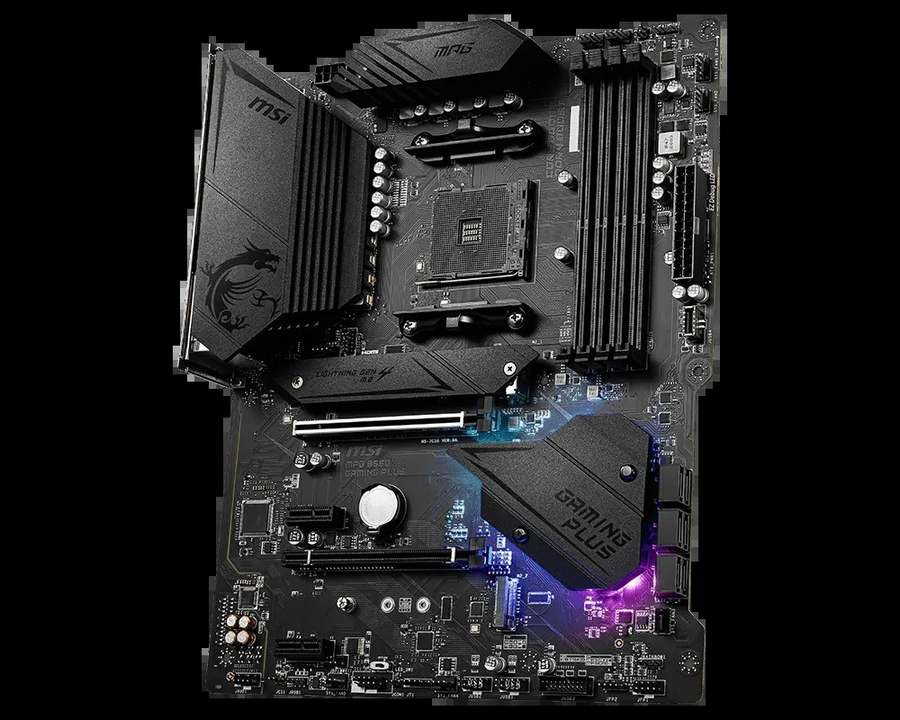
MSI MPG B550 Gaming Plus
- 10+2+1 Duet Rail VRM, extended heatsink, 8+4-pin CPU power
- Single Realtek gigabit LAN (RTL8111H)
- Realtek ALC892 audio, optical S/PDIF output included
- Dual M.2 (Gen4 x4 + Gen3 x4); Shield Frozr heatsink on slot 1
- Four rear USB 2.0 ports; pre-installed I/O shield
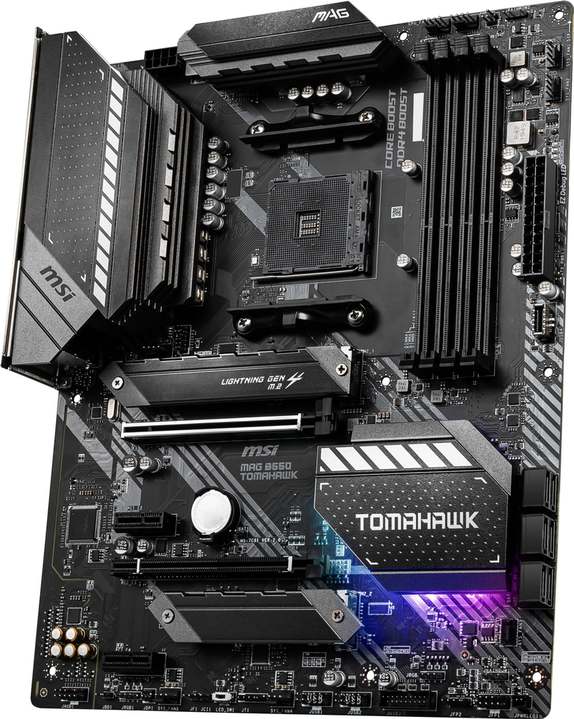
MSI MAG B550 Tomahawk
- 10+2+1 Duet Rail VRM built on 60A Smart Power Stages
- Dual LAN: 2.5 GbE (RTL8125B) plus a gigabit port
- Realtek ALC1200 audio with optical S/PDIF output
- Heatsinks over both M.2 slots; 5100+ MT/s memory rating
- Eight 4-pin fan headers for larger cooling setups
Choose the MPG B550 Gaming Plus if…
The parts list is finished. Mid-range Ryzen, one graphics card, an internet connection that gigabit Ethernet already saturates.
You would rather the saving went somewhere visible — a larger SSD, a second memory kit, a quieter cooler.
Or the build is a showpiece. The dragon-etched heatsink and MPG lighting presentation are this board’s home turf.
Choose the MAG B550 Tomahawk if…
A Ryzen 9 sits in the build today, or in the upgrade plan taped to the wall. Your desk already feeds a NAS, a home server or a multi-gig switch.
You listen through proper headphones wired to the rear panel. You expect a second SSD and an expansion card to coexist without negotiation.
As an Amazon Associate I earn from qualifying purchases at no extra cost to you.
Specifications: The Specs That Actually Matter
Each figure below comes from MSI’s published specification pages, datasheets and user manuals for these two boards.
Because the platform underneath is shared, the table spends its rows where the hardware actually diverges. Two production-variant notes follow it — read them before quoting an audio or memory figure from this page.
| Specification | MSI MPG B550 Gaming Plus | MSI MAG B550 Tomahawk |
|---|---|---|
| Form factor | ATX, 30.5 × 24.4 cm | ATX, 30.5 × 24.4 cm |
| Socket / chipset | AMD AM4 / B550 | AMD AM4 / B550 |
| CPU support | Ryzen 5000, 5000 G, 4000 G, 3000 series — not 3400G / 3200G | Ryzen 5000, 5000 G, 4000 G, 3000 series — not 3400G / 3200G |
| VRM design | 10+2+1 Duet Rail, discrete MOSFETs, extended heatsink, 8+4-pin CPU power | 10+2+1 Duet Rail, 60A Smart Power Stages, digital PWM, extended heatsink, 8-pin CPU power |
| Memory | 4 × DDR4 DIMM, up to 128 GB, 4400+ MT/s (O.C.), A-XMP | 4 × DDR4 DIMM, up to 128 GB, 5100+ MT/s (O.C.), A-XMP |
| Graphics outputs (APU) | HDMI + DisplayPort | HDMI + DisplayPort |
| Expansion slots | PCIe 4.0 x16 + PCIe 3.0 x16 (x4) + 2 × PCIe 3.0 x1 | PCIe 4.0 x16 + PCIe 3.0 x16 (x4) + 2 × PCIe 3.0 x1 |
| M.2 storage | 2 slots: PCIe 4.0 x4 (CPU) + PCIe 3.0 x4 (chipset); heatsink on slot 1 only | 2 slots: PCIe 4.0 x4 / SATA (up to 22110) + PCIe 3.0 x4; heatsinks on both slots |
| SATA | 6 × SATA 6 Gb/s, RAID 0/1/10 | 6 × SATA 6 Gb/s, RAID 0/1/10 |
| LAN | Realtek RTL8111H, 1 Gb/s (single port) | Realtek RTL8125B 2.5 Gb/s + RTL8111H 1 Gb/s (dual ports) |
| Audio | Realtek ALC892, 7.1 HD, Audio Boost, optical S/PDIF out | Realtek ALC1200, 7.1 HD, Audio Boost, optical S/PDIF out |
| USB (rear) | 2 × USB 3.2 Gen 2 (Type-A + Type-C), 2 × Gen 1, 4 × USB 2.0 | 2 × USB 3.2 Gen 2 (Type-A + Type-C), 2 × Gen 1, 2 × USB 2.0 |
| USB (front headers) | USB 3.2 Gen 1 Type-C header + Gen 1 header + 2 × USB 2.0 headers | USB 3.2 Gen 1 Type-C header + Gen 1 header + 2 × USB 2.0 headers |
| Fan headers | 6 × 4-pin (CPU, pump, 4 × system) | 8 × 4-pin (CPU, pump, 6 × system) |
| BIOS flashing | Flash BIOS Button (no CPU/RAM/GPU needed) | Flash BIOS Button (no CPU/RAM/GPU needed) |
Variant notes: MSI’s current spec summaries print a codec pair for each board — “ALC892/ALC897” for the Gaming Plus, “ALC1200/ALC1220P” for the Tomahawk — because production runs have shipped with either chip fitted. This guide quotes the launch codecs (ALC892 and ALC1200); independent teardowns of retail Tomahawks confirm the ALC1200 in the wild.
The Tomahawk’s memory rating has moved during its production life, from 4866+ MT/s in the launch datasheet to 5100+ on the current product page. We quote the current figure. Either way, it stands well clear of the Gaming Plus’s 4400+ ceiling.
The Differences That Actually Matter
1. Networking — the widest gap on the page
Begin where the boards are furthest apart. The Tomahawk’s rear panel carries two Ethernet sockets: a Realtek RTL8125B capable of 2.5 Gb/s, and a standard gigabit port alongside it.
The Gaming Plus stops at one gigabit port, driven by the older RTL8111H. There is no faster option and no spare.
Fairness first: a PC plugged into an ordinary broadband router uses a fraction of one gigabit port. For that owner, this entire section is theoretical, and both boards network identically in practice.
The equation changes the day anything faster joins the network. A NAS finally feeding files at the speed its drives allow. A second PC on a direct cable. A home server that the main rig administers. A spare port when — not if — a cable or switch port starts dropping packets at midnight.
Adding networking afterwards costs a PCIe card and a slot. Section 3 explains why slots on the Gaming Plus are already spoken for. The Tomahawk’s owner never has that conversation.
2. Power delivery — same headline, different hardware
Both boxes advertise a 10+2+1 Duet Rail power design. A buyer comparing headlines concludes the VRMs are equal. They are not.
A phase count describes how many stages share the work. It is silent about the stages themselves. MSI builds the Tomahawk’s stages as 60-amp Smart Power Stages — integrated units that switch efficiently and report their own temperature — under a digital PWM controller.
The Gaming Plus reaches the same count with discrete MOSFETs, the traditional and cheaper construction. Competent components, honestly applied, a class below in efficiency and thermal behaviour.
At Ryzen 5 and Ryzen 7 power levels, the distinction stays invisible. Both boards feed those chips cleanly, indefinitely.
Push a Ryzen 9 into hours of all-core rendering or compiling and the Tomahawk’s stages hold their composure with room to spare, while the discrete design runs hotter doing identical work. Headroom, not day-one performance, is the product being sold.
One apparent contradiction deserves clearing up before it misleads anyone. The Gaming Plus accepts an 8+4-pin CPU power feed; the Tomahawk, a single 8-pin.
Connector count is not a strength rating. A lone 8-pin EPS feed delivers several times the current any AM4 processor can draw at sane voltages. MSI fitted the second connector to the cheaper board as belt-and-braces — the Tomahawk’s stages simply never required one.
Read a VRM by its power stages and its heatsink. On both counts, this section belongs to the Tomahawk.
3. Storage — a tie, until the second drive arrives
The layouts open identically: a CPU-fed M.2 slot at PCIe 4.0 x4, a chipset M.2 at PCIe 3.0 x4, and six SATA ports with RAID 0/1/10 on each board.
Measured by loading screens and copy speeds, there is nothing between them. There never will be. The differences live in the fittings and in one footnote of the Gaming Plus manual.
Fittings first. MSI heatsinks both Tomahawk M.2 slots, so a hard-worked game drive gets cooling instead of bare silicon. The first slot also swallows 22110-length drives — an unusual format, offered free.
The Gaming Plus reserves its M.2 Shield Frozr heatsink for the primary slot. A second drive mounts uncovered, which most SSDs tolerate and fast ones under long writes would rather not.
Now the footnote, and it is the most consequential paragraph in this guide for anyone planning expansion. On the Gaming Plus, M.2_2 shares its lanes with the x4 expansion slot.
Install a second M.2 drive and PCI_E3 is switched off completely. The slot remains physically present and electrically dead.
The Tomahawk’s manual carries a milder rule of the same kind. Its x4 slot only drops out at maximum occupancy — second M.2 fitted and both small slots populated together. An ordinary two-drive, one-card build never triggers it.
Practical summary: a single SSD and no add-in cards, the boards tie. Two SSDs beside a capture card, sound card or network card — the Gaming Plus cannot host that PC. The Tomahawk can.
4. Memory — a ceiling most owners will never touch
Capacity and convenience are shared: four DIMM slots, 128 GB maximum, A-XMP profiles waiting in the BIOS of each board.
The published ceilings part company. MSI validates the Tomahawk to 5100+ MT/s with overclocked memory; the Gaming Plus is rated to 4400+.
For the 3200 and 3600 MT/s kits that fill most AM4 machines, this changes nothing at all, and we will not pretend it does.
Where the higher ceiling earns its mention is as evidence. Sustaining four sticks or high-frequency kits at speed is a test of trace layout and BIOS training, and a board validated further has demonstrated more of both. Memory tweakers and Ryzen 9 owners populating every slot are the audience; everyone else can treat the gap as a tie-breaker, not a reason.
As always on this platform, the processor’s own memory controller casts the deciding vote. Headline figures are overclocking ratings on both boards.
5. Audio — one codec tier, honestly weighed
MSI’s Audio Boost treatment wraps both boards, and both include an optical S/PDIF output for receivers and soundbars — a clean tie on connectivity.
The codecs differ by a tier. The Tomahawk’s ALC1200 is the cleaner Realtek part, with better analogue output quality feeding the rear jacks. The Gaming Plus’s ALC892 is the range’s workhorse: respectable, ubiquitous, unremarkable.
What reaches your ears depends on the rest of the chain. Basic headsets and ordinary desktop speakers flatten the difference into nothing.
Quality headphones or powered monitors reveal it. Builders assembling an audio chain around the motherboard should start from the Tomahawk’s output.
Already running an external USB DAC? Then both codecs sit bypassed, this section scores itself a draw, and the decision falls back to networking, power and slots.
6. Cooling connections — two headers of breathing room
Neither chipset needs a fan; B550’s passive heatsink remains a quiet virtue of the platform, and both boards are built on 2 oz copper PCBs.
The fan-header count is where the boards separate. The Tomahawk provides eight 4-pin headers: CPU, pump and six system connections.
The Gaming Plus stops at six headers in total — CPU, pump and four system fans. A typical mid-tower build fits inside that budget comfortably.
The pressure arrives later, as cooling ambitions grow — a radiator in push-pull, extra intake fans, a larger case. Splitters and hubs are the usual workaround; two native spare headers are the elegant one. The Tomahawk simply starts with more room.
7. Rear panel and presentation — the Gaming Plus strikes back
One row of the spec table belongs outright to the cheaper board. Its rear panel fits four USB 2.0 ports against the Tomahawk’s two, beside the same pair of 10 Gb/s USB 3.2 Gen 2 sockets (one Type-A, one Type-C) and two Gen 1 ports found on both.
Keyboards, mice, wireless dongles, printer cables: legacy ports accumulate occupants faster than spec sheets predict, and two spares are a genuine daily convenience. The front-panel header sets, Type-C included, are identical.
Presentation splits along badge lines. The Gaming Plus arrives with its I/O shield pre-installed, an EZ LED Control switch for killing the lights from the board, and the full dragon-and-RGB MPG wardrobe.
The Tomahawk answers with gunmetal restraint. Behind tempered glass, which board looks expensive is a question of taste, and taste is the one specification we refuse to score.
Stand back and the pattern resolves. The Gaming Plus wins on price, legacy ports and theatre. The Tomahawk wins on the components a future upgrade cannot replace. That single sentence is this comparison in miniature.
CPU Pairing Guide
Pick the processor first and the motherboard argument mostly settles itself. The whole comparison, compressed into a single table:
| Your processor | MPG B550 Gaming Plus | MAG B550 Tomahawk | Our call |
|---|---|---|---|
| Ryzen 5 5600 / 5500 | Excellent | Excellent | Gaming Plus — spend the saving on the GPU |
| Ryzen 5 5600G / 5700G (APU) | Excellent — HDMI + DisplayPort | Excellent — HDMI + DisplayPort | Either; Gaming Plus on price |
| Ryzen 7 5700X / 5800X | Very good | Excellent — 60A stages, larger heatsink | MAG B550 Tomahawk |
| Ryzen 9 5900X / 5950X | Workable at stock | Very good — the sensible choice of the two | Tomahawk; sustained all-core pros should look higher still |
| Ryzen 3000 series | Excellent | Excellent | Whichever is cheaper on the day |
One exclusion covers both boards, and it catches people out. B550 dropped support for the Ryzen 5 3400G and Ryzen 3 3200G, and no Ryzen 2000 chip is welcome either. If your processor is one of those, skip to “When to Skip Both” — the answer is an earlier chipset generation, not a board on this page.
The 30-Second Decision
| If this sounds like you… | Buy this |
|---|---|
| “No lecture. Which board is better?” | MAG B550 Tomahawk |
| “Ryzen 9 power now, or as a later upgrade.” | MAG B550 Tomahawk (60A power stages) |
| “There is a NAS or a fast switch in my network.” | MAG B550 Tomahawk (2.5 GbE + spare port) |
| “Two NVMe drives, and a card in the x4 slot as well.” | MAG B550 Tomahawk — the Gaming Plus disables that slot |
| “Ryzen 5, one graphics card, gigabit router, tight budget.” | MPG B550 Gaming Plus |
| “The Gaming Plus is heavily discounted this week.” | Defensible — simple builds will never feel the gap |
Ready to check today’s price?
Both boards sell through Amazon. Prices move, so check the live figure on the board that fits your build.
View on Amazon — MPG B550 Gaming PlusView on Amazon — MAG B550 TomahawkWhat You Gain. What You Give Up.
MSI MPG B550 Gaming Plus
You gain: the full B550 platform for less money — PCIe 4.0 graphics, two M.2 slots, four DIMM slots and the front USB-C header all intact. Plus four rear USB 2.0 ports, an 8+4-pin power feed, a factory-fitted I/O shield and the dragon-lit MPG presentation.
You give up: the 60-amp power stages. Any networking beyond a single gigabit port. A tier of onboard audio. A heatsink for your second SSD — and, once that SSD is installed, the x4 expansion slot along with it.
MSI MAG B550 Tomahawk
You gain: growth room in every direction — flagship-grade power delivery, a 2.5-gigabit port beside a spare gigabit one, the ALC1200 codec, cooled slots for both SSDs, the higher memory ceiling and two extra fan headers.
You give up: a portion of budget, because it normally sells above its sibling. Two rear USB 2.0 ports. And a second EPS connector that its power stages never needed in the first place.
Pros and Cons
MPG B550 Gaming Plus — Pros
- The cheaper route into an identical slot and storage layout
- Four rear USB 2.0 ports for peripherals
- 8+4-pin CPU power feed
- I/O shield pre-installed; EZ LED Control switch
- Optical S/PDIF output, same as the Tomahawk
Cons
- One gigabit LAN port — no 2.5 Gb/s, no backup
- Discrete-MOSFET VRM behind the shared 10+2+1 headline
- A second M.2 SSD disables the x4 expansion slot
- ALC892 audio sits a tier below
- Memory rating stops at 4400+ MT/s
- No Wi-Fi
MAG B550 Tomahawk — Pros
- 60A Smart Power Stages — genuine Ryzen 9 headroom
- Dual LAN with a 2.5 Gb/s port
- ALC1200 audio with optical S/PDIF
- Heatsinks on both M.2 slots; 22110 support
- 5100+ MT/s memory ceiling; eight fan headers
Cons
- Costs more than the Gaming Plus
- Single 8-pin CPU power — adequate, but plain-looking
- Only two rear USB 2.0 ports
- More board than a basic Ryzen 5 build requires
- No Wi-Fi — same as the Gaming Plus
Before You Order: Names, Codecs and Box Contents
Decode the name first. This article exists because “MPG B550” is a search term, not a model number. Within the MPG family, the unqualified name belongs to the Gaming Plus; its siblings carry qualifiers — Gaming Edge WiFi and Gaming Carbon WiFi — and include wireless hardware this board does not have.
A listing advertising an “MPG B550” with Wi-Fi at a Gaming Plus price is describing one of those siblings, or describing this board wrongly. Either way, confirm the full model name before paying.
Watch the Tomahawk side of the shelf too. The B550 Tomahawk MAX WiFi is a later, different motherboard with Wi-Fi 6E aboard and a price to match; antenna stubs in a product photo are the giveaway. This comparison covers the original MAG B550 Tomahawk, which is Ethernet-only.
The B450 Tomahawk Max is one generation older — a fine used buy that lacks PCIe 4.0 entirely. And anyone shopping for a small case should note the MAG B550M Mortar: the letter M moves the whole discussion to micro-ATX.
Check the codec if audio is your decider. As the variant note under the spec table explains, production runs of each board have shipped with one of two codec chips. The pecking order between the boards survives either draw, but the codec is printed on the PCB, and a seller can verify it on request.
Do not pay extra for a BIOS sticker. Both rear panels carry MSI’s Flash BIOS Button, which updates firmware with no CPU, memory or graphics card installed. An older boxed board is no barrier to a Ryzen 5000 build, and “5000 Ready” labelling should not add a penny to what you pay.
Know what arrives in the box. Board, SATA cables, M.2 screws and documentation is the standard for both. The Gaming Plus spares you one small ritual: its I/O shield leaves the factory already fitted. Neither box contains antennas, because neither board could use them.
The Upgrade Path Test
Every future component has to ask the motherboard’s permission. That is the right frame for judging this pair.
Day one flatters both equally. A mid-range Ryzen and a single graphics card perform identically on either board; no benchmark screenshot will ever betray which one is underneath.
Ownership, though, is a sequence of small ambitions. A flagship CPU bought cheap in a sale. A game library that outgrows its drive. A network that gets a faster switch. A capture card for the project that finally launches.
The Tomahawk was specified for that sequence. Its stages were sized for the flagship. Its fast port is already soldered down. Its second SSD leaves the expansion slot standing.
The Gaming Plus handles the processor step-up within reason, then begins invoicing the rest: the second drive costs the x4 slot, and faster networking costs a card — payable into a slot that may already be gone.
Neither answer is wrong. They are answers to different ownership plans, and the honest move is deciding which plan is yours before the boards decide for you.
When to Skip Both
Some buyers should close this comparison and shop elsewhere entirely. Five profiles, plainly stated:
You need onboard Wi-Fi. Neither board carries a wireless module. MSI builds that requirement into other models — the B550 Tomahawk MAX WiFi and the MPG B550 Gaming Edge WiFi among them.
Your processor is a 3400G, 3200G or any Ryzen 2000. B550 excludes all of them. Keeping the chip means choosing a B450-generation board instead.
Your case is micro-ATX. Both boards here are full ATX. The MAG B550M Mortar class is the correct shelf.
You are moving to DDR5 and PCIe 5.0. That is AM5 territory, and no B550 board — however well specified — bridges the gap.
You plan heavy daily overclocking on a Ryzen 9. Step up to flagship X570 power delivery, a class above both boards compared here.
Everyone outside those five descriptions is choosing between the two boards above — which is to say, most AM4 builders.
BIOS and Long-Term Support
Maturity is a feature, and this platform has it in full. AM4’s BIOS code, drivers and compatibility quirks were ironed out years ago, mostly at other people’s expense.
MSI supports both boards through its standard product pages: BIOS releases, chipset, LAN and audio drivers, and a CPU support list that answers any processor question definitively. Expect future updates to concern security and edge cases — the correct tempo for a settled platform.
The Flash BIOS Button earns a second mention here because it doubles as insurance. A failed flash or a too-new processor stops being a support ticket and becomes a USB stick and ten minutes of patience.
One habit preserves either board’s good behaviour for years: before installing a new processor, check the support list and update the BIOS first.
Final Verdict
The MSI MAG B550 Tomahawk wins this comparison, and it wins on components.
Wherever the Gaming Plus matches a headline number, the Tomahawk stands behind its own with better hardware: integrated 60A stages in place of discrete MOSFETs, a 2.5-gigabit port in place of a lone gigabit one, the cleaner codec, heatsinks over both SSDs, and a memory ceiling from a higher shelf.
Individually, each edge is modest. Accumulated across years of ownership, they describe the difference between a board a build grows into and a board it grows out of.
Buy the Gaming Plus when the price gap is meaningful and the build is genuinely finished: mid-range Ryzen, one graphics card, gigabit networking, no expansion card on the roadmap. It is a fair board at a fair price — bought knowingly, with the compromises itemised above.
View on Amazon — MPG B550 Gaming Plus
Buy the Tomahawk for Ryzen 7 and Ryzen 9 builds, for homes with faster-than-gigabit hardware on the network, for good headphones — and for any PC whose specification is still allowed to change.
View on Amazon — MAG B550 Tomahawk
Frequently Asked Questions
What product does “MPG B550” actually mean?
It is shorthand, not a full model name. MSI’s MPG B550 range contains the Gaming Plus plus two qualified variants — the Gaming Edge WiFi and the Gaming Carbon WiFi. When a listing or a search says simply “MPG B550”, the board meant is the Gaming Plus in this comparison: the only unqualified MPG B550 model. Check for the words Edge or Carbon before assuming wireless is included.
Is the Tomahawk worth its premium over the Gaming Plus?
It is, if any of its advantages intersect with your plans: a Ryzen 9, a NAS or 2.5-gigabit network gear, capable headphones on the rear jacks, or two SSDs alongside an expansion card. If none of those apply — a Ryzen 5 build on gigabit internet is the common case — the premium purchases headroom you may never spend, and the Gaming Plus is the sensible buy.
The VRM headline is identical. Is the power delivery identical too?
No. Both layouts read 10+2+1 Duet Rail, but the Tomahawk’s phases are 60A Smart Power Stages run by a digital controller, while the Gaming Plus uses discrete MOSFETs. The count matches; the components do not. The practical difference appears under sustained high-core-count loads rather than in everyday gaming.
What exactly happens when I add a second M.2 SSD to the Gaming Plus?
Its x4 expansion slot, PCI_E3, is disabled. MSI’s manual states that M.2_2 shares lanes with that slot, so the second drive and the slot cannot operate together. The Tomahawk’s equivalent restriction only applies at full occupancy, so a normal two-drive build there keeps the x4 slot available.
Which of these boards suits a Ryzen 9 5950X?
The Tomahawk. Its 60-amp stages and larger heatsink were designed with sustained all-core loads in mind, and it is the sensible pick of this pair. The Gaming Plus will run the chip at stock settings, but with less thermal margin — and anyone planning heavy daily overclocking on a 5950X should be looking at flagship X570 boards above both of these.
Is Wi-Fi or Bluetooth built into either board?
Neither. Both are Ethernet-only designs with no wireless module fitted. Builders who need onboard wireless should look at the B550 Tomahawk MAX WiFi or the MPG B550 Gaming Edge WiFi, or budget for a PCIe Wi-Fi card — bearing in mind the Gaming Plus’s slot-sharing rule if a second SSD is also planned.
Can I update the BIOS before installing a processor?
Yes, on both boards. Each rear panel has MSI’s Flash BIOS Button: supply power, insert a USB stick holding the firmware, and press it — no CPU, memory or graphics card is required. It removes any worry about a boxed board shipping with firmware older than a Ryzen 5000 processor.
Will my Ryzen 5 3400G work in one of these?
It will not work in either. The 3400G and 3200G are excluded from B550 support, as is the entire Ryzen 2000 series. The supported families are the Ryzen 3000 series apart from those two APUs, the 4000 G-Series, and the Ryzen 5000 and 5000 G-Series. MSI’s CPU support list for each board gives the definitive answer per chip.
Sources & Verification
MSI MPG B550 GAMING PLUS official specifications and datasheet (storage-asset.msi.com) • MSI MAG B550 TOMAHAWK official specifications, datasheet and user manual • MSI manufacturer product data via Scan UK (Gaming Plus power design) • Independent reviews of the MAG B550 Tomahawk (Tom’s Hardware, KitGuru) for the fitted audio codec. Specifications verified November 2026.

James Wilson
James has been building and benchmarking PCs for over a decade and writes Honestly Compared’s motherboard and component guides. His rule for every comparison: the verdict has to survive the spec sheet, not the marketing page.