
MSI MPG X570 Gaming Edge WiFi vs MSI MPG X570 Gaming Plus: Which Should You Buy?
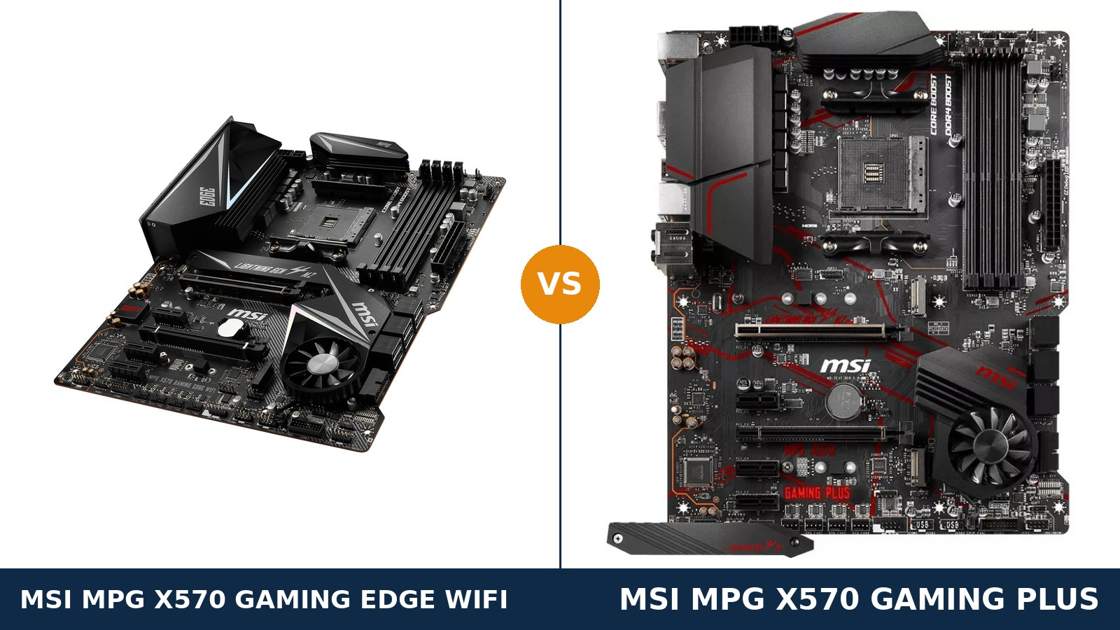
Here is a comparison with a twist: underneath the heatsinks, these are effectively the same motherboard.
MSI built the MPG X570 Gaming Edge WiFi and the MPG X570 Gaming Plus on one shared board design. Same X570 chipset. Same power delivery. Same slots, same storage, same audio, same wired networking.
So why do two products exist? Because the Edge adds the things the Plus leaves off: onboard Wi-Fi and Bluetooth, a faster rear USB mix, and a pre-installed I/O shield. The Plus answers with a lower price for the identical platform.
That makes this a simpler decision than most — but not a trivial one. The Wi-Fi MSI fitted is old and slow. The price gap decides whether it is worth having at all. This guide works through both, using MSI's own published specifications throughout.
Key Takeaways
- The platform is identical. Same VRM design, same PCIe 4.0 slots, same M.2 and SATA layout, same ALC1220 audio, same gigabit LAN.
- The Edge WiFi's only real hardware addition is wireless — Intel Wi-Fi 5 with Bluetooth 4.2. Useful, but it is a basic 1×1 radio, not a fast one.
- The Edge also wins the rear panel: four USB 3.2 Gen 2 ports against the Plus's two, plus a pre-installed I/O shield.
- The Gaming Plus is the value pick. If you wire your PC with a cable, you give up almost nothing by saving the money.
- Neither board is a Ryzen 9 overclocking board. The shared VRM is honest mid-range hardware — fine at stock, not built for pushing 16 cores.
Quick Verdict
Buy the MSI MPG X570 Gaming Edge WiFi if you need wireless, or if the price gap is small. It is the more complete board.
You get everything the Plus has, plus Wi-Fi and Bluetooth on the board, twice as many high-speed USB ports on the rear panel, and an I/O shield that is already fitted. Nothing about the core platform is compromised.
Buy the MSI MPG X570 Gaming Plus if your PC lives next to the router. On a wired connection it is the same motherboard where it counts.
Same power delivery for your processor. Same graphics and storage bandwidth. Same audio. The money you save buys memory, storage, or a better graphics card — things you will actually feel.
The Scorecard
Scores below are derived directly from the manufacturer specifications compared in this guide — slot counts, port counts, wireless hardware and supported standards. They are a reading aid, not benchmark results.
| Category | X570 Gaming Edge WiFi | X570 Gaming Plus | ||
|---|---|---|---|---|
| Power delivery | 7 / 10 | 7 / 10 | ||
| Expansion | 8 / 10 | 8 / 10 | ||
| Storage | 9 / 10 | 9 / 10 | ||
| Memory | 9 / 10 | 9 / 10 | ||
| Networking & wireless | 7 / 10 | 5 / 10 | ||
| USB connectivity | 8 / 10 | 7 / 10 | ||
| Audio | 9 / 10 | 9 / 10 | ||
| Overall | 8.1 / 10 | 7.6 / 10 | ||
Read the tied rows first. They are the story. The Edge's overall lead comes from exactly two categories: wireless and USB. Everything a processor, graphics card or SSD can touch is shared hardware.
At a Glance: Who Each Board Fits
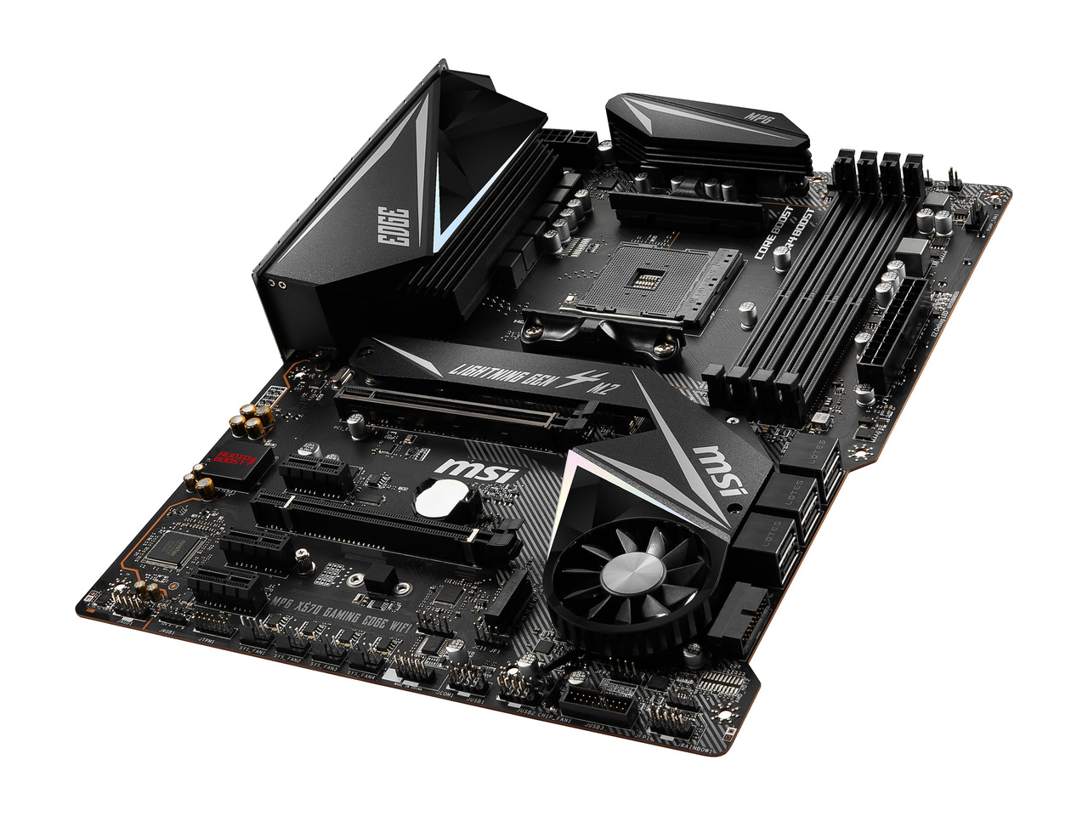
MSI MPG X570 Gaming Edge WiFi
- Onboard Intel Wi-Fi 5 (802.11ac) and Bluetooth 4.2
- Four rear USB 3.2 Gen 2 ports (3× Type-A + Type-C)
- Pre-installed I/O shield
- Same X570 platform: PCIe 4.0 x16, Gen4 M.2, 6× SATA
- Realtek ALC1220 audio with optical S/PDIF output
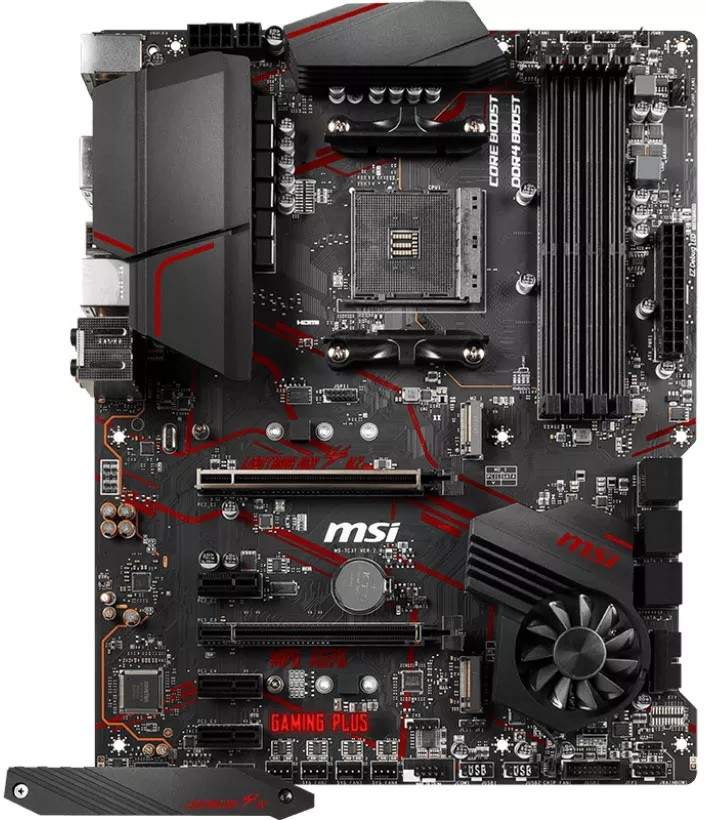
MSI MPG X570 Gaming Plus
- The same board design, minus the wireless module
- Two rear USB 3.2 Gen 2 ports, four Gen 1 ports
- Same X570 platform: PCIe 4.0 x16, Gen4 M.2, 6× SATA
- Realtek ALC1220 audio with optical S/PDIF output
- Usually the cheaper way onto the identical platform
Choose the Gaming Edge WiFi if…
Your PC cannot reach the router with a cable. Or it moves between rooms, desks or houses often enough that onboard wireless earns its place.
You use Bluetooth peripherals — controllers, headsets, keyboards — and want them handled by the board, not a dongle.
Or the price gap on the day you order is small. At near-parity, the Edge's extras are simply free features.
Choose the Gaming Plus if…
Your build is wired, permanently. An Ethernet cable delivers everything this board's gigabit port can use, and the Wi-Fi would sit idle forever.
You would rather put the saving into a faster SSD or a bigger memory kit. On this platform, that trade is real performance for features you will not use.
Or you plan to add a proper Wi-Fi 6 or 6E card later. The Plus has three PCIe x1 slots waiting, and a modern add-in card beats the Edge's ageing radio outright.
As an Amazon Associate I earn from qualifying purchases at no extra cost to you.
Specifications: The Specs That Actually Matter
Every figure below comes from MSI's published specifications and datasheets for these two models. The table is short on drama for a reason: most rows are shared.
| Specification | MSI MPG X570 Gaming Edge WiFi | MSI MPG X570 Gaming Plus |
|---|---|---|
| Form factor | ATX, 30.5 × 24.4 cm | ATX, 30.5 × 24.4 cm |
| Socket / chipset | AMD AM4 / X570 | AMD AM4 / X570 |
| CPU support | Ryzen 5000, 5000 G, 4000 G, 3000 and 2000 series incl. G-series APUs | Ryzen 5000, 5000 G, 4000 G, 3000 and 2000 series incl. G-series APUs |
| VRM design | Core Boost, IR digital PWM, 8+4-pin EPS connectors | Core Boost, IR digital PWM, 8+4-pin EPS connectors |
| Memory | 4 × DDR4 DIMM, up to 128 GB, 4400+ MT/s (O.C.), A-XMP | 4 × DDR4 DIMM, up to 128 GB, 4400+ MT/s (O.C.), A-XMP |
| Expansion slots | 2 × PCIe 4.0 x16 (x16 or x8/x8), 3 × PCIe 3.0 x1, CrossFire | 2 × PCIe 4.0 x16 (x16 or x8/x8), 3 × PCIe 3.0 x1, CrossFire |
| M.2 storage | 2 slots: PCIe 4.0 x4 (22110) + PCIe 3.0 x4 / SATA (2280), M.2 Shield Frozr | 2 slots: PCIe 4.0 x4 (22110) + PCIe 3.0 x4 / SATA (2280), M.2 Shield Frozr |
| SATA | 6 × SATA 6 Gb/s, RAID 0/1/10 | 6 × SATA 6 Gb/s, RAID 0/1/10 |
| LAN | Realtek RTL8111H Gigabit | Realtek RTL8111H Gigabit |
| Wireless | Intel Wireless-AC 3168: Wi-Fi 5 1×1 (up to 433 Mb/s), Bluetooth 4.2 | None fitted |
| Audio | Realtek ALC1220, Audio Boost 4, 5 jacks + optical S/PDIF | Realtek ALC1220, Audio Boost 4, 5 jacks + optical S/PDIF |
| USB (rear) | 3× USB 3.2 Gen 2 Type-A, 1× Gen 2 Type-C, 2× Gen 1, 2× USB 2.0 | 1× USB 3.2 Gen 2 Type-A, 1× Gen 2 Type-C, 4× Gen 1, 2× USB 2.0 |
| Display output (APU) | HDMI — requires processor graphics | HDMI — requires processor graphics |
| I/O shield | Pre-installed | Separate shield, fitted during install |
| BIOS flashing | Flash BIOS Button (no CPU/RAM/GPU needed) | Flash BIOS Button (no CPU/RAM/GPU needed) |
A note on the VRM: MSI does not publish a phase count for either board, and we will not invent one. Both models share MSI's 7C37 board family and the same Core Boost power design — independent teardowns of that design show a doubled discrete layout rather than true high-phase power. Treat both boards identically here: comfortable with Ryzen 5 and Ryzen 7, adequate for a stock Ryzen 9, and not the tool for heavy all-core overclocking.
A note on generations: PCIe 4.0 speeds need a Ryzen 3000 or 5000 processor (excluding the G-series APUs, which run PCIe 3.0). Fit a Ryzen 2000 chip and the slots and first M.2 fall back to PCIe 3.0 — on both boards equally.
The Differences That Actually Matter
1. One board, two products — the shared foundation
Start with what is not different, because it is most of the motherboard.
Both boards carry MSI's 7C37 design lineage: the same PCB layout, the same X570 chipset with the same Frozr fan heatsink, the same slot arrangement, the same storage wiring, the same audio section, the same LAN chip. Even the BIOS family and support pages mirror each other.
This matters for one practical reason. Anything you read about the platform behaviour of one board — memory compatibility, BIOS maturity, chipset fan behaviour, lane layout — applies to the other.
It also means the performance question is already answered. Same processor, same memory kit, same graphics card? Same performance. The choice between these two is purely about features and price.
2. Wi-Fi and Bluetooth — the Edge's headline, with an honest asterisk
The Gaming Edge WiFi fits an Intel Wireless-AC 3168 module. It provides Wi-Fi 5 (802.11ac) and Bluetooth 4.2, with a pair of antenna connectors on the rear panel and antennas in the box.
Now the asterisk. This is a 1×1 radio with a maximum link rate of 433 Mb/s. It is the most basic wireless hardware MSI fitted to any X570 board — the Pro Carbon model above it got a far faster Wi-Fi 6 module.
What is it good for? Plenty, honestly. Web, downloads, cloud saves, online gaming when a cable is impossible, Bluetooth controllers and headsets. For a PC that simply needs to be online without a cable run, it does the job and it costs you no slots.
What is it not good for? Fast local network transfers. If you move large files to a NAS, a modern Wi-Fi 6 card in one of the Plus's spare x1 slots will outrun it comfortably. Judge the Edge's wireless as a convenience feature, not a performance feature.
The Plus, to be clear, has no wireless hardware and no Key-E slot to add MSI's module later. Your upgrade routes are a PCIe x1 card — the better option — or a USB dongle.
3. The rear panel — same port count, different speed mix
Both boards put eight USB ports on the rear panel. The difference is the recipe.
The Edge wires four of them at USB 3.2 Gen 2 speed (10 Gb/s): three Type-A and one Type-C. The Plus wires only two at Gen 2 — one Type-A, one Type-C — and fills the rest with Gen 1 ports.
Total USB across the whole board is sixteen ports on each. The front-panel headers are identical too: USB 3.2 Gen 1 and USB 2.0 headers, four ports each.
Who cares? Anyone plugging fast external storage, a capture device or a high-speed dock directly into the back of the PC. That is exactly where Gen 2 ports belong, and the Edge has twice as many.
One shared limitation, stated plainly: neither board has a front-panel USB Type-C header. A case with a front USB-C port leaves it unconnected on both. At this level of the X570 range, that was the standard compromise.
4. Storage — a genuine tie, down to the lane wiring
Storage is identical in every particular that matters.
Both boards: a CPU-connected M.2 slot at PCIe 4.0 x4 that accepts drives up to 22110 length. A second chipset M.2 at PCIe 3.0 x4 that also accepts SATA M.2 drives. Six SATA ports with RAID 0, 1 and 10.
Both fit MSI's M.2 Shield Frozr heatsink over the primary slot. Both cool the X570 chipset with the same Frozr fan heatsink, with a zero-speed mode at low load.
There is no storage argument for either board. Buy your SSD for the drive's own merits; either of these will run it at full speed.
5. Power delivery — a tie, and a shared ceiling
Both boards use the same Core Boost design: IR digital PWM control, an extended VRM heatsink, and 8+4-pin EPS power connectors.
MSI publishes no phase count, and the honest description from teardowns of this shared design is a doubled discrete layout — a cost-conscious approach that reviewers noted when X570 launched.
Practical translation: Ryzen 5 and Ryzen 7 processors run at full stock performance, indefinitely. A Ryzen 9 runs at stock too, and that is the sensible limit of the design.
If your plan is a 5950X with sustained all-core overclocking, neither of these is your board. Look up the range, not across it. Within this comparison, power delivery scores a draw — and it should not drive your decision in either direction.
6. Audio and wired networking — flagship codec, basic LAN, both boards
Audio is a shared strength. Both boards run Realtek's ALC1220 codec under MSI's Audio Boost 4 design, with five rear jacks and an optical S/PDIF output.
That is a genuinely good onboard audio package for this class — clean output for headsets and powered speakers, and a digital output for an external DAC or receiver. Neither board gives you anything the other lacks.
Wired networking is the shared compromise. Both use Realtek's RTL8111H gigabit controller — reliable, universal, and limited to 1 Gb/s.
There is no 2.5-gigabit option on either board. If fast wired networking to a NAS matters to you, both boards need the same answer: a network card in a spare slot.
7. Building experience — the small Edge refinements
The last differences appear at build time rather than in the spec table.
The Edge's I/O shield is pre-installed. It sounds trivial until you have finished a build and spotted the forgotten shield still in the box — on the Plus, with its separate shield, that classic mistake is still available to you.
The Edge also carries onboard RGB accent lighting along its chipset heatsink and board edge, driven by Mystic Light. The Plus wears red accent printing instead and leaves lighting to its headers.
Everything else about building is shared: Flash BIOS Button on the rear panel of both, EZ Debug LEDs on both, the same header layout from the same board design. Neither board will fight you.
CPU Pairing Guide
Because the boards share a power design and a CPU support list, this table is mostly about your wider build. The boards only separate where wireless or budget enters the picture.
| Your processor | Gaming Edge WiFi | Gaming Plus | Our call |
|---|---|---|---|
| Ryzen 9 5950X / 5900X | Workable at stock — VRM is the ceiling | Workable at stock — VRM is the ceiling | Either; consider a stronger board for overclocking |
| Ryzen 7 5800X3D / 5800X / 5700X | Excellent | Excellent | Whichever fits budget and cabling |
| Ryzen 5 5600X / 5600 / 5500 | Excellent | Excellent | Gaming Plus, and spend the saving elsewhere |
| Ryzen 5 5600G / 5700G (APU) | Good — HDMI output only, PCIe 3.0 graphics | Good — HDMI output only, PCIe 3.0 graphics | Either board; a B550 board may suit better |
| Ryzen 3000 series | Excellent — native PCIe 4.0 | Excellent — native PCIe 4.0 | Whichever is cheaper |
| Ryzen 2000 series / 3400G / 3200G | Supported — platform runs at PCIe 3.0 | Supported — platform runs at PCIe 3.0 | Either; X570's Gen4 advantage goes unused |
One support note applies to both boards: a board from early stock may need a BIOS update before a Ryzen 5000 processor will boot. The Flash BIOS Button on both rear panels does that update with no processor installed at all, so it is a ten-minute job, not a blocker.
Ready to check today’s price?
Both boards sell through Amazon. Prices move, so check the live figure on the board that fits your build.
View on Amazon — X570 Gaming Edge WiFiView on Amazon — X570 Gaming PlusThe 30-Second Decision
| If this sounds like you… | Buy this |
|---|---|
| “No Ethernet where my PC lives — I need Wi-Fi on the board.” | Gaming Edge WiFi |
| “Wired desk setup, and I'd rather spend on the SSD.” | Gaming Plus |
| “Bluetooth controller and headset, no dongles wanted.” | Gaming Edge WiFi |
| “I move fast drives between PCs on rear USB.” | Gaming Edge WiFi (four Gen 2 ports) |
| “I'll add a proper Wi-Fi 6E card later if I ever need it.” | Gaming Plus (spare x1 slots ready) |
| “The two are priced the same today.” | Gaming Edge WiFi — the extras cost nothing |
What You Gain. What You Give Up.
MSI MPG X570 Gaming Edge WiFi
You gain: wireless and Bluetooth fitted on the board, with antennas in the box. Four high-speed USB ports on the rear panel instead of two. A pre-installed I/O shield and onboard RGB accents. The complete version of this board design.
You give up: the price difference — and that is the whole list. Just know the Wi-Fi is a basic 433 Mb/s radio: a convenience, not a flagship feature.
MSI MPG X570 Gaming Plus
You gain: the identical platform — same performance for every processor, graphics card and SSD — at the lower price. Four rear Gen 1 USB ports suit keyboard-and-mouse-heavy desks, and the spare x1 slots leave room for a faster wireless card than the Edge's built-in radio.
You give up: onboard wireless entirely, two of the rear Gen 2 ports, and the pre-installed shield. Every loss is a convenience feature; none of them touches performance.
Pros and Cons
Gaming Edge WiFi — Pros
- Wi-Fi and Bluetooth fitted — no slots or dongles used
- Four rear USB 3.2 Gen 2 ports
- Pre-installed I/O shield
- Full shared platform: Gen4 M.2, 6 SATA, ALC1220 + optical
- Onboard RGB accents with Mystic Light
Cons
- Wi-Fi is 1×1 Wi-Fi 5 — slow by modern standards
- Bluetooth is the older 4.2 standard
- Costs more for the same core performance
- Gigabit LAN only, same as the Plus
Gaming Plus — Pros
- Lowest price onto this exact platform
- Identical VRM, slots, storage and audio
- Three free PCIe x1 slots for future cards
- ALC1220 audio with optical output
- Flash BIOS Button for CPU-less updates
Cons
- No wireless hardware, no Key-E slot
- Only two rear USB 3.2 Gen 2 ports
- Separate I/O shield to fit (and forget)
- Gigabit LAN only
- No onboard RGB lighting
Check the BIOS, the Box and the Name — Not Just the Board
Check the BIOS version. Both boards launched before Ryzen 5000 existed. Stock sitting in a warehouse may carry an early BIOS.
That is not a reason to avoid either board. Both carry MSI's Flash BIOS Button, which updates the BIOS from a USB stick with no CPU, memory or graphics card installed. Confirm the board posts, or flash first and skip the question entirely.
Check the box contents. The Edge's box should include the Wi-Fi antenna — it is the accessory that makes the board's headline feature work, and a used or open-box Edge without it is a Plus with extra connectors.
The Plus's box holds the separate I/O shield, SATA cables and documentation. On both boards, expect the M.2 Shield Frozr heatsink to be part of the board itself.
Check the name twice. MSI reused the Gaming Edge WiFi formula across several ranges. The buying-guide warnings below exist because the wrong-board mistakes with these names are genuinely easy to make.
The Upgrade Path Test
On AM4, both boards share the same upgrade story — and it is a good one.
The socket takes everything from a Ryzen 2000 chip to the 5800X3D. A build that starts on a Ryzen 5 3600 can end on a Ryzen 7 5800X3D with nothing but a BIOS update in between. The Flash BIOS Button makes that update safe at every step.
Storage and memory headroom are shared too: a second M.2 slot, six SATA ports, and four DIMM slots up to 128 GB on both.
Where the paths diverge is connectivity. The Edge owner who later wants faster wireless replaces a fitted module's job with a card anyway. The Plus owner who later wants any wireless adds a card. Either way, the long-term answer is a PCIe card — the Edge simply covers the years before you bother.
Buy the board for the build you have, and the platform will handle the build you grow into. That sentence is true of both, which is precisely the point of this comparison.
When to Skip Both
Honesty cuts both ways. Some builders should pass over this pair entirely.
Skip both if you need fast wireless as a core feature. The Edge's 1×1 Wi-Fi 5 radio is a backup link, not a headline — boards with Wi-Fi 6 exist at this level, including MSI's own Pro Carbon.
Skip both if 2.5-gigabit Ethernet matters. Neither board offers it, and network cards consume the slots you may want elsewhere.
Skip both for a Ryzen 9 overclocking project; the shared VRM design is the ceiling of this price class, and stronger X570 boards exist for that job. And skip both if your case's front USB-C port must work — neither board can connect it.
For the mainstream X570 builder — Ryzen 5 or 7, one fast SSD, a cable or a basic wireless link — one of these two is the right answer, and the decision is genuinely just about wireless and price.
Watch Out: Similar Names, Different Boards
MSI's naming makes this family a trap for the hurried buyer. Four warnings belong in this guide.
First: the MPG X570S Edge MAX WiFi is a different, later board — fanless X570S chipset, Wi-Fi 6E, 2.5G LAN, a stronger VRM. It is not a variant of the Gaming Edge WiFi in this comparison.
Second: the MPG B550 Gaming Edge WiFi shares the name but not the chipset. It is a B550 board — actually with faster Wi-Fi 6 — and a completely different purchase decision.
Third: the MPG X570 Gaming Pro Carbon WiFi sits above both boards here, with Wi-Fi 6 and a different feature set. Do not let a listing blur it into the Gaming Edge WiFi.
Fourth: X570-A Pro is MSI's entry board below the Gaming Plus — no Flash BIOS convenience story, different heatsinks. “Gaming Plus” in the name is doing real work; check it is there.
Case, Power and Cabling Notes
Both boards are full ATX. They need an ATX case and they fill it properly — no micro-ATX compromises anywhere in this comparison.
Both take a 24-pin main power connector plus 8-pin and 4-pin EPS CPU connectors. A reputable modern power supply covers the pair without adapters; connect both EPS plugs for high-core-count processors.
Front-panel wiring is identical: USB 3.2 Gen 1 and USB 2.0 headers, HD audio, and the standard front-panel block. Neither board provides a front USB-C header, as noted in the USB section.
The chipset fan deserves one sentence on both boards: it is small, it normally stops or idles at low load, and it sits under the graphics card on many layouts. Keep the intake path reasonably clear and forget it exists.
BIOS and Long-Term Support
AM4 is a mature platform, and both boards sit deep into their support lives. That is an advantage, not a warning.
The BIOS is stable. The drivers are stable. Both boards share MSI's standard support pages: BIOS updates, chipset, LAN and audio drivers, and a full CPU support list per model.
Expect future updates to be security and compatibility maintenance — including the AGESA updates that added later processors — rather than new features. On a platform this settled, that is what you want.
One habit covers both boards: before any CPU upgrade, check MSI's CPU support list for your exact model and update the BIOS first. The Flash BIOS Button makes it a short job even if the new chip is already on your desk.
Final Verdict
The MSI MPG X570 Gaming Edge WiFi is the more complete board, and it wins this comparison.
It wins narrowly, and honestly: not on performance, where the two boards are the same hardware, but on completeness. Wireless and Bluetooth fitted. Four fast ports on the rear panel. The shield already on the board.
If those features describe your build, the Edge justifies its premium every day you use them.
Buy the Gaming Edge WiFi if your PC needs wireless, if you use Bluetooth peripherals, or if the live price gap is small enough to stop thinking about.
View on Amazon — X570 Gaming Edge WiFi
Buy the Gaming Plus if your PC is wired and staying wired. It is the same platform, the same performance, and the same upgrade path, with money left over for parts that change how the PC actually runs.
That is the rare comparison where the cheaper board loses nothing that matters to its intended buyer. Choose by your cabling, not by fear of missing out.
View on Amazon — X570 Gaming Plus
Frequently Asked Questions
What is the actual difference between the Gaming Edge WiFi and the Gaming Plus?
Three things: the Edge adds an Intel Wi-Fi 5 / Bluetooth 4.2 module, it wires four rear USB ports at Gen 2 speed instead of two, and its I/O shield is pre-installed. Everything else — VRM, slots, storage, audio, LAN, memory — is the same shared board design.
Is the Gaming Edge WiFi just a Gaming Plus with Wi-Fi added?
Essentially, yes. Both boards come from MSI's shared 7C37 design family with the same layout and features. The Edge is that design with the wireless module fitted, a faster rear USB mix, a pre-installed shield and RGB accents.
How fast is the Edge WiFi's wireless?
It is an Intel Wireless-AC 3168 module: Wi-Fi 5 (802.11ac), 1×1, with a maximum link rate of 433 Mb/s, plus Bluetooth 4.2. That is fine for general use and online gaming without a cable, but a modern PCIe Wi-Fi 6 card is much faster for local network transfers.
Can I add Wi-Fi to the Gaming Plus later?
Yes, but not MSI's module — the Plus has no Key-E slot. The practical route is a PCIe wireless card in one of its three x1 slots, which can be faster than the Edge's built-in radio, or a USB dongle as a stopgap.
Do both boards support Ryzen 5000 processors?
Yes, including the 5800X3D, per MSI's CPU support lists. A board on an early BIOS needs an update first, and both boards have a Flash BIOS Button that performs it with no processor installed.
Which board is better for a Ryzen 9 5900X or 5950X?
Neither has an advantage — the VRM design is shared. Both run a Ryzen 9 correctly at stock settings. For sustained all-core overclocking of a 16-core chip, look at stronger boards higher up MSI's X570 range instead.
Does either board have a front-panel USB-C header?
No. Both provide USB 3.2 Gen 1 and USB 2.0 front headers only, so a case front USB-C port stays unconnected on either board. Both do have a USB Type-C port on the rear panel.
Is the X570 chipset fan loud?
Both boards use the same Frozr chipset heatsink with a fan that stops or slows at low load. In normal use it is inaudible over case fans; it only spins up under sustained chipset load.
Sources & Verification
MSI MPG X570 GAMING EDGE WIFI official specifications and global datasheet (storage-asset.msi.com) • MSI MPG X570 GAMING PLUS official specifications and global datasheet • MSI X570 product-line brochure comparison data (CPU support, Wi-Fi/BT fitment) • MSI user manuals for both models (model family 7C37). Specifications verified November 2026.

James Wilson
James has been building and benchmarking PCs for over a decade and writes Honestly Compared's motherboard and component guides. His rule for every comparison: the verdict has to survive the spec sheet, not the marketing page.