
MSI X570-A Pro vs MSI MPG X570 Gaming Plus: Which Should You Buy?
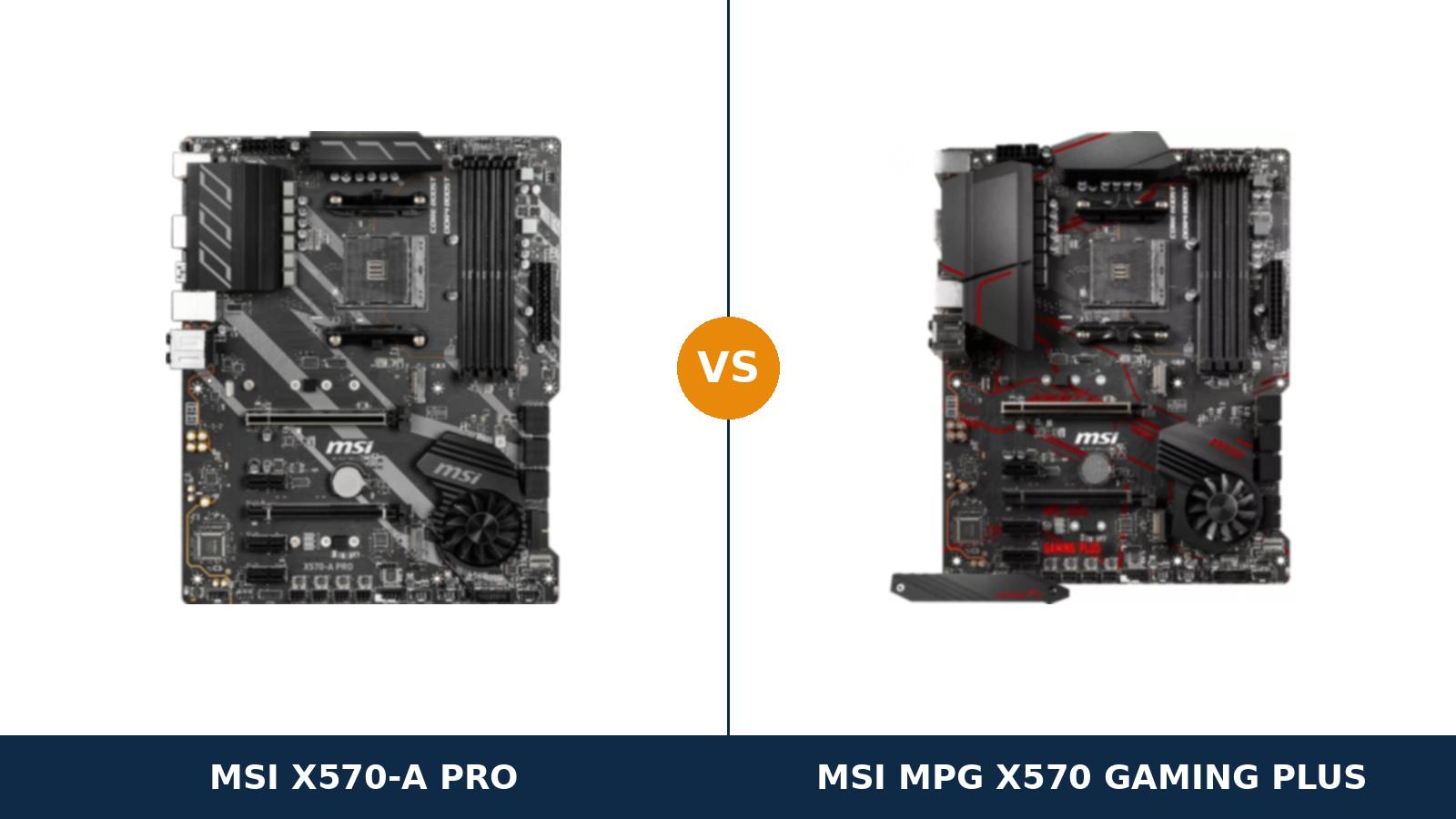
Two boards. Same chipset. Same socket. Same manufacturer. Nearly the same circuit board.
The MSI X570-A Pro and the MSI MPG X570 Gaming Plus are the closest relatives in the entire X570 range. They share a platform, a layout, a rear panel and almost every line of their specification sheets.
MSI simply dresses that platform two ways. The A Pro wears a plain black suit and a business name. The Gaming Plus wears red-and-black gaming livery and a dragon badge.
So the honest question is narrow: what does the gaming trim actually buy you? This guide answers it from MSI's own specifications — and names the one hardware difference among the cosmetics.
Key Takeaways
- The platform is identical. Same VRM design, same slots, same storage, same memory ceiling, same LAN, same audio, same USB — line for line.
- The Gaming Plus wins on one real feature: its primary M.2 slot gets a Shield Frozr heatsink. The A Pro's Gen4 slot runs bare.
- Power delivery is a true tie. Both use MSI's Core Boost design with IR digital PWM and 8+4-pin CPU power. MSI publishes no phase count for either board.
- Both boards support the CPUs rivals dropped — including the Ryzen 5 3400G and 3200G APUs many X570 boards excluded.
- Buy on price and looks. With the hardware this close, the cheaper listing — or the finish you prefer — is the rational decider.
Quick Verdict
Buy the MSI MPG X570 Gaming Plus for most builds. It is the more complete version of this platform.
Everything electrical matches the A Pro. Then the Gaming Plus adds the M.2 Shield Frozr heatsink over its primary Gen4 slot, plus larger VRM heatsink shrouds. A Gen4 NVMe drive under sustained writes is exactly where that heatsink earns its place.
Buy the MSI X570-A Pro if it is the cheaper listing, or if you dislike gaming styling. You give up the M.2 heatsink and nothing else of substance.
Same power delivery. Same expansion. Same memory ceiling. Same audio codec. For a Ryzen 5 or Ryzen 7 build with a mid-range NVMe drive, the A Pro is the same computer in plainer clothes.
The Scorecard
Scores below are derived directly from the manufacturer specifications compared in this guide — phase counts, slot counts, port counts and supported standards. They are a reading aid, not benchmark results.
| Category | X570-A Pro | X570 Gaming Plus | ||
|---|---|---|---|---|
| Power delivery | 6 / 10 | 6 / 10 | ||
| Expansion & chipset bandwidth | 8 / 10 | 8 / 10 | ||
| Storage | 7 / 10 | 8 / 10 | ||
| Memory | 7 / 10 | 7 / 10 | ||
| Networking | 6 / 10 | 6 / 10 | ||
| Audio & display outputs | 7 / 10 | 7 / 10 | ||
| CPU compatibility | 9 / 10 | 9 / 10 | ||
| Overall | 7.0 / 10 | 7.3 / 10 | ||
Read the scorecard carefully. Six of seven categories are dead level. This comparison is decided by a single heatsink and by presentation — everything below explains why that is the honest result.
At a Glance: Who Each Board Fits
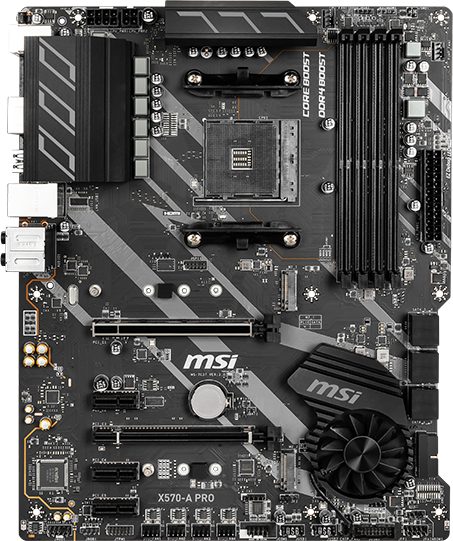
MSI X570-A Pro
- Core Boost power design, IR digital PWM, 8+4-pin CPU power
- PCIe 4.0 x16 + x16 (x4) slots, three PCIe 3.0 x1 slots
- Dual M.2: Gen4 x4 (22110) + Gen3 x4 / SATA
- Realtek ALC1220 audio with Audio Boost 4
- Plain black finish — no gaming livery, no Wi-Fi
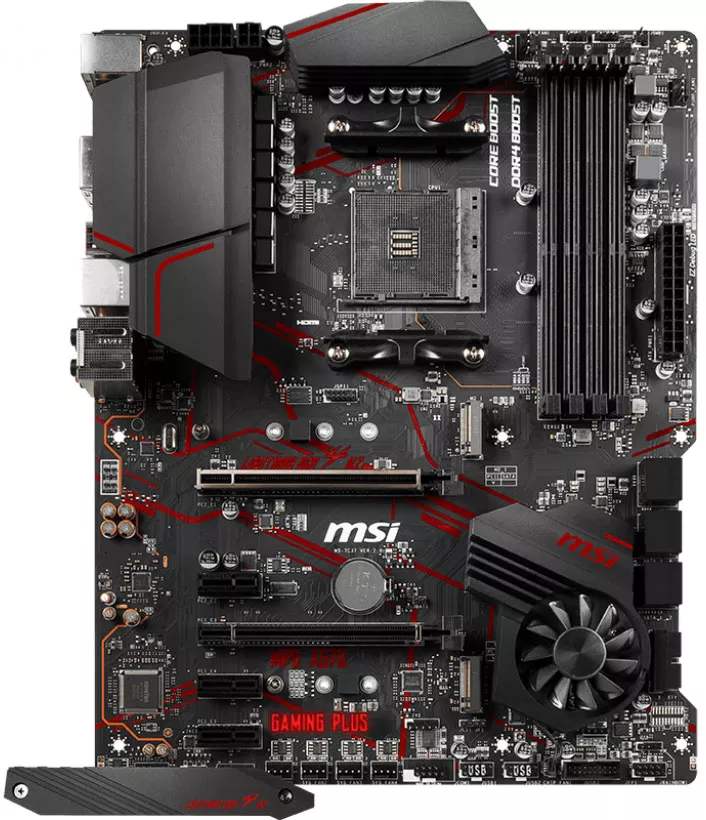
MSI MPG X570 Gaming Plus
- Core Boost power design, IR digital PWM, 8+4-pin CPU power
- M.2 Shield Frozr heatsink on the primary Gen4 slot
- PCIe 4.0 x16 + x16 (x4) slots, three PCIe 3.0 x1 slots
- Realtek ALC1220 audio with Audio Boost 4
- Red-and-black MPG gaming trim — no Wi-Fi
Choose the X570-A Pro if…
It is the cheaper of the two listings when you order. On identical hardware, price is a legitimate decider.
You are building a workstation, an office PC or a home server. The plain finish looks at home there in a way red dragon branding does not.
Your NVMe drive is a mid-range Gen3 or Gen4 model that runs cool, or your case airflow washes over the M.2 area anyway.
Choose the MPG X570 Gaming Plus if…
You are fitting a fast Gen4 NVMe drive and will move large files, install big games or copy media libraries. The included M.2 heatsink protects sustained speeds.
You want the gaming presentation — the shrouds, the livery, the MPG badge — and the marginally larger VRM heatsink assembly that comes with it.
Or the two boards sit at the same price. At parity, take the one with the extra heatsink.
As an Amazon Associate I earn from qualifying purchases at no extra cost to you.
Specifications: The Specs That Actually Matter
Every figure below is taken from MSI's published specifications, datasheets and the boards' user manual, cross-checked against the manufacturer's product data.
These two boards share a design so closely that MSI's own summary tables match almost line for line. Where the boards genuinely differ, the table says so.
| Specification | MSI X570-A Pro | MSI MPG X570 Gaming Plus |
|---|---|---|
| Form factor | ATX, 30.4 × 24.3 cm | ATX, 30.4 × 24.3 cm |
| Socket / chipset | AMD AM4 / X570 | AMD AM4 / X570 |
| CPU support | Ryzen 5000 (BIOS update), 3000, 2000 series + Vega APUs incl. 3400G/3200G | Ryzen 5000 (BIOS update), 3000, 2000 series + Vega APUs incl. 3400G/3200G |
| VRM design | Core Boost, IR digital PWM, 8+4-pin CPU power (MSI publishes no phase count) | Core Boost, IR digital PWM, 8+4-pin CPU power (MSI publishes no phase count) |
| Memory | 4 × DDR4 DIMM, up to 128 GB, 4400+ MT/s (O.C.), A-XMP | 4 × DDR4 DIMM, up to 128 GB, 4400+ MT/s (O.C.), A-XMP |
| Graphics outputs (APU) | HDMI 1.4 only (4096×2160 @24Hz) | HDMI 1.4 only (4096×2160 @24Hz) |
| Expansion slots | PCIe 4.0 x16 + PCIe 4.0 x16 (x4) + 3 × PCIe 3.0 x1 | PCIe 4.0 x16 + PCIe 4.0 x16 (x4) + 3 × PCIe 3.0 x1 |
| M.2 storage | 2 slots: PCIe 4.0 x4 (22110) + PCIe 3.0 x4 / SATA (2280) | 2 slots: PCIe 4.0 x4 (22110) + PCIe 3.0 x4 / SATA (2280) |
| M.2 cooling | No heatsink — primary slot runs bare | M.2 Shield Frozr heatsink on the primary slot |
| SATA | 6 × SATA 6 Gb/s (4 chipset + 2 ASMedia), RAID 0/1/10 | 6 × SATA 6 Gb/s (4 chipset + 2 ASMedia), RAID 0/1/10 |
| LAN | Realtek RTL8111H 1 GbE (single port) | Realtek RTL8111H 1 GbE (single port) |
| Audio | Realtek ALC1220, 7.1 HD, Audio Boost 4, optical S/PDIF | Realtek ALC1220, 7.1 HD, Audio Boost 4, optical S/PDIF |
| USB (rear) | 2 × USB 3.2 Gen 2 (Type-A + Type-C, 10 Gb/s), 4 × Gen 1, 2 × USB 2.0 | 2 × USB 3.2 Gen 2 (Type-A + Type-C, 10 Gb/s), 4 × Gen 1, 2 × USB 2.0 |
| USB (front headers) | 2 × USB 3.2 Gen 1 headers + 2 × USB 2.0 headers, no Type-C header | 2 × USB 3.2 Gen 1 headers + 2 × USB 2.0 headers, no Type-C header |
| Fan headers | 6 (CPU + pump + 4 system) | 6 (CPU + pump + 4 system) |
| Chipset cooling | Frozr fan (double ball bearing), Zero Frozr fan-stop at low load | Frozr fan (double ball bearing), Zero Frozr fan-stop at low load |
| BIOS flashing | Flash BIOS Button on rear panel | Flash BIOS Button on rear panel |
Platform note: both boards share MSI's entry-X570 design — same board family, same manual lineage, same connector layout. That is why this table reads as an echo. The M.2 cooling row is the only line where the hardware itself changes.
The Differences That Actually Matter
1. One platform, two nameplates
Start with the fact that shapes everything else: these boards are siblings, not rivals from different stables.
They come from the same MSI design family. The connector layout matches. The slot positions match. The rear panel matches port for port. Even the headline feature list — Core Boost, DDR4 Boost, Audio Boost 4, Lightning Gen4 — is shared word for word.
MSI built one entry-level X570 platform and sold it into two market segments. The A Pro went to the productivity shelf. The Gaming Plus went to the gaming shelf.
That is not a criticism. It is useful knowledge. It means every comparison below is about trim and cooling, not capability — and price should weigh more heavily than usual in your decision.
2. Power delivery — a genuine, documented tie
Both boards run MSI's Core Boost design: a fully digital power layout with an IR digital PWM controller and 8+4-pin CPU power connectors.
Here is what MSI does not do: publish a phase count. Not for the A Pro. Not for the Gaming Plus. Any listing or review that quotes you a precise phase figure for either board is quoting teardown estimates, not the manufacturer.
Those teardowns describe the same arrangement in both boards — a doubled discrete design of modest ambition, squarely in the entry tier of X570 power delivery. There is no hidden VRM upgrade inside the Gaming Plus box.
What does that mean in practice? Ryzen 5 and Ryzen 7 processors run comfortably on either board, at stock or with sensible tuning. The flagship 12- and 16-core chips under sustained all-core loads are where this entire VRM class runs warm — on both boards, equally.
So power delivery cannot separate them, and we will not invent a separation. If your workload is a 5950X rendering all day, your answer is a stronger board class altogether — see When to Skip Both.
3. M.2 cooling — the one real hardware difference
The slot layout is identical. Two M.2 slots each: a CPU-connected PCIe 4.0 x4 slot that accepts drives up to 22110 length, and a chipset slot offering PCIe 3.0 x4 or SATA at 2280.
The difference is what covers the first slot. The Gaming Plus includes MSI's M.2 Shield Frozr — a metal heatsink plate that sits over the primary drive and spreads its heat.
The A Pro includes nothing. Its primary slot is bare PCB and fresh air.
Why it matters: Gen4 NVMe controllers throttle when they run hot, and they run hottest during exactly the jobs Gen4 drives are bought for — game installs, library copies, media exports. A heatsink does not make a drive faster at peak. It keeps it fast for longer.
Context matters too. In a case with strong front-to-back airflow, a bare slot copes. In a sealed case with the drive tucked under a hot graphics card, the Shield Frozr is the difference between full speed and a mid-transfer slowdown.
Note the limit of the Gaming Plus's win: its second M.2 slot is bare too. This is a one-slot advantage, honestly sized.
4. Cooling and the chipset fan — shared hardware, different shrouds
Both boards cool the X570 chipset the same way: a small Frozr fan with double ball bearings, governed by MSI's Zero Frozr logic that stops the fan entirely at low load.
That fan is the known wear item of every original X570 board. It is also identical here — same design, same control, same three speed modes in MSI's software. Neither board escapes it, and neither board is worse for it.
The visible difference is the VRM heatsink assembly. The Gaming Plus wears the larger, angular shrouds of the MPG line. The A Pro's heatsinks are slimmer, plainer blocks.
Under the shrouds sits the same power design, so treat this as a styling difference with a minor cooling footnote — not a capability gap. Fan control is level as well: six headers on each board, one CPU, one pump, four system, all with full curve control.
5. The rear panel — identical, port for port
Turn both boards around and the comparison briefly becomes a spot-the-difference puzzle with no solution.
Each rear panel offers: a PS/2 combo port, two USB 2.0 ports, four USB 3.2 Gen 1 ports, one USB 3.2 Gen 2 Type-A and one Gen 2 Type-C at 10 Gb/s, a single gigabit Ethernet port, five audio jacks, optical S/PDIF, one HDMI port and the Flash BIOS Button.
The LAN chip is the same Realtek RTL8111H gigabit controller on both. No 2.5-gigabit port on either. No Wi-Fi on either.
The audio is the same Realtek ALC1220 codec with MSI's Audio Boost 4 treatment — a genuinely good codec that sits a tier above the entry-level ALC897 parts found on cheaper boards. Headphone users get the same experience from both.
Even the limitation is shared: HDMI 1.4 is the only display connector, and it only works with an APU.
6. Memory and CPU support — the same ceilings, the same generosity
Four DDR4 slots. Up to 128 GB. An official overclocking ceiling of 4400+ MT/s with A-XMP profiles. Identical on both boards, because the memory circuitry is part of the shared platform.
As ever, the headline figure is an overclocking ceiling, not a promise. What your kit runs at depends on your processor's memory controller. For most AM4 builds, a quality 3200–3600 MT/s kit remains the sensible buy on either board.
CPU support is where this platform quietly outshines fancier rivals. Both boards accept Ryzen 5000 (with a BIOS update), Ryzen 3000 and Ryzen 2000 — and, unusually for X570, the range also covers the Vega-graphics APUs, including the Ryzen 5 3400G and Ryzen 3 3200G that many X570 boards refused.
That breadth matters for budget builds and second-life machines. A cheap APU today, a Ryzen 7 later, one board throughout — both of these allow it, equally.
7. Trim, lighting and the look of the thing
Strip away the cooling plate and what remains is presentation. It is a legitimate thing to buy — you just should not mistake it for performance.
The A Pro is finished in black and grey diagonal striping with silver accents. No red. No dragon. It disappears into a workstation build, which for many builders is precisely the point.
The Gaming Plus wears the MPG line's red-and-black livery, with angular shrouds over the VRM and chipset and GAMING PLUS printed along the board's edge. In a windowed case, it is unmistakably the gaming product.
Lighting hardware, though, is shared: both boards carry two 4-pin RGB headers and two 3-pin addressable rainbow headers, both run MSI's Mystic Light, and neither board has onboard lighting zones of its own. A lit build wires up identically on either.
Buy the look you want to live with. Just know that is what you are buying.
CPU Pairing Guide
The fastest way to choose between these boards is to start from your processor. This table is the whole comparison in one view.
| Your processor | X570-A Pro | X570 Gaming Plus | Our call |
|---|---|---|---|
| Ryzen 5 5600 / 5500 | Excellent | Excellent | Buy whichever is cheaper |
| Ryzen 5 5600G / 5700G (APU) | Good — HDMI 1.4 only | Good — HDMI 1.4 only | Tie — both share the same display limit |
| Ryzen 5 3400G / 3200G (APU) | Supported | Supported | Tie — a rare X570 strength, on both |
| Ryzen 7 5700X / 5800X | Excellent | Excellent | Buy whichever is cheaper |
| Ryzen 9 5900X / 5950X | Workable — VRM runs warm under sustained load | Workable — same VRM class | Either at stock; consider a stronger board for all-core work |
| Ryzen 3000 series | Excellent | Excellent | Buy whichever is cheaper |
Read the Ryzen 9 row carefully. It is the honest limit of this price class, and it is a limit of the shared VRM design — the gaming badge on one box does not raise it.
Ready to check today’s price?
Both boards sell through Amazon. Prices move, so check the live figure on the board that fits your build.
View on Amazon — X570-A ProView on Amazon — X570 Gaming PlusThe 30-Second Decision
| If this sounds like you… | Buy this |
|---|---|
| “Fast Gen4 SSD, big installs, lots of file copying.” | X570 Gaming Plus (M.2 heatsink) |
| “One board is clearly cheaper this week.” | The cheaper one — the hardware is the same |
| “Workstation or office build, no gaming look.” | X570-A Pro |
| “Windowed case, red-and-black build theme.” | X570 Gaming Plus |
| “APU build now, graphics card later.” | Either — both support the 3400G/3200G |
| “I need Wi-Fi on the board.” | Neither — see When to Skip Both |
What You Gain. What You Give Up.
MSI X570-A Pro
You gain: the full platform — Gen4 slots, dual M.2, ALC1220 audio, Gen 2 USB Type-C — in a plain finish that suits workstations and offices. Usually the lower price of the two, for hardware that is electrically the same.
You give up: the M.2 heatsink. Your primary Gen4 drive runs bare, so sustained-write speeds rest on your case airflow. You also give up the gaming presentation, which for this board's audience is often the point.
MSI MPG X570 Gaming Plus
You gain: the M.2 Shield Frozr heatsink over the slot that matters, larger VRM heatsink shrouds, and the MPG gaming finish. Everything else is the shared platform, unchanged.
You give up: usually a little money over the A Pro, spent entirely on trim and one heatsink. And the understated look — this board announces itself in any case window.
Pros and Cons
X570-A Pro — Pros
- The full X570 platform at the range's entry price
- ALC1220 audio — a tier above budget codecs
- Broad CPU support, incl. 3400G/3200G APUs
- Flash BIOS Button for CPU-less updates
- Understated finish suits work builds
Cons
- No M.2 heatsink for the Gen4 slot
- Entry-class VRM — Ryzen 9 sustained loads run warm
- Single gigabit LAN, no Wi-Fi
- HDMI 1.4 is the only display output
- Chipset fan is a wear item, as on all early X570
X570 Gaming Plus — Pros
- M.2 Shield Frozr heatsink included
- Same full platform: Gen4, dual M.2, ALC1220
- Broad CPU support, incl. 3400G/3200G APUs
- Larger VRM heatsink shrouds
- Flash BIOS Button for CPU-less updates
Cons
- Usually pricier than the A Pro for trim
- Entry-class VRM — same ceiling as the A Pro
- Single gigabit LAN, no Wi-Fi
- HDMI 1.4 is the only display output
- Second M.2 slot has no heatsink
Buy the Exact Model — the Names Around These Boards Are Traps
Check the full model name. “X570-A Pro” and “X570 Gaming Plus” sit in a crowded catalogue, and near-identical names hide different hardware.
The Gaming Plus has two close relatives: the MPG X570 Gaming Edge WiFi, which adds a wireless module, and the Gaming Pro Carbon WiFi, a step-up board. If a listing says Wi-Fi, it is not the board in this comparison.
The A Pro's trap is cross-brand. ASUS sells a Prime X570-P and a Prime X570-Pro — different boards from a different maker that search results love to interleave with MSI's A Pro. Check the brand before the price.
Check the bundle. Both boards are old enough that many listings are marketplace or refurbished stock. Expect the board, I/O shield, two SATA cables and documentation — and on the Gaming Plus, confirm the M.2 Shield Frozr plate is in the box. A used Gaming Plus missing its heatsink plate has lost its main advantage over the A Pro.
Check the BIOS. Ryzen 5000 support arrives by BIOS update on both boards. The Flash BIOS Button means you can update with no CPU fitted at all — so an old-stock board is a ten-minute fix, not a dead end. Still, ask the seller, and update before the build goes together.
Check the chipset fan. On used examples of either board, the small Frozr fan has years of runtime behind it. It should spin freely and quietly, and it stops at low load by design — a silent fan at idle is correct behaviour, not a fault.
The Upgrade Path Test
Judge these boards by their second and third years, because that is where AM4 boards earn their keep.
Year one, both run a Ryzen 5 and a mid-range graphics card identically. The chipset's Gen4 lanes feed a current GPU and a Gen4 boot drive at full speed on either board.
Year two, the cheap upgrade arrives: a discounted Ryzen 7, or a 5800X3D — the processor that turned AM4 into a long-lived gaming platform. Both boards take it with a BIOS update. The Flash BIOS Button means the update never needs a loaner CPU.
Storage upgrades split them, slightly. Add a second NVMe drive and both boards accept it in the chipset slot. Load the primary Gen4 drive with big sustained writes and only the Gaming Plus wears a heatsink.
That is the whole long-term story: one platform, one upgrade ceiling, one small cooling difference that may or may not touch your workload.
When to Skip Both
Honesty cuts both ways. There are builders neither of these boards serves well.
Skip both if you need Wi-Fi on the board itself. MSI's own Gaming Edge WiFi covers that from the same generation. Skip both if you plan sustained all-core work on a 12- or 16-core Ryzen 9 — this VRM class runs warm there, and stronger boards exist for the job.
Skip both if the chipset fan itself is a dealbreaker. The later X570S generation cooled the chipset passively; those boards cost more and are different products.
Skip both if you are building an APU desktop around a high-refresh or 4K monitor. A single HDMI 1.4 output is a real ceiling, and boards with DisplayPort serve that build better.
For everyone else — which is most AM4 builders on a budget — one of these two is the right answer. The only question is whether the heatsink and the livery are worth the difference on the day you order.
Final Verdict
The MSI MPG X570 Gaming Plus is the board we would build on.
Not by much — and this guide has been careful to show its working. The platform is shared. The power delivery is shared. The ports, the codec, the memory ceiling and the CPU support are shared.
What the Gaming Plus adds is the one thing that protects real performance: a heatsink over the primary Gen4 M.2 slot, wrapped in the larger shrouds of the gaming line. When two products are this close, the tiebreak goes to the one with fewer compromises.
Buy the Gaming Plus for gaming builds, fast Gen4 storage, and any PC where the primary drive works hard.
View on Amazon — X570 Gaming Plus
Buy the X570-A Pro if it is meaningfully cheaper when you order. If your build is a workstation or office machine. Or if your NVMe drive is a cool-running model in a well-ventilated case.
It is the same foundation without the garnish. Buy it knowing exactly what the saving costs: one heatsink, and nothing else.
Watch Out: Similar Names, Different Boards
X570 naming is a trap for the hurried buyer. Four warnings belong in every version of this guide.
First: the MSI X570-A Pro is not the ASUS Prime X570-P or Prime X570-Pro. Different brands, different boards, endlessly mixed up by search engines and sloppy listings.
Second: the MPG X570 Gaming Plus is not the Gaming Edge WiFi and not the Gaming Pro Carbon WiFi. Both relatives add Wi-Fi and change the feature set. “Gaming Plus” is the wired board in this comparison.
Third: neither board is an X570S model. The S generation removed the chipset fan and revised the boards around it. A listing that says X570S is a different, later product.
Fourth: “A Pro” here is a 2019 product name, not MSI's current PRO series branding. Do not let a newer PRO-series board from a different socket anywhere near your basket by name similarity.
Slow down on the product page. Match the full model name, then the brand, then the price — in that order.
Case, Power and Cabling Notes
Both boards are full ATX. They need an ATX case, and in a large case they leave generous room around the edges for cable runs.
Power connections match: a 24-pin main connector plus 8-pin and 4-pin CPU power. The 8-pin is the essential one for mainstream processors; the extra 4-pin is headroom for heavy overclocking, and most power supplies cover both without adapters.
Front-panel wiring holds one shared limitation. Both boards provide USB 3.2 Gen 1 and USB 2.0 headers, but no front-panel USB-C header. A case with a front Type-C port will leave it unconnected on either board. Know that before you buy the case, not after.
Two layout notes apply to both. The second and fourth x1 slots share lanes — the manual notes one becomes unavailable when the other is populated, so plan add-in cards accordingly. And two of the six SATA ports hang off an ASMedia controller rather than the chipset; boot drives belong on the chipset ports or in the M.2 slots.
The primary M.2 slot on each board accepts 22110-length drives as well as the standard 2280. The second slot tops out at 2280. Check your drive's length before assuming it fits the faster slot — on these boards, unusually, it does.
BIOS and Long-Term Support
AM4 is a mature platform, and both of these boards show the benefit: long, active BIOS support from MSI.
The update history covers the platform's whole second life — Ryzen 5000 support added by update, a dedicated update for the Ryzen 7 5800X3D, Windows 11 support, and AGESA revisions that continued for years after launch. Both boards carry a large 256 Mb BIOS chip, so feature-stripping to fit new CPU support was never the compromise it became on smaller-chip boards.
Drivers and utilities sit on MSI's standard support pages for each model: chipset, LAN, audio and the Dragon Center software that drives fan curves, Mystic Light and the chipset fan's Zero Frozr modes.
Expect future releases to be security patches and edge-case fixes rather than features. On a platform this settled, that is exactly what you want.
One habit worth keeping: before any CPU upgrade, update the BIOS first. The rear-panel Flash BIOS Button makes that a ten-minute job on either board, even with the new processor still in its box.
Frequently Asked Questions
Is the X570 Gaming Plus better than the X570-A Pro?
Slightly, and for one concrete reason: its primary M.2 slot wears a Shield Frozr heatsink, and the A Pro's does not. Everything else — power delivery, expansion, memory, LAN, audio, USB — is the same shared platform. If the price difference is small, the Gaming Plus is the safer buy; if it is large, the A Pro gives up very little.
Do both boards support Ryzen 5000 processors?
Yes, with a BIOS update. Both boards support Ryzen 5000, 3000 and 2000 series processors, plus Vega-graphics APUs including the 3400G and 3200G. Both have a Flash BIOS Button, so the BIOS can be updated for a newer CPU without an older processor installed.
How many power phases do these boards have?
MSI does not publish a phase count for either board. Both use the same Core Boost design with an IR digital PWM controller and 8+4-pin CPU power connectors. Teardowns describe a doubled discrete design in both. Treat any precise phase figure quoted for these boards as an estimate, not a manufacturer specification.
Can I run two M.2 SSDs on either board?
Yes. Both boards have two M.2 slots: a PCIe 4.0 x4 slot connected to the CPU (accepting drives up to 22110 length) and a PCIe 3.0 x4 / SATA slot from the chipset at 2280, plus six SATA ports. Only the Gaming Plus cools its primary slot with a heatsink; the second slot is bare on both.
Does either board have Wi-Fi or 2.5-gigabit Ethernet?
No. Both boards provide a single Realtek RTL8111H gigabit Ethernet port and no wireless module. For built-in Wi-Fi from this generation, look at MSI's Gaming Edge WiFi; for faster Ethernet, you would step up to a different board class entirely.
Which board is better for a Ryzen 9 5950X?
Neither is ideal, and they are equal in the limitation: the shared entry-class VRM runs warm under sustained all-core loads on a 16-core chip. Either board will run a 5950X at stock settings for mixed and gaming workloads. For heavy rendering duty, choose a board with a stronger power design.
Is the chipset fan loud? Can it be replaced?
Both boards use the same Frozr chipset fan with Zero Frozr control, which stops the fan at low load — in light use it is silent by design. It spins up under gaming and storage load. It is a standard wear item on original X570 boards; keep the intake filters clean and it is rarely a problem in practice.
Which board should I choose for an APU build without a graphics card?
Either — the display hardware is identical: a single HDMI 1.4 output, good for 4K at 24Hz or 1080p desktops. Both boards support the 3400G and 3200G, which many X570 boards excluded. If you need DisplayPort or high-refresh output from integrated graphics, look at a B550 board instead.
Sources & Verification
MSI X570-A PRO official specifications and datasheet, msi.com • MSI MPG X570 GAMING PLUS official specifications and datasheet, msi.com • MSI X570-A PRO user manual (E7C37) — specifications, storage and connector tables • MSI BIOS release notes for both models (Ryzen 5000 and 5800X3D support) • Amazon listing data for both models via manuals.plus and camelcamelcamel records. Specifications verified November 2026.

James Wilson
James has been building and benchmarking PCs for over a decade and writes Honestly Compared's motherboard and component guides. His rule for every comparison: the verdict has to survive the spec sheet, not the marketing page.