
MSI MPG Z790 Carbon WiFi vs MSI MAG Z790 Tomahawk WiFi: Which Should You Buy?
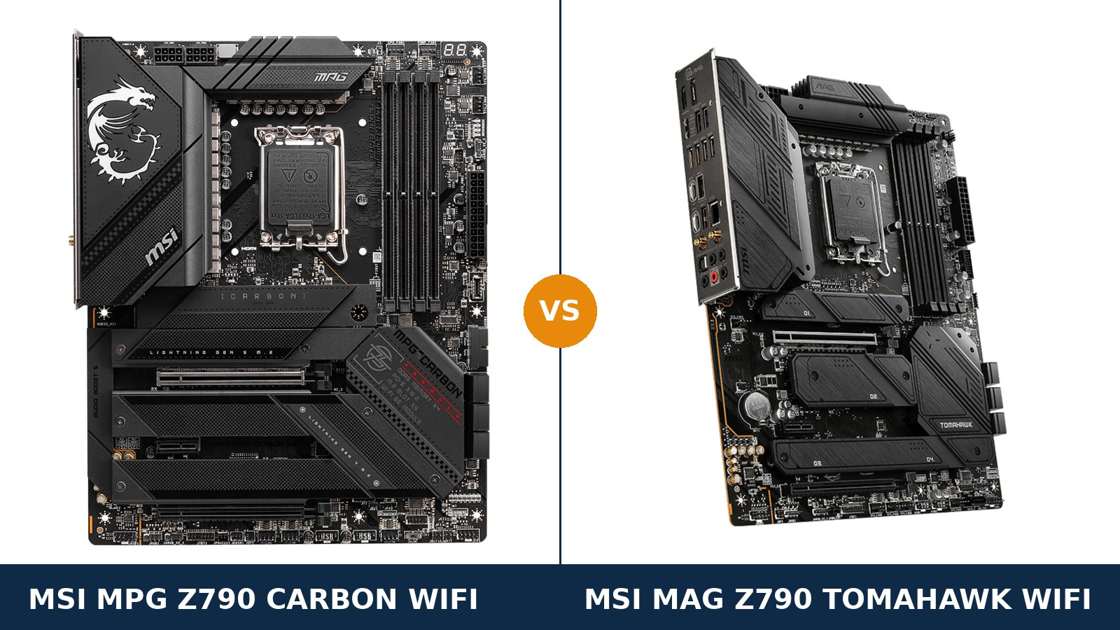
Same brand. Same chipset. Same socket, same audio codec, same network chips.
The MSI MPG Z790 Carbon WiFi and the MAG Z790 Tomahawk WiFi are separated by one rung of MSI's own ladder — MPG above MAG — and by a meaningful step in price. The question is whether the hardware justifies the step.
Most of the spec sheet is shared, and we will say so plainly where it is. The real gaps are concentrated: power delivery, memory ceiling, one very fast storage slot, and the small diagnostic luxuries that separate a board you tolerate from a board you enjoy owning.
This guide compares the two boards specification by specification, using MSI's own published data. It ends with a straight answer for overclockers, for gamers, and for everyone in between.
Key Takeaways
- The Carbon WiFi is the stronger board. A 19+1+1 phase VRM with 105A stages, DDR5 support to 7600+ MT/s, and the only Gen5 M.2 slot in this comparison.
- The Tomahawk WiFi is the smarter value. It keeps the platform essentials intact — 16+1+1 phases at 90A, PCIe 5.0 graphics, Wi-Fi 6E — for less money.
- The Carbon's Gen5 slot has a catch. Populate it and the graphics slot drops to x8. Know that before you plan the build.
- The Tomahawk wins two real categories: it has DisplayPort for integrated graphics, where the Carbon has HDMI only, and it carries one extra SATA port.
- Audio, LAN and Wi-Fi are identical. Same ALC4080 codec, same Intel 2.5G LAN, same Wi-Fi 6E. Nobody should pay the Carbon premium for networking.
Quick Verdict
Buy the MSI MPG Z790 Carbon WiFi if you are building at the top of the platform. It is the more capable board in the ways that cannot be retrofitted.
Its direct 19+1+1 phase power design feeds flagship processors with more headroom. Its memory support runs a full tier higher. And it is the only board here ready for a PCIe 5.0 SSD.
Add the POST code display, the heat-pipe VRM cooling and the screwless M.2 shields, and the Carbon is simply the better-engineered product.
Buy the MSI MAG Z790 Tomahawk WiFi if you want Z790 done properly, without the premium. For a gaming build running a Core i5 or i7 at sensible settings, it gives up nothing you will feel.
It even fights back in two places: DisplayPort alongside HDMI for integrated graphics, and seven SATA ports against six. If the saving funds a better graphics card, the Tomahawk is the correct answer.
The Scorecard
Scores below are derived directly from the manufacturer specifications compared in this guide — phase counts, slot counts, port counts and supported standards. They are a reading aid, not benchmark results.
| Category | MPG Z790 Carbon WiFi | MAG Z790 Tomahawk WiFi | ||
|---|---|---|---|---|
| Power delivery | 10 / 10 | 8 / 10 | ||
| Memory support | 9 / 10 | 8 / 10 | ||
| Storage | 9 / 10 | 8 / 10 | ||
| Expansion | 8 / 10 | 8 / 10 | ||
| USB connectivity | 9 / 10 | 8 / 10 | ||
| Display outputs (integrated graphics) | 6 / 10 | 9 / 10 | ||
| Audio & networking | 9 / 10 | 9 / 10 | ||
| Overall | 8.6 / 10 | 8.3 / 10 | ||
The pattern is consistent. The Carbon wins on ceiling — power, memory speed, storage speed. The Tomahawk wins on value, and steals display outputs outright. Everything else is shared DNA.
At a Glance: Who Each Board Fits
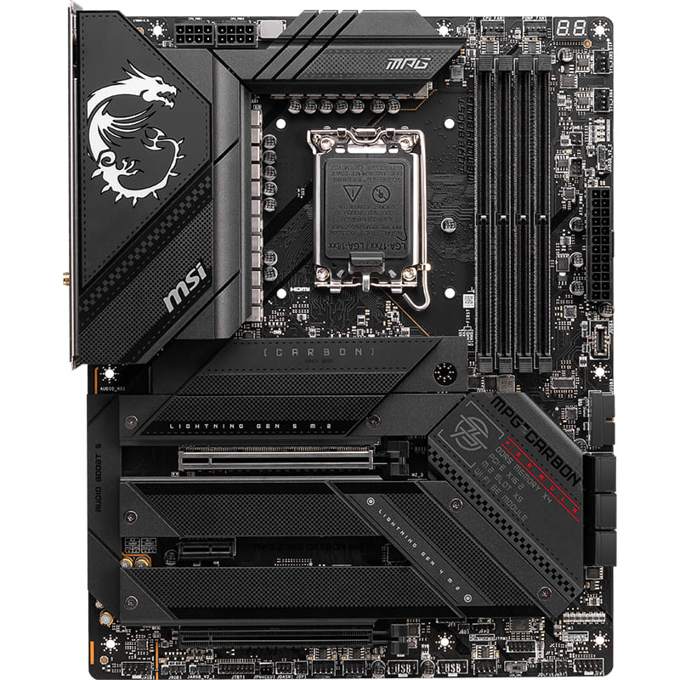
MSI MPG Z790 Carbon WiFi
- Direct 19+1+1 phase VRM, 105A smart power stages
- DDR5 support up to 7600+ MT/s (OC)
- 5 M.2 slots, including one PCIe 5.0 x4
- Two-digit POST code display and EZ Debug LEDs
- Screwless M.2 Shield Frozr heatsinks, magnetic Wi-Fi antenna
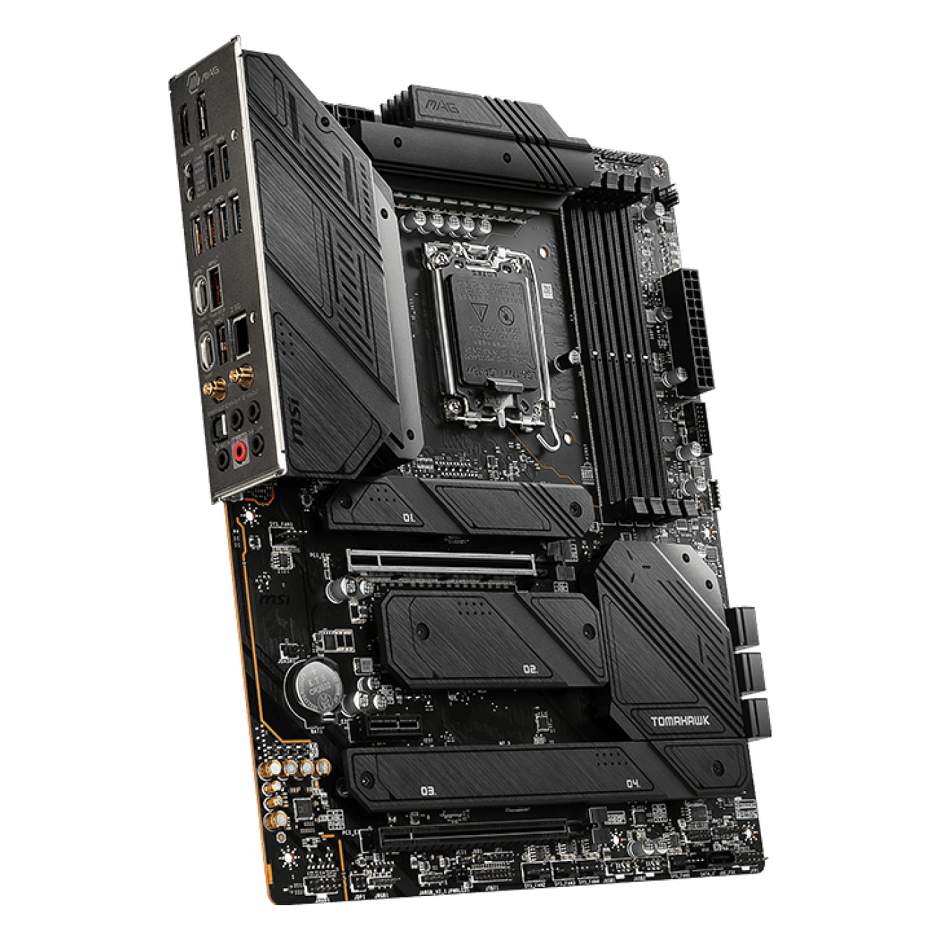
MSI MAG Z790 Tomahawk WiFi
- 16+1+1 Duet Rail power system, 90A smart power stages
- DDR5 support up to 7200+ MT/s (OC)
- 4 M.2 slots, all PCIe 4.0 x4
- HDMI 2.1 + DisplayPort 1.4 for integrated graphics
- 7 SATA ports — one more than the Carbon
Choose the MPG Z790 Carbon WiFi if…
You are building around a Core i9, or you intend to overclock seriously. The VRM headroom is the product.
You want a PCIe 5.0 SSD in the build, now or later. Only one board here can take it.
You chase high DDR5 frequencies. You troubleshoot your own builds and want a POST code display when something refuses to boot. You simply want the best board MSI sells below the flagship tier.
Choose the MAG Z790 Tomahawk WiFi if…
You are building a gaming PC around a Core i5 or i7 and would rather spend the difference on the graphics card.
You need DisplayPort from integrated graphics — for a high-refresh monitor, a second screen, or a test bench.
Or your storage plan leans on SATA drives. The Tomahawk's seventh port is a small, real win.
As an Amazon Associate I earn from qualifying purchases at no extra cost to you.
Specifications: The Specs That Actually Matter
Every figure below is taken from MSI's published specifications and datasheets for these two boards, cross-checked against MSI's product data.
Both boards are DDR5 models. MSI also sells a separate Tomahawk WiFi DDR4 variant — a different board with the same family name — and the buying guide below covers how to avoid mixing them up.
| Specification | MSI MPG Z790 Carbon WiFi | MSI MAG Z790 Tomahawk WiFi |
|---|---|---|
| Form factor | ATX, 30.5 × 24.4 cm | ATX, 30.5 × 24.4 cm |
| Socket / chipset | Intel LGA1700 / Z790 | Intel LGA1700 / Z790 |
| CPU support | Core 14th / 13th / 12th Gen, Pentium Gold, Celeron | Core 14th / 13th / 12th Gen, Pentium Gold, Celeron |
| VRM design | Direct 19+1+1 phases, 105A SPS, dual CPU power connectors | 16+1+1 Duet Rail, 90A SPS, dual CPU power connectors |
| Memory | 4 × DDR5 DIMM, up to 192 GB, 7600+ MT/s (OC), XMP 3.0 | 4 × DDR5 DIMM, up to 256 GB, 7200+ MT/s (OC), XMP 3.0 |
| Graphics outputs (iGPU) | HDMI 2.1 only | HDMI 2.1 + DisplayPort 1.4 (up to 8K 60Hz) |
| Expansion slots | PCIe 5.0 x16 + PCIe 4.0 x16 slot (x4) + PCIe 3.0 x1 | PCIe 5.0 x16 + PCIe 4.0 x16 slot (x4) + PCIe 3.0 x1 |
| M.2 storage | 5 slots: 1 × PCIe 5.0 x4 + 4 × PCIe 4.0 x4 | 4 slots: 4 × PCIe 4.0 x4 |
| SATA | 6 × SATA 6 Gb/s | 7 × SATA 6 Gb/s |
| RAID | RAID 0/1/5/10 (SATA and M.2 NVMe) | RAID 0/1/5/10 (SATA and M.2 NVMe) |
| LAN | Intel 2.5G LAN | Intel 2.5G LAN |
| Wireless | Intel Wi-Fi 6E, Bluetooth 5.3, magnetic antenna | Intel Wi-Fi 6E, Bluetooth 5.3 |
| Audio | Realtek ALC4080, Audio Boost 5, 7.1 USB HD | Realtek ALC4080, Audio Boost 5, 7.1 USB HD |
| USB (rear) | 10 ports incl. USB 20Gbps Type-C and 6 × 10Gbps Type-A | 10 ports incl. USB 20Gbps Type-C and 4 × 10Gbps Type-A |
| Front USB-C header | USB 20Gbps Type-C | USB 10Gbps Type-C |
| Debug & DIY | POST code display + EZ Debug LED, Smart Button, screwless M.2 shields | EZ Debug LED, rear Clear CMOS + Flash BIOS buttons |
| BIOS flashing | Flash BIOS button (no CPU/RAM/GPU needed) | Flash BIOS button (no CPU/RAM/GPU needed) |
Capacity note: the memory figures above are MSI's current published maximums, and they have moved over time. The Carbon launched with a 128 GB ceiling that MSI later raised as denser DDR5 modules arrived.
Treat the headline capacities as bookkeeping, not as a buying difference. Both boards share the same four-slot, dual-channel architecture, and both will hold far more memory than a gaming build will ever install.
Model note: MSI has since added refresh models — a Carbon WiFi II and Carbon MAX WiFi with Wi-Fi 7, and a Tomahawk MAX WiFi. They are different boards at different prices. This comparison covers the original Wi-Fi 6E pair named in the title.
The Differences That Actually Matter
1. Power delivery — the flagship gap
The Carbon runs a direct 19+1+1 phase power design with 105A smart power stages. That is flagship hardware by any honest measure.
The Tomahawk runs MSI's 16+1+1 Duet Rail system with 90A stages. On most brands' ranges, that specification would headline the flagship. Here it is the runner-up.
Both boards feed the CPU through dual 8-pin connectors. Both will run any LGA1700 processor Intel ever released, at stock settings, without drama.
The difference appears at the margins: sustained all-core loads on a Core i9, and manual overclocking. More phases, each rated higher, spread the current wider and run each stage further from its limit.
Cooling reinforces the gap. The Carbon links its MOSFET heatsinks with a direct-touch heat-pipe and fits 7W/mK thermal pads, under an extended heatsink design.
Verdict on power: if a 14900K or serious tuning is anywhere in your future, the Carbon is the correct foundation. For an i5 or i7 at stock or lightly tuned, the Tomahawk's VRM is already more than the job requires.
2. Memory — a higher ceiling on the Carbon
Both boards take four DDR5 DIMMs in dual channel, with Intel XMP 3.0 profiles. The shared architecture is where the similarity ends.
MSI rates the Carbon's memory support to 7600+ MT/s in a one-DIMM-per-channel, single-rank configuration. The Tomahawk is rated to 7200+ MT/s on the same basis.
That 400 MT/s gap is real, and it matters to exactly one audience: builders chasing high-frequency kits for tuned gaming systems.
For everyone else, a quality 6000–6400 MT/s kit is the sensible buy on either board. It will run at its XMP profile on both, and the money saved buys storage or cooling that you will actually notice.
Two honest cautions apply equally to both. Headline speeds are overclocking figures that depend on your processor's memory controller as much as the board. And filling all four slots lowers the achievable ceiling on any DDR5 platform — MSI's own tables say so, for both boards, in identical steps.
The Carbon also builds its memory slots and PCIe slot with SMT soldering and sits on an 8-layer server-grade PCB with 2oz thickened copper. That is signal-integrity insurance. It is part of why its frequency ceiling sits higher.
3. Storage — Gen5 speed, with an honest catch
This is the section the whole comparison turns on for storage-led builds.
The Carbon carries five M.2 slots. Four run at PCIe 4.0 x4. The fifth — M.2_2, wired to the CPU — runs at PCIe 5.0 x4, under a double-sided Shield Frozr heatsink built for the heat Gen5 drives produce.
The Tomahawk carries four M.2 slots, all PCIe 4.0 x4. Competent, generous, and a generation behind at the top end.
Now the catch, stated plainly because MSI states it plainly: the Carbon's Gen5 slot shares lanes with the graphics slot. Install any SSD in M.2_2 and PCI_E1 drops from x16 to x8.
In practice, a modern graphics card at PCIe 5.0 x8 — or 4.0 x8 — loses very little. But it is a trade you should make knowingly, not discover in a forum thread after the build.
The Tomahawk has no such compromise because it has no Gen5 slot to compromise with. Its four slots leave the graphics card at x16 permanently.
Elsewhere, storage is close to a tie with one twist: the Tomahawk offers seven SATA ports to the Carbon's six. For a build mixing NVMe with a wall of mechanical drives, that seventh port is a genuine, if narrow, win.
4. Display outputs — the Tomahawk's clean win
Most buyers will never use onboard graphics outputs. A discrete card does the work. For those buyers, skip this section.
For everyone else — test benches, troubleshooting, a workstation build on integrated graphics, a second life as a home server — this section decides purchases.
The Tomahawk provides HDMI 2.1 and DisplayPort 1.4. The DisplayPort drives up to 8K at 60Hz, or a high-refresh desktop at sensible resolutions, from the processor's integrated graphics.
The Carbon provides HDMI 2.1. Only HDMI 2.1.
It is an odd omission on the premium board, and no amount of VRM headroom compensates for a port that is not there. If integrated graphics matter to your build at all, the Tomahawk takes this category without argument.
5. Cooling and the build experience — where the premium shows daily
Both boards cool their M.2 slots with Shield Frozr heatsinks and give you full fan control in BIOS and software. Neither will cook an SSD in a sensibly ventilated case.
The Carbon goes further in ways you feel with your hands. Its M.2 shields are screwless: press, click, done. Anyone who has dropped an M.2 screw into a finished build understands the value instantly.
Its VRM cooling is the heavier hardware, as covered above: extended heatsinks joined by a heat-pipe, premium pads, and an enlarged chipset heatsink.
Then there is troubleshooting. The Carbon carries a two-digit POST code display alongside its EZ Debug LEDs. When a build refuses to boot, a code tells you where it stopped; four LEDs tell you roughly which neighbourhood.
The Tomahawk carries the EZ Debug LEDs alone — CPU, DRAM, VGA, BOOT — plus rear-panel Clear CMOS and Flash BIOS buttons. That covers most home troubleshooting honestly well.
The Carbon adds a configurable Smart Button on the rear panel and ships a magnetic Wi-Fi antenna that sits where you put it instead of flopping where it falls. Small things. Daily things.
6. USB and connectivity — Carbon leans forward, Tomahawk keeps up
Start with the tie. Both boards run Intel 2.5 gigabit LAN, Intel Wi-Fi 6E with Bluetooth 5.3, and a 20Gbps USB Type-C port on the rear panel.
Networking is identical down to the chip vendor. Do not let any retailer sell the Carbon to you on connectivity.
USB depth is where they separate. The Carbon's rear panel carries six 10Gbps Type-A ports; the Tomahawk carries four, filling its remaining rear slots with 5Gbps ports instead.
The front-panel header tells the same story: the Carbon's front USB-C runs at 20Gbps, the Tomahawk's at 10Gbps. In a case with a front Type-C port and a fast external SSD, that difference is measurable.
Neither gap is dramatic. Both boards are generously ported by any modern standard. But on a spec-for-spec count, the Carbon's USB complement is the deeper one.
7. Audio, lighting and the small stuff — an honest tie with footnotes
Audio is a perfect tie. Both boards use the Realtek ALC4080 codec under MSI's Audio Boost 5 design: 7.1-channel USB high-performance audio, with 32-bit/384kHz playback on the front panel.
Same codec, same implementation tier, same optical S/PDIF output on the rear panel. Headsets and desktop speakers will sound the same on both. Anyone claiming otherwise is selling something.
Lighting splits them cosmetically. The Carbon builds RGB into its carbon-black styling and controls it through Mystic Light. The Tomahawk keeps its own surface unlit and provides headers — three addressable Gen2 RGB connectors and one standard RGB — for your components to do the glowing.
Which you prefer is taste, not quality. We score it a tie and move on.
The remaining footnotes: RAID support is identical (0/1/5/10 across SATA and NVMe). Both boards flash their BIOS from a rear button with no processor installed. Both are full ATX at 30.5 × 24.4 cm and fit the same cases.
CPU Pairing Guide
The fastest way to choose between these boards is to start from your processor. This table is the whole comparison in one view.
| Your processor | MPG Z790 Carbon WiFi | MAG Z790 Tomahawk WiFi | Our call |
|---|---|---|---|
| Core i9-14900K / 13900K | Excellent — 105A stages, built for it | Excellent at stock, less tuning headroom | Carbon WiFi, especially for overclocking |
| Core i7-14700K / 13700K | Excellent | Excellent | Either — decide on storage and price |
| Core i5-14600K / 13600K | Excellent, more board than needed | Excellent, the natural pairing | Tomahawk WiFi for value |
| Core i5 / i3 12th Gen (non-K) | Works, heavily over-specified | Works, still generous | Tomahawk WiFi — or honestly, a cheaper chipset class |
| Integrated graphics build (no GPU) | HDMI only limits your monitors | HDMI + DisplayPort 1.4 | Tomahawk WiFi |
| Pentium Gold / Celeron office build | Supported, far beyond the need | Supported, far beyond the need | Tomahawk WiFi on price alone |
One platform note applies to both boards equally: 14th Gen support on early-production stock may need a BIOS update. Both boards carry a Flash BIOS button, so the update takes a USB stick and a few minutes — no older processor required.
Ready to check today’s price?
Both boards sell through Amazon. Prices move, so check the live figure on the board that fits your build.
View on Amazon — MPG Z790 Carbon WiFiView on Amazon — MAG Z790 Tomahawk WiFiThe 30-Second Decision
| If this sounds like you… | Buy this |
|---|---|
| “Core i9, tuned hard, kept for years.” | MPG Z790 Carbon WiFi |
| “I want a Gen5 SSD in this build.” | MPG Z790 Carbon WiFi (and accept the x8 graphics trade) |
| “Gaming build, i5 or i7, money saved goes to the GPU.” | MAG Z790 Tomahawk WiFi |
| “No graphics card — I run on integrated graphics.” | MAG Z790 Tomahawk WiFi (DisplayPort) |
| “I troubleshoot and upgrade constantly.” | MPG Z790 Carbon WiFi (POST code display, screwless shields) |
| “My storage is mostly SATA drives.” | MAG Z790 Tomahawk WiFi (7 SATA ports) |
What You Gain. What You Give Up.
MSI MPG Z790 Carbon WiFi
You gain: the strongest power delivery in this comparison, a higher DDR5 frequency ceiling, a PCIe 5.0 M.2 slot, deeper USB, a POST code display, screwless M.2 shields and heat-pipe VRM cooling.
You give up: DisplayPort — the Carbon is HDMI-only for integrated graphics. One SATA port. And the premium itself: you pay for headroom that a mid-range build will never touch.
MSI MAG Z790 Tomahawk WiFi
You gain: the same platform essentials for less — a VRM that still outclasses most rivals, PCIe 5.0 graphics, identical audio and networking — plus DisplayPort and a seventh SATA port.
You give up: the Gen5 storage slot, 400 MT/s of rated memory ceiling, the POST code display, and some overclocking margin at the very top of the processor stack.
Pros and Cons
MPG Z790 Carbon WiFi — Pros
- 19+1+1 phase VRM with 105A stages
- Only Gen5 M.2 slot in this comparison
- DDR5 rated to 7600+ MT/s
- POST code display for fast troubleshooting
- Screwless M.2 shields, heat-pipe VRM cooling
- Deepest USB set, 20Gbps front Type-C
Cons
- No DisplayPort for integrated graphics
- Gen5 slot drops the GPU slot to x8 when used
- 6 SATA ports, one fewer than the Tomahawk
- Premium price for headroom many builds never use
MAG Z790 Tomahawk WiFi — Pros
- 16+1+1 Duet Rail VRM with 90A stages
- HDMI + DisplayPort for integrated graphics
- 7 SATA ports
- Identical audio, LAN and Wi-Fi to the Carbon
- Rear Clear CMOS and Flash BIOS buttons
- Lower price tier in MSI's range
Cons
- No PCIe 5.0 M.2 slot
- DDR5 ceiling rated 400 MT/s lower
- No POST code display — LEDs only
- Front USB-C header runs at 10Gbps, not 20
Check the Exact Model — This Family Is a Minefield
Check the memory standard. This is the single most expensive mistake available in this comparison.
Both boards in this guide are DDR5 boards. MSI also sells a MAG Z790 TOMAHAWK WIFI DDR4 — a different motherboard that takes DDR4 memory. DDR4 and DDR5 modules are not interchangeable, physically or electrically.
If the listing does not say DDR5 in the title, stop and verify the full model name before ordering memory, or anything else.
Check which Carbon you are looking at. The MPG line has since gained a Carbon WiFi II and a Carbon MAX WiFi, both with Wi-Fi 7 and revised layouts. They are newer, different, and priced differently from the Carbon WiFi in this guide.
The same applies one rung down: a Tomahawk MAX WiFi exists, adding Wi-Fi 7 and a Gen5 slot. If a listing's specification mentions Wi-Fi 7, you are looking at a refresh model, not the boards compared here.
Check the bundle. Both boards ship with the essentials: Wi-Fi antenna (magnetic on the Carbon), SATA cables, M.2 hardware and documentation. Neither includes anything exotic, and at these tiers nothing is missing that a build actually needs.
Check your case clearance and connectors. Both boards are full ATX. Both want dual 8-pin EPS power runs for their dual CPU connectors — any quality modern power supply provides them, but check an older unit before you build, not during.
The Upgrade Path Test
Judge a board by the build it becomes in year three.
Year one, both boards run a gaming PC identically. Same graphics slot speed. Same networking. Same audio. Nobody benchmarks a motherboard into a frame-rate difference at this level.
Year two, the paths fork. A Gen5 SSD lands in the Carbon's M.2_2 — at the cost of the graphics slot's x8 mode. A flagship processor upgrade leans on the Carbon's VRM. A faster memory kit leans on its higher ceiling.
The Tomahawk's year two is quieter: another Gen4 drive, a processor within its generous limits, and money still in your pocket from day one.
That is the honest summary. The Carbon sells you ceiling. The Tomahawk sells you sufficiency at a professional standard. Which one is “better” depends entirely on whether your future builds reach for ceilings.
When to Skip Both
Honesty cuts both ways. Some builders should buy neither of these boards.
Skip both if you need 10-gigabit networking built in. Neither board offers it; you are shopping a tier up, or planning on an add-in card from the start.
Skip both if Wi-Fi 7 is a requirement. MSI's own MAX and WiFi II refreshes cover that ground — at refresh prices.
Skip both if you already own a DDR4 kit you refuse to retire. The Tomahawk name continues on a DDR4 variant built for exactly that situation.
And skip both if your build is small. These are full ATX boards; a compact case wants a micro-ATX or Mini-ITX platform decision instead.
For everyone else building on LGA1700 — which is a great many builders — one of these two is the right answer.
Final Verdict
The MSI MPG Z790 Carbon WiFi wins this comparison.
It wins on the hardware that defines a board's ceiling: a 19+1+1 phase, 105A power design; the highest DDR5 support in the pairing; and the only PCIe 5.0 storage slot either board offers.
It wins the daily details too — POST code display, screwless shields, heat-pipe cooling, deeper USB. Live with both boards for a month and the Carbon is the one you would keep.
Buy the Carbon WiFi for Core i9 builds, overclocking, Gen5 storage, and any system you intend to push rather than merely run.
View on Amazon — MPG Z790 Carbon WiFi
Buy the Tomahawk WiFi if your build is a gaming PC on a Core i5 or i7, if the saving buys graphics performance instead, or if DisplayPort for integrated graphics is on your requirements list.
It is not the consolation prize. It is the board we would recommend to most builders, most of the time — the Carbon is simply the board we would recommend when the brief is “best,” not “smartest.”
View on Amazon — MAG Z790 Tomahawk WiFi
Watch Out: Similar Names, Different Boards
MSI's Z790 range is a trap for the hurried buyer. Four warnings belong in every version of this guide.
First: MAG Z790 TOMAHAWK WIFI and MAG Z790 TOMAHAWK WIFI DDR4 are different motherboards with different memory. The one in this guide is the DDR5 board.
Second: the MPG Z790 CARBON WIFI is not the CARBON WIFI II or the CARBON MAX WIFI. The refresh models add Wi-Fi 7 and change the storage layout — and the price.
Third: a MAG Z790 TOMAHAWK MAX WIFI also exists. MAX means refresh: Wi-Fi 7 and a Gen5 M.2 slot. If a listing promises Wi-Fi 7, it is not the board reviewed here.
Fourth: the MPG Z790 EDGE WIFI sits between these two in MSI's range and shares the Carbon's surname styling. It is a third board entirely.
Slow down on the product page. Match the full model name — every word of it — before you match the price.
Case, Power and Cabling Notes
Both boards are ATX, 30.5 × 24.4 cm. They fit any case that takes a standard ATX motherboard, with room to spare in full towers.
Both take a 24-pin main power connector and dual 8-pin EPS CPU connectors. Feed both EPS connectors on either board; flagship processors under load are exactly what the second connector exists for.
Front-panel connections differ in one place that matters: the Carbon's front USB-C header runs at 20Gbps, the Tomahawk's at 10Gbps. If your case's front Type-C port feeds fast external storage, the Carbon uses its full speed.
Fan and pump headers are generous on both — the Tomahawk lists one CPU, one pump and six system fan connectors — and the Carbon is built for custom water cooling, with a dedicated pump header rated to 3 amps.
One shared convenience: both boards pre-mount their rear I/O shields and flash BIOS updates from a rear button with the system stripped to a power supply. A failed update or a new-generation processor is a ten-minute job on either.
BIOS and Long-Term Support
LGA1700 is a finished platform. Intel has closed the socket's story at 14th Gen, and both boards support the full arc — 12th, 13th and 14th Gen Core, plus Pentium Gold and Celeron.
That maturity is a genuine advantage. The BIOS is stable. The drivers are stable. The platform's surprises are documented, not pending.
Both boards live on MSI's standard support pages: BIOS updates, drivers, and full CPU and memory compatibility lists per model.
Expect future BIOS releases to be about security patches and edge-case compatibility rather than features. On a mature platform, that is what you want.
One habit worth keeping: before any processor upgrade, check the CPU support list for your exact board and update the BIOS first. The Flash BIOS button makes that painless on both — USB stick, rear button, no processor installed.
Frequently Asked Questions
Is the MPG Z790 Carbon WiFi better than the Tomahawk WiFi?
On specifications, yes. It has a stronger VRM (19+1+1 phases at 105A against 16+1+1 at 90A), higher rated DDR5 support (7600+ against 7200+ MT/s), five M.2 slots including a PCIe 5.0 slot, and a POST code display. The Tomahawk counters with DisplayPort, an extra SATA port and a lower price — which makes it the better buy for many gaming builds.
Does the Carbon WiFi's Gen5 M.2 slot slow down the graphics card?
It reduces the graphics slot's lane count, yes. MSI states the PCI_E1 slot runs at x8 when an SSD is installed in the M.2_2 Gen5 slot, because the two share CPU lanes. In practice the performance effect on current graphics cards is small, but builds that never plan to use a Gen5 SSD should simply use the Carbon's other M.2 slots and keep x16.
Do both boards support 14th Gen Intel processors?
Yes. MSI lists 14th, 13th and 12th Gen Core support for both boards, plus Pentium Gold and Celeron. Early-production boards may need a BIOS update for 14th Gen chips, and both boards can be flashed with the rear Flash BIOS button without a processor installed.
Is the Tomahawk WiFi in this guide the DDR4 or DDR5 version?
The DDR5 version. MSI sells two boards under the Tomahawk WiFi name: this DDR5 model and a separate DDR4 variant. They take different, incompatible memory. Check the full model name on any listing before ordering.
Which board is better for a Core i9-14900K?
The Carbon WiFi, particularly if you will tune it. Its 19+1+1 phase design with 105A stages and heat-pipe VRM cooling provides more power and thermal headroom. The Tomahawk's 16+1+1, 90A design runs a 14900K at stock settings without issue — the Carbon's advantage is margin, not permission.
Do either of these boards have Wi-Fi 7?
No. Both boards in this comparison use Intel Wi-Fi 6E with Bluetooth 5.3. Wi-Fi 7 arrived with MSI's refresh models — the Carbon WiFi II, Carbon MAX WiFi and Tomahawk MAX WiFi — which are different boards.
Can I run a PC without a graphics card on these boards?
Yes, with a processor that has integrated graphics. The Tomahawk is the better choice for it: it offers HDMI 2.1 and DisplayPort 1.4, while the Carbon offers HDMI 2.1 only. Processors with an F suffix have no integrated graphics and need a discrete card on either board.
How many M.2 drives can each board take?
The Carbon WiFi takes five: one PCIe 5.0 x4 and four PCIe 4.0 x4, plus six SATA drives. The Tomahawk WiFi takes four, all PCIe 4.0 x4, plus seven SATA drives. Both support RAID 0, 1, 5 and 10 across SATA and NVMe storage.
Sources & Verification
MSI MPG Z790 CARBON WIFI official product page and datasheet, msi.com • MSI MAG Z790 TOMAHAWK WIFI official specifications, msi.com • MSI product data for MPG Z790 CARBON WIFI (19+1+1 phases, 105A SPS) and MAG Z790 TOMAHAWK WIFI (16+1+1 Duet Rail, 90A SPS) • Amazon listing data for both boards (ASIN-verified listings). Specifications verified November 2026.

James Wilson
James has been building and benchmarking PCs for over a decade and writes Honestly Compared's motherboard and component guides. His rule for every comparison: the verdict has to survive the spec sheet, not the marketing page.