
MSI MAG X570 Tomahawk WiFi vs MSI MAG X570S Tomahawk Max WiFi: Which Should You Buy?
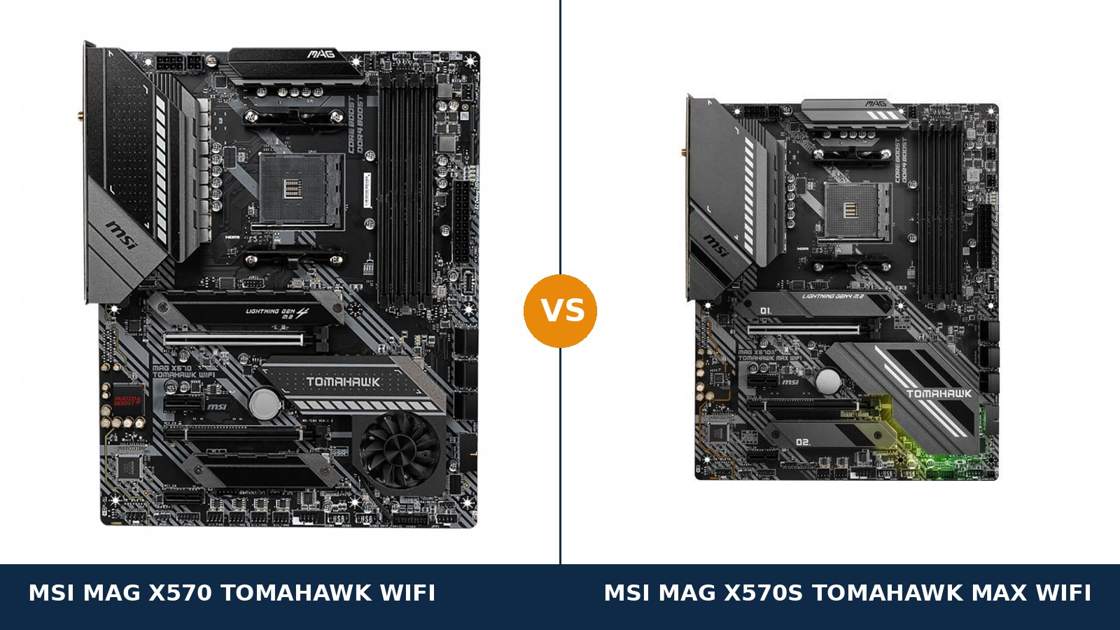
Same name. Same chipset. Same power design. One small letter between them.
The MSI MAG X570 Tomahawk WiFi built its reputation the hard way: it launched after MSI's first X570 boards were criticised for weak power delivery, and it fixed the problem so completely that it became the default recommendation in its class. The MAG X570S Tomahawk Max WiFi is its refresh — the same board, revisited.
So what does the “S” actually buy you? A fanless chipset, newer wireless, newer audio and zero-fuss Ryzen 5000 support. What it does not buy you is a faster computer: the performance core of these two boards is identical.
This guide separates the real differences from the shared DNA, using MSI's own published specifications throughout.
Key Takeaways
- The X570S Tomahawk Max is the refined board. Fanless chipset cooling, Wi-Fi 6E, the newer ALC4080 audio codec and Ryzen 5000 support out of the box.
- The performance core is a dead tie. Both boards run the same 12+2 Duet Rail VRM with 60A power stages, dual Gen4 M.2 storage and 2.5G LAN.
- The chipset fan is the original's one real liability. MSI's Zero Frozr stops it at idle, but it remains a small moving part sitting under your graphics card.
- The original Tomahawk is the value play. It is a discontinued board now, so remaining stock and used listings regularly undercut the X570S by a wide margin.
- Check the BIOS before pairing the original with a Ryzen 5000. It launched before those processors existed; support arrives by BIOS update, and the Flash BIOS Button makes that painless.
Quick Verdict
Buy the MSI MAG X570S Tomahawk Max WiFi for most builds. It is the same proven Tomahawk with every rough edge sanded off.
The chipset fan is gone, replaced by a larger passive heatsink. Wi-Fi steps up to 6E with the 6 GHz band. The audio codec is a generation newer. And any Ryzen processor you are likely to fit — 5000 series included — works out of the box.
Buy the original MSI MAG X570 Tomahawk WiFi if the price gap is real and you know what you are accepting. You give up nothing in power delivery, storage or wired networking.
What you accept is a chipset fan, Wi-Fi 6 instead of 6E, the older audio codec, and one BIOS flash before a Ryzen 5000 build. For a discounted or used board in good condition, that trade is often worth it.
The Scorecard
Scores below are derived directly from the manufacturer specifications compared in this guide — phase counts, port counts, supported standards and cooling design. They are a reading aid, not benchmark results.
| Category | X570 Tomahawk | X570S Tomahawk Max | ||
|---|---|---|---|---|
| Power delivery | 9 / 10 | 9 / 10 | ||
| Chipset cooling & noise | 6 / 10 | 10 / 10 | ||
| Networking | 8 / 10 | 9 / 10 | ||
| Audio | 7 / 10 | 9 / 10 | ||
| Storage & expansion | 9 / 10 | 9 / 10 | ||
| USB connectivity | 9 / 10 | 8 / 10 | ||
| CPU support out of the box | 7 / 10 | 10 / 10 | ||
| Overall | 7.9 / 10 | 9.1 / 10 | ||
Read the shape of that scorecard carefully. The X570S does not win on muscle — muscle is tied. It wins on everything that surrounds the muscle: silence, wireless, audio and convenience.
At a Glance: Who Each Board Fits
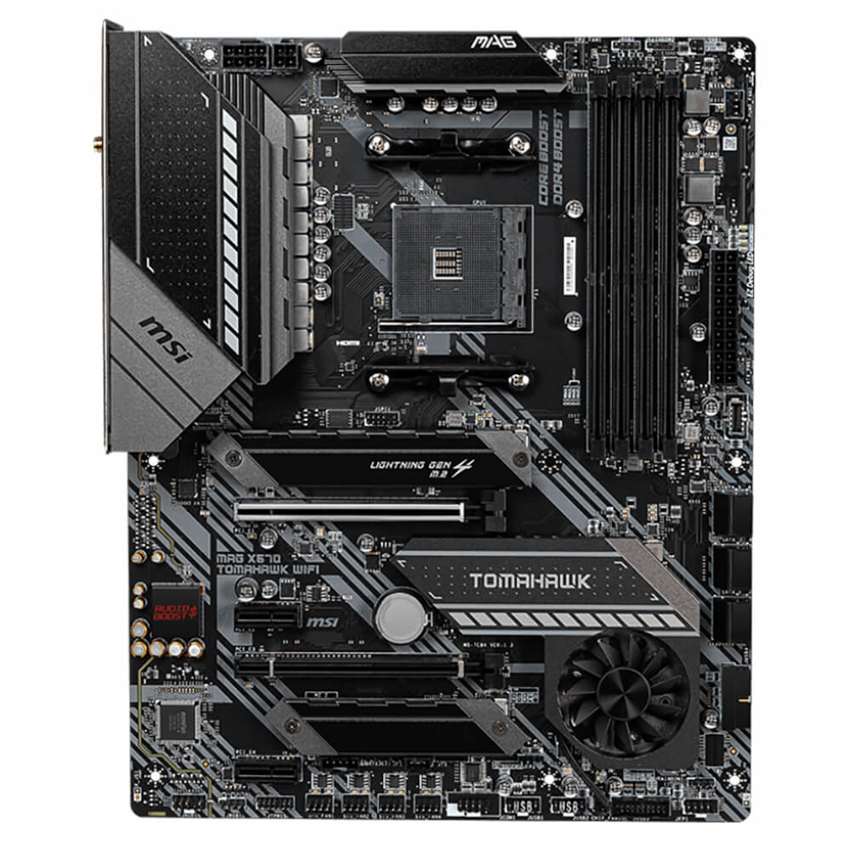
MSI MAG X570 Tomahawk WiFi
- 12+2 Duet Rail VRM, 60A power stages, 8+4 pin CPU power
- Frozr chipset heatsink with fan and Zero Frozr fan-stop
- Intel Wi-Fi 6 AX200, Bluetooth 5.1, Realtek 2.5G LAN
- Dual PCIe 4.0 M.2 with M.2 Shield Frozr, 6 × SATA
- Realtek ALC1200 audio with optical S/PDIF output
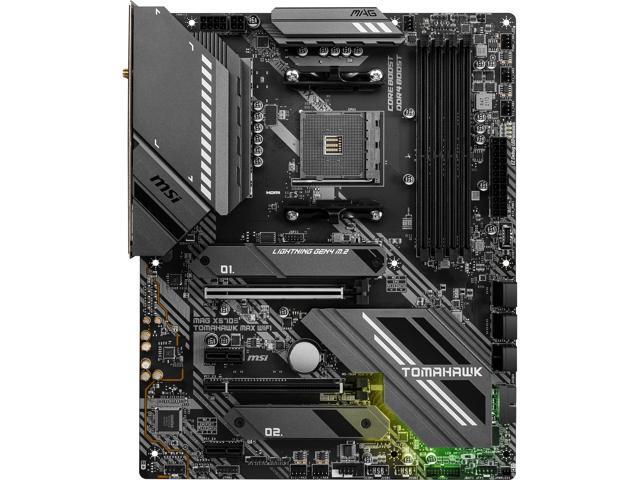
MSI MAG X570S Tomahawk Max WiFi
- 12+2 Duet Rail VRM, 60A power stages, 8+4 pin CPU power
- Fanless chipset — enlarged passive heatsink, zero fan noise
- Intel Wi-Fi 6E AX210, Bluetooth 5.2, Realtek 2.5G LAN
- Dual PCIe 4.0 M.2 with M.2 Shield Frozr, 6 × SATA
- Realtek ALC4080 audio with Audio Boost 5
Choose the MAG X570 Tomahawk WiFi if…
You have found one at a genuinely lower price — clearance stock, an open-box return, or a clean used board from a seller you trust.
Your router is Wi-Fi 6 anyway, so the 6 GHz band would sit unused. And you are comfortable flashing a BIOS once with the button on the rear panel.
You are keeping a Ryzen 3000 build alive, or you simply refuse to pay a premium for refinements you will never notice.
Choose the MAG X570S Tomahawk Max WiFi if…
You are building fresh with a Ryzen 5000 processor and want it to boot first time, no BIOS errands.
You care about noise. A silent chipset is one less fan spinning — and one less fan that can ever start failing — inside your case.
You have, or plan to buy, a Wi-Fi 6E router. Or you run good wired headphones from the rear audio jacks and want the newer codec behind them.
As an Amazon Associate I earn from qualifying purchases at no extra cost to you.
Specifications: The Specs That Actually Matter
Every figure below is taken from MSI's published specifications and datasheets for these two boards, cross-checked against MSI's product data.
One naming note first, because it causes real confusion: the “S” in X570S is not a different chipset. Both boards use AMD's X570 chipset. The S-generation boards are the later, fanless designs built around it — same silicon, new cooling, refreshed extras.
| Specification | MSI MAG X570 Tomahawk WiFi | MSI MAG X570S Tomahawk Max WiFi |
|---|---|---|
| Form factor | ATX, 30.5 × 24.4 cm | ATX, 30.5 × 24.4 cm |
| Socket / chipset | AMD AM4 / X570 | AMD AM4 / X570 |
| Chipset cooling | Frozr heatsink with fan (Zero Frozr fan-stop at low load) | Passive — enlarged heatsink, completely fanless |
| CPU support | Ryzen 2000 / 3000 series at launch; Ryzen 5000 via BIOS update | Ryzen 5000, 5000 G, 4000 G, 3000, 3000 G, 2000, 2000 G — out of the box |
| VRM design | 12+2 Duet Rail, 60A power stages, 8+4 pin | 12+2 Duet Rail (mirrored arrangement), 60A power stages, 8+4 pin |
| Memory | 4 × DDR4 DIMM, up to 128 GB, 4600+ MT/s (O.C.), A-XMP | 4 × DDR4 DIMM, up to 128 GB, 5100 MT/s (O.C.), A-XMP |
| Expansion slots | PCIe 4.0 x16 + PCIe 4.0 x16 slot (x4) + 2 × PCIe x1, CrossFire | PCIe 4.0 x16 + PCIe 4.0 x16 slot (x4) + 2 × PCIe x1, CrossFire |
| M.2 storage | 2 × PCIe 4.0 x4, M.2 Shield Frozr heatsinks | 2 × PCIe 4.0 x4, M.2 Shield Frozr heatsinks |
| SATA | 6 × SATA 6 Gb/s, RAID 0/1/10 | 6 × SATA 6 Gb/s, RAID 0/1/10 |
| LAN | Realtek 8125B 2.5G | Realtek 8125B 2.5G |
| Wireless | Intel Wi-Fi 6 AX200, Bluetooth 5.1 | Intel Wi-Fi 6E AX210 (6 GHz band), Bluetooth 5.2 |
| Audio | Realtek ALC1200, 7.1 HD, optical S/PDIF | Realtek ALC4080, Audio Boost 5, 7.1 HD, optical S/PDIF |
| USB (rear panel) | 4 × USB 3.2 Gen 2 (3 Type-A + Type-C), 2 × Gen 1, 2 × USB 2.0 | 3 × USB 3.2 Gen 2 (2 Type-A + Type-C), 2 × Gen 1, 2 × USB 2.0 |
| USB (front panel) | USB 3.2 Gen 2 Type-C header + 4 × Gen 1 via headers | USB 3.2 Gen 2 Type-C header + 4 × Gen 1 via headers |
| Display output (APU) | 1 × HDMI | 1 × HDMI 2.1, 4K@60 |
| BIOS flashing | Flash BIOS Button (no CPU/RAM/GPU needed) | Flash BIOS Button (no CPU/RAM/GPU needed) |
The BIOS note that matters: MSI's original datasheet for the X570 Tomahawk lists Ryzen 2000 and 3000 series support, because the board predates Ryzen 5000. MSI's current support list takes it up to Ryzen 9 — the 5000 series works, but only on an updated BIOS.
The X570S Tomahawk Max lists the full range, 5000 series first, straight out of the box. Same destination, different amount of admin to get there.
The Differences That Actually Matter
1. Chipset cooling — the fan, and everything it implies
This is the headline difference, and you can see it in the photos. Look at the bottom-right corner of each board.
On the original X570 Tomahawk, there is a small fan set into the chipset heatsink. On the X570S, there is a larger slab of finned metal — and no fan at all.
Why did the original need a fan? The X570 chipset runs hot for a chipset, because it carries PCIe 4.0 lanes of its own. First-generation X570 boards across every brand answered that heat with a little fan.
MSI's implementation is one of the better ones: a double-ball-bearing fan, with Zero Frozr technology that stops it completely when chipset temperatures are low. In a light desktop workload, it usually is not spinning at all.
But “usually not spinning” is not “not there.” Small fans are the components most likely to get noisy, rattle or fail as a system ages — and this one sits in the worst possible location, buried under a hot graphics card, breathing dusty case air. There is no software fix for a dead bearing.
MSI says the quiet part out loud in its own X570S material: it “replaced the PCH fan with enlarged heatsink design to reduce dust and noise.” Dust, noise and a failure mode — deleted in one design change.
For a build you intend to run for five or more years, this is the single strongest argument for the X570S. It is not about today's noise. It is about year five's reliability.
2. CPU support — out of the box versus after one errand
The X570S Tomahawk Max supports the whole AM4 story out of the box: Ryzen 5000, the 5000 G-series APUs, 4000 G, the 3000 series and even the 2000 series.
Fit a 5800X, a 5600 or a 5700G, and it boots. That is the entire experience.
The original Tomahawk launched into a world where Ryzen 5000 did not yet exist. Its datasheet lists Ryzen 2000 and 3000 series processors. Ryzen 5000 support arrived later, delivered by BIOS updates — up to and including Ryzen 9.
In practice this splits buyers into two camps. Buy the original new-old-stock or from a seller who kept it updated, and your 5000-series chip may simply work.
Buy a board that has sat in a warehouse or a previous build since early in its life, and it may not recognise your processor until the BIOS is flashed. The board is not broken. It just does not know what a 5600X is yet.
The rescue is built in: the Flash BIOS Button on the rear panel updates the BIOS with no CPU, memory or graphics card installed. It turns a potential dead-end into a ten-minute job with a USB stick.
Verdict on this section: the X570S wins on convenience, not capability. Once the original is flashed, both boards run the same processors.
3. Wireless — Wi-Fi 6E is a real upgrade, if your router agrees
The original Tomahawk carries Intel's AX200: Wi-Fi 6 across the 2.4 GHz and 5 GHz bands, with Bluetooth 5.1. At its launch, that was the best wireless you could reasonably ask for on a board at this level.
The X570S carries Intel's AX210: Wi-Fi 6E, which adds the 6 GHz band, plus Bluetooth 5.2. Both adapters are rated up to 2.4 Gbps, so the headline speed does not change.
What changes is congestion. The 6 GHz band is wide, clean spectrum that your neighbours' networks mostly are not on. In a dense apartment building, that is the difference between wireless that feels wired and wireless that stutters at peak hours.
The honest condition: you only get that benefit with a Wi-Fi 6E or newer router — 6 GHz signals are stopped by walls more easily than 5 GHz. If your router is Wi-Fi 6 and staying that way, this section scores a draw. If a 6E router is in your home or your plans, the X570S takes the point permanently: you cannot retrofit a 6 GHz radio with a driver update.
4. Audio — a generation newer where it counts
The original Tomahawk uses Realtek's ALC1200 codec with 7.1 HD audio and an optical S/PDIF output. It was a respectable, mainstream-good solution — a clear step above the entry-level codecs of its day.
The X570S uses Realtek's ALC4080 with MSI's Audio Boost 5. The ALC4080 is the newer generation of codec, a USB-interface design that became the standard fitment on later AM4 boards, paired here with MSI's higher-grade audio component selection.
Who hears the difference? Builders running good wired headphones or powered speakers straight from the rear jacks. Anyone on a USB headset, a USB DAC or HDMI audio bypasses the board's codec entirely — on those setups, this whole section is a tie.
Both boards keep the optical output, which matters if your audio runs to an older AV receiver or soundbar.
5. Memory ceiling — 5,100 versus 4,600, and why it barely matters
On paper, the X570S supports DDR4 overclocking to 5100 MT/s. The original is rated to 4600+ MT/s. Four slots and 128 GB maximum on both.
Here is the context that turns that gap into a footnote: Ryzen's real-world memory sweet spot sits far below either ceiling. A quality 3600 MT/s kit with tight timings is the sensible buy for gaming on both boards, and both run it identically.
The higher ceiling is headroom for enthusiasts who enjoy tuning memory for its own sake. If that is you, the X570S gives you a longer runway. For everyone else, call this a nominal X570S win with no practical weight — do not choose between these boards on memory specifications.
6. Rear USB — the one place the older board fights back
Credit where it is due. Count the fast ports on the rear panel and the original Tomahawk wins.
It offers four USB 3.2 Gen 2 ports at the back — three Type-A and one Type-C. The X570S offers three — two Type-A and one Type-C. Both add two Gen 1 Type-A and two USB 2.0 ports behind, and both provide a front-panel Type-C Gen 2 header plus Gen 1 headers.
One extra 10 Gbps Type-A port will not change most builds. But if fast external drives and capture devices live on your rear ports, the older board quietly serves you better.
It is a small, genuine win — and a reminder that “refresh” means better at what the manufacturer chose to prioritise. MSI prioritised silence, wireless and audio. This port paid for part of it.
7. The tie — power, storage and expansion did not change
Now the most important section in this comparison, precisely because nothing happens in it.
Power delivery: identical class. Both boards run MSI's 12+2 Duet Rail design with 60A power stages, digital PWM control, Core Boost layout, 8+4 pin CPU power connectors and extended heatsinks over the power stages.
This VRM is the reason the Tomahawk name carries weight. It is comfortably specified for the entire Ryzen stack, including the 16-core Ryzen 9 5950X, on both boards.
Storage: identical. Two PCIe 4.0 x4 M.2 slots, both under M.2 Shield Frozr heatsinks, plus six SATA ports with RAID 0/1/10 on both boards.
Expansion: identical. A full-speed PCIe 4.0 x16 slot for the graphics card, a second x16 slot wired at x4 from the chipset, two x1 slots, steel-armoured main slot, and 2-Way CrossFire support on both.
Wired networking: identical. The same Realtek 8125B 2.5-gigabit controller, with the same LAN Manager prioritisation software.
Understand what this means and the whole comparison snaps into focus. The X570S is not a faster or stronger board. It is the same board with its ownership experience modernised. Every purchasing decision between these two should be made on that basis — and on price.
CPU Pairing Guide
Start from your processor and the choice usually makes itself. This is the whole comparison in one view.
| Your processor | MAG X570 Tomahawk WiFi | MAG X570S Tomahawk Max WiFi | Our call |
|---|---|---|---|
| Ryzen 9 5950X / 5900X | Excellent — VRM is well up to it; BIOS update may be needed first | Excellent — supported out of the box | X570S for zero fuss; either once flashed |
| Ryzen 7 5800X3D | Excellent — requires a later BIOS that adds X3D support | Excellent — supported out of the box | X570S Tomahawk Max |
| Ryzen 7 5700X / 5800X | Excellent — check BIOS version for 5000 support | Excellent — out of the box | X570S, or the original if the saving is big |
| Ryzen 5 5600 / 5600X | Excellent — check BIOS version for 5000 support | Excellent — out of the box | Whichever board is cheaper |
| Ryzen 5 5600G / 7 5700G (APU) | Good — G-series support depends on BIOS version; HDMI output fitted | Excellent — 5000 G-series listed out of the box | X570S Tomahawk Max |
| Ryzen 3000 series (3600 / 3700X) | Excellent — native, launch-day support | Excellent — also supported | Original Tomahawk; save the money |
Notice the pattern in the right-hand column. The X570S is never the wrong answer. The original is the right answer exactly when its price does the talking — or when your processor predates the BIOS question entirely.
Ready to check today’s price?
Both boards sell through Amazon — the original now mostly as remaining and marketplace stock. Check the live figure on the board that fits your build.
View on Amazon — MAG X570 Tomahawk WiFiView on Amazon — MAG X570S Tomahawk Max WiFiThe 30-Second Decision
| If this sounds like you… | Buy this |
|---|---|
| “New Ryzen 5000 build, and I want it to just work.” | MAG X570S Tomahawk Max WiFi |
| “I hate fan noise and plan to keep this PC for years.” | MAG X570S Tomahawk Max WiFi |
| “I found the original at a big discount or clean used.” | MAG X570 Tomahawk WiFi |
| “My router is Wi-Fi 6E and my flat is full of networks.” | MAG X570S Tomahawk Max WiFi |
| “Ryzen 3000 build — I just need a strong, cheap X570.” | MAG X570 Tomahawk WiFi |
| “I run everything off rear USB and want every fast port I can get.” | MAG X570 Tomahawk WiFi (one extra Gen 2 Type-A) |
What You Gain. What You Give Up.
MSI MAG X570 Tomahawk WiFi
You gain: the Tomahawk's full performance core — 12+2 phase VRM, dual Gen4 M.2, 2.5G LAN — at whatever discount a discontinued board commands. Plus one extra rear USB 3.2 Gen 2 Type-A port over the newer board.
You give up: the fanless chipset, Wi-Fi 6E, the newer audio codec and out-of-the-box Ryzen 5000 support. You also take on a chipset fan as a long-term wear item.
MSI MAG X570S Tomahawk Max WiFi
You gain: silent, fanless chipset cooling that can never wear out. Wi-Fi 6E with the 6 GHz band and Bluetooth 5.2. The ALC4080 codec with Audio Boost 5. And the widest out-of-the-box CPU support of the two, Ryzen 5000 first in line.
You give up: one rear USB 3.2 Gen 2 Type-A port, and the difference in price — the X570S is the board still sold as a current product, and it is priced like one.
Pros and Cons
MAG X570 Tomahawk WiFi — Pros
- Same 12+2 Duet Rail VRM with 60A stages as the refresh
- Four rear USB 3.2 Gen 2 ports — one more than the X570S
- Zero Frozr stops the chipset fan under light load
- Dual Gen4 M.2 with heatsinks, 2.5G LAN
- Discontinued pricing makes it the value pick
Cons
- Chipset fan is a long-term noise and failure risk
- Wi-Fi 6, not 6E — no 6 GHz band
- ALC1200 codec is a generation behind
- Ryzen 5000 needs a BIOS update before it boots
MAG X570S Tomahawk Max WiFi — Pros
- Completely fanless chipset — silent, nothing to wear out
- Wi-Fi 6E AX210 with 6 GHz band, Bluetooth 5.2
- ALC4080 codec with Audio Boost 5
- Ryzen 5000 and 5000G supported out of the box
- Higher memory overclocking ceiling (5100 MT/s)
Cons
- Costs more — a current product, not clearance stock
- One fewer rear USB 3.2 Gen 2 Type-A port
- No performance gain over the original anywhere
- Same two M.2 slots — no storage expansion over the original
Check the BIOS, the Name and the Bundle
Check the BIOS on the original. This is the only real trap in this comparison.
An X570 Tomahawk that has been in service will almost certainly carry a modern BIOS. New-old-stock and early used boards may not. If your Ryzen 5000 build does not post, do not panic and do not return the board — flash it with the Flash BIOS Button and a USB stick, exactly as MSI intends.
Check the name — twice. MSI sells a MAG X570S Torpedo Max that looks similar and costs less, but drops the Wi-Fi this board's name promises. And the “Tomahawk Max” name also appears on newer AM5 boards for a different platform entirely.
The board in this comparison is the MAG X570S Tomahawk Max WiFi, socket AM4. Match the full name, the socket and the Wi-Fi before you pay.
Check the bundle on used originals. The I/O shield is pre-installed on both boards, which removes one classic used-board headache. What does go missing from used listings is the Wi-Fi antenna — both boards are crippled on wireless without it, and replacements are an unwelcome extra cost.
Also confirm the M.2 Shield Frozr heatsinks and their screws are present on a used board. They are part of the cooling design, not decoration.
Check which stock you are buying. The X570S is the current product with a normal retail channel behind it. The original is discontinued: listings mix remaining retail stock, open-box returns and used boards, and what arrives varies accordingly. Buy from a seller whose returns policy you have actually read.
The Upgrade Path Test
Judge these boards by the build they become, not the build they start as.
Both start anywhere. A Ryzen 5 5600 today is equally at home on either board, and neither will hold it back.
Both also finish in the same place. AM4's endgame processors — the Ryzen 7 5800X3D for gaming, the Ryzen 9 5950X for work — are exactly what this 12+2 phase power design was built to feed. On the original, the final upgrade may ask for one BIOS flash first. On the X570S, it will not.
The difference shows up in the years between. The X570S asks nothing of you in that time. The original asks for exactly one thing — that its little fan keeps spinning. Most do, for years. But it is the only component on either board with a designed-in expiry date, and it is worth naming plainly.
One shared ceiling, honestly stated: neither board grows beyond two M.2 drives and this socket. AM4 is a finished platform. Buy either Tomahawk as the final form of an AM4 build, not as a stepping stone to one.
When to Skip Both
Two good boards can still both be wrong for you.
Skip both if you do not need what X570 adds over B550 — chipset-fed PCIe 4.0 lanes and a second fast M.2 path. A good B550 Tomahawk-class board runs a single-GPU Ryzen build just as well, usually for less.
Skip both if you are starting completely fresh and the budget stretches to a current platform. AM4's value is in the processors and DDR4 you already own or can buy cheaply; it is not where new money goes for a ten-year runway.
Skip both if you need more than two M.2 slots without adapters, or multi-GPU at full width. Those builds live a tier above this one.
And skip the original specifically if you cannot verify its condition or BIOS state and the X570S is within comfortable reach. Certainty is a feature. Sometimes it is the feature worth paying for.
BIOS and Long-Term Support
AM4 is a finished, mature platform. For both of these boards, that is good news.
The BIOS is stable, the drivers are stable, and every quirk has long since been found and fixed. Expect future BIOS releases to be security and edge-case compatibility updates, not new features — which is exactly what a mature platform should deliver.
Both boards sit on MSI's standard support pages: BIOS downloads, chipset, LAN, audio and wireless drivers, and the CPU support list that settles any processor question definitively.
One habit covers both boards: before any processor upgrade, check that list for the exact BIOS version your chip requires, and update first. It is a ten-minute job that prevents the only frustrating afternoon either of these boards can give you.
Final Verdict
The MSI MAG X570S Tomahawk Max WiFi is the Tomahawk to buy.
Not because it is faster — it is not, and any review that tells you otherwise is inventing a difference. The VRM, the storage, the wired networking and the expansion are the same.
It wins because ownership is better. A chipset that can never make noise or lose its cooling. Wireless that speaks to modern routers on a band the original cannot reach. Audio a generation newer. And a BIOS that already knows your processor.
Buy the X570S Tomahawk Max for a fresh Ryzen 5000 build, a quiet build, or any AM4 system you intend to keep for the platform's remaining life.
View on Amazon — MAG X570S Tomahawk Max WiFi
Buy the original X570 Tomahawk when its price does the arguing — a genuine discount, a trusted used board, a Ryzen 3000 system that needs a strong home. Flashed once and fitted with its antenna, it delivers the same performance this comparison measured everywhere else.
Just buy it with open eyes: the fan, the older wireless and the older codec are the price of the saving. For the right buyer, at the right figure, that is a trade worth making.
View on Amazon — MAG X570 Tomahawk WiFi
Frequently Asked Questions
Is the X570S Tomahawk Max WiFi better than the X570 Tomahawk WiFi?
As a complete product, yes — but not in performance. Power delivery, storage, wired LAN and expansion are identical. The X570S wins on chipset cooling (fanless versus a fan), Wi-Fi 6E versus Wi-Fi 6, a newer ALC4080 audio codec, and out-of-the-box Ryzen 5000 support. The original counters with one extra rear USB 3.2 Gen 2 port and, usually, a lower price.
What does the “S” in X570S mean?
It marks AMD's later, fanless X570 board generation — MSI's own material ties it to silent chipset cooling. The chipset itself is the same X570 silicon in both boards. The S boards pair it with a passive heatsink instead of a fan, and MSI used the refresh to update wireless, audio and CPU support at the same time.
Does the original MAG X570 Tomahawk WiFi support Ryzen 5000?
Yes — via BIOS update. The board launched before Ryzen 5000 existed, so its original datasheet lists Ryzen 2000 and 3000 series support; MSI's current CPU support list covers the 5000 series up to Ryzen 9. If a board has an old BIOS, the rear-panel Flash BIOS Button updates it without a CPU installed.
Is the chipset fan on the X570 Tomahawk a problem?
Not on day one, and MSI engineered it better than most: a double-ball-bearing fan with Zero Frozr control that stops it entirely under light load. The concern is long-term. Small fans are wear items, and this one sits under the graphics card where it breathes hot, dusty air. The X570S removes the question entirely with passive cooling.
Do both boards have the same VRM?
Effectively, yes. Both use MSI's 12+2 Duet Rail power system with 60A power stages, digital PWM, Core Boost layout, 8+4 pin CPU power and extended heatsinks (the X570S arranges its stages in a mirrored layout). Either board feeds any AM4 processor, including the Ryzen 9 5950X, with room to spare.
Which board should I choose for a Ryzen 7 5800X3D?
The X570S Tomahawk Max, for convenience: it supports the 5800X3D without any BIOS preliminaries. The original Tomahawk runs it just as well once updated to a BIOS that includes X3D support — check MSI's CPU support list for the required version before swapping processors.
Does the X570S have more M.2 slots or faster storage?
No. Both boards have exactly two M.2 slots, both PCIe 4.0 x4, both under M.2 Shield Frozr heatsinks, plus six SATA ports with RAID 0/1/10. Storage is one of the comparison's complete ties.
Is Wi-Fi 6E worth choosing the X570S for?
Only if your network can use it. The AX210's 6 GHz band needs a Wi-Fi 6E or newer router, and performs best in the same room or one wall away. With such a router in a busy wireless environment, it is a genuine quality-of-life upgrade. With a Wi-Fi 6 router you plan to keep, the original's AX200 Wi-Fi 6 is fully sufficient.
Sources & Verification
MSI MAG X570 TOMAHAWK WIFI official product page, specifications and datasheet, msi.com • MSI MAG X570S TOMAHAWK MAX WIFI official product page, specifications and datasheet, msi.com • MSI X570S series launch material (12+2 phase, 60A SPS power design) • Retail product data for MAG X570 TOMAHAWK WIFI and MAG X570S TOMAHAWK MAX WIFI (ASIN- and UPC-verified listings). Specifications verified November 2026.

James Wilson
James has been building and benchmarking PCs for over a decade and writes Honestly Compared's motherboard and component guides. His rule for every comparison: the verdict has to survive the spec sheet, not the marketing page.