
MSI MAG X570 Tomahawk WiFi vs MSI MAG X570S Tomahawk Max WiFi: Which Should You Buy?
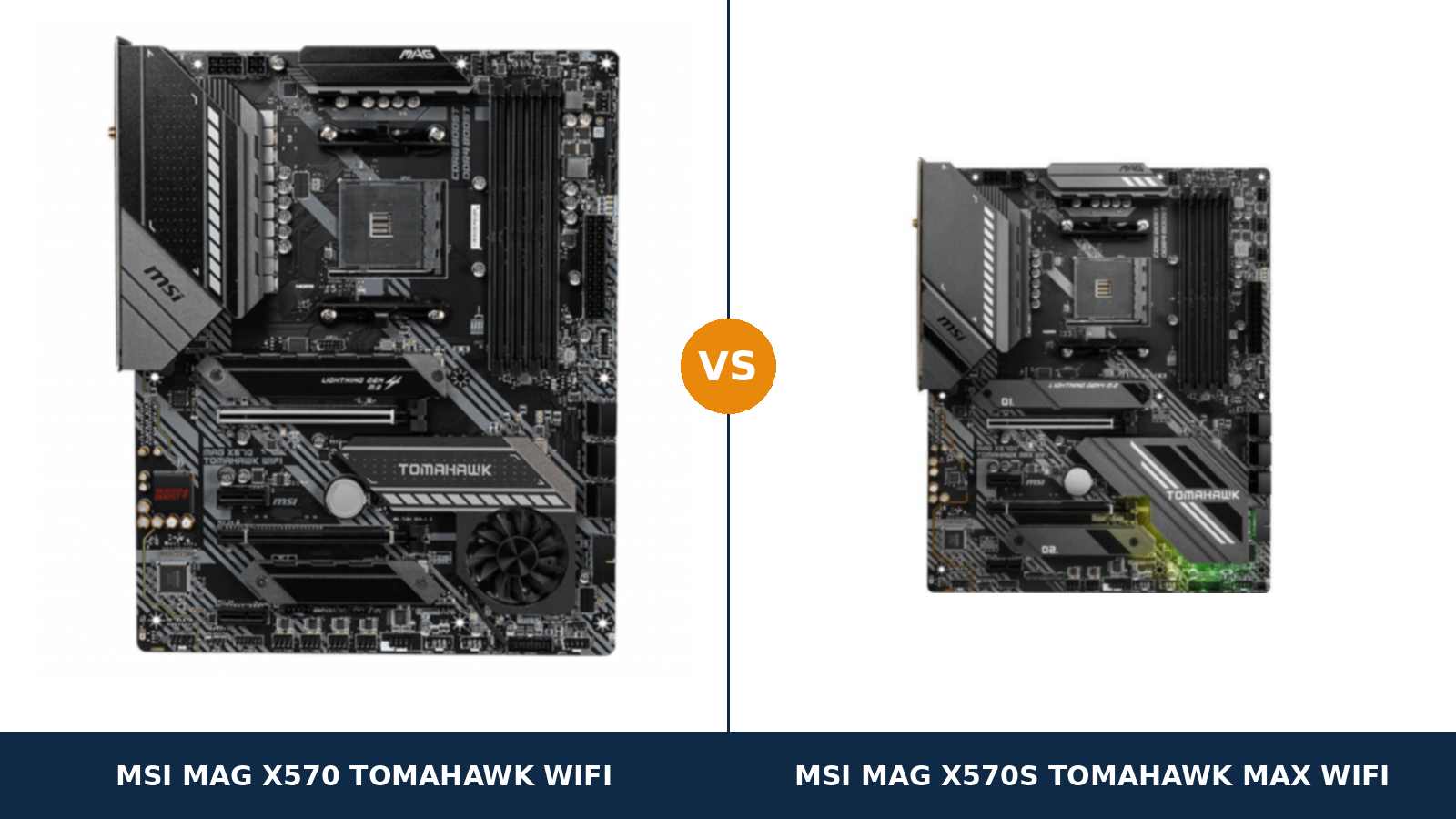
Start with the smallest part on either board: a chipset fan no bigger than a coin.
One of these motherboards has it; the other was designed specifically to get rid of it. Almost everything in this comparison flows from that decision.
Underneath, the MSI MAG X570 Tomahawk WiFi and the MAG X570S Tomahawk Max WiFi are the same machine: same chipset, same power delivery, same storage, same wired networking. MSI did not redesign this board. It revisited it, changing everything around the edges while leaving the performance core exactly where it was.
So the choice is not about speed. It is about noise, wireless standards, audio, first-boot convenience and price — worked through below from MSI's own published specifications, with the ties called ties.
Key Takeaways
- Buy the X570S Tomahawk Max for a new build. Fanless chipset, Wi-Fi 6E, newer ALC4080 audio and full Ryzen support without touching the BIOS.
- Performance is not the decider. Identical 12+2 Duet Rail VRM with 60A stages, identical dual Gen4 M.2 layout, identical 2.5G LAN.
- The chipset fan is the original's only structural weakness. Fan-stop keeps it still at idle, but it is a wear item buried beneath the graphics card.
- The original fights back on price and one port. Discontinued stock often sells well below the X570S, and it carries one extra rear USB 3.2 Gen 2 Type-A.
- Ryzen 5000 works on both — on the older board, possibly after one BIOS update via the rear Flash BIOS Button.
Quick Verdict
Buy the MSI MAG X570S Tomahawk Max WiFi if you are building now. It takes everything that made the original the class benchmark and removes every asterisk.
No chipset fan to whine or wear out. A Wi-Fi 6E radio with the 6 GHz band. A newer audio codec. And a BIOS that recognises every AM4 processor worth fitting, straight out of the box.
Buy the original MSI MAG X570 Tomahawk WiFi when its price does the convincing. Clearance and used listings regularly price it like yesterday's board, and on raw capability it gives nothing away.
The trade is written out in full below: fan versus silence, Wi-Fi 6 versus 6E, one BIOS flash versus none. If the saving is small, take the newer board. If it is large, the original is the smarter money.
The Scorecard
These scores are worked out from the specifications compared in this guide — power stages, cooling design, port counts and supported standards — not from benchmark runs. Treat them as a map of the spec sheet, not a performance measurement.
| Category | X570 Tomahawk | X570S Tomahawk Max | ||
|---|---|---|---|---|
| Power delivery | 9 / 10 | 9 / 10 | ||
| Chipset cooling & noise | 6 / 10 | 10 / 10 | ||
| Networking | 8 / 10 | 9 / 10 | ||
| Audio | 7 / 10 | 9 / 10 | ||
| Storage & expansion | 9 / 10 | 9 / 10 | ||
| USB connectivity | 9 / 10 | 8 / 10 | ||
| CPU support out of the box | 7 / 10 | 10 / 10 | ||
| Overall | 7.9 / 10 | 9.1 / 10 | ||
Study the pattern for a moment. Every row where the X570S wins is about living with the board. Every row about feeding a processor or a drive is level. That is the entire comparison in one table.
At a Glance: Who Each Board Fits
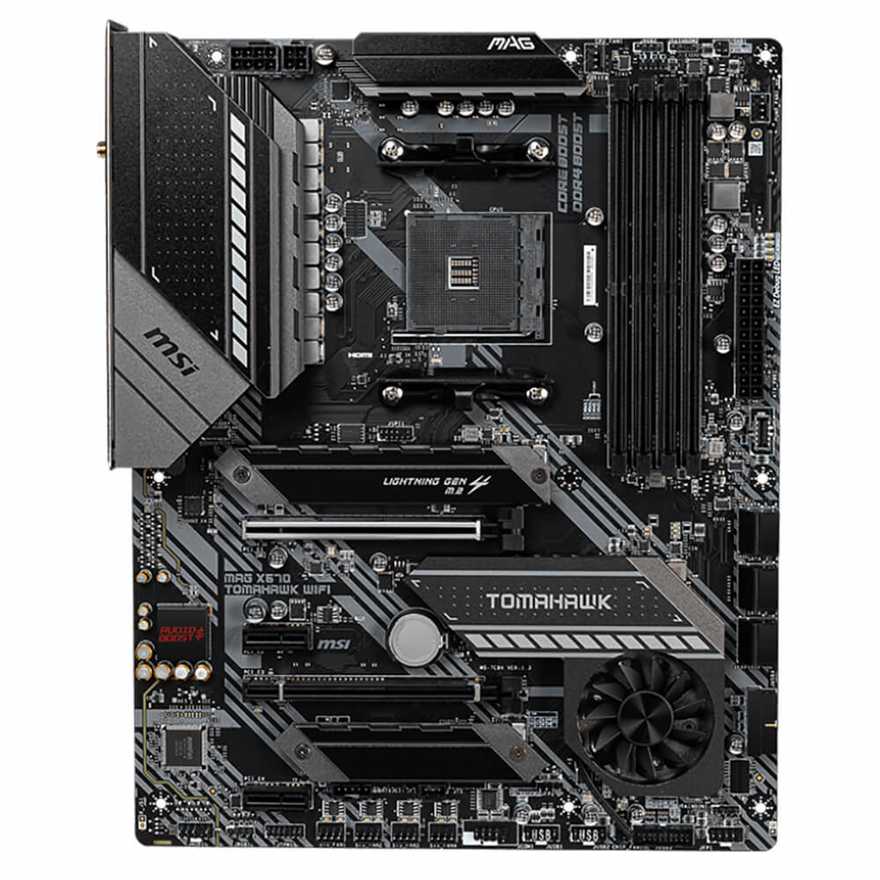
MSI MAG X570 Tomahawk WiFi
- 12+2 Duet Rail VRM with 60A stages and 8+4 pin CPU power
- Chipset heatsink with fan — Zero Frozr stops it under light load
- Intel Wi-Fi 6 AX200 and Bluetooth 5.1, Realtek 2.5G LAN
- Two PCIe 4.0 M.2 slots under heatsinks, 6 × SATA
- Realtek ALC1200 audio, optical S/PDIF on the rear panel
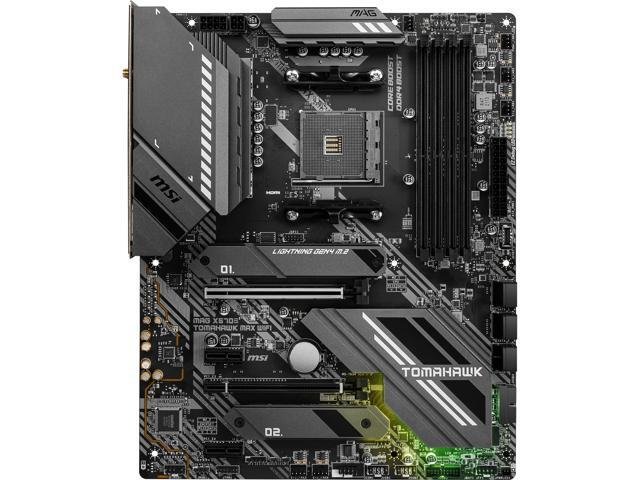
MSI MAG X570S Tomahawk Max WiFi
- 12+2 Duet Rail VRM with 60A stages and 8+4 pin CPU power
- Fully passive chipset cooling — a bigger heatsink, no fan at all
- Intel Wi-Fi 6E AX210 and Bluetooth 5.2, Realtek 2.5G LAN
- Two PCIe 4.0 M.2 slots under heatsinks, 6 × SATA
- Realtek ALC4080 audio with Audio Boost 5, optical S/PDIF
Choose the MAG X570 Tomahawk WiFi if…
The listing in front of you is priced like a discontinued board, because that is what it is. A wide gap between the two prices is this board's whole argument — and it is a good one.
Your wireless router is Wi-Fi 6 and staying that way. The 6 GHz band would never get used in your home.
You are building around a Ryzen 3000 processor, or around a 5000 chip with a seller who kept the BIOS current. Either way, the support question never arises.
Choose the MAG X570S Tomahawk Max WiFi if…
This is a fresh Ryzen 5000 build and you want the first boot to be the boring kind: parts in, power on, Windows installer.
Your PC lives in a quiet room, or runs for long hours. Removing one small fan from a system you keep for years removes one future failure along with it.
You own a Wi-Fi 6E router, or your next router upgrade is already planned. This is the board whose radio will still match it.
As an Amazon Associate I earn from qualifying purchases at no extra cost to you.
Specifications: The Specs That Actually Matter
All figures below come from MSI's published specification pages and datasheets for the two boards, cross-checked against MSI's retailer product data.
One clarification before the table, because listing titles get it wrong constantly: X570S is not a separate chipset. Both boards run AMD's X570. The S generation is the later board design built on it — passive chipset cooling and refreshed supporting hardware.
| Specification | MSI MAG X570 Tomahawk WiFi | MSI MAG X570S Tomahawk Max WiFi |
|---|---|---|
| Form factor | ATX, 30.5 × 24.4 cm | ATX, 30.5 × 24.4 cm |
| Socket / chipset | AMD AM4 / X570 | AMD AM4 / X570 |
| Chipset cooling | Frozr heatsink with fan, Zero Frozr fan-stop | Passive enlarged heatsink — no fan fitted |
| CPU support | Ryzen 2000 / 3000 at launch; Ryzen 5000 by BIOS update | Ryzen 5000, 5000 G, 4000 G, 3000, 3000 G, 2000, 2000 G — out of the box |
| VRM design | 12+2 Duet Rail, 60A power stages, 8+4 pin | 12+2 Duet Rail (mirrored layout), 60A power stages, 8+4 pin |
| Memory | 4 × DDR4 DIMM, up to 128 GB, 4600+ MT/s (O.C.), A-XMP | 4 × DDR4 DIMM, up to 128 GB, 5100 MT/s (O.C.), A-XMP |
| Expansion slots | PCIe 4.0 x16 + PCIe 4.0 x16 slot (x4) + 2 × PCIe x1, CrossFire | PCIe 4.0 x16 + PCIe 4.0 x16 slot (x4) + 2 × PCIe x1, CrossFire |
| M.2 storage | 2 × PCIe 4.0 x4, M.2 Shield Frozr heatsinks | 2 × PCIe 4.0 x4, M.2 Shield Frozr heatsinks |
| SATA | 6 × SATA 6 Gb/s, RAID 0/1/10 | 6 × SATA 6 Gb/s, RAID 0/1/10 |
| LAN | Realtek 8125B 2.5G | Realtek 8125B 2.5G |
| Wireless | Intel Wi-Fi 6 AX200, Bluetooth 5.1 | Intel Wi-Fi 6E AX210 with 6 GHz band, Bluetooth 5.2 |
| Audio | Realtek ALC1200, 7.1 HD, optical S/PDIF | Realtek ALC4080 with Audio Boost 5, 7.1 HD, optical S/PDIF |
| USB (rear panel) | 4 × USB 3.2 Gen 2 (3 Type-A + Type-C), 2 × Gen 1, 2 × USB 2.0 | 3 × USB 3.2 Gen 2 (2 Type-A + Type-C), 2 × Gen 1, 2 × USB 2.0 |
| USB (front panel) | USB 3.2 Gen 2 Type-C header + 4 × Gen 1 via headers | USB 3.2 Gen 2 Type-C header + 4 × Gen 1 via headers |
| Display output (APU) | 1 × HDMI | 1 × HDMI 2.1, 4K@60 |
| BIOS flashing | Flash BIOS Button (no CPU/RAM/GPU needed) | Flash BIOS Button (no CPU/RAM/GPU needed) |
The support line deserves a second look. The original board's launch datasheet cannot list Ryzen 5000 — those processors did not exist when it was printed. MSI's current CPU support list for the board runs all the way to Ryzen 9.
The X570S simply starts there. Its box promises, and delivers, the full AM4 catalogue with no homework attached.
The Differences That Actually Matter
1. The fan question — quiet today, reliable in year five
Find the bottom-right corner in each product photo. On the original board, a small fan sits inside the chipset heatsink. On the X570S, that whole corner is solid finned metal.
The fan exists because X570 earns its keep with PCIe 4.0 lanes of its own, and that work makes a chipset run hotter than its predecessors. Every first-wave X570 board from every manufacturer answered with active cooling. MSI's version is among the better executions: a double-ball-bearing unit governed by Zero Frozr, which holds it stationary whenever chipset temperatures are low.
On a typical desktop, the fan therefore spends much of its life doing nothing. Credit MSI for that — but doing nothing is the best case available to a moving part, not a permanent state.
Small fans fail in predictable ways: bearings dry out, blades collect dust, and the first symptom is usually a whine that rises and falls with load. When it happens here, it happens in the least accessible spot on the board, directly beneath a hot graphics card, in air the GPU has already warmed.
MSI's own X570S launch material describes the redesign as replacing the chipset fan with an enlarged heatsink to cut dust and noise. The manufacturer is telling you, in its own words, what the fan cost you.
None of this makes the original a bad board today. It makes the X570S the lower-maintenance board across a long ownership — and long ownership is precisely what a finished platform like AM4 invites.
2. Wireless — the 6 GHz band, and the router it depends on
Intel supplies the wireless on both boards, one generation apart. The original carries the AX200: Wi-Fi 6 on the 2.4 and 5 GHz bands, Bluetooth 5.1. The X570S carries the AX210: Wi-Fi 6E, adding the 6 GHz band, with Bluetooth 5.2.
Both adapters peak at the same 2.4 Gbps headline rate, so a speed test will not separate them. Congestion is what separates them. The 6 GHz band is broad, lightly used spectrum; in a block of flats where forty networks fight over 5 GHz, moving your PC onto 6 GHz is the closest wireless gets to feeling like a cable.
Now the condition, stated plainly: none of that exists without a Wi-Fi 6E or newer router at the other end. Pair the X570S with a Wi-Fi 6 router and its radio behaves exactly like the original's. The 6 GHz band also fades faster through walls, so it rewards same-room and next-room setups most.
Decide it on your network's future, not its present. Routers get replaced during a PC's lifetime; motherboard radios do not. If a 6E router is coming at any point in this build's life, the X570S is ready for it.
3. Audio — one codec generation, heard by some
Audio is the quiet generational step. The original board runs Realtek's ALC1200, a capable 7.1 HD codec with an optical S/PDIF output. The X570S runs the ALC4080 under MSI's Audio Boost 5 banner — the newer USB-interface codec that became standard fitment on late AM4 boards, backed by a higher-grade component selection around it.
Whether you hear any of that depends entirely on how your sound leaves the PC. Rear-panel analogue outputs — good wired headphones, powered speakers — are where the newer codec earns its place.
USB headsets, USB DACs and HDMI audio never touch the onboard codec at all. On those setups this section is a genuine tie, and no amount of codec marketing changes it.
One shared mercy: both boards keep the optical output. If an older AV receiver or soundbar anchors your audio, neither board forces you to retire it.
4. CPU support — identical destination, different first boot
Both boards ultimately run the same processors, up to and including the 16-core Ryzen 9 5950X and the gaming-favourite 5800X3D. The VRM underneath is not a limiting factor on either, which is why this section is about process rather than capability.
The X570S supports the whole range as shipped: 5000 series, the G-series APUs, 4000 G, 3000 and 2000 lines. Fit your chip, press power, proceed.
The original's story depends on where its individual unit has been. A board that spent its life in an updated system will greet a Ryzen 5000 chip without complaint. A board that sat sealed in a warehouse since its early production may not recognise one at all — because the BIOS it carries predates the processor's existence.
That sounds alarming and is not. The Flash BIOS Button on the rear I/O updates the board with nothing installed but the power supply: USB stick in, button pressed, a few minutes of patience. It converts the original's one genuine inconvenience into a single, well-documented chore.
Score it honestly: a clear X570S win on convenience, and no win at all on what either board can run once set up.
5. Memory ceiling — a bigger number that changes nothing
MSI rates the X570S for DDR4 overclocking up to 5100 MT/s; the original is rated at 4600+ MT/s. Four slots and a 128 GB maximum are shared.
Here is why that gap should not move your decision. Ryzen processors reward memory tuning up to a point well below either figure, after which their internal fabric clock becomes the wall. The widely agreed sweet spot — a 3600 MT/s kit with tight timings — runs identically on both boards.
Chasing those numbers means specialist kits and patient tuning for single-digit gains. If memory overclocking is your hobby, the X570S offers more headroom to play in.
If it is not, file this row under trivia and decide on the sections above and below.6. Rear USB — the row the older board wins outright
Refreshes giveth, and occasionally they taketh away. Count the fast ports across each rear panel.
The original offers four USB 3.2 Gen 2 ports at the back: three Type-A and one Type-C. The X570S offers three: two Type-A and the Type-C. Behind those, both carry two Gen 1 Type-A and two USB 2.0 ports, and both expose a front-panel Gen 2 Type-C header plus Gen 1 headers inside the case.
For most builders, one 10 Gbps Type-A port is a rounding error. For the builder whose desk runs fast external SSDs, a capture device and a dock off the rear panel, it is a real, if modest, advantage — for the older, cheaper board.
It also teaches the right lesson about refreshes. MSI spent the X570S budget on silence, wireless and audio. This port is part of what paid for them.
7. The frozen core — power, storage and expansion never changed
The most useful section of this comparison is the one where nothing happens, because it frames every other section correctly.
Power delivery is the same design in the same class: a 12+2 Duet Rail arrangement with 60A power stages, digital PWM control, an 8+4 pin CPU power feed and extended heatsinks. The X570S arranges its stages in a mirrored layout; the capability is unchanged. It is the VRM that made the Tomahawk name, properly specified for the entire Ryzen range on both boards.
Storage is step-for-step identical. Two M.2 slots, each PCIe 4.0 x4, each wearing an M.2 Shield Frozr heatsink, plus six SATA ports with RAID 0/1/10.
Expansion matches too: a full-speed PCIe 4.0 x16 slot, a second x16 slot wired at x4, two x1 slots and 2-Way CrossFire support on each. Wired networking is the same Realtek 8125B 2.5-gigabit controller with the same traffic-prioritisation software.
Hold those ties in mind and the verdict writes itself. The X570S does not outperform the original anywhere a benchmark could measure. It out-lives it, out-quietens it and out-connects it. Whether that is worth the asking price is a question about your build, not about the boards.
CPU Pairing Guide
Your processor narrows this choice faster than any other factor. One view, whole story:
| Your processor | MAG X570 Tomahawk WiFi | MAG X570S Tomahawk Max WiFi | Our call |
|---|---|---|---|
| Ryzen 9 5950X / 5900X | Excellent — VRM fully up to it; may need a BIOS update beforehand | Excellent — works out of the box | X570S for a frictionless start |
| Ryzen 7 5800X3D | Excellent — needs a later BIOS with X3D support | Excellent — works out of the box | X570S Tomahawk Max |
| Ryzen 7 5700X / 5800X | Excellent — check the BIOS covers Ryzen 5000 | Excellent — works out of the box | X570S, unless the original is much cheaper |
| Ryzen 5 5600 / 5600X | Excellent — check the BIOS covers Ryzen 5000 | Excellent — works out of the box | Cheaper board wins |
| Ryzen 5 5600G / 7 5700G (APU) | Good — G-series support rides on BIOS version; HDMI is fitted | Excellent — 5000 G-series supported as shipped | X570S Tomahawk Max |
| Ryzen 3000 series (3600 / 3700X) | Excellent — native support from launch day | Excellent — also supported | Original Tomahawk, keep the change |
The right-hand column keeps repeating one theme. The X570S is the safe default everywhere, and the original only needs one excuse to become the right buy: its price, or a processor old enough to make the BIOS question irrelevant.
Ready to check today’s price?
Both boards are listed on Amazon, though the original now trades mostly as leftover and marketplace stock. Compare live prices before you decide.
View on Amazon — MAG X570 Tomahawk WiFiView on Amazon — MAG X570S Tomahawk Max WiFiThe 30-Second Decision
| If this sounds like you… | Buy this |
|---|---|
| “Fresh Ryzen 5000 build — I want zero setup surprises.” | MAG X570S Tomahawk Max WiFi |
| “This PC will run daily for years, a few feet from my ears.” | MAG X570S Tomahawk Max WiFi |
| “The original just showed up at a steep discount, or used from a good seller.” | MAG X570 Tomahawk WiFi |
| “Wi-Fi 6E router, busy building, wireless that must not stutter.” | MAG X570S Tomahawk Max WiFi |
| “Ryzen 3000 system that simply needs a strong board.” | MAG X570 Tomahawk WiFi |
| “My rear panel is a forest of fast USB devices.” | MAG X570 Tomahawk WiFi (the extra Gen 2 Type-A) |
What You Gain. What You Give Up.
MSI MAG X570 Tomahawk WiFi
You gain: the full Tomahawk capability set — the 12+2 phase VRM, dual Gen4 M.2 storage, 2.5G LAN — at discontinued-board pricing, plus a rear panel with one more fast USB Type-A than its replacement offers.
You give up: silent chipset cooling, the 6 GHz wireless band, the newer audio codec and guaranteed first-boot Ryzen 5000 support. You also adopt a small fan as a lifetime maintenance question.
MSI MAG X570S Tomahawk Max WiFi
You gain: a chipset that can never whine or lose its cooling, Wi-Fi 6E and Bluetooth 5.2, the ALC4080 codec, and the widest possible out-of-the-box processor support on AM4.
You give up: one rear USB 3.2 Gen 2 Type-A port, and the discount. The X570S sells as the current product and carries a current product's price.
Pros and Cons
MAG X570 Tomahawk WiFi — Pros
- Identical 12+2 Duet Rail VRM to the refresh — no performance penalty
- Four rear USB 3.2 Gen 2 ports, one more than the X570S
- Zero Frozr keeps the chipset fan still during light work
- Dual heatsinked Gen4 M.2 slots and 2.5G LAN
- Clearance and used pricing makes it the value route in
Cons
- Chipset fan is a long-term noise and wear risk
- Wi-Fi 6 only — no 6 GHz band
- ALC1200 audio is a generation older
- Ryzen 5000 may require a BIOS flash before first boot
MAG X570S Tomahawk Max WiFi — Pros
- Completely fanless chipset — nothing to whine or wear out
- Wi-Fi 6E AX210 with the 6 GHz band, Bluetooth 5.2
- ALC4080 codec with Audio Boost 5
- Every AM4 processor supported out of the box
- Rated for DDR4 overclocking to 5100 MT/s
Cons
- Priced as a current product, not as clearance
- One fewer rear USB 3.2 Gen 2 Type-A port
- No extra M.2 slots or storage speed over the original
- Performance identical to the board it replaced
Names, Antennas and BIOS Versions: The Three Checks
Check the name in full. This corner of MSI's catalogue is crowded. The MAG X570S Torpedo Max wears a similar badge at a lower price but leaves the Wi-Fi behind. Tomahawk Max boards also exist on AM5, a different socket entirely.
The board reviewed here is the MAG X570S Tomahawk Max WiFi for socket AM4. Confirm all three of those — name, socket, Wi-Fi — against the listing before money moves.
Check the antenna on a used original. Both boards ship with a pre-installed I/O shield, which spares you one classic second-hand headache. The part that actually goes missing in used listings is the Wi-Fi antenna, and without it both boards' wireless is effectively decorative. Verify it is in the box.
While you are there, confirm the two M.2 heatsinks and their screws survived. They belong to the cooling design, not the cosmetics.
Check the BIOS story on the original. A board coming out of an active system will almost certainly carry a current BIOS. Sealed old stock is the gamble. If a Ryzen 5000 build refuses to post, reach for the Flash BIOS Button before you reach for the returns label — that is precisely the failure it exists to fix.
Check what kind of listing you are buying. The X570S moves through a normal retail channel with normal stock rotation. The original's listings blend leftover retail units, open-box returns and used boards, and the condition gap between those categories is where buyer's remorse lives. Read the returns terms, not just the headline price.
The Upgrade Path Test
Rate these two by the system they end up as, because AM4 now has a known ending.
Either board can start almost anywhere in the Ryzen catalogue. A Ryzen 5 5600 build on one is indistinguishable from the same build on the other — same frame rates, same load times, same everything.
Either board can also finish at the platform's summit. The 5800X3D for gaming and the 5950X for heavy work are exactly the processors this power design was built around. The only difference in reaching them is whether a BIOS update stands between you and the swap.
What differs is the ownership in between those two points. The X570S asks for nothing across those years. The original asks for one small thing — that a coin-sized fan keeps doing its job. Most will, for a long time. It remains the only component across both boards that physics guarantees will eventually wear.
One ceiling applies equally: two M.2 slots is all either board will ever have, and AM4 will take no newer processors. Buy either Tomahawk as the final form of an AM4 system, priced accordingly.
When to Skip Both
Good boards, wrong jobs. A few situations should send you elsewhere.
Skip both if chipset-fed PCIe 4.0 lanes and dual fast M.2 support are not on your requirements list. That is most of what X570 charges for; a strong B550 board covers a single-graphics-card Ryzen build for less money.
Skip both if this is a from-scratch build with a healthy budget and no AM4 parts on hand. The platform's value lives in cheap processors and the DDR4 you already own, not in future expandability it cannot offer.
Skip both if your plans involve more storage than two M.2 slots can hold natively, or graphics configurations wider than the second slot's x4 wiring feeds.
Skip the original, specifically, if you cannot verify a used unit's condition or BIOS state and the X570S sits within easy reach of it. Peace of mind is a legitimate line item. Sometimes it is the one worth paying for.
BIOS and Long-Term Support
A finished platform is an underrated virtue, and both boards enjoy it.
AM4's BIOS and driver landscape is settled. The bugs that matter were found years ago, by other people, and fixed. What arrives now is the occasional security or compatibility update — the correct pace for mature hardware.
Both boards are served by MSI's standard support pages: BIOS downloads, chipset, LAN, audio and wireless drivers, plus the CPU support list that settles any processor question with a required BIOS version.
Keep one habit and neither board will ever ambush you: before fitting a new processor, look up its line on that support list and update the BIOS first if it asks. Ten minutes of diligence, applied once, removes the only rough edge either board has left.
Final Verdict
The MSI MAG X570S Tomahawk Max WiFi is the one to buy.
Be clear about why, because it is not the usual reason. It is not quicker, stronger or better fed than the board it replaces; on every performance row of the specification table, the two are the same board.
It wins on the ownership ledger. A chipset cooled by metal alone, which cannot whine, clog or fail. A radio that speaks the current wireless standard on a band its predecessor cannot reach. A newer codec behind the rear jacks. And a first boot that simply works, whatever AM4 processor you brought home.
Buy the X570S Tomahawk Max for a new Ryzen 5000 build, a quiet or always-on system, or any AM4 machine you plan to keep until the platform itself is retired.
View on Amazon — MAG X570S Tomahawk Max WiFi
Buy the original X570 Tomahawk when the numbers argue for it: a steep clearance price, a clean used board from a seller you trust, or a Ryzen 3000 system that needs a proper home. One BIOS flash and an antenna check later, it delivers every unit of performance this comparison measured.
Just take it with eyes open. The fan, the older radio and the older codec are not defects in that deal — they are the deal, and at the right price they are worth accepting.
View on Amazon — MAG X570 Tomahawk WiFi
Frequently Asked Questions
X570 Tomahawk or X570S Tomahawk Max — which should I buy?
The X570S, for most builders. It matches the original on power delivery, storage, expansion and wired networking, then adds fanless chipset cooling, Wi-Fi 6E, a newer audio codec and out-of-the-box Ryzen 5000 support. The original makes sense when its discontinued pricing opens a real gap, or for a Ryzen 3000 build.
What does the S in X570S actually stand for?
It marks the later, fanless generation of X570 boards — MSI's own launch material frames the change around silent chipset cooling. The chipset itself is unchanged X570 silicon in both boards; the S boards cool it with a larger passive heatsink, and MSI used the redesign to refresh wireless, audio and processor support alongside.
Will the original X570 Tomahawk run a Ryzen 5000 processor?
Yes, once its BIOS is new enough. The board predates Ryzen 5000, so early units ship without support for it — MSI's current support list covers the 5000 series up to Ryzen 9. If a build will not post, the rear-panel Flash BIOS Button updates the board with no processor installed.
Can I silence or replace the chipset fan on the original board?
Not practically: the fan is integrated into the Frozr heatsink assembly and is not a user-serviceable part. The good news is Zero Frozr control stops it completely under light chipset loads, so in everyday desktop work it is usually stationary anyway. If guaranteed silence matters, that is the X570S's reason to exist.
Which board suits a PC that runs 24/7, like a home server?
The X570S Tomahawk Max. Around-the-clock running is exactly where a fanless chipset pays off: there is no small bearing accumulating wear through the night, and the board's 2.5G LAN and dual Gen4 M.2 storage serve file duties well. The original can do the job, but its fan is the first component the duty cycle will test.
I already own the original Tomahawk. Is the X570S worth upgrading to?
Almost never as a like-for-like swap. Performance would be identical, so you would be paying full price for silence, Wi-Fi 6E and a newer codec. Those are worth having when you are choosing between the two boards — they rarely justify replacing a working one you already own.
Do the two boards differ on storage?
No. Each provides two M.2 slots running PCIe 4.0 x4 under M.2 Shield Frozr heatsinks, plus six SATA 6 Gb/s ports with RAID 0/1/10. Capacity, speed and cooling for your drives are the same on both — storage should not influence this choice at all.
Is Wi-Fi 6E a good enough reason to pick the X570S on its own?
Only alongside a router that broadcasts it. The AX210's 6 GHz band needs a Wi-Fi 6E or newer router, and it performs best within a room or two of it. Where that setup exists — especially in a building dense with competing networks — it is a tangible upgrade. Without the router, the original's Wi-Fi 6 is not a compromise at all.
Sources & Verification
MSI MAG X570 TOMAHAWK WIFI official product page, specification page and datasheet, msi.com • MSI MAG X570S TOMAHAWK MAX WIFI official product page, specification page and datasheet, msi.com • MSI X570S series launch material (fanless chipset design, 12+2 phase 60A SPS power delivery) • Retail product data for both boards from listings verified against model numbers and UPCs. Specifications verified November 2026.

James Wilson
James has been building and benchmarking PCs for over a decade and writes Honestly Compared's motherboard and component guides. His rule for every comparison: the verdict has to survive the spec sheet, not the marketing page.